Red Wizard XTF-CD187 - Office Xtech - Free user manual and instructions
Find the device manual for free Red Wizard XTF-CD187 Xtech in PDF.


| Product Type | Office Telephone |
| Model | Red Wizard XTF-CD187 |
| Brand | Xtech |
| Color | Red |
| Dimensions (H x W x D) | 8.5 x 6.3 x 3.5 inches |
| Weight | 1.2 lbs |
| Power Source | AC adapter (input: 100-240V, output: 9V DC 0.5A) |
| Connectivity | RJ11 telephone jack |
| Display | LCD backlit screen |
| Keypad | Full numeric keypad with dedicated function keys |
| Call Features | Caller ID, call waiting, redial, mute, hold, speakerphone |
| Memory | Store up to 50 contacts |
| Ringer Volume | Adjustable with multiple ringer tones |
| Audio Controls | Volume up/down, equalizer settings |
| Mounting Options | Desktop or wall-mountable |
| Accessories Included | Handset, coiled cord, AC adapter, user manual |
| Maintenance | Clean with a soft dry cloth; avoid liquids |
| Safety | Designed for indoor use; keep away from heat sources |
| Spare Parts Availability | Replacement handset and power adapter available from Xtech support |
| Warranty | 1 year limited warranty |
| Compatibility | Works with standard analog telephone lines (PSTN) |
| Certifications | FCC, CE, RoHS compliant |
Frequently Asked Questions - Red Wizard XTF-CD187 Xtech
User questions about Red Wizard XTF-CD187 Xtech
0 question about this device. Answer the ones you know or ask your own.
Ask a new question about this device
Download the instructions for your Office in PDF format for free! Find your manual Red Wizard XTF-CD187 - Xtech and take your electronic device back in hand. On this page are published all the documents necessary for the use of your device. Red Wizard XTF-CD187 by Xtech.
USER MANUAL Red Wizard XTF-CD187 Xtech
natural_image
Black folding table with metal frame and matching logo (no readable text or symbols on the table itself)XTF-CD187
REDWIZARD
GAMING COMPUTER DESK
English
Quick assembly guide
Introduction:
Thank you for purchasing the Xtech Gaming desk. This product is shipped with all necessary hardware and components. Upon opening the box, make sure that none of these parts are missing and/or damaged before assembling the desk.
Hardware kit:
| Label | Item | Quantity | Image |
| A | M6×60mm screw | 4 | |
| B | M6×35mm screw | 6 | |
| C | M6×30mm screw | 8 | |
| D | M6×12mm screw | 3 | |
| E | Adjustable leveling foot | 4 |
2
Assembly steps
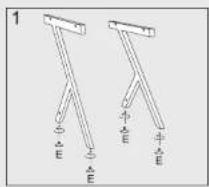
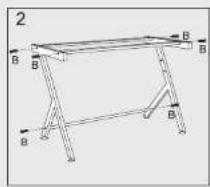
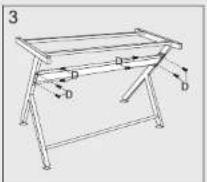
3
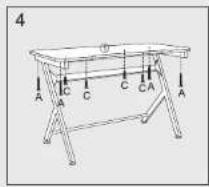
Español
Brand : Xtech
Model : Red Wizard XTF-CD187
Category : Office