
HP24FO-4 - Freezer Perlick - Free user manual and instructions
Find the device manual for free HP24FO-4 Perlick in PDF.


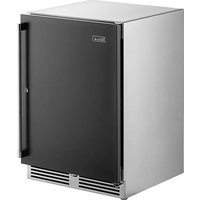
| Product Type | Undercounter Freezer |
| Brand | Perlick |
| Model | HP24FO-4 |
| Temperature Range | -10°F to 10°F (-23°C to -12°C) |
| Defrost Type | Manual defrost (initiated via control) |
| Refrigerant | R600a (Isobutane), flammable |
| Electrical Requirements | 115V, 60Hz, 15A (dedicated circuit recommended) |
| Dimensions (Width x Depth x Height) | 24" x 24" x 34" (approx., undercounter fit) |
| Weight | Approximately 120 lbs (54 kg) |
| Control Type | Digital touch-screen controller with programmable temperature |
| Lighting | Adjustable blue and white LED interior light |
| Door Material | Stainless steel |
| Installation | Undercounter, requires 24" width opening, proper ventilation |
| Condenser Cleaning | Every 3 months; located behind front grille |
| Interior Finish | Stainless steel |
| Door Ajar Alarm | Audible alarm after 1 minute |
| High/Low Temperature Alarm | Yes, displayed as "HA" or "LA" on controller |
| Warranty | See manual for details; registration required |
Frequently Asked Questions - HP24FO-4 Perlick
User questions about HP24FO-4 Perlick
0 question about this device. Answer the ones you know or ask your own.
Ask a new question about this device
Download the instructions for your Freezer in PDF format for free! Find your manual HP24FO-4 - Perlick and take your electronic device back in hand. On this page are published all the documents necessary for the use of your device. HP24FO-4 by Perlick.
USER MANUAL HP24FO-4 Perlick
natural_image
Interior view of a modern beverage refrigerator with illuminated shelves and bottled products (no visible text or labels)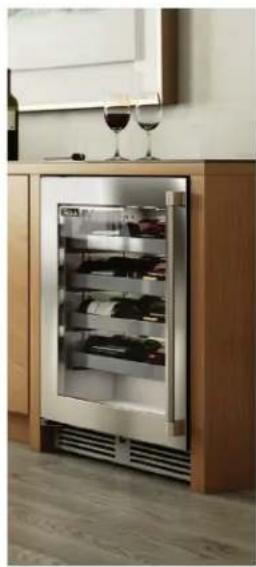
natural_image
Modern stainless steel refrigerator with glass doors and a wine glass on top (no visible text or symbols)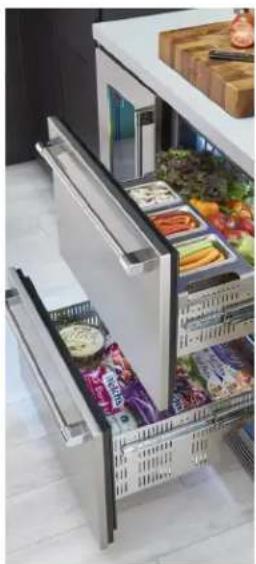
natural_image
Interior view of a modern refrigerator with open doors and food compartments (no visible text or labels)PERLICK RESIDENTIAL UNDERCOUNTER REFRIGERATION
To prevent appliance damage and injury, read these instructions thoroughly prior to operation.
GENERAL INFORMATION
Introduction
Congratulations on your purchase of a Perlick Residential undercounter product. This manual has been prepared to assist you in the installation of your cabinet and to acquaint you with its operation and maintenance.
This manual has been prepared to assist you in the installation of your under counter refrigerator and to acquaint you with its operation and maintenance.
We dedicate considerable time to ensure that our products provide the highest level of customer satisfaction. If service is required, your dealer can provide you with a list of qualified service agents. For your own protection, never return merchandise for credit without our approval.
We thank you for selecting a Perlick product and assure you of our continuing interest in your satisfaction.
Warranty
To register your product, visit our web site at www.perlick.com. Click on "Residential", then "Resources". Click on the link "Warranty Registration Form". You must complete and submit this form or the installation date will revert back to the ship date.
Please record the purchase date and the dealer's name, address and telephone number below.
Model Number: ____
Serial Number: ____
Purchase Date: ____
Dealer Name & Address ____
Phone Number ____
TABLE OF CONTENTS
General Information....2
Safety 3
Refrigerant....3
Prior To Installation .... 3
Use and Operation....4
Touch-Screen Control Operation 4
Checking Product Temperature....4
Digital Temperature Control 4
Programming Button Definitions ....4
LED Functions ....5
Care & Maintenance....6
Stainless Steel Care and Cleaning....7
Troubleshooting....9
SAFETY
PLEASE READ all instructions completely before attempting to install or operate the unit. Take particular note of the DANGER, WARNING and CAUTION information in the manual. The information is important for the safe and efficient installation, operation and care of your Perlick unit.

Indicates a hazard that WILL result in serious injury or death if precautions are not followed.

Indicates a hazard MAY cause serious injury or death if followed.
precautions are not followed.

Indicates a hazard where minor or moderate injury may occur if followed.
precautions are not followed.
NOTICE
Indicates that property damage may occur if warnings or
instructions are not followed.
IMPORTANT!
Read and understand all information in this manual before attempting the installation. All plumbing and electrical work must be performed by a qualified technician and conform to all applicable state and local codes.
Refrigerant

Take caution when handling, moving and using the product to
avoid damaging the refrigerant tubing or increasing the risk of a leak

All service work shall be performed by factory authorized
service personnel and all component parts shall be replaced with like components to minimize the risk of possible ignition due to incorrect parts or improper service.

If service is necessary, repair work must be performed by a Perlick
authorized servicer. Work done by unqualified individuals could potentially be dangerous and will void the warranty.
NOTICE
This product contains blown foam insulation using blowing agent
R-611 (Methyl Formate). The foam in this product does not contain HFC's, CFC's, or HCFC's.
Prior To Installation
Carefully inspect cabinet for hidden damage. If damage is discovered, file your claim immediately with the transport company. Perlick is not responsible for damage in transit.

When moving the unit, be sure to protect finished flooring with ap-to avoid damage from moving the
propriate material to avoid damage from moving the unit.

Do not lift unit by drawer, shelving or door handles, as damage to the
unit could occur if not moved as instructed.
All models covered in this user manual are manufactured using refrigerant R600a(Isobutane).R600a is a hydrocarbon. This refrigerant is flammable and is only allowed for use in appliances with fulfill the requirements of UL/IEC 60335-1 and UL/IEC 60335-2-24. (To cover potential risk originated from the use of flammable refrigerants). Consequently, R600a is only allowed to be used in refrigerating appliances with are designed for this refrigerant and fulfill the above-mentioned standard.
- R600a is heavier than air. The concentration will always be highest at the floor level.
• The explosion limits are as follows:
o Lower Limit: 1.8% by volume
o Upper Limit: 8.4% by volume
o Ignition Temperature: 460°C

To prevent personal injury, a minimum of two people are required to
lift the unit. Larger units may require additional personnel.
Before moving the unit, secure the door shut with tape to prevent door from swinging open while being moved. Carefully move unit to installation site and place in front of opening.

If unit has been laid on its back or sides, place unit upright and allow minimum of 24 hours before connecting power.
Signature Series products come equipped with a master power switch located behind the louvered toe kick. Remove the toe kick to turn power on or off to the unit.
INTERIOR LIGHT
Door units are equipped with an interior light that illuminate when the door is opened. All models come standard with adjustable blue and white LED lighting. The cabinet also comes equipped with a manual light switch for displaying the products through a glass door.
Always ensure that the manual light switch is in the OFF position before closing a solid wood or stainless steel door. If manual light switch is left on for an extended period of time, it will increase energy usage and decrease LED life.
LOADING PRODUCT
Before storing perishables, turn unit on and allow it to operate for a minimum of 24 hours to allow temperatures to stabilize. When loading items into the unit, do not block internal louvers and fan guard openings or performance will be decreased.
CHECKING PRODUCT TEMPERATURE
1) To accurately check the temperature of product stored in the refrigerated compartment, insert an accurate thermometer into a plastic unbreakable bottle, partially filled with water. Tighten bottle cap securely.
2) Place the bottle in the desired area for 24 hours. Refrain from opening the unit during the testing period. After 24 hours, check the temperature of the water. Adjust the temperature accordingly using the following procedures:
DIGITAL TEMPERATURE CONTROL
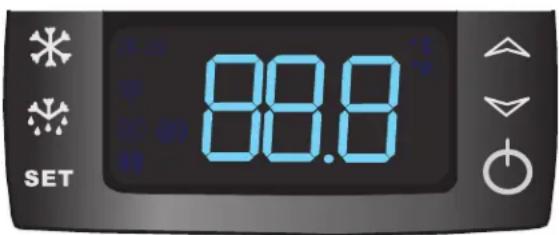
Figure 1. Digital Temperature Controller
HP & HH models feature a blue display
HC & HA models feature a red display
Programming Button Definitions:

SET Button

DEFROST button (melting snowflake)

UP Arrow

DOWN Arrow

ON/OFF Button
Signature Series Dual-Zone Control Instructions
On/Off
Press the ON/OFF button to turn the unit on or off.
Upper Compartment:
To view the upper compartment temperature, press and release the DEFROST button (melting snowflake).
Lower Compartment (Must be coldest zone):
Display reading always shows the lower compartment temperature.
Changing the Lower Compartment Temperature:
- Press and hold the SET button until the display shows St1 with "F" flashing.
- Press SET again to display the lower compartment's current temperature ("F" will continue to flash).
- Use the UP or DOWN arrow key to scroll to the desired temperature. The controller will memorize the new temperature.
Changing the Upper Compartment Temperature:
- Press and hold the SET button until the display shows St1 with "F" flashing. Press the DOWN arrow once; the display will read St2.
- Press SET again to display the upper compartment's current temperature ("F" will continue to flash).
- Use the UP or DOWN arrow key to scroll to the desired temperature. The controller will memorize the new temperature.
NOTE: Dependent on the model and configuration, the controllers have been programmed to only allow a lower compartment temperature adjustment range as specified within the chart below. The upper compartment range is not limited, but should always be kept within the specified range shown in the table for the upper compartment. See the chart below for the specified range allowed for your unit.
| Signature Series – Dual-Zone Units | |
| Model | Range (F) |
| HP24Z | Upper 33° - 42°F / Lower -10° - 10°F |
| HP24C | Upper 45° - 65°F / Lower 33° - 42°F |
| HP24D | Upper 51° - 65°F / Lower 45° - 55°F |
Temperature Scale
To change F to C, press and hold the down arrow for 3 seconds.
To Start A Manual Defrost (HP24Z Models Only)
Press and hold the DEFROST button (melting snowflake) for 3-5 seconds. Melting snowflake will illuminate.
15", 24" Single Zone, 24" Shallow Depth, and ADA Controls
To Set Target Temperature
Press and release the SET button. Display will show the current temperature setpoint.
To Change Setpoint Temperature
- Press and hold the SET button until the display shows the current setpoint temperature with the "F" flashing.
- Use the UP and DOWN arrow button to scroll to the desired temperature.
To Start A Manual Defrost (Freezer Models Only)
Press the DEFROST button (melting snowflake).
To See Maximum Stored Temperature
Press the UP arrow button to see the maximum stored temperature. To reset the maximum stored temperature, while displayed, press and hold the SET button until 'rst' flashes in the display.
To See Minimum Stored Temperature
Press the DOWN arrow button to see the minimum stored temperature. To reset the minimum stored temperature, while displayed, press and hold the SET button until 'rst' flashes in the display.
On/Off
Press the ON/OFF button to turn the unit on or off.
NOTE: Dependent on the model and configuration, the controllers have been programmed to only allow a temperature adjustment within a specified range. See the chart to right for the specified range allowed for your unit.
| Signature Series – HP15 Models | ||
| Model Min Temp Set Max Temp Set | ||
| HP15R 33° F 42° F | ||
| HP15B 33° F 48° F | ||
| HP15W 45° F 65° F | ||
| HP15T 33° F 42° F | ||
| Signature Series – HP24 Models | ||
| Model Min Temp Set Max Temp Set | ||
| HP24R 33° F 42° F | ||
| HP24F -10° F 10° F | ||
| HP24B 33° F 48° F | ||
| HP24W 45° F 65° F | ||
| HP24T 33° F 42° F | ||
| Signature Series Shallow Depth | ||
| Model Min Temp Set Max Temp Set | ||
| HH24RS 33° 42° | ||
| HH24BS 33° 48° | ||
| HH24WS 45° 65° | ||
| C-Series Models | ||
| Model Min Temp Set Max Temp Set | ||
| HC24RB 33° 42° | ||
| HC24BB 33° 48° | ||
| HC24WB 45° 65° | ||
| ADA-Compliant Series | ||
| Model Min Temp Set Max Temp Set | ||
| HA24FB -10° 10 | ||
| HA24RB 33° 42° | ||
| HA24BB 33° 48° | ||
| HA24WB 45° 65° | ||
LED Functions
The following table describes LED functions.
| LED Mode | Function | |
 | ON | Compressor is on |
 | Flashing | Anti-short cycle delay is on |
 | ON Defrost is on | |
 | ON | Alarm is on |
 | Flashing | You are in the process of programming the unit |
Audible alarm will sound if the door is left ajar for longer than one minute. Fully closing the door will clear the alarm condition, prolonged time spent with the door open can damage the equipment.
CARE & MAINTENANCE
MAINTENANCE
SEASONAL MAINTENANCE FOR UL-APPROVED OUTDOOR MODELS
Winterizing
This process should occur when the daily low temperatures is at or below the temperatures stated below:
Freezer models: 32°F
Refrigerator models: 38° F
Beverage Center: 42°F
Wine Reserve: 45°F
It is best to winterize your unit before the low temperatures listed above.
- Turn the unit to OFF position by pressing the OFF button on the controller. The controller displays the word "OFF" and, for Signature Series models, turn the master switch located behind the grille off (if the power cord is accessible, unplug the power cord. If not, turn off the circuit breaker to the electrical receptacle the cabinet is plugged into).
- Remove all contents from the unit.
- Remove the front grille.
- Clean the condenser by using a vacuum cleaner to remove loose debris (leaves, dirt, etc.) that may have accumulated inside the grille.
- Reinstall the front grille.
- Clean the interior of the unit using stainless steel cleaner and polish (see page 9).
- Clean the exterior of the unit using stainless steel cleaner and polish (see page 9).
NOTE: Do not place a cover over the unit. While not required, you may choose to remove the unit from the outdoor location and store indoors.
CAUTION
Operating the unit at temperatures lower than those recommended will
void the warranty.
Spring Start-Up
This process should occur after the daily low temperatures is above the temperatures stated below:
Freezer models: 32° F
Refrigerator models: 38°F
Beverage Center: 42°F
Wine Reserve: 45°F
- Remove the grille.
- Check the condensing unit to ensure it is clear of loose debris, and clean as necessary with a vacuum cleaner.
- Reattach front grille to the unit.
- Clean the interior of the unit using stainless steel cleaner and polish (see page 9).
- Clean the exterior of the unit using stainless steel cleaner and polish (see page 9).
- Plug the unit into the electrical receptacle or turn on the circuit breaker.
- Turn on the master switch located behind the grille if model is Signature Series. Press the OFF button one time to turn the unit on. The controller display will show the actual temperature inside the cabinet.
- The cooling process will begin to bring the unit to the set temperature. It's recommended you run the unit for 24 hours to stabilize the operating temperature before using.
DANGER
Never attempt to repair or perform maintenance on the unit until the
main electrical power to the unit has been disconnected!
LED REPLACEMENT
Call your Perlick Factory Authorized Service Center. For the location of the Service Center in your area, contact your selling dealer, inquire via the web at www.perlick.com, E-mail us at warrantyserv@perlick.com, or call (800) 558-5592 during normal business hours.
CARE & MAINTENANCE
STAINLESS STEEL CARE & CLEANING General
Stainless steel is a "passive" metal because it contains other metals like chromium, nickel and manganese that stabilize the atoms. Chromium provides an invisible passive film that covers the steel surface, acting as a shield against corrosion. As long as the film is intact and not contaminated, the metal is passive and stainless. If the passive film of stainless steel has been broken, equipment can start to corrode and rust.
Three materials or processes can break down stainless steel's passive layer and allow corrosion to occur:
- Mechanical abrasion
- Deposits and water
- Chlorides
Mechanical abrasion refers to items that will scratch a steel surface. Steel pads, wire brushes and scrapers are prime examples.
Water comes out of the faucet in varying degrees of hardness. Hard water may leave spots. When allowed to sit, these deposits will break down the passive chromium layer and rust stainless steel. Other deposits from food preparation must be promptly removed with an appropriate cleaning agent.
Chlorides are found nearly everywhere. They are in water, food and table salt. Household and industrial cleaners are the worst offenders.
Preventing Stainless Steel Rust
Use non-abrasive tools to clean stainless steel products. Soft cloths and plastic scouring pads will not harm the steel's passive layer.
Clean with polish lines. Some stainless steels have visible polishing lines or "grain". When visible lines are present, always scrub in a motion parallel to the lines. When the grain cannot be seen, polish in a consistent straight pattern and not in a circular motion.
Use alkaline, alkaline chlorinated or non-chloride containing cleaners. While many traditional cleaners are loaded with chlorides, the industry is providing an ever-increasing choice of non-chloride cleaners. If you are not sure of chloride content in the cleaner being used, contact your cleaner supplier. If your present cleaner contains chlorides, ask your supplier for an alternative. Avoid cleaners containing quaternary salt; it also can attack stainless steel and cause pitting and rusting.
Keep food equipment clean. Use alkaline, alkaline chlorinated or non-chloride cleaners at recommended strength. Clean frequently to avoid build-up of hard, stubborn stains. The single most likely cause of damage is chlorides in the water. Remember, adding heat to cleaners that contain chlorides dramatically increases their effect on stainless steel.
If chlorinated cleaners are used, immediately rinse and wipe equipment and supplies dry. The sooner you wipe standing water, especially when it contains cleaning agents, the better. After wiping equipment down, allow it to air dry. Oxygen helps maintain the stainless steel passive film.
Cleaning the Cabinet Interior/Exterior
CAUTION NEVER use hydrochloric acid (muriatic acid) on stainless steel. Do not use abrasive cleansers or cloths on any interior or exterior surfaces or removeable parts.
Glass panels may be cleaned using any standard glass cleaner available on the market.
To clean interior and exterior non-metallic surfaces and removable parts, wash with mild solution of soap and lukewarm water with a little baking soda. Rinse and dry thoroughly. Avoid getting water on the lights, controllers, fan motors and unfinished wood wine rack faces.
Cleaning the Condenser
The condenser (located behind the front grille cover) should be cleaned every three (3) months. Use a soft bristle brush and vacuum to remove dust and lint.
DANGER Flammable Refrigerant. Risk of fire or explosion. Do not damage
refrigeration tubes.
CAUTION Avoid damaging or crushing the condenser fins or tubing.
CARE & MAINTENANCE
| Job Cleaning Agent Comments | ||
| Routine cleaning Soap, ammonia, detergent Apply with sponge or soft cloth | ||
| Fingerprints and smears Areal 20, Lac-O-Nu, Lumin Wash, O-Cedar Cream Polish | Provides barrier film to minimize fingerprints. Can be used on all finishes. Rub the surface with a cloth as directed on the package. | |
| Stubborn stains and discolorations AllChem Concentrated Cleaner, Samae, Twinkle, Cameo Copper Cleaners, Grade FFF Italian Pumice Whiting, Steel Bright, Lumin Cleaner, Zud Restoro, Sta-Clean, Highlite Cooper's Stainless Steel Cleaner or Revere Stainless Steel Cleaner | Apply with a damp sponge or cloth, then rinse with clear water and wipe dry. | |
| Old Dutch, Lighthouse Sunbrite, Wyandotte Bab-O, Gold Dust, Sapollo, Bon Ami or Comet | ||
| Liquid NuSteel or Dubois Temp For these products, rub the surface with a dry cloth using only a small amount of cleanser. Rinse with water and dry. | ||
| Heat tint or heavy discoloration Penny-Brite, Copper Brite, Paste Nu-Steel, Dubois Temp or Tarnite | Rub onto surface with a dry cloth | |
| Bar Keepers Friend, Revere Stainless Steel Cleaner, Allen Polish, Steel Bright Wyandotte Bab-O or Zud | When using these cleaners, apply with a damp sponge or cloth, rinse thoroughly and wipe dry. | |
| Tenacious deposits, rust, discoloration, industrial atmospheric stains | Oakite No. 33 Dilac, Texo NY, Flash-Klenz Caddy Cleaner, Turco Scale 4368 or Permag 57 | Swab and soak with a clean cloth. Let stand for 15 minutes or more according to directions on package, then rinse and wipe dry. |
| Rust discoloration or corrosion caused by cleaning agents containing hydrochloric (muriatic) acid or chlorine bleach | 3M Scotch Pad, type A, grade "fine" Clean off the surface soil using cleaning methods above. Then rub discolored or corroded areas lightly with a dry pad. | |
| Use of property names is intended only to indicate a type of cleaner and does not constitute an endorsement. Omission of any proprietary cleaner does not imply its inadequacy. All products should be used in strict accordance with instructions on the package.NOTE: Do NOT use steel wool or scouring pads to clean stainless steel. | ||
For Product Information
- Contact your selling dealer
• Inquire via the web at www.perlick.com - Call 800-558-5592 for factory assistance on planning installation or product information
- Write to Perlick Corporation, Customer Service Department, 8300 West Good Hope Road, Milwaukee, WI 53223
- Email us at warrantyserv@perlick.com
For Product Service
- Check the model and serial number of your unit located on the label attached to the inside top of the cabinet.
- Inquire via the web at www.perlick.com, or call 800-558-5592.
For Replacement Parts and Accessories
- Use only genuine Perlick replacement parts and accessories. Genuine Perlick parts and accessories are designed to work correctly with Perlick products and offer superior service life. The use of non-Perlick parts can damage the unit and may void the warranty.
- Check the model and serial number of your unit located on the label attached to the inside top of the cabinet. Call your Perlick Factory Authorized Service Center.
- Inquire via the web at www.perlick.com, or call 800-558-5592.
TROUBLESHOOTING
TROUBLESHOOTING
If the unit appears to be malfunctioning, read through the OPERATION section of this manual first. If the problem persists, check this troubleshooting section to see if you can refer to the cause and remedy of the problem and resolve it without a service call.
DANGER
Never attempt to repair or perform maintenance on the unit until the
main electrical power to the unit has been disconnected!
| Problem Cause Solution | ||
| No interior light LED board is inoperable • Contact Perlick Technical Service at | 800-558-5592 | |
| Light stays on when door switch is closed Manual switch is on • Turn manual switch off | ||
| Door is not making contact with the door switch | • Makre sure the door closes tightly | |
| Noisy operation Soft sounds from compressor, fan motor and valves heard | • Normal operation | |
| “Crackling” sound during defrost • Normal operation | ||
| LED Controller display is flashing “P1”* Thermostat probe has failed • Contact Perlick Technical Service at 800-558-5592 | ||
| LED Controller display is flashing “P2”* Evaporator probe has failed • Contact Perlick Technical Service at 800-558-5592 | ||
| LED Controller display is flashing “HA”* Internal compartment has exceeded the high temperature alarm preset value for over 30 minutes. | • Make sure the door is completely closed.• Check the door gasket seal. Replace if necessary.• Check the condenser and clean it if necessary.• Make sure the louvered plate is unobstructed. If surrounding ambient temperature has recently changed dramatically, the compartment may be affected.• Make sure the interior light is off.• Warm product was recently placed in the cabinet. Wait 24 hours for the product to chill and then recheck the temperature. | |
| LED Controller display is flashing “LA” | Internal compartment has exceeded the low temperature alarm preset value for over 30 minutes. | • Make sure the door is completely closed.• Check the door gasket seal. Replace if necessary.• If the surrounding ambient temperature has recently changed dramatically, the compartment temperature may be affected. |
| LED Controller display is flashing “dA” | Door is open. | • Make sure the door is completely closed. |
| Unit is not running | No power is going to the unit. | • Home circuit breaker was tripped. Reset the circuit breaker.• ON/OFF keypad is turned off. Turn it on.• If it is a Dual-Zone model, check the Dual-Zone power switch (see page 4). |
| Condenser is dirty. | • Clean the condenser | |
TROUBLESHOOTING
| Problem Cause Solution | ||
| Compartments are warmer than usual Control | preset is set to warm • Lower the setpoint temperature. | Referto changing the set point for the specific model |
| Light is staying on • Turn the manual light switch off. | ||
| Condenser is dirty or obstructed • Clean the condenser and clear obstruction. | ||
| The door is open or has been opened more frequently lately. | • Wait 24 hours and recheck the temperature. | |
| Internal louvers and/or the fan guard is obstructed. | • Reset the preset temperature if necessary – refer to page 5 and 6 of this guide.• Make sure the louvers and/or the fan are not obstructed. | |
| Warm product product was recently placed in the cabinet. | • Wait 24 hours for product to chill, then recheck the temperature. | |
| System runs for a long period of time. Condenser is dirty or obstructed. • Clean the condenser and clear the obstruction. | ||
| Condensation forms outside of the unit High humidity and/or frequent door opening • Normal operation | ||
| Condensation forms inside the compartments | High humidity and/or frequent door opening | • Normal operation |
| Door is not closing and sealing properly • Make sure the door is closing properly. Check the door seal and replace if necessary.• If condensation persists, contact Perlick Technical Service at 800-558-5592 | ||
NOTES

natural_image
Three-panel image showing a beer refrigerator with illuminated shelves and a side view of its open refrigerator with food items (no visible text or symbols)
Perlick Residential is a division of Perlick Corporation
© 2020 Perlick Corporation
8300 West Good Hope Road, Milwaukee, WI 53223, USA
perlick.com/residential • (800) 558-5592

- PERLICK RESIDENTIAL UNDERCOUNTER REFRIGERATION
- GENERAL INFORMATION
- Introduction
- Warranty
- TABLE OF CONTENTS
- SAFETY
- NOTICE
- IMPORTANT!
- Refrigerant
- Prior To Installation
- INTERIOR LIGHT
- LOADING PRODUCT
- CHECKING PRODUCT TEMPERATURE
- Programming Button Definitions:
- Signature Series Dual-Zone Control Instructions
- On/Off
- Upper Compartment:
- Lower Compartment (Must be coldest zone):
- Changing the Lower Compartment Temperature:
- Changing the Upper Compartment Temperature:
- Temperature Scale
- To Start A Manual Defrost (HP24Z Models Only)
- 15", 24" Single Zone, 24" Shallow Depth, and ADA Controls
- To Set Target Temperature
- To Change Setpoint Temperature
- To Start A Manual Defrost (Freezer Models Only)
- To See Maximum Stored Temperature
- To See Minimum Stored Temperature
- LED Functions
- CARE & MAINTENANCE
- MAINTENANCE
- SEASONAL MAINTENANCE FOR UL-APPROVED OUTDOOR MODELS
- Winterizing
- CAUTION
- Operating the unit at temperatures lower than those recommended will
- Spring Start-Up
- DANGER
- LED REPLACEMENT
- STAINLESS STEEL CARE & CLEANING General
- Preventing Stainless Steel Rust
- Cleaning the Cabinet Interior/Exterior
- CAUTION NEVER use hydrochloric acid (muriatic acid) on stainless steel. Do not use abrasive cleansers or cloths on any interior or exterior surfaces or removeable parts.
- Cleaning the Condenser
- DANGER Flammable Refrigerant. Risk of fire or explosion. Do not damage
- CAUTION Avoid damaging or crushing the condenser fins or tubing.
- For Product Information
- For Product Service
- For Replacement Parts and Accessories
- TROUBLESHOOTING
- NOTES
Brand : Perlick
Model : HP24FO-4
Category : Freezer