
KASHAIRTG1A - Home Automation Kogan - Free user manual and instructions
Find the device manual for free KASHAIRTG1A Kogan in PDF.


| Product Type | Smart Wi-Fi Plug |
| Model | KASHAIRTG1A |
| Brand | Kogan |
| Power Supply | 220-240V AC, 50/60Hz |
| Max Load | 10A (2400W) |
| Connectivity | Wi-Fi 2.4GHz IEEE 802.11 b/g/n |
| Compatibility | Amazon Alexa, Google Assistant, Apple HomeKit (via hub) |
| App Support | Kogan Smart Home (iOS & Android) |
| Dimensions | 48 x 48 x 28 mm |
| Weight | 45 g |
| Material | Flame-retardant PC/ABS |
| Color | White |
| Functions | Remote on/off, scheduling, timer, energy monitoring |
| Overload Protection | Yes (automatic shut-off) |
| Certifications | CE, RoHS, RCM |
| Warranty | 1 year |
| Operating Temperature | 0°C to 40°C |
| Humidity | 10% to 90% non-condensing |
Frequently Asked Questions - KASHAIRTG1A Kogan
User questions about KASHAIRTG1A Kogan
0 question about this device. Answer the ones you know or ask your own.
Ask a new question about this device
Download the instructions for your Home Automation in PDF format for free! Find your manual KASHAIRTG1A - Kogan and take your electronic device back in hand. On this page are published all the documents necessary for the use of your device. KASHAIRTG1A by Kogan.
USER MANUAL KASHAIRTG1A Kogan
SMART TAG
COMPATIBLE WITH FIND MY IPHONE APP
KASHAIRTG1A, KASHAIRTG2A & KASHAIRTG4A
BEFORE FIRST USE
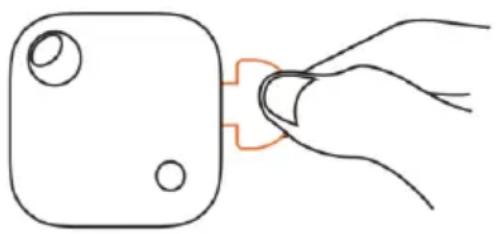
Pull out the tab to activate the battery. The smart tag will play a chime to indicate it is operational.
ABOUT APPLE FIND MY APP
The Apple Find My network provides an easy, secure way to locate compatible personal items using the Find My app on your iPhone, iPad, Mac, or the Find Items app on Apple Watch.
To use the Apple Find My app to locate this item, the latest version of iOS, iPadOS, or macOS is recommended. The Find Items app on Apple Watch requires the latest version of watchOS.
Use of the Works with Apple badge means that a product has been designed to work specifically with the technology identified in the badge and has been certified by the product manufacturer to meet Apple Find My network product specifications and requirements. Apple is not responsible for the operation of this device or use of this product or its compliance with safety and regulatory standards.
Apple, Apple Find My, Apple Watch, Find My, iPhone, iPad, iPadOS, Mac, macOS and watchOS are the trademarks of Apple Inc. IOS is a trademark or registered trademark of Cisco in the U.S. and other countries and is used under license.
Works with
Apple Find My

WARNING
KEEP OUT OF REACH OF CHILDREN
Swallowing can lead to chemical burns, perforation of soft tissue, and death. Severe burns can occur within 2 hours of ingestion. Seek medical attention immediately.

After activating the tag, you will need to pair it to your phone within 3 minutes. If the tag is not paired within 3 minutes, the device will leave the pairing state.
To place the tag back in pairing mode, press the button once, the tag will play a chime indicating it is in pairing mode. At this point, the tag can be paired using the Find My App.
| Function | Operation |
| Power On | Press the button once to turn it on. You will hear a chime to indicate that it is powered on. |
| Power Off | Hold the button for 3 seconds. You will hear a chime to indicate that your tag is powered off. |
| Pairing mode | With the tag on, press the button once, the device will play a ringing chime indicating it is in pairing mode. |
| Factory Reset | Press the button 4 times rapidly and then press and hold it a 5th time until you hear a ringing chime. |
CONNECTING TO THE APP
Connecting the Tag
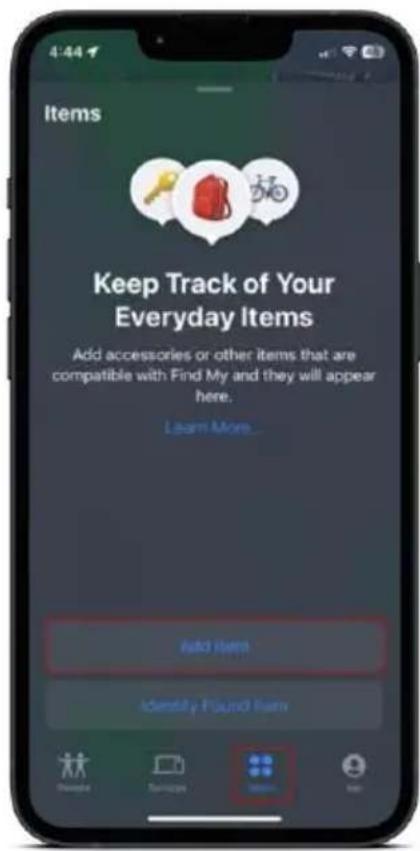
- Open the Find My app on your supported iOS device.
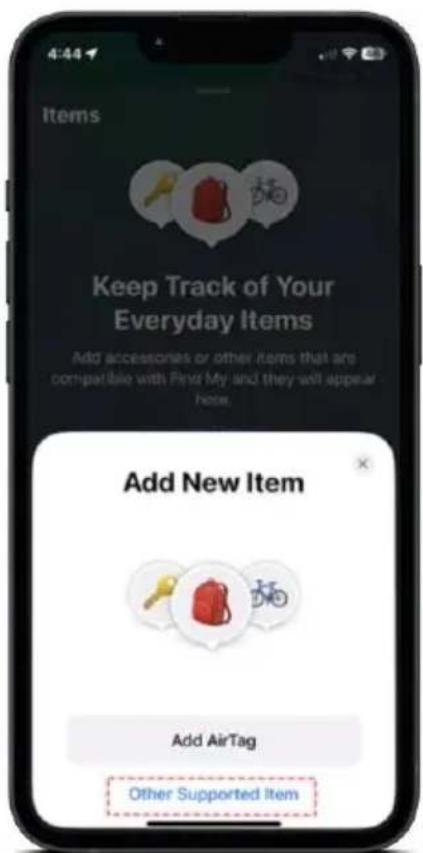
- In the Items tab, tap "Add Item", then choose "Other Supported Item".
- Ensure the tag is in pairing mode, the Find My app will begin searching for the tag. Once the tag has been found, tap "Connect."
- Follow the onscreen steps to name it and register it to your Apple ID.

Notes:
The Find My app requires an iPhone or iPod touch with iOS 14.5 or later, iPad with iPadOS 14.5 or later.
NOTES
Need more information?
We hope that this user guide has given you the assistance needed for a simple set-up.
For the most up-to-date guide for your product, as well as any additional assistance you may require, head online to help.kogan.com
kogan.com

Brand : Kogan
Model : KASHAIRTG1A
Category : Home Automation