ez-MD+ - Uncategorized Lumantek - Free user manual and instructions
Find the device manual for free ez-MD+ Lumantek in PDF.


| Product Type | Measurement Device |
| Brand | Lumantek |
| Model | ez-MD+ |
| Dimensions (H x W x D) | 15 cm x 7 cm x 3 cm |
| Weight | 200 g (including batteries) |
| Power Source | 2 x AAA batteries (1.5V each) |
| Display | 2-line LCD with backlight |
| Measurement Range | 0.1 - 100 units (varies by mode) |
| Accuracy | ±1% of reading |
| Operating Temperature | 0°C to 40°C |
| Storage Temperature | -10°C to 50°C |
| Main Functions | Measurement, data hold, auto power-off, backlight |
| Cleaning and Maintenance | Wipe with a dry, soft cloth. Do not use solvents. |
| Safety Precautions | Do not expose to extreme temperatures or moisture. Remove batteries if not in use. |
| Spare Parts | Batteries, replacement probes (if applicable) |
| Repairability | User-replaceable batteries; other repairs by qualified technician |
Frequently Asked Questions - ez-MD+ Lumantek
User questions about ez-MD+ Lumantek
0 question about this device. Answer the ones you know or ask your own.
Ask a new question about this device
Download the instructions for your Uncategorized in PDF format for free! Find your manual ez-MD+ - Lumantek and take your electronic device back in hand. On this page are published all the documents necessary for the use of your device. ez-MD+ by Lumantek.
USER MANUAL ez-MD+ Lumantek
HDMI/SDI Cross Converter with Audio Mux/Demux
Operation manual
REVISION NUMBER: 1.0.0
DISTRIBUTION DATE: AUGUST. 2020
Copy Rights
Copyright © 2006\~2020 LUMANTEK Co., Ltd.
All Rights Reserved
This document contains information that is proprietary to LUMANTEK.CO., LTD. The information in this document is believed to be accurate and reliable; however, LUMANTEK assumes no responsibility or liability for any errors or inaccuracies that may appear in this document, nor for any infringements of patents or other rights to third parties resulting from its use.
This publication may contain technical issues, inaccurate information or typos. These will be revised in revised edition, if there is any. No part of this publication is subject to be reproduced, stored in retrieval system, or transmitted in any forms, or any means without the prior consent by Lumantek.
Trademarks
HD ENCODULATOR TM, SD ENCODULATOR TM LUMANTEK Logo, Mega CruiserTM, ORIXTM, X-CruiserTM, DTA-PlusTM, Media BlasterTM, are Trademarks of Lumantek. Co., Ltd.
Any other trademarks than stated above in this document belongs to its pertinent corporation.
Warranty Period
Lumantek's products comes with One(1) year limited warranty. Please contact below if you need more information.
HDCP Protection
LUMANTEK products comply with HDCP, thus we will not allow any HDCP connection. If the input video source is protected by HDCP, then no video source will be displayed through LUMANTEK products.
LUMANTEK CUSTOMER SERVICES
gs@lumantek.com
TEL: +82-2-6947-7429
FAX: +82-2-6947-7440
01. Introduction
Lumantek's ez-MD+ is a cross-converter supporting both SDI and HDMI as inputs and outputs. It has many functionalities other than converting like audio mux and demux through XLR, reference in (genlock), scaler, and audio delay control.
Features
① Inputs & outputs
Input: 1 x SD/HD/3G-SDI (BNC 75Ω)
1 x SD/HD/3G HDMI (Type A)
1 x Ref. In / Genlock B/B or TRI-Level (BNC 75Ω)
Output: 1 x SD/HD/3G-SDI (BNC 75Ω)
1 x SD/HD/3G HDMI (Type A)
Audio in & out: 1 x D-SUB 9pin (female)
② Supports SD/HD/3G
③ DIP Switch for settings changes
Video output resolution and ratio, video format input (SDI or HDMI)
Audio (internal or external), sync mode (free running, input lock, Genlock (B.B or TRI-Level)
Audio Gain(0 or -10dB)
④ ROTARY Switch: Audio Delay Control (10 Step) x1
⑤ LED Display : Link (GREEN x1), Ref (GREEN x1), Audio Level Meter Left (GREEN x1, RED x1), Audio Level Meter Right (GREEN x1, RED x1)
Diagram
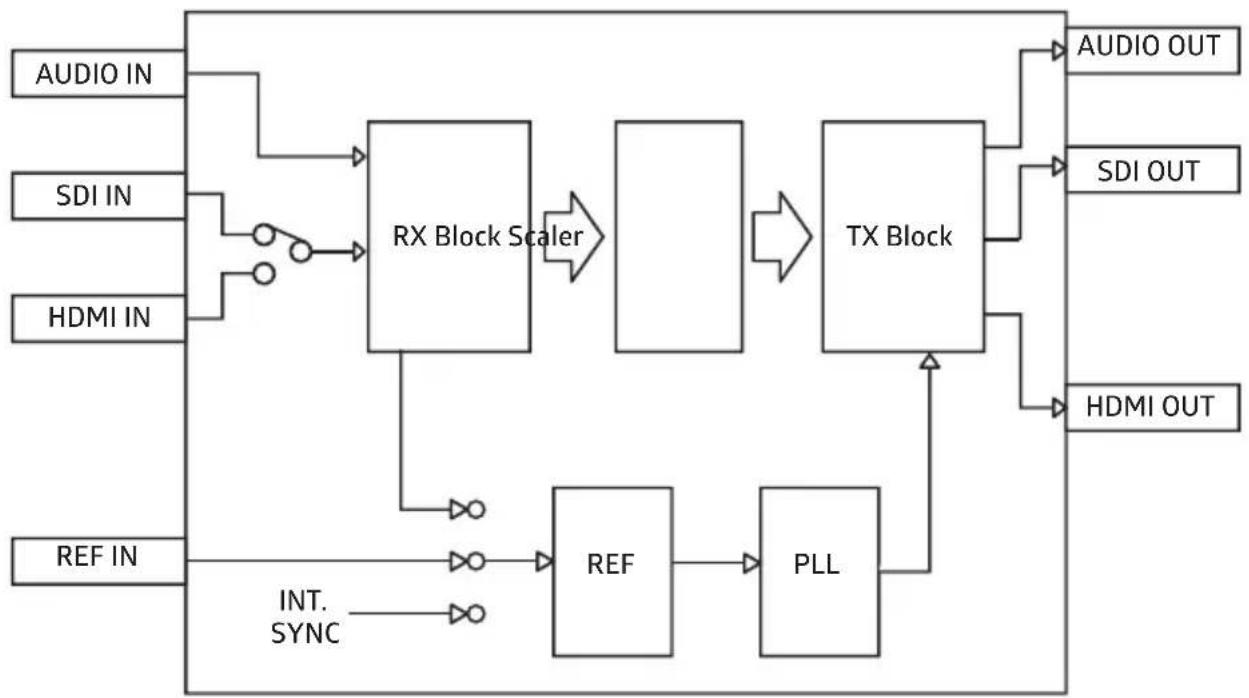
flowchart
graph LR
    A["AUDIO IN"] --> B["RX Block Scaler"]
    C["SDI IN"] --> B
    D["HDMI IN"] --> B
    E["REF IN"] --> F["REF"]
    F --> G["PLL"]
    H["AUDIO OUT"] --> I["TX Block"]
    J["SDI OUT"] --> I
    K["HDMI OUT"] --> I
    B --> I
    I --> L["Output"]
    F --> M["Input"]
    G --> N["Input"]
    M --> O["INT. SYNC"]
    N --> P["INT. SYNC"]
02. Interface
a. Specifications [Top]
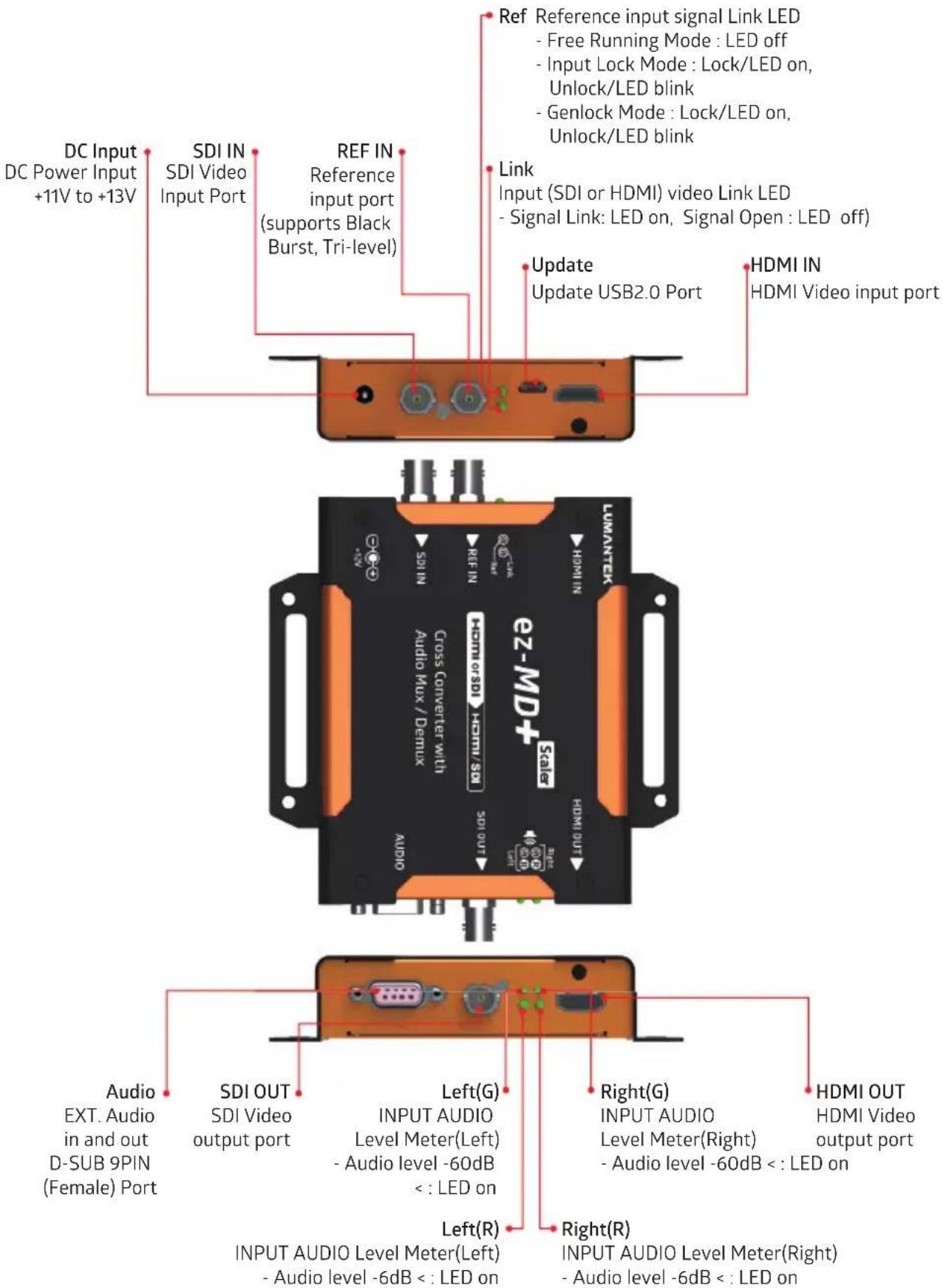
02. Interface
a. Specifications [Bottom]
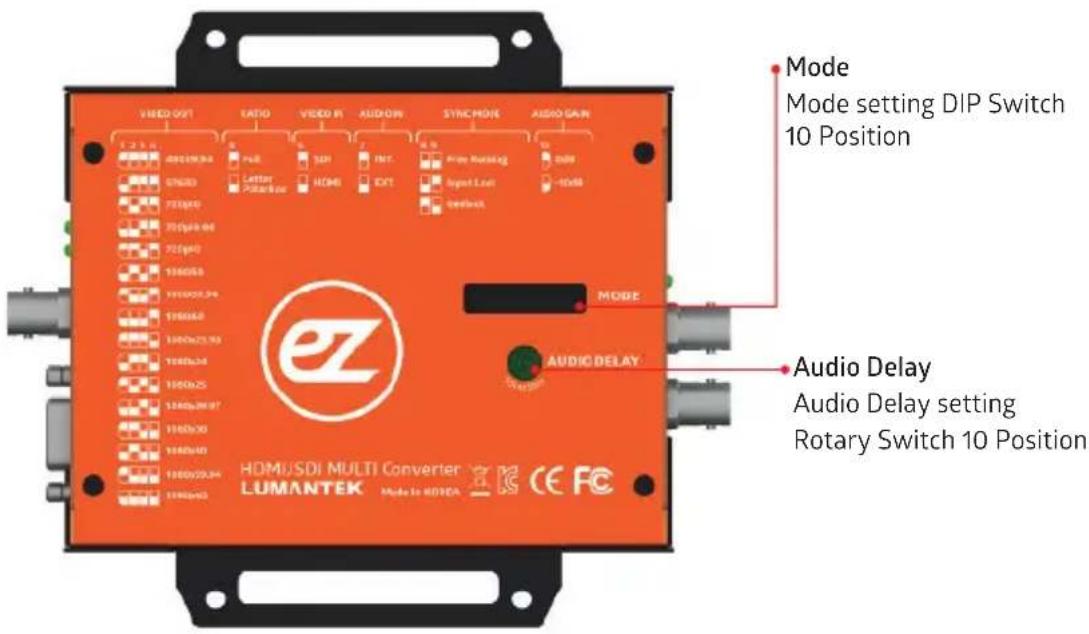
02. Interface
b. MODE Settings
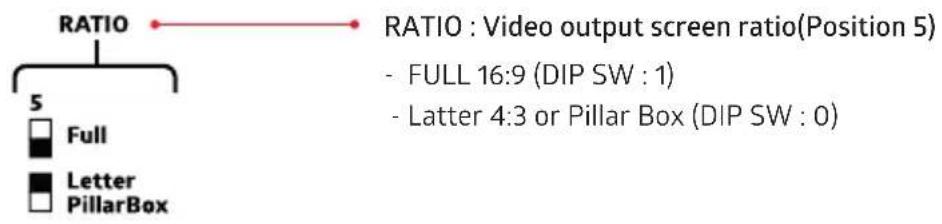
| VIDEO OUT : Video output resolution (Position 1, 2, 3, 4) | |
| 1 2 3 4 | |
| 480i59.94 | - 720x480i@59.94 (DIP SW : 1111) |
| 576i50 | - 720x576i@50 (DIP SW : 0111) |
| 720p50 | - 1280x720p@50 (DIP SW : 1011) |
| 720p59.94 | - 1280x720p@59.94 (DIP SW : 0011) |
| 720p60 | - 1280x720p@60 (DIP SW : 1101) |
| 1080i50 | - 1920x1080i@50 (DIP SW : 0101) |
| 1080i59.94 | - 1920x1080i@59.94 (DIP SW : 1001) |
| 1080i60 | - 1920x1080i@60 (DIP SW : 0001) |
| 1080p23.98 | - 1920x1080p@23.98 (DIP SW : 1110) |
| 1080p24 | - 1920x1080p@24 (DIP SW : 0110) |
| 1080p25 | - 1920x1080p@25 (DIP SW : 1010) |
| 1080p29.97 | - 1920x1080p@29.97 (DIP SW : 0010) |
| 1080p30 | - 1920x1080p@30 (DIP SW : 1100) |
| 1080p50 | - 1920x1080p@50 (DIP SW : 0100) |
| 1080p59.94 | - 1920x1080p@59.94 (DIP SW : 1000) |
| 1080p60 | - 1920x1080p@60 (DIP SW : 0000) |
02. Interface
b. MODE Settings
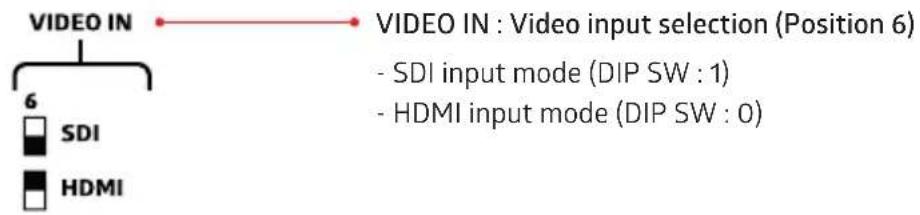
flowchart
graph TD
    A["VIDEO IN"] --> B["6 SDI"]
    A --> C["HDMI"]
    B --> D["VIDEO IN : Video input selection (Position 6)"]
    C --> D
    style A fill:#f9f,stroke:#333
    style B fill:#ccf,stroke:#333
    style C fill:#cfc,stroke:#333
    note1["- SDI input mode (DIP SW : 1)"]
    note2["- HDMI input mode (DIP SW : 0)"]
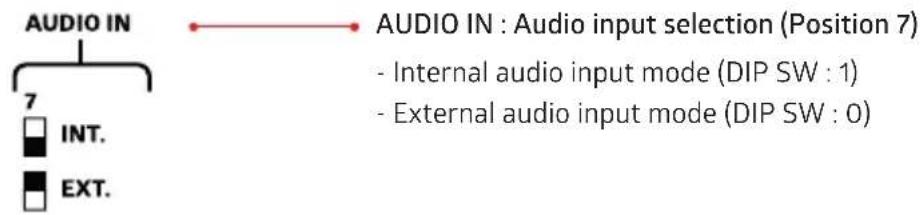
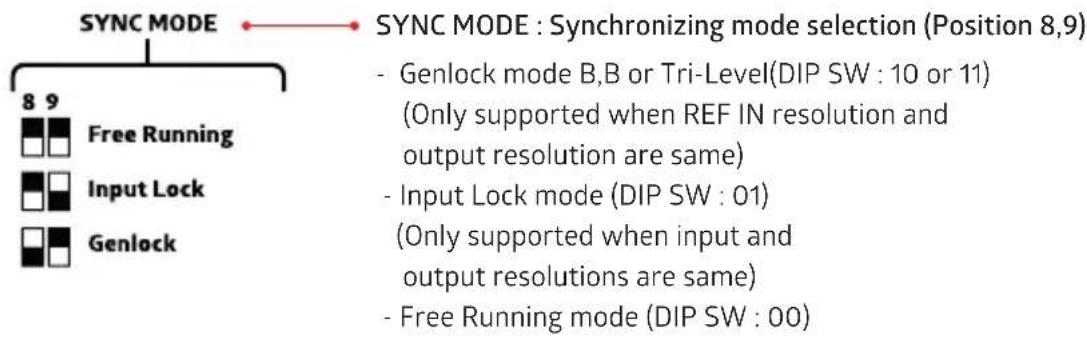
flowchart
graph TD
    A["SYNC MODE"] --> B["8 9 Free Running"]
    A --> C["Input Lock"]
    A --> D["Genlock"]
    E["SYNC MODE : Synchronizing mode selection (Position 8,9)"] --> F["- Genlock mode B,B or Tri-Level(DIP SW : 10 or 11)<br>(Only supported when REF IN resolution and output resolution are same)"]
    E --> G["- Input Lock mode (DIP SW : 01)<br>(Only supported when input and output resolutions are same)"]
    E --> H["- Free Running mode (DIP SW : 00)"]

02. Interface
b. MODE Settings
GENLOCK Mode
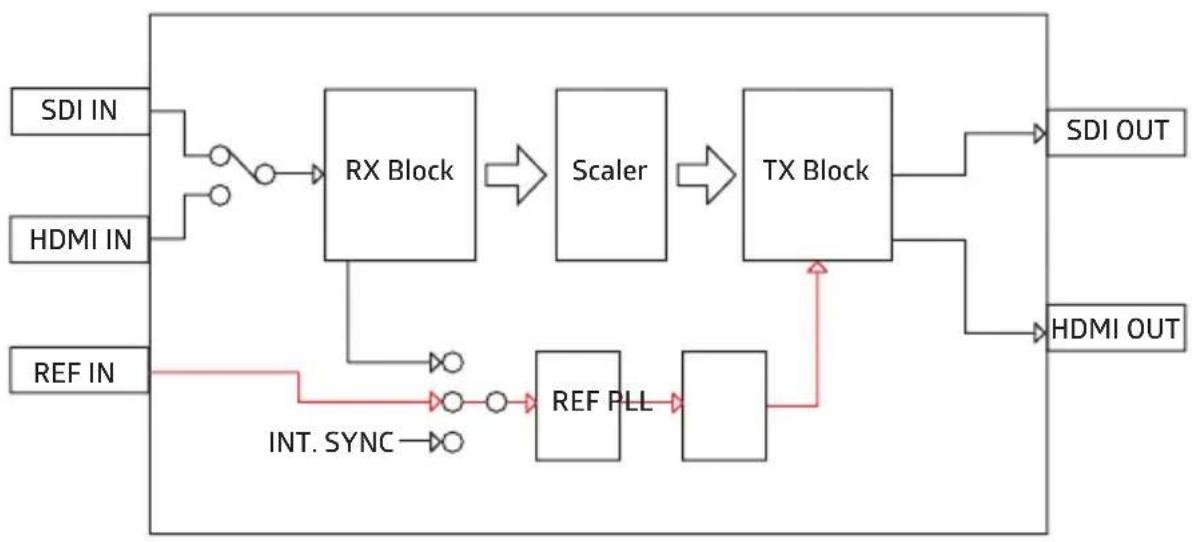
flowchart
graph LR
    A["SDI IN"] --> B["RX Block"]
    C["HDMI IN"] --> B
    D["REF IN"] --> E["REF PLL"]
    B --> F["Scaler"]
    E --> F
    F --> G["TX Block"]
    G --> H["SDI OUT"]
    G --> I["HDMI OUT"]
    J["INT. SYNC"] --> E
Compatible REF Input signals
| Output resolution | REF IN resolution |
| 720x480i59.94 | NTSC |
| 720x576i50 | PAL |
| 1280x720p50 | PAL, 720p50, 1080p50 |
| 1280x720p59.94 | NTSC, 720p59.94, 1080p59 |
| 1280x720p60 | not supported |
| 1920x1080i50 | PAL, 1080i50 |
| 1920x1080i59.94 | NTSC, 1080i59.94 |
| 1920x1080i60 | not supported |
| 1920x1080p23.98 | 1080p23.98 |
| 1920x1080p24 | 1080p24 |
| 1920x1080p25 | PAL, 1080i50, 1080p25 |
| 1920x1080p29.97 | NTSC, 1080i59.94, 1080p29.97 |
| 1920x1080p30 | not supported |
| 1920x1080p50 | PAL, 720p50, 1080i50, 1080p50 |
| 1920x1080p59.94 | NTSC, 720p59.94, 1080i59.94, 1080p59.94 |
| 1920x1080p60 | not supported |
02. Interface
b. MODE Settings
Free Running Mode
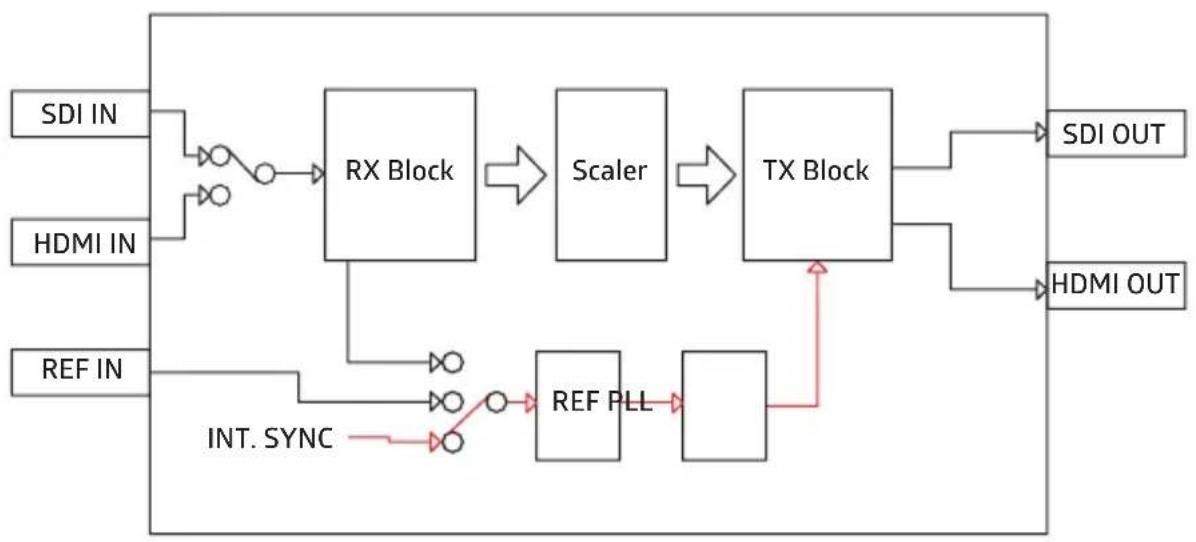
flowchart
graph LR
    A["SDI IN"] --> B["RX Block"]
    C["HDMI IN"] --> B
    D["REF IN"] --> E["REF PLL"]
    B --> F["Scaler"]
    E --> G["TX Block"]
    F --> H["SDI OUT"]
    G --> I["HDMI OUT"]
    J["INT. SYNC"] --> E
Input Lock Mode
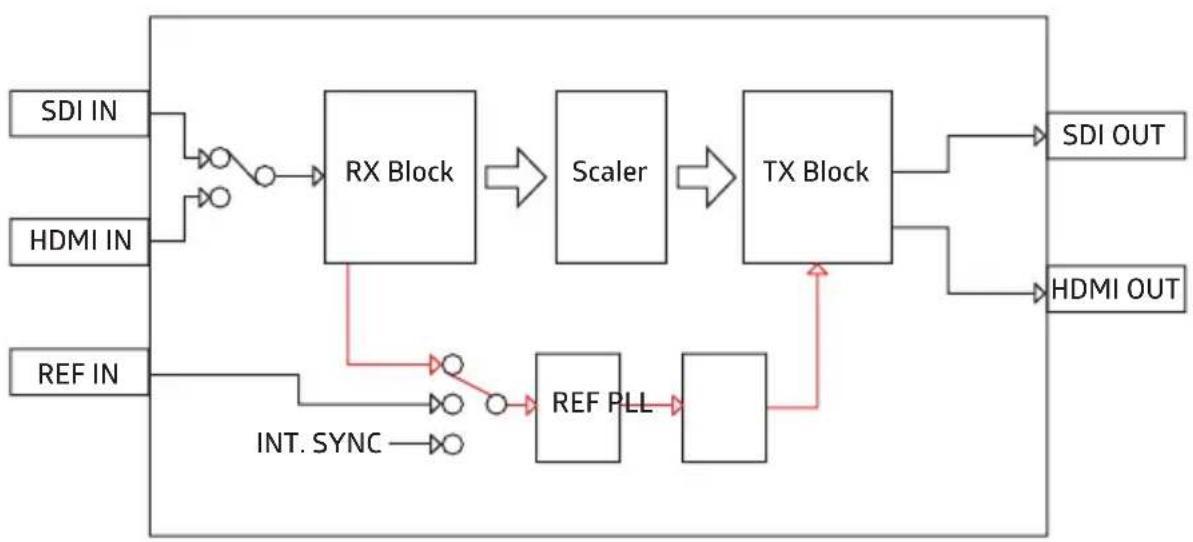
flowchart
graph LR
    A["SDI IN"] --> B["RX Block"]
    C["HDMI IN"] --> B
    D["REF IN"] --> E["REF PLL"]
    B --> F["Scaler"]
    E --> F
    F --> G["TX Block"]
    G --> H["SDI OUT"]
    G --> I["HDMI OUT"]
    J["INT. SYNC"] --> E
02. Interface
c. AUDIO DELAY Settings
Rotary Switch AUDIO DELAY min. 50ms Step
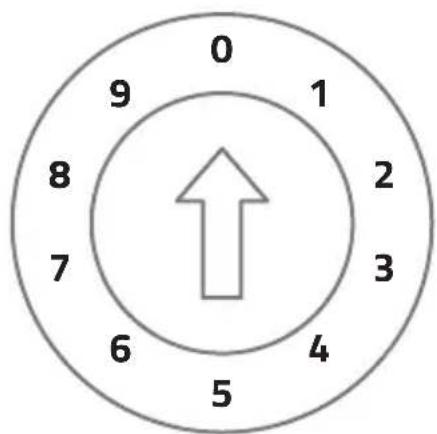
radar
| Value | |-------| | 0 | | 1 | | 2 | | 3 | | 4 | | 5 | | 6 | | 7 | | 8 | | 9 |- 0ms Delay (Position : 0)
- 50ms Delay (Position : 1)
- 100ms Delay (Position : 2)
• 150ms Delay (Position : 3) - 200ms Delay (Position : 4)
- 250ms Delay (Position : 5)
- 300ms Delay (Position : 6)
• 350ms Delay (Position : 7) - 400ms Delay (Position : 8)
- 450ms Delay (Position : 9)
03. Product Configuration
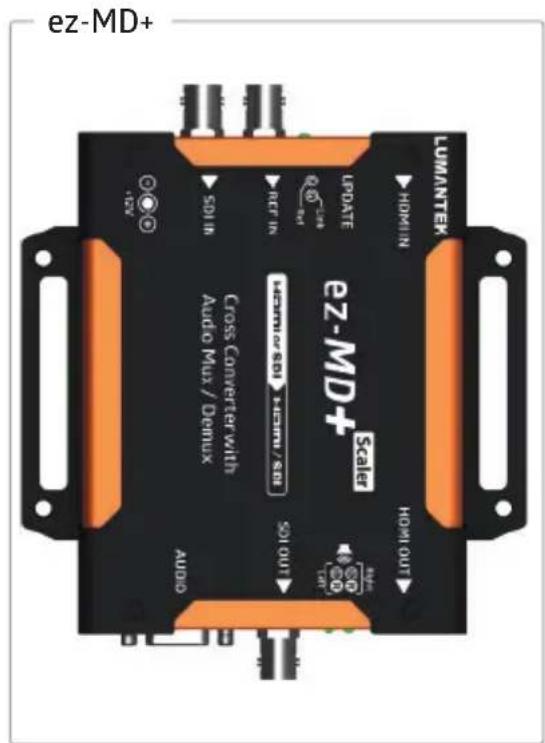
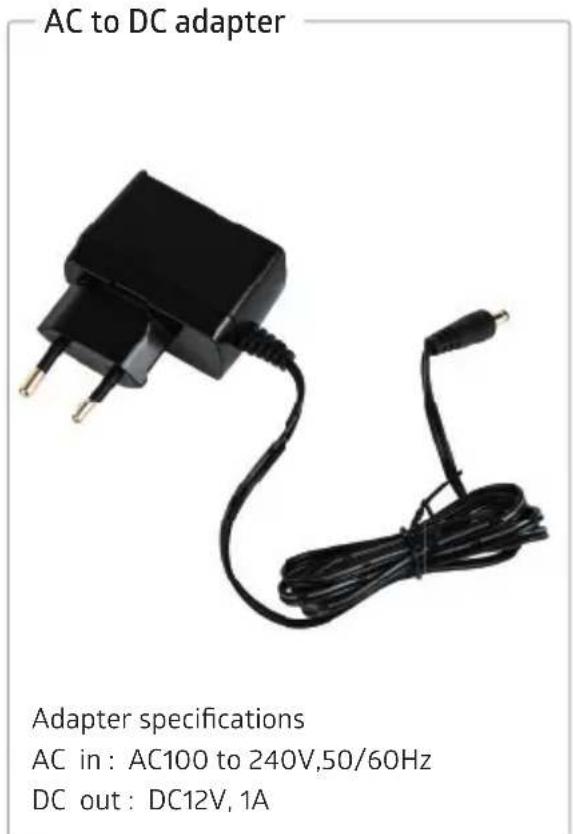
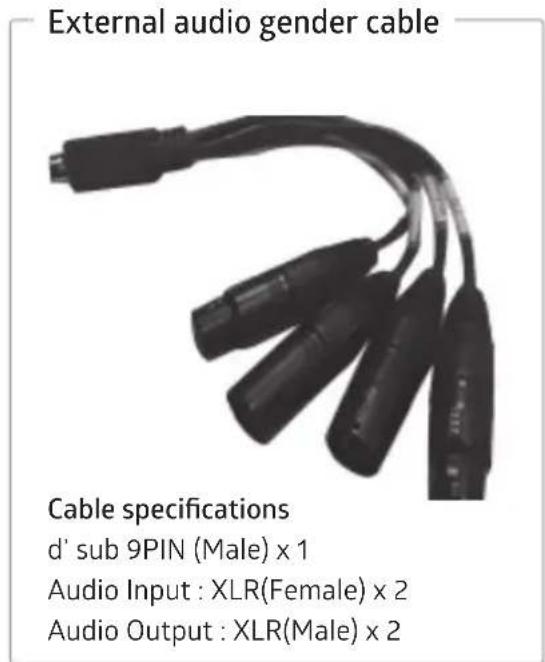
03. Product Configuration
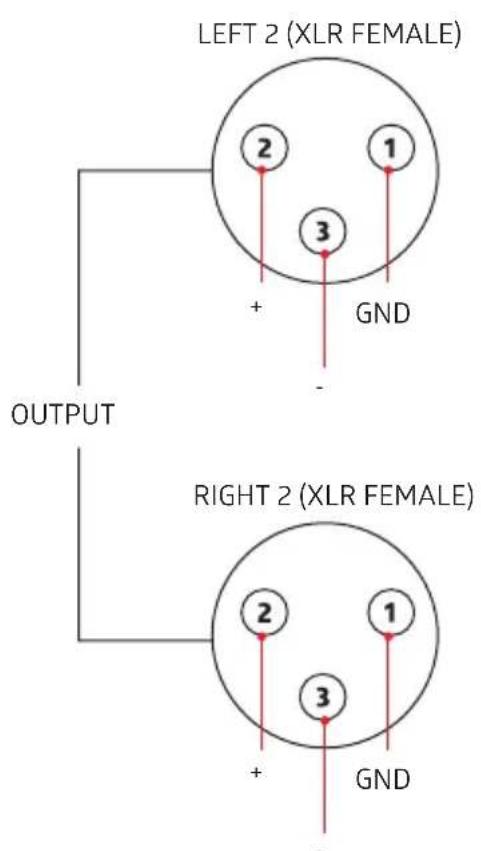
d' sub 9PIN
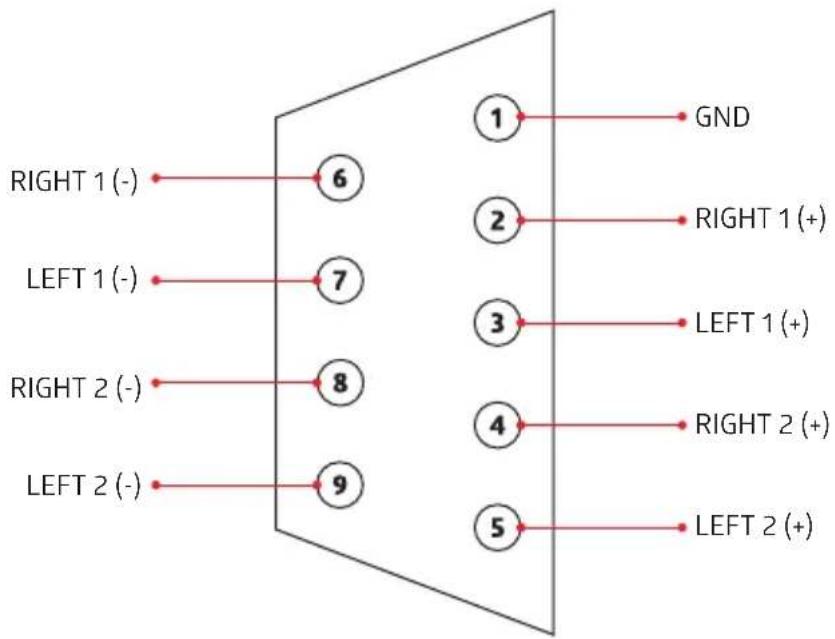
flowchart
graph TD
    A["RIGHT 1 (-)"] --> B["6"]
    C["LEFT 1 (-)"] --> D["7"]
    E["RIGHT 2 (-)"] --> F["8"]
    G["LEFT 2 (-)"] --> H["9"]
    I["1"] --> J["GND"]
    K["2"] --> L["RIGHT 1 (+)"]
    M["3"] --> N["LEFT 1 (+)"]
    O["4"] --> P["RIGHT 2 (+)"]
    Q["5"] --> R["LEFT 2 (+)"]
Audio Input : XLR(Female) x 2
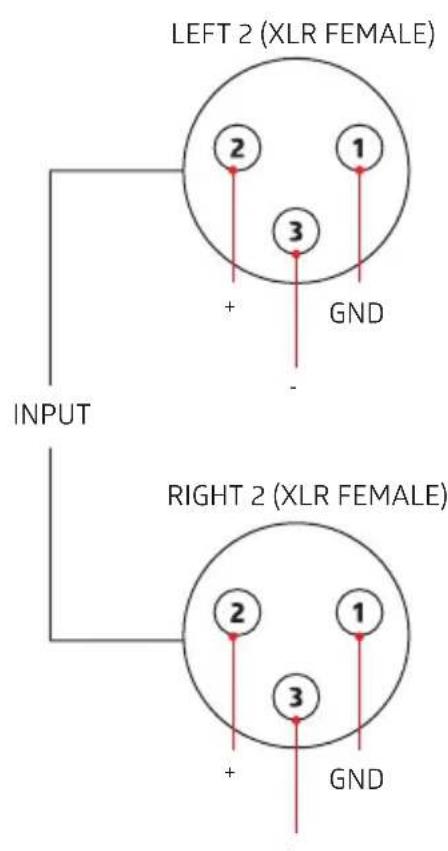
Audio Output : XLR(Male) x 2
04. Technical Specifications
ez-MD+
Data Input
SDI Video Input: SD/HD/3G-SDI (BNC 75Ω) x1
HDMI Video Input: SD/HD/3G (HDMI Type A) x1
Reference Input: B.B, TRI (BNC 75Ω) x1
Audio Input: D-SUB 9PIN (Female) x1
Video Formats
- 720x480i@59.94/60
- 720x576i@50
- 1280x720p@50/59.94/60
- 1920x1080i@50/59.94/60
- 1920x1080p@23.98/24/25/29.97/30
- 1920x1080p@50/59.94/60
Data Output
SDI Video Output: SD/HD/3G-SDI (BNC 75Ω) x1
HDMI Video Output: SD/HD/3G (HDMI Type A) x1
Audio Output : D-SUB 9PIN (Female) x1
Video Formats
- 720x480i@59.94 (DIP SW : 1111)
- 720x576i@50 (DIP SW : 0111)
- 1280x720p@50 (DIP SW : 1011)
- 1280x720p@59.94 (DIP SW : 0011)
- 1280x720p@60 (DIP SW : 1101)
- 1920x1080i@50 (DIP SW : 0101)
- 1920x1080i@59.94 (DIP SW : 1001)
- 1920x1080i@60 (DIP SW : 0001)
- 1920x1080p@23.98 (DIP SW : 1110)
- 1920x1080p@24 (DIP SW : 0110)
- 1920x1080p@25 (DIP SW : 1010)
- 1920x1080p@29.97 (DIP SW : 0010)
- 1920x1080p@30 (DIP SW : 1100)
- 1920x1080p@50 (DIP SW : 0100)
- 1920x1080p@59.94 (DIP SW : 1000)
- 1920x1080p@60 (DIP SW : 0000)
Connections
Power : DC Power Input (DC Jack) x1
Update : Debug (Micro-USB) x1
DIP Switch : (10 Pole) x1
Video Output Resolution, Video Output Ratio, Video
Input(SDI or HDMI),Audio(INT or EXT),Sync Mode :
Free Running, Input lock, Genlock (B.B or TRI-Level),
Audio Gain(0 or -10dB)
ROTARY Switch : (10 Step) x1
Audio Delay Control (50ms Step)
Display
Link (GREEN x1) : HDMI or SDI Input Video Detect
Ref (GREEN x1): REF Input Signal Detect
Left (GREEN x1, RED x1): INPUT AUDIO Level
Meter(Left)
Right (GREEN x1, RED x1): INPUT AUDIO Level
Meter(Right)
Electrical
Power Input: DC +11V to +13V
Power Consumption: 8W(max.)
Operation Temperature: 0\~45°C
Physical
Dimension: 130 (W) x 100.4 (H) x 26.9 (D) (mm)
Weight: 0.4 kg (0.88 lb)
EASY FOR EVERYONE.
ez-Pro
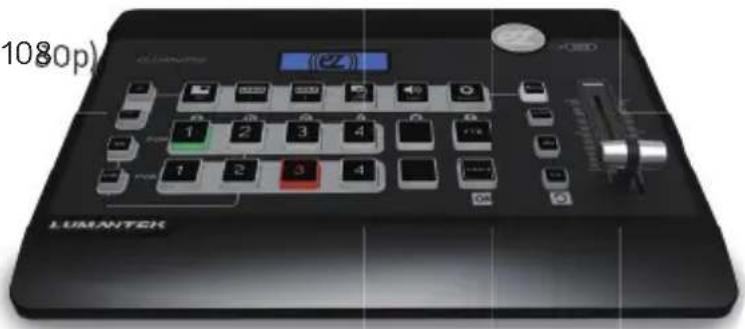
VS4
FULL HD SWITCHER
• 4 Channel video switcher
- Internal scalers
(output to any HD resolution up to 1080p)
• Multiview and Program screens
• PIP
- 2 x Logo
• Luma/Chroma
• 18 Transition effects!
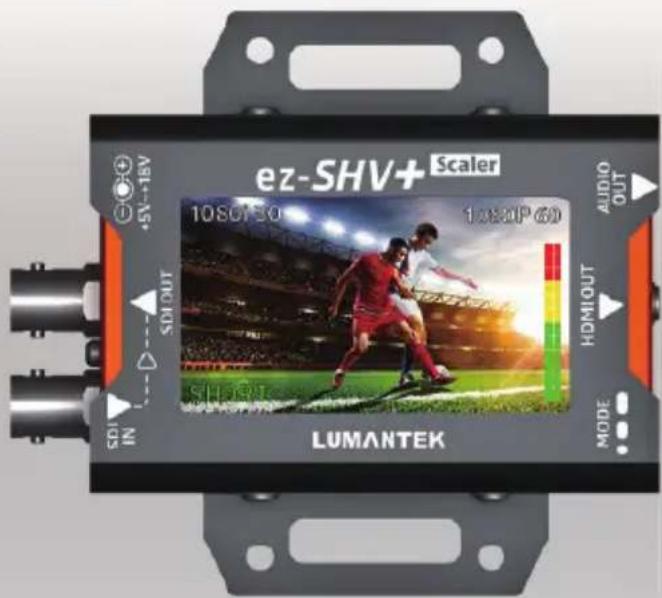
SDI TO HDMI CONVERTER WITH DISPLAY AND SCALER
- Display Monitoring
- Eye Pattern
- Scaling
- Cable Length
• Audio Level Meter Bar

Brand : Lumantek
Model : ez-MD+
Category : Uncategorized