
MXA46SB28 - Soundbar Memphis Audio - Free user manual and instructions
Find the device manual for free MXA46SB28 Memphis Audio in PDF.


| Product Type | Overhead Soundbar |
| Brand | Memphis Audio |
| Model | MXA46SB28 |
| Speaker Configuration | 4 x 6.5" Mid-Bass Drivers + 4 Tweeters |
| Total Power Rating | 300W |
| Audio Sources | Bluetooth, AUX, AM, FM, Weatherband |
| App Control | Memphis Radio App (iOS/Android) |
| App Features | RGB settings, custom EQ, balance/fade/subwoofer control, AM/FM presets |
| Output Channels | 6-channel preamp (Front, Rear, Subwoofer) |
| Preamp Output Voltage | 2.5V |
| USB Charging | Yes |
| RGB LED | Integrated, app-controlled |
| Protection Rating | IP66 (conformal coated PCB) |
| Grill Material | Protective aluminum mesh |
| Power Input | 12V DC, 15A fuse |
| Dimensions (Approx.) | 28 x 4.5 x 4.5 in (711 x 114 x 114 mm) |
| Mounting System | Bracket with dovetail, 14mm bolts |
| Warranty | 1 year (3 years if dealer installed) |
| FCC Compliance | Class B digital device, 20cm radiation exposure |
| Maintenance | Clean with dry cloth; avoid liquids |
| Safety | Follow wiring instructions; ensure proper mounting |
| Spare Parts | Contact authorized dealer |
Frequently Asked Questions - MXA46SB28 Memphis Audio
User questions about MXA46SB28 Memphis Audio
0 question about this device. Answer the ones you know or ask your own.
Ask a new question about this device
Download the instructions for your Soundbar in PDF format for free! Find your manual MXA46SB28 - Memphis Audio and take your electronic device back in hand. On this page are published all the documents necessary for the use of your device. MXA46SB28 by Memphis Audio.
USER MANUAL MXA46SB28 Memphis Audio
natural_image
Circular logo with stylized letter M in black and yellow against a blue and red gradient background (no text or symbols)MEMPHIS
AUDIO SINCE 1965
MXA46SB28
28" APP CONTROLLED
OVERHEAD SOUNDBAR
SHOW US YOUR INSTALL

WWW.MEMPHISCARAUDIO.USA

@MEMPHISCARAUDIO

@MEMPHISCARAUDIOUSA
App Controlled Overhead Soundbar
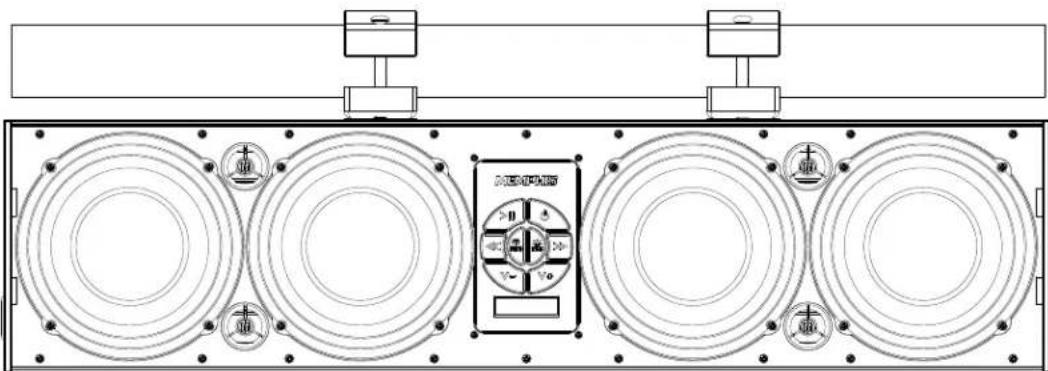
The MXA46SB28 App Controlled Overhead Soundbar is an extremely innovative soundbar solution for powersports machines. Traditional soundbars are capable of streaming music from a Bluetooth device. The MXA46SB28 features a unique app controlled interface allowing you to use the soundbar as a hub for an entire audio system. The app allows you to select between five sources including Bluetooth, FM, AM, AUX, Weatherband radio. The app also enables users to control EQ settings, set radio presets, adjust fade/balance and more from the convenience of their Bluetooth devices interface. This unit features a slightly wider body than traditional soundbars allowing for 4 rich 6.5" mid bass drivers and 4 tweeters to crank out massive sound that it is unrivaled by anything in its class. If you need even more output, the MXA46SB28 features Front, Rear, and Sub outputs allowing you to expand your audio into a massive multi speaker set up which can be controlled via the app making this unit one of the most unique and versatile powersports solutions on the market.
Features
• 8 Speaker Soundbar System: 4 - 6.5" Mids 4 - Tweeters
• RGB LED included in speakers
- App Controlled Soundbar Features 5 Source options: AUX, BT, AM/FM, Weatherband
• USB Charging
- 6 Channel output: Front/Rear/Subwoofer
• 2.5-Volt preamp output
- Conformal coated PCB IP66 rated
- Protective aluminum mesh grill included
• AUX input
• 300w Power Rating
App Controls The Following
- RGB Settings
- Custom EQ settings
• Balance, fade, subwoofer control
• AM/FM Preset Control - Radio search settings
- Manual/Seek/Presets
Warranty
Electronics limited warranty (including Memphis accessories) When purchased from an Authorized Memphis Dealer, Memphis warrants this product to be free from defects in material and workmanship under normal use for a period of ONE (1) YEAR from date of original purchase (receipt required), THREE (3) YEARS years if installed by an authorized Memphis dealer (receipt required). If this product is identified as "Refurbished" or "B Goods", the warranty is limited to a period of THREE (3) MONTHS from date of original purchase. In all cases you must have the original receipt. Should service be necessary under this warranty for any reason due to manufacturing defect or malfunction during the warranty period, Memphis will repair or replace (at its discretion) the defective merchandise with equivalent merchandise. Warranty replacements may have cosmetic scratches and blemishes. Discontinued products may be replaced with more current equivalent products. Warranty is valid only for the original purchaser and is not extended to owners of the product subsequent to the original purchaser. Any applicable implied warranties are limited in duration to a period of the express warranty as provided herein beginning with the date of the original purchase at retail, and no warranties, whether express or implied, shall apply to this product thereafter. NOTE: This equipment has been tested and found to comply with the limits for a Class B digital device, pursuant to part 15 of the FCC Rules. These limits are designed to provide reasonable protection against harmful interference in a residential installation. This equipment generates, uses and can radiate radio frequency energy and, if not installed and used in accordance with the instructions, may cause harmful interference to radio communications. However, there is no guarantee that interference will not occur in a particular installation. If this equipment does cause harmful interference to radio or television reception, which can be determined by turning the equipment off and on, the user is encouraged to try to correct the interference by one or more of the following measures: Reorient or relocate the receiving antenna. Increase the separation between the equipment and the receiver. Connect the equipment into an outlet or a circuit different from that to which the receiver is connected.
Consult the dealer or an experienced radio/TV technician for help.
Warning: Changes or modifications to this unit not expressly approved by the part responsible for
Compliance could void the user's authority to operate the equipment.
FCC Radiation Exposure Statement
This equipment complied with FCC radiation exposure limits set forth for an uncontrolled environment. This equipment should be installed and operated with minimum distance 20cm between the radiator & your body.
App Controls
The MXA46SB28 Overhead soundbar can be connected via AUX or Bluetooth like a traditional soundbar. It is also capable of pairing with the MEMPHIS RADIO app which allows you to maximize your control over your audio system. See below for pairing instructions.
Downloading Memphis App
The Memphis App is available on iOS & Android in the app store. Search for "MEMPHIS RADIO" and locate the MEMPHIS RADIO App. Download and install the app to begin controlling your MXA46SB28.

Bluetooth Pairing (Audio Streaming Only)
Hold the power button to turn the unit on. The indicator light will begin flashing blue. On your Bluetooth device, search for Bluetooth devices. When you see MXA46SB28 click connect. The blue light will stay solid blue when connected. When connected via Bluetooth you can stream music to your MXA46SB28 soundbar.
Bluetooth Pairing The APP
To control you MXA46SB28 unit's settings and radio stations via the MEMPHIS RADIO App, you must establish a Bluetooth connection using the MEMPHIS RADIO App. Open the BLUETOOTH SETTINGS menu on the MEMPHIS RADIO App and follow the instructions on the next page to pair your MEMPHIS RADIO App with you MXA46SB28 unit.
Button Function
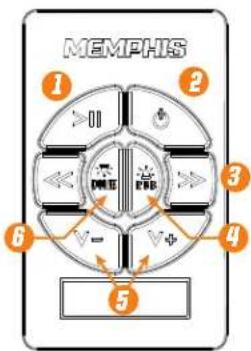
CONTROLS
- Play Music / Pause Music // MUTE(AUX Mode Only)
- Long Push: Power ON and OFF // Short Push: Change Source
- Previous/Next Track
- Short Push: RGB ON / Change Color // Long Push: RGB OFF
- Volume Down/Up
- Dome light ON/OFF
Connections
- AUX Line Input
- Front Output
- Rear Output
- Subwoofer Output
- USB For Charging
- Antenna Input
7.12V + [Yellow] - Remote Turn On (blue)
- Ignition (Red)
- Ground (Black)
- Quick connect/disconnect
-
RGB LED Output
-
In-Line 15A Fuse and Fuse Holder
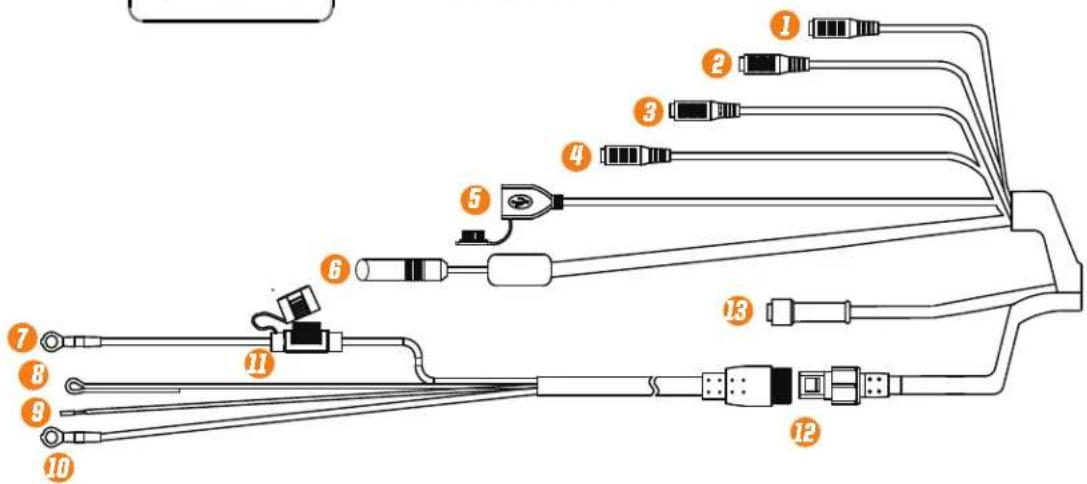
Wiring Instructions
When wiring this soundbar the 12V+ should be wired directly to the vehicles positive battery terminal. The black wire should be connected directly to the vehicles chassis where the paint has been removed or the negative battery terminal. The ignition wire should receive constant power even when the vehicle is off. The Remote turn on wire should be wired receive power when the vehicle is in ACC or the ON position.
App Instructions
Main Menu/Source Selection
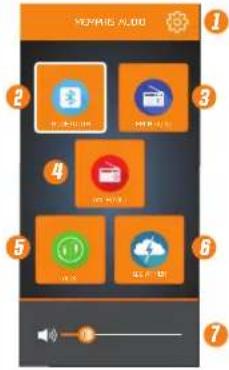
- Settings
- Bluetooth Source
- FM Radio Source
- AM Radio Source
- AUX Source
- Weather Band Source
- Volume Control
Settings
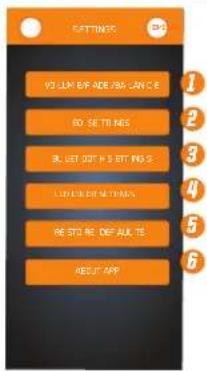
- Adjust volume, fade, balance
- EQ settings Menu
- Bluetooth configuration
- Adjust LED color settings
- Restore Default settings
- App version information
Bluetooth Settings Menu
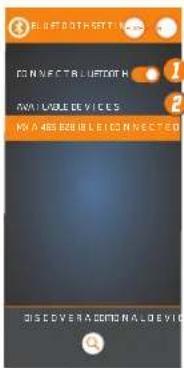
Use this menu to connect your MEMPHIS RADIO App via Bluetooth to your MXA46SB28 Soundbar. This connection allows the MEMPHIS RADIO App to control your MXA46SB28. You should only have to make this connection once to pair the MEMPHIS RADIO App to the MXA46SB28.
1. Connect/Disconnect Bluetooth
2. Select MXA46SB28(BLE) to pair your MEMPHIS RADIO App on your Bluetooth Device with the MXA46SB46.
Volume/Fade/Balance Menu
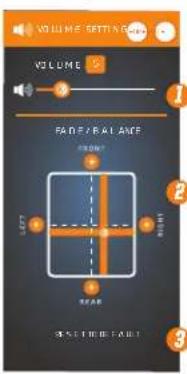
- Volume slider adjusts volume of system. Volume level is indicated in the box above slider.
- Fade/Balance Adjuster: Adjust the fade/balance of your system by positioning the center of the slider to the location that best fits your listening needs. You can also tap the Front/Rear/Left/Right "+" icons to increase the level by +1 in the desired direction.
- Reset the screen to the factory default settings.
EQ Settings Menu
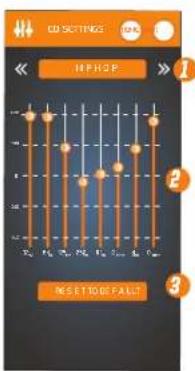
- EQ Preset options. Top arrows to toggle through presets settings.
- Manually adjust EQ settings. Slide the band you wish to adjust into the desired position. Desired EQ setting will be saved as "Custom Setting"
- Restore to the factory default settings
LED COLOR SETTINGS MENU
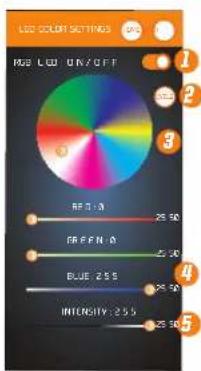
- Turns the connected RGB LED Lighting on/off
- Lighting color cycle on/off Light button system RGB LED color cycle
- Use the wheel to select your systems RGB LED color. Touch the wheel and slide the indicator point to the desired color.
- You can use the RGB sliders to dial in a specific color value. Adjust Red, Green and Blue individually until you've reached your desired color.
- You can adjust the brightness using the slider.
AM/FM/WB Source Screen
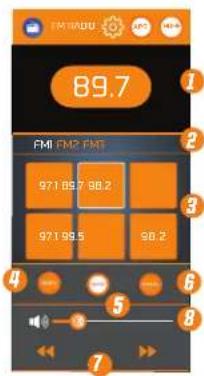
- Indicates current radio station
- Select radio preset category [FM1, FM2, FM3, AM1, AM2, AM3 allows you to store 3 stations in each preset category]
- Presets 1-6. Use Seek/manual tuning to locate desired station. Press and hold desired preset button for several seconds to save station as a preset.
- Puts unit into SEEK mode. Arrows will now seek for the next station.
- Puts unit into PRESET mode. Tapping Left or Right arrows skips to the next programmed preset station.
- Puts unit into MANUAL TUNER mode. The arrows will now manually tune to the next station.
- Changes to the next available station. Select SEEK or MANUAL above to change the way the system locates the next station.
- Adjusts volume of the unit
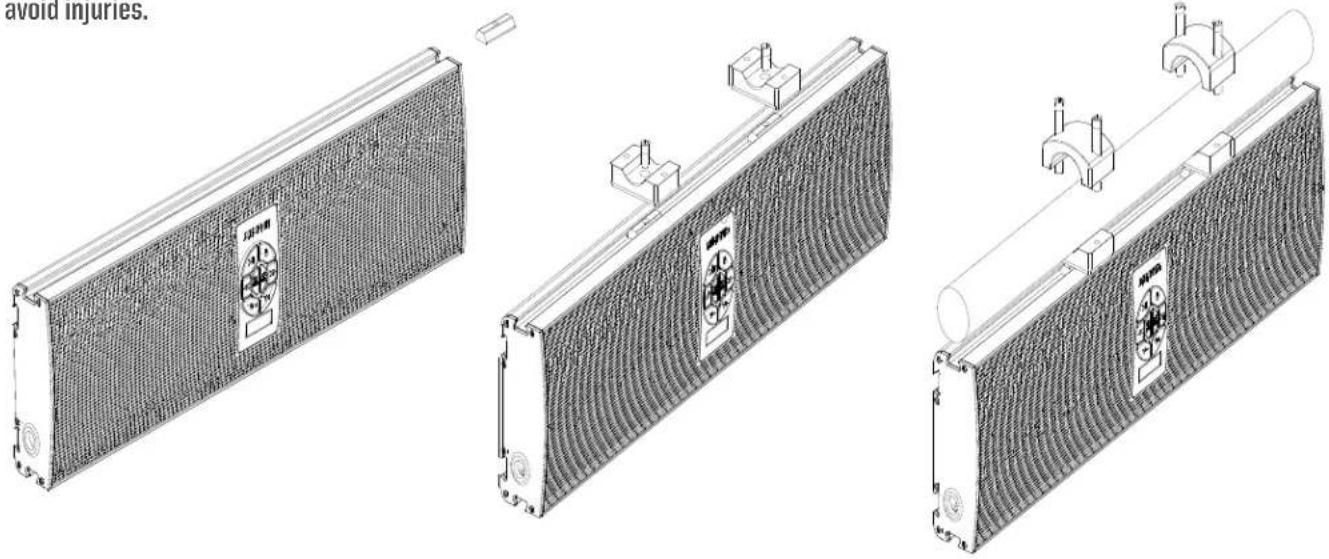
MOUNTING
• Take 14 mm bolt with lock washer and place it through bottom of clamp and slightly thread into Dove tailed piece.
- Slide assembly into one of the three dove tail recessed areas placing the unit at the desired angle.
- Tighten bolt to securely hold bracket in place.
- Repeat this step for both included brackets. Both brackets must be used during installation.
- Use bracket top half and tighten down over bar using the four included bolts, two per clamp.
- Tighten until the unit is secure.
- Connect necessary power wires and audio connections
• Always inspect the area carefully to be certain you are not drilling into any electrical, fuel or hydraulic lines.
- Be certain your unit is securely mounted on your vehicle prior to taking it out on the trail. This unit must be properly mounted to avoid injuries.
TROUBLESHOOTING
No Output:
- Confirm all wiring is firmly connected.
Both +12V must have +12 Volts present and GND must be connected to chassis' ground or to the negative battery terminal. - Confirm the signal source is connected via Bluetooth or the auxiliary cable is connected to both the source and the MXA46SB28 Weak Output
- Check Bluetooth device volume level.
Unwanted Noise
- Whine that increases and decreases with engine speed - confirm the Amp & Source unit are grounded properly.
- Clicking or popping noise at a rate that follows engine speed - this is often induced by the vehicles ignition system. Confirm that the vehicle is equipped with resistor spark plugs and wires. The ignition system may need service.
- Noise can be caused by routing speaker input wires too close to the light wires and other accessory wires in the vehicle. Re-route wires to avoid unwanted interference.
Red LED is Illuminated
- Speaker or wire is shorted • Battery voltage too low
- Battery voltage too high • Amplifier has overheated due to improper ventilation
If above steps do not improve/reduce noise, the system should be checked by a professional audio installer at a Memphis Authorized Dealer.
SHOW US YOUR INSTALL

WWW.MEMPHISCARAUDIO.USA

@MEMPHISCARAUDIO

@MEMPHISCARAUDIOUSA

CONTACT INFO
122 GAYOSO AVE
MEMPHIS, TN USA 38101
TECH SUPPORT
800-903-6979

- MEMPHIS
- AUDIO SINCE 1965
- MXA46SB28
- App Controlled Overhead Soundbar
- Features
- App Controls The Following
- Warranty
- App Controls
- Downloading Memphis App
- Bluetooth Pairing (Audio Streaming Only)
- Bluetooth Pairing The APP
- Button Function
- CONTROLS
- Connections
- Wiring Instructions
- App Instructions
- MOUNTING
- TROUBLESHOOTING
- No Output:
- Unwanted Noise
- Red LED is Illuminated
Brand : Memphis Audio
Model : MXA46SB28
Category : Soundbar