
MXASB9 - Soundbar Memphis Audio - Free user manual and instructions
Find the device manual for free MXASB9 Memphis Audio in PDF.


| Product Type | Soundbar |
| Brand | Memphis Audio |
| Model | MXASB9 |
| Dimensions (W x H x D) | 40 x 3 x 4 inches |
| Weight | 5.5 lbs |
| Power Supply | AC 120V, 60Hz |
| Power Consumption | 30W |
| Audio Channels | 2.1 |
| Bluetooth Version | 5.0 |
| Inputs | HDMI ARC, Optical, AUX, USB |
| Output | Subwoofer (wireless) |
| Remote Control | Included |
| Wall Mountable | Yes (brackets included) |
| Frequency Response | 60Hz - 20kHz |
| Maximum Power Output | 120W |
| Cleaning Instructions | Wipe with soft dry cloth; avoid liquids |
| Safety Warnings | Do not expose to water or moisture; unplug during storms |
| Spare Parts Availability | Contact Memphis Audio support |
| Repair Service | Authorized service centers |
| Warranty | 1 year limited |
Frequently Asked Questions - MXASB9 Memphis Audio
User questions about MXASB9 Memphis Audio
0 question about this device. Answer the ones you know or ask your own.
Ask a new question about this device
Download the instructions for your Soundbar in PDF format for free! Find your manual MXASB9 - Memphis Audio and take your electronic device back in hand. On this page are published all the documents necessary for the use of your device. MXASB9 by Memphis Audio.
USER MANUAL MXASB9 Memphis Audio
122 GAYOSO AVE, MEMPHIS, TN. 38101
- TECH SUPPORT: 800.489.2300
WWW.MEMPHISCARAUDIO.COM

@MEMPHISCARAUDIOUSA

@MEMPHISCARAUDIO
-#MEMPHISAUDIO


ENGINEERED TO RESIST
WATER & ELEMENTS
ESTABLISHED KINETEEN SIXTY-FIVE // MEMPHIS TENNESSEE // UNITED STATES OF AMERICA

MEMPHIS
AUDIO SINCE 1965
MXA
MEMPHIS XTREME AUDIO
natural_image
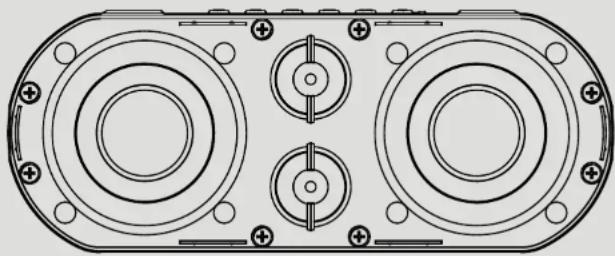
Technical line drawing of a dual-chamber electronic device with mounting holes and central hub (no text or symbols)MXASB9
ALL WEATHER CLAMP MOUNT SOUND BAR


ENGINEERED TO RESIST
WATER & ELEMENTS

MEMPHIS
AUDIO SINCE 1965
MXASB9
READY TO TURN IT UP? READ THIS FIRST!
Memphis Audio built a 50 year legacy in the audio industry engineering the highest quality products to produce the best possible listening experience for our fans and loyal supporters. To fully appreciate our products we recommend taking the time to read and follow the instructions in this manual. As always, we recommend all installations and service be performed by an authorized Memphis Audio dealer.

For optimal performance, Memphis recommends using only Memphis Connection accessories. Outfitting your system with properly sized Memphis Connection wire and accessories will dramatically boost your listening experience and increase the durability of your Memphis Audio products.
The Memphis MXASB9 Sound bar is designed to make it easy to bring Memphis sound to virtually any vehicle. The easy to install, all in one unit is transforms your Bluetooth enabled device into the controls for your entire audio system. The multiple mounting options allow the MXASB9 to fit on nearly any personal watercraft, UTV, boat, golf cart or anything with a bar to mount the unit onto. The MXASB9 was designed to be resistant to the outdoor elements, so get ready to enjoy that Memphis sound wherever you are!
FEATURES
Built in Bluetooth receiver
Resistant to water and elements (IPX7 rated)
Dual adjustable clamp fits bars and UTV bracket
Self powered Plug & Play for quick installation
AUX input
2-Channel output
SPECIFICATIONS
• 4 Speaker system: 2 - 3" speakers and 2 - 1" tweeters
• Total Power: 100 Watts
- Dimensions: 8.9" x 3.7" x 3.5"
- Handle bar clamps fit: 0.75" - 1.25" bars
- UTV bar clamp fit: 1.25" - 2.25" bars
CONTROLS
Bluetooth pairing:
Hold the power button to turn the unit on. The indicator light will begin flashing blue. Go to your device and search for "MXASB9" and click connect. The blue light will stay solid blue when connected.
Bluetooth Operation:
POWER BUTTON: HOLD for power ON/OFF. QUICK PRESS to select between Bluetooth and AUX in modes
PLAY PAUSE: Pauses and Plays the music. (Mutes music when in Aux-in mode)
TRACK FORWARD/BACK: Skips tracks forward and back
V+/V-: Controls the volume of the internal amplifier
STATUS LIGHT:
BLUE FLASHING - Bluetooth Discovery mode.
BLUE SOLID - Paired and Connected to device.
GREEN SOLID - in AUX mode.
REQUIRED WIRING
RED - 12V+ constant, should be connected directly to the vehicle positive battery terminal
BLACK - 12V negative, should be connected directly the vehicle chassis where the paint is removed or directly to the negative battery terminal
BLUE - 12V switched, This should be connected to the vehicle ignition or external switch. When this wire is connected to +12V the soundbar will turn on.
OPTIONAL WIRING
GREEN FEMALE 3.5MM JACK: To be used for an optional Auxiliary input to connect any audio device via 3.5mm jack
BLACK FEMALE 3.5MM JACK: Is a 2.5v low level audio output designed to drive external amplifiers. This allows the MXASB9 to be used as the main source while adding more audio components to your system.
MOUNTING
- Included are 2 sets of mounting hardware. One set for handlebar mounting and one set for UTV mounting.
- Handlebar mounting will use the multi-position brackets that can be secured directly into the enclosure threaded inserts or slide rail as shown below.
• The slide rail can be mounted on the back or bottom of the enclosure - Handle bar brackets can be mounted to a .75" bar using the smaller "U" bolt, 1" bar larger "U" bolt and spacer, and 1.25" using the larger "U" bolt.
- UTV Installation: Use bracket top half and tighten down over bar using the both included bolts.
- Surface mount installation: Use the 2 provided flat plates to mount on the inside of you desired surface. Then thread the bolts through and secure using the supplied nuts.
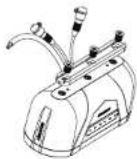
Attach bracket to desired mounting location using provided screws
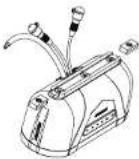
Slide mounting points into the channel
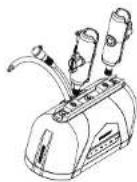
Screw mounting posts into threaded mounting points
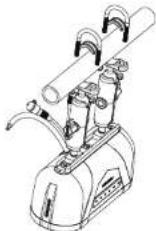
Use appropriate U bolt to connect the MNASB9 to the bar
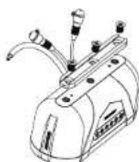
Attach bracket to desired mounting location using provided screws
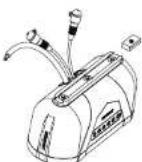
Slide mounting points into the channel
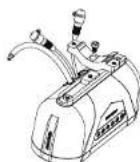
Screw UTV bracket into threaded mounting points
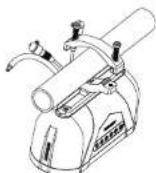
Using bolts provided, tighten top UTV bracket to bottom UTV bracket around bar
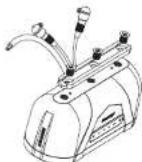
Attach bracket to desired mounting location using provided screws
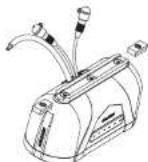
Slide mounting points into the channel
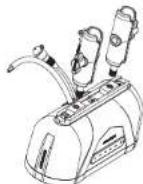
Screw mounting posts into threaded mounting points
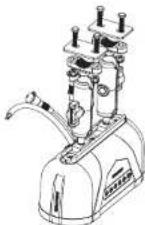
on the inside of
the surface then thread the
bolts though and tighten using
the supplied nuts
TROUBLESHOOTING
NO OUTPUT
- Confirm all wiring is firmly connected: Both +12V must have +12 Volts present and GND must be connected to chassis' ground or to the negative battery terminal.
- Confirm the signal source is connected via Bluetooth or the auxiliary cable is connected to both the source and the MXASB9
WEAK OUTPUT
- Check Bluetooth device volume level.
UNWANTED NOISE
- Whine that increases and decreases with engine speed - confirm the Amp & Source unit are grounded properly.
- Clicking or popping noise at a rate that follows engine speed - this is often induced by the vehicles ignition system. Confirm that the vehicle is equipped with resistor spark plugs and wires. The ignition system may need service.
- Noise can be caused by routing speaker input wires too close to the light wires and other accessory wires in the vehicle. Re-route wires to avoid unwanted interference.
RED LED IS ILLUMINATED
- Speaker or wire is shorted • Battery voltage ton low
- Battery voltage too high -Amplifier has overhe ated due to improper ventilation
If above steps do not improve/reduce noise, the system should be checked by a professional audio installer at a Memphis Authorized Dealer.
WARRANTY
Memphis Xtreme Audio MXASB9 Limited Warranty
This product has a one year warranty from the date of purchase for defects in material or workmanship. This warranty will be extended to 2 years when installed by a Memphis authorized dealer using Memphis Connection products. The warranty is void if the product has been physically damaged by improper usage or abuse. If repairs are attempted outside of a Memphis Audio facility, the warranty is void.
This warranty is limited to the original retail purchaser and does not cover any expenses incurred in the removal or re-installation of the product. This warranty does NOT apply to product exterior and cosmetics. Memphis Audio disclaims any liability for incidental or consequential damages caused by product defects. Memphis Audio liability will not exceed the purchase price of the product and the warranty period specified.
What is NOT covered under warranty
• Damage due to improper installation
- Damage through negligence, misuse, accident or abuse. (Repeated returns for the same damage may be abuse)
• Product damaged in accident and/or due to criminal activity
• Service performed by anyone other than Memphis Audio
- Subsequent damage to other components
- Any cost or expense related to the removal or re-installation of product
- Products with tampered, missing, altered or defaced serial numbers/labels
- Freight damage
• The cost of shipping product to Memphis Audio
- Return shipping on non-defective items
- Any product not purchased from an authorized Memphis Audio dealer
Some states do not allow the exclusion or limitation of incidental or consequential damages. The above limitations or exclusions may not apply to you. This warranty gives you specific tights, you may have other rights which vary from state to state.
If warranty service is required, a return authorization number is required to return the product to Memphis Audio. Warranty shipments to Memphis Audio are the responsibility of the purchaser. Pack the product carefully in the original carton if possible Memphis Audio will not be responsible for damages incurred in shipment or due to improper packaging materials used by the purchaser.
If determined to be within warranty your product will be repaired or replaced at the discretion of Memphis Audio.

- MEMPHIS
- MXASB9
- READY TO TURN IT UP? READ THIS FIRST!
- FEATURES
- SPECIFICATIONS
- CONTROLS
- Bluetooth pairing:
- Bluetooth Operation:
- REQUIRED WIRING
- OPTIONAL WIRING
- MOUNTING
- TROUBLESHOOTING
- NO OUTPUT
- WEAK OUTPUT
- UNWANTED NOISE
- RED LED IS ILLUMINATED
- WARRANTY
- Memphis Xtreme Audio MXASB9 Limited Warranty
- What is NOT covered under warranty
Brand : Memphis Audio
Model : MXASB9
Category : Soundbar