IR-STV - Remote control Vello - Free user manual and instructions
Find the device manual for free IR-STV Vello in PDF.


| Product Type | Remote Control |
| Brand | Vello |
| Model | IR-STV |
| Connectivity | Infrared (IR) |
| Power Source | 2 x AAA batteries (not included) |
| Battery Life | Approximately 12 months under normal use |
| Dimensions (L x W x H) | 200 x 50 x 25 mm |
| Weight (with batteries) | Approx. 120 g |
| Operating Range | Up to 8 meters |
| Compatible Devices | TV, STB, DVD, SAT, etc. |
| Functions | Volume, Channel, Power, Mute, Input, Menu, Navigation, OK, Numeric keys |
| Programming Method | Automatic code search or manual code entry |
| Code Storage | Non-volatile memory |
| Material | ABS plastic |
| Color | Black |
| Cleaning Instructions | Wipe with a soft, dry cloth. Do not use liquids or abrasives. |
| Storage Temperature | -10°C to 50°C |
| Operating Temperature | 0°C to 40°C |
| Safety Precautions | Keep away from liquids and heat sources. Remove batteries if not used for extended periods. |
| Repairability | Refer to manual for battery replacement. No user-serviceable parts inside. |
Frequently Asked Questions - IR-STV Vello
User questions about IR-STV Vello
0 question about this device. Answer the ones you know or ask your own.
Ask a new question about this device
Download the instructions for your Remote control in PDF format for free! Find your manual IR-STV - Vello and take your electronic device back in hand. On this page are published all the documents necessary for the use of your device. IR-STV by Vello.
USER MANUAL IR-STV Vello
natural_image
Black remote control with black keys and a red scroll on top (no readable text or symbols beyond basic function labels)Introduction
Thank you for choosing Vello.
Congratulations on the purchase of your Vello IR-STV infrared remote control. This wireless remote lets you take photos, shoot video, print images, and control playback on your Sony DSLR or NEX camera from up to fifteen feet away. The Vello IR-STV is especially useful for preventing camera shake during long exposures and for taking self-portraits. It can also be used to trigger a remote camera when shooting events.
Precautions
Before using your Vello IR-STV infrared remote control, please read the following safety notices carefully and thoroughly to ensure safe use and to help prevent damage to your remote control or injury to yourself or others.
- Remove the battery from this product before long-term storage in order to prevent it from leaking corrosive liquids.
- This product is not water resistant. Keep it away from rain, snow, humidity, and general moisture.
- Do not clean this product with agents containing corrosive or flammable substances such as paint thinner, benzene, or nail polish remover.
- Strong light and weak batteries may adversely affect the transmission of the infrared signal.
- Dispose of used batteries properly. Never heat them or throw them into a fire, as this can cause the batteries to leak corrosive liquids, generate heat, or explode.
Overview
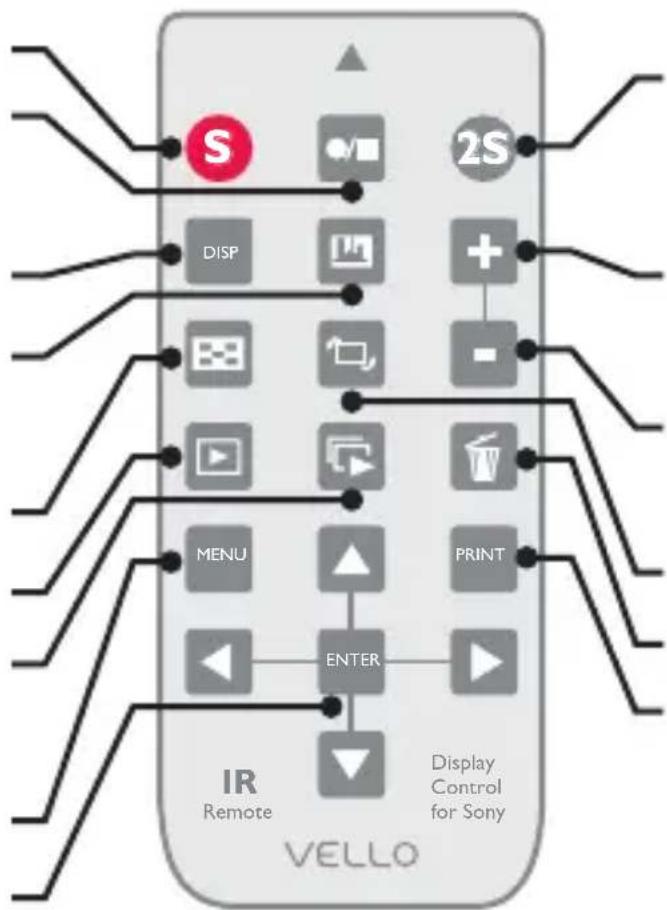
Shutter Release\*
Video Button:
Starts and stops video shooting.
Display\*
Histogram
Displays histogram onscreen.
Index\*
Playback\*
Slideshow
Begins a slideshow of images.
Menu\*
Multi-Selector
flowchart
graph TD
    A["IR Remote"] --> B["2S"]
    B --> C["DISP"]
    C --> D["+"]
    D --> E["+"]
    E --> F["+"]
    F --> G["+"]
    G --> H["+"]
    H --> I["+"]
    I --> J["+"]
    J --> K["+"]
    K --> L["+"]
    L --> M["+"]
    M --> N["+"]
    N --> O["+"]
    O --> P["+"]
    P --> Q["+"]
    Q --> R["+"]
    R --> S["+"]
    S --> T["+"]
    T --> U["+"]
    U --> V["+"]
    V --> W["+"]
    W --> X["+"]
    X --> Y["+"]
    Y --> Z["+"]
    Z --> AA["+"]
    AA --> AB["+"]
    AB --> AC["+"]
    AC --> AD["+"]
    AD --> AE["+"]
    AE --> AF["+"]
    AF --> AG["+"]
    AG --> AH["+"]
    AH --> AI["+"]
    AI --> AJ["+"]
    AJ --> AK["+"]
    AK --> AL["+"]
    AL --> AM["+"]
    AM --> AN["+"]
    AN --> AO["+"]
    AO --> AP["+"]
    AP --> AQ["+"]
    AQ --> AR["+"]
    AR --> AS["+"]
    AS --> AT["+"]
    AT --> AU["+"]
    AU --> AV["+"]
    AV --> AW["+"]
    AW --> AX["+"]
Shutter Two-Second Delayed
Releases the shutter after a two-second delay.
Enlarge
Enlarges the selected image.
Shrink
Shrinks the selected image.
Rotate\*
Delete\*
Prints the selected image on a connected PictBridge-compliant printer.
* These controls perform the same function as their on-camera equivalents.
Note: Except for the S, S2, and Video buttons, the buttons will work only when the camera is plugged into a TV.
Using Your IR-STV as a Remote Trigger
The Vello IR-STV can trigger your camera's shutter from up to fifteen feet away. To use your IR-STV as a remote trigger, turn on your camera and follow these steps:
I. Remove the plastic separator from the battery.
2. Set up your shot and make sure your camera is in focus.
3. Set your camera for remote triggering. For more information about the remote triggering feature, consult your camera's manual.
4. Aim the remote at the camera's infrared sensor and press the S button to release the shutter. To release the shutter with a two-second delay, press the 2S button.
The Vello IR-STV can trigger video shooting on compatible Sony cameras. To start shooting video, press the Video button. To stop shooting video, press the Video button again.
Important! Because infrared technology requires line-of-sight communication between the two devices, make sure there are no obstructions between the remote and your camera's sensor.
Playback, Slideshow, and Printing
You can use your Vello IR-STV remote to wirelessly control playback on your Sony camera when the camera is plugged into your TV. Most of the buttons on the IR-STV will correspond with the buttons on your Sony camera.
To begin a slideshow, press the slideshow button on the remote. Use the right or left buttons on the multi-selector to display the next or previous image, and use the ENTER button for play and pause.
To print images while viewing them on the TV, follow these steps:
I. Use an HDMI cable to connect your camera to an HDTV.
2. Plug your camera into a PictBridge-compliant printer.
3. Display the image you want to print, and then press the PRINT button on the remote control.
For more information about the playback and printing features, consult your camera's manual.
Replacing the Battery
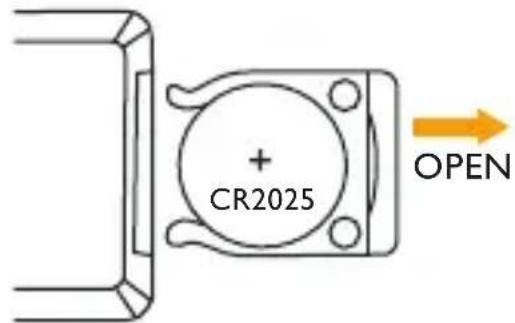
The Vello IR-STV is powered by a 3 V CR2025 lithium battery. To replace the battery, follow these steps:
I. Use your fingernail to pry the battery tray out of the remote.
-
Remove the old battery and replace it with a new one, making sure the side marked with a plus sign (+) is facing up.
-
Push the battery tray back into the remote so it locks in place.
Specifications
- Operating distance: up to 15 ft. (4.6 m)
- Operating temperatures: 32^ - 104^ (0^ - 40^)
- Storage temperatures: -4°F–140°F (-20°C–60°C)
- Battery type: 3 V CR2025 lithium
• Dimensions: 3.6 × 1.6 × 0.4 in. ( 90.3 × 40.9 × 10.8 mm)
• Weight: 0.8 oz. (22.6 g)
Compatible Cameras
Sony® DSLR A230 / A330/ A380 / A390 / A500 / A550 / A560 / A580 DSLR A700 / A850 / A900 / SLT: A33 / 55 / A57 / A65 / A77 / NEX: 5 5n / 6 / 7
Warranty
This VELLO product is warranted to the original purchaser to be free from defects in materials and workmanship under normal consumer use for a period of one (1) year from the original purchase date or thirty (30) days after replacement, whichever occurs later. The warranty provider's responsibility with respect to this limited warranty shall be limited solely to repair or replacement, at the provider's discretion, of any product that fails during normal use of this product in its intended manner and in its intended environment. Inoperability of the product or part(s) shall be determined by the warranty provider. If the product has been discontinued, the warranty provider reserves the right to replace it with a model of equivalent quality and function.
This warranty does not cover damage or defect caused by misuse, neglect, accident, alteration, abuse, improper installation or maintenance. EXCEPT AS PROVIDED HEREIN, THE WARRANTY PROVIDER MAKES NEITHER ANY EXPRESS WARRANTIES NOR ANY IMPLIED WARRANTIES, INCLUDING BUT NOT LIMITED TO ANY IMPLIED WARRANTY OF MERCHANTABILITY OR FITNESS FOR A PARTICULAR PURPOSE. This warranty provides you with specific legal rights, and you may also have additional rights that vary from state to state.
To obtain warranty coverage, contact the Vello Customer Service Department to obtain a return merchandise authorization ("RMA") number, and return the defective product to Vello along with the RMA number and proof of purchase. Shipment of the defective product is at the purchaser's own risk and expense.
For more information, or to arrange service, visit www.vellogear.com or call Customer Service at 212-594-2353.
Vello is a Gradus Group Brand. Product warranty provided by the Gradus Group.
www.gradusgroup.com
Vello is a registered trademark of the Gradus Group. © 2014 Gradus Group LLC. All Rights Reserved
www.vellogear.com
© Copyright 2012 Gradus Group
- Introduction
- Precautions
- Overview
- Shutter Release\*
- Video Button:
- Display\*
- Histogram
- Index\*
- Playback\*
- Slideshow
- Menu\*
- Multi-Selector
- Shutter Two-Second Delayed
- Enlarge
- Shrink
- Rotate\*
- Delete\*
- Using Your IR-STV as a Remote Trigger
- Playback, Slideshow, and Printing
- Replacing the Battery
- Specifications
- Compatible Cameras
- Warranty
Brand : Vello
Model : IR-STV
Category : Remote control