
Enhance Select 50R - Hearing aid JABRA - Free user manual and instructions
Find the device manual for free Enhance Select 50R JABRA in PDF.


| Product Type | Receiver-In-The-Ear (RIE) hearing aids, rechargeable |
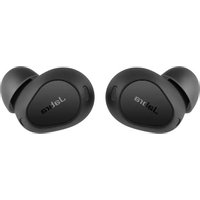
| Model | Jabra Enhance Select 50R |
| Intended Use | Over-the-counter for adults 18+ with perceived mild to moderate hearing loss |
| Battery | Built-in rechargeable lithium-ion, non-removable |
| Battery Life (Expected) | Up to 30 hours per charge (varies with usage) |
| Charging Case | Included with wall charger and cable |
| Listening Programs | All-Around, Restaurant, Music, Outdoor |
| Connectivity | Bluetooth 2.4 GHz, Made for iPhone/iPad/iPod, Android streaming (Android 10+) |
| Frequency Range | 100-8060 Hz |
| Maximum Output | 116 dB SPL (HFA 113 dB SPL) |
| Total Harmonic Distortion | < 1% (0.3-0.7%) |
| Equivalent Input Noise | 24 dB SPL (without noise reduction) |
| Water and Dust Resistance | IP6X (dust), IPX8 (water) - avoid immersion |
| Daily Cleaning | Wipe with soft cloth, brush microphone inlets; change domes every 3 months |
| Replaceable Parts | Domes, wax filters, receivers (receiver wires) |
| Optional Accessories | Sport lock, TV streamer, phone clip, wireless microphone |
| Mobile App | Jabra Enhance Select app for control and fine-tuning |
| Flight Mode | Wireless off (press and hold button for 9 seconds) |
| Service Lifetime (Hearing Aid) | 5 years |
| Color Coding | Left: blue, Right: red |
Frequently Asked Questions - Enhance Select 50R JABRA
User questions about Enhance Select 50R JABRA
0 question about this device. Answer the ones you know or ask your own.
Ask a new question about this device
Download the instructions for your Hearing aid in PDF format for free! Find your manual Enhance Select 50R - JABRA and take your electronic device back in hand. On this page are published all the documents necessary for the use of your device. Enhance Select 50R by JABRA.
USER MANUAL Enhance Select 50R JABRA
ENHANCE SELECT 50R
User guide
Receiver-In-The-Ear hearing aids, Rechargeable
Life is richer when you can hear it. ™
FDA warnings and cautions
WARNING: If you are younger than 18, do not use this
You should go to a doctor, preferably an ear-nose-throat doctor (an ENT), because your condition needs specialized care. Over-the-counter (OTC) hearing aids are only for users who are age 18 or older
This OTC hearing aid is for users who are 18 and older. People who are younger than 18 with hearing lo should see a doctor, preferably an ENT, because they may need medical testing and management. Hearing loss can affect speech and learning, so professional fitting and continuing care are also important.

WARNING:
When to See a Doctor
If you have any of the problems listed below, please see a doctor, preferably an ear-nose-throat doc (an ENT).
- Your ear has a birth defect or an unusual shape. Your ear was injured or deformed in an accident.
- You saw blood, pus, or fluid coming out of your ear in the past 6 months
- Your ear feels painful or uncomfortable
- You have a lot of ear wax, or you think something could be in your ear
- You get really dizzy or have a feeling of spinning or swaying (called vertigo)
- Your hearing changed suddenly in the past 6 months
-
Your hearing changes: it gets worse then gets better again
-
You have worse hearing in one ear
- You hear ringing or buzzing in only one ear.
This hearing aid should not cause pain when inserting it
Remove this device from your ear if it causes pain or discomfort when you insert or place it. To try make sure to follow the instructions. If you feel pain or discomfort again, contact the manufacturer. If your pain or discomfort doesn't go away, contact your hearing healthcare professional. You can also report this to FDA as an adverse event according to the instructions that appear later.

CAUTION:
This is not hearing protection
You should remove this device if you experience overly loud sounds, whether short or long-lasting. If you're in a loud place, you should use the right kind of hearing protection instead of wearing this device. In general, if you would use ear plugs in a loud place, you should remove this device and use ear
The sound output should not be uncomfortable or painful
You should turn down the volume or remove the device if the sound output is uncomfortably loud or painful. If you consistently need to turn the volume down, you may need to further adjust your device
You might need medical help if a piece gets stuck in your ear
If any part of your hearing aid, like the eartip (dome), gets stuck in your ear, and you can't easily r it with your fingers, get medical help as soon as you can. You should not try to use tweezers or co swabs because they can push the part further into your ear, injuring your eardrum or ear canal, pos seriously.

NOTE:
If you remain concerned, consult a professional
- If you try this device and continue to struggle with or remain concerned about your hearing, you should consult with a hearing healthcare professional.
What you might expect when you start using your hearing aid
- A hearing aid can benefit many people with hearing loss. However, you should know it will not restore normal hearing, and you may still have some difficulty hearing over noise. Further, a heart aid will not prevent or improve a medical condition that causes hearing loss.
- People who start using hearing aids sometimes need a few weeks to get used to them. Similarly, many people find that training or counseling can help them get more out of their devices.
- If you have hearing loss in both ears, you might get more out of using hearing aids in both, especially in situations that make you tired from listening – for example, noisy environments.
Tell FDA about injuries, malfunctions, or other adverse events
- To report a problem involving your hearing aid, you should submit information to FDA as soon as possible after the problem. FDA calls them “adverse events”, and they might include: skin irritation your ear, injury from the device (like cuts or scratches, or burns from an overheated battery), piece of the device getting stuck in your ear, suddenly worsening hearing loss from using the device, et Instructions for reporting are available at https://www.fda.gov/Safety/MedWatch, or call 1-800-FDA-1088. You can also download a form to mail to FDA.
Table of Contents
FDA warnings and cautions 2
Introduction 7
What is in the box? 9
Your hearing aid 10....
Preparing your hearing aids for use 13.
Placing your hearing aids in your ears 16
Ensuring a proper fit of your hearing aid 18
Removing your hearing aids from your ears 20
Using your hearing aids 21.
Using a telephone 24
Advanced options 25
Wireless accessories 28
Cleaning and caring for your hearing aids 29.
General warnings and cautions 43
Cyber security 45
Troubleshooting 46
Regulatory information 50
Technical specifications 56
Additional information 57
Introduction
Thank you for choosing Jabra Enhance hearing aids. We recommend that you use your hearing aids every day.

NOTE:
- Read this booklet carefully BEFORE using your hearing aids.
- Visit jabraenhance.com/start to learn how to wear your hearing aids, pair them to your mobile device and download the Jabra Enhance Select app.
Intended use
The hearing aid is intended to amplify sound for individuals 18 years of age or older with perceived mild to moderate hearing impairment. The device is intended for direct-to-consumer sale and use without the assistance of a hearing care professional.
User profile
The hearing aid is intended to be used by adults 18 years of age or older.
The hearing aid is intended to be used by lay persons.
Therapeutic indications
Perceived mild to moderate hearing impairment.
Symbols

WARNING: Points out a situation that could lead to serious injuries.

Legal manufacturer.

CAUTION: Indicates a situation that could lead to minor and moderate injuries.

NOTE: Advice and tips.

Date of manufacture.

Follow instructions for use. (Logo in blue)

Unique Device Identification.

Equipment includes an RF transmitter.

Do not dispose of electronic devices or batteries with ordinary household waste. They should be disposed of at sites intended for electronic waste. Please note: There may be specific regulations in your country.
What is in the box?
The following items are included in the package:
• A set of 2 hearing aids
• A charging case with wall charger and cable
• A user guide for the charger
• A "clamshell" storage case
- Extra domes. See "Changing your hearing aid domes", page 32
- A cleaning cloth and brush. See "Cleaning tools", page 30
- A wax guard kit. See "Changing the wax filter", page 36
- An ear measuring tool for receiver wires. See "Replacing the receivers", page 39
- A tool for receiver wire replacement. See "Replacing the receivers", page 39
• A kit of cards to get you started
- An App (Getting Started) Guide with instructions for downloading and connecting to the Jabra Enhance Select app
- This user guide.
If anything is missing, please contact customer support at Jabra Enhance. See the back page for contact information.
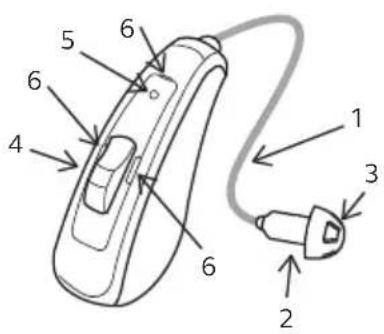
Your hearing aid
- Receiver wire
- Receiver
- Dome (an open dome is shown)
- Push button
- LED (green light)
- Microphone inlets
- Left/right indicator
- Serial number and model

Replacement parts and optional extras
Contact Jabra Enhance for further information and ordering. See the back page for contact information.
Domes

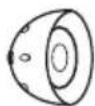
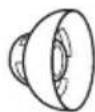
Tulip dome Closed dome Open dome
Tulip domes are one size. Closed and open domes are available in different sizes. Domes are all light grey.

NOTE: Only use domes supplied by Jabra Enhance.
See "Changing your hearing aid domes", page 32 for instruction on how to change the domes.
Receiver
The receiver consists of a connector for attachment to the hearing aid, a receiver wire, the receiver itself, a replaceable dome, and a replaceable wax filter.
Your receivers are color-coded. Left = blue. Right = red.
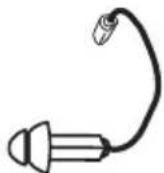
Sport lock (optional)
The sport lock helps keep your hearing aids in place when you are physically active.
See "Mounting a sport lock on the receiver", page 42 for instruction on how to mount the sport lock on the receiver.
Preparing your hearing aids for use
Charging the hearing aids
WARNING: Refer to the user's guide for your hearing aid charger for a full instruction on how to use it.
NOTE: We recommend that you charge your hearing aids fully before using them.
Battery warnings
- Do not attempt to open the product or replace the battery. This will terminate the warranty.
- Rechargeable hearing aids are supported by a non-removable rechargeable lithium-ion battery cell. Exposure or ingestion can be seriously harmful.
- Never put your rechargeable hearing aid in your mouth.
- Keep your rechargeable hearing aid away from pets, children, and people with cognitive, intellectual, or mental health challenges.
- Never swallow lithium-ion batteries nor place them inside any part of the body, as this may lead to fatal injuries in two hours or less. If a lithium-ion battery is swallowed or placed inside any part of the body, rechargeable hearing aid is swallowed, seek immediate medical attention.
-
If the outer casing of your rechargeable hearing aid is broken, the rechargeable batteries inside may leak. In this case, do not attempt to use the hearing aid – contact Jabra Enhance. See the back page for cont information.
-
Battery leakage can cause chemical burns. If you get exposed to battery leakage material, rinse immediately with warm water. If you get chemical burns, redness, or skin irritation from battery leakage, seek medical attention.
- Batteries are harmful for the environment. Therefore, never try to burn them. Dispose of your used batteries according to your country's regulations or return them to your hearing care professional.
- When traveling, consult your airline about any rules for transportation of your hearing aid and charger.

NOTE:
- For safety reasons, use only the charger supplied with your hearing aids.
- Use of other chargers may invalidate any approval or warranty.
• To save battery power, turn off your hearing aids when they are not in use.
Low battery alert
When the batteries are low on power, the volume in your hearing aids will momentarily reduce and a melo will play every 15 minutes until there is no more power - then your hearing aids will turn off.
Low battery alert when paired with wireless accessories (optional)

NOTE:
- Your batteries will run out faster when you use wireless functions like streaming from your smart device or from your TV with our TV streamer. As the battery power declines, the wireless function stop working. A short melody will play every five minutes to let you know that the battery power low. The table below shows the functionality with different battery charge levels.
| Battery level Signal Hearing aid | Remote control | Streaming | ||
| Fully charged | √ √ √ | |||
| Low |  4 even tones 4 even tones | √ | √ | x |
| Depleted | 3 even tones and1 longer tone | √ | x | x |
You can check the battery status by placing the hearing aid in the hearing aid charger. You can also check battery status in the Jabra Enhance Select app.
Placing your hearing aids in your ears
How to tell left from right
If you have two hearing aids, they may be programmed differently. One for your left ear, the other for you Do not swap them. Please pay attention to this when cleaning, storing, and inserting the hearing aids.

natural_image
Line drawing of a handheld electronic device with a cord and connector (no text or symbols)
natural_image
Line drawing of a handheld electronic device with a cord and connector (no text or symbols)Left hearing aid (blue marking) Right hearing aid (red marking)
When you place your left and right hearing aid side by side (as shown), the receivers should turn inwards. the hearing aids are in the correct side for insertion.
Inserting the receiver dome into your ear

- Hang the hearing aid over the2. top of your ear.
Hold the receiver wire where 3t Push the dome far enough into bends and gently place/push your ear canal so that the the receiver dome into your ear receiver wire rests against your canal. You can check in a mirror.

CAUTION: Never attempt to modify the shape of the receiver wire yourself.
Sport lock
If you have ordered sport locks with your hearing aids and mounted them as instructed on page 42, insert them as follows:
To insert a hearing aid with a sport lock:
- Insert the hearing aid as usual
- Tuck the sport lock into the bottom of the concha (the part of your ear just outside the ear canal).
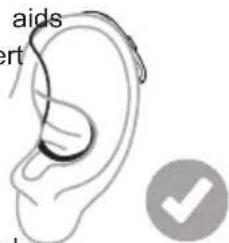

NOTE: Sport locks may become stiff, brittle, or discolored over time and need replacement. Contact Jabra Enhance for further information and ordering. See the back page for contact information.
Ensuring a proper fit of your hearing aid
To check if the hearing aid is placed correctly:
• The body of the hearing aid should be placed just behind your ear.
- When inserted in your ear canal, the dome should feel secure and comfortable. See "Inserting the receiver dome into your ear", page 17 on how to insert the dome.
• The receiver wire should fit comfortably around the top of your ear.
- If the wire is too long, it may bend away from your ear.
- If the wire is too short, it may feel tight and may pull the dome partly out of your ear.

natural_image
Line drawing of a human ear with shaded area indicating the ear area (no text or symbols present)
NOTE:
- To avoid whistling, ensure that the receiver wire and dome fit correctly into your ear. If you continue to experience whistling, check the troubleshooting guide for other possible reasons and solutions.
- If the receiver wire of the hearing aid does not rest against the side of your head, try using a smaller dome size. (See page 32 for dome replacement). A different receiver length may also be needed. (See "Replacing the receivers", page 39).
- If you are still unable to receive an appropriate fit, contact Jabra Enhance. See the back page for contact information.
Removing your hearing aids from your ears

natural_image
Illustration of a hand performing a finger massage on an ear (no text or symbols)
natural_image
Line drawing of a hand holding a tool, with a dashed line indicating a measurement or alignment (no text or symbols present)- Lift the hearing aid off your ear. 2. Hold the receiver wire with your thumb and index
finger where it bends and pull the dome out of your ear canal.
Using your hearing aids
Turning your hearing aids on and off
-
To turn on: Press and hold the button for 5 seconds
-
To turn off: Press and hold the button for 5 seconds
Pressing the button for different lengths of time enables other functions such as flight mode and streaming. "Using the push button ", page 22.
When the hearing aid turns on, the green LED lights up. When the hearing aid turns off, the green LED fl 3 times.
Your hearing aids also turn off automatically when you place them in the charger (while it is active), and t turn on automatically when you remove them from the charger (while it is active).
Your hearing aids always start in program 1 at the pre-set volume.
Smart Start
Smart Start delays the time before your hearing aid turns on after you remove the hearing aid from the ch With this function activated, you will hear a beep for each second of the delay period (either 5 or 10 sec
Listening programs
The hearing aids are programmed for the following programs that can help you in specific situations.
| Listening Programs Use | |
| 1. All-Around (1 beep) The best option if | you want only one program. |
| 2. Restaurant (2 beeps) For use in noisy | places such as restaurants and social gatherings. |
| 3. Music (3 beeps) For listening to music. | |
| 4. Outdoor (4 beeps) For outdoor use (to | reduce wind noise). |
Using the push button
Controlling the volume
• To turn the volume up, press the button on the right hearing aid for less than 1 second.
• To turn the volume down, press the button on the left hearing aid for less than 1 second.
Changing programs
- Push the button for 1-2 seconds to switch from one program to the next. Your hearing aids will beep to confirm the change. The number of beeps indicates which program you have selected.
• To get back to the default listening program, keep scrolling, or turn your hearing aids off and on again.

NOTE: If you have two hearing aids with synchronization enabled, changing the program on one hearing aid automatically applies the change to the second hearing aid as well.
Flight mode
You can also use the push button to set the hearing aid in flight mode (wireless mode off). See "Flight M (optional)", page 27.
Streaming
You can activate streaming from the Jabra Enhance Select app.
The LED light indicator
Your hearing aid communicates with both sound and light whenever you change program or turn it on or
| Action Light | |
| Turn on: Press and hold the button for 5 seconds Green flash | |
| Turn off: Press and hold the button for 5 seconds Flashes green | three times |
| Enter flight mode (optional): Press and hold the button for 9 seconds Four times green double flash | |
Using a telephone
Your hearing aid allows you to use your telephone as you normally do. Finding the optimal position for holding the phone may require practice.

The following suggestions may be helpful:
- Hold the telephone up to your ear canal or hold it close to the hearing aid microphones as illustrated.
- If you hear whistling, try holding the telephone in the same position for a few seconds. The hearing aid may be able to cancel the whistling.
- You can also try holding the telephone slightly away from the ear.
Mobile phones
Your hearing aids comply with the most stringent Standards of International Electromagnetic Compatibility. A degree of disturbance can be due to the nature of your particular mobile phone or of your wireless telephone service provider.

NOTE:
- If you have a mobile device, you can pair it to connect directly to your hearing aids. See "Advanced options", page 25.
- If you find it difficult to get a good result while using your mobile phone, see jabraenhance.com/accessories for an overview of wireless accessories that may be useful for you. See also "Wireless accessories", page 28.
Advanced options
Using your hearing aids with iPhone, iPad, and iPod touch (optional
The advanced models of our hearing aids are Made for iPhone®, iPad® and iPod touch®, which allow for audio streaming and control from these devices.
Streaming from an Android™ smartphone
Some Android smartphones can stream audio directly to the advanced models of our hearing aids. Your device must be running Android 10 or newer and it must have the Android Streaming for Hearing Aids feature as

NOTE:
- See jabraenhance.com/compatibility for a list of compatible devices and operating system requirements.
- Visit jabraenhance.com/start to learn how to pair your hearing aids to your mobile device and download the Jabra Enhance Select app.
- If your Bluetooth® enabled Android smartphone does not stream directly to your hearing aids, you can use our Phone Clip+ for streaming capabilities.
Controlling your hearing aids with the mobile device app
The Jabra Enhance Select app lets you control your hearing aids right from your mobile device. For example, you can choose different listening programs based on your current environment. It will also enable you to receive important updates for your hearing aids, and your hearing professional can fine-tune your settings for you through the app.
- Use only our compatible mobile device app with your hearing aids.
- Do not disable app notifications.
• Install updates to keep the app working correctly.
- To get step-by-step instructions on how to connect your hearing aids with the Jabra Enhance Select app, refer to the printed "Get Connected" guide that came with your box.


Online Services (optional)
If you have signed up to use Online Services available with your hearing aids, you can allow your hearing to be adjusted remotely.
All you need is a compatible mobile device with internet enabled. This allows you to:
- Request assistance remotely to adjust your hearing aids to be a better fit for you.
- Keep your hearing aids up to date with the latest software to ensure the best performance possible.
This service only works if your mobile device is connected to the internet. Visit jabraenhance.com/start to le how to pair your hearing aids to your mobile device and download the Jabra Enhance Select app.
For optimum performance, make sure the hearing aids are connected to the Jabra Enhance Select app and placed close to the iPhone, iPad, iPod touch, or the Android smartphone before applying the changes.

NOTE: Your hearing aids shut down during the installation and update process.
Flight Mode (optional)
Your hearing aids can be controlled from your mobile device or Remote Control, an option that can be adi Jabra Enhance. However, in some areas you are requested to turn off wireless communication.

CAUTION: When boarding a flight or entering an area where RF transmitters are prohibited, wireless functionality must be deactivated.

NOTE: Both hearing aids must be set in Flight mode - even with synchronization enabled.
Turning off wireless communication (enter Flight Mode)
- Turn off your hearing aid.
- Press the button for 9 seconds.
- Your hearing aid will double-flash four times. If you are wearing your hearing aids at the time, you will double tones 🎥 🎥 for about 10 seconds, meaning the hearing aid is now in Flight Mode.
Activating wireless communication (exit Flight Mode)
- Turn your hearing aid off and then on.
- Wireless communication will be activated after 10 seconds.
Wireless accessories
Our wireless eco-system features a comprehensive range of seamlessly integrated wireless accessories. These let you stream high quality stereo sound and speech directly to your hearing aids. See jabraenhance.com/accessories for an overview of wireless accessories that may be useful for you.
Available wireless accessories and their features
- A TV streamer streams audio from a TV and most other audio sources to your hearing aids at a volume that suits you.
- A phone clip streams phone conversations and stereo sound to both hearing aids and doubles as a remote control.
- A wireless microphone. It doubles as a table microphone. Furthermore, it has a built-in telecoil that allows it to connect with a teleloop system, a connector for an FM receiver, and a mini-jack input for wired streaming of audio from a computer or music player.
Accessing wireless accessories
You can activate streaming from the Jabra Enhance Select app.

NOTE:
- You should only use recommended wireless accessories with your wireless hearing aids.
Cleaning and caring for your hearing aids
Care and maintenance
Please follow the advice below to have the best user experience and to prolong the life of your hearing air
- Keep your hearing aids dry and clean.
- Wipe the hearing aids with a soft cloth after use to remove grease or moisture.
- Do not wear your hearing aids when putting on cosmetics, perfume, aftershave, hairspray, suntan lotion, etc. These might discolor the hearing aid or get into the hearing aid causing damage.
- Do not immerse your hearing aid in any liquid.
- Keep your hearing aids away from excessive heat and intense direct sunlight. The heat may deform the shell, damage the electronics, and deteriorate the surface.
- The hearing aid is dust, splash, and water resistant:
- The hearing aid has IP6X dust resistance. Avoid exposure to extensive dust.
- The hearing aid has IPX8 water resistance. Avoid exposure to liquids, and do not swim, shower or sauna while wearing the device.
Daily maintenance
It is important to keep your hearing aid clean and dry. On a daily basis, clean the hearing aids using a soft cloth or tissue. In order to avoid damage due to humidity or excessive perspiration, the use of a drying kit is recommended.

WARNING: Always turn your hearing aids off while cleaning and maintaining them.

Cleaning tools
- Soft cloth.
- Brush for cleaning. Use the brush on all surfaces and orifices. Also use your brush for daily cleaning.
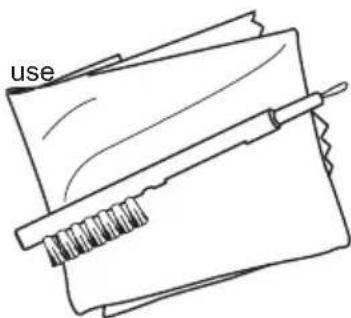
If the microphone inlets are clogged, gently brush across the microphone inlets with the brush.

natural_image
Line drawing of a hand holding a handheld tool with a small connector (no text or symbols)
WARNING: Do not use force to press the bristles on the small brush into the inlets because the microphones may be damaged.

CAUTION: Do not use alcohol or other solvents to clean your hearing aid or the protective coating will be damaged.

NOTE: If the microphone inlets remain clogged after brushing the exterior, ask a hearing care professional to help you clean them.
Changing your hearing aid domes
You should change your domes every 3 months or more often. For example, if a dome is filled with earwa replace it with a new one. If the hearing aids sound more quiet, this might indicate that new domes are n See also "Changing the wax filter", page 36.
If you don't know your dome size, mount different sizes, one at a time, on the receiver and test them in: Choose a dome size that fits snugly, yet comfortably in the ear canal.

NOTE:
- Incorrect dome replacement can result in a dome being left in your ear when you remove your hearing aid.
- If you don't feel confident performing this task, please contact Jabra Enhance support. See the back page for contact information.

CAUTION:
- If you suspect that you have a dome, wax filter or other object stuck in your ear, consult a hearing care professional or a physician. These objects can be harmful and can cause an infection in your ear.
- Use only accessories intended for use with your hearing aids. Contact Jabra Enhance for further information and ordering.
Standard domes
The illustrations show an open dome, but the procedure is the same for closed domes. Follow these instructions to replace your domes.

natural_image
Simple line drawing of a syringe and a fan with a curved arrow indicating motion (no text or symbols)
natural_image
Simple line drawing of a syringe and a device with an arrow indicating motion (no text or symbols)- Remove the used dome by pulling it off the receiver and 2. Push the new dome over the ribbed then discard it. This may require a bit of force. end of the receiver.

natural_image
Line drawing of a hand holding a pen or tool, with a dashed arrow indicating motion (no text or symbols)
- Check that the dome is securely mounted by carefully lifting OK. the lower part of the dome and verifying that the collar completely covers the ribbed end of the receiver.

NOTE: Change the dome at least every three months.
Tulip domes
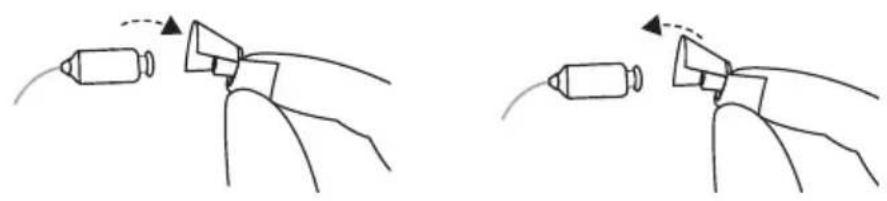
To change a tulip dome, follow these instructions:
natural_image
Two diagrams showing a hand holding a device with a curved arrow indicating motion (no text or symbols present)- Remove the used dome by pulling2.itPush the largest petal back, then off the receiver and then discard it. press the tulip dome over the This may require a bit of force. ribbed end of the receiver.

- Check that the tulip dome is 4. Push the securely mounted by verifying that receiver. the collar completely covers the ribbed end of the receiver.
larger petal toward the This illustration shows a correctly mounted tulip dome. Ensure the large petal is outside the small petal.
Changing the wax filter
The wax filter is located at the inward end of the receiver.
The wax filter helps keep earwax away from the components of the hearing aid. You must replace it on a regular basis. It will depend on how much wax your ears produce.
You will need your box of wax filter tools.

NOTE: Hearing aids should not be used without a wax filter installed for any amount of time. Using the hearing aid without a wax filter can cause permanent damage to the receiver.

Box of 8 wax filter tools.
The wax filter tool has two functions: a removal tip to collect the used filter, and a replacement tip with a white filter.
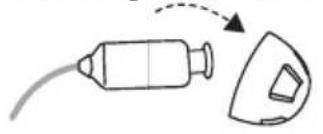
Removing the old wax filter
natural_image
Simple line drawing of a tool and a device with an arrow indicating motion (no text or symbols)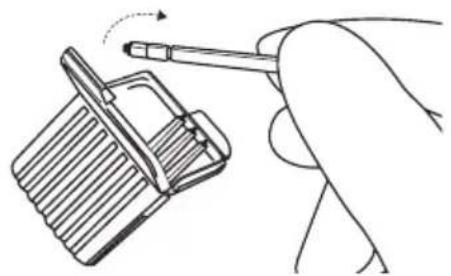
natural_image
Hand holding a pen inserted into a slot, with motion arrow indicating rotation (no text or symbols)- Remove the dome from the receiver. 2. Open the wax filter case and take out one of the tools. Each tool has a small hook (removal tip) in one end and a new wax filter in the other.
natural_image
Illustration of two hands holding a small object with a pencil, showing a dashed arrow and a circular button (no text or symbols)
natural_image
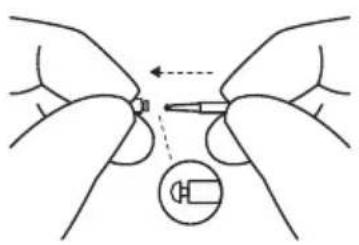
Illustration of two hands holding a small object with a dashed arrow indicating direction, and a circular icon with a battery symbol (no text or labels)- Insert the removal tip into the used wax filter and then pull the tool straight out. It is important to pull it straight and not on an angle.
Inserting the new wax filter

natural_image
Illustration of hands holding a small object with a magnified inset showing a button (no text or symbols)
natural_image
Illustration of hands holding a small object with a dashed arrow indicating direction, and a circular inset showing a coiled spring (no text or symbols)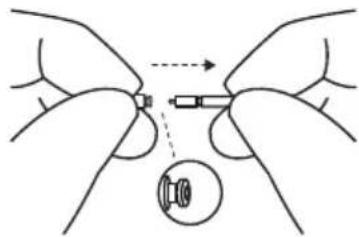
natural_image
Illustration of two hands holding a small object with an arrow indicating direction, and a circular inset showing a magnified view (no text or symbols)- Insert the other end of the tool into the sound outlet (the end with the replacement filter).
Gently press the replacement straight into the sound outlet until the outer ring is touching the sound outlet.
- Pull the tool straight out. Your new wax filter will remain in place. Re-attach your dome or a replacement dome.

NOTE: If you don't feel confident performing this task, please contact Jabra Enhance support. See the back page for contact information.

CAUTION: Only use original consumables from the manufacturer (e.g., domes and wax filters).
Replacing the receivers
If you are unable to achieve an appropriate fit of the receiver to your ear, you may need another length of receiver wire. Contact Jabra Enhance for further information and ordering. See the back page for contact information.
The support team will be available to walk you through the measurement procedure, which is also describe here:
Determine the length of the receiver wire before ordering
-
Use the ear measuring tool supplied with your hearing aids to measure the vertical distance from the top of the ear where it meets the head to the top of the ear canal.
-
Locate the corresponding size number (0, 1, 2, 3 or 4) on the tool and state it when you order.

Replace the receiver
When you have received the new receivers, follow this procedure to replace them:

- Use the receiver removal tool from your box. Start removing the receiver by inserting the tip of the receiver tool into the small hole at the front of the receiver lock.
Tilt the receiver tool downwards. Pull the receiver away from until the lock release disengages the body of the hearing aid. from the body of the hearing aid.

natural_image
Line drawing of a computer mouse with a cable and connector, no text or symbols present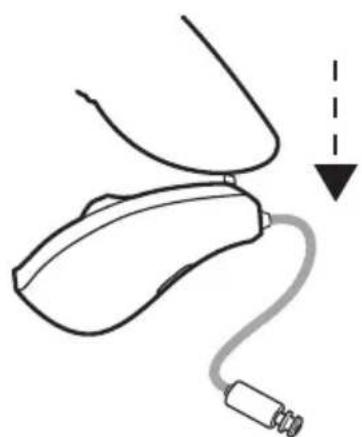
natural_image
Simple line drawing of a medical device with a catheter and arrow indicating direction (no text or symbols)
natural_image
Simple line drawing of a curved mechanical component inside a circle (no text or symbols)-
Attach a new receiver by inserting the receiver attachment into the top of the hearing aid.
-
Push the lock release down 6. The receiver is now attached until it is flush with the back of and ready. the hearing aid.

NOTE:
- If you don't feel confident performing this task, please contact Jabra Enhance support. See the back page for contact information.
Mounting a sport lock on the receiver
If you have acquired a sport lock for your hearing aid, follow this procedure to fasten it on the receiver:
- Remove the dome. See "Changing your hearing aid domes", page 32.
- Position the receiver with the receiver wire up, and the sport lock with the tail pointing down.
- Thread the sport lock over the receiver nozzle on to the body of the receiver.
- Ensure the sport lock is fully seated on the receiver.
- The sport lock is now attached and ready.

NOTE: If you don't feel confident performing this task, please contact Jabra Enhance support. See the back page for contact information.
General warnings and cautions

WARNING:
• See also "FDA warnings and cautions", page 2.
- Never leave children, or people with cognitive, intellectual, or mental health challenges unsupervised while using their hearing aids. Hearing aids contain small pieces that can be dangerous if swallow
- Swallowing a hearing aid can result in choking, and can be harmful to your health.
- If any part of a hearing aid is swallowed, seek immediate medical attention.
- Do not wear your hearing aids while being exposed to radiation. Some types of radiation, such as from MRI or CT scanners, can affect the settings in your hearing aids, causing malfunction and potentially damage to your hearing.
- Other types of radiation, such as burglar alarms, room surveillance systems, mobile phones, metal detectors, and radio equipment will not damage your hearing aids. However, they may briefly affect the sound quality in your hearing aids and may create undesired sounds.
- Never use your hearing aids in places with explosive gases such as mines, oil fields, or similar locations unless these areas are certified for hearing aid use. Using your hearing aids in places that are not certified for hearing aid use can be dangerous.
- Do not attempt to dry your hearing aids in an oven, microwave oven, or other heating equipment. This will cause them to melt and may cause burns to your skin.
- No modification of this device is allowed.

CAUTION:
- Use your hearing aids as recommended. Incorrect use may damage your hearing.
- Do not use a broken or modified hearing aid. It may not work properly and may be harmful to your hearing. It may also cause scratches or sores due to sharp edges.
- Use only original consumables from the manufacturer (e.g., wax guards).
- Use only accessories intended for use with your hearing aids. Contact Jabra Enhance for further information and ordering.
- Do not try to modify the shape of your hearing aid or accessories. This can cause skin reactions or sharp edges leading to scratches or sores.
- Your two hearing aids may each be programmed differently. Do not swap them as this could damage your hearing. Your hearing aids are color-coded. Left = blue. Right = red.
- If you have a sore or injury where your hearing aid touches your ear or head, continued use of the hearing aid may cause it to worsen or prevent it from healing. Consult a hearing care professional assistance.
- Do not allow others to use your hearing aids as this can damage their hearing.
- When using wireless functions, your hearing aid uses low-powered digitally coded transmissions to communicate with other wireless devices. It is possible, but not likely, that other electronic devices will be affected. If this happens, move the hearing aid away from the affected electronic device.
- Turn off hearing aid wireless functionality when this is required.
Cyber security
Failing to follow these precautions can compromise the information security of your hearing aid and potential cause hearing loss or tinnitus.

CAUTION:
- Only connect your hearing aid to a trusted computer or mobile device, or one used by a hearing care professional.
- For 3 minutes after being turned on, your hearing aid is open to connections. Do not restart your hearing aid if requested by someone you don't trust as this may compromise the safety of your device.
- If your device plays the pairing sound at an unexpected time, this could indicate someone has gained access to your device.
- Only connect your hearing aid to the official mobile device app.
- Only apply remote fine tuning updates that you are expecting.
• Always use the latest available software update for your hearing aid. - Only accept live assistance calls from the hearing care professional that you are expecting.
Troubleshooting
| Issue Potential | cause Potential solution | |
| Receiver wire doesn't fit comfortably | Is the receiver inserted correctly in the and is the receiver wire length correct? | See "Inserting the receiver dome into your ear", page 17, or contact Jabra Enhance. See the back page for contact information. |
| Feedback or "whistling" | Is your dome inserted correctly in your ear? | Put it back in. |
| Is the volume very loud? Reduce the volume. | ||
| Is the receiver wire broken? Contact Jabra Enhance for a replacement. | ||
| Are you holding an object (e.g., a hat telephone mouthpiece) close to the hearing aid? | Move your hand away to create more space between the hearing aid and the object. | |
| Is your ear full of wax? Visit your doctor. | ||
| No sound Is the hearing aid turned off? Turn it on. | ||
| Is the hearing aid charged? Charge the hearing aid.(See the user guide for your charger.) | ||
| Is the receiver wire broken? Contact Jabra Enhance for a replacement. | ||
| Does the hearing aid need cleaning, or clean your hearing aids and change your wax filters. | ||
| Is your ear full of wax? Visit your doctor. | ||
| Sound is distorted, spluttering, or weak? | Is the receiver wire broken? Contact Jabra Enhance for a replacement. | |
| Battery drains very quickly. | Did you leave your hearing aid on for periods of time? | Always turn off your hearing aids when you are not using them, or place them in the charger for charging.Your batteries will run out faster when you use wireless functions like streaming from your smart device or from your TV with our TV streamer. |
| Is the hearing aid 3-4 years old? Your | hearing aids may be reaching the end of their life expectancy. Contact Jabra Enhance to troubleshoot or purchase a new set. | |
| Hearing aid is not charging | Is the hearing aid correctly inserted in charger? | Put the hearing aid back in the charger.(See the user guide for your charger.) |
| Is the hearing aid charger plugged into power source? | Plug the charger into a power source.(See the user guide for your charger.) | |
FAQ on rechargeable batteries
| Question Answer | |
| How should I prepare a new battery? No pre | paration is required in a normal use situation. Simply charge your hearing aids as described in this user's guide |
| Can I damage a battery by incorrect use? Only if you expose it to extreme temperatures or excessive physical force | |
| Is it required to remove the hearing aids when fully charged? | No |
| Can I interrupt the charging of the hearing aids? Yes | |
| Should I use up all battery power before charging again? | No |
| Why do my hearing aids not turn on automatically, although they have been in the charger for an extended period of time? | If you leave your hearing aids in the charger for more than 24 hours, the charger will go into standby mode and turn off the power of the hearing aids. When you remove the hearing aids from the charger, they will not turn on automatically as normally. Press the push button for 5 seconds to turn the hearing aids on manually. |
| Does the battery heat up when charging? There is a slight temperature increase at the end of the charging process | |
| Can I charge at low temperatures? If the hearing aid temperature is below 0 °C (32 °F), it will not charge immediately. Charging must take place between 0 °C (32 °F) and 35 °C (95 °F) | |
| Can I charge at high temperatures? The operating temperature range for the charger and the hearing aids is 0 °C (+32 °F) to +35 °C (+95 °F) | |
Regulatory information
Warranties and repairs
The manufacturer provides a warranty on hearing aids in the event of defects in workmanship or materials, described in applicable warranty documentation. In its service policy, the manufacturer pledges to secure functionality at least equivalent to the original hearing aid. As a signatory to the United Nations Global Con initiative, the manufacturer is committed to doing this in line with environment-friendly best practices. Hearing aids therefore, at the manufacturer's discretion, may be replaced by new products or products manufactured from new or serviceable used parts, or repaired using new or refurbished replacement parts. The warranty period of hearing aids is designated on your warranty card, which is provided by Jabra Enhance. For full details, visit jabraenhance.com/terms-and-conditions.
For hearing aids that require service, please contact Jabra Enhance for assistance.
Hearing aids that malfunction must be repaired by a qualified technician. Do not attempt to open the case hearing aids, as this will invalidate the warranty.
Ambient conditions
Temperature test
Our hearing aids are subjected to various tests in temperature and damp heating cycling between -25ircC (-13°F) and +70ircC (+158°F) according to internal and industry standards.
During use
During normal operation the temperature should not exceed the limit values of 0\ ircC (+32 ircF ) to +45 ircC (+113 ircF ) at a relative humidity of 90%, non-condensing. An atmospheric pressure between 500 hPa and 1100 hPa is appropriate.
While charging, the ambient temperature should be within the limit values of +5ircC (+41ircF) - +35ircC (+95ircF)

NOTE: During use, your hearing aids may reach temperatures up to +43°C (+109°F).
During transport or storage
During transport or storage, the temperature should not exceed the limit values of -20ircC ( -4ircF ) to +60ircC ( +140ircF ) at a relative humidity of 90% RH, non-condensing (for a limited time).
Warm-up time: 5 minutes.
Cool-down time: 5 minutes.
Expected service lifetime
The expected service lifetime for the product when used as intended is:
| Product Lifetime | |
| Hearing aid 5 years | |
| Built-in rechargeable battery 5 years | |
| Dome 3 months | |
| Receivers 2 years | |
| Electronic accessories (e.g., wireless accessories) 5 years |
Non-clinical testing
The devices covered within this user guide have undergone tests for the relevant non-clinical performance testing and biological endpoints in accordance with standards identified below:
- Electrical safety testing is performed according to IEC 60601-1:2005 + A1:2012+A2:2020, IEC 60601-2-66:2019, IEC 60601-1-11 Edition 2.0 2015-1, IEC 62133-2 Edition 1.0 2017-02 and IEC 62368-1:2018/COR1:2020.
- Electromagnetic compatibility (EMC) testing is performed according to IEC 62479:2010, ANSI IEEE C63.19-2019 and IEC 60601-1-2:2014+A1:2020.
- Radio and Telecommunication testing is performed to be in compliance with applicable parts of the FCC rules in title 47 of the CFR.
• Electroacoustic testing is performed according to ANSI/ASA S3.22-2014 and ANSI/CTA 2051:2017
• Usability Engineering was performed in compliance with IEC 62366-1:2015
The devices covered in this user guide passed all tests for the relevant non-clinical performance testing and biological endpoints, namely cytotoxicity (ISO 10993-05:2009), sensitization, and intracutaneous reactivity (ISO 10993-10:2010).
Similarly, usability testing and software verification and validation demonstrated mitigation of risks to an acceptable level as well as reasonable assurance of safe and effective device performance.
Clinical data
The devices have been evaluated clinically through equivalence, and the devices have been compared to equivalent devices and similar devices on the market with similar intended purpose, e.g., to compensate for hearing impairment by amplifying and transmitting sound to the ear.
Based on technical and clinical data presented for the device in question, the equivalent predecessor and generally similar devices, it is concluded to support the clinical performance expressed in user needs and claims.
The clinical data leaves no questions open regarding clinical performance and is for this reason deemed sufficient.
Statement
This device complies with part 15 of the FCC rules and ISED rules. Its operation is subject to the followin conditions:
- This device may not cause harmful interference.
- This device must accept any interference received, including interference that may cause undesired operation.

NOTE: This equipment has been tested and found to comply with the limits for a Class B digital device,
pursuant to part 15 of the FCC rules and ISED rules. These limits are designed to provide reasonable protection against harmful interference in a residential installation. This equipment generates, uses, and can radiate radio frequency energy and, if not installed and used according to the instructions, may cause harmful interference to radio communications.
However, there is no guarantee that interference will not occur in a particular installation. If this equipment does cause harmful interference to radio or television reception, which can be determined turning the equipment off and on, the user is encouraged to try to correct the interference by one or of the following measures:
- Redirect or relocate the receiving antenna.
– Increase the separation between the equipment and the receiver - Consult the dealer or an experienced radio/TV technician for help.
- Connect the equipment to an outlet or a circuit that is different from the one to which the receive connected
Changes or modifications can void the user's authority to operate the equipment.
The products are in compliance with the following regulatory require
• In the US: FCC CFR 47 Part 15, subpart C.
Type designations
Hearing aid type designations for models included in this user guide are:
LXR45 02 Q, FCC ID: X26LXR45 02 Q, IC: 6941C-LXR45 02 Q.
This device includes an RF transmitter which operates in the frequency band of 2.4 GHz - 2.48 GHz.
Hearing aid variants
Mini Receiver In-the-Ear (RIE) hearing aids of type LXR45 with FCC ID X26LXR45, IC number 6941C-LXR45, are available in the following variant(s):
QC361-C
Nominal RF output power transmitted is: +0.82 dBm
Technical specifications
RIE - MP receiver
Models: QC361-C
| Reference test gain (60 dB SPL input) HFA 36 dB | ||
| Full-on gain (50 dB SPL input) Max. | 58 | dB |
| HFA | 50 | |
| Maximum output (90 dB SPL input) Max. | 116 | dB SPL |
| HFA | 113 | |
| Total harmonic distortion 500 Hz | 0.3 | % |
| 800 Hz | 0.4 | |
| 1600 Hz | 0.7 | |
| Equivalent input noise, w/o noise reduction 24 dB SPL | ||
| 1/3 Octave Equivalent input noise, w/o Noise reduction 1600 Hz 11 dB | SPL | |
| Frequency range IEC 60118-0: 2015 100-8060 Hz | ||
| *Expected operating time | 30 | Hours |
| Latency, mid frequency delay (2 kHz) | 5.1 | ms |

line
| Frequency (Hz) | Output (dB SPL) | | -------------- | --------------- | | 100 | 105 | | 200 | 110 | | 300 | 112 | | 400 | 115 | | 500 | 118 | | 600 | 105 |
line
Full On and Reference Test Gain | Frequency (Hz) | Full-on gain (dB) | Reference test gain (dB) | |---|---|---| | 100 | 25 | 30 | | 1200 | 45 | 40 | | 10000 | 35 | 25 |Data in accordance with ANSI S3.22-2014, IEC 60118-0:2015. Measured in a 2cc coupler.
*Expected operating time of the rechargeable battery depends on active features, the use of wireless accessories, hearing loss, battery age and sound environment.
Additional information
Acknowledgements
Portions of this software are written by Kenneth MacKay (micro-ecc) and licensed under the following terms and conditions:
Copyright © 2014, Kenneth MacKay. All rights reserved.
Redistribution and use in source and binary forms, with or without modification, are permitted provided that following conditions are met:
- Redistributions of source code must retain the above copyright notice, this list of conditions and the following disclaimer.
- Redistributions in binary form must reproduce the above copyright notice, this list of conditions and the following disclaimer in the documentation and/or other materials provided with the distribution.
THIS SOFTWARE IS PROVIDED BY THE COPYRIGHT HOLDERS AND CONTRIBUTORS "AS IS" AND AN EXPRESS OR IMPLIED WARRANTIES, INCLUDING, BUT NOT LIMITED TO, THE IMPLIED WARRANTIES OF MERCHANTABILITY AND FITNESS FOR A PARTICULAR PURPOSE ARE DISCLAIMED. IN NO EVEN SHALL THE COPYRIGHT HOLDER OR CONTRIBUTORS BE LIABLE FOR ANY DIRECT, INDIRECT, INCIDENTAL, SPECIAL, EXEMPLARY, OR CONSEQUENTIAL DAMAGES (INCLUDING, BUT NOT LIMITED TO, PROCUREMENT OF SUBSTITUTE GOODS OR SERVICES; LOSS OF USE, DATA, OR PROFITS; OR BUSINESS INTERRUPTION) HOWEVER CAUSED AND ON ANY THEORY OF LIABILITY, WHETHER IN CONTRACT, STRICT LIABILITY, OR TORT (INCLUDING NEGLIGENCE OR OTHERWISE) ARISING IN ANY WAY OUT OF THE USE OF THIS SOFTWARE, EVEN IF ADVISED OF THE POSSIBILITY OF SUCI DAMAGE.

NOTE: Use of the Made for Apple badge means that an accessory has been designed to connect specifically to iPhone, iPad, and iPod touch models, and has been certified by the developer to meet Apple performance standards. Apple is not responsible for the operation of this device or its compliant with safety and regulatory standards.
© 2023 GN Hearing A/S. All rights reserved. Jabra is a trademark of GN Audio A/S. Apple, the Apple logo, iPhone, iPad, iPod touch are trademarks of Apple Inc., registered in the U.S. and other countries. App Store a service mark of Apple Inc., registered in the US and other countries. Android, Google Play and the Google Play logo are trademarks of Google LLC. The Bluetooth word mark and logos are registered trademarks owned by Bluetooth SIG, Inc.
Manufacturer according to FDA

GN Hearing A/S
Lautrupbjerg 7
DK-2750 Ballerup
Denmark
Notes
For support, please contact:
GN Consumer Hearing Corporation
dba Jabra Enhance
8001 E Bloomington Freeway
Bloomington, MN 55420
USA
(800) 854-2772
support@jabraenhance.com
JabraEnhance.com
- ENHANCE SELECT 50R
- User guide
- FDA warnings and cautions
- WARNING:
- When to See a Doctor
- This hearing aid should not cause pain when inserting it
- CAUTION:
- This is not hearing protection
- The sound output should not be uncomfortable or painful
- You might need medical help if a piece gets stuck in your ear
- NOTE:
- If you remain concerned, consult a professional
- What you might expect when you start using your hearing aid
- Tell FDA about injuries, malfunctions, or other adverse events
- Table of Contents
- Introduction
- Intended use
- User profile
- Therapeutic indications
- Symbols
- What is in the box?
- Your hearing aid
- Replacement parts and optional extras
- Domes
- Receiver
- Sport lock (optional)
- Preparing your hearing aids for use
- Battery warnings
- Low battery alert
- Low battery alert when paired with wireless accessories (optional)
- Placing your hearing aids in your ears
- How to tell left from right
- Inserting the receiver dome into your ear
- Sport lock
- Ensuring a proper fit of your hearing aid
- Removing your hearing aids from your ears
- Using your hearing aids
- Turning your hearing aids on and off
- Smart Start
- Listening programs
- Using the push button
- Controlling the volume
- Changing programs
- Flight mode
- Streaming
- The LED light indicator
- Using a telephone
- Mobile phones
- Advanced options
- Streaming from an Android™ smartphone
- Controlling your hearing aids with the mobile device app
- Online Services (optional)
- Flight Mode (optional)
- Turning off wireless communication (enter Flight Mode)
- Activating wireless communication (exit Flight Mode)
- Wireless accessories
- Available wireless accessories and their features
- Accessing wireless accessories
- Cleaning and caring for your hearing aids
- Care and maintenance
- Daily maintenance
- Cleaning tools
- Changing your hearing aid domes
- Standard domes
- Tulip domes
- Changing the wax filter
- Replacing the receivers
- Determine the length of the receiver wire before ordering
- Replace the receiver
- Mounting a sport lock on the receiver
- General warnings and cautions
- Cyber security
- Regulatory information
- Warranties and repairs
- Ambient conditions
- Temperature test
- During use
- During transport or storage
- Expected service lifetime
- Non-clinical testing
- Clinical data
- Statement
- The products are in compliance with the following regulatory require
- Type designations
- Hearing aid variants
- Technical specifications
- RIE - MP receiver
- Additional information
- Acknowledgements
- Manufacturer according to FDA
- Notes
Brand : JABRA
Model : Enhance Select 50R
Category : Hearing aid