SpringAge - Audio software Overloud - Free user manual and instructions
Find the device manual for free SpringAge Overloud in PDF.


| Product Type | Audio Software (VST, AU, AAX plugin) |
| Developer | Overloud |
| Model | SpringAge |
| Platforms | Windows 7+ (64-bit), macOS 10.9+ (64-bit) |
| Plugin Formats | VST2, VST3, AU, AAX Native |
| Bit Depth | 64-bit floating point processing |
| Sample Rate Support | Up to 192 kHz |
| CPU Architecture | Intel x86, Apple Silicon (native) |
| Sound Engine | Physical modeling of spring reverb tank |
| Key Features | Adjustable spring tension, multi-tap, preamp emulation, tone control |
| Controls | Decay, Mix, Tone, Pre-delay, Drive, Dwell |
| Presets | Over 50 factory presets covering classic and modern reverb sounds |
| GUI | Resizable, high-resolution interface with real-time visual feedback |
| Latency | Near-zero latency for real-time monitoring |
| Installation | Download installer from Overloud website, serial activation via iLok or machine |
| License | Single-user license, iLok account or free iLok USB not required |
| Documentation | PDF user manual included in download |
| Updates | Free lifetime updates for current version |
| System Requirements | Minimum 2 GB RAM, 200 MB free disk space, OpenGL 2.0 compatible GPU |
Frequently Asked Questions - SpringAge Overloud
User questions about SpringAge Overloud
0 question about this device. Answer the ones you know or ask your own.
Ask a new question about this device
Download the instructions for your Audio software in PDF format for free! Find your manual SpringAge - Overloud and take your electronic device back in hand. On this page are published all the documents necessary for the use of your device. SpringAge by Overloud.
USER MANUAL SpringAge Overloud
Overloud is continuously evolving and improving its products. We advise you to always check for possible updates before installing, and to do the same after installation from time to time.
Check for latest versions here:
www.overloud.com
1. INTRODUCTION
Thank you for purchasing SpringAge, the most complete and flexible high quality simulation of a spring reverb. SpringAge combines the sound fidelity of a convolution-based reverb, with the flexibility and low CPU usage of an algorithmic reverb.
SpringAge features three different spring models, modeled on the most acclaimed and standard spring tones:
| AQTX | Models one of the springs mostly used into guitar amplifiers. Its tone characteristics are perfect for guitar tracks but are also great on other stringed instruments as well as on vocals |
| ANGEL | The tone of this spring really rocks! It is great for any high gain, compressed or harmonically rich tone. It is inspired by the tone of famous German amplifiers. |
| S201 | Is a more general purpose spring, great on any kind of tracks and especially on keyboards, synths, vocals and lead instruments... at least, this was the way the original spring that SpringAge is modeling was used. |
SpringAge is able to reproduce the tone of the original spring with the same decay, dynamic and transient response but, at the same time, it can modify the tone with great flexibility. When all the knobs are in their default position, SpringAge reproduces the response of the original spring with great fidelity, as if it were a convolution reverb.
Then, by using the controls on the user interface, you can decide how much of each tone characteristics you want to add or remove.
2.SCHEMATIC
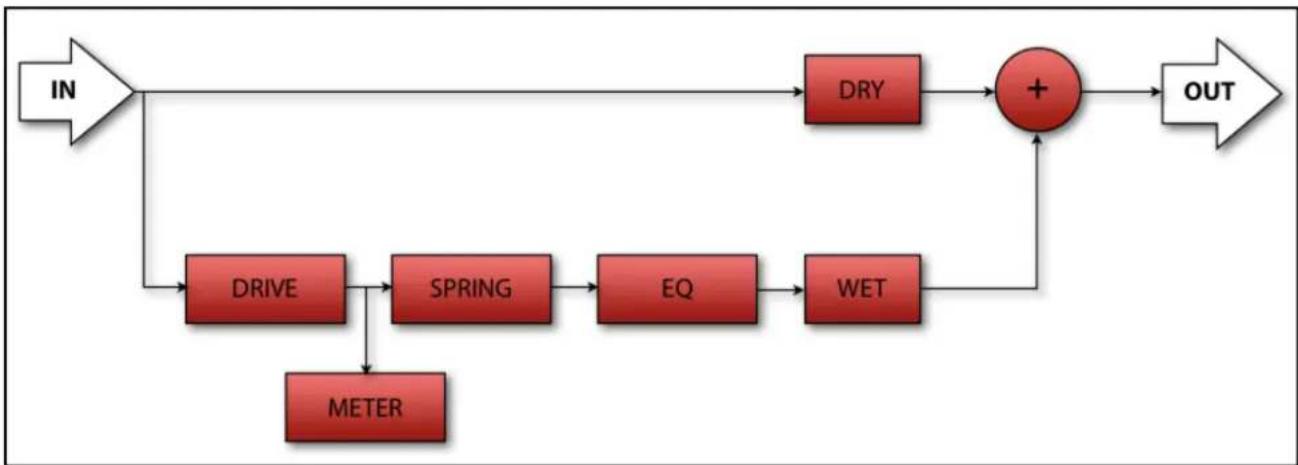
flowchart
graph TD
    IN["IN"] --> DRIVE["DRIVE"]
    IN --> METER["METER"]
    DRIVE --> SPRING["SPRING"]
    SPRING --> EQ["EQ"]
    EQ --> WET["WET"]
    WET --> OUT["OUT"]
    DRY["DRY"] --> +
    + --> OUT
The schematic above depicts SpringAge's signal chain.
The Input signal is split in two: the Dry portion, which is the Input sound without any change whatsoever, and the Wet portion, which will carry the Input sound processed by the Spring module, followed by the EQ. At the far right, at the end of the processing, the Output section (the '+' in the scheme) will mix the Dry and the Wet channels in order to perfectly set the sound levels.
If we look at the lower part of the diagram and follow the signal chain we'll encounter these modules:
| DRIVE | As in real spring reverberation units, the spring is driven by an amplifier which, in vintage designs, is typically a tube amplifier. The Drive knob controls the amplification of this tube stage. By turning it clockwise the reverb tone becomes progressively more compressed and rich with harmonics. |
| SPRING | This is the core of SpringAge; it provides the main processing for the entire unit. You can choose between three different spring models whose response can be modified by a set of many parameters. For an in-depth description of the concepts behind reverberation and the functionality of the parameters, please head to the next chapter. |
| EQ | This EQ Unit is a two-band fully parametric equalizer. Each band is allowed to span the entire audio spectrum and can be operated with the usual set of three parameters: Gain (dB), Frequency (Hz) and Q factor (%). While the first and the second parameters will set the amount and frequency of the process, the Q factor is a little more complex; in a common situation it will set the width of the EQ's bell-shaped curve, but at the lower extreme settings it will turn the EQ into a second order Shelf EQ (low for band 1 or high for band 2). |
3.USER INTERFACE
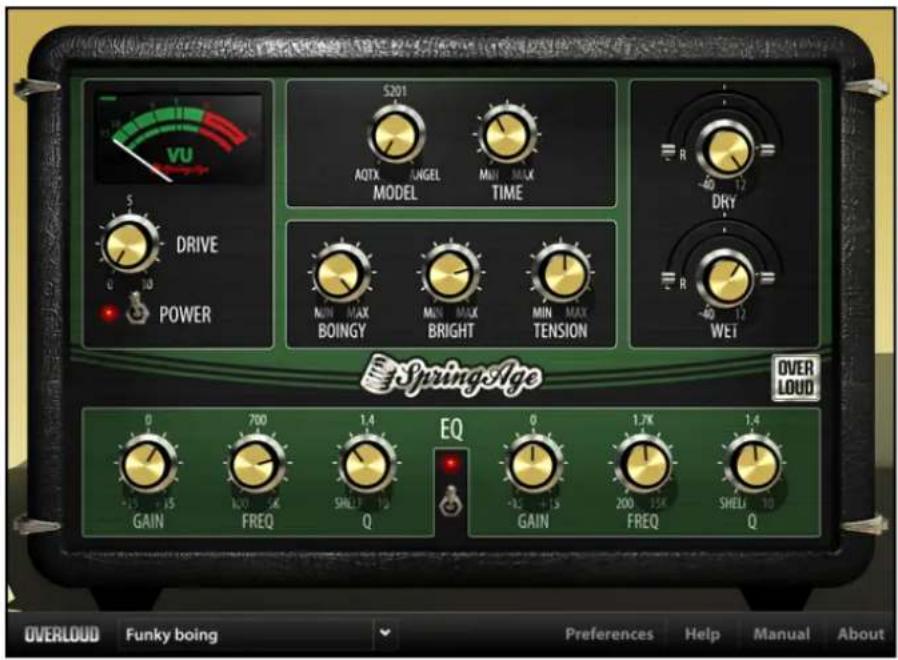
The SpringAge user interface is divided into two parts.
The upper part contains all the parameters that control the tone of the reverb. You can adjust each parameter by clicking on a knob and dragging it. If you selected the appropriate preference in the Preference window, during the dragging operation the value of the parameter will be displayed into a box that will appear near the knob.
The lower part of the interface contains all the controls not directly related to audio processing.
| DROP-DOWN MENU | From the drop-down menu you can select a factory preset. SpringAge does not internally manage user presets: you can rely on the preset management of your host application to save your presets. |
| PREFERENCES | The Preferences button opens the Preference window from which some plugin settings can be selected. For a list of plugin preferences please read the Preferences section of this manual. |
| HELP | When the Help button is active, it enables the tooltips that appear when you hover on a control for a little while, giving a brief description of its function. |
| MANUAL | When pressing the Manual button, this help file is opened. |
| ABOUT | This button shows a window with information about the plugin. From here you can read the version number. |
4. REVERB PARAMETERS
Input Section
| METER | Shows the input level after the tube driver. If the meter goes in the red zone, you are pushing the spring driver into saturation. |
| DRIVE | Controls the amount of amplification in the tube stage that drives the spring. If you raise the Drive control, you can push the tube into saturation and have a more harmonic and compressed tone. |
| POWER | When Power is on, the effect is active. If power is off the effect is bypassed and only the dry sound can be heard. |
Reverb Section
| MODEL | Selects the three different spring models. AQTX models one of the springs mostly used in guitar amplifiers. Its tonal characteristics are perfect for guitar tracks but are also great on other stringed instruments as well as on vocals. S201 is a more general-purpose spring, great on any kind of tracks and especially on keyboards, synths, vocals and lead instruments... at least, this was the way the original spring that SpringAge is modeling was used. The tone of ANGEL spring really rocks! It is great for any high gain, compressed or harmonically rich tone. It is inspired by the tone of famous german amplifiers. |
| TIME | Controls the duration of the reverb decay. If you set Time at center you will have the original decay of the spring. Turning up or down will produce variations of the original tone. |
| BOINGY | Controls the amount of "elastic" effect you have on the transients of the tone. The center position of this knob corresponds to the original tone of the spring. |
| BRIGHT | With Bright knob you can adjust the tone of the spring and make it brighter or darker. |
| TENSION | Tension knob will simulate varying the tension of the springs. Turning the control up will produce a tone that is more tight and high pitched. The central position is the default tension of the original spring. |
EQ
GAIN Sets the gain of this equalizer band.
FREQ Sets the frequency at which the equalizer operates.
Q Sets the with of the bell curve of the equalizer. Turning the knob fully CCW will transform the band from a peaking filter to a 2nd-order shelving filter (low for band 1 and high for band 2).
EQ SWITCH | Switches on or bypasses the EQ. EQ will only affect the spring tone and not the dry tone.
Output Section
DRY | Controls the level of the direct tone.
DRY L | Places on the stereo field the left channel of the direct tone.
DRY R | Places on the stereo field the right channel of the direct tone.
WET | Controls the level of the reverb.
WET L | Places on the stereo field the left channel of the reverb.
WET R | Places on the stereo field the right channel of the reverb.
5.PREFERENCES
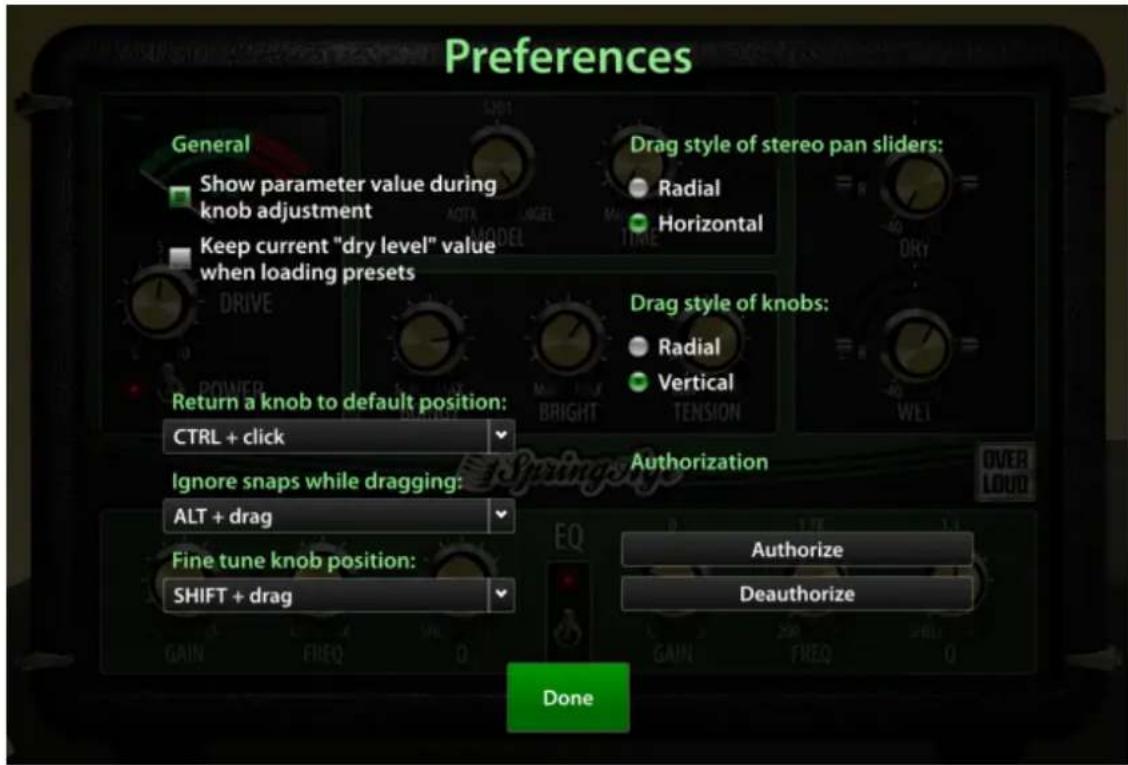
The Preference button in the lower bar of the plugin interface opens the Preferences window from which some behaviors of the plugin can be controlled.
The Show parameter value during knob adjustment enables the boxes showing knob values while dragging.
Checking the Keep current "dry level" option, the Dry Level knob value is not changed while loading different presets. This is useful when you use SpringAge in and AUX channel and you want to keep the Dry Level off.
With the Drag style of stereo pan sliders option you can decide how you can drag the two round sliders over the Dry and Wet parameters. When radial is set, slider cursors settings will require you to drag the mouse describing a curved path. When horizontal is set you can move the cursors by dragging the mouse left and right along an horizontal line.
With the Return a knob to default position you can select the keys combination to bring the knobs to their default value.
With the Ignore snaps while dragging you can select the keys combination to freely move the knobs disregarding the snap points.
With the Fine tune knob position you can select the keys combination to slow down the knob movements (fine setting) and set its position with more accuracy.
With the Authorize button you can run the authorization procedure of the plugin. You will be required to enter your Overloud account credentials and the product serial number. If an Internet connection is available the plugin will automatically authorize. With no Internet connection, please follow the instructions on the Overloud Products Install Manual to authorize.
The Deauthorize button will remove the authorization from the current computer. The plugin will contact Overloud servers to restore your available authorization count.
Technical Support
FAQ – FREQUENTLY ASKED QUESTIONS
If you need technical support please first take a look at our FAQ pages online at www.overloud.com: there you'll find answers to the most common questions.
FREE TECHNICAL SUPPORT
If the FAQ pages didn't help, you can get free technical support online at www.overloud.com or writing to support@overloud.com.
While submitting a technical support request, please be as precise and detailed as you can. The goal is to let us reproduce your issue.
Therefore, don't forget to report: The product serial number and version, your system specs, settings, version, host application name and version, and provide a step-by-step sequence to spot the problem.
End User License Agreement
1. DEFINITIONS
EULA: this end user license agreement
SpringAge plug-in software: the software program included in the enclosed package, and all related updates supplied by Overloud.
Overloud Product: the SpringAge plug-in software and the related documentation and models and multimedia content (such as animations, sounds and graphics) and all related updates supplied by Overloud.
Overloud: a trademark property of Almateq srl which does business as Overloud.
Not for resale (NFR) Version: a version of Overloud Product, so identified, that is intended for review and evaluation purposes, only.
2. LICENSE
The Overloud Product is protected by copyright laws and international copyright treaties, as well as other intellectual property laws and treaties. The Overloud Product is licensed, not sold to you.
This EULA grants you the rights as specified here below. All other actions and means of usage are reserved to the written permission of the rights holder: Overloud.
This EULA grants you a license of use of the Overloud Product. The product requires to be authorized to let you take advantage of the license.
Software License. Since this kind of license links to the system where you install the Overloud Product on, you cannot move the license anymore after the authorization. You are allowed to install and authorize a single Overloud Product (one unique serial number) on up to three (3) computers, provided that: a) each computer is owned by (or leased to), and under the exclusive control of the licensee; b) the program/s shall NOT be used simultaneously on more than one computer; c) any computer/s with the Overloud Product installed shall not be sold, rented, leased, loaned or otherwise removed from the licensee's possession, without first removing (uninstalling) the licensed software, except as provided in Paragraph 4 (below) pertaining to "Product Transfer".
Storage/Network use. You may also store or install a copy of the Overloud Product on a storage device, such as a network server, used only to install or run the Overloud Product on your own computers over a local network; however, you must acquire and dedicate a distinct license for each user of the Overloud Product from the storage device. Any given license for the Overloud Product may not be shared or used concurrently or otherwise on different computers or by different employees of a given organization.
3. AUTHORIZATION
The Overloud Product only works when you are in possession of a valid license file. You will receive a license file upon completion of the authorization procedure. Once your system will be able to find the license, you may use the product.
You agree to follow the authorization procedure and therefore to provide true, accurate and complete information about yourself. If you provide any information that is untrue, inaccurate, not correct or incomplete; or if Overloud has reasonable grounds to suspect that such information is untrue, inaccurate, not correct or incomplete, Overloud has the right to suspend or to revoke the license.
The termination of the license shall be without prejudice to any rights, whatsoever, of Overloud.
4. DESCRIPTION OF OTHER RIGHTS AND LIMITATIONS
Limitations on Reverse Engineering. You may not reverse engineer, decompile, or disassemble the Overloud Product, except and only to the extent that such activity is expressly permitted by applicable law notwithstanding this limitation of components. The Overloud Product is licensed as a single product. Its component parts may not be separated for use on more than one computer.
Not For Resale version. If the Overloud Product is labeled "Not for Resale" or "NFR" or "Evaluation Copy", then, notwithstanding other sections of this EULA, you may not sell, or otherwise transfer the Overloud Product.
Rental. You may not rent, lease, or lend the Overloud Product to any party.
Product Transfer. You may not transfer, license or sublicense your rights as Licensee of the software or any Overloud Product, as licensed to you under this agreement.
5. UPGRADES
If the Overloud Product is labeled or otherwise identified by Overloud as an “upgrade”, you must be properly licensed to use a product identified by Overloud as being eligible for the upgrade in order to use the Overloud Product.
An Overloud Product labeled or otherwise identified by Overloud as an upgrade replaces and/or supplements the product that formed the basis for your eligibility for such upgrade. You may use the resulting upgraded product only in accordance with the terms of this EULA. If the Overloud Product is an upgrade of a component of a package of software programs that you licensed as a single product, the Overloud Product may be used and transferred only as part of that single product package and may not be separated for use on more than one computer.
6. MULTI-MEDIA SOFTWARE
You may receive the Overloud Product in more than one medium. You may not loan, rent, lease, or otherwise transfer the other media to other users.
7. LIMITED WARRANTY
Overloud warrants to the original purchaser of the computer software product, for a period of ninety (90) days following the date of original purchase, that under normal use, the software program and the user documentation are free from defects that will materially interfere with the operation of the program as described in the enclosed user documentation.
8. WARRANTY CLAIMS
To make a warranty claim under the above limited warranty, please return the product to the point of purchase, accompanied by proof of purchase, your name, your return address and a statement of the defect, or send the CD/s to us at the below address within ninety (90) days from purchase. Include a copy of the dated purchase receipt, your name, your return address and a statement of the defect. Overloud or its authorized dealer will use reasonable commercial efforts to repair or replace the product and return it to you (postage prepaid) or issue to you a credit equal to the purchase price, at its option.
9. LIMITATIONS ON WARRANTY
Overloud warrants only that the program will perform as described in the user documentation. No other advertising, description or representation, whether made by an Overloud dealer, distributor, agent or employee, shall be binding upon Overloud or shall change the terms of this warranty.
EXCEPT AS STATED ABOVE, OVERLOUD MAKES NO OTHER WARRANTY, EXPRESSED OR IMPLIED, REGARDING THIS PRODUCT. OVERLOUD DISCLAIMS ANY WARRANTY THAT THE SOFTWARE IS FIT FOR A PARTICULAR PURPOSE, AND ANY IMPLIED WARRANTY OF MERCHANTABILITY SHALL BE LIMITED TO A NINETY (90) DAY DURATION OF THIS LIMITED EXPRESS WARRANTY AND IS OTHERWISE EXPRESSLY AND SPECIFICALLY DISCLAIMED.
OVERLOUD SHALL NOT BE LIABLE FOR SPECIAL, INCIDENTAL, CONSEQUENTIAL OR OTHER DAMAGES, EVEN IF OVERLOUD IS ADVISED OF OR AWARE OF THE POSSIBILITY OF SUCH DAMAGES. THIS MEANS THAT OVERLOUD SHALL NOT BE RESPONSIBLE OR LIABLE FOR THE LOSS OF PROFITS OR REVENUES, OR FOR DAMAGES OR COSTS AS A RESULT OF LOSS OF TIME, DATA OR USE OF THE SOFTWARE, OR FROM ANY OTHER CAUSE EXCEPT THE ACTUAL COST OF THE PRODUCT. IN NO EVENT SHALL OVERLOUD LIABILITY EXCEED THE PURCHASE PRICE OF THIS PRODUCT.
10. CHOICE OF LAW
You agree that any and all claims, suits or other disputes arising from the use of the Overloud Product shall be determined in accordance with the laws of Italy, in the event Overloud is made a party thereto. You agree to submit to the jurisdiction of the court in Modena, Italy, for all actions, whether in contract or in tort, arising from your use or purchase of the software.
11. GENERAL
This Agreement contains the complete agreement between the parties with respect to the subject matter hereof, and supersedes all prior or contemporaneous agreements or understandings, whether oral or written. All questions concerning this agreement shall be directed to:
ALMATEQ srl
Via N. Biondo 173
41126 Modena - Italy
e-mail: info@overloud.com
© 2010 Overloud®. All rights reserved.
Overloud ^® is a registered trademark property of Almateq srl
- INTRODUCTION
- 2.SCHEMATIC
- 3.USER INTERFACE
- REVERB PARAMETERS
- Input Section
- Reverb Section
- EQ
- Output Section
- 5.PREFERENCES
- Technical Support
- FAQ – FREQUENTLY ASKED QUESTIONS
- FREE TECHNICAL SUPPORT
- End User License Agreement
- DEFINITIONS
- LICENSE
- AUTHORIZATION
- DESCRIPTION OF OTHER RIGHTS AND LIMITATIONS
- UPGRADES
- MULTI-MEDIA SOFTWARE
- LIMITED WARRANTY
- WARRANTY CLAIMS
- LIMITATIONS ON WARRANTY
- CHOICE OF LAW
- GENERAL
Brand : Overloud
Model : SpringAge
Category : Audio software