
Power Plant - Guitar amplifier ART - Free user manual and instructions
Find the device manual for free Power Plant ART in PDF.


| Brand | ART |
| Model | Power Plant |
| Product Type | Guitar Amplifier |
| Power Output | 30 Watts RMS |
| Speaker Configuration | 1 x 12" Custom Speaker |
| Channels | 2 (Clean and Overdrive) |
| Controls | Gain, Volume, Bass, Mid, Treble, Presence, Reverb |
| Inputs | 1 x 1/4" Instrument Input, 1 x 1/8" Aux Input |
| Outputs | 1 x 1/4" Speaker Output, 1 x 1/4" Headphone Output, 1 x XLR Line Out |
| Reverb | Spring Reverb with dedicated Reverb control |
| Effects Loop | Built-in series effects loop (Send/Return) |
| Footswitch | Channel switching and Reverb on/off (not included) |
| Power Supply | 120V AC, 60Hz |
| Power Consumption | 50 Watts |
| Dimensions (W x D x H) | 18 x 10 x 8 inches |
| Weight | 20 lbs |
| Construction | Plywood Cabinet with Black Tolex Covering |
| Cooling | Passive ventilation |
| Included Accessories | Power Cord, User Manual |
Frequently Asked Questions - Power Plant ART
User questions about Power Plant ART
0 question about this device. Answer the ones you know or ask your own.
Ask a new question about this device
Download the instructions for your Guitar amplifier in PDF format for free! Find your manual Power Plant - ART and take your electronic device back in hand. On this page are published all the documents necessary for the use of your device. Power Plant by ART.
USER MANUAL Power Plant ART
APPLIED RESEARCH AND TECHNOLOGY
APPLIED RESEARCH AND TECHNOLOGY, INC.
215 TREMONT STREET
ROCHESTER, NY 14608 USA
585 240-436-2720 voice
216-436-3942 inx
AOL: artroch
Power Plant
Studio Guitar Preamp
artopch@compuseva.com
http://www.artech.com
411-5004-101
www.ARTPROAUDIO.com

APPLIED RESEARCH AND TECHNOLOGY
USER'S GUIDE
Table of Contents
| Introduction | 2 |
| Features | 2 |
| Notes on Design | 2 |
| Installation | 3 |
| Connections | 3 |
| Input | 3 |
| Output | 4 |
| ACM Circuitry | 4 |
| Output to Guitar Amp | 4 |
| Main & Aux. Out | 4 |
| Effects Loop (Send and Return) | 4 |
| Power Amp Output | 4 |
| Direct Output to Console | 5 |
| Controls and Operation | 5 |
| Front Panel Controls | 5 |
| Clean Channel | 5 |
| Overdrive Channel | 6 |
| Rear Panel Controls | 6 |
| Remote Channel Switch | 6 |
| Clean EQ Bypass Switch | 6 |
| +4/ -10dB Switch | 6 |
| Studio and Live Applications | 7 |
| Studio | 7 |
| Direct Recording Tips | 7 |
| Use With A Guitar Amplifier | 8 |
| Use With A Power Amplifier | 8 |
| Specifications | 8 |
| Warranty | 9 |
| Service Information | 9 |
Fill in the following information for your reference:
Date Of Purchase: ____
Purchased From: ____
Serial Number: ____
411-5004-101
Introduction
Congratulations! You have purchased what many leading professionals consider to be the finest, most technically advanced guitar preamplifier ever produced. We strongly suggest that you read this manual and use it while getting familiar with all of the Power Plant's functions and capabilities.
Features
- Dual channel operation
- Advanced distortion and overdrive circuitry
- Low noise design
- Proportional compression circuitry
- Separate gain and active EQ for clean and drive channels
- ACM (Amp, Cabinet Mic) "Simulation Circuitry" for direct-to-console recording applications
- Rear panel instrument level input (front panel input overrides rear)
- Instrument level output designed for use with guitar amplifier
- Aux/ Tuner output (instrument level output)
- Line level output designed to drive power amps
- Switchable +4dB / -10 dB output level
- 600 ohm balanced outputs (XLR & 1/4") for direct-to-console recording
- Effects loop
- Remote channel switching
Form and Function
The A R T POWER PLANT STUDIO GUITAR PREAMP represents 10 years of research and development. Our goal was to recreate "The Sound" produced by vintage American and British 50 and 100 watt tube amps. The design had to be versatile, reliable, quiet; easy to use and fit in a single rack space chassis. It had to have dual channel capability with active equalization for each channel, separate outputs specifically engineered to interface with guitar amps, power amps, and "DI" outputs with "ACM" cabinet simulation for use in direct-to-console applications.
Design Considerations
During the design phase, we examined numerous tube amps. The key was to plot and perform an in-depth wave form analysis on each of the various gain stages to determine what each section contributed to the overall sound. Unlike current "Tube" preamps using a single or dual 12AX7 gain stage, the POWER PLANT accurately reproduces "The Sound" that takes place when the preamp, driver, and output stages function as a unit. The design renders the correct percentage of odd and even harmonics, smooth transition from clean to distortion, great tone,
control, punch, and sustain. The end result is a totally unique guitar preamp!
Installation
The POWER PLANT is designed for use in a wide variety of live and studio applications, and is self contained in an all-steel single space 19" rack chassis. The POWER PLANT is designed for continuous professional use. For touring rack applications, care should be taken to provide adequate support to the rear panel to protect it from mechanical shock. NOTE: The front panel may bend if no rear support is provided. Mounting location is not critical but for greater reliability, avoid placing the unit on top of equipment that produces excessive heat.
You will notice that the POWER PLANT does not have a power switch. This is because most applications will involve a multiple space rack system housing other signal processing devices, all of which receive power from a common AC power strip. No harm will come to the unit if it is switched on and off in this manner.
As the POWER PLANT is a instrument preamp, it is recommended that it be installed first in a chain of effects.
Connections
All audio connections are made on the back panel via 1/4" phone jacks and an XLR connector with the exception of a parallel instrument level input jack located on the front panel.
Input
The Input is intended for a guitar, however, keyboards, bass or other instrument may be used. There are two input jacks on the POWER PLANT. One is located on the front panel and another on the on the rear panel. Either jack may be used. The front panel jack has priority over the rear panel jack. That is, if both are used,

flowchart
graph TD
    A["Power"] --> B["RUN"]
    A --> C["AIR"]
    B --> D["Ground"]
    C --> E["Ground"]
    D --> F["ON/OFF"]
    E --> F
    G["Current"] --> H["Ground"]
    I["Power"] --> J["Ground"]
    K["Current"] --> L["Ground"]
the front jack will be processed while the rear connection is ignored. If no inputs are used, the input is grounded to eliminate noise and feedback.
Outputs
A variety of outputs are available allowing the POWER PLANT to function in numerous performance applications. Any combination may be used at one time.
ACM (Amplifier - Cabinet - Microphone) Circuitry.
This proprietary filter network is available on the XLR and 1/4" Direct Out To Console outputs. The ACM circuitry accurately reproduces the sound created when the preamp, driver, and output stages function as a unit. The POWER PLANT'S ACM circuit simulates a 4x12 cabinet loaded with vintage speakers mixed "off-axis" with dual dynamic microphones (The most widely accepted combination for producing guitar sounds).
Output to Guitar Amp.:
The Output to Guitar Amp Outputs are unbalanced connections that provide two instrument level outputs. These outputs are intended for use when using the POWER PLANT with an instrument amplifier (a combo or head) or a signal processor. Use the Main output if running mono. The Aux output is used for sending a second signal to another amp, processor, or tuner when the same signal level is required. Note: there is no ACM simulation circuitry on this jack.
Main & Aux:

A mono effects loop is provided for interfacing with external signal processors. The loop level is determined by the Gain settings or the channel controls. When using the effects loop, connect the Send jack to the input of your effects unit and the output of the effects unit to the Return jack.
Output to Power Amp:
This 1/4" unbalanced output is designed to be compatible with virtually every
Effects send and return:

power amp on the market. When using the POWER PLANT with a power amp and cabinet set-up, use this jack to connect the POWER PLANT to the input of the amplifier. Note: always remember to turn on your amplifier after turning on the POWER PLANT. Likewise, turn off your amplifier before turning off the POWER PLANT. Note: there is no ACM simulation circuitry on this jack. Two outputs (1/4" TRS - Tip = hot, Ring = cold, sleeve = ground & XLR - Pin 2 = hot, Pin 3 = cold, Pin 1 = ground) are available for direct-to-console live (DI) or recording applications. These outputs feature our unique "ACM" (Amp-Cabinet-Microphone) simulation circuitry. The level (+4db /-10db) select switch lets you set the output level of the XLR connector and 1/4" jack. Refer to the input sensi-
tivity of the recording console (or signal processor) that you are plugging the POWER PLANT into for which setting you should use. Note: The 1/4" direct output may also be used to drive head phones.
Direct Output to Console:
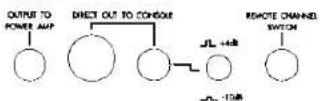
You may use any or all output connections simultaneously.
Front Panel Controls
Clean Channel
The Clean channel consists of Input Gain, Low, Mid, and High frequency equalization controls. A green LED, when lit, indicates the clean channel is active.
There are three equalization controls in the Clean channel. They operate as boost or cut filters and are located after (post) the input gain control. The Low and Mid controls have a range of +/- 10dB. The High control has a range of +/- 18dB. Setting the controls at their "0" setting provides a flat response. These controls are provided to enhance your sound. The EQ section of the Clean channel may be bypassed via the Clean EQ Bypass Switch located on the rear panel.

Overdrive channel:
The Overdrive channel contains an Input Gain, Pre-Emphasis, Low, Mid, and High equalization controls, and channel Master output level control. A red LED, when lit, indicates the channel active.
The Gain control varies the amount of level driving the distortion circuitry. The Pre-Emphasis control is a gain control with a fixed EQ (pre gain) point. Similar to a "presence" control, turning this control up results in increased sustain and "bite". The EQ controls operate as boost or cut filters and are located after (post) the Gain control. The Low and Mid controls have a range of +/- 10dB. The High control has a range of +/- 12dB. Setting the controls at their "0" setting provides a flat response.
Rear Panel Controls
The Back panel controls consist of a remote channel select switch jack, a clean channel EQ bypass switch, and a line level (14dB/-10dB) select switch.
Remote Channel Switch:
The 1/4" (tip/ sleeve) channel switch provides noise-less switching between channels when used with a momentary footswitch. This switch should be a normally open, temporarily closed type.
Clean EQ Bypass Switch
The Clean EQ Bypass Switch lets you defeat the equalization producing a "flat" or straight-thru guitar signal. This is most useful when using the clean channel as a buffered direct box or for use with a guitar amplifier.
With the switch in the "bypass" position, adjust your amp's tone controls to get the desired clean sound. To enhance the amp's tone with the Power Plant, place the EQ switch "in" and adjust the Low, Mid, and High frequency controls as needed. (Note: The EQ Bypass has no effect on the Clean channel gain or Overdrive channel equalization).
+4/-10dB Switch
This switch allows you to set the output level of the Direct Output to Console jacks (1/4" and XLR) to the appropriate line level for direct or DI applications independent of the amplifier output jacks.
Use The Correct Output Connectors!!!
The POWER PLANT'S output stages are designed for specific applications. When setting up for stage or studio, it's important to make sure you select the correct output for the task at hand. For example, if you are in the studio and you choose to go "direct," make sure to select the 1/4" jack or balanced XLR connector, which incorporates our "ACM" (Amp-Cabinet Microphone) simulation circuitry.
STUDIO AND LIVE APPLICATIONS
The following instructions and front panel settings will give you a good starting point for using the POWER PLANT and developing your sound. STUDIO (Direct to console)
-
Use either the XLR or 1/4" connectors (Direct Output to Console) to a balanced / unbalanced line level input of your console.
-
Select the proper output level using the -10db/+4 output level switch.
-
Match the Overdrive channel's output level to that of your Clean channel with the Overdrive channel's Master output level control.
(Note: For best results, the POWER PLANT should be the first device in your effect chain, with short delay devices such as chorus and echo units next in line. Long delay and/or reverb patches should be last in the chain).

Direct Recording Tips
Start with the channel EQ flat and adjust the input fader and trim for the desired input level. You may wish to add 3db at 300Hz and 2db to 3db at the 3k to 6K range to add additional punch. The POWER PLANT'S "ACM" circuit simulates a 4x12 cabinet loaded with vintage speakers milked "off-axis" with dual dynamic microphones. (The most widely accepted combination for producing guitar sounds).
While the ACM circuit provides an incredible reproduction of a miked cabinet, it is often desirable to place the "cabinet" in a room. Add a noise gate and digital reverb with a small room patch. The reverb unit will help to "open-up" the sound as if you had placed a "room" mic to catch some early reflections.
Using the POWER PLANT with a guitar amplifier:
-
Connect the Output To Guitar Amp output(s) to the instrument input of the amp(s).
-
Activate the clean channel EQ bypass by placing the switch in the bypass mode (switch in). Set the gain and EQ on your amp's clean channel. Now activate the EQ stage on the POWER PLANT by placing the EQ Bypass switch in the "out" position. Adjust the gain and EQ controls to enhance your amp's clean tone.
-
Connect any additional effect devices using the POWER PLANT's Effects Loop (Send and Return) 1/4" jacks, or connect your effects in series from the same output jacks.
-
Match the Overdrive channel's output level to that of your Clean channel with

the Overdrive channel's Master output level control.
Using the POWER PLANT with a Power Amplifier:
-
Plug the input to your power amp into the POWER PLANT's "Output to Power Amp" jack.
-
For stereo applications utilize a Digital Multi-Effects processor. Connect the processor's input to the POWER PLANT'S "output to power amp" jack. Connect the left and right stereo outputs of your effects processor to the left and right inputs to the power amp.
-
Match the Overdrive channel's output level to that of your Clean channel with the overdrive channel's Master output level control.

Specifications
| Input: | |
| Impedance: | 470k Ohms |
| Maximum Input Level: | +17 dBv |
| Output: | |
| Impedance (unbalanced): | 100 Ohms |
| Impedance (Balanced): | 600 Ohms |
| Maximum Output Level: | +19 dB |
| Bandwidth: | 80Hz to 30kHz |
| Clean Channel EQ: | |
| Low Freq: | +/-10dB centered @ 90Hz |
| Mid Freq: | +/-10dB centered @ 450Hz |
| High Freq: | +/- 18dB centered @ 4kHz |
| Oversdrive Channel EQ: | |
| Low Freq: | +/-10dB centered @ 130Hz |
| Mid Freq: | +/-10dB centered @ 450Hz |
| High Freq: | +/-12dB centered @ 5kHz |
| Dimensions: | 1.75"H x 19"W x 10"D |
| Power Requirements: | 105-125 VAC, 50/60Hz, 12W, Int. Fuse (export unit configured for country of destination). |
A R T retains a policy of constant product improvement. Therefore, specifications are subject to change without notice. Designed and manufactured in the United States of America.
Warranty and Service Information
Limited Warranty
Warranty service for this unit will be provided by Applied Research and Technology, Inc. in accordance with the following warrant statement.
Applied Research and Technology, Inc. (A R T) warrants to the original purchaser that this product and the component thereof will be free from defects in workmanship and materials for a period of three years from the date of purchase. Applied Research and Technology, Inc. will, without charge, repair or replace, at its option, defective product or component parts upon a prepaid delivery to the Customer Service department or authorized service center, accompanied by proof or purchase date in the form of a valid sales receipt.
EXCLUSIONS: This warranty does not apply in the event of misuse or abuse of the product or as a result of unauthorized alterations or repairs. This warranty is void if the serial number is altered, defaced, or removed.
A R T reserves the right to make changes in design or make additions to or improvements upon this product without any obligation to install the same on products previously manufactured. A R T shall not be liable for any consequential damages, including without limitation damages resulting from loss of use. Some states do not allow limitations or incidental or consequential damages, so the above limitation or exclusion may not apply to you. This warranty gives you specific rights and you may also have other rights which vary from state to state. For units purchased outside the United States, service will be provided by an authorized distributor of Applied Research and Technology, Inc.
Service
The following information is provided in the unlikely event that your unit requires service.
1) Be sure the unit is the cause of the problem. Check to make sure the unit has power supplied, all cables are connected properly, and the cables themselves are in working condition. 2) If you find the unit to be at fault, write down a description of the problem, including how and when the problem occurs. 3) Call the factory for a Return Authorization (RA) number.
4) Pack the unit in its original carton or a reasonable substitute. The packing box is not intended as a shipping carton. Put the packaged unit in another box for shipping. Print the RA number clearly under the address.
5) Include with your unit: a return shipping address (we cannot ship to a P.O. box), a copy of the purchase receipt, a daytime phone number, and a description of the problem. 6) Ship only the unit (keep your owners manual) to:
Applied Research and Technology, Inc.
215 Tremont Street
Rochester, NY 14608
Arten: Repair Department RA#
7) Contact our Customer Service department at (716) 426-2720 for your return authorization number or questions regarding repairs. Customer Service hours are 8:30 AM to 5:00 Pm Eastern Time, Monday through Friday.
Customer Service
You may contact A R T's Customer Service department between the hours of 8:30 AM and 5:00 PM Eastern Time Monday through Friday. The Customer Service department will answer technical questions about A R T products and provide information concerning products.
ADDITIONAL INFORMATION
If you are planning to purchase additional equipment for your audio needs, please consider the following A R T products.
Recording/Live Sound Applications:
MR-1, Personal Reverb Processor TUBE-MP, Personal Microphone Preamplifier MDM-8L, Eight Channel Limiter PRO GATE, Eight Channel Noise Gate CS-2, Two Channel Compressor/Limiter/Gate MDC-2001, Dual Channel Compressor/Expander/Limiter/Gate FXR Elite, Two Channel Digital Multi-effects Processor Multiverb Alpha, Digital Multi-effects Processor HD-15, Two Channel 15 Band EQ HD-31, 31 Band EQ EFFECTS NETWORK, Studio Effects Processor ....More to come.....
Instrument Applications:
XTREME, Personal Distortion Processor w/Digital Preset Effects SGX-2000, A/D Multi-effects Processor/Preamp for Guitar SGX NIGHTBASS, A/D Multi-effects Processor/Preamp for Bass ECC, A/D Multieffects Processor for Guitar, Floor Applications BCC, A/D Multieffects Processor for Bass, Floor Applications DST-4, Guitar Preamplifier with Digital Effects ....More to come.....
MIDI:
X-15, MIDI Foot Controller with Two Expression Pedals X-12, MIDI Foot Controller with Optional Power Pedal Controller

- Introduction
- Features
- Form and Function
- Design Considerations
- Installation
- Connections
- Input
- Outputs
- Output to Guitar Amp.:
- Main & Aux:
- Output to Power Amp:
- Effects send and return:
- Direct Output to Console:
- Front Panel Controls
- Clean Channel
- Overdrive channel:
- Rear Panel Controls
- Remote Channel Switch:
- Clean EQ Bypass Switch
- +4/-10dB Switch
- Use The Correct Output Connectors!!!
- STUDIO AND LIVE APPLICATIONS
- Direct Recording Tips
- Using the POWER PLANT with a guitar amplifier:
- Using the POWER PLANT with a Power Amplifier:
- Warranty and Service Information
- Limited Warranty
- Service
- Customer Service
- ADDITIONAL INFORMATION
- Recording/Live Sound Applications:
- Instrument Applications:
- MIDI:
Brand : ART
Model : Power Plant
Category : Guitar amplifier