
ACC-FV - Audio Visual Accessory Peerless-AV - Free user manual and instructions
Find the device manual for free ACC-FV Peerless-AV in PDF.


| Product Type | Riser Feet / AV Accessory |
| Brand | Peerless-AV |
| Model | ACC-FV |
| Compatible Devices | HD Flow units |
| Purpose | Maximize ventilation by elevating the unit |
| Included Components | 4 feet (A), 8 velcro circles (B), 4 adhesive tapes (C) |
| Foot Material | Plastic (black) |
| Adhesive Type | Double-sided tape |
| Fastening Method | Adhesive and velcro attachment |
| Number of Feet | 4 |
| Number of Velcro Circles | 8 |
| Number of Adhesive Tapes | 4 |
| Spare Parts Available | ACC-V (additional velcro circles) |
| Installation Steps | 5 steps (see manual) |
| Customer Care Phone | 1-800-865-2112 |
| Customer Care Email | tech@peerlessmounts.com |
| Warnings | Read instructions before installation; avoid moving after adhesion |
| Ventilation Requirement | Do not obstruct venting slots |
| Series | ACC |
| Manual Pages | 2 pages |
Frequently Asked Questions - ACC-FV Peerless-AV
User questions about ACC-FV Peerless-AV
0 question about this device. Answer the ones you know or ask your own.
Ask a new question about this device
Download the instructions for your Audio Visual Accessory in PDF format for free! Find your manual ACC-FV - Peerless-AV and take your electronic device back in hand. On this page are published all the documents necessary for the use of your device. ACC-FV by Peerless-AV.
USER MANUAL ACC-FV Peerless-AV
Note: Do not begin to install your Peerless product until you have read and understood the instructions and warnings contained in this Installation Sheet. If you have any questions regarding any of the instructions or warnings, please call Peerless Customer Care at 1-800-865-2112.
| Parts List | ACC-FV ACC-V | |
| Description Qty. Part # Part # | ||
| A foot, black 4 600-0223 | - | |
| B velcro circle 8 600-0224 600-0224 | ||
| C adhesive tape 4 570-0053 | - | |

natural_image
Simple line drawing of a conical object with a circular top and rectangular base, labeled 'A' in the top-left corner (no text or symbols on the object itself)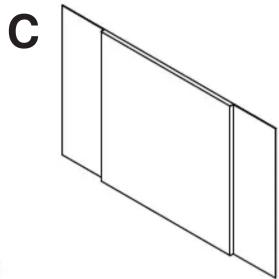
natural_image
Simple line drawing of two adjacent rectangular panels with no text or symbols

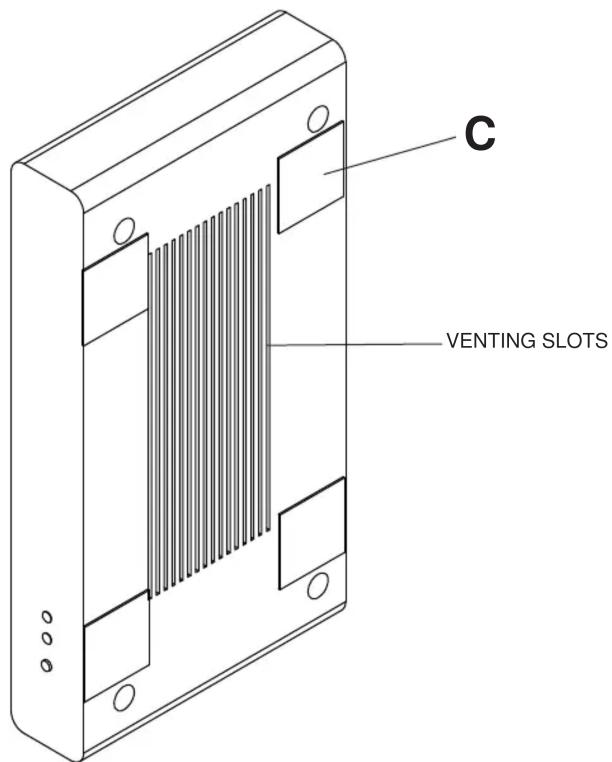
Note: To properly support the HD Flow unit, 4 feet (A) MUST be used for this installation. Choose a location to install your HD Flow unit. Remove the adhesive tape (C) from its white paper backing and apply adhesive side down to the approximate areas shown, on either side of the unit, making sure not to obstruct the HD Flow units venting slots.
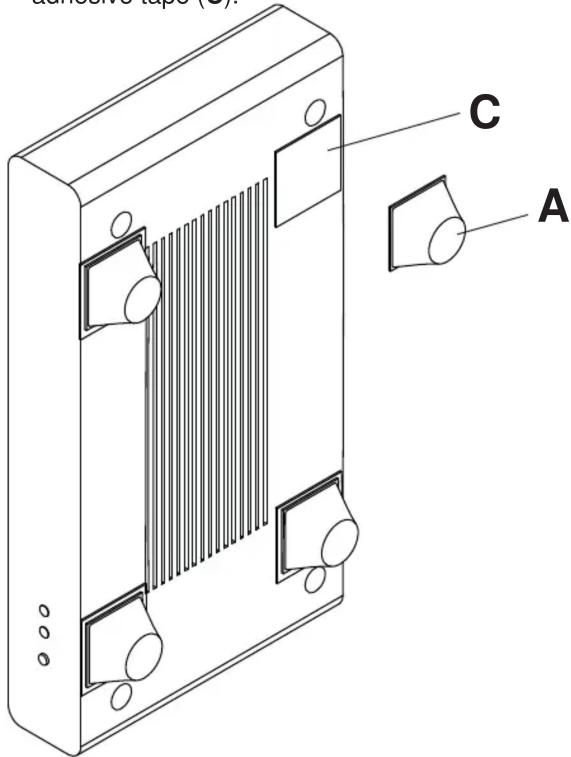
2 Remove red covering from adhesive tape (C). Remove white paper backing from each foot (A) and apply adhesive side of foot (A) to adhesive tape (C).
4 Place the remaining four velcro circles (B) onto the circles previously installed so that the white paper backing is facing outward.

natural_image
Technical line drawing of a heat exchanger or radiator component with mounting holes and a labeled part B (no text or symbols beyond label)3 Remove the white paper backing from four velcro circles (B) and apply, adhesive side down, to each foot (A).

5 Note: Double check the desired placement of your HD Flow unit prior to adhesion. Changing the units placement after initial adhesion will result in premature adhesive failure.
Remove the white paper backing from the velcro circles (B) and attach your HD Flow unit to your desired location.
To install your HD Flow unit in another location, additional velcro circles may be purchased. Call Customer Care at (800) 865-2112 and order part number ACC-V.
peerless-AV
Peerless-AV 3200 White Oak Circle Aurora, IL 60502 Email: tech@peerlessmounts.com Ph:(800) 865-2112 Fax:(800) 359-6500 www.peerless-av.com
© 2011, Peerless Industries, Inc.

Brand : Peerless-AV
Model : ACC-FV
Category : Audio Visual Accessory