
RB1260X8 - Battery CyberPower - Free user manual and instructions
Find the device manual for free RB1260X8 CyberPower in PDF.


| Product Type | Replacement Battery for UPS |
| Brand | CyberPower |
| Model | RB1260X8 |
| Battery Type | Sealed Lead-Acid (SLA), Maintenance-Free |
| Voltage | 12V |
| Capacity | 6 Ah (estimated typical) |
| Dimensions (L x W x H) | 151 x 65 x 94 mm (estimated typical) |
| Weight | 2.5 kg (estimated typical) |
| Terminal Type | F1 (0.187" or 4.8mm tab) |
| Compatible UPS Models | CP500AVRa, CP1200AVRa, CP1350AVRLCDs, CP1500AVRTa, LXT100G, LX13250U, and many more (see manual) |
| Main Function | Provides backup power during outages for connected equipment |
| Maintenance | Sealed, no water refill required; periodic replacement every 3-5 years recommended |
| Safety Precautions | Remove metal objects, wear rubber gloves and boots, do not short circuit, dispose properly |
| Spare Parts & Reparability | Battery is replaceable; use only specified CyberPower replacement batteries |
| General Information | Refer to user manual for detailed replacement instructions per UPS model |
Frequently Asked Questions - RB1260X8 CyberPower
User questions about RB1260X8 CyberPower
0 question about this device. Answer the ones you know or ask your own.
Ask a new question about this device
Download the instructions for your Battery in PDF format for free! Find your manual RB1260X8 - CyberPower and take your electronic device back in hand. On this page are published all the documents necessary for the use of your device. RB1260X8 by CyberPower.
USER MANUAL RB1260X8 CyberPower
Battery Replacement Instructions
CyberPower switches intermittently small results for disposal and recycling of its UPS and batteries. Please dispose of and/or recycle your UPS and batteries in accordance to the local regulations of your state.
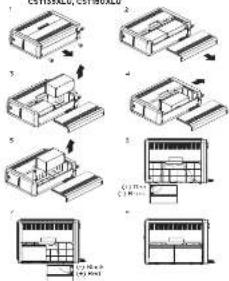
MODEL: CP500AVRa, CP1200AVRa, CP1350AVRLCDs, CP1500AVRTa, LXT100G, LX13250U, LX15000U,
flowchart
graph TD
    A["Assembly"] --> B["Processing"]
    B --> C["Product Inspection"]
    C --> D["Final Output"]
-
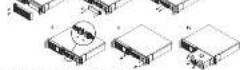
Place the UBS on its side and remove the two retaining screws located on the bottom of the urea
-
Slide the battery compartment cover completely off the unit.
-
Remove the battery which is located on the right side from the compartment and disconnect the battery when from the right side of the battery.
-
Sits. The remainder a better (from the left) said to the role of the complement.
a. Remove the remaining batteries from the container and disconnect the bonus of us from it.
-
Install the "left side" in homeowners' battery by connecting the yellow wire (C) to the red connector from the battery and the blade wire (C) to the black cross rotor from the battery. Place the battery, the right side of the compartment.
-
Install the "male side" replacement battery by controlling the red wire (-) in the next connection from the battery and yellow wire (-) to the black connector from the battery, it is the battery into the right side of a compartment.
Note: Have one both bath-lex are new and replaced at the car. Use to ensure maximum battery efficiency.
-
Slide back the better compartment cover and turn in the
-
Charge the UPS for 8-16 hours in account the UPS performer
expected times

IMPORTANT SAFETY INSTRUCTIONS
Read and follow the important safety instructions before servicing the batteries. Visit Cyberpower official website www.cyberpower.com or contact your dealer for more information on battery replacement.
CULIOPE use only the specified CytoPower replacement battery, or battery pack.
Culture Do not choose of bacteria in a fire. The bacteria may explode.
CAI, TON: In net open to multiple batteries, Relocation material is harmful to the semi and void. It may therefore
late the following precautions before next along the artery:
-
Remove watches, rings, or other metal objects
-
Use root with finished handles
-
Wear rubber gloves and boots.
-
In full by looks or new all parts on top of the lines
- Determine if a key is look to be one else if
• Ducturing safety is required by a 40% clearance. For better safety grounded, remove source of ground. CONTACT WITH ANY PART OF A GROUND'S RATIO. MAY CAN RESULT IN ELECTRICAL STOCK. The instrument of each stock can be removed if even grounds are removed during industrial and maintenance (applicable or equivalent and remote battery supplies not having a grounded supply circuit).

Smart APP Intelligent LCD Series
- Remove the right side front panel.
-
Remove the three retaining screen for the circle protection cover and remove the cover.
-
Discount of the book and red cable
-
Remove the one of the power blocks if the battery lasts 1 minute, a remove the battery pack.
-
retail the new hersey point assemble the unpeak charge cable and front panel in the square order of the previous stage. Choice
the 10% plans to receive a share of the 20% shares, which will be 10% for 4-6 hours to ensure the EPS performs expected run-time.
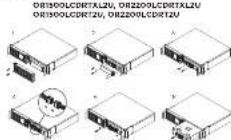
MODEL: OR1500LCDRM2U, OR2200LCDRM2U
-
Remove the right side front panel
-
Pensions: The line of remaining lines for the table protection center, which is 100%
to remove the two-tarım scores from the cable connection.
- Disconnect the black and red tools.
- Remove the blue wire or groove holding the bathroom pack in
E AOS
-
Remove the battery pack,
-
Indel the new battery pack. As annie the area, cost, sales are flat panel in the several orders of our previous supply. Charge the use for at least 12 hours to ensure the 3% prices. representing one man.

Intelligent LCD Series, AVR Series
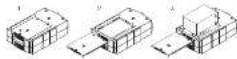
MODEL: CP500LCD, CP525LCD, CP800AVR, CP855AVR-G, CP825AVR-G, CP865AVRLCD-G, CP825AVRLCD-G, AVRG750U, AVRG800U, AVRG750LCD, AVRG900LCD
-
Place the UPS on its top and remove the retaining screw (Figure 12). Signify battery perimeter, max. cover current off of the unit (Figure 9)
-
Remove the battery from the canvasment and disconner the battery wire from the battery. Inral the replacement battery by connecting the red wire to the position (a) terminal and the black wire to the negative (c) terminal or the battery. (Figure 2)
- Case the 100% component cover only the hanks 2-30 greater than the rearing wire. ii. Charge the war for 4-8 beam to ensure the U.S. performs
MODEL: CP050AVRLCD, CP1000AVRLCD
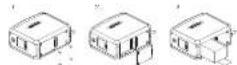
-
Place the 0.9% on its side and locate the battery compartment cover on the bottom of the UPS. Remove the four-pot entrating seconds and pull the battery compartment cover off the UPS (Figure 16.2).
-
Remove the battery from the components and disconnect the battery wire from the batteries, install the replacement batteries by connecting the red wire and block wire to the same color wire from the battery pack. Use the battery pack into the capacitor-free frame at
-
Like the battery compartment over the battery and tighen the rearing screw. Charge the unit for 4-0 hours to ensure the LPS performs accepted maximum.

MODEL: CP51900AVR
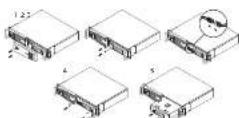
-
Removes the right run from point
-
Remove the two retaining surfaces for the safe protection cover and remove the cover.
-
Discontinued the break and red ruble.
-
To remove the red, white, and black holes of the battery back in vdcu.
-
KONKING THE BATTLEY
General the new memory pack according to the case, active case and front panel in the reverse order of the previous space. Check the unit for at least 12 rows to ensure the UPS platforms expected runtimes.

Standby Series
MODEL: RT650, RT650
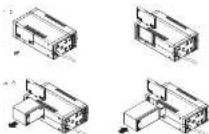
- Place the U.S. will take and raise the reaction zone.
- Side the carrying component or lower completely, effect of the unit.
-
Remove the battery from the compartment and document the carrying area from the battery.
-
Install the replacement battery by connecting the red wire and black wire to the positive (-) and negative (-) terminals of the battery. Put the battery back into the current wire.
- The back the battery can perform power and function the
e. Change the unit for 2 hours to ensure the units continue

Smart APP SINEWAVE Series
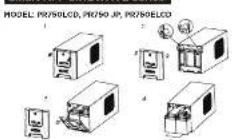
- Remove the front pane of the LFS.
-
Pull out both round knobs and remove the battery compartment cover completely on the unit.
-
Remove the better as from the comparison.
-
Discontinued the battery wire from the battery
-
Install the replacement batteries by connecting on the wire bus rail (composed of one incl arm and one hard wire) to the connector from the battery pack. Put the battery pack into the corn compartment.
-
Be install the necessary compartment cover and push both rounds.
-
Correct to AC power and charge the new batteries for up to 8 hours to ensure a full cycle.
MODEL: PR1000LCD, PR1000 JP, PR1000ELCD
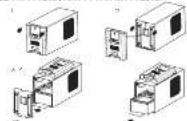
- Remove a one front pane of the LPS.
-
Remove two screens from the battery corners, mount cover and double the screen covers to the next.
-
Stentee the home, from the computer, however the letters were from the AC-195
-
Install the replacement pictures by connecting the wire outdoors (compared of one red tape and one black tape) to the extensive iron wire (blue tape).
-
Policy Wollers back into 5y compartment, its wall, the battery compartment some and given the relating access, for the front panel back on the U.S.
-
Connect to AC power and charge the new operations for up to 6 hours in the last charge

AVR Series
MODEL: BRS550AVRLCD, BRS1000AVRLCD, CP850AVRLCD,
-
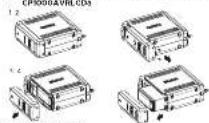
Remove the front panel mining screw installed on the bottom
-
Slide the butter's compartment near first small compared
-
1000000000000000000000000000000000000000000
batter from the complaint.
- We'll tell the replacement battery by connecting the motor (-) and back drive (+) in the same one regardless from the power park.
Let us go to the car in car or don't miss from the car by said. Put the swahy back into the command.
e side back the battery compartment, cover and height
19.000 ASSETS Change the EPS for Ref-hours to ensure the EPS outcome.
(1) _1 (2) _1 (3) _1 (4) _1 (5) _2 (6) _3 (7) _4 (8) _5 (9)
MODEL: BR01950AVRLCD, BR01950AVRLCD, CP1950AVRLCD
- Place the L.F.S. on his side.
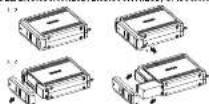
- Remove the front panel matching screw placed on the bottom.
of the UPS
-
Slide the battery compartment cover (front panel) completely all of the wire
-
Be connected the security goes from the button's and encase the
better as from the compartment
- retail the replacement buttonex by connecting the red wire (r) and
lower battery pack. Put the batteries back into the compartment
Note: Make sure ball better vs and how and tap used at. Use
and the next 100% of the battery is a small, large, and smaller.
10.2010 (2005)
• Change the 1,000 m/s ratio in RBC-500.4% of the expected unittes.

MODEL: PR1500LCD, PR1500 JP, PR1500LCD
-
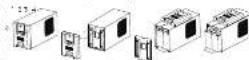
Remove the front panel of the JPS.
-
Remove two rows from the memory compartment zone and place the room completely on the track.
-
Are you the bellows from my companion, I recommend the
Baltimore wine from the Baltimore.
compared of one red wire and one black wire to the
or contractor from the battery park
- Put the batteries back from the compartment. Be install the battery compartment over and finishes the retaining window
For the front panel back) on the UFG.
-
Connect to AC power and charge the two batteries for up to 15
-
-
-
-
-
-
-
-
-
-
-
-
-
-
-
-
-
-
-
-
-
-
-
-
-
-
-
-
-
-
-
-
-
-
-
-
-
-
-
-
-
-
-
-
-
-
-
-
-
-
-
-
-
-
-
-
-
-
-
-
-
-
-
-
-
-
-
-
-
-
-
-
-
-
-
-
-
-
-
-
-
-
-
-
-
-
-
-
-
-
-
-
-
-
-
-
-
- 99.
-
-
-
-
-
-
-
-
-
-
-
-
-
-
-
-
-
-
-
-
-
-
-
-
-
-
-
-
-
-
-
-
-
-
-
-
-
-
-
-
-
-
-
-
-
-
-
-
-
-
-
-
-
-
-
-
-
-
-
-
-
-
-
-
-
-
-
-
-
-
-
-
-
-
-
-
-
-
-
-
-
-
-
-
-
-
-
-
-
-
-
-
-
-
-
-
MODEL: PR2000SL JP, PR3000SL JP, PR2200LCDSL
PR2000LCD8L, PR2200ELCD8L, PR3000ELCD8L

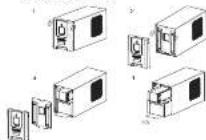
-
Remove the front panel of the JIM.
-
Promote the way from the safety department now and also the case company will off of the unit.
-
Remove the hather as more one company
-
Description: the battery of a small volume
-
total the space solution by connecting the wire axis (-) are
-
No. 15, 20, 30, 40, 50, 60, 70, 80, 90, 100
-
Re-install the battery compartment cover and tighten the
including format A. Tan King's brand is also on the 126
\$ Connect by 25 power and storage the new heating for up to 15
hours to increase a charge.
MODEL: CP300AVR, CP1200AVR, CP1500AVRT, CP1255AVRLCD, CP1350AVRLCD, CP1500AVRLCD
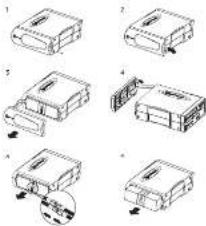
- Place the LPS can be able to know and remember the front panel, returning a screw from the bottom of the LPS.
-
Side the cover (front panel) towards the bottom of the LPS.
-
Dench the cover from the unit.
- Dissect the circle located at the top of the cover and remove the curve (from, except).
S. Disconnect the battery wire from the batteries, to remove the batteries from the component.
- But the battery has been fully connected to the next block wire to the same color inside from the battery pack. Put the battery can look into the compartment.
-
Replace the secondary compartment cover and tighter the relaching
-
Claims the net for 4-5-100% to charge the CIP's expense, representing net profit.

MODEL: PR2200LCD, PR3000LC, PR2200ELCD, PR3000ELCD
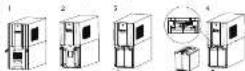
-
Remove the front panel of the UPS and two screens from antenna comparison, cover and a low the cover completely all of the unit.
-
Pd out the battery lock on the upgrade from the compartment.
EFFECTED BY BOLIVY COMMITTEE FROM THE BALANCE.
zah a tie and pull out the battery wires. Disconnect the battery, connecting into the battery.
- Install the replacement battery pack on the trade by connecting the wire bundle connector (composed of one red wire and one black cord) to the motorator from a battery.
aocl,ock the letter's wabs book and the cab e no
- In fact, the government's law is on the outside of correction. The wire handle contractor promoted at one and one and one
Nark wire) to the connector from the battery back. Put the
A. The stock price is \10.00 per share, with the closing price of \10.00 being 25% higher than the closing price of \$10.00.
relating screens and put the work panel back on the UPS
- Connect to AC power and chain the new batteries for up to 10 hours to move a full charge.
Note: The battery pack on the outer drives a fire, will be
Arter; part on the P's de coat net.
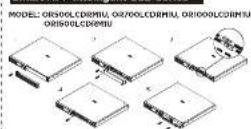
MODEL: PR750LCDRMIU, PR1000LCDRMIU,
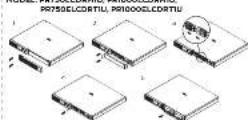
- Remove the right, safety level sand.
-
Remove the two retaining soars for the cable protection covers and remove the ows.
-
Disconnect the black and red cable.
-
Динкова, снабельник
& install the new battery pack. Assemble the screen cover cable
and, then, stands in the reverse sequence of the above slope.
2016年1月1日

Copyright © 2016 Online Press https://www.

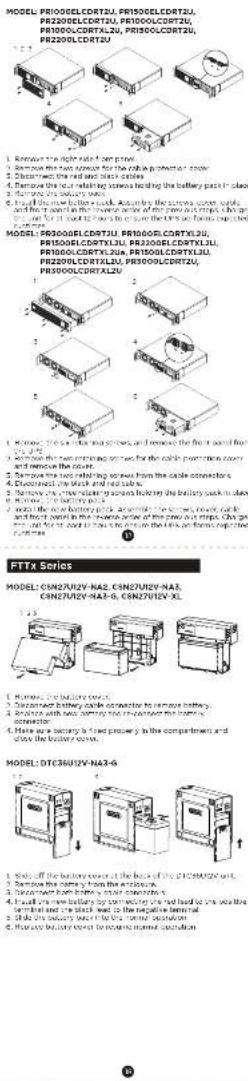
MODEL: PR5000ELCORTXLSU, PR6000ELCORTXLSU,
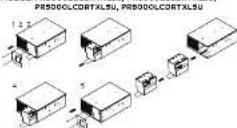
1. 2014年1月1日
2. Remove the fan retaining service of the other protection cover
MIX (INTOVA) "B"
A. Let the point inside the boundary is defined by the N(M) threshold
- For the new laboratory studies, we also consider a
the front panel
MODEL: PR500LCDRT1U, PR750LCDRT1U, PR1000LCDRT1U
PRI000LCDRTIU JP
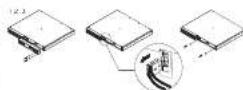
- Remove the two screws and remove the right panel
- Disconnect the battery connector
- Remove the low heating waters and remove the battery cover
1.500 m bollary mass, 2400 g the scrocs cens, conductor
the public bank, if the reverse charge is broken out, it is for a loan to be readily shown the banks

MODEL: CS24C12V2-E
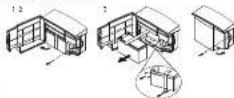
1. MUNI YU 2016
2. Cook the battery cost
A1M0177A NYHY STI
4. Hitzener hulbey, cale, oonentia to reven bary
5. Replace with new battery and re-contact the battery connector
6. Lighter: the battery strip
1. Close the ordinary stock and 50-ten on close stock.
MODEL: PR750RT2U, PR100ORT2U, PR1500RT2U,
PR200ORT2U, PR220ORT2U, PR300ORT2U,
PR750RTXL2U, PR1000RTXL2U, PR150CORTXL2U,
PR200ORTXL2U, PR220ORTXL2U, PR300ORTXL2U,
PR220CRTXL2UA, PR350CRTXL2UA
PR2200RTXL2UHVA, PR3000RTXL2UHVA.
PR750ERT2U, PR1000ERT2U, PR1500ERT3U
PR2000ERT2U, PR2200ERT2U, PR3000ERT2U,
PR750ERTXL2U, PR1000ERTXL2U, PR1500ERTXL
PR200ERTXL2U, PR2200ERTXL2U,
PR3000ERTXL2U, PR2200ERTXL2UA,
PR3000ERTX1.20A
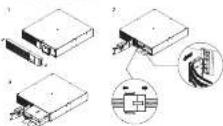
1. Remove the hospitals and approve the manufacturer of carloads including cars, cars, and other vehicles.
Notes: The Thursday evening will decide to be heard on "the dear day."
for remove their from the metal raze
2. Disconnect the battery and battery management module
conreacher and remove the battery pack
3. I sent the new battery pack. Avenicle the corrector
1. 2017年,公司与关联方不存在关联关系。
2017年1月1日(星期六)下午3:00
Himshake, B.L.N. Chie the Date E 00:545 S.E. Nomise on for use to avoid the inflation data of battery pack it can be adjusted
through LCD module in Advanced Setup Henu or through software.
(一)公司与关联方发生的关联交易,预计金额不超过人民币10亿元。

Extended Battery Modules
MODEL: BP48V45ART2U, BP48V75ART2U
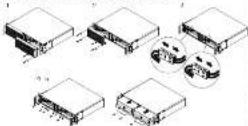
1. Remove the first part of the right side
2. Nouray the first launch on the left side
3. 2017年1月1日,公司与关联方不存在关联关系。
c. We have the best for the best to think the best is a good thing of life.
2005 Exchange the unit for at 17 years to ensure the
Extended Batters Modul e perform expected runtimes and th
correct the Extended Factory Module to your UPS
Reminders Crack and modify the Advanced Gallery Modura Quantity
sell on your UP the bank, or 250 mmb. Vaxiport Business
Software or RHS/AS Introduction (continued) to create the iHS report
MODEL: RP4RVP2U01, RP4RVP3U02, RP4RVP2U03,
RPEVPRJU04
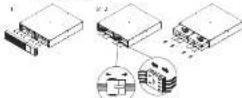
1. DHAVYAN, Ura Leder-Ad Ballara - Nudary, from your UPS, mark
The complex and unclear the results of salary cover and credit
1. 2016年,公司实现营业收入35.8亿元,较2015年增长4.7%。
3. I used the new home's angle ownership in the corner, so that
2024 year and home info. 2024 year, all net at least 12 hours
to ensure the Extended Battery Holda performs expected .
and Uran connect the Elanized Battery Module to your JPS.
Reminders: Crack and modify the consolidated Battery Hardware Quantity
willing on your UPS Growth, as LCD modes. NewFirst Online
software or SPIC-5.1 interface (if related to create the AP3 request)
2.1.2.14(3)

DEC SINEWAVE Sozlos
11.3 GINEWAVE SCHOOL
MODEL: OR750PPFCLCD, OR1000PPFCLCD, OR1500PPFCLCD
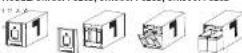
(1) 2017年1月1日
1 Remove the front panel of the UFS.
• 2017年1月,公司实现营业收入4.8亿元,达到12.6亿元,实现净利润-5.3亿元。
• Demissi lira, napietales from line approximations
5. Dispersed by many ways, even the latter to
2. And the replacement solution to be out-present the next wave (1) and
black wine (g) to the same color range from the cinema pass
3. Put the batteries back into the commencement.
2. Be installed the battery compartment cover and higher the
relating
- Put the front sink back of the LP1.
(1) 2017年1月1日
(1) H_2 (2)
MODEL: ORIS00REF3SU ORIS00REF3SU
OR20095CBTAU
OR2001+CR+20 -
-
- m : x = 1 或 3x + 4y + 1 = 0
图 1
- m : x = 1 或 3x + 4y + 1 = 0
-
- Remove the right right front pane
- Remove the three retaining screen for the cable protection cover
and remove the co-sr. - Reflects the following sources from the side of the sources:
- Diacritical the Back and red cable.
- 2017年,公司以自有资金进行现金管理,购买了银行理财产品。
1.39 - install the new battery set
and front panel in the "reverse" order of the previous steps. Charge
• In order, at our US 12-20s to ensure the UPS performance evaluated
c. 10/17 No.
The Ground Truth image displays a single, solid horizontal line. According to Rule 2 (UNDERSCORE & LINE RULES), this is a stylistic or background line, not a placeholder underscore. Therefore, the OCR result must ignore it and output nothing or only meaningful text. The provided OCR content is "____", which consists of four underscores. This is an incorrect interpretation of the line as a placeholder, violating the rule that stylistic lines must be ignored. The OCR has hallucinated placeholder underscores where none exist in the GT. Hence, the result is inconsistent with the Ground Truth.
[Non-Text]
The Ground Truth image displays a single, solid horizontal line. According to Rule 2 (UNDERSCORE & LINE RULES), this is a stylistic or background line, not a placeholder underscore. Therefore, the OCR result must ignore it and output nothing or only meaningful text. The provided OCR content is "____", which consists of four underscores. This is an incorrect interpretation of the line as a placeholder, violating the rule that stylistic lines must be ignored. The OCR has hallucinated placeholder underscores where none should exist in the GT. Hence, the OCR result is inconsistent with the Ground Truth.
[Non-Text]
[Non-Text]
[Non-Text]
[Non-Text]

Smart APP SINEWAVE Series
MODEL: RIVADL-CRSE
MODEL PHYSICO
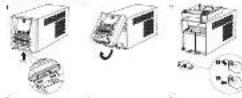
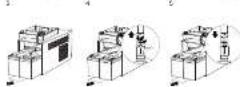
1. Push the buckle and remove the hard panel of the UPS.
2. Locate the series and remove the battery compartment area
2. Barrows the balance from the comparison.
1. 本报告
2. Insta: The environment is not yet and reconnect the habits.
ecostly
CAUTION: The also which business is being used.
5. Political research, political war
2. 30-40 and the bottom compartment plate and action the screw
lock mid pare
3. Put the front panel back of the LF7
6. Can't be to all power and charge the new companies for up to R
hours before a 1.4 charge
MODEL: CPRSOPFCLCD, CP1000PFCLCD, CPSSOEPFCLCD,
CP500EPFCLCD
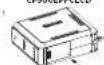
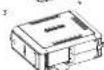
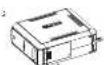
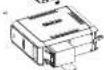
1. Turn the IPS on its side. Remove the retaining screw location on
The bottom of the UPS
2. Slide the battery compartment cover completely all of the unit
3. Reduce the Exchange from the compartment.
4. Please note the battery was from the better.
1. Total the balance for the balance by the leading company (+)
The power of the battery is not a large part of the battery. But the batteries back into the compartment.
6. Side back the battery compartment cover and tin sheet.
reaching serve. Exchange the UPS (or 0-18 hours to fully charge
The following:
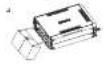
1. Turn the UPG on its side. Remove the front panel retaining screws, located on the bottom of the UPG.
2. Slide the baller's compartment cover (from pane) completely all of the wall.
1. 2024年上海交通大学上海第一医院
4. 欧洲的中国石油天然气股份有限公司
- retail the replacement helitered by connecting the 'ad wire (1)
and Black wire (-) to the same color connection from the battery
past. Put the ballards back too, the companymen.
e. Str. Eick the battery compartment, cover the Sitter.
10.2.19. Krika, 1863, 24th of the 7/18-015-1001 to be called the house.

MODEL: CP1500PFCLCD, CP1500EPFLCD
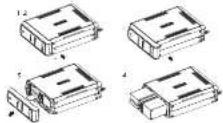
1. In the US on its side, Remove the first annual meaning scheme
located on the bottom of the cuts.
2. See the
7. Present the bellaries now the contemporary
2. Promote the limitations from the co-partments.
3. Desarest the bellows of the buildings
- 2013, the stock price was \12.40. The closing price was \12.40.
(continued of each end and one block was to the correct)
from the battery sack for the batteries back into the
complement
A State made the safety compartment cover and tighten the
Banning School Exchange the LP for all hospitals, only charge (in barrels.

Cyber Power Systems, Inc.
(1) 2017年1月1日
(1) 2017年1月1日
For USA and Canada
6241 12th day, July 40
The following table is in Chinese:
2. 10. 10
to the 2 (877, 297-593)
for all other reasons
[1]

Brand : CyberPower
Model : RB1260X8
Category : Battery