
TT600 - Turntable Lenoxx - Free user manual and instructions
Find the device manual for free TT600 Lenoxx in PDF.


| Product Type | Belt-drive Semi-automatic Turntable with USB/SD Encoding, AM/FM Radio, Cassette Player, and Speakers |
| Brand / Model | Lenoxx TT600 |
| Speed Settings | 33 1/3, 45, 78 RPM |
| Operation | Semi-automatic: auto-start when tonearm moved over record, auto-stop at end (switchable) |
| Cartridge / Stylus | Ceramic stereo cartridge with jewel stylus (replaceable) |
| Radio | AM/FM/FM Stereo analog tuner with manual and auto search |
| Cassette Player | Playback only, auto-stop, fast-forward via half-press eject |
| Digital Audio Input/Output | USB, SD/MMC card slot for MP3/WMA playback and recording (128 kbps MP3) |
| Recording Sources | Vinyl, cassette, radio, Aux In to USB/SD |
| Audio Outputs | Built-in full-range stereo speakers (2), 3.5mm headphone jack |
| Audio Input | 3.5mm Aux In jack for external devices |
| EQ Presets | Normal, Pop, Rock, Jazz, Classic |
| Dimensions (Approx.) | 420 mm (W) x 360 mm (D) x 140 mm (H) (including dust cover) |
| Weight (Approx.) | 4.5 kg |
| Power Supply | AC 230V ~ 50Hz (built-in power cord) |
| Power Consumption (Approx.) | 30 W |
| Accessories Included | Removable dust cover, 45 RPM adapter, stylus guard, vinyl twist-tie for tonearm |
| Cleaning & Care | Clean dust cover and housing with soft damp cloth; clean stylus with soft brush back-to-front; avoid harsh chemicals |
| Safety Notes | Do not expose to dripping/splashing; max ambient temp 35°C; unplug before cleaning; do not cover ventilation holes |
| Repairability | No user-serviceable parts; refer servicing to qualified personnel |
| Compliance | For use in Australia; manufactured for Lenoxx Electronics Aust. Pty Ltd |
Frequently Asked Questions - TT600 Lenoxx
User questions about TT600 Lenoxx
0 question about this device. Answer the ones you know or ask your own.
Ask a new question about this device
Download the instructions for your Turntable in PDF format for free! Find your manual TT600 - Lenoxx and take your electronic device back in hand. On this page are published all the documents necessary for the use of your device. TT600 by Lenoxx.
USER MANUAL TT600 Lenoxx
natural_image
Black TP-80 MP3 radio with open lid and control knobs (no visible text or symbols)READ THIS INSTRUCTIONS CAREFULLY BEFORE USE AND STORE IN A SAFE PLACE FOR FUTURE REFERENCE
BEFORE USE
Read this before operation
- Choose the installation location of your unit carefully. Avoid placing it in direct sunlight or close to a source of heat. Also avoid locations subject to vibrations and excessive dust, heat, cold or moisture.
● The ventilation holes should not be covered. Make sure there is enough space above and beside the amplifier/receiver (about 4 cm). Do not place a CD player or other equipment on top of the Turntable Player/Recorder/ - Do not open the cabinet as this might result in damage to the circuitry or electrical shock. If a foreign object gets into the set. Contact you dealer.
● When removing the power plug, never yank the cord. - Do not attempt to clean the unit with the chemical solvents as this might damage the finish. Use a clean, dry cloth.
- Keep this manual in a safe place for future reference.

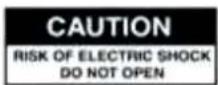

CAUTION: TO REDUCE THE RISK OF ELECTRIC SHOCK DO NOT REMOVE COVER (OR BACK), NO USER SERVICEABLE PARTS INSIDE, REFER SERVICING TO QUALIFIED SERVICE PERSONNEL.
DANGEROUS VOLTAGE

Conducts dangerous voltage, that may be of sufficient magnitude to constitute a risk of electric shock to persons present within this product's enclosure.

ATTENTION The owner's manual contains important operating and maintenance instructions, for your safety, it is necessary to refer to the manual.
WARNING: TO PREVENT FIRE OR SHOCK HAZARD, DO NOT EXPOSE THIS APPLIANCE TO DRIPPING OR SPLASHING.
Note :
This unit will become warm when used for a long period of time. This is normal and does not indicate a problem with the unit.
Automatic Stereo Turntable System
Installation and Operation
CAUTION: To avoid stylus damage, make certain the included stylus guard is in place whenever the turntable is being installed, moved or cleaned.

The turntable features:
- 3-speed turntable fit for 33 1/3, 45, 78 RPM
- belt-drive and semi-automatic play tone arm
- ceramic stereo cartridge with jewel stylus
- built-in 45 rpm adapter
- slot-in USB/SD/MMC for encoding & decoding
- analog AM/FM/FM stereo radio
- cassette tape playback
- Aux in and headphone sockets
- full range stereo speakers
- removable semi transparent plastic dust cover
LOCATION OF CONTROLS
- Transparent dust cover
- 45rpm adapter
- Tone arm set
- Full range dynamic stereo speakers
- Play/pause lift lever
- Speed switch
- Power/Volume knob
- Tuner knob
- USB socket
- SD/MMC socket
- Function switch
- Tuner BAND switch
- Headphone jack
- Aux in jack
- REC key
- EQ key
- DELETE key
- FOLDER+ key
- PLAY/PAUSE key
- STOP key
- PREV key
- NEXT key
- Diamond cartridge
- The big platter
- Tape slot

CAUTION:
Usage of controls or adjustments or performance of procedures other than those specified herein may result in hazardous radiation exposure.
This unit should not be adjusted or repaired by anyone except qualified service personnel.
CONNECTION
- Connect the power cord to AC outlet 230V/50Hz.
- Switch the function selector to PHONO/AUX IN/USB&SD/TUNER function. Now your system is ready to play the music.
FM/AM OPERATION
- Set FUNCTION switch to TUNER mode, then choose needed band (AM, FM and FM stereo) by BAND switch.
- Search stations: Rotate the TUNER knob to choose request station, or press PREV/NEXT keys to choose idea stations. User can also press one of the two keys a little longer around 1.5s then the model will search automatically and it would stop at a clearest station.
- Record Radio: Firstly insert memory device (USB flash disk or SD/MMC card). When Radio is working, press the REC key on front control board of the unit, now recording works will begin. To finish the work just need to press the STOP key.
Note: When you insert both USB flash disk and SD Card, the recorded file will be saved into the latter inserting device.
PHONO OPERATION
- Press the Function switch to PHONO position. Then put a record on the Platter lightly. In certain circumstances, 45 RPM adapter is needed;
- Select the speed of record: 33 1/3, 45, 78rpm according to vinyl to played.
- Remove the stylus guard and push the lift lever upward to raise
the tone arm from the arm park, and then move the cartridge holder over the record gently, now the platter will run automatically (default set of Auto/Manual stop switch at ON position). Then put down the lever, the tone arm would drop and touch record surface gently. Now users can enjoy their favorite sons.
- Select the auto/manual stop control: The turntable will stop automatically while the song on the record finished when the switch at ON position. The other side it will always play when it is at OFF position, this may helps to play some long recorded vinyl which can not be played to the end by normal way.
- Rotate the volume control knob to get desired sound level.
- Push the arm lift lever up to raise the arm, now platter will still running but play will pause. To continue the play, user just need to put down the lever.
- Record vinyl: Firstly insert memory device (USB flash disk or SD/MMC card). When turntable is working, press the REC key on front control board of the unit, now recording works will begin. To finish the work just need to press the STOP key.
Note1: When you insert both USB flash disk and SD Card, the recorded file will be saved into the latter inserting device.
natural_image
Hand holding a cable with a tool, no visible text or symbolsNote2: Recorded file in mp3 format with 128bit.
- Press the Function switch to AUX IN (TAPE) position first.
-
Insert a pre-recorded cassette tape into tape slot, with the exposed side facing right. By pushing, the cassette will slide into the tape mechanism and play start automatically. Note: one end of tape will remain visible.
-
Adjust volume control to your desired sound level.
-
Depress the eject button completely in, the tape will be ejected from the slot.
-
Press the eject button half way to fast forward of the tape you are listening.
-
The tape will stop automatically when it comes to its end.
-
Record Cassette: Firstly insert memory device (USB flash disk or SD/MMC card). When Cassette is working, press the REC key on front control board of the unit, now recording works will begin. To finish the work just need to press the STOP key.
Note: When you insert both USB flash disk and SD Card, the recorded file will be saved into the latter inserting device.

flowchart
graph TD
    A["①: eject out"] --> B["②: insert in"]
    B --> C["③: insert in"]
    C --> D["④: half press"]
    D --> E["⑤: press down"]
AUX IN JACK
- The external sound sourcing can be played and recorded through the device.
- The external sound sourcing can be recorded to the USB flash disk or SD through the sockets.
- Record Aux in: Firstly insert memory device (USB flash disk or SD/MMC card). When Aux in is working, press the REC key on front control board of the unit, now recording works will begin. To finish the work just need to press the STOP key.
Note1: to enjoy the function, user need to select the function switch to AUX IN position, and Aux In source will be prior to tape play.
Note2: When you insert both USB flash disk and SD Card, the recorded file will be saved into the latter inserting device.
USB/SD PLAYING
PLAYING THE MUSIC FROM USB/SD/MMC DIRECTLY:
- Be sure power is on, insert USB flash disk or Mp3 player into USB port and/or insert MEMORY CARD (SD/MMC) into SD socket.
- Set FUNCTION switch to USB/SD position
- The device supports for Mp3 and WMA formats. During play status, press PLAY/PAUSE button once to halt playing, press it again to continue.
- Press PREV once to play the preview song, hold down continuously to speed up selecting backward. Press NEXT once to play next one, holds down continuously to speed up selecting forward.
- EQ Function: You can press "EQ" button to choose different sound effects.E1 is for Normal; E2, POP; E3, ROCK; E4, JAZZ; E5, CLASSIC.
- DELETE Function: When it is playing the music from U-Disk or SD Card, you can delete the file by pressing the "DELETE" button about 2 seconds.
- FOLDER+: By pressing this button, it can switch the stored music files (the music which you have stored in memory devices) and the recorded music files (the music which is recorded from turntable, cassette and aux in). It works as USB-Card switch button.
- Press STOP to end up the play.
-
The turntable can be connected to amplifier or speakers by 3.5mm headphone jack.
-
Private listen of earphone also can be realized through this jack.
TIPS FOR BETTER PERFORMANCE
- When opening or closing the turntable cover, handle it gently, moving it either at the center or equally from both sides.
- Do not touch the stylus tip with your fingers; avoid bumping the stylus on the turntable mat or a record's edge
- Clean the stylus tip frequently, using a soft brush with a back-to-front motion only.
- If you use a stylus cleaning fluid, use it very sparingly.
- Wipe the dust cover and turntable housing gently with a soft cloth. Use only a small amount of mild detergent solution to clean the turntable and dust cover.
- Never apply harsh chemicals or solvents to any part of the turntable system.
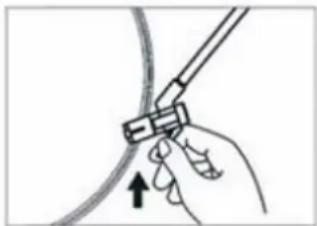
- Prior to moving the turntable, always unplug it from the AC outlet and fasten the tone arm on the tone arm rest with the vinyl twist-tie.
HOW TO REPLACE THE NEEDLE
To replace the needle, please refer to the instructions below.
Removing the needle form the cartridge
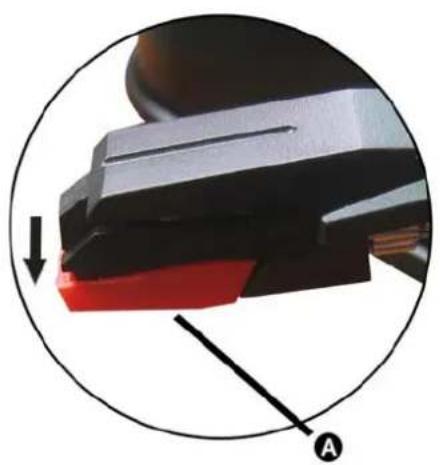
- Place a screwdriver at the tip of the needle heads hell and push downwards in the direction shown in sketch "A"
- Remove the needle head shell by pulling it forwards and pushing downwards.
Inserting the needle
natural_image
Close-up of a mechanical component with red and black parts, circled in blue (no visible text or symbols)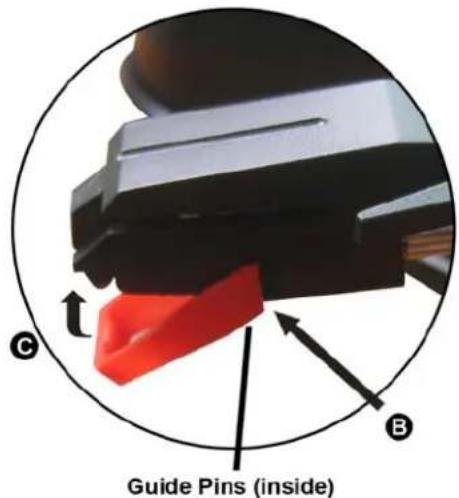
-
Hold the tip of the needle head shell and insert it by pressing in the direction illustrated by "B"
-
Push the needle head shell upwards in the direction illustrated by "C" until the needle locks into the tip position.
MAINTENANCE AND CARE
Caring for the player
● Apparatus shall not be exposed to dripping or splashing and no objects filled with liquids, such as vases, shall be placed on the apparatus.
● The maximum ambient temperature: 35^ C
● Electronic products of this kind should never be subjected to extreme temperatures or high humidity. For instance, this set should not be placed in bathing areas of around stoves and radiators.
- If anything falls into the cabinet, unplug the unit and have it checked by qualified personnel before operating it any further.
Cleaning the Unit
● To prevent fire or shock hazard, disconnect your unit from the AC power source when cleaning.
● The finish on your unit may be cleaned with a dust cloth and cared for as other furniture. Use caution when cleaning and wiping the plastic parts.
● Mild soap and a damp cloth may be used on the front panel.
Inclination
- Do not install the unit in a inclined position, It is designed to be operated in a horizontal position only.
Condensation
- If the unit is brought directly from a cold to a warm location, moisture may condense inside the player, and cause damage it. When you first install the unit, or when you move it from a cold to a warm location, wait for 30 minutes before operating the unit.
Disconnect Power
- If you are not going to use the player for long time, be sure do disconnect the player from the AC power source
LENOXX
Lenoxx Electronics Aust. Pty Ltd
Importers and Wholesalers of Electronics and toys
6 Oban court, Laverton North. Victoria. 3026
ABN: 97 844 321 851
PH: 03 9267 2100
FAX: 03 9267 2199
For service call: 1300 666 848
Email: lenoxx@lenoxx.com.au
www.lenoxx.com.au

- BEFORE USE
- DANGEROUS VOLTAGE
- Note :
- Automatic Stereo Turntable System
- Installation and Operation
- The turntable features:
- LOCATION OF CONTROLS
- CAUTION:
- CONNECTION
- FM/AM OPERATION
- PHONO OPERATION
- AUX IN JACK
- USB/SD PLAYING
- TIPS FOR BETTER PERFORMANCE
- HOW TO REPLACE THE NEEDLE
- Removing the needle form the cartridge
- Inserting the needle
- MAINTENANCE AND CARE
- Caring for the player
- Cleaning the Unit
- Inclination
- Condensation
- Disconnect Power
- LENOXX
Brand : Lenoxx
Model : TT600
Category : Turntable