SPXRGBCD - Lighting Stinger - Free user manual and instructions
Find the device manual for free SPXRGBCD Stinger in PDF.


| Product Type | Lighting |
| Brand | Stinger |
| Model | SPXRGBCD |
| Dimensions (L x W x H) | 4.5 x 3.2 x 2.8 inches |
| Weight | 0.6 lbs |
| Power Source | 12V DC |
| Bulb Type | LED |
| Brightness | 1200 lumens |
| Color Temperature | 6000K (Cool White) |
| Beam Pattern | Flood |
| Housing Material | Aluminum |
| IP Rating | IP67 |
| Mounting Type | Surface Mount |
| Warranty | 1 Year |
| Certifications | CE, RoHS |
Frequently Asked Questions - SPXRGBCD Stinger
User questions about SPXRGBCD Stinger
0 question about this device. Answer the ones you know or ask your own.
Ask a new question about this device
Download the instructions for your Lighting in PDF format for free! Find your manual SPXRGBCD - Stinger and take your electronic device back in hand. On this page are published all the documents necessary for the use of your device. SPXRGBCD by Stinger.
USER MANUAL SPXRGBCD Stinger
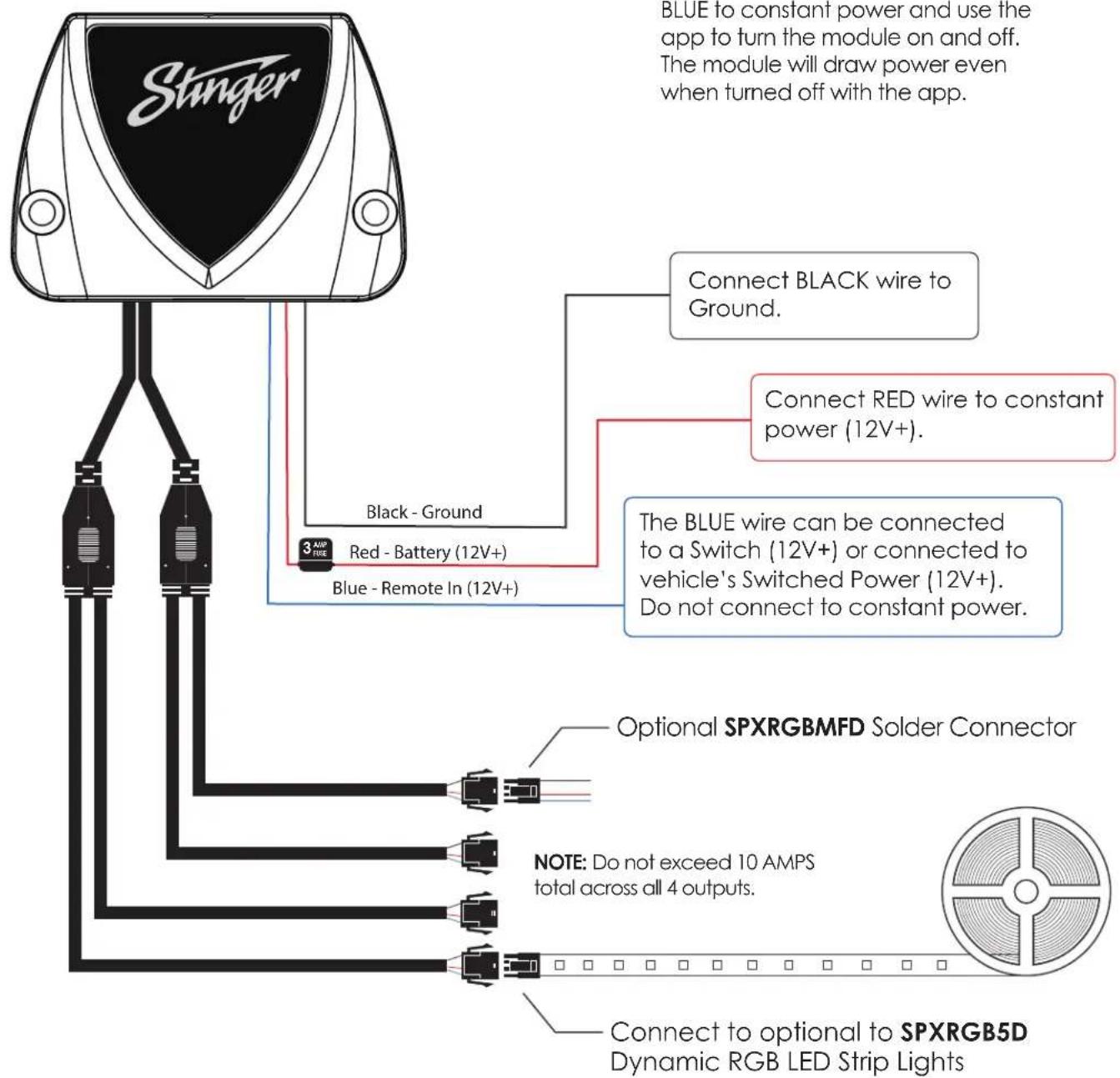
Universal, waterproof, Dynamic RGB controller with Bluetooth and RF Remote Control. Before you start, review directions completely. If your vehicle is not pre-wired for accessory lighting, you may need a switch and relay.
WIRING DIAGRAM
The SPXRGBCD can be wired to a switch or to accessory power using the BLUE lead. The RED wire should be connected to constant power to save the RGB light settings.
NOTE: Do not connect the Red and BLUE to constant power and use the app to turn the module on and off. The module will draw power even when turned off with the app.
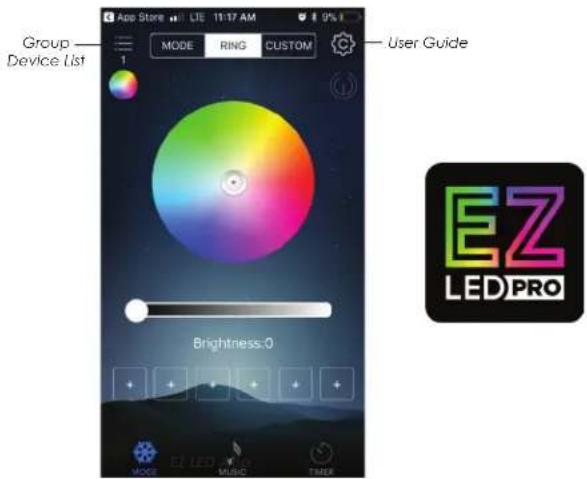
Bluetooth Control
Scan the QR Code, or visit Google Play or iTunes to download the EZLED PRO app. Once the app is installed, power up the SPXRGBCD Module and open the app. The module should auto-connect and be listed in the Group Device List.

SCAN for Apple iOS SCAN for Android

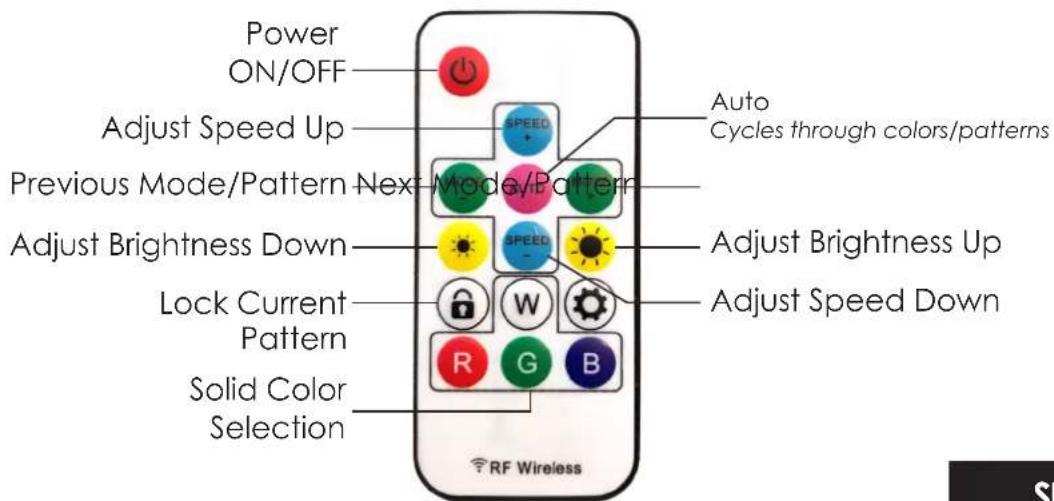
RF Remote Control
LIMITED WARRANTY:
Stinger warrants this product to be free of defects in materials and workmanship for a period of one (1) years from the original date of purchase. This warranty is not transferable and applies only to the original purchaser from an authorized Stinger dealer in the United States of America only. Should service be necessary under this warranty for any reason due to manufacturing defect or malfunction, Stinger will (at its discretion), repair or replace the defective product with new or remanufactured product at no charge. Damage caused by the following is not covered under warranty: accident, misuse, abuse, product modification or neglect, failure to follow installation instructions, unauthorized repair attempts, misrepresentations by the seller. This warranty does not cover incidental or consequential damages and does not cover the cost of removing or reinstalling the unit(s). Cosmetic damage due to accident or normal wear and tear is not covered under warranty.
INTERNATIONAL WARRANTIES:
Products purchased outside the United States of America are covered only by that country's Authorized Slinger reseller and not by Slinger. Consumers needing service or warranty information for these products must contact that country's reseller for information.
SPECIFICATIONS
• APP: EZLED PRO (iOS and Android)
- Operating temperature: -20\~80°C
• Voltage: DC12V/24V,
• Distance: 10-20M
• Maximum output current: 10A
• Outputs: 4
Stinger is a Power Brand of AAMP Global
15500 Lightwave, Clearwater, Florida 33760
P:888-228-5560
support@stingerelectronics.com
www.stingerelectronics.com
© 2019 AAMP Global
Brand : Stinger
Model : SPXRGBCD
Category : Lighting