
WCH-004 - Mobile Device Charger Orava - Free user manual and instructions
Find the device manual for free WCH-004 Orava in PDF.


| Product Type | AC Charger for Mobile Devices |
| Brand | Orava |
| Model | WCH-004 |
| Input Voltage | 100-240 V AC, 50/60 Hz |
| Output Voltage | 5 V DC |
| Output Current | 2 A |
| Output Power | 10 W |
| Connector Type | USB-A (Female) |
| Dimensions | 5.0 x 4.0 x 2.5 cm |
| Weight | 50 g |
| Housing Material | Plastic |
| Color | White |
| Plug Type | EU (Type C) |
| Overcurrent Protection | Yes |
| Overvoltage Protection | Yes |
| Short-Circuit Protection | Yes |
| Operating Temperature Range | 0°C to 40°C |
| Storage Temperature Range | -20°C to 60°C |
| Certifications | CE, RoHS |
| Cleaning Instructions | Wipe with a dry, soft cloth. Do not use liquids. |
| Compatible Devices | Smartphones, tablets, and other USB-charged devices |
Frequently Asked Questions - WCH-004 Orava
User questions about WCH-004 Orava
0 question about this device. Answer the ones you know or ask your own.
Ask a new question about this device
Download the instructions for your Mobile Device Charger in PDF format for free! Find your manual WCH-004 - Orava and take your electronic device back in hand. On this page are published all the documents necessary for the use of your device. WCH-004 by Orava.
USER MANUAL WCH-004 Orava
natural_image
Black remote control device with circular sensor icon and ports (no text or symbols visible)Wireless charging powerbank
Intended use of the device
- The device is intended exclusively for wireless charging and charging from the power bank of the device, to the extent specified by technical and operating parameters and functions, safety and user instructions and external influences of the operating environment.
Warning!
- ORAVA electrical appliances are manufactured in accordance with the state of the art and recognized safety regulations. Nevertheless, incorrect and unprofessional may create a risk of injury or endanger the life of the user or a third party, resp. damage to equipment and other property.
Safety instructions for using the device

Read all instructions before using the device!
- The electrical device is designed and manufactured in such a way as to allow safe operation and use by persons without professional qualifications. Despite all the measures that were taken made for the safe use, operation and use by the manufacturer entails certain residual risks and the possible hazards associated with them.
- The following symbols and their meanings have been used on the device and in the accompanying documentation to warn of possible dangers:

This symbol alerts users to the risk of failure to observe the safety instructions when using and operating the equipment: Danger of serious injury or death! Danger of equipment damage or other property damage!
General instructions
- Before putting the device into operation, we recommend that you carefully read the instructions and operate the device according to the established instructions.
- By failing to observe the safety instructions and warnings, the manufacturer is not liable for any damage to health or property!
• Always keep the instructions with the device for future reference and use by new users.
- Use the device only for the intended purpose and in the manner specified by the manufacturer.
- The device is intended for use in households and similar indoor areas intended for housing, without special focus.
- Do not use the device in an industrial or outdoor environment!
- Do not expose the device to:
- sources of excessive heat or open flame,
- dripping or splashing water,
- insects, animals and flora,
- aggressive and chemical substances.
- The operating environment of the device must always comply with the specified basic characteristics.
Characteristics of the operating environment
- Ambient temperature: +5÷+40°C
- Humidity: 5 ÷ 85%
- Altitude: ≤2,000 m
- Occurrence of water: occasional condensation of water or the presence of water vapor
-
Occurrence of foreign bodies: the amount and type of dust are insignificant
-
Degree of protection by cover: IP20
- Do not unplug the power cord by pulling on the cord/cord. Disconnect by unplugging the power cord by the plug of the power cord.
Special safety instructions
- Unpack the device and accessories before putting them into operation and dispose of all parts of the packaging materials, labels and tags. Keep packaging materials in a safe place or keep them out of the reach of children and incompetent persons. Danger of serious injuries!
Danger of suffocation!
• We recommend performing initial and subsequent regular inspections of the device. Use the device only with accessories and spare parts supplied and approved by the manufacturer.
- Never use the device if it is incomplete, damaged or its parts or accessories are damaged during use (e.g. due to a fall).
There is a risk of electric shock! Danger of serious injuries!
- Never clean the device (body with electrical parts) and the power cord with plug in a way that could cause liquid to flow into the device.
- Clean these parts only with a damp cloth and wipe them dry or allow them to dry.
- Only clean the device when it is switched off and unplugged. Keep the device clean and dry.
- If you use a pacemaker or similar device, consult your doctor before using this product. Under no circumstances should the pacemaker be closer than 22 cm to the device. Electromagnetic waves from the charger could affect the pacemaker.
Danger of serious injuries!
Warning!
- Do not place any objects between the charging devices and the wireless charging pad.
There is a risk of fire! - Do not place any metal objects or aluminum stickers on the wireless charger.
There is a risk of fire!
Operation/Supervision
Warning!
- This device may only be used with original and undamaged parts and accessories.
• Always keep the device under supervision during use and operation!
Warning!
- Do not place the device:
- on the edges of tables or parts of furniture,
- on unstable or uneven surfaces,
- on contaminated surfaces,
- near containers containing water and other liquids.
Danger of serious injuries!
There is a risk of damage to the device or other property damage!
- Do not use or place the device in a place where children can reach freely. Keep children away from the device.
- Mechanical damage (cracking or breaking parts and covers) of the device can cause serious injury. Do not use damaged equipment and accessories. Danger of serious injuries!
There is a risk of damage to the device or other property damage!
- Do not use or place the device near containers containing water. If the device falls into water, take it to a specialist garage to check that it is safe and working properly.
There is a risk of electric shock! Danger of electrical short circuit!
- Never underestimate the possible dangers and take extra care!!!
Device information
Purpose of use
- Wireless charging makes it easier for you to charge your smartphone. If your phone supports it, just place it on the built-in charger.
- Intelligent wireless charging of Qi-compatible devices.
- Charging efficiency is ≥70%.
- Operating conditions: temperature +5 to +40 °C, humidity 10 to 90%, altitude <2,000 m above sea level.
- Storage conditions: temperature -30 to +70 °C, humidity 10 to 90%, altitude <5,000 m above sea level.
- Short-circuit protection, overcurrent protection, undervoltage protection, overvoltage protection, overheating protection.
- Intelligent charging function, built-in Li-ion rechargeable battery.
Power supply (power bank charging)
The device is powered by an optional AC adapter (charger)
with DC output voltage 5 V, 2 A with fast charging 18 W, which has a micro USB/USB-C connector.
Connect the AC adapter to an electrical socket, and connect the micro
USB/USB-C connector to the micro USB/USB-C connector on the device.
You can also power the device from a PC after connecting the PC and this device with a suitable USB cable with the prescribed USB connectors.
When charging, the corresponding LED indicators light up. The Powerbank is fully charged when all LEDs are lit. Charge the Powerbank as soon as it starts to discharge, otherwise there is a risk of damaging it if you let it fully discharge and then not charge.
Charging devices from the powerbank
Cable charging
- For cable charging, connect the device you want to charge (e.g. a mobile phone) to this device with a suitable USB cable. Use USB output connector 1 or USB output connector 2 on the power bank.
- Press the POWER button once.
The corresponding LED indicators light up according to the remaining capacity of the power bank. Your device will be charged with 5 VDC via the power bank's USB output connector.
- If you press the POWER button and no charging devices are connected, the LEDs will turn off after about 30 seconds and the powerbank will turn off automatically.
- If the battery of the charger is completely discharged, it may take a few minutes for charging to start. This is completely normal. When the battery starts charging, the battery charging symbol will appear on your phone.
- You can use both USB output connector 1 and 2 at the same time as the wireless charging zone, so you can charge up to 3 devices at the same time.
Wireless charging
- For wireless charging, place the device you want to charge (e.g. mobile phone) on the wireless charging zone on the power bank. For optimal operation of the charger, the charger must be located directly on the wireless charging zone.
- Press the POWER button once. If the charging device is positioned correctly, the wireless charging LED will light up.
For some devices, you need to enable wireless charging in their settings. If the wireless charging receiver in your phone is not in the center, you can adjust the position of the phone to get the best charging effect.
When the phone is fully charged, charging ends automatically and the powerbank switches to standby mode.
- If you press the POWER button and no charging device is correctly positioned in the wireless charging zone, the powerbank will turn off automatically after about 30 seconds.
- If the battery of the charger is completely discharged, it may take a few minutes for charging to start. This is completely normal. When the battery starts charging, the battery charging symbol will appear on your phone. The wireless charging zone on the mobile phone must be in contact with the wireless charging zone on the base.
- You can use the wireless charging zone and the USB output connector 1 and 2 at the same time, so you can charge up to 3 devices at the same time.
Troubleshooting
Notifications!
- Use a safe 5 V, 2 A charger, fast charging function 18 W, charging from PC or car charger. Improper voltage or insufficient current can result in incorrect charging of the power bank.
- The wireless charging coils are built into the center of the wireless charging zone. Powerbank can usually charge all mobile devices with Qi technology. Some coils of wireless mobile phone receivers may be different from the middle. For such phones, adjust their position to activate charging.
- Some mobile phones respond more slowly when attached to a wireless charger. Please note that the cause of this phenomenon is their operating system, not the powerbank.
If you encounter any issues with this device, try resolving them using this report. If the measures do not solve the problem, do not try to remove the device cover or repair it yourself. There is a risk of electric shock!
This device cannot be charged.
Make sure you are using the correct AC adapter (charger) (not supplied). Wireless charging of another device failed.
- Make sure that the mobile phone has a wireless charging function and, if so, that its function is activated.
- Make sure that the wireless charging zone of the mobile phone is in contact with the wireless charging zone on the power bank (or that the LED charging indicator is lit).
Maintenance
Cleaning the surface of the device
Use a soft cloth slightly moistened with a mild cleaning solution to clean the surface, panel, and controls. Do not use any type of abrasive pad, scouring powder, or solvent, such as thinner, petrol, or alcohol.
Technical specifications
Generally
Power supply (USB-C): optional AC adapter with 5 V, 2 A DC output voltage
Output voltage USB connector 1: DC voltage 5 V, 1 A
Output voltage USB connector 2: DC voltage 5 V, 2 A
Wireless charging output power: 5 W
Capacity: 10,000 mAh Dimensions: 140 x 71.5 x 18 mm (L x W x D) Operating humidity: 10 to 90%, altitude max. 2,000 m. n m.
Supplied accessories: operating instructions (1)
We reserve the right to make changes!
Producer:
ORAVA retail 1, a.s.
Seberíniho 2
821 03 Bratislava
Slovenská republika
Importer:
ORAVA retail 1, a.s.
Seberíniho 2
821 03 Bratislava
Slovenská republika
ORAVA distribution CZ, s.r.o.
Ostravská 494
739 25 Sviadnov
Česká republika
BATTERY DISPOSAL
natural_image
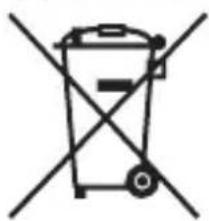
Simple line drawing of a trash bin with two crossed lines indicating no waste or prohibition (no text or symbols)Batteries contain substances that are harmful to the environment and should not be disposed of with normal household waste. Dispose of them in accordance with the applicable regulations and standards at the collection points.
DISPOSAL OF USED ELECTRICAL AND ELECTRONIC EQUIPMENT

natural_image
Simple line drawing of a trash bin with two crossed lines indicating no waste or prohibition (no text or symbols)The symbol on the product or on its packaging indicates that this product does not belong to household waste. It is necessary to take it to a collection point for electrical recycling and electronic equipment.
By ensuring proper disposal of this product, you will help prevent negative consequences to the environment and human health that would otherwise be caused by inappropriate disposal of this product. For more detailed information about recycling of this product, please contact your local authority, your household waste disposal service or the shop where you purchased the product.

This product meets all the essential requirements of the EU directives that apply to it.
- Intended use of the device
- Warning!
- Safety instructions for using the device
- Read all instructions before using the device!
- General instructions
- Characteristics of the operating environment
- Special safety instructions
- Operation/Supervision
- Device information
- Purpose of use
- Power supply (power bank charging)
- Charging devices from the powerbank
- Cable charging
- Wireless charging
- Troubleshooting
- Notifications!
- This device cannot be charged.
- Maintenance
- Cleaning the surface of the device
- Technical specifications
- Generally
- Producer:
- Importer:
- BATTERY DISPOSAL
- DISPOSAL OF USED ELECTRICAL AND ELECTRONIC EQUIPMENT
Brand : Orava
Model : WCH-004
Category : Mobile Device Charger