DP740K - Piano Medeli - Free user manual and instructions
Find the device manual for free DP740K Medeli in PDF.


| Product Type | Digital Piano |
| Model | DP740K |
| Brand | Medeli |
| Number of Keys | 88 |
| Key Action | Weighted Hammer Action |
| Touch Sensitivity | 3 Levels + Fixed |
| Polyphony | 128 Notes |
| Built-in Voices | 30+ (Acoustic Piano, Electric Piano, Organ, etc.) |
| Pedals | 3 (Soft, Sostenuto, Damper) |
| Speakers | 2 x 6.5 inch, 20W each |
| Connectivity | USB-MIDI, MIDI In/Out, Headphone Jack (2), Audio Out |
| Dimensions (W x D x H) | 1370 x 350 x 770 mm |
| Weight | 38 kg |
| Power Supply | AC Adapter (DC 12V, 2.5A) |
| Power Consumption | 30W |
| Auto Power Off | Yes (adjustable) |
| Transpose | Yes (-6 to +5 semitones) |
| Metronome | Yes (tempo adjustable) |
| Recording | 2 Tracks, 1 Song |
| Demo Songs | 15 |
| Cleaning | Use a soft, dry cloth. Avoid solvents. |
| Safety | Keep away from moisture, heat, and direct sunlight. |
| Repairability | Contact authorized Medeli service center for parts and repairs. |
Frequently Asked Questions - DP740K Medeli
User questions about DP740K Medeli
0 question about this device. Answer the ones you know or ask your own.
Ask a new question about this device
Download the instructions for your Piano in PDF format for free! Find your manual DP740K - Medeli and take your electronic device back in hand. On this page are published all the documents necessary for the use of your device. DP740K by Medeli.
USER MANUAL DP740K Medeli
natural_image
Line drawing of a grand piano with visible keys and base plate (no text or symbols)
INFORMATION FOR YOUR SAFETY!
THE FCC REGULATION WARNING (for USA)
This equipment has been tested and found to comply with the limits for a Class B digital device, pursuant to Part 15 of the FCC Rules.
These limits are designed to provide reasonable protection against harmful interference in a residential installation. This equipment generates, uses, and can radiate radio frequency energy and, if not installed and used in accordance with the instructions, may cause harmful interference to radio communications. However, there is no guarantee that interference will not occur in a particular installation.
If this equipment does cause harmful interference to radio or television reception, which can be determined by turning the equipment off and on, the user is encouraged to try to correct the interference by one or more of the following measures:
■ Reorient or relocate the receiving antenna.
■ Increase the separation between the equipment and receiver.
■ Connect the equipment into an outlet on a circuit different from that to which the receiver is connected.
■ Consult the dealer or an experienced radio/TV technician for help.
Unauthorized changes or modification to this system can void the user's authority to operate this equipment.
CAUTION
The normal function of the product may be disturbed by Strong Electro Magnetic Interference. If so, simply reset the product to resume normal operation by following the owner's manual. In case the function could not resume, please use the product in other location.
PRECAUTIONS
PLEASE READ CAREFULLY BEFORE PROCEEDING
Please keep this manual in a safe place for future reference.
Power Supply
Please connect the designated DC adaptor to an AC outlet of the correct voltage.
Do not connect it to an AC outlet of voltage other than that for which your instrument is intended.
Unplug the DC power adaptor when not using the instrument, or during electrical storms.
Connections
Before connecting the instrument to other devices, turn off the power to all units. This will help prevent malfunction and / or damage to other devices.
Location
Do not expose the instrument to the following conditions to avoid deformation, discoloration, or more serious damage:
■ Direct sunlight
■ Extreme temperature or humidity
■ Excessive dusty or dirty location
■ Strong vibrations or shocks
■ Close to magnetic fields
Interference with other electrical devices
Radios and televisions placed nearby may experience reception interference. Operate this unit at a suitable distance from radios and televisions.
Cleaning
Clean only with a soft, dry cloth.
Do not use paint thinners, solvents, cleaning fluids, or chemical-impregnated wiping cloths.
Handling
Do not apply excessive force to the switches or controls.
Do not let paper, metallic, or other objects into the instrument. If this happens, remove the electric plug from the outlet. Then have the instrument inspected by qualified service personnel.
Disconnect all cables before moving the instrument.

Contents
Setup
Component Guide....4
Setup Guide....4
Panel & Display Description
Front Panel....7
LCD Display....8
Connections....9
Power Supply....10
Adjusting the Master Volume....10
Adjusting the Brilliance....10
Playing the Demos....11
Playing the Voices
Playing a Voice....11
Playing Two Voices Simultaneously....12
Playing Different Voices with Both Hands....12
Transpose....13
Piano Mode....13
Twinova 14
Auto Accompaniment
Playing Only the Rhythm Tracks....15
Playing All Tracks of a Style....15
Accompaniment Variations....16
Chord Basics....16
Adjusting the Tempo....17
One Touch Setting....18
Metronome....18
Metronome Beat....18
Mixer....19
DSP Effect....20
Harmony....21
Function Menu
Tune....23
Octave....23
Touch Response....23
Chord Type....23
Lower Split Point....23
Twinova Split Point / Octave....23
Harmony Type....24
EQ....24
String Resonance....24
Soft Pedal....24
Freeze....25
Metronome Beat....25
Fade Time....25
MIDI Out Channel....25
Song Looping....25
Auto Power Off....25
System Time....26
Bluetooth Auto Link....26
Factory Reset......26
Performance Memory
Registering the Panel Settings....27
Recalling the Memory Settings....27
Selecting a Memory Bank....27
Freezing Specific Settings....27
Song Recording....28
MIDI Recording
Prepare Recording....28
Start Recording....28
Stop Recording....28
Play Back Recording....28
Audio Recording....29
Song
Play the Songs....30
Control the Song Playback....30
Practice the Songs....30
Bluetooth....31
Connecting USB Flash Drive
Playing....32
Saving....32
Loading....32
Formatting....32
MIDI
What's MIDI?......33
Troubleshooting....33
Specifications....34
Appendices
Voice List....36
Style List....47
Song List....49
Demo List....49
Chord List....50
MIDI Implementation Chart ....51
Setup
This section contains information about setting up your instrument and preparing to play. Please read through this section carefully before turning the power on.
Component Guide
Check that all the parts listed below are included before proceeding to the Setup Guide.
Setup Guide
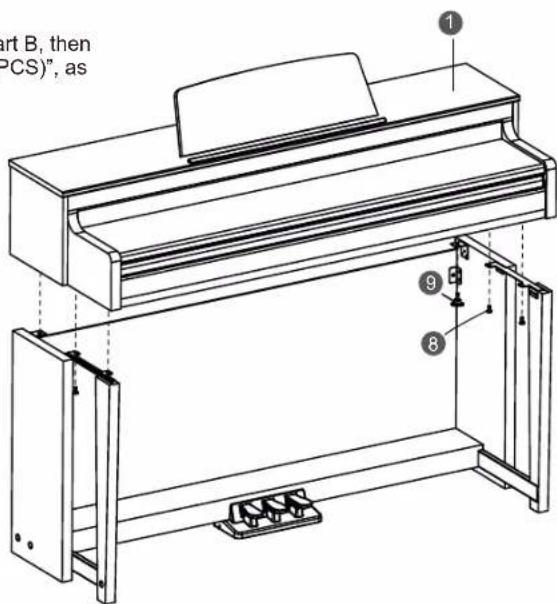
To assemble the stand, you will need a Phillip's screwdriver (not supplied).
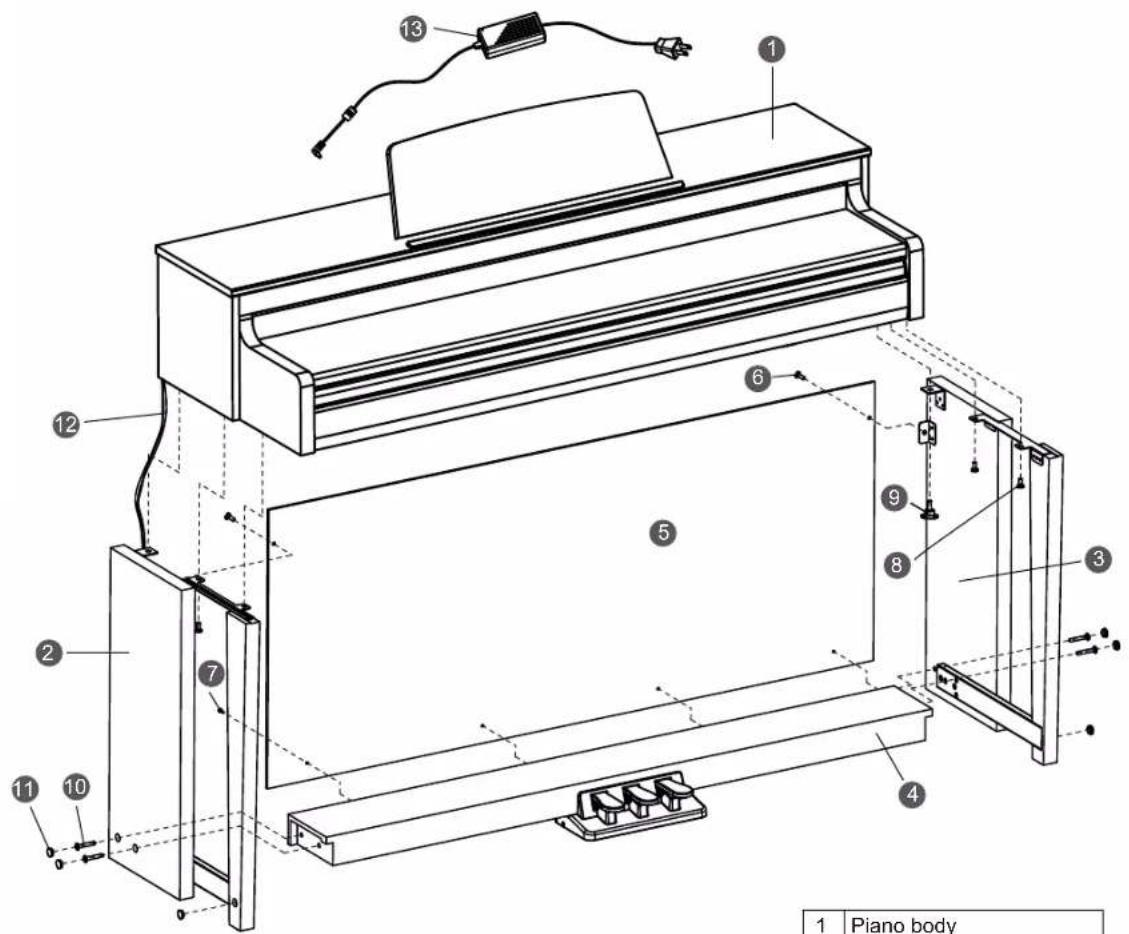
| 1 | Piano body |
| 2 | Left stand component |
| 3 | Right stand component |
| 4 | Pedal assembly |
| 5 | Back board |
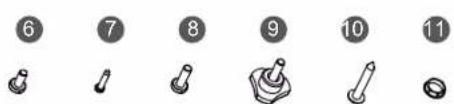
| 6 | Screws 6x12 BM (2PCS) |
| 7 | Screws 4x15 PA (4PCS) |
| 8 | Screws 6x18 BM (4PCS) |
| 9 | Hand screws (2PCS) |
| 10 | Screws 6x50 PA (4PCS) |
| 11 | Screw caps (6PCS) |
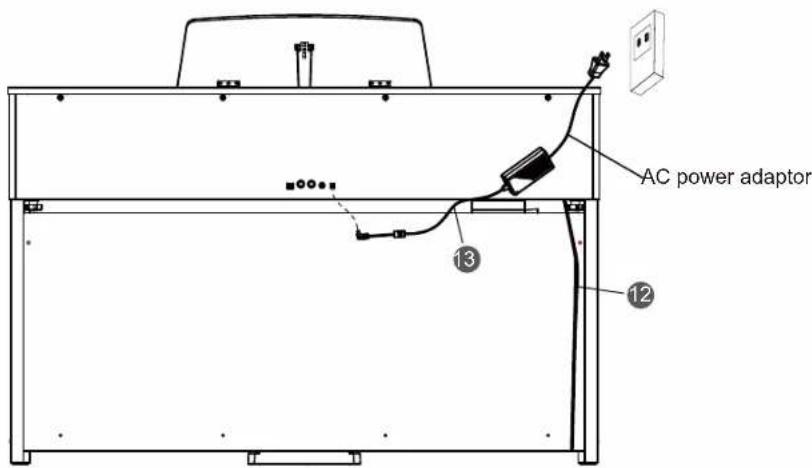
| 12 | Pedal cable |
| 13 | AC power adaptor |




04




Setup
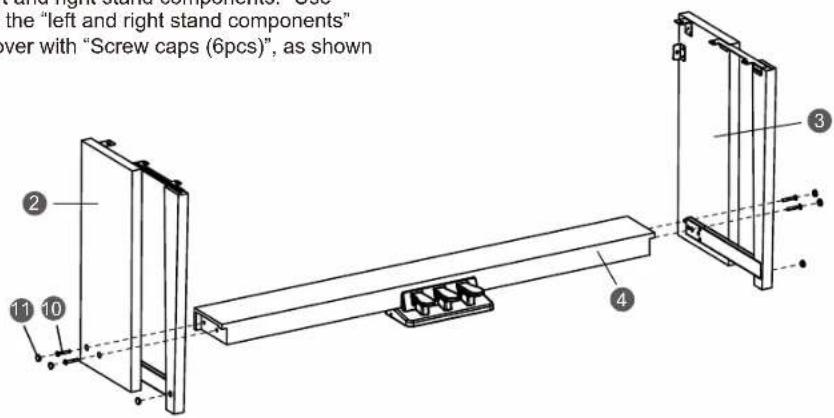
A. Put the "pedal box" between the "left and right stand components." Use "Screws 6x50PA (4pcs)" to stabilize the "left and right stand components" onto to the pedal assembly, then cover with "Screw caps (6pcs)", as shown in the picture.
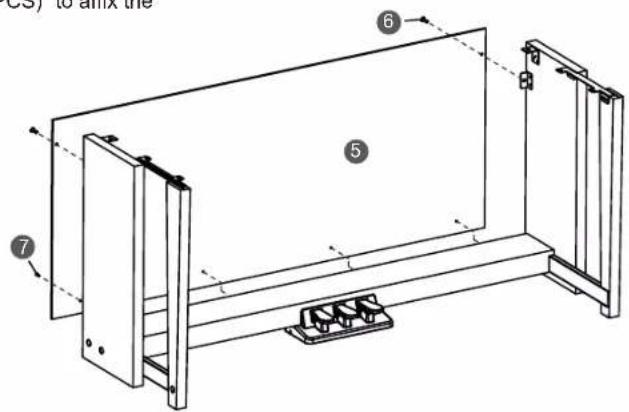
B. Use "Screws 6x12BM(2PCS)" and "Screws 4x15PA(4PCS)" to affix the back board to the stands, as shown in the picture.
C. Put the "piano body" on the top of the assembly finished in part B, then affix it with "Screws 6x18 BM (4PCS)" and "Hand Screws (2PCS)", as shown in the picture.






Setup
D. Connect the "pedal cable" to the pedal jack at the bottom rear of the Piano. Then connect the power cable to the power jack, and plug the other end into an AC outlet. At this point the Piano is fully assembled and you can turn on the power.


Panel & Display Description
Front Panel

- [POWER] Switch
Turn the power on or off.
- [VOLUME] Knob
Adjust the master volume.
- [BRILLIANCE] Knob
Adjust the brilliance.
- [REC] Button
USB flash drive inserted: press the button to enter Audio Recording. USB flash drive not inserted: press the button to enter MIDI Recording. Press and hold the button to enter the recording setting menu.
- [TEMPO +/-] Buttons
Press to edit the tempo value.
- STYLE Select Buttons
Directly set a preset style. Press a button once to select the first preset style, press it again to select the second preset style.
- [A.B.C.] Button
Press it to turn the A.B.C. function on or off. Press and hold it to enter the Chord setting menu.
- [FADE IN/OUT] Button
Press it to turn the Fade In or Fade Out on or off. Press and hold it to enter the Fade Time setting menu.
- [INTRO/ENDING 1] Button
Play the Intro or Ending pattern 1.
- [INTRO/ENDING 2] Button
In style mode: play the Intro or Ending pattern 2. In song mode: mute/activate the left hand part.
- [MAIN A] Button
In style mode: play the Main pattern A. In song mode: mute/activate the right hand part.
- [MAIN B] Button
In style mode: play the Main pattern B. In song mode: play the current song in a loop.
- [MAIN C] Button
In style mode: play the Main pattern C. In song mode: play all songs in a loop.
- [MAIN D] Button
In style mode: play the Main pattern D. In song mode: rewind the song playback. In Bluetooth mode: play the previous Bluetooth song.
- [SYNC STOP] Button
In style mode: turn the Sync Stop function on or off. In song mode: fast forward the song playback. In Bluetooth mode: play the next Bluetooth song.
- [SYNC START] Button
In style mode: turn the Sync Start function on or off. In song mode: pause the song playback. In Bluetooth mode: pause playing the Bluetooth song.
- [START/STOP] Button
Start or stop playing a song or a style. Start or stop playing a Bluetooth song.
- [METRO] Button
Press it to turn the Metronome on or off. Press and hold it to enter the Metronome setting menu.
- [FUNCTION] Button
Press it to enter the Function menu.
- [DEMO] Button
Press it to enter Demo mode.
- [MIXER] Button
Press it to enter the Mixer menu.
- [STYLE] Button
Press it to enter Style mode.
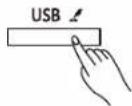
- [USB] Button
Press it to enter the USB Play menu. Press and hold it to enter the USB menu.
- [VOICE] Button
Press it to enter Voice mode.
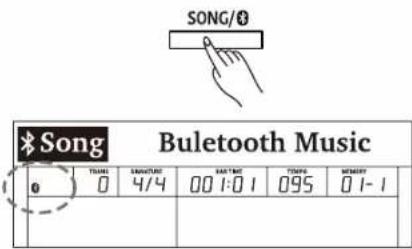
- [SONG/ Ⓞ] Button
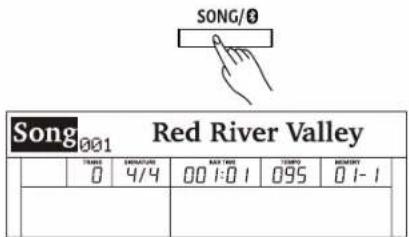
When Bluetooth is disabled, press it to enter Song mode. When Bluetooth is connected, press it once to enter Bluetooth mode, press it again to switch to Song mode.






Panel & Display Description

26. Data Dial
Adjust the parameters.
27. [+/YES] Button
Increase the value.
Press [+/YES] and [-/NO] together to restore default settings.
28. [-/NO] Button
Decrease the value.
Press [+/YES] and [-/NO] together to restore default settings.
29. [BANK] Button
Select a memory bank.
30. [FREEZE] Button
Press it to turn the Freeze function on or off.
Press and hold it to enter the Freeze setting menu.
31. [STORE] Button
Save current panel settings to one of the memories.
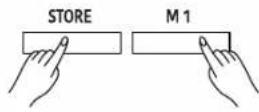
Press [STORE] and [M1] together to save the settings to M1.
32. VOICE Select Buttons
Directly select a preset voice. Press a button once to select the first preset voice, press it again to select the second preset voice.
33. [M1]-[M6] Buttons
In memory mode: recall panel settings from one of the memories. In O.T.S. mode: recall voice settings that match the current style.
34. [O.T.S.] Button
Press it to turn the One Touch Setting function on or off.
35. [DUAL] Button
Press it to turn the Dual function on or off.
36. [PIANO] Button
Press it to enter Piano Mode.
37. [LOWER] Button
Press it to turn the Lower function on or off. Press and hold it to enter the Split Point setting menu.
38. [TWINOVA] Button
Press it to turn the Twinova function on or off. Press and hold it to enter the Twinova Split setting menu.
39. [HARMONY] Button
Press it to turn the Harmony function on or off. Press and hold it to enter the Harmony setting menu.
40. [TRANSPOSE +/-] Buttons
Adjust the transpose value.
41. [DSP] Button
Press it to turn the DSP effect on or off. Press and hold it to enter the DSP setting menu.
LCD Display
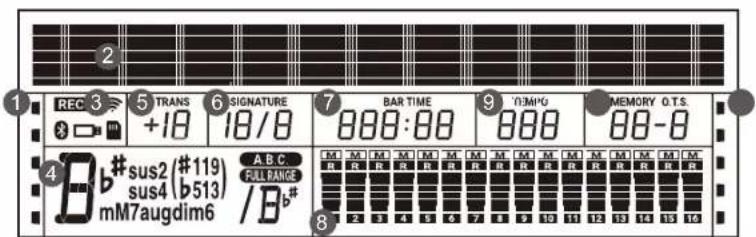
-
Function Indicators
-
192x16 Dot Matrix LCD
-
Function Indicators
-
Chord
-
Transpose
-
Beat
-
Measure/Beat/Time
-
During playback, shows the MIDI Channel Volume When playback stops, shows the track Volume
-
Tempo
-
Memory/O.T.S.
-
Function Indicators
Connections
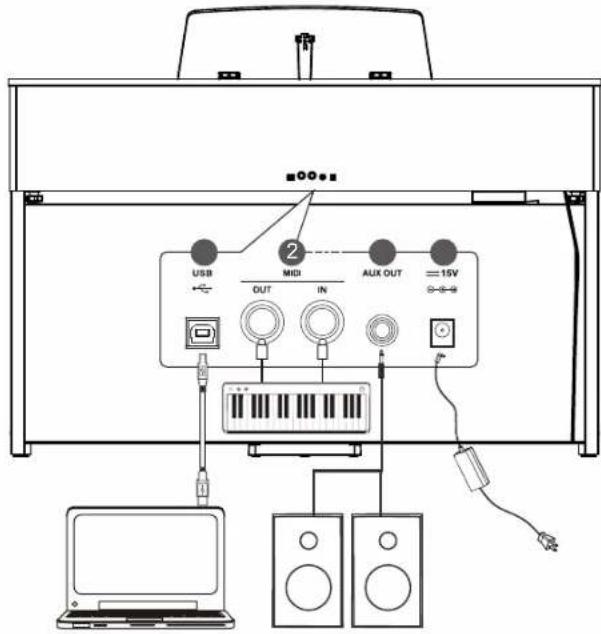
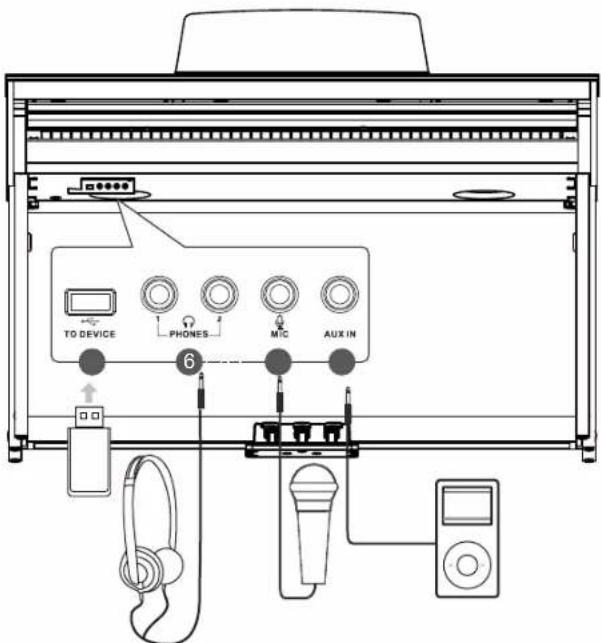
1. USB Jack
Use a standard USB cable to connect the USB jack of the instrument to the USB port of a computer. With USB, you can save a keyboard performance to the computer or use the instrument to play back music played on the computer.
Note:
Do not set the USB MIDI device to be both input and output simultaneously when configuring the software on your computer. Otherwise, the sound will be overlapped when playing the keyboard.
2. MIDI OUT, MIDI IN Jacks
Use a standard MIDI cable to connect the MIDI OUT jack of the instrument to the MIDI IN jack of an external device. The instrument will transmit MIDI messages to the external device and work as a MIDI controller.
Use a standard MIDI cable to connect the MIDI IN jack of the instrument to the MIDI OUT jack of an external device. The instrument will receive MIDI messages from the external device and work as a sound source.
3. AUX OUT Jack
The AUX OUT jack delivers the output of the instrument to external audio equipment such as a keyboard amplifier, stereo sound system, mixing console, or recording interface. Use an audio cable to connect the AUX OUT jack of the instrument to the INPUT jack of the external audio equipment.
Notes:
-
Turn off the power to all devices before connecting or disconnecting external equipment.
-
To avoid damaging the speakers, set the master volume level to minimum before turning on the power.
4. DC IN Jack
Connect the specified power adaptor.
5. USB Port
Connect a USB flash drive to the instrument to save the data you've created to the USB flash drive. You can also load files from a USB flash drive to the instrument, or use the instrument to play back files saved on USB flash drive.
Note:
To avoid errors or damaging the USB flash drive, do not remove it when reading or writing is in progress
6. PHONES Jack
Plug a pair of standard stereo headphones into the PHONES jack for private practice or late-night playing. When headphones are connected, the internal speakers will be muted, and the sound can only be heard from the headphones.
Note:
To avoid the risk of hearing loss, do not use headphones at high volume level for a long period of time.
7. MIC Jack
Before connecting or disconnecting a microphone, set the master volume level to minimum. Plug the microphone into the MIC jack, then adjust the master volume to an appropriate level.
Note:
Please unplug the microphone when it is not in use.
8. AUX IN Jack
The AUX IN jack receives audio signals from an external audio source such as an MP3 or a CD player. Use an audio cable to connect the AUX IN jack of the instrument to the OUTPUT jack of an MP3/CD player. The instrument's speakers will play the music transmitted from the external player, and you can play along.

Power Supply
- Before connecting the power supply, please set the [POWER] switch to "OFF" and set the master volume level to minimum.
- Connect the power adaptor to the DC IN jack on the rear panel.
- Plug the power adaptor into an appropriate AC outlet.
- Press the [POWER] switch. The LCD will light up and display the welcome interface, indicating the instrument is powered on.
- When you are ready to turn the instrument off, press and hold the [POWER] switch for a second. The LCD light will turn off.
Notes:
- In order to save energy, the instrument will automatically shut down after 30 minutes when not in use. (see Auto Power Off).
- For your safety, please unplug the instrument when it is not in use or during a thunderstorm.
Adjusting the Master Volume
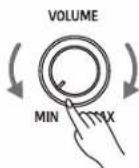
Rotate the [VOLUME] knob clockwise to increase the master volume or counter-clockwise to decrease it. Adjust to set the desired volume level.
Note:
If the speakers do not produce sound, check if the master volume is set too low or if headphones are plugged into the PHONES jack.
Adjusting the Brilliance
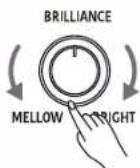
Use the [BRILLIANCE] knob to adjust the overall brilliance level. The brilliance is set to medium by default. Rotate the knob clockwise to brighten the sound, or counter-clockwise to mellow the sound.
Playing the Demos
The instrument features several professional demos. Please refer to the Demo List for details.
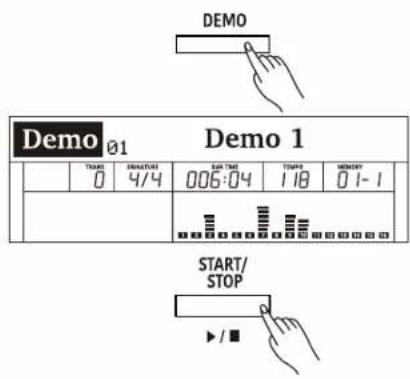
- Start playing the demo. Press the [DEMO] button to enter Demo mode and start playing the demos in a continuous loop. The LCD shows the current demo number and name.
- Select a demo. Use the data dial or [+/Yes]/[-/No] buttons to select a desired demo.
- Stop playing the demo. Press the [START/STOP] button to stop playing and exit Demo mode.
Note:
During demo playback, playing the keyboard will not produce sound.

Playing the Voices
The instrument features a variety of realistic voices. Please refer to the Voice List for details.
Playing a Voice
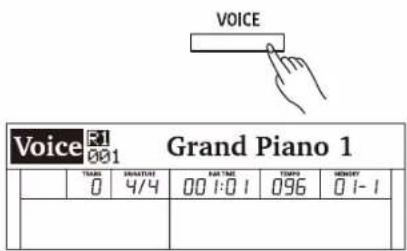
- Enter the voice mode. Press the [VOICE] button or one of the VOICE select buttons to enter Voice mode. The "R1" indicator appears and the LCD shows the current voice number and name.
- Select a voice to play. Use the data dial or [+/Yes]/[-/No] buttons to select a desired voice. You can also use the VOICE select buttons to select a preset voice.
- Play the selected voice. Play the keyboard to use the selected voice for performance.
Playing the Voices
Playing Two Voices Simultaneously
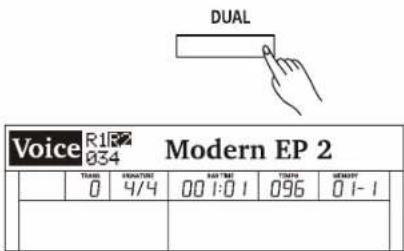
The Dual function allows two different voices to be layered together, creating a more full and rich sound. Turn this function on and select a voice for the dual voice "R2".
- Turn on the dual function.
Press the [DUAL] button to turn on the Dual function. The "R2" indicator appears and the LCD shows the current dual voice number and name.
- Select a dual voice.
Use the data dial or [+/Yes]/[-/No] buttons to select a dual voice. You can also use the VOICE select buttons to select a preset voice.
- Play the voices.
Play the keyboard and you will hear two different voices playing together, just like two different instruments being played at the same time.
- Turn off the dual function.
Press the [DUAL] button again to turn off the Dual function.
Playing Different Voices with Both Hands
The Lower function splits the keyboard into two areas so as to create different voices for each of your hands. The left hand voice is the lower voice "L".
- Turn on the lower function.
Press the [LOWER] button to turn on the Lower function. The "L" indicator appears. The LCD shows the current lower voice number and name.
- Select a lower voice.
Use the data dial or [+/Yes]/[-/No] buttons to select a lower voice. You can also use the VOICE select buttons to select a preset voice.
- Play the voices.
Play the keyboard with both hands and you will hear two different voices from the left and right hand areas.
- Set the lower split.
Press and hold the [LOWER] buttons to enter the lower split setting menu, then use the [+/Yes]/[-/No] buttons or press a key on the keyboard to assign the lower split.
Press [+/YES] and [-/NO] at the same time to restore the default lower split.
- Turn off the lower function.
Press the [LOWER] button again to turn off the lower function.
Switch between Voice R1 / R2 / L
The voice "R1" is turned on by default, and cannot be turned off. The dual voice "R2" and lower voice "L" can be turned on/off as desired. In voice mode, when the R1, R2, and L voices are all in use, you can press the [VOICE] button repeatedly to switch between different voice layers.
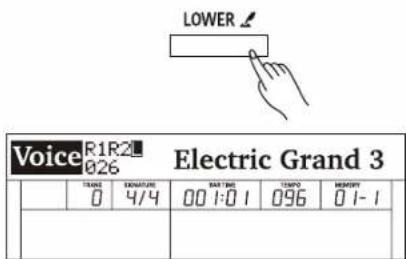

Playing the Voices
Lower Split
The key that splits the keyboard into the left and right hand areas is called "Lower Split". The default lower split is F#3 (34), however, you can assign it to any other key. Please refer to the Function Menu for details.
Notes:
- When the Lower and Dual functions are in use, only the right hand area will play the dual voices.
- You can adjust the volume for voice R1/ R2/ L separately in the Mixer. Please refer to Mixer for details.
Transpose
The transpose function allows the overall pitch of the instrument to be transposed up or down by a maximum of one octave in semitone steps.
-
Enter the transpose setting interface. Press the [TRANSPOSE+] / [TRANSPOSE-] buttons to edit the transpose setting. The LCD shows the current transpose value.
-
Adjust the transpose value. Use the data dial, [+/Yes]/ [-/No] buttons or [TRANSPOSE+] / [TRANSPOSE-] to adjust the transpose value.
-
Reset the transpose to default. Press the [TRANSPOSE+] and [TRANSPOSE-] buttons at the same time to reset the value to default.
Notes:
- For example, if you set the transpose value to -05 or 007, you will hear "G" pitch when playing the "C" keys.
- Transpose setting applies to the accompaniment and the entire keyboard voice.
| FUNC LOWER SPLIT F#3 | ||||||
| TRANS0 | SUBTURE4/4 | PART TIME00 1:0 1 | COMP0096 | MEMBUT0 1-1 | ||
Default Lower Split
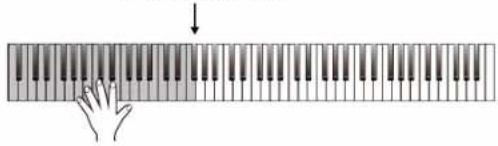
natural_image
Illustration of a hand pressing down on a piano keyboard with a downward arrow indicating compression (no text or symbols)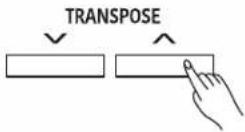
| Voice R1 Grand Piano 1 | |||||
| THANK DENNATURE (+1) 4/4 | RAT TIME 00 1:0 1 | THANK 096 | MENCHY 01-1 | ||
Piano Mode
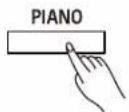
Piano Mode is specially designed for piano players. It recreates the voice and touch of a real acoustic piano. By pressing the [PIANO] button, the instrument replicates a concert grand voice. All parameters become optimized for concert piano performance.
Press the [PIANO] button to enter or exit Piano Mode.
Note:
In Piano Mode, the Dual and Lower functions will not be available.
| Concert Grand | ||||||
| TRAVEL0 | DUCUMULER4/4 | RAT TUN00 1:0 1 | TANTO096 | MOMERY0 1-1 | ||
Twinova
The Twinova function splits the keyboard into two areas with the same pitch and voice, for the convenience of playing together with a friend or instructor.
- Turn on the Twinova function.
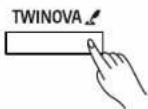
Press the [TWINOVA] button to turn on the function. The default split point is E3.
- Set the Split Point for Twinova.
Press and hold [TWINOVA] to enter the setting menu. Use the data dial to select "TWINOVA SPLIT", then use the [+/YES]/[-/NO] buttons to assign the split point. You can also tap a key on the keyboard to assign the split point to that key.
- Set the Octave for Twinova.
Press and hold [TWINOVA] to enter the setting menu. Use the data dial to select "TWINOVA OCTAVE", then use the [+/Yes]/[-/No] buttons to adjust the octave range from -2 to +2.
| Twinova | ||||||
| TRADE0 | STRUMENT44/4 | RAS TRIN00 1:0 1 | TRAPE096 | MENOMY0 1-1 | ||
| Func TWINOVA SPLIT E3 | ||||||
| TEAM | SERVICE | DATE | TIME | ORDER | ||
| 0 | 4/4 | 00 1:0 1 | 078 | 01-1 | ||
| Func TWINOVA OCTAVE 0 | ||||||
| TIME0 | SMRUCTORE4/4 | BAR TIME00 1:0 1 | TIME00'18 | MOSSEM00'1-1 | ||
Pedal Function in Twinova
Left Pedal: notes played on the left hand area will have longer sustain.
Middle Pedal: notes played on both areas will have longer sustain.
Right Pedal: notes played on the right hand area will have longer sustain.
Note:
In Twinova mode, both the Dual and Lower functions will not be available.

Auto Accompaniment
The auto accompaniment function puts a full backing band at your fingertips. All you have to do is to play chords with your left hand, and the accompaniment will automatically play along, following the chords you play. With auto accompaniment, even a solo performer can enjoy the experience of playing with a full band or orchestra.
The instrument features a variety of styles. Please refer to the Style List for details.
Playing Only the Rhythm Tracks
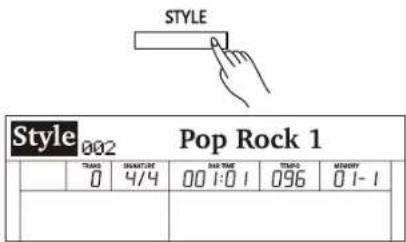
- Enter the style mode. Press the [STYLE] button to enter Style mode. The LCD shows the current style number and name.
- Select a style to play. Use the data dial or [+/Yes]/[-/No] buttons to select a desired style. You can also use the STYLE select buttons to select a preset style.
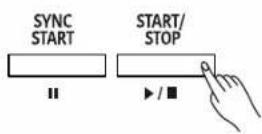
- Start playing auto accompaniment of the rhythm tracks. Press the [START/STOP] button to start playing the rhythm tracks. Alternatively, press the [SYNC START] button, then play the keyboard to start rhythm playback.
Playing All Tracks of a Style
During rhythm playback, if you turn on the chord mode and then play a chord on the keyboard, it will start the chord part as well.
In chord mode, you can play chords in the following ways: Fingered, Multi-finger, Bass Invert and Full Range. Except for Full Range, the other three will divide the keyboard into two areas (same as in the Lower function).
| Chord Type | Description |
| Fingered | Automatically detects Single Finger and Multi Finger chords. |
| Multi Finger | Detects only Multi Fingerchords. |
| Bass Invert | Detects Multi Finger chord inversion of bass track. |
| Full Range | Detects Multi Finger chords over the entire keyboard range and supports Bass Invert. |
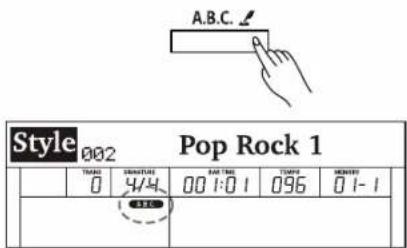
- Turn on the A.B.C. function. Press the [A.B.C.] button to turn on the A.B.C. Function. The LED button lights up. Press the button repeatedly to switch between "A.B.C." → "FULL RANGE" → "OFF".
To select a desired way to play chords, press and hold the [A.B.C.] button to enter the setting menu, then use the [+/YES]/[-/NO] buttons to select a chord type.
- Start playing auto accompaniment of all tracks. Press the [SYNC START] button to turn on the Sync Start function. The LED button lights up. When you play a chord in the chord section, it will start the auto accompaniment of all tracks. When you play a different chord, the accompaniment will change along with you.
Alternatively, press the [START/STOP] button to start rhythm playback. Then play a chord in the chord section, and the chord part will start as well.
| Func CHORD Fingered | ||||||
| THA0 | SINNATUR 4/4 | BAR TIME 00 1:0 1 | SHORT 078 | HOMONT 01-1 | ||






Auto Accompaniment
Accompaniment Variations
Specially created variation patterns can be added into the accompaniment, making your performance more professional and personalized.
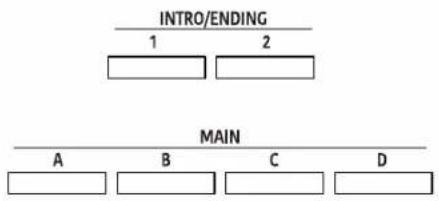
INTRO
The Intro is the opening section of a song. When the Intro pattern is finished, it will automatically shift to the selected Main section. The length of the Intro section differs depending on the selected style.
MAIN
The Main is the principal section of a song. It will play and repeat the Main pattern until another section's button is pressed.
FILL IN
The Fill-in will automatically add a fill to your performance. When the Fill-in pattern is finished, it will shift to the related Main section.
ENDING
The Ending is the ending section of a song. When the Ending pattern is finished, the accompaniment will stop as well.
The length of the Ending section differs depending on the selected style.
Note:
During style playback, if you press and hold one of the MAIN [A]-[D] buttons, the Fill-in pattern will repeat until the button is released. Playback will then switch to the related Main section.
Chord Basics
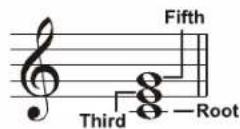
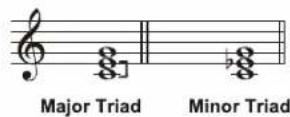
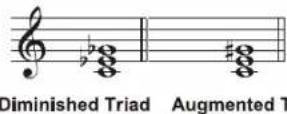
A chord, in music, is a harmonic set of three or more notes that are heard simultaneously. The most common type of chord is a triad. A triad is a set of three notes that can be stacked in thirds. When arranged this way, the triad's notes, from lowest pitched to highest, are called: the Root, the Third, and the Fifth.
Triad Type
The basic triad types are as follows:
| Major Triad | A root with a major third added above and a perfect fifth constitutes a “Major Triad”. |
| Minor Triad | A root with a minor third added above and a perfect fifth constitutes a “Minor Triad”. |
| Augmented Triad | A root with a major third added above and an augmented fifth constitutes an “Augmented Triad”. |
| Diminished Triad | A root with a minor third added above and a diminished fifth constitutes a “Diminished Triad”. |
Chord Inversion
When a chord's root is not the lowest note in the triad, it is called an inversion chord. When the root note is the lowest note, it is called a root-position chord. If we put the Third and Fifth in the root position, it forms an "Inversion", so it is called an "Inverted Chord". A major triad and its inversion are illustrated on the right.
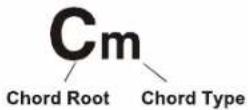
Chord Name
The chord name consists of two parts: Chord root and Chord type.
flowchart
graph TD
    A["MAIN"] --> B["A"]
    A --> C["B"]
    A --> D["C"]
    A --> E["D"]
    F["INTRO/ENDING"] --> G["1"]
    F --> H["2"]

Root Position First Inversion Second Inversion
Auto Accompaniment
Single Finger
Single-finger makes it easy to produce major, seventh, minor and minor seventh chords by pressing a minimum number of keys on the auto accompaniment section.
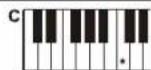
★Major Triad
Only press the root note on the keyboard.
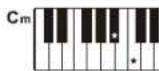
★Minor Triad
Press the root note and the nearest left black key simultaneously.
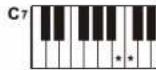
★Seventh chord
Press the root note and the nearest left white key simultaneously.
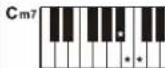
*Minor seventh chord
Press the root note and the nearest left white and black keys simultaneously.
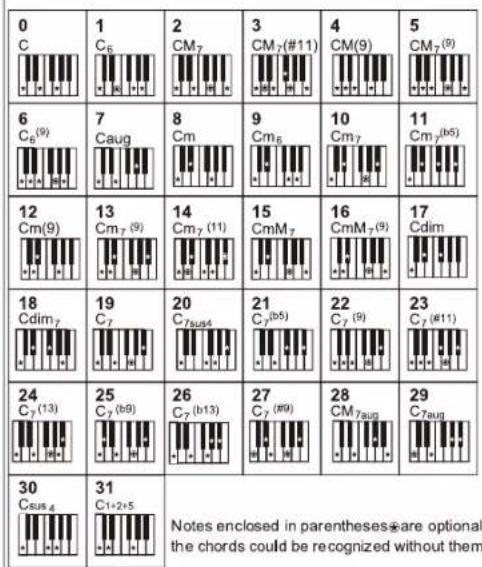
Multi-finger
Multi-finger allows you to play chords in normal fingering. Try playing the 32 types of C chords listed on the right.
Full Range
In Full Range mode, it detects chords played in normal fingering (Multi-finger) over the entire keyboard range.
Adjusting the Tempo
Each style is preset with a default or standard tempo, but you can change it as needed.
- Adjust the tempo.
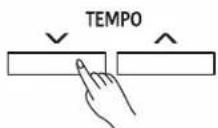
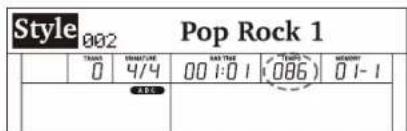
Press the [TEMPO+]/[TEMPO-] buttons to edit the tempo setting. The tempo value will flash on the LCD.
Use the data dial or [+/YES]/[-/NO] buttons to change the value.
- Reset the tempo to default.
When the tempo value is flashing, press the [+/YES] and [-/NO] buttons at the same time to reset the tempo to default.
Note:
When style stops, changing the style will automatically reset the tempo. However, changing the style during style playback will not result in tempo change.






Auto Accompaniment
One Touch Setting
When One Touch Setting is switched on, you can instantly recall all auto accompaniment related settings including voice selection and digital effects, all with the single touch of a button.
-
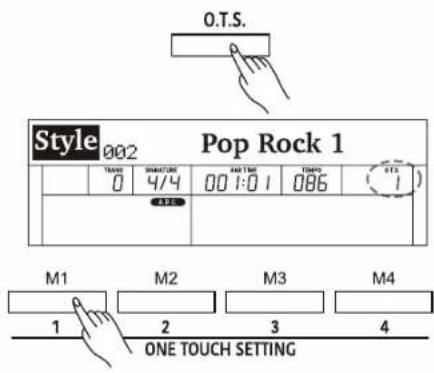
Turn on the One Touch Setting function. Press the [O.T.S.] button to turn on the function. The "O.T.S" indicator lights up and the A.B.C. function will be turned on.
-
Recall the settings in O.T.S. mode. Press one of the [M1] - [M4] buttons. Various panel settings (including voice and effects) that match the current style will be recalled instantly. Each style has 4 preset settings.
Parameters in One Touch Setting:
Part on/off, voice number, voice volume, voice octave setting, voice reverb level, voice chorus level, voice pan.
Note:
In O.T.S. mode, the Performance Memory is not available.
Metronome
The metronome provides a steady beat to help you practice at a preset tempo.
-
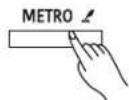
Turn on the metronome. Press the [METRO] button to turn on the metronome. Beats on the LCD will flash in sync with the metronome sound.
-
Turn off the metronome. Press the [METRO] button again to turn off the metronome.
Notes:
- If you turn on the metronome during style playback, the metronome sound will start from the next beat and its time signature will match the current style.
- In MIDI Recording, if can turn on the metronome, the metronome sound will not be recorded.
- In Audio Recording, if you turn on the metronome, the metronome sound will be recorded.
Metronome Beat
Press and hold the [METRO] button to enter the setting menu, then use the [+/YES]/[-/NO] buttons to change the metronome beat.
| Func METRO 4/4 | ||||||
| TEAM0 | MEMSURE4/4 | RAN TIME00 1:0 1 | TIME096 | MEOFF01-1 | ||
Mixer
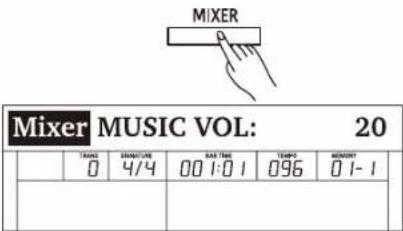
The Mixer function allows you to separately adjust the volume of each track, so as to keep an appropriate volume balance.
- Enter the Mixer menu.
Press the [MIXER] button to enter the Mixer menu. The LCD shows the current parameter.
- Select a parameter.
Use the data dial to select a parameter.
- Adjust the volume level.
Use the [+/YES]/ [-/NO] buttons to adjust the volume of the current item. Press [+/YES] and [-/NO] at the same time to switch between the default volume and muting the volume.
Detailed parameters and their volume ranges:
| Parameter | LCD Display | Volume Range | |
| Music volume | MUSIC VOL: | xxx | 0 - 32 |
| Voice R1 volume | R1 VOL: | xxx | 0 - 32 |
| Voice R2 volume | R2 VOL: | xxx | 0 - 32 |
| Voice L volume | L VOL: | xxx | 0 - 32 |
| Metronome volume | METRO VOL: | xxx | 0 - 32 |
| Mic volume | MIC VOL: | xxx | 0 - 32 |
| Rhythm sub. volume | RHYTHM_S VOL: | xxx | 0 - 32 |
| Rhythm master volume | RHYTHM_M VOL: | xxx | 0 - 32 |
| Bass volume | BASS VOL: | xxx | 0 - 32 |
| Chord 1 volume | CHORD1 VOL: | xxx | 0 - 32 |
| Chord 2 volume | CHORD2 VOL: | xxx | 0 - 32 |
| Chord 3 volume | CHORD3 VOL: | xxx | 0 - 32 |
| Phrase 1 volume | PHRASE1 VOL: | xxx | 0 - 32 |
| Phrase 2 volume | PHRASE2 VOL: | xxx | 0 - 32 |

DSP Effect
The DSP effects will add ambiance and depth to your performance in a variety of ways. They can be set to simulate sound from a real environment, making your tone more crystal and strong, or even give you distortion for a rougher edge. Experiment with the various effects to find the ones that work best for you.
Turn the DSP Effect on or off.
The DSP effect is turned on by default. You can press the [DSP] button to turn the function on or off.
Set the DSP Effect.
- Press and hold the [DSP] button to enter the DSP settings menu.
- Use the data dial to select a parameter.
- Use the [+/YES]/ [-/NO] buttons to change the settings of the selected parameter.
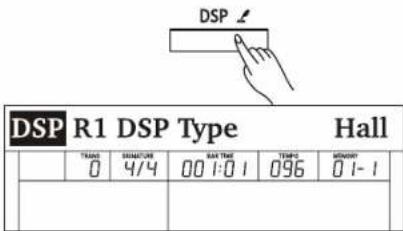
DSP effect parameters and their ranges:
| Parameter | Display | Range | |
| Voice R1 DSP Effect Type | R1 DSP TYPE | xxx | Hall, Room, Crs.Dely, Tp.Delay, Tp.Echo, Chorus, Flanger, Phaser, Overdriv, Amp, Metl.Dst, Hard.Dst, Tremolo, Auto.Wah, Tp.Wah, None(Off) |
| Voice R1 DSP Effect Level | R1 DSP LEVEL | xxx | 0-32 |
| Voice R1 Global Reverb Level Send | R1 G.REV SEND | xxx | 0-32 |
| Voice R1 Global Chorus Level Send | R1 G.CHR SEND | xxx | 0-32 |
| Voice R2 DSP Effect Type | R2 DSP TYPE | xxx | Hall, Room, Crs.Dely, Tp.Delay, Tp.Echo, Chorus, Flanger, Phaser, Overdriv, Amp, Metl.Dst, Hard.Dst, Tremolo, Auto.Wah, Tp.Wah, None(Off) |
| Voice R2 DSP Effect Level | R2 DSP LEVEL | xxx | 0-32 |
| Voice R2 Global Reverb Level Send | R2 G.REV SEND | xxx | 0-32 |
| Voice R2 Global Chorus Level Send | R2 G.CHR SEND | xxx | 0-32 |
| Voice L DSP Effect Type | L DSP TYPE | xxx | Hall, Room, Crs.Dely, Tp.Delay, Tp.Echo, Chorus, Flanger, Phaser, Overdriv, Amp, Metl.Dst, Hard.Dst, Tremolo, Auto.Wah, Tp.Wah, None(Off) |
| Voice L DSP Effect Level | L DSP LEVEL | xxx | 0-32 |
| Voice L Global Reverb Level Send | L G.REV SEND | xxx | 0-32 |
| Voice L Global Chorus Level Send | L G.CHR SEND | xxx | 0-32 |
| Microphone DSP Effect Type | MIC DSP TYPE | xxx | Echo1, Echo2, Echo3, Phaser1, Phaser2, Enhanc, Wah, Overdv1, Overdv2, Lo-Fi, Comp, Gate, None(Off) |
| Microphone DSP Effect Level | MIC DSP LEVEL | xxx | 0-32 |
| Microphone Global Reverb Level Send | MIC G.REV SEND | xxx | 0-32 |
| Microphone Global Chorus Level Send | MIC G.CHR SEND | xxx | 0-32 |
| Global Reverb Type | G.REV TYPE | xxx | Hall1, Hall2, Hall3, Hall4, Pno.Hall, Room1, Room2, Room3, Church, Garage, Std.Hall |
| Global Reverb Level | G.REV LEVEL | xxx | 0-32 |
| Global Chorus Type | G.CHR TYPE | xxx | Chorus1, Chorus2, Chorus3, Chorus4, GM.Chr1, GM.Chr2, Celeste1, Celeste2, Sympho1, Sympho2, Doubler, Std.Chr |
| Global Chorus Level | G.CHR LEVEL | xxx | 0-32 |
Note:
There may be a slight pause in the sound if you switch the DSP effect on/off while style or song is playing.

Harmony
The harmony function will automatically add harmony effect to the notes you play in the right hand area, enriching your performance with more harmonic expression.
Playing with Harmony
- Press the [HARMONY] button to turn on the function. The button LED lights up.
- Turn on the A.B.C. function, then play a chord in the left hand area. When you play in the right hand area, it will add harmony effect to the notes you play.
- Press the [HARMONY] button again to turn off the function. The LED light turns off.
Setting the Harmony Type
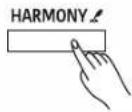
- Press and hold the [HARMONY] button to enter the settings menu.
- Use the [+/YES]/[-/NO] buttons to change the harmony type.
Notes:
Harmony type "1+5" and "octave" are always available, but the rest will not respond until you turn on the A.B.C. function and then play a chord in the chord section.
| Func HARMONY Duet | ||||||
| THANK 0 | DURATION 4/4 | DATE DATE 00 1:0 1 | DATE'S 096 | MAYDAY 01-1 | ||

Function Menu
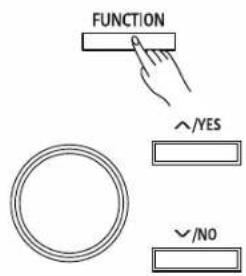
1. Enter the function menu.
Press the [FUNCTION] button to enter the function menu. The LCD shows the current parameter.
2. Adjust the settings.
Use the data dial to select a parameter. Use the [+/YES]/[-/NO] buttons to change the setting of the selected item. Press [+/YES] and [-/NO] at the same time to restore the default setting.
Note:
It will exit the function menu if there is no operation in 10 seconds.
Detailed parameters and their ranges:
| No. | Parameter | LCD Display | Range | Default |
| 1 | Tune | TUNE | -50 ~ +50 | 0 |
| 2 | Voice R1 Octave | OCTAVE R1 | -2 ~ +2 | 0 |
| 3 | Voice R2 Octave | OCTAVE R2 | -2 ~ +2 | 0 |
| 4 | Voice L Octave | OCTAVE L | -2 ~ +2 | 0 |
| 5 | Touch Response | TOUCH | Off, Soft2, Soft1, Medium1, Medium2, Hard1, Hard2 | Medium1 |
| 6 | Chord Type | CHORD | Fingered, Multi, Bass Invert | Fingered |
| 7 | Lower Split Point | LOWER SPLIT | A0 ~ C8 | F#3 |
| 8 | Twinova Split Point | TWINOVA SPLIT | A0 ~ C8 | E3 |
| 9 | Twinova Octave | TWINOVA OCTAVE | -2 ~ 2 | 0 |
| 10 | Harmony Type | HARMONY | Duet, Trio, Octave, 1+5, Country Duet, Block, 4 Close 1, 4 Close 2, 4 Open | Duet |
| 11 | EQ | EQ | Piano, Pop, Classical, Rock, Jazz,R&B | Piano |
| 12 | String Resonance | STRING RES. | 0 ~ 32 | 8 |
| 13 | Soft Pedal | SOFT PEDAL | Soft, Play, Memory | Soft |
| 14 | Freeze | FREEZE | Style, Voice, Song | Style |
| 15 | Metronome Time Signature | METRO | 2/2~12/8 | 4/4 |
| 16 | Fade In/Out Time | FADE TIME | 1 ~ 20 | 10 |
| 17 | MIDI Out Channel | MIDI OUT CH | 1 ~ 16 | 1 |
| 18 | Song Looping | SONG LOOP | Single, All, Off | All |
| 19 | Auto Power Off | POWER OFF | Never, 30 min, 60 min | 30 min |
| 20 | System Time-Year | YEAR | 2016~2100 | 2016 |
| 21 | System Time-Month | MONTH | Jan.~ Dec. | - |
| 22 | System Time-Day | DAY | 1 ~ 31 | - |
| 23 | System Time-Hour | HOUR | 0 ~ 23 | - |
| 24 | System Time-Minute | MINUTE | 0 ~ 59 | - |
| 25 | Bluetooth Auto Link | BLUETOOTH AUTO | On, Off | On |
| 26 | Restore Factory Setting | SYSTEM RESET | - | - |


Function Menu
Tune
This function adjusts the pitch of the entire keyboard in 2-cent increments over a range of ±50 (100 cents).
- In the function menu, use the data dial to select "TUNE".
- Use the [+/YES]/[-/NO] buttons to change the tune value.
Octave
This function will shift the pitch of the specified voice layer up or down by one octave.
- In the function menu, use the data dial to select "OCTAVE R1"/ "OCTAVE R2"/ "OCTAVE L".
- Use the [+/YES]/[-/NO] buttons to change the octave value.
Note:
The default octave setting of each preset voice may differ.
| Func TUNE 00 | ||||||
| TRANS0 | DETAILIVE4/4 | DAY TIME00 1:0 1 | TEMP0096 | MEMORY0 1-1 | ||
| DATE | ||||||
Touch Response
The touch response feature allows you to expressively control the voice level based on your playing dynamics, just as on an acoustic instrument.
- In the function menu, use the data dial to select "TOUCH".
- Use the [+/YES]/[-/NO] buttons to change the setting.
Note:
Your setting will be automatically saved when you press [POWER] to turn off the instrument.
| Func OCTAVE R1 00 | |||||
| TIME | ORDER | DAY 00 | TIME | MEMORY | |
| 0 | 4/4 | 00 1:0 1 | 096 | 0 1-1 | |
| DATE | |||||
Chord Type
You can select a desired fingering type to play chords.
- In the function menu, use the data dial to select "CHORD".
- Use the [+/YES]/[-/NO] buttons to select a fingering type.
Lower Split Point
This function assigns a key to split the entire keyboard into two areas. When the A.B.C. function is in use, the left hand area controls the playback of auto accompaniment. When A.B.C. is disabled, the left hand area plays the lower voice.
- In the function menu, use the data dial to select "LOWER SPLIT".
- Use the [+/YES]/[-/NO] buttons or press any key on the keyboard to assign the split point.
Twinova Split Point / Octave
You can adjust the split point and octave for Twinova mode.
- In the function menu, use the data dial to select "TWINOVA SPLIT" / "TWINOVA OCTAVE".
- Use the [+/YES]/[-/NO] buttons to change the setting.
| Func | TOUCH | Medium1 | ||||
| THA0 | MAYOT44/4 | DAYTHE00 1:0 1 | THA0096 | MAYOT00 1-1 | ||
| ### | ||||||
| FUNC CHORD Fingered | ||||||
| TIME0 | SEMOTURE4/4 | DAY TIME00 1:0 1 | TIME096 | MEMORY0 1-1 | ||
| ### | ||||||
| Func LOWER SPLIT F#3 | ||||||
| TIME0 | SUPPORT44/4 | BAR TIME00 1:0 1 | TIME2096 | MINISTRY0 1-1 | ||
| TWINOVA SPLIT E3 | ||||||
| TRANS0 | SINOCOL4/4 | RAN TOL00 1:0 1 | TOMY078 | MENWOT01-1 | ||
| Func TWINOVA OCTAVE 0 | ||||||
| TAI#0 | MENATUTR | BAR #00 | TAMPS | MENOMY | 01-1 | |
| 0 | 4/4 | 00 1:0 1 | 078 | 01-1 | ||
Function Menu
Harmony Type
- In the function menu, use the data dial to select "HARMONY".
- Use the [+/Yes]/[-/No] buttons to select a harmony type.
Detailed harmony types:
| Harmony Type | LCD Display |
| Duet | Duet |
| Trio | Trio |
| Octave | Octave |
| 1+5 | 1+5 |
| Country Duet | CountryDuet |
| Block | Block |
| 4 Close 1 | 4Close1 |
| 4 Close 2 | 4Close2 |
| 4 Open | 4Open |
| Func HARMONY Duet | ||||||
| TRANS0 | AMOUNT4/4 | HARTAGE00 1:0 1 | TUES096 | MENEFY0 1-1 | ||
EQ
An EQ controls the gain value of different frequency bands. Different gain settings will produce different sound effects.
- In the function menu, use the data dial to select "EQ".
- Use the [+/YES]/[-/NO] buttons to change the setting.
String Resonance
When a piano voice is selected, pressing the sustain pedal will add a string resonance effect to the notes you play. The string resonance effect faithfully recreates the resonance from the strings and soundboard of an acoustic grand piano.
- In the function menu, use the data dial to select "STRING RES."
- Use the [+/YES]/[-/NO] buttons to change the setting.
Note:
Your setting will be automatically saved when you press [POWER] to turn off the instrument.
| Func EQ Piano | ||||||
| TIME 0 | SINNATRIC 4/4 | BATTAGE 00 1:0 1 | TOMA 096 | MEMSIT 0 1-1 | ||
Soft Pedal
You can assign other pedal functions to the soft pedal.
- In the function menu, use the data dial to select "SOFT PEDAL".
- Use the [+/Yes]/[-/No] buttons to select a pedal function.
Detailed pedal functions:
| Pedal Function | Description |
| Soft | Press the pedal to make notes played on the keyboard sound softer. |
| Play | Press the pedal to start or stop playing the style. |
| Memory | Press the pedal to switch between the memories. |
| TRANS0 | EMARKING4/4 | SHEET00 1:0 1 | TOMPO96 | MENIANT0 1-1 | ||
| Func SOFT PEDAL SOFT | ||||||
| TIME0 | SURFACE4/4 | SMT#00 1:0 1 | TIME096 | MERRY0 1-1 | ||
Function Menu
Freeze
When Freeze function is in use, the selected parameter setting will remain unchanged when a performance memory is recalled.
- In the function menu, use the data dial to select "FREEZE".
- Use the [+/YES]/[-/NO] buttons to select a parameter.
Note:
The setting will be usable only when Freeze function is in use.
| Func FREEZE Style | ||||||
| TRAFS0 | SUBFURE4/4 | BAR TIME00 1:0 1 | TOMPO96 | MENIANT0 1-1 | ||
Metronome Beat
- In the function menu, use the data dial to select "METRO".
- Use the [+/YES]/[-/NO] buttons to change the Beat.
| Func METRO 4/4 | ||||||
| THRS0 | AMOUNT4/4 | BAR TH5001:01 | THRS096 | MENIANT01-1 | ||
Fade Time
Set the time length (in seconds) for Fade In/Out.
- In the function menu, use the data dial to select "FADE TIME".
- Use the [+/YES]/[-/NO] buttons to change the time setting.
| Func FADE TIME 10 | ||||||
| TIME 0 | DESCRIPTION 4/4 | RAT TIME 00 1:0 1 | TIME 096 | REMARK 0 1-1 | ||
MIDI Out Channel
Set the MIDI OUT channel for Voice R1.
- In the function menu, use the data dial to select "MIDI OUT CH".
- Use the [+/YES]/[-/NO] buttons to change the MIDI Out channel.
| Func MIDI OUT CH 01 | ||||||
| TRANS0 | SIGNATURE4/4 | SAT TIME00 1:0 1 | TOMPS096 | MEMORY01-1 | ||
Note:
Your setting will be automatically saved when you press [POWER] to turn off the instrument.
Song Looping
You can play back songs in the following ways: looping all songs, looping a single song, or no looping (looping off).
- In the function menu, use the data dial to select "SONG LOOP".
- Use the [+/YES]/[-/NO] buttons to change the setting.
| Func SONG LOOP All | ||||||
| TRANS0 | SINNCH44/4 | BAR TRUST00 1:0 1 | TOMPO096 | MEMMINT01-1 | ||
Note:
Your setting will be automatically saved when you press [POWER] to turn off the instrument.
Auto Power Off
The instrument will automatically shut down after 30 minutes of inactivity, but you can disable this function or change the time setting.
- In the function menu, use the data dial to select "POWER OFF".
- Use the [+/YES]/[-/NO] buttons to change the time setting.
| Func POWER OFF 30 min | ||||||
| THAAT0 | SINNATION4/4 | BAR TH2001-01 | TOMPO96 | METHOW01-1 | ||
Note:
Your setting will be automatically saved when you press [POWER] to turn off the instrument.
Function Menu
System Time
You may want to set the correct system time, as it will appear on files saved to a USB flash drive and other applications.
- In the function menu, use the data dial to select "YEAR" / "MONTH" / "DAY" / "HOUR" / "MINUTE".
- Use the [+/YES]/[-/NO] buttons to set the time.
Note:
Your setting will be automatically saved when you press [POWER] to turn off the instrument.
| Func YEAR 2016 | ||||||
| THANK 0 | SUBSTRUCTURE 4/4 | BATH RATE 00 1:0 1 | THANK 096 | MINISTRY 01-1 | ||
Bluetooth Auto Link
This function decides whether Bluetooth connection is automatically linked or not. Once a Bluetooth device is successfully paired, it will automatically establish a connection when the device is in within range.
- In the function menu, use the data dial to select "BLUETOOTH AUTO".
- Use the [+/YES]/[-/NO] buttons to change the setting.
Factory Reset
- In the function menu, use the data dial to select "SYSTEM RESET".
- Press [+/YES]. The LCD will show "Reset all settings?"
- Press [+/YES] to confirm. Note: The operation will delete all user settings.
- The LCD will show "Delete the user song?"
- Press [+/YES] to confirm. Note: The operation will delete all user songs.
- The reset procedure may take several minutes to complete.
Note:
Do not turn off the power when factory reset is in progress, otherwise it may corrupt the internal data and cause malfunction.
| Func BLUETOOTH AUTO On | ||||||
| THRS0 | SINUTURE4/4 | BATTIME00 1-0 1 | TEMP.096 | METHRY0 1-1 | ||
| Func SYSTEM RESET | ||||||
| TRANS0 | SOLUTION4/4 | RATIME00 1:0 1 | TEMP.096 | NOTARY0 1-1 | ||







Performance Memory
This function is designed to make your performance easy and efficient. It allows you to save virtually all panel settings to a single performance memory for instant recall.
Note:
To reset the performance memory to factory default, press and hold both the [STORE] and [M1] buttons, then turn on the power. The operation will delete all user memory.
Registering the Panel Settings
Press and hold the [STORE] button, then press one of the [M1]-[M6] buttons. This will save the current panel settings to the selected memory.
Note:
This operation will overwrite any previous data.
Recalling the Memory Settings
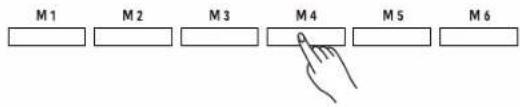
Press one of the [M1] - [M6] buttons to instantly recall the settings saved in that memory. This will reset the related parameters on the control panel.
Note:
Performance memory cannot be recalled when the O.T.S. function is in use.
Selecting a Memory Bank
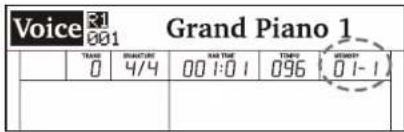
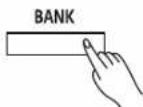
- Press the [BANK] button. The LCD shows the current bank number.
- Use the data dial to select a memory bank. You can also press the [BANK] button repeatedly to select a bank.
Freezing Specific Settings
When Freeze function is in use, specified panel parameters will remain unchanged even when a performance memory is recalled.
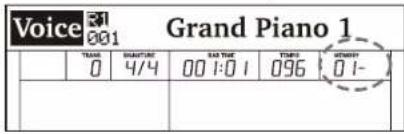
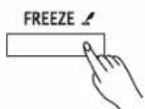
- In memory mode, press the [FREEZE] button to turn on the function. The LED lights up.
- Press the button again to turn off the function. The LED turns off.
- Press and hold [FREEZE] to enter the settings menu. You can select to freeze voice, style, or song settings. Please refer to the Function Menu for details.
Song Recording
You can record your performance in two ways: MIDI recording and Audio recording.
MIDI Recording
In MIDI recording, you can record and save your keyboard performance as a user song on the instrument. You can then play it back and save it to a USB flash drive.
Prepare Recording
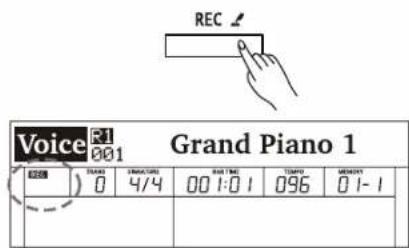
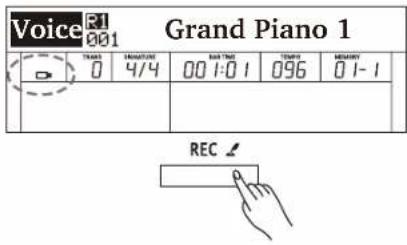
- Press the [REC] button to enter recording standby mode. The Record button LED and the "REC" indicator will blink.
Note:
If a USB flash drive has been inserted, press and hold the [REC] button to enter the Recording settings menu, then set the Record Type to "MIDI". You can select to save the MIDI recording to either the internal flash memory or the connected USB flash drive. Please refer to Recording Settings for details.
After configuring the settings, press the [REC] button to enter recording standby mode.
-
In recording standby mode, you can set the instrument voice, song style, tempo and so on.
-
In recording standby mode, press the [REC] button again to exit recording.
Start Recording
In recording standby mode, press the [START/STOP] button or simply play the keyboard to start recording. The [REC] button LED and the "REC" indicator stop blinking and stay lit.
Alternatively, you can turn on the Sync Start function, then play the keyboard to start recording.
Stop Recording
-
During recording, press the [REC] button to stop recording. The Record button LED and the "REC" indicator will turn off.
-
If the memory gets full during recording, recording will stop and be saved automatically.
Play back Recording
-
During recording, if you press the [REC] button to stop recording, it will enter Song mode and show the recorded song. Press the [START/STOP] button to play back the user song.
-
In standby mode, press the [SONG] button to enter Song mode, then use the [+/YES]/[-/NO] buttons to select the user song. Press the [START/STOP] button to play back the song.
Recording Settings
-
Press and hold the [REC] button to enter the Recording settings menu.
-
Use the data dial to select a parameter.
-
Use the [+/YES]/ [-/NO] buttons to change the settings.
-
After configuring the settings, follow the normal procedures to enter Recording mode.
| Song 161 User Song | |||||
| 000 | 1000 | 0000000000000000000000000000000000000000000000000000000000000000000000000000000000000000000000000000 | 00000000000000000000000000000000000000000000000000000000000000000000000000000000000000000000000 | 0001000000000000000000000000000000000000000000000000000000000000000000000000000000000000000000000000000 | |
| Record Record Type: MIDI | |||||
| ### | THANK 0 | DESCRIPTION 4/4 | DATE: 001:01 | TIME 096 | ORDER BY 01-1 |
28





Song Recording
| Parameter | LCD Display | Range | |
| Record Type Setting | Record Type: | xxx | MIDI, MP3 |
| MIDI Recording Channel 1 | Ch1:R1 | xxx | On, Off |
| MIDI Recording Channel 2 | Ch2:R2 | xxx | On, Off |
| MIDI Recording Channel 3 | Ch3:L | xxx | On, Off |
| MIDI Recording Channel 4 | Ch4:MIDI Ch4 | xxx | On, Off |
| MIDI Recording Channel 5 | Ch5:MIDICh5 | xxx | On, Off |
| MIDI Recording Channel 6 | Ch6:MIDICh6 | xxx | On, Off |
| MIDI Recording Channel 7 | Ch7:MIDICh7 | xxx | On, Off |
| MIDI Recording Channel 8 | Ch8:MIDICh8 | xxx | On, Off |
| MIDI Recording Channel 9 | Ch9:Rhythm_s | xxx | On, Off |
| MIDI Recording Channel 10 | Ch10:Rhythm_m | xxx | On, Off |
| MIDI Recording Channel 11 | Ch11:Bass | xxx | On, Off |
| MIDI Recording Channel 12 | Ch12:Chord1 | xxx | On, Off |
| MIDI Recording Channel 13 | Ch13:Chord2 | xxx | On, Off |
| MIDI Recording Channel 14 | Ch14:Chord3 | xxx | On, Off |
| MIDI Recording Channel 15 | Ch15:Phrase1 | xxx | On, Off |
| MIDI Recording Channel 16 | Ch16:Phrase2 | xxx | On, Off |
| Saving the MIDI Recording To | MIDI Save To: | xxx | Internal Flash, USB Flash |
Note:
- The settings of the first and the last items above cannot be changed until a USB flash drive is inserted. Please refer to Connecting USB Flash Drive for details.
- If you have used the DSP effects during MIDI recording, when you play back the MIDI file, the preset DSP effects for voice R1/ R2/ L will be disabled and the relevant DSP Types will be set to OFF and cannot be changed. The DSP effects for the voice layers will work again only when you pause, stop or exit MIDI playback.
- If you use channel 4 - 8 for recording, connect an external MIDI keyboard or other MIDI device via either the USB jack or the MIDI jack, and then set the device's MIDI Out channels accordingly.
Audio Recording
Audio recording will record your performance and save it to a USB flash drive as an MP3 file. During recording, the sounds and effects you hear from the instrument will all be recorded.
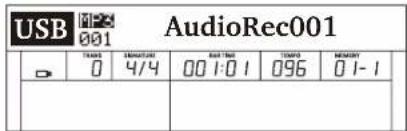
- Connect a USB flash drive to the instrument, then wait until the USB indicator appears on the LCD.
- Press the [REC] button to start recording. The Record button LED and "REC" indicator will light up.
Note:
If you want to switch to MIDI recording, press and hold the [REC] button to enter the Recording settings menu, then set the Record Type to "MIDI". Please refer to Recording Settings for details.
- During recording, you can play back style accompaniment, play the keyboard, play back songs or demos, play back music from the AUX IN jack, and sing through a microphone. All these sounds will be recorded.
- During recording, press the [REC] button to stop recording. The recording button LED and the "REC" indicator will turn off.
- The recorded song will be automatically saved as "AudioRec XXX". Press the [START/STOP] button to play back the song.
Note:
Do not remove the USB flash drive or turn off the power when song saving is in progress, otherwise it may cause damage to the audio files and the USB flash drive.
Song
The instrument features several complete piano songs. Please refer to the Song List for details.
Play the Songs
- Press the [SONG] button to enter Song mode. The LCD shows the current song number and name.
- Use the data dial or [+/YES]/[-/NO] buttons to select a desired song.
- Press the [START/STOP] button to start or stop song playback.
Notes:
- You can set to playing a single song or all songs in a loop. Please refer to the Function Menu for details.
- When Bluetooth connection is activated, press the [SONG] button once to enter Bluetooth mode, the press it again to switch to Song mode.
Control the Song Playback
- Fast Forward, Rewind or Pause the Playback During song playback:
Press the [▶] button to fast forward the song.
Press the [◀] button to rewind the song (based on the measure).
Press the [ " ] button to pause the song. Press it again to continue the playback.
- Song Looping
Press [ ] button when playing songs to play the current song in a loop.
Press [ ] button when playing songs to play all the songs in a loop.
Practice the Songs
All the preset songs can be practiced with melody-off.
- Press the [LEFT] button to mute the left-hand melody. The "L-OFF" indicator will light up. You can then practice the left hand melody of the song.
- In the same way, press the [RIGHT] button to mute the right-hand melody. The "R-OFF" indicator will light up. You can then practice the right hand melody of the song

| Song L-OFF Red River Valley 001 | ||||||
| TIME 0 | STORAGE 4/4 | RATING 00 1:0 1 | TIME 095 | MEMORY 01-1 | ||
| Song R-OFF Red River Valley 001 | ||||||
| TRADE 0 | SOMATORE 4/4 | EARTING 00 1:0 1 | TEMP. 095 | MEMORY 0 1-1 | ||
Bluetooth
Bluetooth Pairing
-
The Bluetooth function is turned on by default.
-
You can pair the Bluetooth Audio function of the instrument with an external mobile device. Bluetooth Audio Name: Piano-Audio
After it is paired, the instrument will remember that device and automatically pair it when the mobile device is within range. You can disable Bluetooth Auto Link in the function menu. Please refer to the Function Menu for details.
- To use the Bluetooth MIDI function, you may need to select you instrument in the MIDI device interface of compatible external devices. Bluetooth MIDI name: Piano-MIDI
Playing the Bluetooth Songs
- After the device is paired, the Bluetooth indicator will appear on the LCD. Press the [SONG/®] button to enter Bluetooth mode.
- Press the [START/STOP] button to start or stop playing Bluetooth music.
- Select a song to play over Bluetooth. Press [◀] button to play the previous song. Press [▶] button to play the next song. In Bluetooth mode, you can also use the [+/YES]/[-/NO] buttons to select a desired song from your Bluetooth connected device.
Disable the Bluetooth Connection
- Use the data dial to select "Disconnect", then press [+/YES]. The LCD will prompt "Disconnect Bluetooth?"
- Press [+/YES] to confirm and disable the Bluetooth connection.
Note:
In Bluetooth mode, you can press the [SONG] button to switch to Song mode.
| Song | Disconnect | ||||
| 0 | TIME | INJUNCTION | MATCH | TOMO | MESSAGE |
| 0 | 4/4 | 00 1:0 1 | 095 | 0 1-1 | |






Connecting USB Flash Drive
The instrument recognizes USB flash drives (32M to 128G) in FAT32 format. It does not support multi-partitioned USB flash drives. We recommend formatting the USB flash drive on the instrument before using.
Note:
A USB flash drive in FAT32 format supports up to 512 files under its root directory. Exceeding this limit will make it unable to save or record to the USB flash drive.
Playing
- Press the [USB] button to enter the USB Play menu. The LCD shows all MIDI and MP3 songs under the root directory of the USB flash drive.
- Use the data dial or [+/YES]/[-/NO] buttons to select a song.
- Press the [START/STOP] button to start playback. You can set to loop play a single song or all songs. Please refer to the Function Menu for details.
- Press the [START/STOP] button again to stop playback.
Saving
- Press and hold the [USB] button to enter the USB menu. Use the data dial to select "Save MIDI".
- Press [+/YES] to save the user song to the root directory of the USB flash drive. The file will be saved as "UserSong00X_YYMMDD_NUB.MIDI". If the user song is empty, the LCD will prompt "NoFile!"
- After saving, the LCD will prompt "User song save successful!", then return to the USB menu.
File Name Description:
"UserSong00X" is the user song name and number (corresponds to the user song on the instrument).
"YYMMDD" is the year, month and date the song was saved.
“NUB” is the track number of the saved song (001\~512).
Loading
- Press and hold the [USB] button to enter the USB menu. Use the data dial to select "Load MIDI".
- Press [+/YES]. The LCD will show all MIDI files (*.mid) under the root directory. Use the data dial to select one.
- Press the [+/YES] button. The LCD will prompt "Load MIDI Successful!". If the user song on the instrument is not empty, the LCD will prompt "Over-write the User Song?" Press the [+/YES] button to confirm loading or press [-/NO] to cancel.
- After loading, the LCD will return to the USB menu.
Note:
This operation will overwrite the previous user song on the instrument.
Formatting
- Press and hold the [USB] button to enter the USB menu. Use the data dial to select "Format USB".
- Press [+/YES]. The LCD will prompt "Format USB Flash Drive?".
- Press [+/YES] to format the flash drive or press [-/NO] to cancel.
- After formatting, it will return to the USB menu.
Notes:
- Formatting will delete all data on the USB flash drive!
- It may take several minutes to format a USB flash drive of large capacity.
| USB MP3001 AudioRec001 | ||||||
| THUS | STANTURE | RAT TIME | TEMP | SINEMA | ||
| 0 | 4/4 | 00 1:0 1 | 096 | 01-1 | ||
| USBMenu Save MIDI | ||||||
| THAI0 | DIMESTIVE4/4 | DAY TIME00 1:0 1 | TUES096 | BENEFY01-1 | ||
| USBMenu Load MIDI | ||||||
| THAAD0 | SUBSTURE4/4 | BAR TIME00 1:0 1 | TEMP3096 | MEMORY01-1 | ||
| USBMenu Format USB | ||||||
| TRAS0 | SUBTURE4/4 | BAR TIME00 1:0 1 | TEMP096 | MEMS001-1 | ||
MIDI
The MIDI function will expand your musical possibilities.
What's MIDI?
MIDI (short for Musical Instrument Digital Interface) allows a wide variety of electronic musical instruments, computers and other related devices to connect and communicate with one another. MIDI carries event messages that specify notation, pitch and velocity, controls signals for parameters such as volume, vibrato, audio panning, and programs change information to change the voice selections.
The instrument can output real-time playback information via MIDI messages and control external MIDI devices. The instrument can also accept incoming MIDI messages and generate sound accordingly.
Troubleshooting
| Problem | Possible Cause and Solution |
| The speakers produce a pop sound whenever the power is turned ON/OFF. | This is normal and is no cause for alarm. |
| Speakers do not produce sound when the keyboard is played. | 1. Check if the master volume is set too low.2. Check if headphones are plugged into the PHONES jack.3. Check if the R1/R2/L1 voice volume is set too low (in the Mixer). |
| There is noise when I use a mobile phone. | Using a mobile phone in close proximity to the instrument may produce interference. To prevent this, turn off the mobile phone or keep it away from the instrument when in use. |
| The auto accompaniment does not play back even when Sync is in standby and a key is pressed. | You may be playing keys in the right hand range of the keyboard. To start the accompaniment with Sync Start, make sure to play keys in the left-hand range. |
| Certain notes seem to be in the wrong pitch. | Make sure that the tune value is set to 0. Hold down the [+/YES] and [-/NO] buttons and turn on the power to restore factory settings. |
| When connecting to computer, the instrument cannot be recognized. | Check if the USB cable is firmly connected. Try connecting another USB port on the computer. This instrument is plug and play and should work without installing a driver. |
| The pedal does not respond. | Check if the pedal cable is firmly connected. |
| It cannot read/save to the USB flash drive. | Make sure your USB flash drive is in FAT32 format and not multi-partitioned. |
| It shuts down after a period of time. | The auto power off function will turn off the instrument after a preset period of time when the instrument is not in use. You can adjust the auto-off function in the Function Menu. |

Specifications
| Keyboard & Display | |
| Keyboard | 88 Graded Hammer-Action Keys with Triple Sensors |
| Touch Response | 6 types, Off |
| Display | Multi-functional LCD |
| Voices | |
| Polyphony (max.) | 256 |
| Voices | 1200 panel, 13 drum kits |
| Layer | Left, Right1, Right2 |
| Split | Yes |
| Duo (Twinova) | Yes |
| Styles | |
| Styles | 270 presets |
| Style Control | Start / StopSync startSync stopIntro 1 / Ending 1Intro 2 / Ending 2Main A / Fill in AMain B / Fill in BMain C / Fill in CMain D / Fill in DA.B.C.Fade in/out |
| Style Creator | — |
| O.T.S. | Yes |
| Chord Types | 32 |
| Effects | |
| Effects | DSP on / off;Second-generation Acoustic Piano String Resonance Simulation |
| Master EQ | 6 types |
| Reverb | 11 types |
| Chorus | 12 types |
| Voice Effect | 15 types |
| Performance Enhance | |
| Harmony | 9 types |
| Song & Recording | |
| Music Library | 90 preset songs; L / R hand learning |
| Sequencer | 1 user song (16 tracks) |
| Demo Song | 3 |
| Audio Playback | MP3 |
| Audio Recorder | MP3 |
| Score Display | — |
| Pitch Adjustment | |
| Transpose | -12 ~ +12 |
| Octave | -2 ~ +2 |
| Tuning | -50 ~ +50 |
| Other Functions | |
| Mixer | Yes (14 tracks) |
| Performance Memory | 32 preset banks x 6 |
| Assignable Controllers | Soft pedal |
| Pitch Bend | — |
| Modulation | — |
| Metronome | Yes |
| Tempo | 30 ~ 280 |
| Other control | Piano mode;Brilliance;Bluetooth Audio/MIDI |

Specifications
| Connections | |
| Interaction & Expansion | USB MIDI, USB Audio, Bluetooth |
| External Drive | USB flash drive (128G max) |
| Microphone | YES (Mic effect:12 types) |
| Phones | 2 Standard Stereo |
| Pedals | Sustain, Soft, Sostenuto |
| MIDI | In, Out |
| USB | USB Audio & MIDI |
| Input | Standard Stereo |
| Output | Standard Stereo |
| Power Supply | |
| Power | DC 15V / 2.5A |
| Power Off Protection | Yes |
| Amplifiers & Speakers | |
| Amplifiers | 25W x 2, 15W x 2 |
| Speakers | 40W x 2, 25W x 2 |
| Dimensions & Weight | |
| Dimensions LWH (mm) | 1400 x 494 x 910 |
| Weight (kg) | 58 |
* All specifications and appearances are subject to change without notice.

Voice List
| No. | Voice Name | LCD Name |
| Piano | ||
| 1 | Acoustic Grand Piano 1 | Grand Piano 1 |
| 2 | Acoustic Grand Piano 2 | Grand Piano 2 |
| 3 | Bright Acoustic Piano (wide) 1 | Bright Pno/Wide 1 |
| 4 | Acoustic Grand Piano (dark) 1 | Grand Piano/Dark 1 |
| 5 | Rock Piano | Rock Piano |
| 6 | Honky Tonk Piano (wide) 1 | Honky Tonk/Wide 1 |
| 7 | Octave Grand Piano 1 | Octave Piano 1 |
| 8 | Octave Grand Piano 2 | Octave Piano 2 |
| 9 | Grand Piano/Live | Grand Piano/Live |
| 10 | Bright Acoustic Piano 1 | Bright Piano 1 |
| 11 | Grand Piano (Warm) | Grand Piano/Warm |
| 12 | Octave Grand Piano 3 | Octave Piano 3 |
| 13 | Octave Grand Piano 4 | Octave Piano 4 |
| 14 | Honky Tonk Piano 1 | Honky Tonk 1 |
| 15 | Harpsichord (Live) | Harpsichord/Live |
| 16 | Harpsichord (Octave) 1 | Harpsi/Octave 1 |
| 17 | Harpsichord 1 | Harpsichord 1 |
| 18 | Electric Grand Piano 1 | Electric Grand 1 |
| 19 | Electric Grand Piano 2 | Electric Grand 2 |
| 20 | Pop Piano | Pop Piano |
| 21 | Piano & Strings 1 | Piano&Strings 1 |
| 22 | Piano & Pad 1 | Piano&Pad 1 |
| 23 | Piano & Choir 1 | Piano&Choir 1 |
| 24 | Piano & EP 1 | Piano&EP 1 |
| 25 | Piano & EP 2 | Piano&EP 2 |
| 26 | Electric Grand Piano 3 | Electric Grand 3 |
| 27 | Harpsichord (Octave) 2 | Harpsi/Octave 2 |
| 28 | Harpsichord & Strings | Harpsi&Strings |
| 29 | Electric Grand Piano 4 | Electric Grand 4 |
| Electric Piano | ||
| 30 | Electric Piano 1 | E.Piano 1 |
| 31 | Electric Piano 2 | E.Piano 2 |
| 32 | Modern Electric Piano 1 | Modern EP 1 |
| 33 | Jazz Electric Piano 1 | Jazz EP 1 |
| 34 | Modern Electric Piano 2 | Modern EP 2 |
| 35 | Jazz Electric Piano 2 | Jazz EP 2 |
| 36 | Phase Electric Piano 1 | Phase EP 1 |
| 37 | Vintage Electric Piano 1 | Vintage EP 1 |
| 38 | Funk EP 1 | Funk EP 1 |
| 39 | Vintage Electric Piano 2 | Vintage EP 2 |
| 40 | Classic Electric Piano 1 | Classic EP 1 |
| 41 | Electric Piano 3 | E.Piano 3 |
| 42 | Tremolo EP 1 | Tremolo EP 1 |
| 43 | Funk EP 2 | Funk EP 2 |
| 44 | 60's Electric Piano 1 | 60's EP 1 |
| 45 | Vintage Electric Piano 3 | Vintage EP 3 |
| 46 | Warm Electric Piano | Warm EP |
| 47 | Tremolo EP 3 | Tremolo EP 3 |
| 48 | Electric Piano 4 | E.Piano 4 |
| 49 | Modern Electric Piano 3 | Modern EP 3 |
| 50 | Tremolo EP 2 | Tremolo EP 2 |
| 51 | Classic Electric Piano 2 | Classic EP 2 |
| 52 | Sereo Clavi | Sereo Clavi |
| 53 | Phase Clavi | Phase Clavi |
| 54 | Clavi 1 | Clavi 1 |
| 55 | Wah Clavi 1 | Wah Clavi 1 |
| 56 | Clavi 2 | Clavi 2 |
| 57 | Wah Clavi 2 | Wah Clavi 2 |
| 58 | Massiness Electric Piano | Massiness EP |
| 59 | Wah Electric Piano | Wah EP |
| 60 | Bright Electric Piano | Bright EP |
| 61 | Dark Electric Piano | Dark EP |
| 62 | Wire Electric Piano | Wire EP |
| 63 | Aah Electric Piano | Aah EP |
| 64 | Overdriven Electric Piano | Overdriven EP |
| 65 | Modern Jazz Electric Piano | Modern Jazz EP |
| 66 | Jump Electric Piano | Jump EP |
| 67 | Warm Jump Electric Piano | Warm Jump EP |
| 68 | Metallic Electric Piano 1 | Metallic EP 1 |
| 69 | Metallic Electric Piano 2 | Metallic EP 2 |
| 70 | Rock Electric Piano | Rock EP |
| 71 | Pop Electric Piano | Pop EP |
| 72 | Crysta Electric Piano | Crysta EP |
| 73 | Crysta Jazz Electric Piano | Crysta Jazz EP |
| 74 | Rock Electric Clavi | Rock Elec Clavi |
| 75 | Jazz Electric Clavi | Jazz Elec Clavi |
| 76 | Pop Electric Clavi | Pop Elec Clavi |
| 77 | Aahs Electric Clavi | Aahs Elec Clavi |
| 78 | Bright Electric Clavi | Bright Elec Clavi |
| 79 | Warm Electric Clavi | Warm Elec Clavi |
| 80 | Echo Electric Clavi | Echo Elec Clavi |
| 81 | Dark Electric Clavi | Dark Elec Clavi |
| Organ | ||
| 82 | Drawbar Organ 1 | Draw Org 1 |
| 83 | Percussive Organ 1 | Perc Org 1 |
| 84 | Rock Organ 1 | Rock Org 1 |
| 85 | Church Organ 1 | Church Org 1 |
| 86 | Detuned Church Organ 1 | Det Church Org 1 |
| 87 | Percussive Organ 2 | Perc Org 2 |
| 88 | Detuned Percussive Organ 1 | Det Prec Org 1 |
| 89 | Rotary Organ 1 | Rotary Org 1 |
| 90 | Church Organ (octave mix) 1 | ChurchOrg/Octave 1 |
| 91 | Rock Organ 2 | Rock Org 2 |
| 92 | Detuned Organ | Detuned Org |
| 93 | Rotary Organ 2 | Rotary Org 2 |
| 94 | Pop Organ | Pop Org |
| 95 | Classic Organ 1 | Classic Org 1 |
| 96 | Jazz Organ 1 | Jazz Org 1 |
| 97 | Rock Organ 3 | Rock Org 3 |
| 98 | Rotary Organ 3 | Rotary Org 3 |
| 99 | Classic Organ 2 | Classic Org 2 |
| 100 | Detuned Drawbar Organ | Detuned DrawOrg |
| 101 | Italian 60's Organ 1 | 60's Org 1 |
| 102 | Rock Organ 4 | Rock Org 4 |
| 103 | Percussive Organ 3 | Perc Org 3 |
| 104 | Drawbar Organ 2 | Drawbar Org 2 |
| 105 | Classic Organ 3 | Classic Org 3 |
| 106 | Italian 60's Organ 2 | 60's Org 2 |
| 107 | Drawbar Organ 3 | Drawbar Org 3 |
| 108 | Vintage Organ 1 | Vintage Org 1 |
Voice List
| 109 | Vintage Organ 2 | Vintage Org 2 |
| 110 | Detuned Church Organ 2 | Det Church Org 2 |
| 111 | Mellow Organ 1 | Mellow Org 1 |
| 112 | Mellow Organ 2 | Mellow Org 2 |
| 113 | Mellow Organ 3 | Mellow Org 3 |
| 114 | Mellow Organ 4 | Mellow Org 4 |
| 115 | Organ 1 | Organ 1 |
| 116 | Organ 2 | Organ 2 |
| 117 | Organ 3 | Organ 3 |
| 118 | Reed Organ 1 | Reed Org 1 |
| 119 | Puff Organ 1 | Puff Org 1 |
| 120 | Dark Drawbar Organ | Dark Drawbar Organ |
| 121 | Soft Drawbar Organ | Soft Drawbar Org |
| 122 | Soft 60's Organ | Soft 60's Org |
| 123 | Bright 60's Organ | Bright 60's Org |
| 124 | Detuned Classic Organ | Det Classic Org |
| 125 | Mellow Rotary Organ | Mellow Rot Org |
| 126 | Dark Rotary Organ | Dark Rotary Org |
| 127 | Bright Rotary Organ | Bright Rot Org |
| 128 | Bright Percussive Organ | Br Perc Org |
| 129 | Jazz Percussive Organ | Jazz Perc Org |
| 130 | Rock Percussive Organ | Rock Perc Org |
| 131 | Octave Percussive Organ | Octave Perc Org |
| 132 | Mellow Percussive Organ | Mellow Perc Org |
| 133 | Puff Percussive Organ | Puff Perc Org |
| 134 | Pop Percussive Organ | Pop Perc Org |
| 135 | Reed Percussive Organ | Reed Perc Org |
| 136 | Vintage Rock Organ | Vintage Rock Org |
| 137 | Dark Rock Organ | Dark Rock Org |
| 138 | Mellow Rock Organ | Mellow Rock Org |
| 139 | Soft Rock Organ | Soft Rock Org |
| 140 | Reed Rock Organ | Reed Rock Org |
| 141 | Rotary Rock Organ | Rotary Rock Org |
| 142 | Wah Rock Organ | Wah Rock Org |
| 143 | Puff Rock Organ | Puff Rock Org |
| 144 | Bright Vintage Organ | Bright Vintage Org |
| 145 | Dark Vintage Organ | Dark Vintage Org |
| 146 | Mellow Vintage Organ | Mellow Vintage Org |
| 147 | Rotary Vintage Organ | Rotary Vintage Org |
| 148 | Rock Vintage Organ | Rock Vintage Org |
| 149 | Pop Vintage Organ | Pop Vintage Org |
| 150 | Soft Vintage Organ | Soft Vintage Org |
| 151 | Percussive Vintage Organ | Per Vintage Org |
| 152 | Dark Reed Organ | Dark Reed Org |
| 153 | Jazz Reed Organ | Jazz Reed Org |
| 154 | Pop Reed Organ | Pop Reed Org |
| 155 | Puff Reed Organ | Puff Reed Org |
| 156 | Rock Reed Organ | Rock Reed Org |
| 157 | Rotary Puff Organ | Rot Puff Org |
| 158 | Jazz Puff Organ | Jazz Puff Org |
| 159 | Pop Puff Organ | Pop Puff Org |
| 160 | Musette | Musette |
| 161 | Accordion 1 | Accordion 1 |
| 162 | Tango Accordion 1 | Tango Accordion 1 |
| 163 | Accord It Solo 1 | Accord It Solo 1 |
| 164 | Tango Accordion 2 | Tango Accordion 2 |
| 165 | Chorus Accordion | Chorus Accordion |
| 166 | Accordion 2 | Accordion 2 |
| 167 | Accord It Solo 2 | Accord It Solo 2 |
| 168 | Harmonica 1 | Harmonica 1 |
| 169 | Harmonica 2 | Harmonica 2 |
| 170 | Wah Harmonica | Wah Harmonica |
| 171 | Dark Musette | Dark Musette |
| 172 | Bright Musette | Bright Musette |
| 173 | Chorus Musette | Chorus Musette |
| 174 | Musette 2 | Musette 2 |
| 175 | Aah & Musette | Aah & Musette |
| 176 | Voice Oohs & Musette | Voice Ohs & Musette |
| 177 | Voice Oohs & Dark Musette | Ohs & Dk Muset |
| 178 | Dark Harmonica | Dark Harmonica |
| 179 | Bright Harmonica | Bright Harmonica |
| 180 | Chorus Harmonica | Chorus Harmonica |
| 181 | Harmonica 3 | Harmonica 3 |
| 182 | Aah & Harmonica | Aah & Harmonica |
| 183 | Voice Oohs & Harmonica | Voice Ohs & Harm |
| 184 | Voice Oohs & Dark Harmonica | Vc Ohs & Dk Harm |
| 185 | Dark Accordion | Dark Accordion |
| 186 | Bright Accordion | Bright Accordion |
| 187 | Chorus Accordion | Chorus Accordion |
| 188 | Aah & Accordion | Aah & Accordion |
| 189 | Voice Oohs & Accordion | Voice Oohs & Acd |
| 190 | Voice Oohs & Dark Accordion | Vc Ohs & Dk Acd |
| 191 | Accordion 3 | Accordion 3 |
| Guitar & Bass | ||
| 192 | Nylon Guitar | Nylon Guitar |
| 193 | Steel Guitar 1 | Steel Guitar 1 |
| 194 | Jazz Guitar 1 | Jazz Guitar 1 |
| 195 | Clean Guitar 1 | Clean Guitar 1 |
| 196 | Steel Guitar 2 | Steel Guitar 2 |
| 197 | Mandolin | Mandolin |
| 198 | Funk Guitar 1 | Funk Guitar 1 |
| 199 | Velocity Clean Guitar | Velocity CleanGtr |
| 200 | Lead Guitar 1 | Lead Guitar 1 |
| 201 | Velocity Lead Guitar | Velocity LeadGtr |
| 202 | Lead Guitar 2 | Lead Guitar 2 |
| 203 | Overdriven Guitar 1 | OverdrivenGtr 1 |
| 204 | Tremolo clean Guitar | Tremolo cleanGtr |
| 205 | 12-String Guitar | 12String Guitar |
| 206 | Steel Guitar 3 | Steel Guitar 3 |
| 207 | Clean Guitar 2 | Clean Guitar 2 |
| 208 | Feedback Guitar 1 | Feedback Guitar 1 |
| 209 | 5th Distortion | 5th Distortion |
| 210 | Velocity Steel Guitar | Velocity SteelGtr |
| 211 | Delay Guitar 1 | Delay Guitar 1 |
| 212 | Vintage Guitar 1 | Vintage Guitar 1 |
| 213 | Jazz Guitar 2 | Jazz Guitar 2 |
| 214 | Rhythm Guitar | Rhythm Guitar |
| 215 | Jazz Lead 1 | Jazz Lead 1 |
| 216 | Vintage Guitar 2 | Vintage Guitar 2 |
| 217 | Classic Guitar | Classic Guitar |
| 218 | Jazz Lead 2 | Jazz Lead 2 |
| 219 | Vintage Guitar 3 | Vintage Guitar 3 |


Voice List
| 220 | Folk Guitar | Folk Guitar |
| 221 | Chorus Guitar 1 | Chorus Guitar 1 |
| 222 | Muted Guitar 1 | Muted Guitar 1 |
| 223 | Pedal Guitar | Pedal Guitar |
| 224 | Distortion Guitar 1 | DistortionGtr 1 |
| 225 | Chorus Guitar 2 | Chorus Guitar 2 |
| 226 | Tremolo Guitar 1 | TremoloGuitar 1 |
| 227 | Octave Guitar | OctaveGuitar |
| 228 | Chorus Guitar 3 | Chorus Guitar 3 |
| 229 | Tremolo Guitar 2 | TremoloGuitar 2 |
| 230 | Metal Guitar | Metal Guitar |
| 231 | Clean Guitar 3 | Clean Guitar 3 |
| 232 | Wah Guitar | Wah Guitar |
| 233 | Jazz Guitar & EP | JazzGtr&EP |
| 234 | Distortion Guitar 2 | DistortionGtr 2 |
| 235 | 12-String Electric Guitar | 12StrE.Guitar |
| 236 | Feedback Guitar 2 | Feedback Guitar 2 |
| 237 | 12-String Guitar 1 | 12String Guitar 1 |
| 238 | Muted Guitar 2 | Muted Guitar 2 |
| 239 | Funk Guitar 2 | Funk Guitar 2 |
| 240 | Overdriven Guitar 2 | OverdrivenGtr 2 |
| 241 | 12-String Guitar 2 | 12String Guitar 2 |
| 242 | Nylon Guitar & Acoustic Bass | NyGt&AcBass |
| 243 | Steel Guitar & Finger Bass | SteGt&FgBass |
| 244 | Chorus Steel Guitar | Chorus Ste Gt |
| 245 | Soft Chorus Steel Guitar | Soft Cho Ste Gt |
| 246 | Dark Chorus Steel Guitar | Dk Cho Ste Gt |
| 247 | Nylon Guitar & Steel Guitar | Ny Gt & Ste Gt |
| 248 | Jazz Guitar & Steel Guitar | Jazz Gt & Ste Gt |
| 249 | Distortion Steel Guitar | Dt Steel Guitar |
| 250 | Dark Steel Guitar | Dark Steel Gt |
| 251 | Warm Steel Guitar | Warm Steel Gt |
| 252 | Chorus Jazzy Guitar | Chorus Jazzy Gt |
| 253 | Bright Jazzy Guitar | Bright Jazzy Gt |
| 254 | Overdriven Jazzy Guitar | Over Jazzy Gt |
| 255 | Distortion Jazzy Guitar | Dist Jazzy Gt |
| 256 | Overdriven Octave Guitar | Over Octave Gt |
| 257 | Wah Octave Guitar | Wah Octave Gt |
| 258 | Jazz Octave Guitar | Jazz Octave Gt |
| 259 | Chorus Octave Guitar | Cho Octave Gt |
| 260 | Chorus Vintage Guitar | Cho Vintage Gt |
| 261 | Vintage Funk Guitar | Vintage Funk Gt |
| 262 | Overdriven Funk Guitar | Ovrdriv Funk Gt |
| 263 | Chorus Wah Guitar | Chorus Wah Gt |
| 264 | Clean Vintage Guitar | Clean Vintage Gt |
| 265 | Dark Vintage Guitar | Dark Vintage Gt |
| 266 | Bright Vintage Guitar | Brt Vintage Gt |
| 267 | Soft Vintage Guitar | Soft Vintage Gt |
| 268 | Dark Mute Guitar | Dark Mute Gt |
| 269 | Chorus Mute Guitar | Chorus Mute Gt |
| 270 | Overdrive Mute Guitar | Overdrive Mute Gt |
| 271 | Distortion Mute Guitar | Dist Mute Gt |
| 272 | Wah Mute Guitar | Wah Mute Gt |
| 273 | Pulse Mute Guitar | Pulse Mute Gt |
| 274 | Nylon Mute Guitar | Nylon Mute Gt |
| 275 | Funk Mute Guitar | Funk Mute Gt |
| 276 | Dark Overdrive Guitar | Dark Over Gt |
| 277 | Bright Overdrive Guitar | Bright Over Gt |
| 278 | Soft Overdrive Guitar | Soft Over Gt |
| 279 | Delay Overdrive Guitar | Delay Over Gt |
| 280 | Delay Feedback Guitar | Delay Feedback Gt |
| 281 | Chorus Feedback Guitar | Cho Feedback Gt |
| 282 | Wah Overdrive Guitar | Wah Over Gt |
| 283 | Dark Wah Overdrive Guitar | Dark Wah Over Gt |
| 284 | Chorus Distortion Guitar | Chorus Dist Gt |
| 285 | Dark Distortion Guitar | Dark Dist Gt |
| 286 | Wah Distortion Guitar | Wah Dist Gt |
| 287 | Velocity Lead Guitar 3 | Velocity Lead Gt 3 |
| 288 | Soft Distortion Guitar | Soft Dist Gt |
| 289 | Bright Lead Guitar 3 | Bright Lead Gt 3 |
| 290 | Modern Distortion Guitar | Modern Dist Gt |
| 291 | Delay Distortion Guitar | Delay Dist Gt |
| 292 | Finger Bass 1 | Finger Bass 1 |
| 293 | Acoustic Bass 1 | Acoustic Bass 1 |
| 294 | Pick Bass 1 | Pick Bass 1 |
| 295 | Fretless Bass 1 | Fretless Bass 1 |
| 296 | Slap Bass 1 | Slap Bass 1 |
| 297 | Resonant Bass | Resonant Bass |
| 298 | Attack Pulse | Attack Pulse |
| 299 | Resonant Bass 2 | Resonant Bass 2 |
| 300 | Analog Bass 1 | Analog Bass 1 |
| 301 | Resonance SynBass | Resonance SynBass |
| 302 | Rock Bass | Rock Bass |
| 303 | Fretless Bass 2 | Fretless Bass 2 |
| 304 | Pick Bass 2 | Pick Bass 2 |
| 305 | Finger Slap Bass | Finger Slap Bass |
| 306 | Acoustic Bass & Cymbal | Bass & Cymbal |
| 307 | Analog Bass 2 | Analog Bass 2 |
| 308 | Resonant Slap Bass | Resonant SlapBass |
| 309 | Warm Synth Bass 1 | Warm Syn Bass 1 |
| 310 | Hammer 1 | Hammer 1 |
| 311 | Synth Bass (rubber) | Synth Bass (rubber) |
| 312 | Power Slap Bass | Power Slap Bass |
| 313 | Finger Bass 2 | Finger Bass 2 |
| 314 | Warm Synth Bass 2 | Warm Syn Bass 2 |
| 315 | Mute Pick Bass | Mute Pick Bass |
| 316 | Attack Pulse 2 | Attack Pulse 2 |
| 317 | Bright Finger Bass | Brt Finger Bass |
| 318 | Overdriven Finger Bass | Over Finger Bass |
| 319 | Distortion Finger Bass | Dt Finger Bass |
| 320 | Distortion Guitar & Finger Bass | Dt Gt & Fngr Ba |
| 321 | Wah Finger Bass | Wah Finger Bass |
| 322 | Finger Slap Bass 2 | Fngr Slap Bass 2 |
| 323 | Soft Wah Slap Bass | Soft Wah Slap Ba |
| 324 | Dark Slap Bass | Dark Slap Bass |
| 325 | Bright Pick Bass | Bright Pick Bass |
| 326 | Dark Pick Bass | Dark Pick Bass |
| 327 | Overdriven Pick Bass | Over Pick Bass |
| 328 | Distortion Guitar&Pick Bass | DtGt&Pick Bass |
| 329 | Wah Pick Bass | Wah Pick Bass |
| 330 | Chorus Pick Bass | Cho Pick Bass |
| 331 | Warm Chorus Pick Bass | Warm Cho Pick Ba |
Voice List
| 332 | Rock Bass 2 | Rock Bass 2 |
| 333 | Bright Fretless Bass | Brt Fret Bass |
| 334 | Overdriven Fretless Bass | Over Fret Bass |
| 335 | Distortion Fretless Bass | Dist Fret Bass |
| 336 | Wah Fretless Bass | Wah Fret Bass |
| 337 | Mute Fretless Bass | Mute Fret Bass |
| 338 | Dark Fretless Bass | Dark Fret Bass |
| 339 | Pick Mute Fretless Bass | Pick Mu Fret Bass |
| 340 | Slap Fretless Bass | Slap Fret Bass |
| 341 | Dark Slap Bass | Dark Slap Bass |
| 342 | Chorus Slap Bass | Chorus Slap Bass |
| 343 | Distortion Guitar & Slap Bass | DtGt & Slap Bass |
| 344 | Bright Resonant Slap Bass | Bt Rt Slap Bass |
| 345 | Dark Resonant Slap Bass | Dk Rt Slap Bass |
| 346 | Chorus Resonant Slap Bass | Chs Rt Slap Bass |
| 347 | Wah Resonant Slap Bass | Wah Rt Slap Bass |
| 348 | Warm Resonant Slap Bass | Warm Rt Slap Ba |
| 349 | Dark Power Slap Bass | Dk Power Slap Ba |
| 350 | Bright Power Slap Bass | Bt Power Slap Ba |
| 351 | Distortion Power Slap Bass | Dt Power Slap Ba |
| 352 | Distortion Guitar & Power Slap Bass | DtGt & PowrSlpBa |
| 353 | Overdriven Guitar & Power Slap Bass | OvGt & PowrSlpBa |
| 354 | Chorus Power Slap Bass | Cho Powr Slp Ba |
| 355 | Wah Power Slap Bass | Wah Powr Slp Ba |
| 356 | Warm Power Slap Bass | Warm Powr Slp Ba |
| 357 | Dark Analog Bass | Dark Analog Bass |
| 358 | Bright Analog Bass | Bt Analog Bass |
| 359 | Chorus Analog Bass | Cho Analog Bass |
| 360 | Wah Analog Bass | Wah Analog Bass |
| 361 | Distortion Guitar & Analog Bass | DtGt & Analog Ba |
| 362 | Overdriven Guitar & Analog Bass | OvGt & Analog Ba |
| 363 | Hammer Analog Bass | Hammer Analog Ba |
| 364 | Dark Hammer Bass | Dark Hammer Ba |
| 365 | Bright Attack Bass | Bright Attack Ba |
| 366 | Pulse Attack Bass | Pulse Attack Ba |
| 367 | Bright Pulse Bass | Bright Pulse Ba |
| 368 | Octave Analog Bass | Octave Analog Ba |
| 369 | Power Analog Bass | Power Analog Ba |
| 370 | Power Pulse Bass | Power Pulse Ba |
| 371 | Wah Pulse Bass | Wah Pulse Bass |
| 372 | Chorus Pulse Bass | Cho Pulse Bass |
| Strings | ||
| 373 | Solo Strings | Solo Strings |
| 374 | Slow Strings 1 | Slow Strings 1 |
| 375 | Sweet Violin | Sweet Violin |
| 376 | Sweet Cello | Sweet Cello |
| 377 | The Strings 1 | The Strings 1 |
| 378 | Orchestra 1 | Orchestra 1 |
| 379 | Slow Strings 2 | Slow Strings 2 |
| 380 | Contrabass 1 | Contrabass 1 |
| 381 | Chamber Music | Chamber Music |
| 382 | Slow Strings 3 | Slow Strings 3 |
| 383 | Strings & Brass 1 | Strings&Brass 1 |
| 384 | Strings & Brass 2 | Strings&Brass 2 |
| 385 | Strings & Flute | Strings & Flute |
| 386 | Strings & Oboe | Strings & Oboe |
| 387 | Arco Strings 1 | Arco Strings 1 |
| 388 | String Ensembles 1 | Str Ensembles 1 |
| 389 | Choir Aahs 1 | Choir Aahs 1 |
| 390 | Voice Oohs | Voice Oohs |
| 391 | Synth Voice | Synth Voice |
| 392 | Orchestra 2 | Orchestra 2 |
| 393 | Arco Strings 2 | Arco Strings 2 |
| 394 | The Strings 2 | The Strings 2 |
| 395 | Tremolo Strings | Tremolo Strings |
| 396 | Pizzicato Strings | Pizzicato Str |
| 397 | The Strings 3 | The Strings 3 |
| 398 | Synth Strings 1 | Synth Strings 1 |
| 399 | Synth Strings 2 | Synth Strings 2 |
| 400 | Synth Strings 3 | Synth Strings 3 |
| 401 | Orchestral Harp | Orchestral Harp |
| 402 | Violin | Violin |
| 403 | Viola | Viola |
| 404 | Cello | Cello |
| 405 | Contrabass 2 | Contrabass 2 |
| 406 | Choir Aahs 2 | Choir Aahs 2 |
| 407 | Humming | Humming |
| 408 | Analog Voice | Analog Voice |
| 409 | Orchestra Hit | Orchestra Hit |
| 410 | Bass Hit Plus | Bass Hit Plus |
| 411 | 6th Hit | 6th Hit |
| 412 | Euro Hit | Euro Hit |
| 413 | Slow Sweet Violin | Slow Sweet Vin |
| 414 | Dark Sweet Violin | Dark Sweet Vin |
| 415 | Bright Sweet Violin | Bright Sweet Vin |
| 416 | Slow Violin | Slow Violin |
| 417 | Dark Violin | Dark Violin |
| 418 | Bright Violin | Bright Violin |
| 419 | Chorus Violin | Chorus Violin |
| 420 | Sweet Violin 2 | Sweet Violin 2 |
| 421 | Slow Viola | Slow Viola |
| 422 | Dark Viola | Dark Viola |
| 423 | Bright Viola | Bright Viola |
| 424 | Volin & Viola | Volin & Viola |
| 425 | Chorus Viola | Chorus Viola |
| 426 | Harp & Viola | Harp & Viola |
| 427 | Cello & Viola | Cello & Viola |
| 428 | Aah & Viola | Aah & Viola |
| 429 | Slow Cello | Slow Cello |
| 430 | Dark Cello | Dark Cello |
| 431 | Bright Cello | Bright Cello |
| 432 | Chorus Cello | Chorus Cello |
| 433 | Violin & Cello | Violin & Cello |
| 434 | Aah & Cello | Aah & Cello |
| 435 | Harp & Cello | Harp & Cello |
| 436 | Contrabass & Cello | Contrbs & Cello |
| 437 | Dark Contrabass | Dark Contrabass |
| 438 | Bright Contrabass | Bright Contrbs |
| 439 | Chorus Contrabass | Chorus Contrbs |
| 440 | Slow Contrabass | Slow Contrabass |
| 441 | Violin & Contrabass | Vin & Contrbs |
| 442 | Viola & Contrabass | Viola & Contrbs |


Voice List
| 443 | Aah & Contrabass | Aah & Contrabass |
| 444 | Harp & Contrabass | Harp & Contrbs |
| 445 | Dark Tremolo Strings | Dark Trem Str |
| 446 | Bright Tremolo Strings | Brt Trem Str |
| 447 | Slow Tremolo Strings | Slow Trem Str |
| 448 | Cello & Tremolo Strings | Cello & Trem Str |
| 449 | Violin & Tremolo Strings | Violin & Trem Str |
| 450 | Aah & Tremolo Strings | Aah & Trem Str |
| 451 | Harp & Tremolo Strings | Harp & Trem Str |
| 452 | Chorus Tremolo Strings | Cho Trem Str |
| 453 | Dark Pizzicato Strings | Dark Pizz Str |
| 454 | Bright Pizzicato Strings | Bright Pizz Str |
| 455 | Bass Hit & Pizzicato Strings | BassH & Pizz Str |
| 456 | 6th Hit & Pizzicato Strings | 6th Hit&Pizz Str |
| 457 | Euro Hit & Pizzicato Strings | EuroHit & PizStr |
| 458 | Harp & Pizzicato Strings | Harp & PizzStr |
| 459 | Arco Strings & Pizzicato Strings | ArcoStr & PizzStr |
| 460 | Strings & Pizzicato Strings | St & Pizz Str |
| 461 | Dark Harp | Dark Harp |
| 462 | Bright Harp | Bright Harp |
| 463 | Aah Harp | Aah Harp |
| 464 | String Harp | String Harp |
| 465 | Chorus Harp | Chorus Harp |
| 466 | Humming & Harp | Humming & Harp |
| 467 | Euro Hit & Harp | Euro Hit & Harp |
| 468 | Synth Voice & Harp | Sy Voice & Harp |
| Brass & Sax | ||
| 469 | Trumpet 1 | Trumpet 1 |
| 470 | Trombone 1 | Trombone 1 |
| 471 | Muted Trumpet 1 | Muted Trumpet 1 |
| 472 | French Horn 1 | French Horn 1 |
| 473 | Dark Trumpet Soft | DarkTrump Soft |
| 474 | Tuba | Tuba |
| 475 | Trumpet 2 | Trumpet 2 |
| 476 | Trombone 2 | Trombone 2 |
| 477 | Muted Trumpet 2 | Muted Trumpet 2 |
| 478 | Bright Trombone1 | Bright Trombone1 |
| 479 | Dark Trombone 1 | Dark Trombone 1 |
| 480 | Dark Trombone 2 | Dark Trombone 2 |
| 481 | Resonant Trombone 1 | Reson Trb 1 |
| 482 | Resonant Trombone 2 | Reson Trb 2 |
| 483 | Brassband 1 | Brassband 1 |
| 484 | French Horn 2 | French Horn 2 |
| 485 | Warm Trumpet | Warm Trumpet |
| 486 | Bright Trumpet | Bright Trumpet |
| 487 | Chorus Trumpet | Chorus Trumpet |
| 488 | Trumpet 1 & Trumpet 2 | Trp 1 & Trp 2 |
| 489 | Trombone & Trumpet | Tb & Trp |
| 490 | Tuba & Trumpet | Tuba & Trumpet |
| 491 | Resonant Trumpet | Reson Trp |
| 492 | French Horn & Trumpet | Fr Horn & Trp |
| 493 | Warm Trombone | Warm Trombone |
| 494 | Bright Trombone2 | Bright Trombone2 |
| 495 | Chorus Trombone | Chorus Trombone |
| 496 | Trombone1 & Trombone2 | Trb1 & Trb2 |
| 497 | French Horn & Trombone | Fr Horn & Trb |
| 498 | Tuba & Trombone | Tuba & Trombone |
| 499 | Soprano Sax & Trombone | Sp Sax & Trb |
| 500 | Alto Sax & Trombone | Alto Sax & Trb |
| 501 | Dark Tuba | Dark Tuba |
| 502 | Bright Tuba | Bright Tuba |
| 503 | Warm Tuba | Warm Tuba |
| 504 | Chorus Tuba | Chorus Tuba |
| 505 | Resonant Tuba | Resonant Tuba |
| 506 | Slow Tuba | Slow Tuba |
| 507 | Soprano Sax & Tuba | Sprno Sax & Tuba |
| 508 | Alto Sax & Tuba | Alto Sax & Tuba |
| 509 | Dark Muted Trumpet | Dark Muted Trp |
| 510 | Bright Muted Trumpet | Bright Muted Trp |
| 511 | Warm Muted Trumpet | Warm Muted Trp |
| 512 | Chorus Muted Trumpet | Chorus Muted Trp |
| 513 | Tuba & Muted Trumpet | Tuba & Muted Trp |
| 514 | French Horn & Muted Trumpet | FrHorn & MtTrp |
| 515 | Soprano Sax & Muted Trumpet | SprnSax & MtTrp |
| 516 | Alto Sax & Muted Trumpet | AltoSax & MtTrp |
| 517 | Dark French Horn | Dark French Horn |
| 518 | Bright French Horn | Bright Fr Horn |
| 519 | Warm French Horn | Warm French Horn |
| 520 | Chorus French Horn | Chorus Fr Horn |
| 521 | Tuba & French Horn | Tuba & Fr Horn |
| 522 | Soprano Sax & French Horn | SprnSax & FrHorn |
| 523 | Alto Sax & French Horn | AltoSax & FrHorn |
| 524 | Slow French Horn | Slow French Horn |
| 525 | Dark Brass Section | Dark Br Section |
| 526 | Bright Brass Section | Brt Br Section |
| 527 | Warm Brass Section | Warm Br Section |
| 528 | Chorus Brass Section | Cho Br Section |
| 529 | Resonant Brass Section | Reson Br Section |
| 530 | Slow Brass Section | Slow Br Section |
| 531 | Funk Brass Section | Funk Br Section |
| 532 | Jazz Brass Section | Jazz Br Section |
| 533 | Dark Synth Brass | Dark Syn Brass |
| 534 | Bright Synth Brass | Brt Syn Brass |
| 535 | Warm Synth Brass | Warm Syn Brass |
| 536 | Chorus Synth Brass | Cho Syn Brass |
| 537 | Resonant Synth Brass | Reson Syn Brass |
| 538 | Slow Synth Brass | Slow Syn Brass |
| 539 | Rock Synth Brass | Rock Syn Brass |
| 540 | Pop Synth Brass | Pop Synth Brass |
| 541 | Dark Analog Synth Brass | Dk Ana Syn Br |
| 542 | Bright Analog Synth Brass | Brt Ana Syn Br |
| 543 | Warm Analog Synth Brass | Warm Ana Syn Br |
| 544 | Chorus Analog Synth Brass | Cho Ana Syn Br |
| 545 | Resonant Analog Synth Brass | Reso Ana Syn Br |
| 546 | Slow Analog Synth Brass | Slow Ana Syn Br |
| 547 | Rock Analog Synth Brass | Rock Ana Syn Br |
| 548 | Wah Analog Synth Brass | Wah Ana Syn Br |
| 549 | Brass Section 1 | Brass Section 1 |
| 550 | Brass Section 2 | Brass Section 2 |
| 551 | Octave Brass Section | Oct Br Section |
| 552 | French Horn Live 1 | Fr Horn Live 1 |
| 553 | French Horn Live 2 | Fr Horn Live 2 |
Voice List
| 554 | Brassband 2 | Brassband 2 |
| 555 | Brass Section 3 | Brass Section 3 |
| 556 | Dark Brass 1 | Dark Brass 1 |
| 557 | Synth Brass 1 | Synth Brass 1 |
| 558 | Bright Brass Section 1 | Bright Brass 1 |
| 559 | Sforzato Brass | Sforzato Brass |
| 560 | Brassband 3 | Brassband 3 |
| 561 | Club Brass Section | Club Brass |
| 562 | Bright Brass Section 2 | Bright Brass 2 |
| 563 | Soft Brass Section 1 | Soft Brass 1 |
| 564 | Synth Brass 2 | Synth Brass 2 |
| 565 | Soft Synth Brass 1 | Soft Synth Brass 1 |
| 566 | Soft Synth Brass 2 | Soft Synth Brass 2 |
| 567 | Jump Brass | Jump Brass |
| 568 | Soft Brass Section 2 | Soft Brass 2 |
| 569 | BigBand 1 | BigBand 1 |
| 570 | Solo Brass 1 | Solo Brass 1 |
| 571 | Bright Brass Section 3 | Bright Brass 3 |
| 572 | Synth Brass 3 | Synth Brass 3 |
| 573 | Solo Brass 2 | Solo Brass 2 |
| 574 | Soft Brass Section 3 | Soft Brass 3 |
| 575 | BigBand 2 | BigBand 2 |
| 576 | Synth Brass 4 | Synth Brass 4 |
| 577 | Brass Hit | Brass Hit |
| 578 | Analog Synth Brass 1 | Ana Syn Br 1 |
| 579 | Solo Brass 3 | Solo Brass 3 |
| 580 | Solo Brass 4 | Solo Brass 4 |
| 581 | Analog Synth Brass 2 | Ana Syn Br 2 |
| 582 | Funky Synth Brass 1 | Funky Syn Br 1 |
| 583 | Echo Brass | Echo Brass |
| 584 | Analog Synth Brass 3 | Ana Syn Br 3 |
| 585 | Soft Synth Brass | Soft Syn Br |
| 586 | Funky Synth Brass 2 | Funky Syn Br 2 |
| 587 | Tenor Sax 1 | Tenor Sax 1 |
| 588 | Alto Sax 1 | Alto Sax 1 |
| 589 | Soprano Sax 1 | Soprano Sax 1 |
| 590 | Baritone Sax 1 | Baritone Sax 1 |
| 591 | Sax Band 1 | Sax Band 1 |
| 592 | Sax Band 2 | Sax Band 2 |
| 593 | Sax & Clarinet | Sax & Clarinet |
| 594 | Sax Live 1 | Sax Live 1 |
| 595 | Sax Live 2 | Sax Live 2 |
| 596 | Soprano Sax 2 | Soprano Sax 2 |
| 597 | Tenor Sax 2 | Tenor Sax 2 |
| 598 | Alto Sax 2 | Alto Sax 2 |
| 599 | Baritone Sax 2 | Baritone Sax 2 |
| 600 | Slow Tenor Sax | Slow Tenor Sax |
| 601 | Soft Sax Band | Soft Sax Band |
| 602 | Super Sax Band | Super Sax Band |
| Flute & Wood Wind | ||
| 603 | Flute 1 | Flute 1 |
| 604 | Clarinet 1 | Clarinet 1 |
| 605 | Pan Flute 1 | Pan Flute 1 |
| 606 | Oboe 1 | Oboe 1 |
| 607 | Flute & Sax | Flute & Sax |
| 608 | English Horn | English Horn |
| 609 | Bassoon | Bassoon |
| 610 | Sweet Flute | Sweet Flute |
| 611 | Piccolo | Piccolo |
| 612 | Clarinet & Sax | Clarinet & Sax |
| 613 | Sweet Pan Flute | Sweet Pan Flute |
| 614 | Shakuhachi | Shakuhachi |
| 615 | Clarinet 2 | Clarinet 2 |
| 616 | Flute 2 | Flute 2 |
| 617 | Pan Flute 2 | Pan Flute 2 |
| 618 | Oboe 2 | Oboe 2 |
| 619 | Whistle | Whistle |
| 620 | Recorder | Recorder |
| 621 | Blown Bottle | Blown Bottle |
| 622 | Ocarina | Ocarina |
| 623 | Dark Piccolo | Dark Piccolo |
| 624 | Bright Piccolo | Bright Piccolo |
| 625 | Chorus Piccolo | Chorus Piccolo |
| 626 | Warm Piccolo | Warm Piccolo |
| 627 | Slow Piccolo | Slow Piccolo |
| 628 | Whistle & Piccolo | Whistle & Piccolo |
| 629 | Dark Flute | Dark Flute |
| 630 | Bright Flute | Bright Flute |
| 631 | Chorus Flute | Chorus Flute |
| 632 | Warm Flute | Warm Flute |
| 633 | Slow Flute | Slow Flute |
| 634 | Whistle & Flute | Whistle & Flute |
| 635 | Piccolo & Recorder | Piccolo & Record |
| 636 | Pan Flute & Recorder | Pan Flu & Record |
| 637 | Shakuhachi & Recorder | Shaku & Record |
| 638 | Clarinet & Recorder | Clarine & Record |
| 639 | Flute & Recorder | Flute & Record |
| 640 | Blown Bottle & Recorder | BlowBot & Record |
| 641 | Dark Pan Flute | Dark Pan Flute |
| 642 | Bright Pan Flute | Bright Pan Flute |
| 643 | Warm Pan Flute | Warm Pan Flute |
| 644 | Chorus Pan Flute | Chorus Pan Flute |
| 645 | Whistle & Pan Flute | Whistle & PanFlu |
| 646 | Slow Pan Flute | Slow Pan Flute |
| 647 | Dark Blown Bottle | Dk Blown Bottle |
| 648 | Bright Blown Bottle | Brt Blown Bottle |
| 649 | Chorus Blown Bottle | Cho Blown Bottle |
| 650 | Warm Blown Bottle | Warm Blow Bottle |
| 651 | Slow Blown Bottle | Slow Blow Bottle |
| 652 | Oboe & Blown Bottle | Obo & BlowBottle |
| 653 | Dark Shakuhachi | Dark Shakuhachi |
| 654 | Bright Shakuhachi | Bright Shaku |
| 655 | Chorus Shakuhachi | Chorus Shaku |
| 656 | Warm Shakuhachi | Warm Shaku |
| 657 | Slow Shakuhachi | Slow Shakuhachi |
| 658 | Piccolo & Shakuhachi | Piccolo & Shaku |
| 659 | Bright Whistle | Bright Whistle |
| 660 | Blown Bottle & Whistle | BlowBot & Whist |
| 661 | Shakuhachi & Whistle | Shaku & Whistle |
| 662 | Oboe & Whistle | Oboe & Whistle |
| 663 | Piccolo & Ocarina | Piccolo & Ocarina |
| 664 | Pan Flute & Ocarina | Pan Flu & Ocari |


Voice List
| 665 | Oboe & Ocarina | Oboe & Ocarina |
| 666 | Blown Bottle & Ocarina | BlowBott & Ocari |
| 667 | Shakuhachi & Ocarina | Shaku & Ocari |
| Lead & Pad | ||
| 668 | Sine Solo 1 | Sine Solo 1 |
| 669 | Sine Solo 2 | Sine Solo 2 |
| 670 | Corrie 1 | Corrie 1 |
| 671 | Wire Lead 1 | Wire Lead 1 |
| 672 | Wire Lead 2 | Wire Lead 2 |
| 673 | Big Lead 1 | Big Lead 1 |
| 674 | Wavy Sawtooth 1 | Wavy Sawtooth 1 |
| 675 | Bauble Lead | Bauble Lead |
| 676 | Super Analog | Super Analog |
| 677 | Big Lead 2 | Big Lead 2 |
| 678 | Wire Lead 3 | Wire Lead 3 |
| 679 | Massiness 1 | Massiness 1 |
| 680 | Massiness 2 | Massiness 2 |
| 681 | 2Oscillators Lead 1 | 2Oscillator Ld 1 |
| 682 | 2Oscillators Lead 2 | 2Oscillator Ld 2 |
| 683 | Square | Square |
| 684 | Sawtooth | Sawtooth |
| 685 | Soft Big Lead 1 | Soft Big Lead 1 |
| 686 | Thick Saw 1 | Thick Saw 1 |
| 687 | Thick Saw 2 | Thick Saw 2 |
| 688 | Soft Sine 1 | Soft Sine 1 |
| 689 | Wah Lead 1 | Wah Lead 1 |
| 690 | Wah Lead 2 | Wah Lead 2 |
| 691 | Soft Wah Lead | Soft Wah Lead |
| 692 | Corrie 2 | Corrie 2 |
| 693 | Funky Lead | Funky Lead |
| 694 | Delayed Lead 1 | Delayed Lead 1 |
| 695 | Chiffer Lead | Chiffer Lead |
| 696 | Octave Lead | Octave Lead |
| 697 | Echo Drops 1 | Echo Drops 1 |
| 698 | SynCalliope Soft 1 | SynCalliop Soft 1 |
| 699 | Delayed Lead 2 | Delayed Lead 2 |
| 700 | Massiness 3 | Massiness 3 |
| 701 | EchoBell 1 | EchoBell 1 |
| 702 | SynCalliope Soft 2 | SynCalliop Soft 2 |
| 703 | Soft Sine 2 | Soft Sine 2 |
| 704 | Jazz Lead | Jazz Lead |
| 705 | Soft Big Lead 2 | Soft Big Lead 2 |
| 706 | EchoBell 2 | EchoBell 2 |
| 707 | Echo Crystal 1 | Echo Crystal 1 |
| 708 | EchoBell 3 | EchoBell 3 |
| 709 | Echo Crystal 2 | Echo Crystal 2 |
| 710 | Rising | Rising |
| 711 | Charang 1 | Charang 1 |
| 712 | Wavy Sawtooth 2 | Wavy Sawtooth 2 |
| 713 | Thick Square | Thick Square |
| 714 | Wah Sine Solo 1 | Wah Sine Solo 1 |
| 715 | TremoloMatrix | TremoloMatrix |
| 716 | DarkWire | DarkWire |
| 717 | ChorusHipLead 1 | ChorusHip Lead 1 |
| 718 | ChorusHipLead 2 | ChorusHip Lead 2 |
| 719 | Wire Lead 3 | Wire Lead 3 |
| 720 | Bright Hop Lead | Bright Hop Lead |
| 721 | Wah Hop Lead | Wah Hop Lead |
| 722 | TremoloBauble Lead | TreBauble Lead |
| 723 | ChorusSoftMini | ChorusSoftMini |
| 724 | Soft Trance Lead | SoftTraLead |
| 725 | Chiffe Fire Wire | ChiFireWire |
| 726 | Soft Analogon | Soft Analogon |
| 727 | BrightAnalogon | BrightAnalogon |
| 728 | Tekkline Analogon | Tekkline Ana |
| 729 | Corrie Analogon | Corrie Analogon |
| 730 | CorrieCalliope 1 | CorrieCalliope 1 |
| 731 | WahCalliope | WahCalliope |
| 732 | BrightCalliope | BrightCalliope |
| 733 | AnalogonCalliope1 | AlgnCalliope1 |
| 734 | AnalogonCalliope2 | AlgnCalliope2 |
| 735 | AnalogonCalliope3 | AlgnCalliope3 |
| 736 | CorrieCalliope 2 | CorrieCalliope 2 |
| 737 | Wah Calliope | Wah Calliope |
| 738 | Soft Chiffer Lead | Soft Chiffer Ld |
| 739 | Bright Chiffer Lead | Brt Chiffer Ld |
| 740 | Tremolo Chiffer Lead | Trem Chiffer Ld |
| 741 | TrumpSaw Chiffer Lead | TrpSaw Chiff Ld |
| 742 | Analogon Chiffer Lead | Ana Chiffer Ld |
| 743 | Tekkline Chiffer Lead | Tekklin Chiff Ld |
| 744 | Corrie Chiffer Lead | Corrie Chiff Ld |
| 745 | Stardust Warp | Stardust Warp |
| 746 | Soft Funky Lead 1 | Soft Funky Ld 1 |
| 747 | Soft Funky Lead 2 | Soft Funky Ld 2 |
| 748 | Wire Funky Lead | Wire Funky Lead |
| 749 | Soft Octave Lead | Soft Octave Lead |
| 750 | Bauble Octave Lead | Bauble Octave Ld |
| 751 | Tremolo Octave Lead | Tremolo Oct Ld |
| 752 | Calliope Octave Lead | Calliope Oct Ld |
| 753 | Big Octave Lead | Big Octave Lead |
| 754 | Bright Voice Lead | Bright Voice Ld |
| 755 | Soft Voice Lead | Soft Voice Lead |
| 756 | Delayed Voice Lead 1 | Dely Voice Lead1 |
| 757 | Delayed Voice Lead 2 | Dely Voice Lead2 |
| 758 | Funky Voice Lead1 | Funky Voice Ld 1 |
| 759 | Funky Voice Lead2 | Funky Voice Ld 2 |
| 760 | Jazz Voice Lead | Jazz Voice Lead |
| 761 | Big Voice Lead | Big Voice Lead |
| 762 | Soft Rising 1 | Soft Rising1 |
| 763 | Soft Rising 2 | Soft Rising2 |
| 764 | Bright Rising 1 | Bright Rising 1 |
| 765 | Bright Rising 2 | Bright Rising 2 |
| 766 | Wah Rising 1 | Wah Rising 1 |
| 767 | Wah Rising 2 | Wah Rising 2 |
| 768 | Wah Rising 3 | Wah Rising 3 |
| 769 | Wah Rising 4 | Wah Rising 4 |
| 770 | Soft Bass Lead 1 | Soft Bass Lead 1 |
| 771 | Soft Bass Lead 2 | Soft Bass Lead 2 |
| 772 | Voice Bass Lead | Voice Bass Lead |
| 773 | Bright Bass Lead 1 | Bright Bass Ld 1 |
| 774 | Calliope Bass Lead | Calliope Bass Ld |
| 775 | Analogon Bass Lead | Analogon Bass Ld |
Voice List
| 776 | Bright Bass Lead 2 | Bright Bass Ld 2 |
| 777 | Wah Bass Lead | Wah Bass Ld |
| 778 | Bright Delayed Lead | Bright Delay Ld |
| 779 | Soft Cry Eyes 1 | Soft Cry Eyes 1 |
| 780 | Soft Cry Eyes 2 | Soft Cry Eyes 2 |
| 781 | Bright Cry Eyes | Bright Cry Eyes |
| 782 | Square Cry Eyes | Square Cry Eyes |
| 783 | Analogon Cry Eyes | Ana Cry Eyes |
| 784 | Vox Cry Eyes | Vox Cry Eyes |
| 785 | Space Voice Cry Eyes | Spa Vc Cry Eyes |
| 786 | Soft Stardust 1 | Soft Stardust 1 |
| 787 | Soft Stardust 2 | Soft Stardust 2 |
| 788 | Bright Stardust 1 | Brt Stardust 1 |
| 789 | Bright Stardust 2 | Brt Stardust 2 |
| 790 | Wah Stardust 1 | Wah Stardust 1 |
| 791 | Warm Stardust | Warm Stardust |
| 792 | Wah Stardust 2 | Wah Stardust 2 |
| 793 | Square Stardust | Square Stardust |
| 794 | Space Voice 1 | Space Voice 1 |
| 795 | Vox Pad 1 | Vox Pad 1 |
| 796 | Vox Pad 2 | Vox Pad 2 |
| 797 | Vox Pad 3 | Vox Pad 3 |
| 798 | New Year Pad 1 | New Year Pad 1 |
| 799 | New Year Pad 2 | New Year Pad 2 |
| 800 | Soft Vox | Soft Vox |
| 801 | Space Voice 2 | Space Voice 2 |
| 802 | New Year Pad 3 | New Year Pad 3 |
| 803 | New Year Pad 4 | New Year Pad 4 |
| 804 | New Age Pad 1 | New Age Pad 1 |
| 805 | New Age Pad 2 | New Age Pad 2 |
| 806 | Soft Space Voice 1 | Soft Space Vc 1 |
| 807 | Bright Space Voice 1 | Brt Space Vc 1 |
| 808 | Bright Vox | Bright Vox |
| 809 | Bright Space Voice 2 | Brt Space Vc 2 |
| 810 | Soft Space Voice 2 | Soft Space Vc 2 |
| 811 | Choir&Organ | Choir&Organ |
| 812 | New Age Pad 3 | New Age Pad 3 |
| 813 | New Age Pad 4 | New Age Pad 4 |
| 814 | Warm Pad 1 | Warm Pad 1 |
| 815 | PWM Pad | PWM Pad |
| 816 | Warmly Pad 1 | Warmly Pad 1 |
| 817 | Warm Pad 2 | Warm Pad 2 |
| 818 | Sine Pad 1 | Sine Pad 1 |
| 819 | Warm Pad 3 | Warm Pad 3 |
| 820 | Sweep Pad 1 | Sweep Pad 1 |
| 821 | Poly Synth 1 | Poly Synth 1 |
| 822 | Dipolar Pad | Dipolar Pad |
| 823 | Poly Synth 2 | Poly Synth 2 |
| 824 | Poly Synth 3 | Poly Synth 3 |
| 825 | New Age Pad 3 | New Age Pad 3 |
| 826 | Horn Pad | Horn Pad |
| 827 | Metallic Pad 1 | Metallic Pad 1 |
| 828 | Metallic Pad 2 | Metallic Pad 2 |
| 829 | Pan Pad 1 | Pan Pad 1 |
| 830 | Congregate | Congregate |
| 831 | Pan Pad 2 | Pan Pad 2 |
| 832 | Pan Pad 3 | Pan Pad 3 |
| 833 | New Age Pad 4 | New Age Pad 4 |
| 834 | Itopia Pad 1 | Itopia Pad 1 |
| 835 | Itopia Pad 2 | Itopia Pad 2 |
| 836 | Metallic Pad 3 | Metallic Pad 3 |
| 837 | Metallic&Itopia | Metallic&Itopia |
| 838 | Sine Pad 2 | Sine Pad 2 |
| 839 | Sweep Pad 2 | Sweep Pad 2 |
| 840 | Analog Pad 1 | Analog Pad 1 |
| 841 | Analog Pad 2 | Analog Pad 2 |
| 842 | Bowed Pad 1 | Bowed Pad 1 |
| 843 | New Age&Bowed Pad 1 | NewAge&Bow Pd 1 |
| 844 | New Age&Bowed Pad 2 | NewAge&Bow Pd 2 |
| 845 | Halo Pad 1 | Halo Pad 1 |
| 846 | Halo&Bowed Pad | Halo&Bowed Pad |
| 847 | Poly Pad | Poly Pad |
| 848 | Slow Warm Pad | Slow Warm Pad |
| 849 | Bright New Age Pad | Brt New Age Pd |
| 850 | Warmly New Age Pad1 | Warm New Age Pd1 |
| 851 | Metallic New Age Pad | Metal New Age Pd |
| 852 | New Age Tune Pad | New Age Tune Pad |
| 853 | Choir New Age Pad | Choir New Age Pd |
| 854 | Warmly New Age Pad2 | Warm New Age Pd2 |
| 855 | Dipolar New Age Pad | Dipol New Age Pd |
| 856 | Wah New Age Pad | Wah New Age Pad |
| 857 | Warmly Pad | Warmly Pad |
| 858 | Warmly Pad 2 | Warmly Pad 2 |
| 859 | BigBand Pad | BigBand Pad |
| 860 | Organ Pad | Organ Pad |
| 861 | 12-String Guitar Pad | 12-String Gt Pd |
| 862 | Modern Pad | Modern Pad |
| 863 | Bright Pad 1 | Bright Pad 1 |
| 864 | Bright Pad 2 | Bright Pad 2 |
| 865 | Soft PolySy Pad | Soft PolySy Pad |
| 866 | Bright PolySy Pad | Bright PolySy Pd |
| 867 | Wah PolySy Pad | Wah PolySy Pad |
| 868 | Vox PolySy Pad | Vox PolySy Pad |
| 869 | Calliope PolySy Pad | Callio PolySy Pd |
| 870 | Harmonica PolySy Pad | Harm PolySy Pd |
| 871 | Analogon PolySy Pad | Ana PolySy Pd |
| 872 | Square PolySy Pad | Square PolySy Pd |
| 873 | Wah Space Voice 1 | Wah Space Vc 1 |
| 874 | Wah Space Voice 2 | Wah Space Vc 2 |
| 875 | Soft Itopia Pad 1 | Soft Itopia Pd 1 |
| 876 | Square Itopia Pad | Squar Itopia Pd |
| 877 | Bright Itopia Pad 1 | Brt Itopia Pd 1 |
| 878 | Analogon Itopia Pad | Ana Itopia Pd |
| 879 | Bright Itopia Pad 2 | Brt Itopia Pd 2 |
| 880 | Soft Itopia Pad 2 | Soft Itopia Pd 2 |
| 881 | Bright Bowed Pad 1 | Brt Bowed Pd 1 |
| 882 | Soft Bowed Pad 1 | Soft Bowed Pad 1 |
| 883 | Wah Bowed Pad | Wah Bowed Pad |
| 884 | Corrie Bowed Pad | Corrie Bowed Pd |
| 885 | Congregate Bowed Pad | Cong Bowed Pd |
| 886 | Calliope Bowed Pad | Calliop Bowed Pd |
| 887 | Bright Bowed Pad 2 | Brt Bowed Pd 2 |


Voice List
| 888 | Soft Bowed Pad 2 | Soft Bowed Pad 2 |
| 889 | Bright Metal Pad 1 | Brt Metal Pd 1 |
| 890 | Soft Metal Pad | Soft Metal Pad |
| 891 | Wah Metal Pad | Wah Metal Pad |
| 892 | Space Voice Metal Pad | Space Vc Met Pd |
| 893 | Modern Metal Pad | Modern Metal Pad |
| 894 | Congregate Metal Pad | Cong Metal Pd |
| 895 | Calliope Metal Pad | Calliop Metal Pd |
| 896 | Bright Metal Pad 2 | Brt Metal Pd 2 |
| 897 | Bright Halo Pad | Bright Halo Pad |
| 898 | Soft Halo Pad | Soft Halo Pad |
| 899 | Wah Halo Pad | Wah Halo Pad |
| 900 | PWM Halo Pad | PWM Halo Pad |
| 901 | Bowed Halo Pad | Bowed Halo Pad |
| 902 | Congregate Halo Pad | Cong Halo Pd |
| 903 | Metal Halo Pad | Metal Halo Pad |
| 904 | Corrie Halo Pad | Corrie Halo Pad |
| 905 | Soft Dipolar Pad | Soft Dipolar Pad |
| 906 | Wah Dipolar Pad | Wah Dipolar Pad |
| 907 | Vox Dipolar Pad | Vox Dipolar Pad |
| 908 | Metallic Dipolar Pad | Metal Dipolar Pd |
| 909 | Warmly Dipolar Pad | Warm Dipolar Pd |
| 910 | Congregate Dipolar Pad | Cong Dipolar Pd |
| 911 | Calliope Dipolar Pad | Calli Dipolar Pd |
| 912 | Corrie Dipolar Pad | Corie Dipolar Pd |
| Synth FX & Sound Effects | ||
| 913 | Guitar Fret Noise | GtFret Noise |
| 914 | Guitar Cutting Noise | GtCutting Noise |
| 915 | Acoustic Bass String Slap | Bass String Slap |
| 916 | Breath Noise | Breath Noise |
| 917 | Flute Key Click | Flute Key Click |
| 918 | Seashore | Seashore |
| 919 | Rain | Rain |
| 920 | Thunder | Thunder |
| 921 | Wind 1 | Wind 1 |
| 922 | Stream | Stream |
| 923 | Bubble | Bubble |
| 924 | Bird Tweet 1 | Bird Tweet 1 |
| 925 | Dog | Dog |
| 926 | Horse Gallop | Horse Gallop |
| 927 | Bird Tweet 2 | Bird Tweet 2 |
| 928 | Telephone Ring 1 | Telephone Ring 1 |
| 929 | Telephone Ring 2 | Telephone Ring 2 |
| 930 | Door Creaking | Door Creaking |
| 931 | Door | Door |
| 932 | Scratch | Scratch |
| 933 | Wind Chime | Wind Chime |
| 934 | Helicopter | Helicopter |
| 935 | Car Engine | Car Engine |
| 936 | Car Stop | Car Stop |
| 937 | Car Pass | Car Pass |
| 938 | Car Crash | Car Crash |
| 939 | Siren | Siren |
| 940 | Train | Train |
| 941 | Jetplane | Jetplane |
| 942 | Starship | Starship |
| 943 | Burst Noise | Burst Noise |
| 944 | Applause | Applause |
| 945 | Laughing | Laughing |
| 946 | Screaming | Screaming |
| 947 | Punch | Punch |
| 948 | Heart Beat | Heart Beat |
| 949 | Footsteps | Footsteps |
| 950 | Gunshot | Gunshot |
| 951 | Machine Gun | Machine Gun |
| 952 | Lasergun | Lasergun |
| 953 | Explosion | Explosion |
| Ethnic & Combined | ||
| 954 | Fiddle | Fiddle |
| 955 | Sitar | Sitar |
| 956 | Hackbrett | Hackbrett |
| 957 | Banjo | Banjo |
| 958 | Shamisen | Shamisen |
| 959 | Koto | Koto |
| 960 | Kalimba | Kalimba |
| 961 | Shanai | Shanai |
| 962 | Bag Pipe | Bag Pipe |
| 963 | Stereo Piano & Strings | Piano&Strings |
| 964 | Stereo Piano & Calliope | Piano&Calliope |
| 965 | Stereo Piano & Sweep | Piano&Sweep |
| 966 | Honky Tonk Piano & Fifths | Honk&Fifths |
| 967 | Honky Tonk Piano & Sweep | Honk&Sweep |
| 968 | FM Electric Piano | FM E.Piano |
| 969 | Digital Piano | Digital Piano |
| 970 | E.Piano & Pad | E.Piano&Pad |
| 971 | E.Piano & Sweep | E.Piano&Sweep |
| Perc/Drum | ||
| 972 | Vibraphone (wide) 1 | Vibraphone/Wide 1 |
| 973 | Rigid Vibraphone | Rigid Vibraphone |
| 974 | Vibraphone 1 | Vibraphone 1 |
| 975 | Steel Drums 1 | Steel Drums 1 |
| 976 | Celesta 1 | Celesta 1 |
| 977 | Vibraphone 2 | Vibraphone 2 |
| 978 | Vibraphone 3 | Vibraphone 3 |
| 979 | Music Box & Flute | Music Box&Flute |
| 980 | Marimba 1 | Marimba 1 |
| 981 | Xylophone 1 | Xylophone 1 |
| 982 | Steel Drums 2 | Steel Drums 2 |
| 983 | Celesta 2 | Celesta 2 |
| 984 | Glockenspiel 1 | Glockenspiel 1 |
| 985 | Music Box 1 | Music Box 1 |
| 986 | Tubular Bells 1 | Tubular Bells 1 |
| 987 | Church Bell 1 | Church Bell 1 |
| 988 | Carillon 1 | Carillon 1 |
| 989 | Dulcimer 1 | Dulcimer 1 |
| 990 | Timpani 1 | Timpani 1 |
| 991 | Taiko Drum | Taiko Drum |
| 992 | Concert Bass Drum | Concert Ba Drum |
| 993 | Melodic Tom 1 | Melodic Tom 1 |
| 994 | Melodic Tom 2 | Melodic Tom 2 |
| 995 | Synth Drum | Synth Drum |
Voice List
| 996 | Rhythm Box Tom | Rhythm Box Tom |
| 997 | Electric Drum | Electric Drum |
| 998 | Reverse Cymbal | Reverse Cymbal |
| 999 | Standard Set 1 | Standard Set 1 |
| 1000 | Standard Set 2 | Standard Set 2 |
| 1001 | Jazz Set | Jazz Set |
| 1002 | Brush Set | Brush Set |
| 1003 | Dance Set 1 | Dance Set 1 |
| 1004 | Room Set | Room Set |
| 1005 | Power Set | Power Set |
| 1006 | Electronic Set | Electronic Set |
| 1007 | Analog Set | Analog Set |
| 1008 | Dance Set 2 | Dance Set 2 |
| 1009 | Orchestra Set | Orchestra Set |
| 1010 | SFX Set | SFX Set |
| 1011 | Studio Set | Studio Set |
| GM | ||
| 1012 | Acoustic Grand Piano | Grand Piano |
| 1013 | Acoustic Grand Piano (wide) | Grand Piano/Wide |
| 1014 | Acoustic Grand Piano (dark) | Grand Piano/Dark |
| 1015 | Bright Acoustic Piano | Bright Piano |
| 1016 | Bright Acoustic Piano (wide) | Bright Piano/Wide |
| 1017 | Electric Grand Piano | Electric Grand |
| 1018 | Electric Grand Piano (wide) | Elec.Grand/Wide |
| 1019 | Honky Tonk Piano | Honky Tonk |
| 1020 | Honky Tonk Piano (wide) | Honky Tonk/Wide |
| 1021 | Electric Piano 1 | E.Piano 1 |
| 1022 | Electric Piano 2 | E.Piano 2 |
| 1023 | Detuned Electric Piano 1 | Detuned EP 1 |
| 1024 | Electric Piano 1 (velocity mix) | Velocity EP 1 |
| 1025 | 60's Electric Piano | 60's EP |
| 1026 | Detuned Electric Piano 2 | Detuned EP 2 |
| 1027 | Electric Piano 2 (velocity mix) | Velocity EP 2 |
| 1028 | EP Legend | EP Legend |
| 1029 | Phase EP 1 | Phase EP 1 |
| 1030 | Harpsichord | Harpsichord |
| 1031 | Harpsichord (octave mix) | Harpsichord/Octave |
| 1032 | Harpsichord (wide) | Harpsichord/Wide |
| 1033 | Harpsichord (with key off) | Harpsichord/KeyOff |
| 1034 | Clavi | Clavi |
| 1035 | Pulse Clavi | Pulse Clavi |
| 1036 | Celesta | Celesta |
| 1037 | Glockenspiel I | Glockenspiel I |
| 1038 | Music Box | Music Box |
| 1039 | Vibraphone | Vibraphone |
| 1040 | Vibraphone (wide) | Vibraphone/Wide |
| 1041 | Marimba | Marimba |
| 1042 | Marimba (wide) | Marimba/Wide |
| 1043 | Xylophone | Xylophone |
| 1044 | Tubular Bells | Tubular Bells |
| 1045 | Church Bell | Church Bell |
| 1046 | Carillon | Carillon |
| 1047 | Dulcimer | Dulcimer |
| 1048 | Drawbar Organ | Drawbar Organ |
| 1049 | Detuned Drawbar Organ | Detuned DrawOrg |
| 1050 | Italian 60's Organ | 60's Organ |
| 1051 | Drawbar Organ 2 | Drawbar Organ 2 |
| 1052 | Percussive Organ | Percussive Organ |
| 1053 | Detuned Percussive Organ | Detuned PercOrgan |
| 1054 | Percussive Organ 2 | Percussive Organ 2 |
| 1055 | Rock Organ | Rock Organ |
| 1056 | Church Organ | Church Organ |
| 1057 | Church Organ (octave mix) | ChurchOrg/Octave |
| 1058 | Detuned Church Organ | Detune ChurchOrg |
| 1059 | Reed Organ | Reed Organ |
| 1060 | Puff Organ | Puff Organ |
| 1061 | Accordion | Accordion |
| 1062 | Accordion 2 | Accordion 2 |
| 1063 | Harmonica | Harmonica |
| 1064 | Tango Accordion | Tango Accordion |
| 1065 | Acoustic Guitar (nylon) | Nylon Guitar |
| 1066 | Ukulele | Ukulele |
| 1067 | Acoustic Guitar (nylon + key off) | NylonGtr/KeyOff |
| 1068 | Acoustic Guitar (nylon 2) | Nylon Guitar 2 |
| 1069 | Acoustic Guitar (steel) | Steel Guitar |
| 1070 | 12-String Guitar | 12String Guitar |
| 1071 | Mandolin | Mandolin |
| 1072 | Steel Guitar with Body Sound | SteelGtr/BodySd |
| 1073 | Electric Guitar (jazz) | Jazz Guitar |
| 1074 | Electric Guitar (pedal steel) | Pedal Guitar |
| 1075 | Electric Guitar (clean) | Clean Guitar |
| 1076 | Electric Guitar (detuned clean) | Detuned CleanGtr |
| 1077 | Mid Tone Guitar | Mid Tone Guitar |
| 1078 | Electric Guitar (muted) | Muted Guitar |
| 1079 | Electric Guitar (funky cutting) | Funk Guitar |
| 1080 | Electric Guitar (muted velo-sw) | Velocity MutedGtr |
| 1081 | Jazz Man | Jazz Man |
| 1082 | Overdriven Guitar | OverdrivenGtr |
| 1083 | Guitar Pinch | Guitar Pinch |
| 1084 | Distortion Guitar | DistortionGtr 1 |
| 1085 | Distortion Guitar (with feedback) | Feedback Guitar |
| 1086 | Distorted Rhythm Guitar | Rhythm DistGtr |
| 1087 | Guitar Harmonics | Guitar Harmonics |
| 1088 | Guitar Feedback | Feedback Guitar 3 |
| 1089 | Acoustic Bass | Acoustic Bass |
| 1090 | Electric Bass (finger) | Finger Bass |
| 1091 | Finger Slap Bass | Finger Slap Bass |
| 1092 | Electric Bass (pick) | Pick Bass |
| 1093 | Fretless Bass | Fretless Bass |
| 1094 | Slap Bass 1 | Slap Bass 1 |
| 1095 | Slap Bass 2 | Slap Bass 2 |
| 1096 | Synth Bass 1 | Synth Bass 1 |
| 1097 | Synth Bass 2 | Synth Bass 2 |
| 1098 | Synth Bass (warm) | Warm Synth Bass |
| 1099 | Synth Bass 3 (resonance) | Resonance SynBass |
| 1100 | Clavi Bass | Clavi Bass |
| 1101 | Hammer | Hammer |
| 1102 | Synth Bass 4 (attack) | Attack Bass |
| 1103 | Synth Bass (rubber) | Rubber Bass |
| 1104 | Attack Pulse | Attack Pulse |
| 1105 | Violin | Violin |
| 1106 | Violin (slow attack) | Slow Violin |
| 1107 | Viola | Viola |


Voice List
| 1108 | Cello | Cello |
| 1109 | Contrabass | Contrabass |
| 1110 | Tremolo Strings | Tremolo Strings |
| 1111 | Pizzicato Strings | Pizzicato Str |
| 1112 | Orchestral Harp | Orchestral Harp |
| 1113 | Yang Chin | Yang Chin |
| 1114 | Timpani 1 | Timpani 1 |
| 1115 | String Ensembles 1 | String Ensembles 1 |
| 1116 | String Ensembles 2 | String Ensembles 2 |
| 1117 | Strings & Brass | Strings&Brass |
| 1118 | 60's Strings | 60's Strings |
| 1119 | Synth Strings 1 | Synth Strings 1 |
| 1120 | Synth Strings 2 | Synth Strings 2 |
| 1121 | Synth Strings 3 | Synth Strings 3 |
| 1122 | Choir Aahs | Choir Aahs |
| 1123 | Choir Aahs 2 | Choir Aahs 2 |
| 1124 | Voice Oohs | Voice Oohs |
| 1125 | Humming | Humming |
| 1126 | Analog Voice | Analog Voice |
| 1127 | Synth Voice | Synth Voice |
| 1128 | Orchestra Hit | Orchestra Hit |
| 1129 | Bass Hit Plus | Bass Hit Plus |
| 1130 | 6th Hit | 6th Hit |
| 1131 | Euro Hit | Euro Hit |
| 1132 | Trumpet | Trumpet |
| 1133 | Dark Trumpet Soft | DarkTrump Soft |
| 1134 | Trombone | Trombone |
| 1135 | Trombone 2 | Trombone 2 |
| 1136 | Bright Trombone | Bright Trombone |
| 1137 | Tuba | Tuba |
| 1138 | Muted Trumpet | Muted Trumpet |
| 1139 | Muted Trumpet 2 | Muted Trumpet 2 |
| 1140 | French Horn | French Horn |
| 1141 | French Horn 2 (warm) | French Horn 2 |
| 1142 | Brass Section | Brass Section |
| 1143 | Brass Section 2 (octave mix) | Brass Section 2 |
| 1144 | Synth Brass 1 | Synth Brass 1 |
| 1145 | Synth Brass 2 | Synth Brass 2 |
| 1146 | Synth Brass 3 | Synth Brass 3 |
| 1147 | Synth Brass 4 | Synth Brass 4 |
| 1148 | Analog Synth Brass 1 | Analog SynBrass 1 |
| 1149 | Analog Synth Brass 2 | Analog SynBrass 2 |
| 1150 | Jump Brass | Jump Brass |
| 1151 | Soprano Sax | Soprano Sax |
| 1152 | Alto Sax | Alto Sax |
| 1153 | Tenor Sax | Tenor Sax |
| 1154 | Baritone Sax | Baritone Sax |
| 1155 | Oboe | Oboe |
| 1156 | English Horn | English Horn |
| 1157 | Bassoon | Bassoon |
| 1158 | Clarinet | Clarinet |
| 1159 | Piccolo | Piccolo |
| 1160 | Flute | Flute |
| 1161 | Recorder | Recorder |
| 1162 | Pan Flute | Pan Flute |
| 1163 | Blown Bottle | Blown Bottle |
| 1164 | Shakuhachi | Shakuhachi |
| 1165 | Whistle | Whistle |
| 1166 | Ocarina | Ocarina |
| 1167 | FX 1 (rain) | FX 1 Rain |
| 1168 | FX 2 (soundtrack) | FX 2 SoundTrack |
| 1169 | FX 3 (crystal) | FX 3 Crystal |
| 1170 | FX 3a (synth mallet) | Synth Mallet |
| 1171 | FX 4 (atmosphere) | FX 4 Atmosphere |
| 1172 | FX 5 (brightness) | FX 5 Brightness |
| 1173 | FX 6 (goblins) | FX 6 Goblins |
| 1174 | FX 7 (echoes) | FX 7 Echoes |
| 1175 | FX 7a (echo bell) | Echo bell |
| 1176 | FX 7b (echo pan) | Echo pan |
| 1177 | FX 8 (sci-fi) | FX 8 Sci-Fi |
| 1178 | Sitar | Sitar |
| 1179 | Sitar 2 (bend) | Sitar 2/Bend |
| 1180 | Banjo | Banjo |
| 1181 | Shamisen | Shamisen |
| 1182 | Koto | Koto |
| 1183 | Taisho Koto | Taisho Koto |
| 1184 | Kalimba | Kalimba |
| 1185 | Bag Pipe | Bag Pipe |
| 1186 | Fiddle | Fiddle |
| 1187 | Shanai | Shanai |
| 1188 | Tinkle Bell | Tinkle Bell |
| 1189 | Agogo | Agogo |
| 1190 | Steel Drums | Steel Drums |
| 1191 | Woodblock | Woodblock |
| 1192 | Castanets | Castanets |
| 1193 | Taiko Drum | Taiko Drum |
| 1194 | ConcertBass Drum | ConBass Drum |
| 1195 | Melodic Tom | Melodic Tom |
| 1196 | Melodic Tom 2 (power) | Power Melodic Tom |
| 1197 | Synth Drum | Synth Drum |
| 1198 | Rhythm Box Tom | Rhythm Box Tom |
| 1199 | Electric Drum | Electric Drum |
| 1200 | Reverse Cymbal | Reverse Cymbal |
Style List
| No. | Style Name |
| 8BEAT & 16BEAT | |
| 1 | 8Beat Pop 1 |
| 2 | Pop Rock 1 |
| 3 | 8Beat Rock |
| 4 | 8Beat Ballad |
| 5 | Pop Jazz |
| 6 | 8Beat 1 |
| 7 | 8Beat Pop 2 |
| 8 | Pop Funk 1 |
| 9 | Rhythm&Beat 1 |
| 10 | 8Beat Disco 1 |
| 11 | Guitar Pop 1 |
| 12 | Guitar Pop 2 |
| 13 | 8Beat 2 |
| 14 | Sweet Beat |
| 15 | 8Beat Dance |
| 16 | 8Beat Disco 2 |
| 17 | Pop Funk 2 |
| 18 | 8Beat 3 |
| 19 | 60's 8Beat |
| 20 | Rhythm&Beat 2 |
| 21 | 16Beat 1 |
| 22 | 16Beat Funk 1 |
| 23 | 16Beat Ballad 1 |
| 24 | 16Beat R&B |
| 25 | 16Beat Pop 1 |
| 26 | 16Beat Funk 2 |
| 27 | 16Beat Dance |
| 28 | 16Beat Pop 2 |
| 29 | 16Beat 2 |
| 30 | 16Beat Pop 3 |
| 31 | 16Beat Pop 4 |
| 32 | Modern 16Beat |
| 33 | 16Beat Hot |
| 34 | 16Beat Modern |
| 35 | 16Beat Funk 3 |
| 36 | 16Beat 3 |
| 37 | Cool Beat |
| 38 | 16Beat Ballad 2 |
| 39 | 16Beat 4 |
| 40 | Pop Shuffle |
| ROCK | |
| 41 | Blues Rock |
| 42 | Hard Rock |
| 43 | Rock |
| 44 | New Wave |
| 45 | 80's metal |
| 46 | Ska |
| 47 | Pop Rock 2 |
| 48 | Pop Rock 3 |
| 49 | Standard Rock |
| 50 | Slow Rock |
| 51 | 70's Rock&Roll |
| 52 | Folk Rock |
| 53 | Soft Rock |
| 54 | Old Rock |
| 55 | Easy Rock |
| 56 | New Shuffle |
| 57 | Rock Hip Hop |
| 58 | Rock&Roll 1 |
| 59 | Rock Shuffle |
| 60 | Rock&Roll 2 |
| POP & BALLAD | |
| 61 | Sweet Ballad |
| 62 | Piano Ballad |
| 63 | BriPop 1 |
| 64 | 6-8Ballad |
| 65 | Unplugged |
| 66 | Pop Rock 4 |
| 67 | Pop Dance 1 |
| 68 | Pop Fusion |
| 69 | Analog Night 1 |
| 70 | 6/8 Pop |
| 71 | Brit. Pop 1 |
| 72 | Brit. Pop 2 |
| 73 | Pop Hit |
| 74 | Fusion Shuffle |
| 75 | Analog Night 2 |
| 76 | Guitar Pop 3 |
| 77 | Pop Beat |
| 78 | Soft Beat |
| 79 | 60's Pop |
| 80 | Sting Latin |
| 81 | R&B Ballad 1 |
| 82 | Guitar Ballad |
| 83 | Ballad Rock |
| 84 | Piano Pop 1 |
| 85 | Soft Ballad |
| 86 | Natural Ballad |
| 87 | Love Ballad |
| 88 | Easy Ballad |
| 89 | Miami Folk |
| 90 | Slow Ballad |
| 91 | Folk Ballad |
| 92 | Pop Ballad 1 |
| 93 | Pop Ballad 2 |
| 94 | EP Ballad |
| 95 | New R&B Ballad |
| BALLROOM | |
| 96 | Tango 1 |
| 97 | Spain Matador |
| 98 | Twist 1 |
| 99 | Twist 2 |
| 100 | Big Band Fox |
| 101 | Tango 2 |
| 102 | Tango 3 |
| 103 | Slow Fox |
| 104 | Slow Waltz 1 |
| 105 | Swing Fox |
| 106 | Salsa 1 |
| 107 | Pop Cha Cha |


Style List
| 108 | Cha Cha 1 |
| 109 | Cha Cha 2 |
| 110 | Beguine 1 |
| 111 | Beguine 2 |
| 112 | Rumba 1 |
| 113 | Samba 1 |
| 114 | Samba 2 |
| 115 | Jive |
| 116 | Fox Trot |
| DANCE | |
| 117 | Techno 1 |
| 118 | Hip Hop 1 |
| 119 | House 1 |
| 120 | House 2 |
| 121 | Pop Dance 2 |
| 122 | Down Beat |
| 123 | Progressive House |
| 124 | Dubstep |
| 125 | Techno 2 |
| 126 | Progressive |
| 127 | Rap 1 |
| 128 | Rap 2 |
| 129 | Disco |
| 130 | Soft Disco |
| 131 | Disco Party |
| 132 | 70's Disco |
| 133 | 70's Disco Funk |
| 134 | Club Dance |
| 135 | Euro Dance |
| 136 | Hip Hop 2 |
| 137 | Garage |
| SOUL & FUNK | |
| 138 | Pop funk |
| 139 | New R&B |
| 140 | Pop R&B |
| 141 | Neo-Soul |
| 142 | Funk 1 |
| 143 | Classic Funk |
| 144 | Jay R&B |
| 145 | Gospel Swing |
| 146 | Gospel |
| 147 | Funk 2 |
| 148 | Electric Funk |
| 149 | Groove Funk |
| 150 | Rubber Funk |
| 151 | Cool Funky |
| 152 | Jazz Funk |
| 153 | Groove |
| 154 | Soul |
| 155 | Hip Hop Soul |
| 156 | Hip Hop Beat |
| 157 | R&B |
| 158 | Soul Beat |
| 159 | R&B Ballad 2 |
| 160 | British Soul Pop |
| SWING & JAZZ | |
| 161 | Modern Big Band |
| 162 | Gospel Swing |
| 163 | Piano Jazz |
| 164 | Smooth Jazz |
| 165 | Smooth Operator |
| 166 | Latin Jazz 1 |
| 167 | Big Band |
| 168 | Dixieland 1 |
| 169 | Guitar Swing 1 |
| 170 | Broadway Big Band |
| 171 | Swing |
| 172 | Latin Jazz 2 |
| 173 | Fusion |
| 174 | Acid Jazz |
| 175 | Cool Jazz Ballad |
| 176 | Swing Shuffle |
| 177 | Big Band Medium |
| 178 | Dixieland 2 |
| 179 | Acoustic Jazz |
| 180 | Guitar Swing 2 |
| 181 | Ragtime |
| 182 | Modern Jazz Ballad |
| 183 | Swing Ballad |
| 184 | Orchestra Swing |
| COUNTRY | |
| 185 | Ballad Country 1 |
| 186 | 70's Country Rock |
| 187 | Ballad Country 2 |
| 188 | Modern Country 1 |
| 189 | Dixie Chicks |
| 190 | Country Pop 1 |
| 191 | Bluegrass 1 |
| 192 | Bluegrass 2 |
| 193 | 8Beat Country |
| 194 | Modern Country 2 |
| 195 | Country Pop 2 |
| 196 | Country Pop 3 |
| 197 | Bluegrass 3 |
| 198 | 2/4 Country |
| 199 | Country Quick Steps |
| 200 | Country Folk |
| 201 | Country Shuffle |
| LATIN & LATIN DANCE | |
| 202 | Samba 3 |
| 203 | Bossa Nova |
| 204 | Latin |
| 205 | New Reggae |
| 206 | Reggae Dance |
| 207 | Paso Doble |
| 208 | Lite Bossa |
| 209 | Latin Rock |
| 210 | Beguine 3 |
| 211 | Slow Bolero |
| 212 | Disco Samba |
| 213 | Mambo |
| 214 | Meneito |
| 215 | Rumba 2 |
| 216 | Rumba 3 |
| 217 | Tikitikita |
| 218 | Lambada |
| 219 | Pop Cha Cha 1 |
| 220 | Pop Cha Cha 2 |
| 221 | Salsa 2 |
| WALTZ & TRADITIONAL | |
| 222 | Waltz |
| 223 | Old Waltz |
| 224 | English Waltz |
| 225 | German Waltz |
| 226 | Italian Mazurka |
| 227 | Mexico Waltz |
| 228 | Vienna Waltz |
| 229 | Slow Waltz 2 |
| 230 | Jazz Waltz |
| 231 | Polka |
| 232 | 6/8 March |
| 233 | German Polka |
| 234 | Party Polka |
| 235 | Army March |
| 236 | March |
| 237 | US March |
| 238 | Musette |
| 239 | French Musette |
| 240 | Mazurka |
| WORLD | |
| 241 | Enka Ballad |
| 242 | Laendler |
| 243 | Hawaiian |
| 244 | Sirtake |
| 245 | Dangdut |
| 246 | 6/8 Flipper |
| 247 | New Age |
| 248 | Taranlella |
| 249 | Scottish |
| 250 | Norteno |
| PIANIST | |
| 251 | Pianist 1 |
| 252 | Pianist 2 |
| 253 | Pianist 3 |
| 254 | Jazz 1 |
| 255 | Jazz 2 |
| 256 | Jazz Pub |
| 257 | Piano Rock |
| 258 | Pop Bossa |
| 259 | March 1 |
| 260 | March 2 |
| 261 | Piano Beat |
| 262 | Piano Bar |
| 263 | Blues |
| 264 | Pop Waltz |
| 265 | Slow Waltz |
| 266 | Ballad 1 |
| 267 | Ballad 2 |
| 268 | 6/8 Ballad |
| 269 | Pop 1 |
| 270 | Pop 2 |


Song List
| No. | English Name | LCD Name |
| FOLK & COUNTRY | ||
| 1 | Red River Valley | Red River Valley |
| 2 | Troika | Troika |
| 3 | Oh! Susannal | Oh! Susanna! |
| 4 | Wave Of The Danube | Wave of Danube |
| 5 | Long Long Ago | Long Long Ago |
| 6 | Old Folks at Home | Old Folks at Home |
| 7 | Jambalaya | Jambalaya |
| 8 | Ding! Dong! Merrily On High | Ding! Dong! |
| 9 | Battle Hymn Of The Republic | Battle Hymn |
| 10 | The Old Gray Mare | The Old Gray Mare |
| 11 | American Patrol | American Patrol |
| 12 | Christmas Is Coming | Christmas Coming |
| 13 | Sippin' Cider Through A Straw | Sipping Cider |
| 14 | Christmas Sound | Christmas Sound |
| 15 | On London Bridge | On London Bridge |
| GOLDEN & POP | ||
| 16 | House Of The Rising Sun | House of Rising |
| 17 | The Blue Bells Of Scotland | The Blue Bells |
| 18 | Beautiful Dreamer | Beautiful Dreamer |
| 19 | It's Been A Long, Long Time | Been a Long Time |
| 20 | O Sole Mio | O Sole Mio |
| 21 | Der Deitcher's Dog | Der Deitcher's Dog |
| 22 | Joy To The World | Joy to the World |
| 23 | Silent Night | Silent Night |
| 24 | Ave Maria | Ave Maria |
| 25 | Five Hundred Miles | Five Hundred Mil |
| 26 | Happy New Year | Happy New Year |
| 27 | It's Beginning To Look A Lot Like Christmas | Like Christmas |
| 28 | Jeanie With The Light Brown Hair | Jeanie |
| 29 | Music Box Dancer | Music Box Dancer |
| 30 | Go Tell It On The Mountain | Tell it on Mountain |
| 31 | Entertainer | Entertainer |
| 32 | Annie Laurie | Annie Laurie |
| 33 | Rumba Romance | Rumba Romance |
| 34 | The Last Rose Of Summer | Rose of Summer |
| 35 | The Old King Cole | The Old King Cole |
| JAZZ & FUSION | ||
| 36 | Samba In June | Samba in June |
| 37 | Funk | Funk |
| 38 | I Can... | I Can... |
| 39 | Sea Shore | Sea Shore |
| 40 | Guitar&Saxphone | Guitar&Saxphone |
| 41 | The Hip Hop's Night | HipHop's Night |
| 42 | Blue Lunch | Blue Lunch |
| 43 | Cobweb | Cobweb |
| 44 | Wine | Wine |
| 45 | Jazz Old Man | Jazz Old Man |
| 46 | Dark Eyes | Dark Eyes |
| 47 | Carlos | Carlos |
| 48 | Sad | Sad |
| PIANO | ||
| 49 | Lyrical Rondo | Lyrical Rondo |
| 50 | Rialto Ripples (Rag) | Rialto Ripples (Rag) |
| 51 | Neapolitan Song | Neapolitan Song |
| 52 | Waltzes | Waltzes |
| 53 | Turkish March | Turkish March |
| 54 | Schos Doll's Dance No. 2 | Doll's Dance No.2 |
| 55 | Minuet In D Major | Minuet in D Major |
| 56 | Inquietude | Inquietude |
| 57 | Italian Polka | Italian Polka |
| 58 | Moment Musical | Moment Musical |
| 59 | Prelude In C-Sharp Major | Prelude in C-Sharp Maj |
| 60 | The Happy Farmer | The Happy Farmer |
| 61 | The Rag-Time Dance | The Rag-Time Dance |
| 62 | Piano Sonata In C Major, K.330. III | Sonata K.330.III |
| 63 | Mazurka | Mazurka |
| 64 | Prelude In E Major | Prelude in E Major |
| 65 | Piano Sonata In A Major, K.331. I | Sonata K.331.I |
| 66 | Waltz For Piano In g-Sharp Minor | Waltz in g-Sharp |
| 67 | Gavotte | Gavotte |
| 68 | L' Arabesque | L' Arabesque |
| 69 | Austria Variation | Austria Variation |
| 70 | Schos Doll's Dance No. 7 | Doll's Dance No.7 |
| 71 | To A Wild Rose | To a Wild Rose |
| 72 | Gavotte I | Gavotte I |
| 73 | Waltz | Waltz |
| 74 | Minuet In G Major (BWV Anh. 116) | Minuet in G 2 |
| 75 | Innocence | Innocence |
| 76 | Tchaikovsky Waltz | Tchaikovsky Waltz |
| 77 | Salut d' Amour | Salut d' Amour |
| 78 | Barcarolle | Barcarolle |
| 79 | Robot Doll | Robot Doll |
| 80 | Consolation | Consolation |
| 81 | 2-Part Invention #13 In A Minor.B.W. lii | Invention A 2 Voix |
| 82 | Minuet In G Major (BWV Anh. 114) | Minuet in G 1 |
| 83 | Barcarolle | Barcarolle |
| 84 | Norwegian Dance No.2 | Norwegian Dance No.2 |
| 85 | Moseta Dance | Moseta Dance |
| 86 | The Small Gathering | The Small Gathering |
| 87 | The Return | The Return |
| 88 | The Wagtail | The Wagtail |
| 89 | Bulie Dance | Bulie Dance |
| 90 | Tender Blossom | Tender Blossom |
Demo List
| No. | Demo Name | LCD Name |
| 1 | Demo1 | Demo1 |
| 2 | Demo2 | Demo2 |
| 3 | Demo3 | Demo3 |

Chord List
| Chord Name (Abbreviation) | Normal Voicing | Chord | Display |
| Major [M] | 1-3-5 | C | C |
| Major sixth [6] | 1-(3)-5-6 | C6 | C6 |
| Major seventh [M7] | 1-3-(5)-7 | CM7 | CM7 |
| Major seventh sharp eleventh [M7#11] | 1-(2)-3-#4-(5)-7 | CM7#11 | CM7#11 |
| Major add ninth [Madd9] | 1-2-3-5 | Cmadd9 | CM(9) |
| Major ninth [M9] | 1-2-3-(5)-7 | CM9 | CM7(9) |
| Major sixth add ninth [6 9] | 1-2-3-(5)-6 | C6 9 | C6(9) |
| Augmented [aug] | 1-3-#5 | Caug | Caug |
| Minor [m] | 1-b3-5 | Cm | Cm |
| Minor sixth [m6] | 1-b3-5-6 | Cm6 | Cm6 |
| Minor seventh [m7] | 1-b3-(5)-b7 | Cm7 | Cm7 |
| Minor seventh flatted fifth [m7b5] | 1-b3-b5-b7 | Cm7b5 | Cm7b5 |
| Minor add ninth [madd9] | 1-2-b3-5 | Cmadd9 | Cm(9) |
| Minor ninth [m9] | 1-2-b3-(5)-b7 | Cm9 | Cm7(9) |
| Minor eleventh [m11] | 1-(2)-b3-4-5-(b7) | Cm11 | Cm7(11) |
| Minor major ninth [mM7] | 1-b3-(5)-7 | CmM7 | CmM7 |
| Minor major ninth [mM9] | 1-2-b3-(5)-7 | CmM9 | CmM7(9) |
| Diminished [dim] | 1-b3-b5 | Cdim | Cdim |
| Diminished seventh [dim7] | 1-b3-b5-6 | Cdim7 | Cdim7 |
| Seventh [7] | 1-3-(5)-b7 | C7 | C7 |
| Seventh suspended fourth [7sus4] | 1-4-5-b7 | C7sus4 | C7sus4 |
| Seventh flatted fifth [7b5] | 1-3-b5-b7 | C7b5 | C7b5 |
| Seventh ninth [7 9] | 1-2-3-(5)-b7 | C7 9 | C7(9) |
| Seventh sharp evelenth [7#11] | 1-2-3-#4-(5)-b7 or 1-(2)-3-#4-5-b7 | C7#11 | C7(#11) |
| Seventh thirteenth [7 13] | 1- 3-(5)-6-b7 or 2- 3-5-6-b7 | C7 13 | C7(13) |
| Seventh flatted ninth [7b9] | 1-b2-3-(5)-b7 | C7b9 | C7(b9) |
| Seventh flatted thirteenth [7b13] | 1-3-5-b6-b7 | C7b13 | C7(b13) |
| Seventh sharp ninth [7#9] | (1)-#2-3-(5)-b7 | C7#9 | C7(#9) |
| Major seventh augmented [M7aug] | 1-3-#5-7 | CM7aug | CM7aug |
| Seventh augmented [7aug] | (1)-3-#5-b7 | C7aug | C7aug |
| Suspended fourth [sus4] | 1-4-5 | Csus4 | Csus4 |
| One plus two plus five [1+2+5] | 1-2-5 | C1+2+5 | C |


MIDI Implementation Chart
| Function | Transmitted | Recognized | Remarks | |
| Basic Channel | DefaultChanged | 1ch1-16ch | ALL1-16ch | |
| Mode | DefaultMessagesAltered | ××********** | 33× | |
| NoteNumber | Note:True voice | 0—127********** | 0—1270—127 | |
| Velocity | Note onNote off | ○9nH,V=1-127×(9nH,V=0) | ○9nH,V=1-127○(9nH,V=0;8nH,V=0-127) | |
| AfterTouch | key'sCh's | ×× | ×× | |
| Pitch Bend | × | ○ | ||
| ControlChange | 01567106465666780819193120121123 | ○××○○×○○××○○×○○×○○×○○○○○○○○○○○○○○○○○○○○○○○○○○○○○○○○○○○○○○○○○○○○○○○○○○○○○○○○○○○○○○○○○○○○○○○○○○○○○○○○○○○○○○○○○○○○○○○○○○○○ ○○○○○○○○○○○○○○○○○○○○○○○○○○○○○○○○○○○○○○○○○○○○○○○○○○○○○○○○○○○○○○○○○○○○○○○○○○○○○○○○○○○○○○○○○○○○○○○○○○○○-127 | ○○○○○○○○○○○○○○○○○○○○○○○○○○○○○○○○○○○○○○○○○○○○○○○○○○○○○○○○○○○○○○○○○○○○○○○○○○○○○○○○○○○○○○○○○○○○○○○○○○○ | |
| ProgramChange | :true | ○********** | ○0—127 | |
| System Exclusive | × | ○ | ||
| SystemCommon | :SongPosition:Song Select:Tune | ××× | ××× | |
| SystemReal Time | :Clock:Commands | ○× | ×× | |
| AuxMessages | :LOCAL ON/OFF:Active sense:Reset | ×○× | ×○ | |
| Notes: | ||||
• Mode 1: OMNI ON, POLY
• Mode 3: OMNI OFF, POLY
○: YES
• Mode 2: OMNI ON, MONO
• Mode 4: OMNI OFF, MONO
x: NO







natural_image
Abstract geometric shape with two gray parallelograms and a white horizontal stripe (no text or symbols)
