
Touchstone BPD066H - Battery Arris - Free user manual and instructions
Find the device manual for free Touchstone BPD066H Arris in PDF.


| Product Type | Lithium-Ion Backup Battery |
| Model | Touchstone BPD066H |
| Brand | Arris |
| Number of Cells | 6 |
| Capacity | 6600 mAh |
| Output Voltage Range | +6.0 to +8.4 V DC |
| Max Charge Current | 500 mA |
| Max Continuous Output Power | 16.8 W at 45°C |
| Dimensions (H x W x D) | 6.3 × 2.0 × 2.1 in (16.0 × 5.1 × 5.3 cm) |
| Weight | 12.8 oz (360–365 g) |
| Color | Black |
| Cell Type | Lithium-Ion 18650 |
| Interface Connector | 5-Pin, 2.0 mm |
| Operating Temperature | 32°F to 122°F (0°C to 50°C) |
| Storage Temperature | -4°F to 140°F (-20°C to 60°C); recommended 50°F to 77°F (10°C to 25°C) |
| Expected Lifetime | 6 to 10 years (with 2 discharge cycles per year at 25°C) |
| Shelf Life (without recharge) | Up to 16 months from manufacture date |
| Compatible Modems | TM722, TM802/TM804/TM822, TM1602 (and possibly others; see manual) |
| Safety Certifications | UL 60950, EN 60950, IEC 60950, RoHS compliant |
| Ordering Code (10-pack) | 785170 |
Frequently Asked Questions - Touchstone BPD066H Arris
User questions about Touchstone BPD066H Arris
0 question about this device. Answer the ones you know or ask your own.
Ask a new question about this device
Download the instructions for your Battery in PDF format for free! Find your manual Touchstone BPD066H - Arris and take your electronic device back in hand. On this page are published all the documents necessary for the use of your device. Touchstone BPD066H by Arris.
USER MANUAL Touchstone BPD066H Arris
natural_image
Illustration of a rural settlement with houses, power lines, and distant buildings under a blue sky (no text or symbols)Touchstone
Battery Reference Guide
STANDARD Revision 2.5
August 2016
© 2008-2016 ARRIS Enterprises LLC. All Rights Reserved.
ARRIS Copyrights and Trademarks
© 2008-2016 ARRIS Enterprises LLC. All Rights Reserved. No part of this publication may be reproduced in any form or by any means or used to make any derivative work (such as translation, transformation, or adaptation) without written permission from ARRIS Enterprises LLC. ("ARRIS"). ARRIS reserves the right to revise this publication and to make changes in content from time to time without obligation on the part of ARRIS to provide notification of such revision or change.
ARRIS and the ARRIS logo are all trademarks of ARRIS Enterprises LLC. Other trademarks and trade names may be used in this document to refer to either the entities claiming the marks and the names of their products. ARRIS disclaims proprietary interest in the marks and names of others.
ARRIS provides this guide without warranty of any kind, implied or expressed, including, but not limited to, the implied warranties of merchantability and fitness for a particular purpose. ARRIS may make improvements or changes in the product(s) described in this manual at any time.
The capabilities, system requirements and/or compatibility with third-party products described herein are subject to change without notice.
Publication History
August 2016
Release 2.5 Standard 1.0 version of this manual. New models: TM1602, TG1652, TG1682, TG2472, TM3202. New compliance information.
April 2015
Release 2.4 Standard 1.0 version of this manual. New batteries, corrected hold-up time tables.
June 2009
Release 2.0 Standard 1.0 version of this document.
July 2008
Release 1.0 Standard 1.0 version of this document.
Table of Contents
- Publication History......2
- About this Document 6
Audience 6
In this Document 6
47 CFR 12.5 Compliance 6
- Safety Considerations 8
Handling....8
Transportation....8
Storage....9
Environmental....9
Extended Storage....9
Disposal....9
- Core Functions 11
Charger Initialization Times.... 11
Battery Gauge Calibration and Accuracy.... 12
Scheduling and Maintenance 13
Booting from Battery (Model 6 and newer)....13
Specifications.... 14
Replacing a Battery.... 16
Installing or Replacing a 2-cell Battery .... 16
Installing or Replacing a 4-cell Battery .... 18
Installing or Replacing a 6-cell or 8-cell Battery (2- and 4-line modems)....19
Installing or Replacing a 8-cell Battery (TM608)....21
- System Performance 22
Typical Lifetimes 22
Temperature vs. Battery Capacity 22
Power Failure Operation 23
Power Outage Recovery and Timing.... 24
Typical Hold-up Times 24
Factors Affecting Hold-up Times.... 25
Estimated Hold-up Times by Model 27
- Provisioning 36
SNMP Interface.... 36
CLI Interface.... 36
Configuration File Settings.... 36
Controlling Data Shutdown Functionality.... 36
Setting the Replace Battery Threshold 37
Scheduling Tests 37
Configuring Battery Temperature Protection.... 38
7. Troubleshooting....40
Logs and Alarms....40
Battery States.... 40
Power Supply Telemetry Alarm 40
Power Supply Telemetry Log 41
MIB Objects 41
Power-related MIB Objects 42
RFC 1628 MIB Objects....42
ARRIS Battery MIB Objects 43
Web-based Troubleshooting Interface.... 49
Power Supply Telemetry Field 50
Battery Test State Field....52
LEDs 52
TM502/504/602/WTM552/652 LED Status.... 52
TM7xx/TM8xx/TG852/TG16xx/TG2472 LED Status 53
TG862 LED Status....53
TM1602/TM3202 LED Status 54
Battery Mismatch 54
Performing Hold-up Testing 54
Requirements.... 54
Action....55
8. Extended Outage Handling 57
Battery Charge Data 57
Preparing for Extended Outages 58
Setting Full Charge 58
Charging Replacement Batteries 58
Servicing Customers During Extended Outages 58
9. Appendix A: Ordering Codes.... 59
2-cell Batteries....61
4-cell Batteries....62
6-cell Battery.... 63
8-cell Battery....64
About this Document
This document provides detailed information about the Touchstone® battery charging and backup power system for Model 5 and newer Telephony Modems.
Audience
This manual assumes you have a basic understanding of Touchstone products, and a working knowledge of cable data and telephony products.
In this Document
This document contains the following information:
Chapter 1, “Safety Considerations,” provides instructions for safe battery handling, transportation, storage, and disposal.
Chapter 2, “Core Functions,” describes the core functionality of the Touchstone battery charging system.
Chapter 3, “System Performance,” discusses typical battery lifetimes and hold-up times, and operation of the Touchstone battery system during power failures.
Chapter 4, “Provisioning,” describes battery monitoring and charging features that can be controlled through provisioning.
Chapter 5, “Troubleshooting,” discusses the available battery monitoring and charger troubleshooting interfaces.
Chapter 6, “Extended Outage Handling,” provides information for preparing, monitoring, and servicing customers during extended power outages.
Appendix A, "Ordering Codes," lists ordering codes for each available battery.
47 CFR 12.5 Compliance
New FCC regulations, released in October 2015 and effective August 2016, include the Ensuring Continuity of 911 Communications Report and Order FCC 15-98. The Order states, in part:
...to promote continued access to 911 during commercial power outages, by requiring providers of facilities-based, fixed residential voice services that are not line powered to offer subscribers the option to purchase a backup power solution capable of 8 hours of standby power, and within three years, an additional solution capable of 24 hours of backup power. The Order also promotes consumer education and choice by requiring covered providers to disclose to subscribers, information about: (a) Availability of backup
power sources; (b) service limitations with and without backup power during a power outage; (c) purchase and replacement options; (d) expected backup power duration; (e) proper usage and storage conditions for the backup power source; (f) subscriber backup power self-testing and monitoring instructions; and (g) backup power warranty details, if any.
All Touchstone products with battery backup support batteries are capable of providing 8 or more hours of standby power. Several Touchstone products already provide 24 hour options as well. See Typical Hold-up Times for details for each model.
You may use the information in this manual to provide information to subscribers needed to comply with the Order. The following links may help to find the proper information for disclosure:
■ Availability of backup power sources: Depends on which Touchstone devices are approved for the network. In general, all Touchstone devices with a "G" suffix support a backup battery.
■ Service limitations with and without backup power during a power outage:
- With backup power, see Power Failure Operation.
- Without backup power, data and telephone services are unavailable for the duration of the outage unless the subscriber uses an external UPS. A UPS provides limited service, usually less than two hours, and is solely the responsibility of the subscriber to maintain.
■ Purchase and replacement options: see ARRIS Modems (http://shop.surfboard.com/).
■ Expected backup power duration: see Estimated Hold-up Times by Model.
■ Proper usage and storage conditions: see Safety Considerations.
- Subscriber backup power self-testing and monitoring instructions: none; self-testing is performed automatically. See Battery Gauge Calibration and Accuracy for details. Some Touchstone models may display a "Replace Battery" indication using front panel LEDs; see the documentation for your Touchstone product for details.
■ Backup power warranty details, if any: ARRIS battery packs purchased at the SURFstore have a one-year limited warranty.
Safety Considerations
For best results, and to avoid risk of product damage and possible injury, observe and follow the recommendations in this chapter.
Handling
Observe the following cautions and warnings to prevent battery damage and possible injury.

WARNING
Risk of explosion
Observe the following guidelines to prevent battery explosion and possible injury:
- Do not incinerate batteries or heat above 75°C.
- Replace battery packs only with the correct battery type.
- Charge battery packs only with an approved Touchstone device.
- Avoid storing batteries where they may be exposed to sparks, flames, or high heat.
- Avoid shorting battery terminals with any metal object.

CAUTION
Risk of injury
Observe the following guidelines to prevent injury or battery damage:
- Do not attempt to open or modify battery packs.
■ Properly dispose of batteries if cracked or leaking. Avoid contact with skin. - Do not drop battery packs onto hard surfaces.
- Do not submerge battery packs in water or other liquids.
- Do not allow battery packs to come into contact with solvents or other potentially damaging substances.
■ Do not store batteries in direct sunlight.
■ Store batteries only as recommended in this chapter.
Transportation
All Touchstone batteries have an Equivalent Lithium Content (ELC) of less than 8.0g and energy ratings of less than 100 watt*hours.
The following requirements govern local and international shipment of Lithium-Ion batteries:
IATA DGR, Section 5.9, Packing Instructions 965 or 966
■ 49 CFR, Special Provision 172.102, part 188
■ USPS Publication 52, Appendix C, Packing instruction 9D
To properly ship a Touchstone battery, follow the instructions in the above references. Contact ARRIS Technical Support if you need more information.
Storage
ARRIS recommends the following guidelines to minimize battery degradation during storage.
Environmental
Store Touchstone batteries in their protective plastic bags to prevent airborne contaminants from damaging the batteries.
The following table shows rated and recommended storage temperatures for Touchstone Li-Ion batteries.
| Temperature | ||
| Min Max | ||
| Rated | -20°C (-4°F) | 60°C (140°F) |
| Recommended | 10°C (50°F) | 25°C (77°F) |
Extended Storage
ARRIS recommends that you deploy batteries as soon as possible. If batteries are stored before deployment, the following considerations apply.

Note: Storage at temperatures above 25^ C ( 77^ F) results in reduced battery life and is not recommended.
If batteries have been in storage, recharge and test the batteries in an ARRIS device before deploying. Recycle bad batteries.
The maximum recommended storage time for Li-Ion batteries is 16 months from date of manufacture. Contact ARRIS Technical Support with the battery serial number to determine the approximate date of manufacture.
Disposal
Some locales may require recycling of Li-Ion batteries. ARRIS recommends recycling all batteries regardless of local ordinances.
In Europe, battery disposal is governed by Directive 2002/96/EC of the European Parliament and of the Council on Waste Electrical and Electronic Equipment (WEEE). WEEE could
potentially prove harmful to the environment; as such, batteries must not be disposed as unsorted municipal waste, but rather collected separately and disposed of in accordance with local WEEE ordinances.
Core Functions
This chapter describes the core functionality of the Touchstone battery charging system.
Charger Initialization Times
When a Touchstone device is connected to AC power, whether for the first time or after replacing a battery, it begins a battery test. The battery test has three phases:
- Initial charging
- Discharging
- Recharging
The time required for this initial charge/test/recharge cycle depends on both the model and installed battery type, as shown in the following tables.
| Total Initialization Time (hours) per Battery Type and 10-pack Ordering Code | |||||||||||
| BPB022S | BPB024S | BPB026S | BPB044S | BPB044H | BPB052H | BPB066H | BPB088S | BPC088S | BPD088H | ||
| Model 718 | 003 721944 | 789699 | 718005 | 722841 | 801190 | 785170 | 721192 | 722842 | 785171 | ||
| TM502G | 72 | 85 | 85 | 144 | 144 | 170 | - | - | - | - | |
| TM504G | 72 | 85 | 85 | 144 | 144 | 170 | - | 288 | - | - | |
| TM552G | 72 | 85 | 85 | 144 | 144 | 170 | - | - | - | - | |
| TM602G | 72 | 85 | 85 | 144 | 144 | 170 | - | 288 | - | - | |
| WTM652G | 72 | 85 | 85 | 144 | 144 | 170 | - | 288 | - | - | |
| TM604G | 72 | 85 | 85 | 144 | 144 | 170 | - | 288 | - | - | |
| TM608G | - | - | - | 144 | 144 | 170 | - | - | 288 | - | |
| TM702G | 72 | 85 | 85 | 144 | 78 | 92 | - | - | - | - | |
| TM722G | 72 | 85 | 85 | 144 | 78 | 92 | 120 | - | - | 160 | |
| TM802G | 72 | 85 | 85 | 144 | 78 | 92 | 120 | - | - | 160 | |
| TM804G | 72 | 85 | 85 | 144 | 78 | 92 | 120 | - | - | 160 | |
| TM822G | 72 | 85 | 85 | 144 | 78 | 92 | 120 | - | - | 160 | |
| TG852G | 72 | 85 | 85 | 144 | 78 | 92 | - | - | - | - | |
| TG862G | 72 | 85 | 85 | 144 | 78 | 92 | - | - | - | - | |
| TG1602G | 72 | 85 | 85 | 144 | 78 | 92 | 120 | - | - | 160 | |
| TG1652G | 72 | 85 | 85 | 144 | 78 | 92 | - | - | - | - | |
| TG1662G | 72 | 85 | 85 | 144 | 78 | 92 | - | - | - | - | |
| Total Initialization Time (hours) per Battery Type and 10-pack Ordering Code | ||||||||||||
| BPB022S | BPB024S | BPB026S | BPB044S | BPB044H | BPB052H | BPB066H | BPB088S | BPC088S | BPD088H | |||
| Model 718003 | 721944 | 789699 | 718005 | 722841 | 801190 | 785170 | 721192 | 722842 | 785171 | |||
| TG1672G 72 | 85 | 85 | 144 | 78 | 92--- | - | ||||||
| TG1682G 72 | 85 | 85 | 144 | 78 | 92--- | - | ||||||
| MG2402G | 72 | 85 | 85 | 144 | 78 | 92--- | - | |||||
| TG2472G 72 | 72 | 85 | 144 | 78 | 92--- | - | ||||||
| TM3202G | 72 | 85 | 85 | 144 | 78 | 92 | 120 | - | - | 160 | ||
| MG5125G | - | - | - | 144 | 78 | 92 | - | - | 288 | - | ||
| MG5225G | - | - | - | 144 | 78 | 92 | - | - | 288 | - | ||
| MG6225G | - | - | - | 144 | 78 | 92 | - | - | - | - | ||
| MG6325G | - | - | - | 144 | 78 | 92 | - | - | - | - | ||
| MG6425G | - | - | - | 144 | 78 | 92 | - | - | - | - | ||
The battery test checks the battery safety, validity, and capacity, and calibrates the battery gauge. Note that the battery gauge (described below) has degraded accuracy until the test completes. While testing, the arrisMtaDevBatteryOperState object has a value of testInProgress(13).
Battery Gauge Calibration and Accuracy
Touchstone firmware uses several MIB objects to provide an estimate of battery power:
upsEstimatedMinutesRemaining
When the eMTA is running on AC power, this object provides estimated hold-up time if the eMTA switches to battery power. When running on battery power, this object provides the estimated hold-up time remaining.
upsEstimatedChargeRemaining
Provides an estimate of the current battery charge as a percentage of the full charge.
The eMTA calibrates the battery gauge under the following conditions:
■ Whenever a battery pack is installed.
■ Every 180 days (see "see "Scheduling Tests (page 37)" for details).
■ When commanded to perform a test (see "see "Scheduling Tests (page 37)" for details).
The calibration process measures the capacity of the battery pack (called the Battery Capacity Test) and uses that data along with the Idle Power of the eMTA
(arrisMtaDevPwrSupplyTypicalIdlePwr) to populate the battery gauge MIB objects mentioned above. The calibration process always assumes that the
arrisMtaDevPwrSupplyEnableDataShutdown object has not been modified from its default setting (15 minutes). If data shutdown is modified or disabled, the battery gauge accuracy is impacted.
During the Battery Capacity Test, the arrisMtaDevBatteryOperState and arrisMtaDevBatteryOperSubState MIB objects normally progress through the following states in the following order:
| arrisMtaDevBatteryOperState arrisMta | DevBatteryOperSubState |
| normal(12) | Test in Progress, Battery is Charging |
| normal(12) | Test in Progress, Battery Test Load ON |
| normal(12) | Test in Progress, Battery Test Load ON & Bat Low |
| normal(12) | Test in Progress, Battery is Charging & Bat Low |
| normal(12) | Test in Progress, Battery is Charging |
| normal(12) Test in Progress | |
| normal(12) Battery Backup Normal |
When the calibration process completes, the battery gauge accuracy is about ±5% . If the battery capacity test has been delayed for a long period of time, or if the arrisMtaDevPwrSupplyEnableDataShutdown object is adjusted, the accuracy degrades. If the battery capacity test has not been performed at all on the installed battery (which can be done by setting the arrisMtaDevPwrSupplyFullChargeTime object to a value between 1 and 16 when the eMTA is first powered up), the Fuel Gauge accuracy could be extremely poor depending on the condition of the installed battery.
Scheduling and Maintenance
To assess whether the battery needs to be replaced, the Telephony Modem periodically performs a battery test. During the battery test, the Telephony Modem charges, discharges, and recharges the battery pack.
The Telephony Modem re-tests the battery every 180 days afterwards (default value). However, the scheduling of this test may be paused or accelerated through provisioning. See the Touchstone Firmware Guide for your current release for more information.
Booting from Battery (Model 6 and newer)
Model 6 and newer Telephony Modems support a "Boot from Battery" feature that allows the Telephony Modem to begin service without AC power.
To start a Telephony Modem from its battery, insert the battery (if necessary) and press and hold the Reset button on the back of the Telephony Modem for at least 1 second. The battery gauge will not be accurate until AC voltage is applied and the Telephony Modem has performed the battery calibration test.
Specifications
The following are general specifications for batteries and the charging system.
Physical:
| Operating Temperature °F (°C) | 32 to 122(0 to 50) | |
| Operating Relative Humidity (Min.-Max.) | 5-95% (non-condensing) | |
| Storage Temperature °F (°C) | -4 to 140(-20 to 60) | |
| Storage above 77°F (25°C) reduces battery life and is not recommended. | ||
| Operating and Storage Altitude ft (m) | -200 to 12,000(-61 to 3,658) | |
| Battery Shelf Life(without recharge, 25°C) | 16 months | |
| Battery Life Expectancy(with 2 discharge cycles per year, 25°C) | 6 to 10 years | |
| Color | BPB022S Black | |
| BPB024S Light Grey | ||
| BPB026S Green | ||
| BPB044S Black | ||
| BPB044H Light Grey | ||
| BPB052H Green | ||
| BPD066H Black | ||
| BPB088S Black | ||
| BPC088S Black | ||
| BPD088H Black | ||
| Dimensions(H x W x D) | BPB022S,BPB024S,BPB026S | 1.2 × 3.1 × 1.8 in. (3.1 × 7.9 × 4.7 cm) |
| BPB044S,BPB044H,BPB052H | 1.2 × 5.7 × 1.8 in. (3.1 × 14.5 × 4.7 cm) | |
| BPD066H | 6.3 × 2.0 × 2.1 in. (16.0 × 5.1 × 5.3 cm) | |
| BPB088S | 2.0 × 6.9 × 2.0 in. (5.1 × 17.6 × 5.1 cm) | |
| BPC088S | 2.0 × 2.0 × 6.9 in. (5.0 × 4.7 × 14.4 cm) | |
| BPD088H | 6.3 × 2.0 × 2.1 in. (16.0 × 5.1 × 5.3 cm) | |
| Weight: | BPB022S ~4.1 oz (111–117 g) | |
| BPB024S ~4.1 oz (111–117 g) | ||
| BPB026S ~4.1 oz (111–117 g) | ||
| BPB044S ~7.8 oz (214–222 g) | ||
| BPB044H ~7.8 oz (214–222 g) | ||
| BPB052H ~7.8 oz (214–222 g) | ||
| BPD066H ~12.8 oz (360–365 g) | ||
| BPB088S ~16.0 oz (455–457 g) | ||
| BPC088S ~14.5 oz (410–411 g) | ||
| BPD088H ~16.0 oz (455–457 g) | ||
| Interface Connector Type: 5-Pin, 2.0 mm | ||
Electrical:
| Output Voltage Range +6.0 to +8.4 V DC | ||
| Output Power (Max. continuous) 16.8 W at 45°C | ||
| Cell Type Lithium-Ion 18650 | ||
| Number of Cells | BPB022S 2 | |
| BPB024S 2 | ||
| BPB026S 2 | ||
| BPB044S 4 | ||
| BPB044H 4 | ||
| BPB052H 4 | ||
| BPD066H 6 | ||
| BPB088S 8 | ||
| BPC088S 8 | ||
| BPD088H 8 | ||
| Pack Capacity | BPB022S 2200 mAh | |
| BPB024S (older) | 2400 mAh | |
| BPB024S 2600 mAh | ||
| BPB026S 2600 mAh | ||
| BPB044S 4400 mAh | ||
| BPB044H 4400 mAh | ||
| BPB052H 5200 mAh | ||
| BPD066H 6600 mAh | ||
| BPB088S 8800 mAh | ||
| BPC088S 8800 mAh | ||
| Charge Current (Max.) | BPB022S 115 mA | |
| BPB024S 115 mA | ||
| BPB026S 115 mA | ||
| BPB044S 115 mA | ||
| BPB044H 500 mA | ||
| BPB052H 500 mA | ||
| BPD066H 500 mA | ||
| BPB088S 115 mA | ||
| BPC088S 115 mA | ||
| BPD088H 500 mA | ||
Standards:
Hazardous Materials Regulations and Procedures CFR Title 49, Section 173, Subsection 185
EN 300386
■ FCC Part 15, Subpart B
UL 60950
EN 60950
IEC 60950
■ SA AS/NZS 60950
■ RoHS Compliant 2002/95/EC
Replacing a Battery
Use this procedure to replace or install a battery.
• Installing or Replacing a 2-cell Battery .... 16
• Installing or Replacing a 4-cell Battery .... 18
- Installing or Replacing a 6-cell or 8-cell Battery (2- and 4-line modems)....19
• Installing or Replacing a 8-cell Battery (TM608) ...... 21
Installing or Replacing a 2-cell Battery
Follow these steps to replace a 2-cell battery in a supported Telephony Modem.
- Insert a finger into the latch opening, press down and pull back on the latch holding the battery door (on the bottom of the Telephony Modem). Pull the door toward you. Set the door aside in a safe place.

- If you are installing a new battery, skip to step 4.
- To remove the battery from the Telephony Modem, position your finger in the battery opening area and use leverage to dislodge the battery while pulling it straight back.
- Hold the battery pack so that the guides on the battery align with the slots on the Telephony Modem and slide the battery into the bay. The diagram below shows the proper orientation.

Note: Batteries will not insert completely into the Telephony Modem if not oriented correctly. The battery should slide into the bay without significant force. Line up the slots in the battery bay with the guides on the battery.
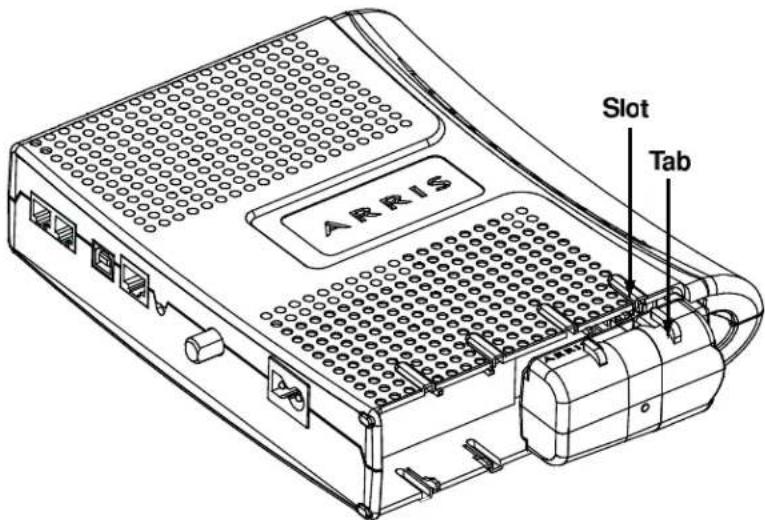
- Push the battery pack into the bay until it seats into place. The following diagram shows a Telephony Modem with a 2-cell battery pack installed.

Note: The Telephony Modem will not begin operating until you apply AC power or press the Reset button.

natural_image
Technical line drawing of an ARIS device chassis showing internal components and ports (no text or symbols beyond branding)- Replace the door. To do so, place the hinge tabs of the battery door into the receiver slots inside the Telephony Modem battery compartment on the opposite end of the battery opening slot. Rotate the door toward the unit until the latch snaps back into place.
Installing or Replacing a 4-cell Battery
Follow these steps to replace a 4-cell battery in a supported Telephony Modem.
- Insert a finger into the latch opening, press down and pull back on the latch holding the battery door (on the bottom of the Telephony Modem). Pull the door toward you. Set the door aside in a safe place.
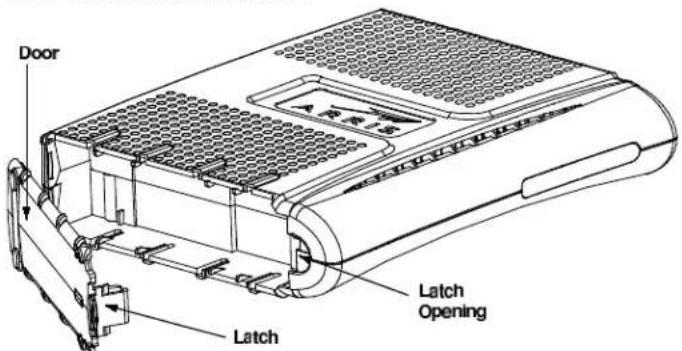
- If you are installing a new battery, skip to step 4.
- To remove a 4-cell battery, use the pull strap to pull the battery out of the bay.
- Hold the battery pack so that the guides on the battery align with the slots on the Telephony Modem and slide the battery into the bay. The diagram below shows the proper orientation.

Note: Batteries will not insert completely into the Telephony Modem if not oriented correctly. The battery should slide into the bay without significant force. Line up the slots
in the battery bay with the guides on the battery and apply even pressure on both ends of the battery.
WRONG

natural_image
Close-up of hands installing or adjusting a black plastic component with a yellow strip (no visible text or symbols)WRONG

natural_image
Close-up of hands installing a black plastic component on a laptop keyboard (no visible text or symbols)RIGHT

natural_image
Close-up of hands holding a black electronic device with a yellow cable inserted (no visible text or symbols)- Push the battery pack into the bay until it seats into place. The following diagram shows a Telephony Modem with a 4-cell battery pack installed.

Note: The Telephony Modem will not begin operating until you apply AC power or press the Reset button.

natural_image
Technical line drawing of an ARIS device housing with internal components and a separate cylindrical component (no text or symbols)- Replace the door. To do so, place the hinge tabs of the battery door into the receiver slots inside the Telephony Modem battery compartment on the opposite end of the battery opening slot. Rotate the door toward the unit until the latch snaps back into place.
Installing or Replacing a 6-cell or 8-cell Battery (2- and 4-line modems)
Follow these steps to replace a 6-cell or 8-cell battery in a supported 2- or 4-line Telephony Modem. Note that not all Telephony Modems support the 8-cell battery. Only TM722 and Model 8 (TM802, TM804, TM822) Telephony Modems support the 6-cell battery.
- Remove the battery door. Insert a finger into the latch opening, press down and pull back on the latch holding the battery door (on the bottom of the Telephony Modem). Pull the door toward you. Set the door aside in a safe place.

-
If you are installing a new battery, skip to step 4.
-
To remove a 6-cell or 8-cell battery, grasp the battery, pull back on the latch, and gently rock the battery out of the bay.
-
Place the new (or replacement) 6-cell or 8-cell battery on a firm horizontal surface.
-
Position the Telephony Modem over the battery, making sure to line up the slots on the battery bay with the tabs on the battery. Push straight down on the Telephony Modem until the battery latch clicks into place.

Note: You may need to push down gently on the front of the Telephony Modem to latch the battery into place.

natural_image
Line drawing of a device with a 'ARRIS' logo and internal components, showing no text or symbols.- If the Telephony Modem is wall-mounted, replace it on the mounting screws.
Installing or Replacing a 8-cell Battery (TM608)
Follow these steps to replace an 8-cell battery in a TM608. The TM608 has a battery bay in the front panel.
- Pull the battery door latch toward the center of the Telephony Modem and remove the battery door. Set the battery door aside.

natural_image
Technical line drawing of a rectangular electronic device with ports and connectors, labeled 'Latch' pointing to the left side (no other text or symbols)-
If necessary, remove the existing battery. Some batteries have a pull strap as shown in the example below.
-
Insert the backup battery as shown below.

natural_image
Technical line drawing of a rectangular electronic device with multiple ports and a side panel (no text or symbols)-
Replace the battery door:
-
Insert the battery door tab into the slot in the right side of the battery bay.
- Swing the battery door closed and press gently until it latches.
System Performance
The Telephony Modem charging system is designed to maximize battery life and optimize hold-up times. This chapter describes important features about the charging system.
Typical Lifetimes
Li-Ion batteries used in Touchstone products typically have a lifetime of 6 to 10 years when deployed immediately.
The following factors may impact battery lifetime:
High temperatures:
Extended exposure to temperatures above 25^ C ( 77^ F) reduces battery life. Warehouses (pre-deployment) and garage or attic installations can exceed this temperature, especially during summer months.
Frequent discharging:
Telephony Modems powered by switched outlets, or installed in areas with unreliable utility power, may experience reduced battery life. Whenever possible, use an unswitched outlet to power the Telephony Modem.

Note: The Telephony Modem partially discharges the battery during periodic capacity testing. Estimated battery lifetimes include this testing. By default, the Telephony Modem performs capacity testing every 180 days; you can change the interval by changing a MIB object in an SNMP browser or the configuration file. See "see "Scheduling Tests (page 37)" for more information.
Temperature vs. Battery Capacity
Touchstone battery capacity figures assume:
■ a storage temperature of 25 °C
■ two discharge cycles per year
In general, hold-up times decrease with lower battery temperature, and increase slightly at higher temperatures (up to 40 °C) as shown in the following chart:

line
| Temperature (C) | 'X' Vendor | 'Y' Vendor | | --------------- | ---------- | ---------- | | 0 | 92.5% | 96.0% | | 5 | 94.0% | 97.0% | | 10 | 95.5% | 98.0% | | 15 | 97.0% | 98.5% | | 20 | 98.5% | 99.0% | | 25 | 100.0% | 100.0% | | 30 | 101.5% | 101.0% | | 35 | 103.0% | 101.5% | | 40 | 104.0% | 102.0% | | 45 | 104.5% | 102.0% | | 50 | 105.0% | 102.0% |Batteries lose capacity over time, losing capacity faster at higher temperatures or when discharged more often. The following graph shows capacity loss per year at various temperatures.
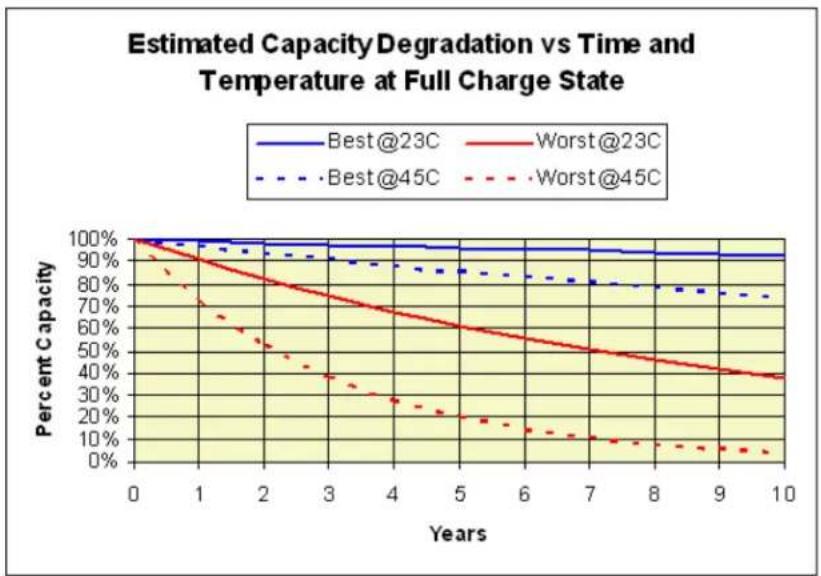
line
| Years | Best@23C | Worst@23C | Best@45C | Worst@45C | |-------|----------|-----------|----------|-----------| | 0 | 100% | 100% | 100% | 100% | | 1 | 98% | 95% | 98% | 85% | | 2 | 96% | 85% | 96% | 60% | | 3 | 94% | 75% | 94% | 40% | | 4 | 92% | 65% | 92% | 25% | | 5 | 90% | 55% | 90% | 15% | | 6 | 88% | 45% | 88% | 10% | | 7 | 86% | 35% | 86% | 8% | | 8 | 84% | 25% | 84% | 6% | | 9 | 82% | 15% | 82% | 4% | | 10 | 80% | 5% | 80% | 2% |Power Failure Operation
When a Telephony Modem with battery backup capabilities loses AC power, it immediately takes the following actions:
- Shuts off some LEDs to conserve battery power. The Power LED flashes and the Telephone and DOCSIS LEDs continue to operate normally.
- Disables the ability to download new firmware until the AC power is restored. Downloading firmware would cause a reset (and terminate service) upon completion of the download.
In addition, the Telephony Modem by default shuts down the data services running over wifi, and the Ethernet and USB ports, after a set amount of time. You can change the amount of time before the Telephony Modem disables data services, or disable data shutdown altogether. See the Touchstone Firmware Guide for details.

Note: Disabling data shutdown reduces battery hold-up time. The reduction depends on the model type (DTM602 and Gateway products, for example, have a much higher reduction than a TM602 or TM702).
Power Outage Recovery and Timing
Telephony Modems with battery backup automatically switch to DC power upon loss of the AC power supply. There is no interruption to the modem operation as a result of the switch to battery power. Note that there are certain changes to modem functions while operating on battery power, as described above.
Telephony Modems without battery backup, including units deployed without batteries, and battery-backed units which experience loss of AC power durations which exceed installed battery capacity, cease to operate upon loss of AC power. Recovery timing from power loss events depends largely on the recovery capability of network components. However, there is a small eMTA contribution to the amount of time required to fully recover. For DOCSIS 2.0 ARRIS Touchstone products, this time is approximately 25 to 30 seconds. DOCSIS 3.0 product recovery time is often longer, as they range on several upstreams and downstreams.
The following figure shows a representation of this recovery timing.

flowchart
graph LR
    A["Power restored"] --> B["varies 5 seconds"]
    B --> C["Boot Up Sequence Complete"]
    C --> D["Locked to cached Downstream Frequency"]
    D --> E["Ranged on cached Upstream with cached power level Frequency"]
    E --> F["CM DHCP Discover"]
    F --> G["CM TFTP Download"]
    G --> H["EMTA DHCP Discover"]
    H --> I["EMTA TFTP Download"]
    I --> J["DT Restored"]
    G --> K["Time dependent on network response"]
Typical Hold-up Times
Use the following information to estimate battery hold-up times for different Telephony Modem models. Note that any hold-up time predictions are necessarily estimates, given the number of variables involved.
Factors Affecting Hold-up Times
The following factors can affect hold-up times:
Capacity vs. Age
The following graph shows typical battery degradation with age. The area between the black curved lines shows the predicted capacity range over time; for example, after four years, a typical Li-Ion battery should have roughly 82% to 91% of its rated capacity.
The blue line shows actual test results averaged over 8 years of testing. Note that advances in battery technology and manufacturing, since this long-term test began, have improved both capacity and reliability for current batteries.
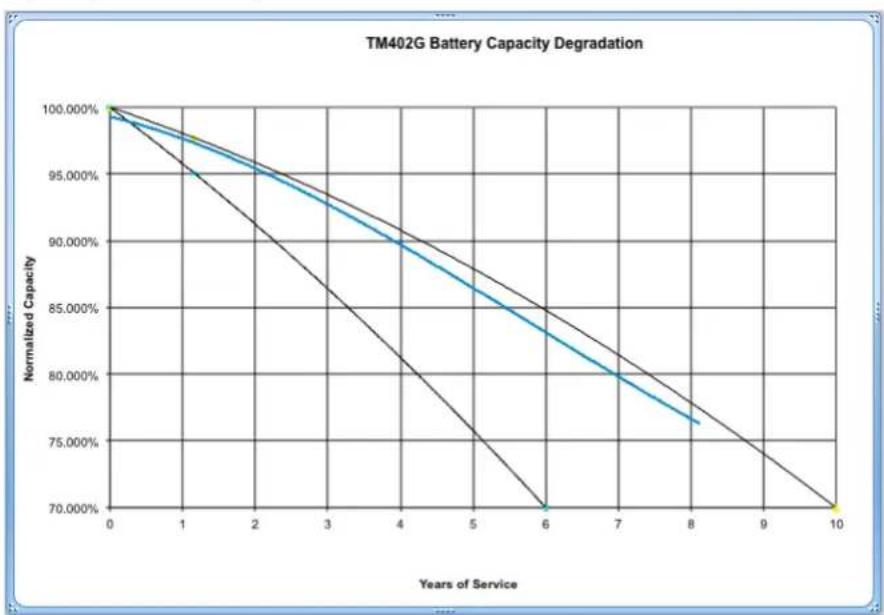
line
| Years of Service | Normalized Capacity | | ---------------- | ------------------- | | 0 | 100.000% | | 6 | 70.000% | | 8 | 76.000% | | 10 | 70.000% |Touchstone Model 5 and newer eMTAs generate a "Battery Replace" log when the battery has degraded to the point where it can provide 1 hour (2- or 4-cell batteries) or 2 hours (8-cell batteries) of holdup time. The actual holdup time threshold can be changed by setting the arrisMtaDevPwrSupplyReplaceBatTime object to the desired charge level.
Boost Current Mode
High ("boost") loop current may be required for proper operation with certain CPE devices. Loop current settings are:
■ 20mA (standard): all models
■ 34mA (boost): all models
■ 40mA (boost): Model 6/7/8 using NorthAmerica-High template
Some firmware loads set boost current as the default; see the Touchstone Firmware Guide for the firmware version deployed in your network for details.
Boost current mode can affect hold-up times depending on the number of lines in use.
■ no lines in use: negligible impact
■ 1 line in use: approx. 5% reduction in hold-up time
■ 2 lines in use: approx. 10% reduction in hold-up time
Data Shutdown
By default, Touchstone firmware shuts down all data interfaces (Ethernet, USB, wireless) after power remains off for a set time (the default depends on the model). Set the arrisMtaDevPwrSupplyEnableDataShutdown MIB object to disabled(2) to disable data shutdown. Some subscribers may prefer to have data services available at the expense of reduced hold-up times.
Disabling data shutdown entirely results in a 10% to 20% reduction in hold-up time, depending on:
■ network activity
Telephony Modem model
■ number of lines off-hook

Note: For the WTM552 and WTM652, and all Data Gateway and Telephony Gateway products, disabling data shutdown reduces hold-up times by 30% to 50%.
Battery Pack Temperature
Hold-up times increase slightly above 25^ C (while reducing battery lifetime). Temperatures below 15^ C reduce hold-up times.

line
| Temperature (°C) | 'X' Vendor | 'Y' Vendor | | ---------------- | ---------- | ---------- | | 0 | 93% | 96% | | 5 | 95% | 97% | | 10 | 97% | 98% | | 15 | 98% | 99% | | 20 | 99% | 100% | | 25 | 100% | 100% | | 30 | 101% | 101% | | 35 | 102% | 102% | | 40 | 103% | 102% | | 45 | 104% | 102% | | 50 | 104% | 102% |Other Factors
Other factors that can affect hold-up time include:
■ Number of battery charge/discharge cycles — the default configuration completely discharges the battery every six months for testing and calibration purposes. Frequent extended power outages, or subscribers removing power (using a power strip or switched outlet), can cause premature battery deterioration.
■ eMTA configuration — in addition to boost current and data shutdown changes described above, Touchstone firmware allows a number of changes to the charging system. See the "Provisioning" chapter for details.
■ Lines off-hook — lines in use require more power than at idle, even without a connection (for example, receivers jarred off-hook during an earthquake).
Estimated Hold-up Times by Model
The following tables provide estimated hold-up times for each Telephony Modem model, assuming:
■ new batteries
■ room temperature
■ data shutdown enabled
■ boost current disabled
Note: The "Lines off-hook" measurements assume the lines remain off-hook constantly while running on battery power. Thus, the tables provide an estimated range of hold-up times based on subscriber telephone usage during the power outage.
TM502
The following table shows typical hold-up times for the TM502 Telephony Modem, with:
■ data shutdown after 15 minutes
■ 23 mA loop current
| Battery Model | Hold-up Time (hours) | |
| Idle | 1 Line Off-hook | |
| BPB022S 5 3 | ||
| BPB024S 5 3 | ||
| BPB026S 5 3 | ||
| BPB044S/H 10 6 | ||
| BPB052H 10 6 | ||
TM504
The following table shows typical hold-up times for the TM504 Telephony Modem, with:
■ data shutdown after 15 minutes
■ 23 mA loop current
| Battery Model | Hold-up Times (hours) | |
| Idle | 1 Line Off-hook | |
| BPB022S 4 3 | ||
| BPB024S 4 3 | ||
| BPB026S 4 3 | ||
| BPB044S/H 8 | 6 | |
| BPB052H 8 6 | ||
| BPB088S/H 16 | 12 | |
WTM552
The following table shows typical hold-up times for the WTM552 Telephony Modem, with:
■ data shutdown after 5 minutes
■ 23 mA loop current
| Battery Model | Hold-up Times (hours) | |
| Idle | 1 Line Off-hook | |
| BPB022S 5 3 | ||
| BPB024S 5 3 | ||
| BPB026S 5 3 | ||
| BPB044S/H 10 | 6 | |
| BPB052H | 10 | 6 |
TM602
The following table shows typical hold-up times for the original TM602 Telephony Modem, with:
■ data shutdown after 15 minutes
■ one line off-hook
■ various loop current settings
| Battery Model | Hold-up Times (hours) (1 Line Off-hook) | |||
| Idle | 23 mA Loop | 33 mA Loop | 40mA Loop | |
| BPB022S 6 3 | 5 3.33 | 3 | ||
| BPB024S 8 5 | 4.5 4 | |||
| BPB026S 8 5 | 4.5 4 | |||
| BPB044S/H | 12 | 7.66 | 6.66 | 6 |
| BPB052H | 12 | 7.66 | 6.66 | 6 |
| BPB088S/H | 24 | 15.33 | 13.33 | 12 |
The following table shows typical hold-up times for the Phase 2 TM602 Telephony Modem, with:
■ data shutdown after 15 minutes
■ one line off-hook
■ various loop current settings
| Battery Model | Hold-up Times (hours) (1 Line Off-hook) | ||
| Idle | 23 mA Loop | 40mA Loop | |
| BPB022S | 8 | 5 | 4 |
| BPB024S | 8 | 5 | 4 |
| BPB026S | 8 | 5 | 4 |
| BPB044S/H | 12 | 7.66 | 6 |
| BPB052H | 12 | 7.66 | 6 |
| BPB088S/H | 24 | 15.33 | 12 |
TM604
The following table shows typical hold-up times for the TM604 Telephony Modem, with:
■ data shutdown after 15 minutes
■ no lines or all four lines off-hook
■ various loop current settings
| Battery Model | Hold-up Times (hours) (4 Lines Off-hook) | ||
| Idle | 23 mA Loop | 40 mA Loop | |
| BPB022S 6 2.5 1.5 | |||
| BPB024S 7 3 2 | |||
| BPB026S 7 3 2 | |||
| BPB044S/H | 12 | 5 | 3 |
| BPB052H | 12 | 5 | 3 |
| BPB088S/H | 24 | 10 | 6 |
WTM652, TG662
The following table shows typical hold-up times for the WTM652 Telephony Modem, with:
■ data shutdown after 5 minutes
■ no lines or one line off-hook
■ various loop current settings
| Battery Model | Hold-up Times (hours) (1 Line Off-hook) | ||
| Idle | 23 mA Loop | 40 mA Loop | |
| BPB022S | 6 | 3.5 | 3 |
| BPB024S | 8 | 5 | 4 |
| BPB026S | 8 | 5 | 4 |
| BPB044S/H | 12 | 7.66 | 6 |
| BPB052H | 12 | 7.66 | 6 |
| BPB088S/H | 24 | 15.33 | 12 |
TM608
The following table shows typical hold-up times for the TM608 Telephony Modem, with:
■ data shutdown after 15 minutes
■ no lines or all eight lines off-hook
■ various loop current settings
| Battery Model | Hold-up Times (hours) (8 Lines Off-hook) | ||
| Idle | 23 mA Loop | 40 mA Loop | |
| BPB044S 8 | 2.75 1.5 | ||
| BPB044H 8 | 2.75 1.5 | ||
| BPC088S | 16 | 5.5 | 3 |
TM702
The following table shows estimated hold-up times for the TM702 Telephony Modem, with:
■ data shutdown after 15 minutes
■ no lines or one line off-hook
■ various loop current settings
| Battery Model | Hold-up Times (hours) (1 Line Off-Hook) | ||
| Idle | 23 mA Loop | 40 mA Loop | |
| BPB022S | 4 | 3.25 | 2.75 |
| BPB024S | 4 | 3.5 | 3 |
| BPB026S | 4 | 3.5 | 3 |
| BPB044S/H | 8 | 6.5 | 5.5 |
| BPB052H | 8 | 6.5 | 5.5 |
TM722
The following table shows typical hold-up times for the TM722 Telephony Modem, with:
■ data shutdown after 15 minutes
■ no lines or one line off-hook
■ various loop current settings
| Battery Model | Hold-up Times (hours) (1 Line Off-hook) | ||
| Idle | 23 mA Loop | 40 mA Loop | |
| BPB022S 4 | 3.25 2.75 | ||
| BPB024S 4 | 3.5 3 | ||
| BPB026S 4 | 3.5 3 | ||
| BPB044S/H 8 | 6.5 | 5.5 | |
| BPB052H 8 | 6.5 5.5 | ||
| BPD066H | 12 | 9.5 | 8 |
| BPD088H | 16 | 13 | 11 |
TM802, TM822
The following table shows typical hold-up times for the TM802 and TM822 Telephony Modems, with:
■ data shutdown after 15 minutes
■ no lines or one line off-hook
■ various loop current settings
| Battery Model | Hold-up Times (hours) (1 Line Off-Hook) | ||
| Idle | 23 mA Loop | 40 mA Loop | |
| BPB022S | 6 | 4 | 3.5 |
| BPB024S | 6 | 4 | 3.5 |
| BPB026S | 8 | 6 | 5 |
| BPB044S/H | 12 | 8 | 7 |
| BPB052H | 12 | 8 | 7 |
| BPD066H | 18 | 12 | 10.5 |
| BPD088H | 24 | 16 | 14 |
TM804
The following table shows typical hold-up times for the TM804 Telephony Modem, with:
■ data shutdown after 15 minutes
■ no lines or one line off-hook
■ various loop current settings
| Battery Model | Hold-up Times (hours) (1 Line Off-Hook) | ||
| Idle | 23 mA Loop | 40 mA Loop | |
| BPB022S 6 | 4 3.5 | ||
| BPB024S 6 | 4 3.5 | ||
| BPB026S 6 | 4 3.5 | ||
| BPB044S/H 12 | 8 7 | ||
| BPB052H 12 | 8 7 | ||
| BPD066H | 18 | 12 | 10.5 |
| BPD088H | 24 | 16 | 14 |
TG852, TG862
The following table shows typical hold-up times for the TG852 and TG862 Telephony Gateways, with:
■ data shutdown after 5 minutes
■ no lines or one line off-hook
■ various loop current settings
| Battery Model | Hold-up Times (hours) (1 Line Off-hook) | ||
| Idle | 23 mA Loop | 40 mA Loop | |
| BPB022S 6 | 4 3.5 | ||
| BPB024S 6 | 4 3.5 | ||
| BPB026S 8 | 6 5 | ||
| BPB044S/H | 12 | 8 | 7 |
| BPB052H | 12 | 8 | 7 |
TM1602, TG1652, TG1662, TG1672, TG1682, TM3202
The following table shows typical hold-up times for the TM1602 and TM3202 Telephony Modems, and the TG1652, TG1662 TG1672, and TG1682 Telephony Gateways, with:
■ data shutdown after 5 minutes
■ one line off-hook
■ various loop current settings
| Battery Model | Hold-up Times (hours) (1 Line Off-hook) | ||
| Idle | 23 mA Loop | 40 mA Loop | |
| BPB022S 4 3 | 2.5 | ||
| BPB024S 4 3 | 2.5 | ||
| BPB026S 4 3 | 2.5 | ||
| BPB044S/H 8 | 6 5 | ||
| BPB052H 8 6 | 5 | ||
| BPB066H* 12 | 9 7.5 | ||
| BPB088H* | 16 | 12 | 10 |
*TM1602/TM3202 only
TG1682, TG2472, MG2402
The following table shows typical hold-up times for the TG1682 Telephony Gateway and MG2402 Media Gateway, with:
■ immediate data shutdown
■ no lines or one line off-hook
■ various loop current settings
| Battery Model | Hold-up Times (hours) (1 Line Off-hook) | ||
| Idle | 23 mA Loop | 40 mA Loop | |
| BPB022S | 4 | 3 | 2.5 |
| BPB024S | 4 | 3 | 2.5 |
| BPB026S | 4 | 3 | 2.5 |
| BPB044S/H | 8 | 6 | 5 |
| BPB052H | 8 | 6 | 5 |
MG5125, MG5225
The following table shows typical hold-up times for the MG5125 and MG5225 Media Gateways.
| Battery Model | Hold-up Times (hours) | ||
| Idle | 1 Line Off-hook | 2 Lines Off-hook | |
| BPB044S/H | 8 | 6 | 5 |
| BPB052H | 8 | 6 | 5 |
| BPC088S | 16 | 12 | 10 |
MG6125, MG6225, MG6325, MG6425
The following table shows typical hold-up times for the MG6125, MG6225, MG6325, and MG6425 Media Gateways, with:
■ immediate data shutdown
■ no lines or one line off-hook
■ various loop current settings
| Battery Model | Hold-up Times (hours) (1 Line Off-hook) | ||
| Idle | 23 mA Loop | 40 mA Loop | |
| BPB022S 4 3 | 2.5 | ||
| BPB024S 4 3 | 2.5 | ||
| BPB026S 5 4 | 3.5 | ||
| BPB044S/H 8 | 6 5 | ||
| BPB052H 8 6 | 5 | ||
Provisioning
You can control several power-related features through provisioning.
SNMP Interface
Touchstone products provide a subset of the RFC 1628-compliant CLAB-UPS-MIB, required by PacketCable 1.5. In addition, the ARRIS-MTA-DEVICE-MIB provides more power-related information. The Touchstone Firmware Guide provides detailed descriptions of the supported MIB objects.
CLI Interface
The CLI interface is available using telnet or SSH to either the CM or MTA IP address. You can make temporary changes to the charging system using the CLI.
To access or use the CLI, see the Touchstone Firmware Guide.
Configuration File Settings
You can control several power-related features by adding MIB object settings to a configuration file.
Controlling Data Shutdown Functionality
When the Telephony Modem loses AC power, one of the default actions it takes to conserve battery power is to shut down the data services running over the Ethernet and USB ports after running on the battery for a specific amount of time.
Enable or disable data shutdown by setting the value of the arrisMtaDevPwrSupplyEnableDataShutdown object. The allowed values are:
■ enabled(1)—The Telephony Modem discontinues data services after the period of time defined in the arrisMtaDevPwrSupplyDataShutdownTime object. This is the default value.
■ disabled(2)—The Telephony Modem allows the subscriber to continue using data services while the modem is running on battery power. Disabling data shutdown can reduce the battery holdup time.
Set the time between initial loss of AC power and data shutdown by changing the value of the arrisMtaDevPwrSupplyDataShutdownTime object. Specify the timeout period in seconds. The default setting varies by model.
Setting the Replace Battery Threshold
The arrisMtaDevPwrSupplyConfigReplaceBatTime MIB object sets the minimum acceptable battery charge, in minutes, needed to achieve the desired End of Life holdup time based on typical idle power. If the Tested Battery Capacity minus the Charge Hysteresis (20%) is less than this value, the eMTA raises a Replace Battery alarm. The default value provides 1 hour (2- or 4-cell batteries) or 2 hours of holdup time; you may change the threshold as needed.
Scheduling Tests
Touchstone firmware periodically performs a battery capacity test to determine whether the battery needs to be replaced. The capacity test is performed when the Telephony Modem is powered up (either for the first time or after replacing a battery), and every 180 days afterward. The capacity test may last up to 10 days, depending on the battery type installed.
Use the following MIB objects to view the testing interval, pause the interval timer, or immediately start or resume a test.
arrisMtaDevPwrSupplyBatteryTestTime
A read-only object that shows the time (in days) to the next capacity test. A value of 0xff (255) indicates that the timer has been paused.
arrisMtaDevPwrSupplyBatteryTest
The object that controls the battery test schedule. It can take the following values:
testScheduled(0)
When written, resumes the battery test scheduler at its current value. When read, indicates that the battery test runs when the scheduled time expires.
disableAutoTesting(1)
When written, pauses the battery test interval timer at its current value.
When read, indicates that the battery test never runs — except when the battery is removed and replaced, the test runs immediately. Once the test completes, the pause status is still in effect. Therefore, the battery test does not run a second time.
testInProgress(2)
When written, starts the battery test cycle immediately and resets the test scheduler to its default value of 180 days. This command is ignored if there is a test in progress. When read, indicates that a test is in progress.
testPending(3)
This is a read-only value.
If a battery test is in progress, and either AC power is lost or a full charge is requested, the battery test is paused and the status is reported as pending. When AC power is
restored, or the full charge period expires, the battery test that was in progress before the event resumes.
Use the arrisMtaDevPwrSupplyBatAvailableMinutes MIB object to view the measured battery capacity. The Telephony Modem uses this value to determine when to send a Replace Battery event.
Configuring Battery Temperature Protection
Battery temperature protection controls battery charging and discharging, based on various temperature thresholds.
Model 5 Behavior
The Model 5 disables battery charging and discharging if the temperature reaches 90^ C. The Telephony Modem reports a "Telemetry Unavailable" status with a "Charger Failure" sub-status. The charger failure status indicates "check temperature," code 0x00. Charging and discharging remain disabled until you power-cycle the Telephony Modem.
Model 6 and Newer Settings
The default settings for Model 6 and newer are:
| Temperature: | Too Low | OK | Too Hot |
| Charging | Disabled | Enabled | Disabled |
| Discharging | Enabled | Enabled | Enabled |
The following table shows the high and low temperature thresholds for disabling and re-enabling charging and discharging for Model 6 and newer Telephony Modems:
| Function | Threshold | |
| Disabled | Re-Enabled | |
| Low Temp Charging | ≤5°C | ≥10°C |
| High Temp Charging | ≥60°C | ≤45°C |
| High Temp Discharging | ≥75°C | ≤65°C |
Discharge protection is disabled by default, but can be enabled through provisioning. For Model 6 and newer Telephony Modems, charging protection is always enabled. Use the following MIB objects to control the battery discharge temperature protection feature.
arrisMtaDevPwrSupplyHiTempBatteryShutdownControl
(Model 6 and newer Telephony Modems) Enables or disables the high-temperature battery shutdown function. This feature is disabled by default.
The valid settings for this object are: disable(0), enable(1).
When enabled, the Telephony Modem shuts off the battery when the battery temperature exceeds 75^ ± 10^ . The Telephony Modem turns on the battery once battery temperature has fallen to 65^ ± 10^ .

Note 1: Consider carefully potential impacts before enabling the over-temperature protection system. While the protection system may prevent battery damage, a functioning Telephony Modem may shut down during an emergency situation and prevent calls to emergency services.

Note 2: Use the arrisMtaDevPwrSupplyOverTempAlarmControl object to control over-temperature behavior on Model 5 Telephony Modems.
arrisMtaDevPwrSupplyOverTempAlarmControl
Controls the battery over-temperature function for Model 5 Telephony Modems.
The valid settings for this object are:
- disable(0): (default for Model 5 Telephony Modems) Disables battery thermal protection and the over-temperature alarm. Reading the arrisMtaDevPwrSupplyTemperature object always returns "unavailable."
- enable(1): (default for Model 6 and newer Telephony Modems) Enables battery thermal protection and the over-temperature alarm. Reading the arrisMtaDevPwrSupplyTemperature object returns the current charger temperature. Note that Model 6 and newer Telephony Modems disallow settings other than enable.
- pendingenable(2): (read-only) Battery thermal protection has been enabled but is not yet active. This value may be seen immediately after enabling thermal protection if there is some system delay.
- pendingdisable(3): (read-only) Battery thermal protection has been disabled but is not yet inactive. This value may be seen immediately after disabling thermal protection if there is some system delay.

Note 1: The setting for this object is not stored in non-volatile memory, so the feature is disabled when the MTA is reset.

Note 2: Model 6 and newer Telephony Modems permanently set this object to enable(1), since they do not allow the over-temperature alarm to be disabled.
arrisMtaDevPwrSupplyOverTempAlarmThreshold
Sets the over-temperature threshold. Valid range: 50 to 70 (degrees C). Default: 60.

Note: The normal operating temperature for Touchstone eMTAs is 0°C to 50°C.
Troubleshooting
This chapter discusses the available battery monitoring and charger troubleshooting interfaces:
- Logs and alarms
■ MIB objects
■ LED patterns
Logs and Alarms
Touchstone firmware provides a "Power Supply Telemetry" message through both the alarm (SNMP TRAP) and log (Syslog) functionality.
Battery States
The following is a list of valid battery states for Telephony Modems with battery backup.
Normal—the Telephony Modem is operating on AC power, and is not in any of the other states listed below.
Battery Replace—the Telephony Modem is operating on AC power, but the battery has deteriorated below the tested capacity indicated by the arrisMtaDevPwrSupplyConfigReplaceBatTime object. The battery should be replaced.
Battery Missing—the battery has been removed or has failed in such a way to appear to be removed.
- Telemetry Unavailable—indicates either a communication problem between the battery charger and modem controller, or a general charger failure.
AC Fail Battery Low—the Telephony Modem is operating from battery power, and has entered the "Battery Low" condition described above.
■ AC Fail Battery Replace—the Telephony Modem is operating from battery power. In addition, the battery has deteriorated as described in "Battery Replace" above and should be replaced.
- AC Fail Battery Low Replace Battery—the Telephony Modem is operating from battery power, and has entered the "Battery Low" condition described above. In addition, the battery has deteriorated as described in "Battery Replace" above and should be replaced.
Power Supply Telemetry Alarm
Severity:
Major, non-service affecting
Cause:
The eMTA has lost AC power or has encountered a problem in the battery charging circuitry. The alarm includes one of the following battery status codes:
- AC Fail—the eMTA has detected an AC power failure.
- Charger Temperature High—the battery temperature alarm is enabled, and the charger temperature has exceeded the temperature set either using the alarm CLI command, or the arrisMtaDevPwrSupplyOverTempAlarmThreshold MIB object. This alarm clears itself when the charger temperature falls to 10°C below the threshold temperature.
Note: The normal operating temperature for Touchstone eMTAs is 0°C to 50°C.
- Charger OverTemp Shutdown—the battery high-temperature discharge protection feature is enabled, and the charger temperature has exceeded the thresholds shown in "see "Configuring Battery Temperature Protection (page 38)." The eMTA has shut down the charger and disconnected the battery.
- Battery Mismatch—the battery installed is of the wrong type for the eMTA (for example, an 8-cell battery pack installed in a TM502 or WTM552). The associated Telemetry Log messages are "TELEMETRY NORMAL" and "BATTERY REPLACE." Remove the battery to clear the alarm.
- Battery Charger Disabled—the eMTA has disabled the battery charger. Backup battery power is not available. Power-cycle or reset the eMTA to re-enable the charger.
- Charger Download Failed—the eMTA has twice failed (initial attempt and one retry) to download charger firmware. This indicates a hardware problem with the eMTA. The battery charger is disabled and backup battery power is not available.
The logs provide more information about the battery status.
Impact:
None at time of alarm. Depending on the condition of the battery and the nature of the power failure, the eMTA may exhaust the battery before AC power is restored.
Action:
Depends on the scope of the power outage.
Power Supply Telemetry Log
Event ID: 14
This event is used to report power supply related events, including state changes related to battery functionality.
MIB Objects
The following battery-related MIB objects are supported in Touchstone firmware. See the Touchstone Firmware Guide for your firmware version for complete details.
Power-related MIB Objects
The CLAB-UPS-MIB lists RFC 1628 MIB objects that are required by PacketCable 1.5. ARRIS implements a subset of this MIB, and provides more power-related information in the ARRIS-MTA-DEVICE-MIB.
RFC 1628 MIB Objects
upsIdentManufacturer
The name of the UPS manufacturer. For Touchstone Telephony Modems, this object always contains the string "ARRIS Interactive, L.L.C."
upsIdentModel
The model name or number of the UPS.
upsIdentAgentSoftwareVersion
The UPS agent software version.
upsIdentName
A customer-designated string identifying the UPS.
upsIdentAttachedDevices
A customer-designated string identifying devices attached to the UPS output.
upsBatteryStatus
The current battery charge status, one of:
- batteryNormal(2)—the remaining hold-up time is greater than the configured upsConfigLowBattTime.
- batteryLow(3)—the remaining hold-up time is less than the configured upsConfigLowBattTime.
- batteryDepleted(4)—if AC power is present, the battery does not have enough charge to sustain the load if AC power is lost. If AC power is not present, shutdown is imminent.
upsSecondsOnBattery
If the unit is on battery power, the elapsed time since the UPS last switched to battery power, or the time since the network management subsystem was last restarted, whichever is less. If AC power is present, this object returns 0.
upsEstimatedMinutesRemaining
The estimated time, in minutes, to battery charge depletion under the current load conditions if AC power is off and remains off, or if AC power were to be lost and remain off. The accuracy of this and the following object depend on the eMTA completing a capacity test.

Note: When AC power is present, the estimate is based on the typical idle power value, not current load conditions.
upsEstimatedChargeRemaining
The estimated battery charge remaining, expressed as a percentage of full charge.
upsInputNumLines
The number of input lines; also the number of rows in the upsInputTable.
upsOutputNumLines
The number of output lines; also the number of rows in the upsOutputTable.
upsAlarmsPresent
The number of active alarm conditions.
upsAlarmDescr
A reference to an alarm description object.
upsAlarmTime
Stores the sysUpTime value when the alarm condition was detected. A value of 0 indicates that the alarm condition was present before the eMTA's SNMP agent started up.
upsConfigLowBattTime
Sets the low battery threshold, expressed in remaining minutes of holdup time. The initial default value is 60 minutes for 2- or 4-cell batteries, or 120 minutes for 8-cell batteries.
ARRIS Battery MIB Objects
arrisMtaDevBatteryOrderingCode
The ordering code of the installed battery. The following table lists the current battery types:
| Code Model # Description | ||
| 718003 | BPB022S | 2.2Ah Battery |
| 721944 | BPB024S | 2.4Ah Battery |
| 789699 | BPB026S | 2.6Ah Battery |
| 718005 | BPB044S | 4.4Ah Battery |
| 722841 | BPB044H | 4.4Ah High-charge Battery |
| 801190 | BPB052H | 5.2Ah High-charge Battery |
| 785170 | BPD066H | 6.6Ah High-charge Battery |
| 721192 | BPB088S | 8.8Ah Battery |
| 722842 | BPC088S | Model 608 8.8Ah Battery |
| 785171 | BPD088H | 8.8Ah High-charge Battery |
The same information is available in the CM State troubleshooting web page. See the Touchstone Firmware Guide for other information about the web interface.

Note: TS6.1 and newer versions of Touchstone firmware read the ordering code from the battery EPROM. Batteries whose serial number begins with 1706 or higher have an EPROM.

Older firmware versions derive the ordering code from the rated battery capacity.
arrisMtaDevBatteryEprom
Contains manufacturing information about the battery. To read EPROM data, the following must be true:
- The hardware must be Model 6 or newer, a TM504, or a TM502 manufactured after November 2, 2006 (serial number begins with 6B2).
- The battery pack must have an EPROM built in (serial number begins with 1706 or higher).
arrisMtaDevBatteryChargerFWRev
The battery charger firmware revision.
arrisMtaDevPwrSupplyEnableDataShutdown
Enables or disables automatic shutdown of data services, but not telephony services, after the Telephony Modem has been using battery power for a specified period of time. The default value for this object is enabled(1). Set to disabled(2) to maintain data communications during a power outage.
arrisMtaDevPwrSupplyEnableDataShutdownTime
Indicates the timeout period, in seconds, that the Telephony Modem continues to provide data services after loss of AC power. The timer starts when the Telephony Modem loses AC power. After the timer expires, the Telephony Modem shuts down data services (Ethernet and USB) to conserve battery power. The default value for this object is 900 seconds (15 minutes).
arrisMtaDevPwrSupplyConfigReplaceBatTime
The replace battery threshold (i.e. the minimum acceptable battery capacity), expressed in minutes of holdup time. If the tested battery capacity has degraded to a point where it can no longer provide more than the specified amount of run-time, the eMTA raises a Replace Battery alarm. The default value provides 1 hour of holdup time for 2- or 4-cell batteries, or 2 hours for 8-cell batteries. You can change the threshold as needed, in multiples of 5 minutes.
arrisMtaDevPwrSupplyBatteryTest
Controls scheduling of the battery test. See see "Scheduling Tests (page 37) for details."
arrisMtaDevPwrSupplyConfigRunTime
The provisioned battery hold-up time, in minutes, based upon the unit's typical idle power.
You can adjust the battery hold-up time using this value. Setting the hold-up time to a lower value extends the total service life of the battery. Increasing the hold-up time in turn decreases the total service life of the battery.
Setting this value greater than arrisMtaDevPwrSupplyBatAvailableMinutes does not provide a run-time greater than arrisMtaDevPwrSupplyBatAvailableMinutes. This object may be set only in multiples of 5 minutes.
arrisMtaDevPwrSupplyFullChargeTime
The time, in days, that the battery is charged and maintained at its maximum charge level.
After this time has elapsed, the battery charge level is returned to the value specified by arrisMtaDevPwrSupplyConfigRunTime.
Valid range: 1 to 16 (days).
arrisMtaDevPwrSupplyTemperature
The current charger temperature, in degrees C. This object is valid only when the arrisMtaDevPwrSupplyOverTempAlarmControl object is enabled.
arrisMtaDevBatteryOperState
Current operational status of the Lithium-Ion battery pack:
unavailable(0)
Indicates a possible charger failure. The charger and battery are disabled. Try:
- allowing the charger to reset itself (which may clear an illegal instruction situation).
o power-cycling the Telephony Modem. - upgrading the firmware.
if the state persists after the above actions, replace the unit.
invalid(1)
(Model 4 only) Indicates a possible charger failure. See the actions for unavailable(0).
batteryReversedShorted(3)
Unused.
batteryLowreplaceBatteryacFail(4)
The Telephony Modem is running on battery power. The battery pack is low, and the user should replace the battery pack.
batteryLowreplaceBattery(5)
The battery pack is low, and the user should replace the battery pack.
batteryLowacFail(6)
The Telephony Modem is running on battery power. In addition, the battery is low (the calculated value of upsEstimatedMinutesRemaining has fallen below the value set in upsConfigLowBattTime).
batteryLow(7)
The battery is low (the calculated value of upsEstimatedMinutesRemaining has fallen below the value set in upsConfigLowBattTime).
batteryMissing(8)
The Telephony Modem cannot detect a battery. If a battery is present, make sure it is inserted properly.
acFailreplaceBattery(9)
The Telephony Modem is running on battery power. The user should replace the battery pack.
replaceBattery(10)
The tested battery capacity has degraded to a point where it can no longer provide a
hold-up time greater than what is specified in the
arrisMtaDevPwrSupplyConfigReplaceBatTime object, or some other battery fault has been detected, or an unsupported battery was installed. Replace the installed battery for optimal battery-backup.
acFail(11)
The Telephony Modem is running on battery power.
Note: Removing the battery during any AC Fail condition turns off the modem.
normal(12)
The Telephony Modem is running on AC power. The battery and charger are functioning properly.
testInProgress(13)
The eMTA is testing the battery.
arrisMtaDevBatteryLastStateChange
The value of sysUpTime when the battery entered its current operational state. If the current state has not changed since the eMTA last re-initialized, this object contains a zero value.
arrisMtaDevBatteryOperSubState
A string containing the current sub-state of the battery, which provides more details about the current operational status. See the table on the next page for details.
The current sub-state is not intended to match the arrisMtaDevBatteryOperState, but to provide supplemental information indicating the current state of the battery.
arrisMtaDevPwrSupplyBatteryTestTime
The value of the battery test scheduler, in days. If the value is 0xFF (255), the scheduler has been paused.
arrisMtaDevPwrSupplyReadBatteryPwr
The present load power, as an eight-second moving average, in 50-milliwatt units. When AC power is not present, this is the power being removed from the battery. When the eMTA is charging the battery, this is the power being applied.
arrisMtaDevPwrSupplySecondsOnBattery
The amount of time, in seconds, that the eMTA has been running on battery power.
arrisMtaDevPwrSupplyBatRatedMinutes
The estimated battery hold-up time, in minutes, based upon the typical idle power and the rated capacity of the battery when fully charged. This is a fixed value based on the capacity of a typical new battery.
arrisMtaDevPwrSupplyBatAvailableMinutes
The estimated available battery hold-up time, in minutes, based upon the typical idle power and the tested capacity of the battery when fully charged. This value may change after each battery test.
arrisMtaDevPwrSupplyHighestTemperature
A read-only string, containing the highest recorded battery charger temperature, in
degrees C. This is only available when arrisMtaDevPwrSupplyOverTempAlarmControl is enabled.
arrisMtaDevPwrSupplyHighestTemperatureTime
A read-only string, displaying the time and date when the highest temperature was recorded.
arrisMtaDevPwrSupplyHighestTemperatureClear
Set to clear(1) to clear the arrisMtaDevPwrSupplyHighestTemperature and arrisMtaDevPwrSupplyHighestTemperatureTime objects. After clearing these objects, their values become valid within 4 seconds, when the eMTA calculates the current temperature.

CAUTION
Potential loss of service
Resetting the battery charger when the eMTA is in an AC Fail condition immediately shuts down the eMTA.
arrisMtaDevPwrSupplyControlChargerReset
Set this object to true(1) to reset the battery charger.
SNMP Battery Telemetry States
Battery telemetry states can be completely described by using the arrisMtaDevBatteryOperState and arrisMtaDevBatteryOperSubState MIB objects. The following table shows which sub-states are associated with each state.
| State Sub-State | |
| unavailable(0) Charger Failure | |
| batteryLow-replaceBattery-acFail(4) | AC-Fail & Replace Bat & Bat Low |
| Test is Pending, AC-Fail, Replace Battery, Battery Low | |
| batteryLow-acFail(6) | AC-Fail & Battery Low |
| Test is Pending, AC-Fail, Battery Low | |
| batteryMissing(8) Battery | Missing |
| acFail-replaceBattery(9) | AC-Fail & Replace Battery |
| Test is Pending, AC-Fail, Replace Battery | |
| replaceBattery(10) | Battery OFF & Replace Battery |
| Replace Battery | |
| Replace Battery & Battery Low | |
| Battery is Charging & Replace Battery | |
| Battery is Charging & Replace Battery & Battery Low | |
| Battery Test Load ON & Replace Battery | |
| Battery Test Load ON & Replace Battery & Battery Low | |
| Test in Progress, Replace Battery | |
| Test in Progress, Replace Battery, Battery Low | |
| Test in Progress, Battery is Charging & Rpl Bat | |
| Test in Progress, Battery is Charging & Rpl Bat & Bat Low | |
| Test is Pending, Replace Battery | |
| Test is Pending, Replace Battery, Battery Low | |
| Test is Pending, Battery is Charging & Rpl Bat | |
| Test is Pending, Battery is Charging & Rpl Bat & Bat Low | |
| Battery OFF & Replace Battery & Battery Low | |
| acFail(11) | AC-Fail |
| Test is Pending, AC-Fail | |
| normal(12) | Battery is Turned OFF |
| Battery Backup Normal | |
| Battery Low | |
| Battery is Charging & Backup is Normal | |
| Battery is Charging & Battery Low | |
| Battery Test Load ON & Backup is Normal | |
| Battery Test Load ON & Battery Low | |
| Test in Progress | |
| Test in Progress, Battery Low | |
| Test in Progress, Battery is Charging | |
| Test in Progress, Battery is Charging & Bat Low | |
| Test is Pending | |
| Test is Pending, Battery Low | |
| Test is Pending, Battery is Charging | |
| Test is Pending, Battery is Charging & Bat Low | |
| testInProgress(13) | Test in Progress, Battery Test Load ON |
| Test in Progress, Battery Test Load ON & Rpl Bat | |
| Test in Progress, Battery Test Load ON & Bat Low | |
| Test in Progress, Battery Test Load ON & Rpl Bat & Bat Low | |
Web-based Troubleshooting Interface
Telephony Modems provide a web-based troubleshooting interface that can be accessed from either the CM or MTA IP addresses.
The Registration Status screen displays the current battery telemetry state and serial number. To display this screen, choose the CM State link.

Battery Test State: Under Test - Final Charge
© Copyright 2012, ARRIS Group, Inc., All rights reserved.
The last two sections of this page provide information about the charging system, as described below.
Power Supply Telemetry Field
The Power Supply Telemetry section provides the following information:
Battery Operation Status
The operational status of the charging system:
TELEMETRY NORMAL
The battery and charging system are functioning normally.
BATTERY MISSING
Either no battery is installed, or the battery has completely failed.
AC FAIL
The Touchstone device is running on battery power, but otherwise functioning normally.
AC FAIL BATTERY LOW
The Touchstone device is running on battery power, but the battery charge level is below a pre-defined charge level.
BATTERY REPLACE
The tested battery capacity is below 80% of its rated capacity and should be replaced
as soon as possible. If the battery is less than a year old, it might be replaced under warranty.
AC FAIL BATTERY REPLACE
The Touchstone device is running on battery power. The tested battery capacity is below 80% of its rated capacity, and thus may not be able to provide the rated hold-up time.
AC FAIL BATTERY LOW REPLACE
The Touchstone device is running on battery power. The tested battery capacity is below 80% of its rated capacity, and the battery charge level is below a pre-defined charge level.
BATTERY TEST IN PROGRESS
The Touchstone device is testing its battery. This happens every six months (or the cable operator can set a different interval). The battery may not be able to provide its rated hold-up time if AC power fails during the test. When this state is active, the Battery Test State field shows the progress of the test.
TELEMETRY UNAVAILABLE
Wait a few minutes, then refresh the page. If this state persists, call your cable operator support for assistance.
No Status Reported
The charging system has been disabled. Try resetting the device to clear this issue. If that does not work, power-cycle the device. If this state persists, call your cable operator support for assistance.
Invalid Code from Charger
Wait a few minutes, then refresh the page. If this state persists, the battery may have a problem.
Battery Serial Number
The battery serial number is available on most Telephony Modems. The following is a list of other messages that may appear in the Battery Serial Number field:
Battery Serial Number Not Supported
The Telephony Modem is an early Model 5 Telephony Modem, or another non-supported modem or battery pack.
Battery Missing
No battery is installed.
AC Failed. S/N Temporarily Unavailable
The Telephony Modem is running on battery power, and has disabled reading the battery serial number as part of the data services shutdown function to conserve power. Not all Telephony Modems disable reading the battery serial number upon data shutdown (for example, Model 7 Telephony Modems).
Unable to obtain Battery Serial Number(s)
Appears in cases where the serial number is missing or unreadable.
Battery Part Number
The ordering code of the installed battery.
If the Battery Part Number is "Contact ARRIS," the battery is either defective or the Telephony Modem has an unsupported battery installed (for example, a model BPB088S battery installed in a TM502).
Battery Test State Field
The Battery Test State field indicates whether the charging system is testing the battery; and if so, the current progress of the test. This field provides one of the following indications:
Not Currently Under Battery Test
The normal operating state.
Under Test - Initial Charge
The battery is being charged to full capacity to begin the test.
Under Test - Initial Discharge
The battery was fully charged, and the E-UE is now running on battery power.
Under Test - Final Charge
The battery was fully charged, then discharged, and now the E-UE is charging the battery to its operational capacity.
LEDs
The Power LED and Battery LED provide a quick indication of power and battery status. The following table describes LED behavior for each power status.
TM502/504/602/WTM552/652 LED Status
| Power Mode | LED | |
| Power | Battery | |
| AC Power Good On | On: battery good or low | |
| Off: battery not installed | ||
| Flash: replace battery | ||
| AC Power Fail Flash | On: battery good | |
| Flash: battery bad or low | ||
TM7xx/TM8xx/TG852/TG16xx/TG2472 LED Status

Note: See sections following for TG862 and TM1602 LED status.
| Power Mode | LED | |
| Power | Battery | |
| AC Power Good On | On: battery good or low | |
| Off: battery not installed | ||
| Flash: replace battery | ||
| AC Power Fail Flash | Off: battery good or low | |
| Flash: replace battery | ||
TG862 LED Status
| Power Mode | LED | |
| Power | Battery | |
| AC Power Good On | On: battery good or low | |
| Off: battery not installed | ||
| Flash: replace battery | ||
| AC Power Fail Flash | On: battery good or low | |
| Flash: replace battery | ||
TM1602/TM3202 LED Status
| Power Mode | LED | |
| Power | Battery | |
| AC Power Good On | On: battery good or low | |
| Off: battery not installed | ||
| Flash: replace battery | ||
| AC Power Fail Flash | Off: battery good | |
| Flash: replace battery or battery low | ||
Battery Mismatch
When an unsupported battery is inserted in a Telephony Modem (for example, a model BPB088S battery inserted in a TM502 or WTM552), it repeats the following sequence:
■ Battery LED on, all others off
■ Battery LED off, all others on
The MTA also sets a "Battery Mismatch" alarm. To clear this issue, replace the battery with one of the proper type.
Performing Hold-up Testing
Use this procedure to test Telephony Modem hold-up times. The hold-up times shown in "see "Estimated Hold-up Times by Model" are reasonably accurate for the conditions specified; you may wish to test hold-up times with a different set of initial conditions.
See Charger Initialization Times for the total time needed for charger initialization and battery tests for each model and battery type.
Requirements
Actual requirements for a hold-up test depend on the conditions you wish to set up. The Telephony Modem must be ranged and registered, with the appropriate battery inserted before powering on the modem. If you are planning to test hold-up times with lines off-hook, you need to connect telephones to the Telephony Modem.
An SNMP browser is useful but not strictly necessary; you can use it to display battery and charger status during the hold-up test.
If you want to run the test with different parameters such as data shutdown times or changing MIB objects that control charger behavior, you need to set up a configuration file with the desired changes.
Temperature-related tests may require an environmental chamber.
Action
Follow these steps to test hold-up times.
-
Prepare the Telephony Modem:
-
Install the battery.
- Connect as many telephones as necessary to test hold-up times with activity.
- Connect RF and (if needed) Ethernet or USB.
-
Apply AC power and allow the Telephony Modem to range and register.
-
Verify that the Telephony Modem has started its battery test cycle using one of the following methods:
-
Check the event log for a "Power Supply Telemetry Log - Battery Test in Progress" message. You can use SNMP or the web-based interface (see the "Event Log" page) to display the event log.
-
Using SNMP, check the status of the arrisMtaDevBatteryOperState object. The object value should be testInProgress(13).
-
Wait for the Telephony Modem to complete its initial charger initialization and battery test. See "Charger Initialization Times" above for the time required.
When the test is complete, the Telephony Modem adds a "Power Supply Telemetry Log -Telemetry Normal" message to the event log and sets the value of the arrisMtaDevBatteryOperSubState object to BatteryBackupNormal.

Note 1: If the charger status is not BatteryBackupNormal, replace the battery (or the Telephony Modem) and start the test again.

Note 2: Begin the hold-up test within 24 hours after the battery test cycle completes (the charger status reads BatteryBackupNormal).
-
Place unit in the desired mode:
-
Idle mode: all lines on hook and no transmit or receive data traffic.
-
Talk mode: one or more lines off-hook with no data traffic.
-
Remove AC power.

Note: When testing in Talk mode, verify that the call is not dropped when removing AC power.
- Record the length of time that it takes for the battery to completely discharge (all LEDs turn off).
If practical, read and record upsEstimatedMinutesRemaining and upsSecondsOnBattery values at 15-minute intervals. When the Telephony Modem logs a "Battery Low" message, read and record data at 1-minute intervals.
Expected Results:
- The Telephony Modem should operate for the times specified in above, while running on battery, adjusted for configuration changes. See "see "Factors Affecting Hold-up Times (page 25)" for selected effects on hold-up time.
- The final value of upsSecondsOnBattery should be approximately equal to the actual recorded time.
- Comparing the sampled upsEstimatedMinutesRemaining times to the actual time remaining should match within ±5% .

Note: Any change in load (for example, taking a line off-hook or hanging up) has an immediate effect on the value of upsEstimatedMinutesRemaining. While the value should accurately reflect the remaining time under current load conditions, keeping the load constant minimizes fluctuations in the reported value.
Extended Outage Handling
While most power outages are brief, some outages can last for hours or over a day. This chapter provides tips for maximizing hold-up times during extended outages.
For the purpose of this manual, the duration of an "extended outage" is at least as long as the typical estimated hold-up time for the normal customer installation in your network. See "see "Estimated Hold-up Times by Model" for a list of typical hold-up times for each Telephony Modem model.

Note: Subscribers that want extended hold-up times may order spare or higher-capacity batteries from http://www.yourbroadbandstore.com (http://shop.surfboard.com/).
Battery Charge Data
You can use the following MIB objects to check the current and potential battery charge status of any Telephony Modem.
arrisMtaDevPwrSupplyBatRatedMinutes
The estimated battery hold-up time, in minutes, based upon the typical idle power and the rated capacity of the battery when fully charged. This is a fixed value based on the capacity of a typical new battery.
arrisMtaDevPwrSupplyBatAvailableMinutes
The estimated available battery hold-up time, in minutes, based upon the typical idle power and the tested capacity of the battery when fully charged. This value may change after each battery test.
arrisMtaDevPwrSupplyConfigRunTime
The provisioned battery hold-up time, in minutes, based upon the unit's typical idle power.
Setting this value greater than arrisMtaDevPwrSupplyBatAvailableMinutes does not provide a run-time greater than arrisMtaDevPwrSupplyBatAvailableMinutes. This object may be set only in multiples of 5 minutes.
upsEstimatedMinutesRemaining
The estimated time, in minutes, to battery charge depletion under the current load conditions if AC power is off and remains off, or if AC power were to be lost and remain off. The accuracy of this and the following object depend on the eMTA completing a capacity test.

Note: When AC power is present, the estimate is based on the typical idle power value, not current load conditions.
Preparing for Extended Outages
In many cases, you can anticipate and prepare for weather-related outages. Weather events that can cause extended outages include:
■ hurricanes (or other high winds)
■ severe thunderstorms
■ ice storms/blizzards
heat waves
The following techniques may be useful to maximize hold-up times during an anticipated extended outage. When changing MIB objects, making the same changes in a configuration file ensures that subscribers do not inadvertently revert the settings by power-cycling the Telephony Modem.
Setting Full Charge
Set the arrisMtaDevPwrSupplyFullChargeTime object to the number of days that you wish to charge and maintain the battery at 100% of its rated voltage. Valid range: 1 to 16 days.

Note: The Telephony Modem disables battery testing during this period.
Charging Replacement Batteries
A bank of Telephony Modems can be employed to pre-charge quantities of batteries to be used in battery swaps during the outage. The modems should be provisioned as described above to charge the batteries completely and to disable battery testing.
Servicing Customers During Extended Outages
Some MSOs provide battery swaps to subscribers during extended power outages. The following tips may be helpful to facilitate battery swaps.
■ Model 6 and newer products can be started from the backup battery by installing a charged battery and pressing the Reset button on the back on the modem. Use a pointed, non-metallic tool to press the Reset button.
■ Model 5 Telephony Modems do not support the "boot from battery" feature. However, you can plug these modems into an external AC source to start them. Once the modem begins ranging, you can disconnect it from the AC source.
Appendix A: Ordering Codes
ARRIS provides the following backup battery packs. The following tables show which devices are compatible with each battery type.
| Battery Model | Telephony Modem/Telephony Gateway | ||||||
| 502 | 504 | 552 | 602 | 604 | 608 | 652 | |
| BPB022S | √ | √ | √ | √ | √ | - | √ |
| BPB024S | √ | √ | √ | √ | √ | - | √ |
| BPB026S | √ | √ | √ | √ | √ | - | √ |
| BPB044S | √ | √ | √ | √ | √ | √ | √ |
| BPB044H | √ | √ | √ | √ | √ | √ | √ |
| BPB052H | √ | √ | √ | √ | √ | √ | √ |
| BPD066H - - - - - - | |||||||
| BPB088S - | √ | - | √ √ | - | √ | ||
| BPC088S - - - - | √ | - | |||||
| BPD088H - - - - - - | |||||||
| Battery Model | Telephony Modem/Telephony Gateway | ||||||
| 702 | 722 | 802 | 804 | 822 | 852 | 862 | |
| BPB022S | √ | √ | √ | √ | √ | √ | √ |
| BPB024S | √ | √ | √ | √ | √ | √ | √ |
| BPB026S - - | √ | √ | √ | √ | √ | ||
| BPB044S | √ | √ | √ | √ | √ | √ | √ |
| BPB044H | √ | √ | √ | √ | √ | √ | √ |
| BPB052H | √ | √ | √ | √ | √ | √ | √ |
| BPD066H - | √ √ | √ √ | -- | ||||
| BPB088S - - | - | √ √ | - | √ | |||
| BPC088S - - | - - - - | ||||||
| BPD088H - | √ √ | √ √ | -- | ||||
| Battery Model Gateway | |||||||||
| 1602 165 | 1662 | 1672 1682 | 2402 247 | 23202 | |||||
| BPB022S | √ | √ | √ | √ | √ | √ | √ | √ | XXX |
| BPB024S | √ | √ | √ | √ | √ | √ | √ | √ | |
| BPB026S | √ | √ | √ | √ | √ | √ | √ | √ | |
| BPB044S | √ | √ | √ | √ | √ | √ | √ | √ | |
| BPB044H | √ | √ | √ | √ | √ | √ | √ | √ | |
| BPB052H | √ | √ | √ | √ | √ | √ | √ | √ | |
| BPD066H - - - | - - - - | ||||||||
| BPB088S - - - | - - - - | ||||||||
| BPC088S - - - | - - - - | ||||||||
| BPD088H - - - | - - - - | ||||||||
| Battery Model | Media Gateway | |||||
| 5125 | 5225 | 6125 | 6225 | 6325 | 6425 | |
| BPB022S -- | √ √ | √ √ | ||||
| BPB024S -- | √ √ | √ √ | ||||
| BPB026S -- | √ √ | √ √ | ||||
| BPB044S | √ | √ | √ | √ | √ | √ |
| BPB044H | √ | √ | √ | √ | √ | √ |
| BPB052H | √ | √ | √ | √ | √ | √ |
| BPD066H -- | - - - - | |||||
| BPB088S -- | - - - - | |||||
| BPC088S | √ √ | - - - - | - | |||
| BPD088H -- | - - - - | |||||
2-cell Batteries
Model BPB022S 2.2 Ah battery pack ordering codes:
10-pack: 718003
■ Single: 790513

Model BPB024S ordering codes:
10-pack: 721944
■ Single: 790515
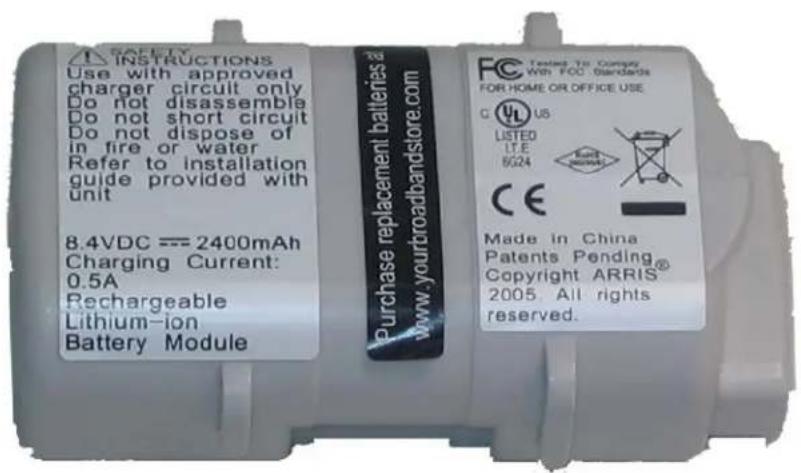
Model BPB026S ordering codes:
10-pack: 789699
■ Single: 794068

4-cell Batteries
Model BPB044S ordering codes:
10-pack: 718005
■ Single: 790512

Model BPB044H ordering codes:
10-pack: 722841

Model BPB052H ordering codes:
10-pack: 801190

6-cell Battery
Model BPD066H ordering codes:
10-pack: 785170
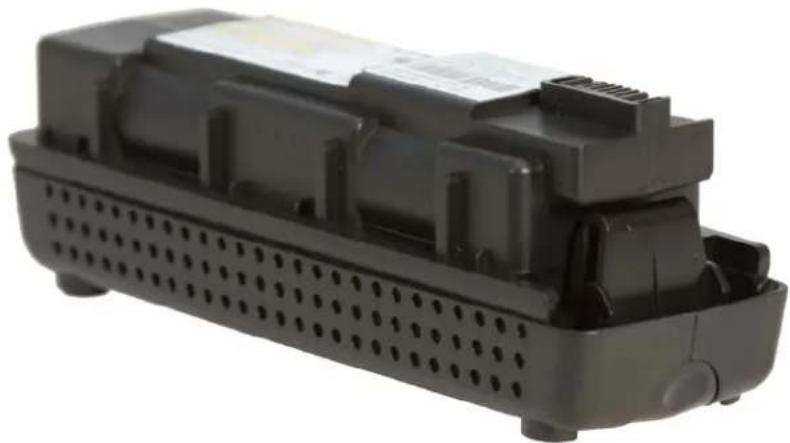
natural_image
Black plastic electronic component with perforated base and mounting bracket (no visible text or symbols)
Note: The BPD066H 6-cell battery is compatible only with the TM722, Model 8 (TM802, TM804, TM822), and TM1602 Telephony Modems.
8-cell Battery
Model BPB088S ordering codes:
10-pack: 721192
■ Single: 790514

Model BPC088S ordering codes:
10-pack: 722842

natural_image
Close-up of a black cylindrical electronic component with a yellow band, no visible text or symbolsModel BPD088H ordering codes:
10-pack: 785171
■ Single: 802251


Note 1: The BPB088S 8-cell battery replaces the battery bay door on the bottom of the Telephony Modem, and increases the height of the Telephony Modem by about 5/8 inch (16 mm).

Note 2: The BPB088S 8-cell battery is compatible only with the TM504, and Model 6 (except TM608) Telephony Modems. The battery fits physically in TM502 and WTM552 modems, but installation in these modems results in a "Battery Mismatch" alarm. Use the BPC088S 8-cell battery in a TM608 multi-line Telephony Modem.

Note 3: The BPD088H 8-cell battery is compatible only with the TM722, Model 8 (TM802, TM804, TM822), and TM1602 Telephony Modems.
Corporate Headquarters
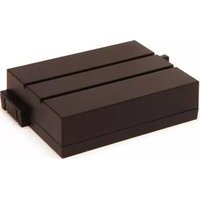
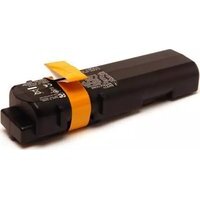
- Touchstone
- ARRIS Copyrights and Trademarks
- Publication History
- August 2016
- April 2015
- June 2009
- July 2008
- Table of Contents
- Troubleshooting....40
- Extended Outage Handling 57
- Appendix A: Ordering Codes.... 59
- About this Document
- Audience
- In this Document
- CFR 12.5 Compliance
- Safety Considerations
- Handling
- WARNING
- Risk of explosion
- CAUTION
- Risk of injury
- Transportation
- Storage
- Environmental
- Extended Storage
- Disposal
- Core Functions
- Charger Initialization Times
- Battery Gauge Calibration and Accuracy
- upsEstimatedMinutesRemaining
- upsEstimatedChargeRemaining
- Scheduling and Maintenance
- Booting from Battery (Model 6 and newer)
- Specifications
- Standards:
- Replacing a Battery
- Installing or Replacing a 2-cell Battery
- Installing or Replacing a 4-cell Battery
- Installing or Replacing a 6-cell or 8-cell Battery (2- and 4-line modems)
- Installing or Replacing a 8-cell Battery (TM608)
- System Performance
- Typical Lifetimes
- Temperature vs. Battery Capacity
- Power Failure Operation
- Power Outage Recovery and Timing
- Typical Hold-up Times
- Factors Affecting Hold-up Times
- Capacity vs. Age
- Boost Current Mode
- Data Shutdown
- Battery Pack Temperature
- Other Factors
- Estimated Hold-up Times by Model
- TM502
- TM504
- WTM552
- TM602
- TM604
- WTM652, TG662
- TM608
- TM702
- TM722
- TM802, TM822
- TM804
- TG852, TG862
- TG1682, TG2472, MG2402
- MG5125, MG5225
- MG6125, MG6225, MG6325, MG6425
- Provisioning
- SNMP Interface
- CLI Interface
- Configuration File Settings
- Controlling Data Shutdown Functionality
- Setting the Replace Battery Threshold
- Scheduling Tests
- arrisMtaDevPwrSupplyBatteryTestTime
- arrisMtaDevPwrSupplyBatteryTest
- Configuring Battery Temperature Protection
- Model 5 Behavior
- Model 6 and Newer Settings
- arrisMtaDevPwrSupplyHiTempBatteryShutdownControl
- arrisMtaDevPwrSupplyOverTempAlarmControl
- arrisMtaDevPwrSupplyOverTempAlarmThreshold
- Troubleshooting
- Logs and Alarms
- Battery States
- Power Supply Telemetry Alarm
- Cause:
- Impact:
- Action:
- Power Supply Telemetry Log
- MIB Objects
- Power-related MIB Objects
- RFC 1628 MIB Objects
- upsIdentManufacturer
- upsIdentModel
- upsIdentAgentSoftwareVersion
- upsIdentName
- upsIdentAttachedDevices
- upsBatteryStatus
- upsSecondsOnBattery
- upsInputNumLines
- upsOutputNumLines
- upsAlarmsPresent
- upsAlarmDescr
- upsAlarmTime
- upsConfigLowBattTime
- ARRIS Battery MIB Objects
- arrisMtaDevBatteryOrderingCode
- arrisMtaDevBatteryEprom
- arrisMtaDevBatteryChargerFWRev
- arrisMtaDevPwrSupplyEnableDataShutdown
- arrisMtaDevPwrSupplyEnableDataShutdownTime
- arrisMtaDevPwrSupplyConfigReplaceBatTime
- arrisMtaDevPwrSupplyConfigRunTime
- arrisMtaDevPwrSupplyFullChargeTime
- arrisMtaDevPwrSupplyTemperature
- arrisMtaDevBatteryOperState
- arrisMtaDevBatteryLastStateChange
- arrisMtaDevBatteryOperSubState
- arrisMtaDevPwrSupplyReadBatteryPwr
- arrisMtaDevPwrSupplySecondsOnBattery
- arrisMtaDevPwrSupplyBatRatedMinutes
- arrisMtaDevPwrSupplyBatAvailableMinutes
- arrisMtaDevPwrSupplyHighestTemperature
- arrisMtaDevPwrSupplyHighestTemperatureTime
- arrisMtaDevPwrSupplyHighestTemperatureClear
- Potential loss of service
- arrisMtaDevPwrSupplyControlChargerReset
- SNMP Battery Telemetry States
- Web-based Troubleshooting Interface
- Power Supply Telemetry Field
- AC FAIL BATTERY REPLACE
- AC FAIL BATTERY LOW REPLACE
- BATTERY TEST IN PROGRESS
- TELEMETRY UNAVAILABLE
- No Status Reported
- Invalid Code from Charger
- Battery Serial Number
- Battery Serial Number Not Supported
- Battery Missing
- AC Failed. S/N Temporarily Unavailable
- Unable to obtain Battery Serial Number(s)
- Battery Test State Field
- LEDs
- TM502/504/602/WTM552/652 LED Status
- TM7xx/TM8xx/TG852/TG16xx/TG2472 LED Status
- TG862 LED Status
- Battery Mismatch
- Performing Hold-up Testing
- Requirements
- Action
- Expected Results:
- Extended Outage Handling
- Battery Charge Data
- Preparing for Extended Outages
- Setting Full Charge
- Charging Replacement Batteries
- Servicing Customers During Extended Outages
- Appendix A: Ordering Codes
- 2-cell Batteries
- 4-cell Batteries
- 6-cell Battery
- 8-cell Battery
Brand : Arris
Model : Touchstone BPD066H
Category : Battery