
WGCXL111ENB - Doorbell HAGER - Free user manual and instructions
Find the device manual for free WGCXL111ENB HAGER in PDF.


| Product Type | Wireless Doorbell Chime |
| Brand | Hager |
| Model | WGCXL111ENB |
| Dimensions (approx.) | 100 x 60 x 30 mm |
| Weight (approx.) | 150 g |
| Power Supply | 230 V AC / 50 Hz |
| Sound Level | Adjustable up to 85 dB |
| Number of Melodies | 8 selectable tunes |
| Volume Control | Yes, adjustable |
| LED Indicator | Yes, for operation and push notification |
| Wireless Range | Up to 150 m in open field |
| Frequency | 433.92 MHz |
| Compatible Push Buttons | Hager WGC series |
| Number of Supported Buttons | Up to 4 |
| Mounting | Wall-mounted (screws included) |
| Protection Class | IP20 (indoor use only) |
| Operating Temperature | -10°C to +40°C |
| Maintenance | Clean with a soft, dry cloth |
| Safety | Low voltage device; no user-serviceable parts |
| Spare Parts | Available from Hager: batteries, mounting kit |
| Repairability | Product should be repaired by qualified personnel only |
Frequently Asked Questions - WGCXL111ENB HAGER
User questions about WGCXL111ENB HAGER
0 question about this device. Answer the ones you know or ask your own.
Ask a new question about this device
Download the instructions for your Doorbell in PDF format for free! Find your manual WGCXL111ENB - HAGER and take your electronic device back in hand. On this page are published all the documents necessary for the use of your device. WGCXL111ENB by HAGER.
USER MANUAL WGCXL111ENB HAGER
Electrical equipment must only be installed and assembled by a qualified electrician in accordance with the relevant installation standards, regulations, directives and safety and accident prevention directives of the country.
Failure to comply with these installation instructions may result in damage to the device, fire or other hazards.
Function
Mechanical press switches for electrical installations in buildings.
Bell switch comes with imprinted bell symbol for door bell applications.
Correct use
- For the flush-mounted installation in standard wall boxes (recommended wall box depth ≥ 35 mm).
- Only suitable for use in indoor areas with no drip and no spray water.
Technical data
Rated voltage: 250 V\~
Frequency: 50/60 Hz
Rated current: max. 10 A
Conductor cross-section of screw terminals: max. 3 x 1.5 mm 4
Distance of fixing holes: 60.3 mm
Switch compliance: BS EN 60669-1, IEC 60669-1
Information for electricians
Installation and electrical connection

DANGER!
Touching live parts can result in an electric shock.
An electric shock can lead to death.
Disconnect the connecting cables before working on the device and cover all live parts in the area!
Preparing the device for installation
(for example "10A 2gang press switch")
1
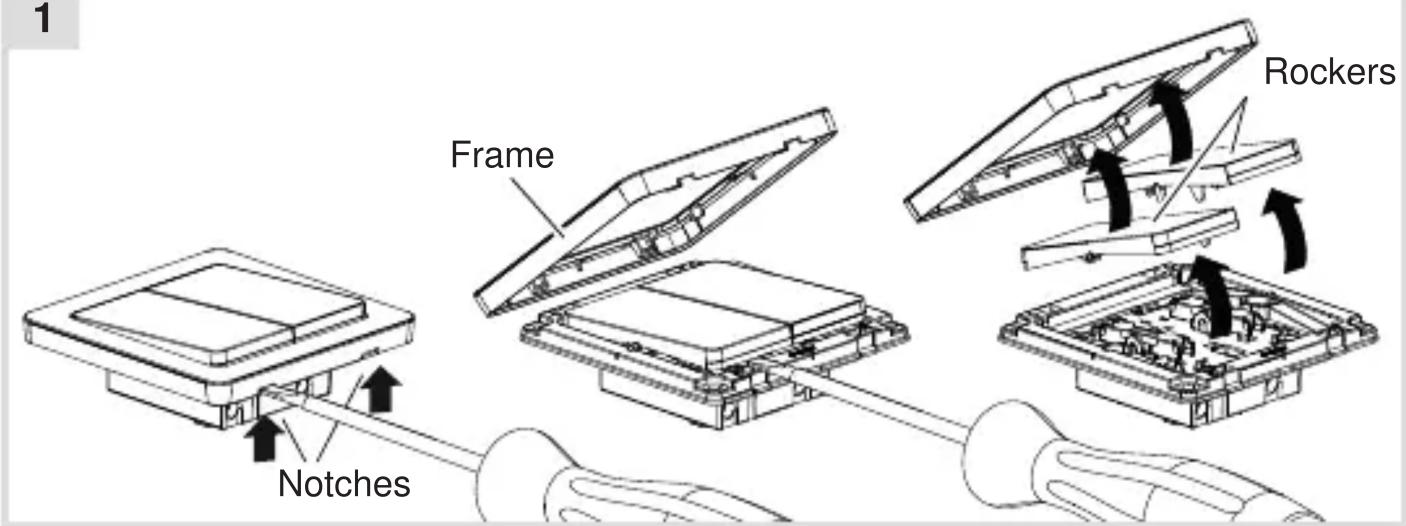
Carefully loosen the frame on the notches with a flat-blade screwdriver. Lift up and remove the frame (1).
■ Remove the rockers also with a flat-blade screwdriver.
Connecting the device
2A
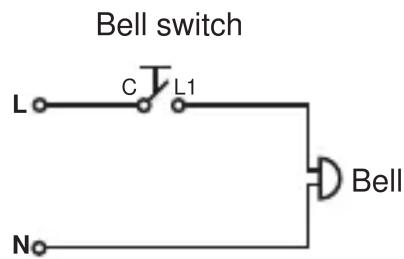
General circuit diagram

Bell switch
Bell switch
2B
Press switch
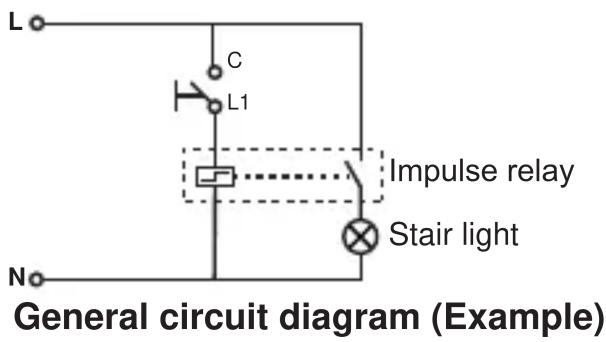
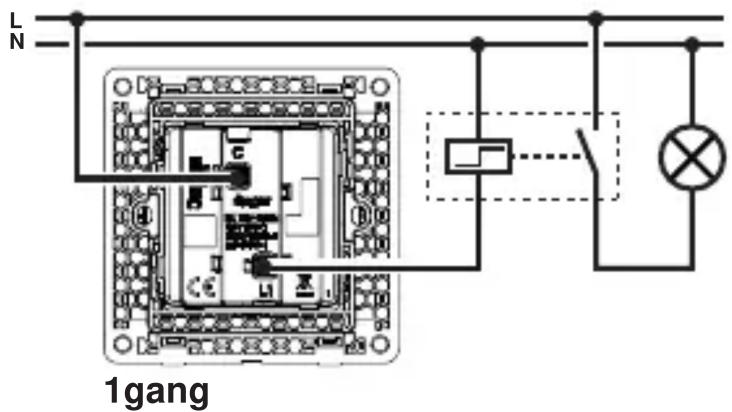

"Exit" switch
2C


- Strip connection cables approx. 10 ... 12 mm.
■ Wire the switch according to the appropriate wiring diagram (2A or 2B or 2C).
Installing the device into the wall box
(for example "10A 2gang press switch")
3

natural_image
Diagram of a device internal structure with screwdriver and cable, showing no text or symbols■ After wiring, fix the device with the two screws attached into the wall box (3).
Assembling the rockers and frame
(for example "10A 2gang press switch")
4

- Fix the rockers and frame onto the device (4).
2-5gang frames are available for multiple combinations.
Brand : HAGER
Model : WGCXL111ENB
Category : Doorbell