
MM-6 - Loudspeaker Kali Audio - Free user manual and instructions
Find the device manual for free MM-6 Kali Audio in PDF.


| Product Type | Active Studio Monitor (Powered Speaker) |
| Woofer Size | 6.5 inches (165 mm) coated paper cone |
| Tweeter Size | 1 inch (25 mm) silk dome |
| Amplifier Power | 60W (LF) + 40W (HF), Class D |
| Frequency Response | 39 Hz – 25 kHz (±3 dB) |
| Crossover Frequency | 1.5 kHz |
| Maximum SPL | 105 dB (peak) |
| Input Connectors | XLR, TRS (balanced), RCA (unbalanced) |
| Output Connectors | XLR (through for subwoofer) |
| Enclosure Type | Ported (front-firing bass reflex) |
| Dimensions (H x W x D) | 14.2 x 9.1 x 10.2 inches (360 x 230 x 260 mm) |
| Weight | 15.4 lbs (7 kg) each |
| Power Supply | 100-240 VAC, 50/60 Hz (IEC power cord) |
| Power Consumption | 70 W typical, standby <0.5 W |
| Controls | Volume, HF trim (-2, 0, +2 dB), LF trim (-2, 0, +2 dB), boundary EQ |
| Protection | RF interference, output current limiting, over-temperature, on/off mute |
| Placement | Vertical or horizontal (tweeter on top) |
| Recommended Use | Nearfield monitoring for mixing, mastering, and critical listening |
| Maintenance | Clean with a soft, dry cloth. Do not use solvents or abrasive cleaners. |
| Safety | Do not expose to rain or moisture. Keep away from heat sources. Ensure adequate ventilation. |
| Repairability | Contact authorized Kali Audio service center. Do not attempt to open the unit. |
| Accessories Included | Power cable, user manual |
Frequently Asked Questions - MM-6 Kali Audio
User questions about MM-6 Kali Audio
0 question about this device. Answer the ones you know or ask your own.
Ask a new question about this device
Download the instructions for your Loudspeaker in PDF format for free! Find your manual MM-6 - Kali Audio and take your electronic device back in hand. On this page are published all the documents necessary for the use of your device. MM-6 by Kali Audio.
USER MANUAL MM-6 Kali Audio
natural_image
Scenic mountain landscape with a winding river and snow-capped peaks in the background, featuring a speaker icon in the foreground (no text or symbols on the landscape itself)MM-6
Multimedia Speaker User's Guide

natural_image
Black KALI audio amplifier speaker with visible sound waves and a circular head (no text or symbols on body)Table of Contents
IMPORTANT SAFETY INFORMATION....3
ABOUT YOUR SPEAKERS....5
FULL SPECIFICATIONS....7
INPUTS AND CONTROLS....8
CONNECTING MULTIPLE SPEAKERS....10
USING THE REMOTE CONTROL....11
DIP SWITCHES....12
CLIMATE CONSIDERATIONS....15
FIRST TIME SETUP....15
TROUBLESHOOTING....16
LIMITED WARRANTY....17
Important Safety Information
- Read these instructions.
- Keep these instructions.
- Heed all warnings.
-
Follow all instructions.
-
Do not use this apparatus near water.
-
Power the product down, and unplug it from power before cleaning.
-
Clean only with a dry cloth.
-
Do not block any ventilation openings.
-
Keep ventilation opening free of dust or other matter.
-
Do not install near any heat sources such as radiators, heat registers, stoves, or other apparatus (including amplifiers) that produce heat.
-
No naked flame sources (such as lighted candles,) should be placed on the product.
-
Do not defeat the safety purpose of the polarized or grounding-type plug. A polarized plug has two blades, with one blade wider than the other. A grounding-type plug has two blades and a third grounding prong. The wide blade or the third prong are provided for your safety. If the provided plug does not fit into your outlet, consult an electrician for replacement of the obsolete outlet.
-
Protect the power cord from being walked on or pinched, particularly at plugs, receptacles, and at the point where they exit the apparatus.
-
Use only attachments and/or accessories specified by the manufacturer.
-
Use only with a cart, stand, tripod, plate, bracket, or table specified by the manufacturer. When a cart is used, use caution when moving the cart/apparatus combination to avoid injury from tip-over.
-
Unplug this apparatus during lightning storms or when unused for long periods of time.
-
Refer all servicing to qualified service personnel. Servicing is required when:
A. The apparatus is damaged in any way
B. The power supply cord or plug is damaged
C. Liquid or other objects have fallen into the product
D. The product has been exposed to rain or moisture
E. The product does not operate normally
F. The product has been dropped
- This apparatus shall not be exposed to dripping or splashing.
- No object filled with liquids, such as a vase or a glass, should be placed on the apparatus.
-
This apparatus is to be used in a moderate climate. Do not expose to extremely high or low temperatures.
-
High sound pressure in excess of 85 dB can cause hearing damage and/or loss. Do not expose yourself to high sound pressure levels.
Important Safety Information
Remote Control Battery
- Keep small cells and batteries which are considered swallowable out of the reach of children.
- Swallowing may lead to burns, perforation of soft tissue, and death. Severe burns can occur within two hours of ingestion.
In case of ingestion of a cell or battery, seek medical assistance immediately.
natural_image
Warning symbol of a lightning bolt inside a triangle (no text or numbers)The lightning bolt with arrowhead symbol within an equilateral triangle is intended to alert the user to the presence of uninsulated “dangerous voltage” within the product’s enclosure that may be of sufficient magnitude to constitute a risk of electric shock to persons.

The exclamation point within an equilateral triangle is intended to alert the user of the presence of important operation and maintaining (servicing) instructions in the literature accompanying the appliance.
About Your Speakers
Congratulations on your Kali Audio MM-Series Speakers! These speakers were designed to deliver exceptional sound quality for your enjoyment. We're confident that no matter what you play through them, you will enjoy their clear, powerful, room-filling sound.
Where does "MM" come from?
The official name of this product line is “Project Mammoth.” Kali names all of our product lines after towns in California. The MM-6 is acoustically identical to our acclaimed LP-6 Studio Monitor, but it’s a bit more flexible and easier to use for someone who is not an audio professional. The LP-6’s name-sake, the town of Lone Pine, is geared towards serious mountaineering enthusiasts, whereas Mammoth, about 100 miles away, is geared towards skiers and other folks who wish to take in the majesty of the Sierra Nevadas without spending days at a time walking uphill.
Features
Acoustic Pedigree
The MM-6 is acoustically identical to our best-selling studio monitor, the LP-6. Kali's studio monitors can be found in the best studios across the globe. Their precision, power, and detail make them a top choice for GRAMMY-winning musicians and producers, film and tevelision studios, and creators working in immersive formats like Dolby Atmos. If you've listened to music, watched something on TV, or been to the movies in the last few years, you've heard something that was made on Kali Audio studio monitors.
This means that when you're listening to your MM-6s, you're hearing things exactly as those creators intended. Nothing is suppressed and nothing is hyped. Everything will come through with perfect clarity, allowing you to sink into the experience and enjoy it as fully as possible.
Output
The MM-6 is designed to have a continuous output of 85 dB at 2.2 meters with 20 dB of headroom. In practical terms, this means that the speaker has sufficient output to listen at safe levels for long periods of time in most home listening environments.
20 dB of headroom ensures that momentary peaks in sound pressure level, including instruments like kick drum and effects like gunshots or explosions, can be reproduced accurately and with minimal distortion.
Limiter Circuit
The MM-6 is equipped with a limiter circuit that will protect the speaker from unsafe voltage levels. In other words, you don't need to worry about blowing up the speaker by playing it too loud.
Unsafe voltage will be plainly audible as distortion, indicating that the speaker is receiving too much input signal. If this is the case, it is recommended to reduce the volume of the playback material.
Kali Audio MM-6 Users' Guide 5
About Your Speakers
Features
Low Noise Port Tube
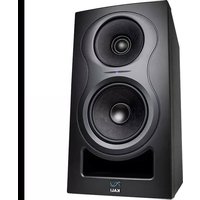
The opening below the woofer on the MM-6 is called a port tube, and it's there to give your speaker extra bass without requiring a larger, more expensive woofer.
Most port tubes create distracting noise that raises the noise floor of your system and muddies the low end. For this reason, most port tubes are on the back of the speaker, which makes it tricky to place the speaker close to a wall.
The design of the port tube on the MM-6 eliminates this problem, allowing you to put the speaker up against a wall or other boundary without hearing any noise or other problems from the port tube.
3-D Imaging Waveguide
The 3-D Imaging Waveguide allows you to hear a 3-D soundstage from a stereo pair of speakers. By matching the shape of the waveguide to the interactions of the HF and LF drivers, this waveguide produces a coherent stereo image that is wider, taller, and deeper than the space where the speakers are placed. It also means that if you're listening in a surround or immersive format, you'll be able to hear a detailed picture of the sound between the speakers and all around you.
Kali's team developed the 3-D imaging waveguide to make mixing easier, but it also means that the MM-6 and the other speakers that use it work better in acoustically challenging rooms, and are more fun to listen to for long periods of time.
DSP
The MM-6 is equipped with digital signal processing (DSP.) The DSP ocontrols the loudspeaker's tuning, the limiter function, the crossover, the boundary EQs, and user definable HF and LF trim.
High Performance Woofer
The LP-Series uses a woofer with an exceptionally large voice coil and magnet. This allows for greater linearity, resulting in exceptional dynamic range and clarity, as well as extended low end response. All of this is achieved with minimal distortion.
Boundary Compensation EQs
The boundary compensation EQs on the MM-6 let you put the speakers wherever you like in your listening environment. Combined with the LF and HF trims, this will ensure that the speakers sound their best no matter what where they're placed.
A full listing of the different boundary EQ settings and how to use them can be found on page 12 of this manual.
Kali Audio MM-6 Users' Guide 6
Full Specifications
| Self-Powered: Yes | |
| Amplifier Class: D | |
| Power Configuration: Bi-Amped | |
| HF Power: 40W (Continuous) | |
| LF Power: 40W (Continuous) | |
| Total Power: 80W (Continuous) | |
| HF Driver: 1-Inch Textile Dome Tweeter | |
| LF Driver: 6.5-Inch Optimized Profile Paper Woofer | |
| Crossover: 1500 Hz | |
| Frequency Response: (-10dB) 39 Hz- 25 kHz | |
| Frequency Range: (+/-3dB) 47 Hz - 21 kHz | |
| Recommended Listening Distance: .5 - 2.5 Meters | |
| Max SPL: (Peak at 1M) | 115 dB |
| System THD: (90dB SPL at 1M) | <3% from 80 Hz to 1.7 kHz<2% above 1.7 kHz |
| Stereo Inputs: | RCA (Unbalanced, -10dBV)Optical (Digital)S/PDIF (Digital) |
| Mono Inputs: | XLR (Balanced, +4dBu) |
| Output: | XLR (Balanced, 1-Sided) |
| Enclosure: | Front Ported |
| Height | 14.125 Inches (35.9 cm) |
| Width: | 8.75 Inches (22.2 cm) |
| Depth: | 10.25 Inches (26 cm) |
| Weight: | 15.54 lbs (7.05 kg) |
Inputs and Controls
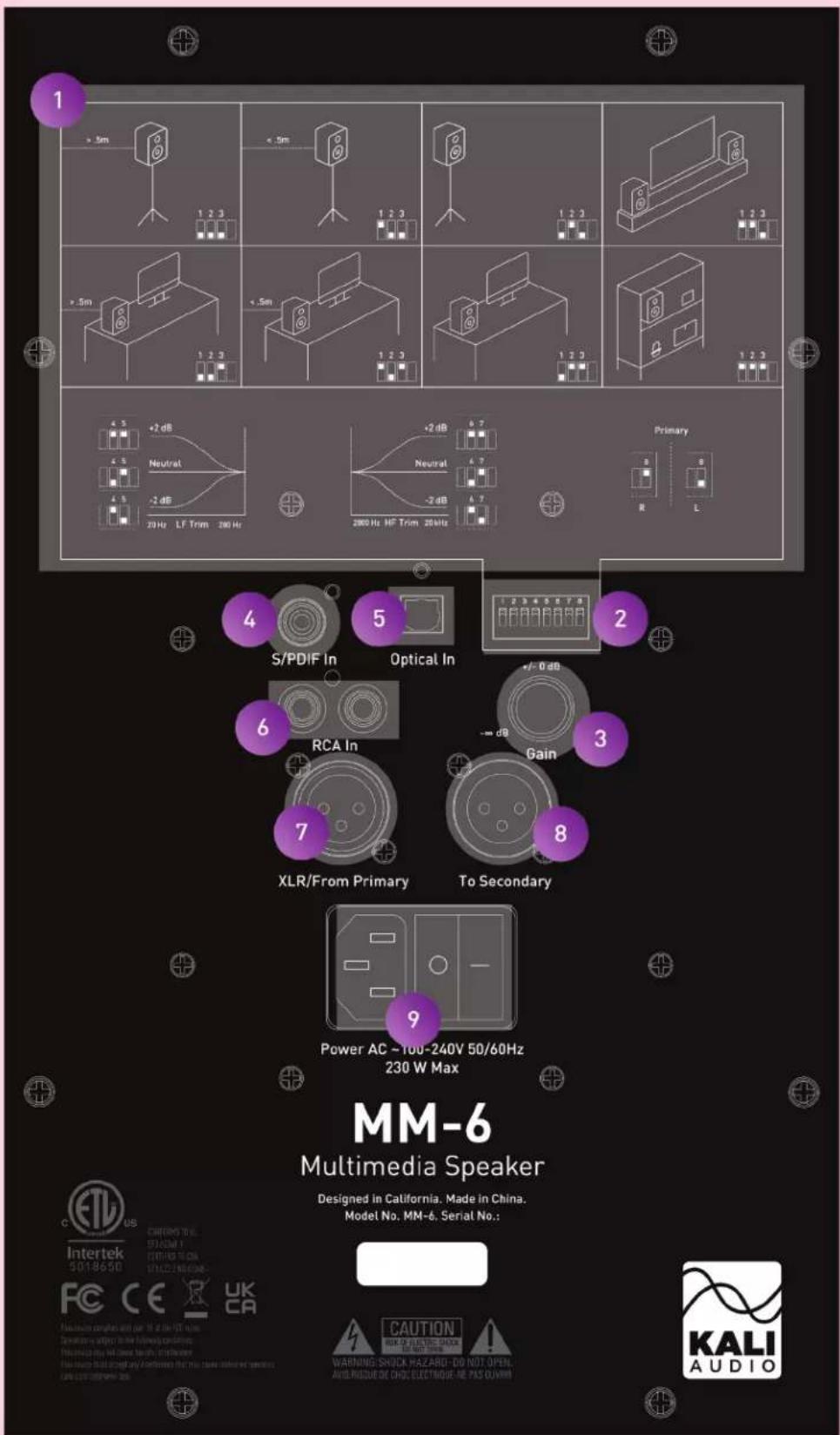
Kali Audio MM-6 Users' Guide 8
Inputs and Controls
Dip Switch Quick Reference Guide
1
The quick reference guide on the back of the speaker can help you set the dip switches to the appropriate positions for your application without needing to consult this manual.
2
Dip Switches
The dip switches control Boundary EQ, HF and LF Trim, and whether the left or right speaker is primary. A full explanation of the operation of the dip switches can be found on page 11.
Volume Control
The volume control allows users to adjust the output of the speaker from -∞ (Muted) to +6 dB. There is a center detente at the +0 dB setting, and this is where Kali recommends you leave the volume setting, adjusting the level via the remote control. Two notable exceptions to this recommendation are:
- If you are in an asymmetrical room, it may be necessary to have one speaker set at a different volume to achieve proper left-to-right balance.
- If you are listening at maximum volume and are not satisfied with the output of the speakers, you may set try setting them both to the +6 dB setting.
3
S/PDIF Input
4
The S/PDIF input allows connection to receivers and other consumer and professional audio equipment. See page 10 for instructions regarding connecting multiple speakers.
5
Optical Input
The optical input allows convenient connection to most televisions and other devices like Blu-Ray players and gaming consoles. See page 10 for instructions regarding connecting multiple speakers.
6
RCA Input
The RCA input allows convenient connection to a wide range of devices. In addition to devices with RCA outputs, adapters for other output formats are easy to find. See page 10 for instructions regarding connecting multiple speakers.
7
XLR Input
The XLR input allows connection to professional audio devices, as well as high end receivers with balanced outputs. The XLR also allows input from another MM-6 speaker when one of the stereo inputs is used on the other speaker. See page 10 for details about connecting multiple speakers.
8
XLR Output
The XLR output sends the secondary channel of a stereo signal coming into one MM-6 to another MM-6. See page 10 for details about connecting multiple speakers.
Power Input - On/Off Switch
Plug the provided power cord into the power input.
9
Use the on/off switch to power the speaker on and off. Be sure to power the speaker off when connecting or disconnecting the power cable, during lightning storms, or during extended periods of disuse. Turning the power on and off externally, for instance via a wifi power switch, will not harm the device.
Connecting Multiple Speakers
Connecting stereo
The MM-6 allows you to connect a stereo (left and right) source to one speaker via the optical, S/PDIF, or RCA cables. The MM-6 will play one channel of audio, and the other channel of audio will be output on the XLR output. This allows you to connect another MM-6 via XLR for stereo sound. Make sure that your device is outputting stereo audio, and not mono, 5.1, or some other format.
Using a single MM-6 will only ever give you playback from one channel of input; the stereo inputs do not sum to a mono output. If you're looking to use a single MM-6 for mono, you must configure your output device to send a mono signal.
If you purchased a pair of MM-6, the pair will have come with a remote control and a 10-foot XLR cable. If you did not purchase a pair, or if you need to get a longer cable, XLR cables are readily available from any music retailer.
Step 1: Plug in any stereo input

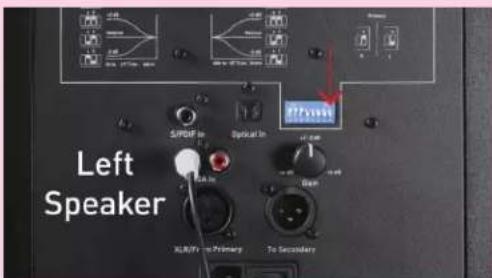
Step 2: Set DIP Switch 8 for the appropriate speaker
On the speaker receiving the stereo input, set DIP switch 8 for either left (default) or right. Left or right refers to the side that the speaker is on when you're looking at it from the listening position. This will be your primary speaker.
There is no benefit or drawback to using the right or left speaker as your primary, so whichever is easier for the sake of cabling should be used.
Connecting Multiple Speakers
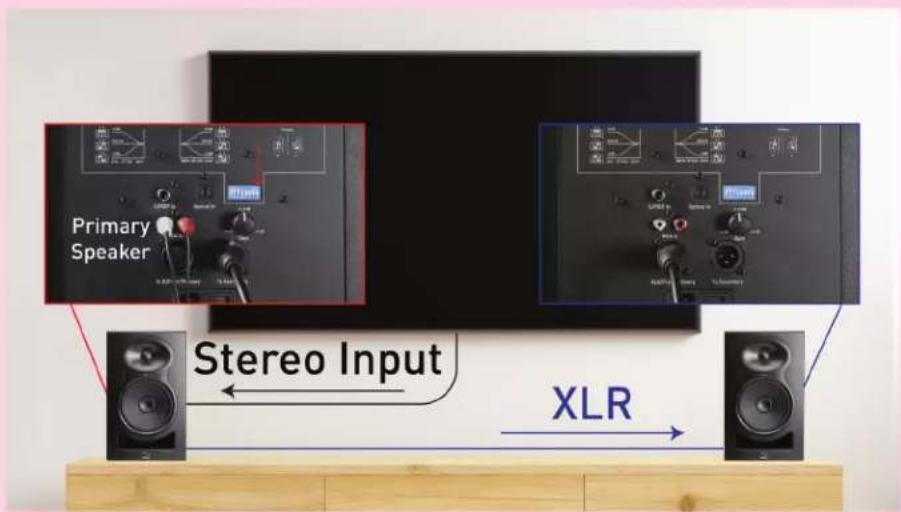
Primary Speaker Left (Default)
Primary Speaker Right
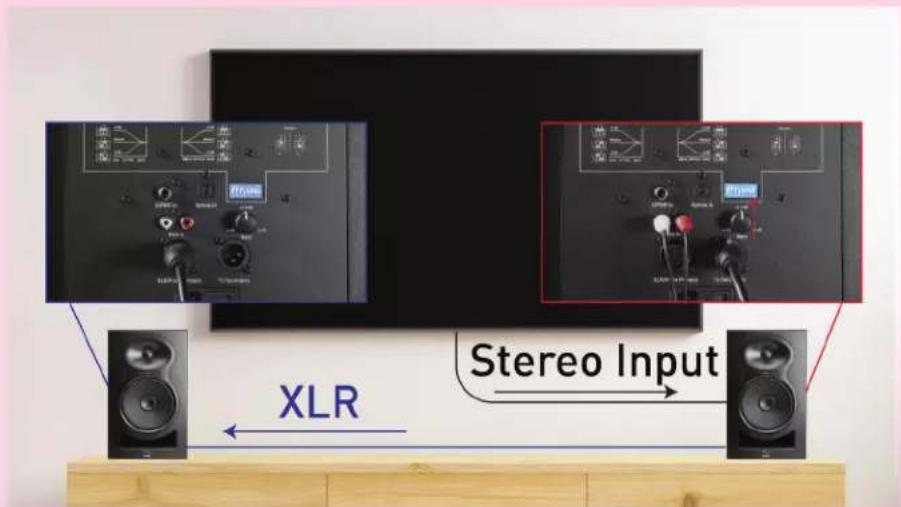
Step 3: Connect the other speaker with XLR
Plug the socket side of the XLR cable into the XLR output of the speaker where your stereo input is plugged in. Plug the other side of the XLR cable into the XLR input on the other MM-6.
Alternative: Connect via RCA without XLR
Plug the left (usually white) side of the RCA connector into the left RCA input of the left speaker, and plug the right (usually red) side of the RCA connector into the right RCA input of the right speaker. Make sure to set DIP switch 8 on both speakers appropriately. In this case, there is no need to run an XLR between the two speakers.
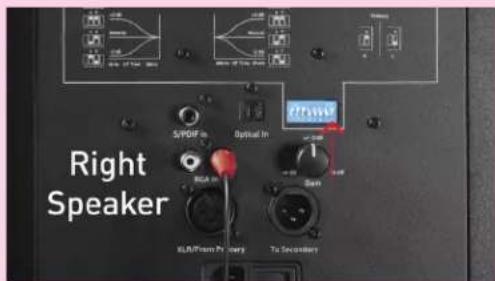
Kali Audio MM-6 Users' Guide 11
Connecting Multiple Speakers
Connecting multichannel
To connect MM-6s in a multichannel system, each speaker will need its own discreet input. You cannot connect more than two speakers using the stereo inputs and XLR outputs.
Most multichannel setups will need to use an A/V receiver, or AVR. When selecting an AVR to use with MM-6s, you should select something with an appropriate number of pre-amplifier outputs. RCA outputs are common and inexpensive. XLR outputs are less common and more expensive, but are less susceptible to spurious noise
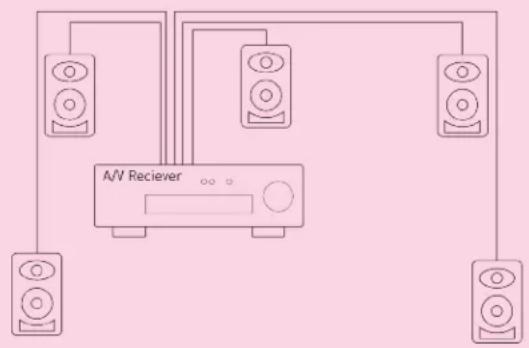
flowchart
graph TD
    A["Speaker 1"] --> D["A/V Reciever"]
    B["Speaker 2"] --> D
    C["Speaker 3"] --> D
    D --> E["Speaker 4"]
Using the Remote Control
The MM-6 comes with a remote control that controls the volume of the system when the digital (optical or S/PDIF) inputs are used. The remote control does not control volume on the analog (RCA or XLR) inputs.
The remote control acts on the input level of the digital inputs, so the volume control on the back of the speaker will still bring the volume up and down, including a hard mute if the volume control is turned all the way down. Additionally, using the remote control with a stereo pair of speakers will control level of the entire system.
The remote control has three controls:

1 Bring the volume up
2 Bring the volume down
3 Mute/unmute the system
Boundary EQs and DIP Switches
One of the most innovative features of the Mammoth Series Speakers are the boundary compensation EQs. These EQs were made to compensate for low frequency interactions that the speakers will have with various surfaces in many common placements.
Each set of dip switches controls one aspect of the speakers performance, independent of the other switches. Switches 1-3 control the boundary compensation EQs. Switches 4 and 5 control the LF trim. Switches 6 and 7 control the HF trim. Switch 8 controls power to the RCA. For this reason, the explanations of the different dip switch settings will only reference the set of switches currently applicable.
Switches 1-3: Boundary Compensation EQs
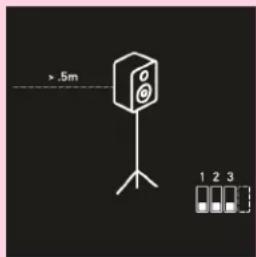
Position 1: Free Space
The speaker is on a monitor stand, at least .5 meters (about 20 inches) away from any walls. This is the ideal position for the loudspeaker.
Switch 1: DOWN
Switch 2: DOWN
Switch 3: DOWN

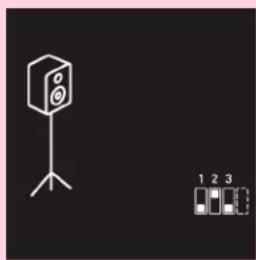
Position 2: On Stands, Close to a Wall
The speaker is on a monitor stand, and is within .5 meters (20 inches) of a wall, without being butted right against one.
Switch 1: UP
Switch 2: DOWN
Switch 3: DOWN
natural_image
Simple line drawing of a speaker on a tripod stand with a small inset showing three numbered items (1, 2, 3) below it.Position 3, On Stands, Against a Wall
The speaker is on a monitor stand, and is as close to the wall as possible without pinching the power and signal cables.
Switch 1: DOWN
Switch 2: UP
Switch 3: DOWN

natural_image
Isometric line drawing of a rectangular electronic device with two speakers and a screen, labeled with three indicators below (no text or symbols on the device itself)Position 4: Credenza
The speaker is on a credenza or media console.
Switch 1: UP
Switch 2: UP
Switch 3: DOWN
Boundary EQs and DIP Switches
Switches 1-3: Boundary Compensation EQs

Position 5: On a Desk, Away from Walls
The speaker is on a desk or table, and is more than .5 meters (20 inches) away from any walls.
Switch 1: DOWN
Switch 2: DOWN
Switch 3: UP

Position 6: On a Desk, Close to a Wall
The speaker is on a desk or table, and is within .5 meters (20 inches) of a wall, without being butted right against one.
Switch 1: UP
Switch 2: DOWN
Switch 3: UP

natural_image
Line drawing of a desktop computer setup with monitor, tower, and keyboard (no text or symbols)Position 7: On a Desk, Against a Wall
The speaker is on a desk or table, and is as close to a wall as possible without pinching any cables.
Switch 1: DOWN
Switch 2: UP
Switch 3: UP
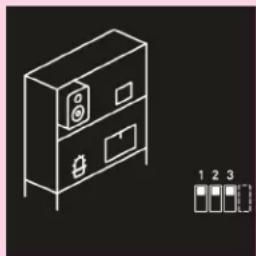
natural_image
Isometric line drawing of a two-tiered cabinet with front panel and side panels, no text or symbols presentPosition 8: Bookshelf
The speaker is on a bookshelf.
Switch 1: UP
Switch 2: UP
Switch 3: UP
Boundary EQs and DIP Switches
Switches 4 & 5: Low Frequency Trim
The low frequency trim will add or subtract a little bit (2 dB) from the bass response of the speaker. If the sound is overly boomy, cut 2 dB. If the sound is thin or if you feel that you're lacking bass content, add 2 dB.

Switch 4: Engage LF Trim
DOWN: LF Trim Disengaged
UP: LF Trim Engaged
Switch 5: Adjust LF Trim:
DOWN: -2 dB in Low Frequencies
UP: +2 dB in Low Frequencies
Note: Switch 5 does not function independent of switch 4. If switch 4 is DOWN, the LF trim will be DISENGAGED, and switch 5 will have no effect.
Switches 6 & 7: High Frequency Trim
The high frequency trim will add or subtract a little bit (2 dB) from the treble response of the speaker. If the sound is shrill, subtract 2 dB. If the sound is dull, add 2 dB. If you're having trouble hearing dialogue, try turning both the bass and treble down by 2 dB.
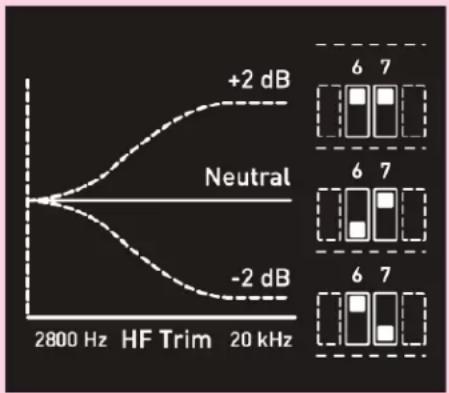
line
| Frequency | Value | | --------- | ----- | | 2800 Hz | -2 dB | | 2800 Hz | +2 dB |Switch 6: Engage HF Trim
DOWN: HF Trim Disengaged
UP: HF Trim Engaged
Switch 7: Adjust HF Trim:
DOWN: -2 dB in High Frequencies
UP: +2 dB in High Frequencies
Note: Switch 7 does not function independent of switch 6. If switch 6 is DOWN, the HF trim will be DISENGAGED, and switch 7 will have no effect.
Switch 8: Primary Speaker

Use DIP Switch number 8 to designate the right or left speaker (as you're facing them from the listening position) as the primary speaker. When using one of the stereo inputs, the primary speaker will play the channel you designate, and the other channel will be output on the XLR output.
By default, the left speaker will be the primary speaker. See page 11 for more details.
Climate Considerations
The MM-6's enclosures are made of MDF wood and wrapped in vinyl, which is sensitive to heat and humidity. The product should be kept and used in a climate-controlled environment. Exposure to direct sunlight, moisture, or consistent humidity above 65% may cause the vinyl to peel and wrinkle. This is not covered under warranty.
First Time Setup
The MM-6 is made for reference level listening up to about 2.5 meters, or 7.5 feet. When you're setting up your speakers, think about each speaker and yourself being corners in an equillateral triangle. The speakers should be about as far apart from each other as each one is from you.

You'll want to position the speakers so that the tweeters are more or less at ear level. If the speakers are too high, you can turn them upside down, but you shouldn't turn them on their side.

natural_image
Black audio speaker with two speakers and a green checkmark on a wooden surface (no text or symbols)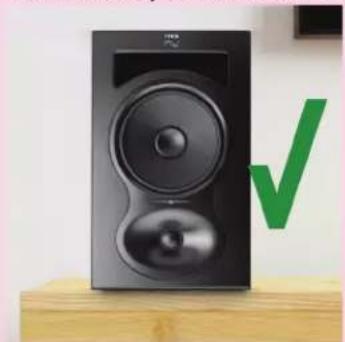
natural_image
Black speaker with two speakers on a wooden stand, next to a green checkmark (no text or symbols visible)
natural_image
Exterior view of a black megaphone with red X marks and a sad emoji face on a wooden base (no text or symbols)Once the speakers are in position, follow these steps to get them powered on and playing for the first time:
- Make sure that the power switch on the speakers is set to the OFF position.
- Turn the volume control on the back of the speakers all the way down.
- Plug the speakers into power.
- Plug in your audio cables. Refer to pages 10 and 11 for more information about connecting multiple speakers.
- Turn on your audio source, whether its a television, a music player, or a gaming console. Start playing music or other content.
- Power on the speakers.
- Slowly turn the volume on the speakers up to the center detente. If you hear distortion, turn the speakers back down and check that all of your connections are tight.
- Use the output volume on your device, or the MM-6's included remote control to set the volume to a comfortable level.
Enjoy your new speakers!
Troubleshooting
1. I opened the speaker, and it is damaged.
If you received a speaker that is obviously damaged, please contact your dealer immediately.
2. The speaker is making no sound.
• Is the speaker plugged in?
- Is the speaker turned on? There should be a blue LED on the front of the speaker if it's on. If this light is off, the speaker is turned off.
• Is the volume turned up?
- Have you tried muting and unmuting the speaker with the remote control?
- Are all cables plugged in to both your playback device and the speaker?
- Are you passing audio via your playback device?
3. The speaker sounds distorted.
- Is the speaker playing too loud? Turn down the volume on the back of the speaker. If the distortion goes away, you may be playing the speaker too loud. Besides the problem of distortion, this can be damaging to your hearing if you are close to the speaker.
- Is your source too loud? Turn the volume down at your source device. If the distortion goes away, you may be overdriving the input. If this is the case, turn the volume of the speaker up with the remote or with the volume control on the back.
If you've turned down the volume on the speaker and the source, and you're still hearing distortion, refer to number 5 below.
4. I hear cracks, hums, or buzzing.
- Are you using RCA?
a. If "yes," be advised that RCA is an unbalanced connection, and is prone to picking up noise as signal travels through the cable. This is especially true if you are using very long RCA cables. - Is the speaker close to electronics like a television, wireless router, phone, motor, or radio? If so, these can interact with the speaker's magnet in ways that cause unwanted noise. Try moving the speaker at least .5 Meters (20 inches) from any such devices.
- Are there loose objects in the room that may be buzzing with the bass? Low frequencies can cause objects in a room to vibrate loudly. Make sure that small, hard objects like screws and other hardware are secure.
If none of the above solves the problem, refer to number 5 below.
5. Isolate the problem
There are many issues in the signal path which might be causing any of the above problems. Before you initiate a return, do your best to make sure that the problem isn't with your cables or your playback device. Here's a simple way to check:
- Disconnect your speaker from your source.
- Plug in the problematic speaker and allow it to play for a minute. Take careful note of the problems you're hearing.
- Disconnect the problematic speaker, and plug that same cable into another speaker. If you're hearing the same issues, there is likely a problem in your signal path, and not the speaker.
If you've determined that your problem is with your speaker, contact your dealer to initiate a return.
Warranty
What does this warranty cover?
This warranty covers defects in materials or workmanship for a period of one year (365 days) after the purchase date of the product.
What will Kali do?
If your product is defective (materials or workmanship,) Kali will replace or repair the product at our discretion - free of charge.
How do you initiate a warranty claim?
Contact the retailer from whom you bought the product to initiate a warranty process. You will need the original receipt showing the date of purchase. The retailer may ask you to provide specific details about the nature of the defect.
What is not covered?
The following cases are NOT covered by this warranty:
• Damage from shipping
- Damage from dropping or otherwise mishandling the speakers
- Damage resulting from failure to heed any of the warnings outlined on pages 3 and 4 of the user's manual, including:
- Water damage.
- Damage from foreign substances or substances entering the port tube.
- Damage resulting from an unauthorized person servicing the product.
- Damage resulting from the product being left plugged in during an electrical storm.
The warranty applies only in the United States. International Customers should contact their dealer about their warranty policy.

natural_image
Close-up of a black KALI audio speaker with visible sound waves and a blue indicator light (no text or symbols on the speaker body)Kali Audio MM-6 Users' Guide 18

- MM-6
- Table of Contents
- Important Safety Information
- About Your Speakers
- Where does "MM" come from?
- Features
- Acoustic Pedigree
- Output
- Limiter Circuit
- Low Noise Port Tube
- 3-D Imaging Waveguide
- DSP
- High Performance Woofer
- Boundary Compensation EQs
- Inputs and Controls
- Dip Switch Quick Reference Guide
- Dip Switches
- Volume Control
- S/PDIF Input
- Optical Input
- RCA Input
- XLR Input
- XLR Output
- Power Input - On/Off Switch
- Connecting Multiple Speakers
- Connecting stereo
- Step 2: Set DIP Switch 8 for the appropriate speaker
- Step 3: Connect the other speaker with XLR
- Alternative: Connect via RCA without XLR
- Connecting multichannel
- Using the Remote Control
- Boundary EQs and DIP Switches
- Switches 1-3: Boundary Compensation EQs
- Position 1: Free Space
- Position 2: On Stands, Close to a Wall
- Position 3, On Stands, Against a Wall
- Position 4: Credenza
- Switches 4 & 5: Low Frequency Trim
- Switches 6 & 7: High Frequency Trim
- Switch 8: Primary Speaker
- Climate Considerations
- First Time Setup
- Troubleshooting
- I opened the speaker, and it is damaged.
- The speaker is making no sound.
- The speaker sounds distorted.
- I hear cracks, hums, or buzzing.
- Isolate the problem
- Warranty
Brand : Kali Audio
Model : MM-6
Category : Loudspeaker