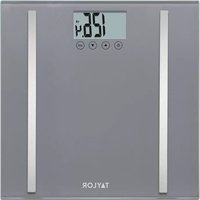
572141933FW - Scale Taylor - Free user manual and instructions
Find the device manual for free 572141933FW Taylor in PDF.


| Brand | Taylor |
| Model | 572141933FW (5721F) |
| Product Type | Body Composition Scale |
| Capacity | 400 lb / 180 kg / 28 st 8 lb |
| Weight Graduation | 0.1 lb / 0.05 kg |
| Weight Measurement Accuracy | ±1.1 lb (11–143.3 lb); ±1.8 lb (143.3–297.6 lb); ±2.6 lb (297.6–400 lb) |
| Body Fat Range | 4% – 60% (graduation 0.1%) |
| Total Body Water Range | 29% – 70% (graduation 0.1%) |
| BMI Calculation | Yes |
| Age Range | 10 – 85 years |
| Height Range | 2'5.5" – 7'4.5" (75 – 225 cm) |
| Memory Profiles | 8 users |
| Athlete Mode | Yes (ages 15–85) |
| Activity Levels | 5 levels (sedentary to extremely active) |
| Technology | Bioelectrical Impedance Analysis (BIA) for body composition; Strain Gauge for weight |
| Display | LCD (power saving, auto-off) |
| Power Supply | 2 x CR2032 lithium batteries (included) |
| Low Battery Indicator | Yes |
| Units | lb, kg, st (selectable) |
| Dimensions (Product) | 11.8 x 11.8 x 1.0 inches (approx) |
| Weight (Product) | 3.63 lb (approx) |
| Warranty | 5 years limited (original purchaser) |
| Country of Origin | Made in China |
| Regulatory Compliance | FCC Part 15 Class B |
| Safety Warnings | Not for use with pacemakers or other implanted devices; not intended for pregnant women; keep batteries away from children |
| Not Legal for Trade | Yes |
Frequently Asked Questions - 572141933FW Taylor
User questions about 572141933FW Taylor
0 question about this device. Answer the ones you know or ask your own.
Ask a new question about this device
Download the instructions for your Scale in PDF format for free! Find your manual 572141933FW - Taylor and take your electronic device back in hand. On this page are published all the documents necessary for the use of your device. 572141933FW by Taylor.
USER MANUAL 572141933FW Taylor
Taylor, a division of Lifetime Brands Inc.
2220 Entrada Del Sol, Suite A
Las Cruces, New Mexico 88001 USA
1-866-843-3905
www.taylorusa.com
Email: taylorusa@lifetimebrands.com
MADE IN CHINA.
Five (5) Year Limited Warranty
This scale is warranted against defects in materials of workmanship (excluding batteries) for five [5] years for the original purchaser from date of retail purchase. It does not cover damages or wear resulting from accident, misuse, abuse, commercial use, or unauthorized adjustment and/or repair. Do not return to retailer. Should this scale require review (or replacement at our option) while under warranty, please pack the item in the original packaging and return it prepaid, along with store receipt showing date of purchase and a note explaining reason for return to:
Taylor, a division of Lifetime Brands Inc.
2220 Entrada Del Sol, Suite A
Las Cruces, New Mexico 88001 USA
1-866-843-3905
www.taylorusa.com
Email: taylorusa@lifetimebrands.com
There are no express warranties except as listed above. This warranty gives you specific legal rights, and you may have other rights which vary from state to state. For additional product information please contact us through:
www.tayloruse.com
If review is required, do not return to retailer. For Information call 1 (866) 843-3905 from 8:00 am to 5:00 pm, Mountain Standard Time, Monday through Friday. To assist us in serving you, please have the model number and date of purchase available.
Not Legal for trade.
© 2020 Taylor, a division of Lifetime Brands Inc. All rights reserved.
Ref 572141933FW/5721F
11.20 WC

IB5721FB
MODEL # 5721F
TAYLOR®
Body Composition Scale
with Body Fat, Body Water and BMI
INSTRUCTIONS FOR USE & WARRANTY INFORMATION
CUSTOMER SERVICE INFORMATION PLEASE READ!
For questions regarding this product, please contact us at:
TAYLOR, a division of Lifetime Brands, Inc.
2220 Entrada Del Sol, Suite A | Las Cruces, New Mexico 88001 USA
1-866-843-3905 | www.taylorusa.com
Email: taylorusa@lifetimebrands.com
We value your thoughts on our product and services. Please post an on-line review to help us continue to meet your needs and expectations.
Please contact us before returning to retailer.
Welcome to the Body Composition Scale
This product is designed to test the body fat, and hydration. The scale is to assist with keeping a close eye on the daily change of your body fat, hydration, and weight. It also calculates your Body Mass Index (BMI), which is a measurement of body fat based on height and weight for men and women. The body composition scale also is equipped with "Athlete Mode" for athletes whose body is built different than non-athletes. Please note that body fat percentages can vary through out the day and day by day. Do not compare your results with other methods. The key is to use one method of calculating composition consistently and track those results with the same device overtime.
Carefully read the Instructions before use.
Preparation Before Use
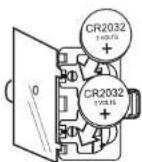
INSERT THE BATTERY
- Insert the 2 CR2032 batteries (included).
- Remove any plastic wrap from the batteries before installing.
- Remove any screws and open the battery cover on the back of the scale unit.
- Place the batteries into the battery compartment according to the "+" and "-" polarity symbols in the battery compartment.
- Replace the battery compartment cover and screws if applicable.
- If you do not intend to use the scale for a prolonged period of time, it is advisable to remove the batteries before storing.
- Do not mix old and new batteries.
WEIGHT UNIT SETTING
- Your scale is set at the factory to weigh in pounds (lbl).
- Switch on the scale and press the "UNIT"
button at back of the scale to convert weight unit if needed.
- Some models have a static cling label on the LCD lens to prevent scratching. Remove before use.
UNIT
SET THE SCALE IN THE RIGHT POSITION
- Always use the scale on a flat and hard floor surface. Do not use on carpets.

START-UP THE SCALE
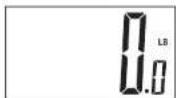
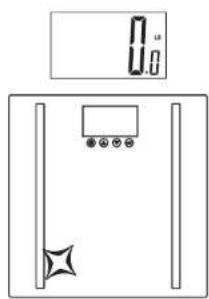
- Press firmly on the scale platform to start-up the scale. The display shows "0.0" and then turns off. The scale is ready for use.
Note: If you move the scale at all, please repeat the steps above for best accuracy.
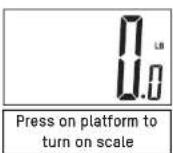
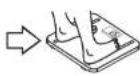
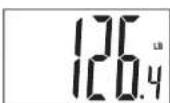
Weight DisplayAllow
Quick Use & Helpful Tips
HOW TO SET UP SCALE
- Place your scale on a hard, flat surface, do not use on uneven tile, flooring or carpeting. Try to keep your scale in the same location or position as much as possible.
- Step on the scale with one foot applying enough pressure to turn the scale on - then remove your foot.
- The digital readout should show dashes or zeros.
- The scale will automatically turn off.
- Now your scale is ready for you to take a weight reading. Step on the scale evenly with both feet. Your weight will display on the scale.
- If you pick up, move or bump your scale, please repeat the steps above for best accuracy.
DURING MEASUREMENT
- Place your feet in the same position every time you weigh your self. Stand still during measurement.
- Weigh yourself with out clothing whenever possible. Clothes can vary in weight.
- Move the location of the scale where it won't be bumped while being activated or while in use, as an inaccurate reading may occur.
- For the most consistent readings, weigh yourself the same time of day. Allow for weight fluctuations due to food or drink in your system.
SAFETY WARNING
- The warning signs and icons shown appear in order for you to use this product safely and correctly as well as to prevent product damage, risk and injury to you and others.
PRECAUTION NOTICE
- Do not use the scale on people who have body implants such as a pacemaker, artificial limbs, contraceptive devices, or metal plates or screws. It may cause the device to malfunction or produce an inaccurate result. When in doubt, consult your physician.
- Do not disassemble the scale as incorrect handling may cause injury.
- Do not step on the scale when your body or feet are wet, especially after bathing or showering to prevent slipping.
IMPORTANT NOTICE TO USERS
• This product is intended for humans ages 10 to 85.
• Make sure to use only the type of battery stated (see Section "INSERT THE BATTERY").
- The "Athlete" mode is applicable only to people 15-85 years of age.
- Body fat percentage estimates will vary with the amount of water in the body, and can be affected by dehydration or over-hydration due to such factors as alcohol consumption, menstruation, illness, intense exercise, etc.
- Do not use on pregnant women. The result is inaccurate and effects on the fetus are unknown.
- For body fat and body water estimates, always estimate in bare feet.
Features/Specifications
- Front view of scale
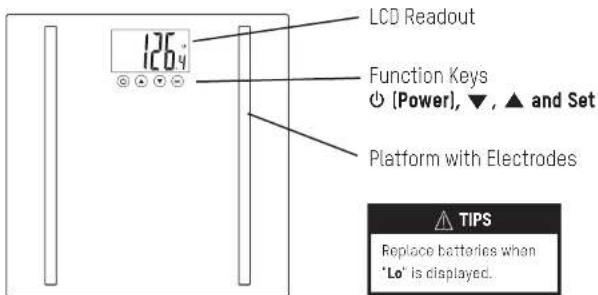
- LCD readout & button description
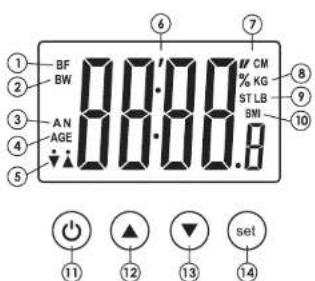
- Body Fat % Reading
- Body Water % Reading
- Athlete / Normal Mode Icon
- Age Icon
- Gender Icon
- Main Readout
- Height Displayed in Feet/Inches / CM
- Weight Readout in Kilograms (kg)
- Weight Readout Pounds (lb) / Stones (st)
- BMI Readout
- Power
12.▲ Forward Button - ▼ Back Button
- SET Button
3. Function keys

POWER
- Turn the scale on and off

SET
• Confirmation button for selection


▲ or ▼
• Changes value of height, age and activity level, toggle between Male / Male
athlete and Female / Female athlete in Body Fat function
- Select memory 1 - 8 in Memory mode & Recall mode
• Recall settings of memory locations
- Backview of scale

Weighing-Only Operation
- Select your desired measurement unit. Your scale is set to default to pounds at the factory but you can switch the measurements to kilograms or stones by pressing the "UNIT" button, located on the bottom of your scale.
- Place the scale on a hard, flat surface. Carpeted or uneven floors may affect accuracy.
- Before first use, after battery replacement, or if the scale has been moved or bumped, press firmly on the scale platform. The scale will turn on and automatically turn off. Your scale is now ready for use. At all other times step straight onto the scale.
- Step onto the scale and stand still while your weight is being measured.
- The display will flash digits and then your weight. The scale will beep and the display will flash when the weight is locked. The scale will hold the display with the weight showing.
- The scale turns off automatically after use.
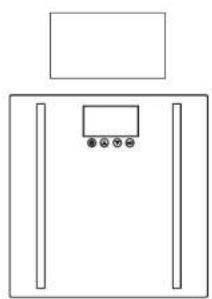
natural_image
Simple line drawing of a room layout with vertical and horizontal bars, no text or symbols presentPlace scale with installed battries on a hard flat surface
natural_image
Simple line drawing of a room layout with a door, front panel, and star-shaped elements (no text or symbols)Press on the platform to turn the scale on and then allow it to turn off
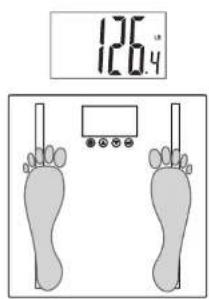
Step evenly on to the scale and your weight will be displayed
Body Composition Estimating Operation
IMPORTANT NOTICE TO USERS
• This scale has 8 personal memory numbers (1–8).
- Before starting, you must save your height, age, gender, normal/athlete mode option and activity level.
- When finished your results will be estimated and saved.
- Important! Once your personal data is entered you only need to change if something needs to be updated: for example, your age.
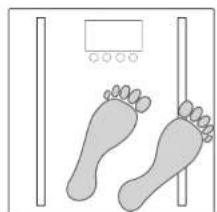
The accuracy of the results depends on how you stand on the scale. See diagram below.
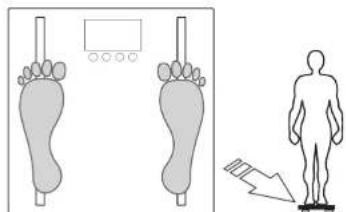
Feet centered on platform (√)
natural_image
Illustration of two footprints placed on vertical bars with a small inset box (no text or symbols)Feet not centered on platform (X)
How To Program Your Personal Data
- Press the " ⏻ " button to turn the scale on.

- Set Memory
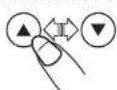
Press the "▲" or "▼" key to select a memory location [1-8 users]. Press the "set" button to confirm.

- Select Height
Press the "▲" or "▼" key to adjust the height. Press the "set" button to confirm.

- Set Age
Press the "▲" or "▼" key to adjust the age. Press the "set" button to confirm.

- Select Gender
Press the "▲" or "▼" key to toggle between the male (▼ & female) Icons. Press the "set" button to confirm.

flowchart
graph LR
    A["Rectangle"] --> B["Rectangle"]
    B --> C["Set"]
Select your Activity Level according to the following guidelines:
Level-1 Sedentary / Very Inactive: little or no exercise
Level-2 Limited Activity: exercise/sports 1-3 days a week
Level-3 Moderate Activity: exercise/sports 4-5 days a week
Level-4 Very Active: exercise/sports 6-7 days a week
Level-5 Extremely Active: physically demanding exercise/sports or athletic training
6. Select Normal or Athlete Mode
Press the “▲” or “▼” key to toggle between normal (N) or athlete (A) mode. Press “set” to confirm all settings.
NOTE: Athlete mode is only available for those 15 to 85 years of age. For those aged 14 or under and 86 or over, this step is automatically by-passed. (See section: "Why is the Athlete Mode necessary in a Body Fat Analyzer?")

flowchart
graph LR
    A["Hand holding triangle"] --> B["Rectangle with arrows indicating direction"]
    B --> C["Transformation arrow"]
    C --> D["Rectangle with arrows indicating direction"]
    D --> E["Circle labeled 'set'"]
    style A fill:#f9f,stroke:#333
    style B fill:#ccf,stroke:#333
    style C fill:#cfc,stroke:#333
    style D fill:#fcc,stroke:#333
    style E fill:#cff,stroke:#333
7. Measuring
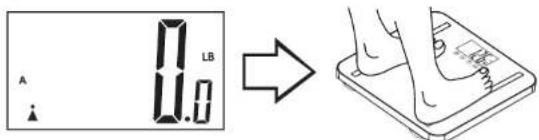
Then the scale shows "0.0". Step on the scale with bare feet and stand still while the weight is being measured.
- Display
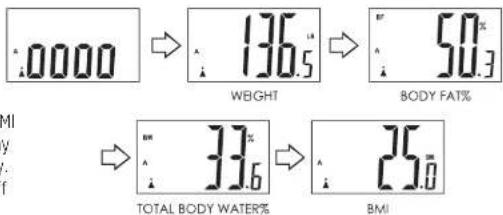
Weight, body fat percentage, total body water percentage and BMI reading will display twice sequentially. The scale turns off automatically.
Couple of Reminders...
• After you programmed your personal data into memory the scale will recognize by your weight.
- Only reprogram if age, height, or weight has changed (+/-6.6 lbs/3kgs).
How to Use Your Saved Profile To Estimate Body Fat, Body Water, and BMI
- Press the "○" (Power) button to turn the scale on. A memory number [1-8] blinks.
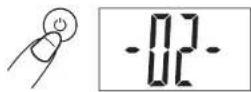
- Press the "▲" or "▼" buttons until your memory number appears. Wait for the screen to show "0.0".

- When "0.0" appears on screen, step on the scale with bare feet, positioning your feet evenly on the scale platform with maximum contact with the metal electrodes.
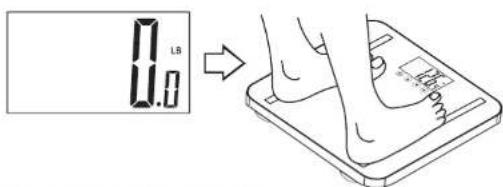
-
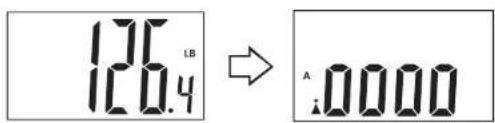
Stand still while the scale measures your weight.
-
Your weight will display, and then the scale will begin to estimate your body composition. The screen shows a moving zeros pattern ("0000") while estimating. Continue to stand still on the scale.
- After a few seconds, your BMI, body fat %, body water %, previous weight and weight difference will display.
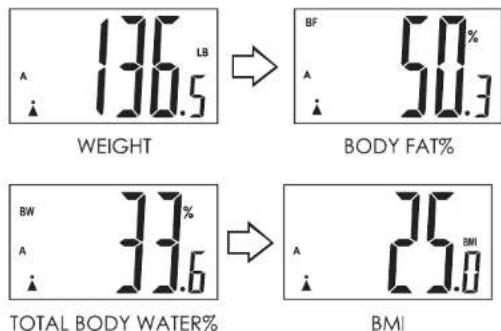
other
| Metric | Value | | ------------------ | --------- | | WEIGHT | 196.5 | | BODY FAT% | 51.3 | | TOTAL BODY WATER% | 33.6 | | BMI | 25.0 |- The results are repeated, and then the scale will turn off automatically.
How to Turn Off the Scale
Press and hold the (Power) key to turn the scale off. Or, if no buttons are pressed for a few seconds, the scale turns off automatically.

Care & Maintenance
- The platform will be slippery when it is wet. Keep it dry! However, do not expose to direct sunlight, extreme hot/cold temperatures or humidity.
- This scale is designed to read weights between 11 and 400 lbs / 5 and 180 kgs / 2 and 28 st 8 lbs. To prevent damage, do not place more than 400 lbs / 180 kgs / 28 st 8 lb on it.
- DO NOT strike, shock, or drop the scale.
- Treat the scale with care as it is a precise instrument.
- Clean the scale with a damp cloth and avoid water getting inside the scale.
- DO NOT use chemical/abrasive cleaning agents.
- Always keep your scale in horizontal position.
- If your scale fails to turn on, check whether battery is installed, or battery power is low. Insert or replace with new batteries.
- When replacing batteries do not mix old and new batteries. DO NOT mix alkaline, standard (carbon-zinc), or rechargeable (ni-cad, ni-mh, etc) batteries.
- Do not use for commercial purpose and follow all instructions provided in this manual.
Battery Warnings!
NOTE: Please recycle or dispose of batteries per local regulations.
WARNING: Batteries may pose a choking hazard. As with all small items, do not let children handle batteries. If swallowed, seek medical attention immediately.
PRECAUTION: Do not dispose of batteries in fire. Batteries may explode or leak. Remove the batteries if the scale will not be used for a long period of time.
⚠ WARNING: Chemical burn hazard. Keep away from children!
- Swallowing batteries may lead to serious injury or death in as little as 2 hours due to chemical burns and potential perforation of the esophagus.
- If it is suspected that a child has swallowed or ingested a button battery, immediately seek urgent medical assistance.
- Dispose of used button batteries immediately and safely. Spent batteries can still be dangerous.
- Tell others about the risk associated with button batteries and how to keep their children safe.
Problem Solving & Questions
- If the scale does not turn on or no weight is displayed?
Check if the scale is powered up and started up. If not, please refer to the Section "Preparation Before Use".
- If the scale is inaccurate or weight varies?
Place feet in center of platform and stand still. Allow weight to lock in before looking down at display. Flooring may be a reason for fluctuation. Use the scale on the hardest floor available for accuracy. Do not move the scale unnecessarily.
- I have tried all corrective actions, but still can't solve the problem ...
Please contact the Taylor Customer Service Department at 1-866-843-3905 (from 8:00 am to 5:00 pm, Mountain Standard Time, Monday through Friday) or by email to taylorusa@lifetimebrands.com.
- Why do I get a different body fat reading when I use a different brand of body fat scale?
Different body composition scales take estimations around different parts of the body and use different mathematic algorithm to estimate the percentage of body fat. The best advice is not to make comparisons from one device to another, but to use the same device each time to monitor any change.
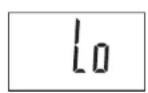
Low Battery Indication:
The Battery is running low please replace with a new battery.
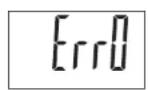
Initialization error :
Step off the scale and wait until the scale automatically switches off. Start the scale again by pressing lightly on the scale platform to re-initialize the scale.
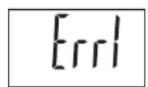
Instability error:
Step off the scale and wait until the scale automatically switches off. Step on the scale to repeat the measurement again, standing still while computation is in process.
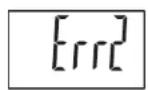
Over-Load warning:
Remove weight immediately or damage can be caused.
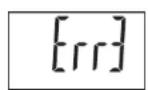
Measurement error:
Impedance cannot be measured. Please make sure that you are standing still on the scale with bare feet and maintaining maximum contact between your feet and the metal contacts. You may need to moisten your feet to improve the electrical contact.
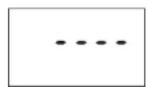
Too Low of a Body Fat, Body Water, and BMI:
The estimation of your body is lower than the scales programmed range. Make sure your feet are making good contact with the electrodes, slightly damp feet may help with contact.
If Error messages continue after following the correct actions above, remove the batteries and reinsert after 1 minute.
Product SpecificationsWarning Indications!
- Bioelectrical Impedance Analysis (BIA) technology for body fat and total body water percentage, body mass index (BMI) calculation
- High precision STRAIN GAUGE technology for weight measurement
- Athlete (for ages 15 to 85 years) or Normal Mode selection
- Slim design
- 8-user memories
- 4-button operation
- Integrated information read out
- Fast recall function
- Auto-on and auto-off functions
- Power saving LCD readout
- Low battery indicator
- Capacity: 400lb, 180kg or 28st 8lb
- Body fat graduation: 0.1% (in the range from 4% - 60%)
- Body water graduation: 0.1% (in the range from 29% - 70%)
- Age range from 10 to 85 years
- Height range from 2'5.5" to 7'4.5" (75 to 225 cm)
- Body fat range: 4 to 60%
- Total body water range: 29 to 70%
- Operates with 2 CR2032 Lithium batteries [included]
- Product dimension: 11.8" x 11.8" x 1.0" (Approx.)
- Gift box dimension: 13" × 13.2" × 2.4" (Approx.)
- Product weight: 3.63 lb (Approx.)
- Total weight (product & gift box): 4.22 lb (Approx.)
- Accuracy of weight measurement: ±1.1 lb (11 lb \~ 143.3 lb); ±1.8 lb (143.3 lb \~ 297.6 lb); ±2.6 (297.6 lb \~ 400 lb)
- Output power for Body Fat Analyzer: <300uA
Education of the Body Composition Scale
Important Information to Know Before Using Your Scale
Before using the scale, you should know ...
- Why is it important to monitor percentage body fat [%BF]?
Body Fat% is an indicator to determine whether a person is obese. Too much body fat can negatively affect of metabolism, which can lead to various illnesses. Measuring Body Fat is an important step toward successful weight management and body health.
- How is percentage body fat (%BFI estimated?
The percentage of BF is measured by a method called Bioelectrical Impedance Analysis (BIA). The use of BIA to estimate body fat has been pioneered since the seventies. It was only in the past decade that the estimation of body fat using BIA technology was successfully offered to the consumer as a compact bathroom scale. With BIA technology, a low intensity electrical signal is sent through the body. The signal is very low and causes no bodily harm. Depending on the amount of body fat of the individual, the electrical signal will flow with a different degree of difficulty. The difficulty with which a signal flows through the body is called electrical impedance. Hence, by measuring the electrical impedance and applying to the data a proprietary algorithm, %BF can be estimated.
'Please note that the percentage of body fat and body water will not add up to 100%.'
Please be reminded that the \%BF estimated with the scale represents only a good approximation of your actual body fat. There exist clinical methods of estimating body fat that can be ordered by your physician.
- Why is it important to monitor percentage Total Body Water (%TBW) in the body?
Water is an essential component of the body and its level is one of the health indicators. Water makes up approximately between 50-70% of the body's weight. It is present proportionally more in lean tissue compared to fat tissue. Water is a medium for biochemical reactions that regulate body functions. Waste products are carried in water from cells for excretion in urine and sweat. Water provides form to cells; helps to maintain body temperature; provides moisture to skin and mucosa; cushions vital organs; lubricates joints and is a component of many body fluids. The amount of water in the body fluctuates with the hydration level of the body and state of health. Monitoring the level of body water can be a useful tool for one's health maintenance. Similar to body fat estimation, the %TBW function provided in this scale is based on BIA.
The estimated % TBW may vary according to your hydration level, that is, how much water you have drunk or how much you have sweated immediately prior to the estimation. For better accuracy, avoid fluctuation in hydration level prior to the estimation. The accuracy of the scale in estimating TBW will also decrease with individuals suffering from diseases that tend to accumulate water in the body.
Please be reminded that the %TBW estimated with the scale represents only a good approximation of your TBW. There exist clinical methods of estimating total body water that can be ordered by your physician.
The optimal %BF and TBW% of an individual varies according to age and gender.
The table as follows may be used as a guide:
| Age | Fat (F) | Hydration (F) | Fat (M) | Hydration (M) | Status |
| ≤ 30 | 4.0 - 16.0% | 66.0 - 57.8% | 4.0 - 11% | 66.0 - 61.2% | Too lean |
| 16.1 - 20.5% | 57.3 - 54.7% | 11.1 - 15.5% | 61.1 - 58.1% | Lean | |
| 20.6 - 25.0% | 54.6 - 51.8% | 15.6 - 20.0% | 58.0 - 55.0% | Normal | |
| 25.1 - 30.5% | 51.5 - 47.8% | 20.1 - 24.5% | 54.9 - 51.9% | Fat | |
| 30.6 - 60.0% | 47.7 - 27.5% | 24.6 - 60.0% | 51.8 - 27.5% | Too Fat |
| Age | Fat (F) | Hydration (F) | Fat (M) | Hydration (M) | Status |
| >30 | 4.0 - 20.0% | 66.0 - 55.0% | 4.0 - 15.0% | 66.0 - 58.4% | Too lean |
| 20.1 - 25.0% | 54.9 - 51.6% | 15.1 - 19.5% | 58.3 - 55.3% | Lean | |
| 25.1 - 30.0% | 51.5 - 48.1% | 19.6 - 24.0% | 55.2 - 52.3% | Normal | |
| 30.1 - 35.0% | 48.0 - 44.7% | 24.1 - 28.5% | 52.2 - 49.2% | Fat | |
| 35.1 - 60.0% | 44.6 - 27.5% | 28.6 - 60.0% | 49.1 - 27.5% | Too Fat |
- When should I use the scale's body fat and total body water functions?
For maximum accuracy and repeatability, it is recommended that the scale's body fat and total body water functions be used at approximately the same time of the day, e.g. before breakfast in the morning. It is also a good practice to avoid swings in hydration level of the body prior to the estimation. Establishing your own baseline value of %BF and %TBW and tracking their changes is better than merely comparing your %BF and %TBW value to the population's "normal" value.
The estimates provided are not substitutes for physician assessments. Consult your physician to determine what body fat percentage, total body water percentage are most ideal for you.
5. Why is the Athlete Mode necessary in a Body Composition Scale?
It has been found that body fat estimation using BIA could overestimate the percentage body fat of adult elite athletes. The physiological variation of athletes in bone density and level of hydration are two of the reasons said to account for the difference. The Athlete mode is selectable only for people 15-85 years old.
6. Definition of an 'Athlete'
The general consensus among researchers is that a quantitative dimension could be used in defining an athlete. For example, an athlete could be defined as a person who consistently trains a minimum of three times per week for two hours each time, in order to improve specific skills required in the performance of their specific sport and/or activity.
FCC INFORMATION
Party issuing Supplier's Declaration of Conformity & Responsible party – U.S. Contact Information:
Taylor division of Lifetime Brands Inc.
2311 W. 22nd Street, Suite 200
Oak Brook, IL 60523
Equipment:
Product Name: Body Composition Scale
Model No.: 5721F
Trade Name: Taylor
We declare under our sole responsibility that the above referenced product has been tested according to FCC requirements and this device complies with part 15 of the FCC Rules. Operation is subject to the following two conditions: (1) this device may not cause harmful interference, and (2) this device must accept any interference received, including interference that may cause undesired operation.
Caution: Changes or modifications not expressly approved by the party responsible for compliance could void the user's authority to operate the equipment.
Note: This equipment has been tested and found to comply with the limits for a Class B digital device, pursuant to part 15 of the FCC rules. These limits are designed to provide reasonable protection against harmful interference in a residential installation. This equipment generates, uses and can radiate radio frequency energy and, if not installed and used in accordance with the instructions, may cause harmful interference to radio communications. However, there is no guarantee that interference will not occur in a particular installation. If this equipment does cause harmful interference to radio or television reception, which can be determined by turning the equipment off and on. The user is encouraged to try to correct the interference by one or more of the following measures:
- Reorient or relocate the receiving antenna.
- Increase the separation between the equipment and receiver.
- Connect the equipment into an outlet on a circuit different from that to which the receiver is connected.
- Consult the dealer or an experienced radio/TV technician for help.
- MADE IN CHINA.
- Five (5) Year Limited Warranty
- Taylor, a division of Lifetime Brands Inc.
- 1-866-843-3905
- Not Legal for trade.
- Body Composition Scale
- CUSTOMER SERVICE INFORMATION PLEASE READ!
- Welcome to the Body Composition Scale
- Preparation Before Use
- INSERT THE BATTERY
- WEIGHT UNIT SETTING
- SET THE SCALE IN THE RIGHT POSITION
- START-UP THE SCALE
- Quick Use & Helpful Tips
- HOW TO SET UP SCALE
- DURING MEASUREMENT
- SAFETY WARNING
- PRECAUTION NOTICE
- IMPORTANT NOTICE TO USERS
- Features/Specifications
- Function keys
- POWER
- SET
- ▲ or ▼
- Weighing-Only Operation
- Body Composition Estimating Operation
- How To Program Your Personal Data
- Select Normal or Athlete Mode
- Measuring
- How to Use Your Saved Profile To Estimate Body Fat, Body Water, and BMI
- How to Turn Off the Scale
- Care & Maintenance
- Battery Warnings!
- ⚠ WARNING: Chemical burn hazard. Keep away from children!
- Problem Solving & Questions
- Low Battery Indication:
- Initialization error :
- Instability error:
- Over-Load warning:
- Measurement error:
- Too Low of a Body Fat, Body Water, and BMI:
- Product SpecificationsWarning Indications!
- Education of the Body Composition Scale
- Important Information to Know Before Using Your Scale
- Why is the Athlete Mode necessary in a Body Composition Scale?
- Definition of an 'Athlete'
- FCC INFORMATION
- Party issuing Supplier's Declaration of Conformity & Responsible party – U.S. Contact Information:
- Equipment:
Brand : Taylor
Model : 572141933FW
Category : Scale