
DWC-400 - Security Camera FIRST ALERT - Free user manual and instructions
Find the device manual for free DWC-400 FIRST ALERT in PDF.


| Product Type | Indoor/Outdoor Security Camera |
| Brand | First Alert |
| Model | DWC-400 |
| Dimensions (H x W x D) | 3.5 x 2.5 x 2.5 inches |
| Weight | 0.5 lbs (227 g) |
| Power Source | AC adapter (included) or 4 AA batteries (not included) |
| Video Resolution | 1080p Full HD |
| Field of View | 130° diagonal |
| Night Vision | Up to 30 ft (9 m) infrared |
| Motion Detection | Passive infrared (PIR) sensor |
| Two-Way Audio | Built-in microphone and speaker |
| Connectivity | 2.4 GHz Wi-Fi (802.11 b/g/n) |
| Compatibility | iOS and Android via First Alert app |
| Storage | Cloud subscription (optional) or local microSD card (up to 128 GB, not included) |
| Weather Resistance | IP65 rated (outdoor use) |
| Operating Temperature | -4°F to 122°F (-20°C to 50°C) |
| Maintenance | Clean lens with soft dry cloth; periodically check for firmware updates |
| Safety Certifications | ETL, FCC, RoHS |
| Parts & Repairability | No user-serviceable parts; contact First Alert support for repair/replacement |
| General Information | Includes mounting kit, quick start guide, and warranty card |
Frequently Asked Questions - DWC-400 FIRST ALERT
User questions about DWC-400 FIRST ALERT
0 question about this device. Answer the ones you know or ask your own.
Ask a new question about this device
Download the instructions for your Security Camera in PDF format for free! Find your manual DWC-400 - FIRST ALERT and take your electronic device back in hand. On this page are published all the documents necessary for the use of your device. DWC-400 by FIRST ALERT.
USER MANUAL DWC-400 FIRST ALERT
WIRELESS SECURITY CAMERA
ADD-ON CAMERA for DWS SERIES DVR
USER'S MANUAL
Model
DWC-400 1 Camera Included

natural_image
Black surveillance camera with antenna and mounted base (no visible text or symbols)
AUDIO
SURVEILLANCE
Thank you for choosing First Alert for your security needs!
For more than half a century, First Alert has made the home-safety and security products that make your job easier. Our products are built to the highest standard which has earned us a leadership role in the home-safety and security product categories. We are committed to serving our customers, from the professionals who install our products, to the families and businesses who count on them. First Alert has been helping families and businesses stay safe for over 50 years. By having a First Alert Security System, you're taking the first step in protecting your home or business from damage or theft. We're watching, even when you're not.
This manual is written for the DWC-400 Wireless Camera. It was accurate at the time it was completed. However, because of our ongoing effort to constantly improve our products, additional features and functions may have been added since that time. We encourage you to visit our website at www.brkelectronics.com to check for the latest manuals (English and Spanish), firmware updates, downloads, other security camera products and announcements. You'll find this product line under Products >> Security Cameras >> Wireless Cameras.
MAIN DESCRIPTION
Digital wireless add-on camera for First Alert DWS Series DVR systems suitable for applications such as high-end residential - new or remodel, light commercial, small business/retail, small warehouse or small grocery.
PRODUCT FEATURES
• 2.4 GHz Digital Frequency Hopping Spread Spectrum (FHSS) Technology
• Audio surveillance camera
• CMOS Color camera with 25 IR LED's for up to 60' night vision
• Camera has built-in IR cut filter for truer color representation
• IP66 weather rating
WHAT'S IN THE BOX

natural_image
Black surveillance camera with antenna and mounted base (no visible text or symbols)Digital Wireless Camera, Antenna and Stand

natural_image
Black and white photo of a charging plug connected to a cable and two cables (no text or symbols visible)Power Supply

User's Manual

natural_image
Colorful CD or DVD disc with reflective surface (no visible text or symbols)English and Spanish Manuals

Mounting Hardware (3 screws and 3 plastic anchors per Camera)
2
SAFETY CAUTION STATEMENTS
SAFETY PRECAUTIONS
• Do not drop, puncture, or disassemble the cameras or DVR.
- Do not tug on the power adapter. Use the plug to remove it from the wall.
- Do not expose the cameras or DVR to high temperatures.
• For your own safety, avoid using the DVR when there is a storm or lightning in your area.
• Use the cameras and DVR with care. Avoid pressing hard on the cameras or DVR body.
• Do not crush or damage the power cable
FCC COMPLIANCE
FCC Compliance Class C Intentional Radiator
This equipment has been tested and found to comply with the limits for a Class C Intentional Radiator, pursuant to Part 15 of the FCC rules. These limits are designed to provide reasonable protection against harmful interference in a residential installation. This equipment generates, uses and can radiate radio frequency energy and, if not installed and used in accordance with the instructions, may cause harmful interference to radio communications.
However, there is no guarantee that the interference will not occur in a particular installation. If this equipment does cause harmful interference to radio or television reception, which can be determined by turning the equipment off and on, the user is encouraged to try to correct the interference by one or more of the following measures:
• Reorient or relocate the receiving antenna.
- Increase the separation between the equipment and receiver.
- Connect the equipment into an outlet on a circuit different from that of the receiver.
- Consult the dealer or an experienced radio or TV technician for help.
Notice: Only peripherals complying with FCC limits may be attached to this equipment. Operation with non-compliant peripherals or peripherals not recommended by First Alert / BRK Brands, Inc. is likely to result in interference to radio and TV reception. Changes or modifications to the product, not expressly approved by First Alert / BRK Brands, Inc., could void the user's authority to operate the equipment.
We, First Alert / BRK Brands, Inc. declare under our sole responsibility that the device to which this declaration relates: Complies with Part 15 of the FCC Rules. Operation is subject to the following two conditions: (1) this device may not cause harmful interference, and (2) this device must accept any interference received, including interference that may cause undesired operation.
FCC Certification
This device contains a radio transmitter. Accordingly, it has been certified as compliant with 47 CFR Part 15 of the FCC Rules for intentional radiators. Products that contain a radio transmitter are labeled with an FCC ID.
DISPOSAL

This symbol indicates that it is prohibited to dispose of these batteries in the household waste. Take spent batteries that can no longer be charged to the designated collection points in your community.
INSTALLING CAMERAS
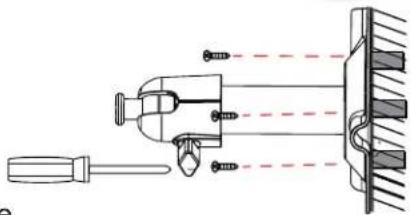
- Select the position for the camera and secure the camera stand. (Screws and anchors are supplied. Use an appropriate screw type for the mounting surface.)
- Screw the camera onto the bracket.

natural_image
Technical line drawing of a mechanical or electrical device mounted on a wall, with no visible text or symbols.- Adjust camera to the proper view angle Make sure the lens is upright relative to your subject. Tighten the thumb bolt.
- Screw the antenna into place on the rear of the camera. Adjust the antenna to an upright position.
- Connect the power cable to the DC IN of the camera.
- Plug the power supply into the electrical outlet.
natural_image
Technical line drawing of a mechanical assembly with tool, spring, and clamping components (no text or symbols)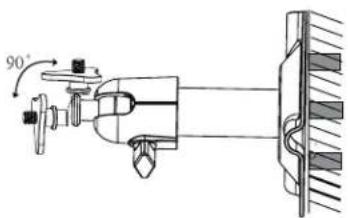

Camera Orientation
It's important the camera is mounted correctly to ensure the image is not upside down as the camera lens can only be positioned one way.
CAMERA PAIRING
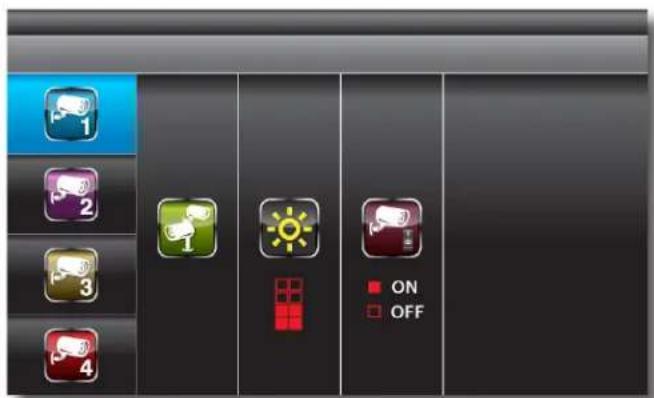
Camera Setup-Sub Menu

Camera Setup-Pairing
Use △ to select the camera to set up (1-4).
Use to select PAIRING, BRIGHTNESS and CAMERA ON/OFF settings.
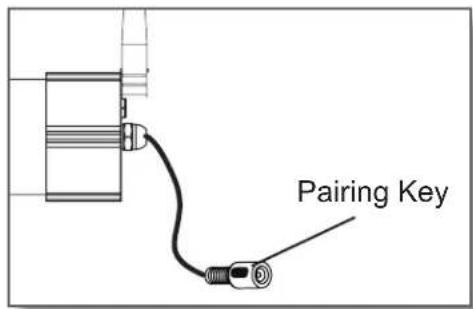
With PAIRING section highlighted, press MENU key once to begin camera pairing. Press Pairing Key button on Camera cord. Pairing LED on camera will blink once then will begin blinking continuously indicating data transmission is in process.
System will confirm pairing process is successful with "PAIRED" displaying on screen. System will indicate pairing process failed with "PAIRING FAIL" displaying on screen.
Press ESC to return to main menu.
TROUBLESHOOTING
| ERROR | POSSIBLE CAUSE | SOLUTIONS | TROUBLESHOOTING |
| System is not receiving power or is not powering up | Cable from power adapter is loose or is unplugged. No power at electrical outlet. | Confirm that all cables are connected correctly.Confirm that the power adapter is securely connected to the back of the unit.Confirm power is on at electrical outlet. | |
| There is no picture on selected channels/camera picture is not being displayed | Camera out of range | Locate camera closer to receiver. | |
| Camera not "Paired" | Connect camera through Camera Pairing menu. | ||
| Signal is blocked | If possible, remove major obstacles in between the camera and the receiver. Or, relocate the camera to another location. | ||
| The power supply for the camera is not plugged in | Confirm camera power supply is connected correctly. | ||
| No power being received at the electrical outlet | Confirm power is on at electrical outlet | ||
| At night, only white appears on the screen | The camera's infra-red LEDs shine invisible light that reflects of surfaces such as glass causing white light | Place the camera on the other side of windows to try to improve the night vision or place in a well lit area. | |
| A black and white image appears at night | This is normal operation for night vision | No action required. | |
| Poor image quality | Interference | Place the camera and/or receiver antenna at a new angle or readjust its position to make an improvement.Remove obstacles between the camera and receiver that might affect the signal (e.g., furniture, cabinets, and walls.)Relocate the camera closer to the receiver. | |
| Low or unstable signal | Antenna direction is limited | Adjust the camera antenna and receiver position | |
| Signal has been blocked | If possible, remove major obstacles in between the camera and receiver. Or, relocate the camera to another location. | ||
| Strong radio signal nearby | Keep WIFI router away from the camera and/or receiver. | ||
| Strong electromagnetic interference nearby | Keep active appliances such as hair dryers, heat fans, air conditioners, water pumps, or microwave ovens away from the camera and/or receiver. | ||
| Audio Feedback | Camera and receiver are too close | The camera has a high sensitivity microphone. Keep the camera at least 10 feet away from the receiver. If the camera must be within 10 feet of the receiver, keep the volume down. | |
TECHNICAL SPECIFICATIONS
| ITEM | DEVICE PARAMETER | SPECIFICATION | SPECIFICATIONS |
| Camera | Wireless Parameters | 2.4 GHz secure digital wireless with 24 transmission channels using Frequency Hop-ping Spread Spectrum (FHSS) technology | |
| Communication Range | 2.4 GHz secure digital wireless at approximately 500 feet (150 meters) open space line of sight | ||
| Camera Resolution 640 x 480 | |||
| IR LED's 25 | |||
| IR Cut Filter Automatic for daytime true color | |||
| Weather Resistant Rating IP-66 | |||
| Night Vision 60' (18m) | |||
| Operating Temperature 14 °F to 122 °F (-10 °C to 50°C) | |||
| Operating Voltage DC 5V / 1A | |||
| Current Consumption 860mA (max) | |||
| Dimensions | 4.8"D (123mm) x 2.6"W (65mm) x 2.6"H (65mm) camera barrel only6.2"D (157mm) x 2.75"W (70mm) x 8.5"H (216mm) w/stand and antenna | ||
WARRANTY
PRODUCT LIMITED WARRANTY
BRK Brands, Inc., ("BRK") the maker of First Alert® brand products warrants that for a period of one year from the date of purchase (the "Warranty Period"), this product will be free from defects in material and workmanship. BRK, at its sole option, will repair or replace this product or any component of the product found to be defective during the Warranty Period. Replacement or repair will be made with a new or remanufactured product or component. If the product is no longer available, replacement may be made with a similar product of equal or greater value. This is your exclusive warranty.
This warranty is valid for the original retail purchaser only from the date of initial retail purchase and is not transferable. In order to obtain warranty service, you must keep the original sales receipt and proof of purchase in the form of the UPC code from the package. BRK dealers, service centers, or retail stores selling BRK products do not have the right to alter, modify or any way change the terms and conditions of this warranty.
WARRANTY EXCLUSIONS
Parts and Labor: 1 year limited (warranted parts do not include bulbs, LEDs, and batteries)
This warranty does not apply to bulbs, LEDs, and batteries supplied with or forming part of the product.
This warranty is invalidated if non-BRK accessories are or have been used in or in connection with the product or in any modification or repair is made to the product.
This warranty does not apply to defects or damages arising by use of the product in other than normal (including normal atmospheric, moisture and humidity) conditions or by installation or use of the product other than in strict accordance with the instructions contained in the product owner's manual.
This warranty does not apply to defects in or damages to the product caused by (i) negligent use of the product, (ii) misuse, abuse, neglect, alteration, repair or improper installation of the product, (iii) electrical short circuits or transients, (iv) usage not in accordance with product installation, (v) use of replacement parts not supplied by BRK, (vi) improper product maintenance, or (vii) accident, fire, flood or other Acts of God.
This warranty does not cover the performance or functionality of any computer software included in the package with the product. BRK makes no warranty that the software provided with the product will function without interruption or otherwise be free of anomalies, errors, or "Bugs." This warranty does not cover any costs relating to removal or replacement of any product or software installed on your computer.
BRK reserves the right to make changes in design or to make additions to or improvements in its products without incurring any obligations to modify any product which has already been manufactured. BRK will make every effort to provide updates and fixes to its software via its website. This warranty does not cover any alteration or damage to any other software that may be or may become resident on the users system as a result of installing the software provided. This warranty is in lieu of other warranties, expressed or implied, and BRK neither assumes nor authorizes any person to assume for it any other obligation or liability in connection with the sale or service of the product. In no event shall BRK be liable for any special or consequential damages arising from the use of the product or arising from the malfunctioning or non-functioning of the product, or for any delay in the performance of this warranty due to any cause beyond its control.
BRK does not make any claims or warranties of any kind whatsoever regarding the product's potential, ability, or effectiveness to prevent, minimize, or in any way affect personal or property damage or injury. BRK is not responsible for any personal damage, loss, or theft related to the product or to its use for any harm, whether physical or mental related thereto. Any and all claims or statements, whether written or verbal, by salespeople, retailers, dealers, or distributors to the contrary are not authorized by BRK, and do not affect this provision of this warranty.
BRK's responsibility under this, or any other warranty, implied or expressed, is limited to repair, replacement or refund, as set forth above. These remedies are the sole and exclusive remedies for any breach of warranty. BRK is not responsible for direct, special, incidental, or consequential damages resulting from any breach of warranty or under any other legal theory including but not limited to, loss profits, downtime, goodwill, damage to or replacement of equipment and property and any costs of recovering, reprogramming or reproducing any program or data stored in or used with a system containing the product accompanying software. BRK does not warrant the software will operate with any other software except that which is indicated. BRK cannot be responsible for characteristics of their party hardware or software which may effect the operation of the software included.
Except to the extent prohibited by applicable law, any implied warranty of merchantability or fitness for a particular purpose is limited in duration to the duration of the above Warranty Period. Some states, provinces, or jurisdictions do not allow the exclusion or limitation of incidental or consequential damages or limitations on how long an implied warranty lasts, so the above limitations or exclusion may not apply to you. This warranty gives you specific legal rights, and you may also have other rights that vary from state to state, or province to province, or jurisdiction to jurisdiction.
OBTAINING SERVICE
If service is required, do not return the product to your place of purchase. In order to obtain warranty service, contact the Consumer Affairs Division at 1-800-323-9005, 7:30 a.m. – 5:00 a.m. Central Standard Time, Monday through Friday. To assist us in serving you, please have the model number and date of purchase available when calling.
After contacting the Consumer Affairs Division and it is determined that the product should be returned for Warranty Service, please mail the product to: BRK Brands, Inc., 3901 Liberty Street Road, Aurora, IL 60504-8122.
First Alert®
©2012 BRK Brands, Inc.
a Jarden Corporation Company (NYSE:JAH)
3901 Liberty Street Road, Aurora, IL 60504-8122
Phone: 630-851-7330 Tech Services: 800-323-9005
www.brkelectronics.com
M08-0427-002
- WIRELESS SECURITY CAMERA
- USER'S MANUAL
- MAIN DESCRIPTION
- PRODUCT FEATURES
- WHAT'S IN THE BOX
- 2
- SAFETY CAUTION STATEMENTS
- SAFETY PRECAUTIONS
- FCC COMPLIANCE
- FCC Compliance Class C Intentional Radiator
- FCC Certification
- DISPOSAL
- INSTALLING CAMERAS
- Camera Orientation
- CAMERA PAIRING
- WARRANTY
- PRODUCT LIMITED WARRANTY
- WARRANTY EXCLUSIONS
- OBTAINING SERVICE
- First Alert®
Brand : FIRST ALERT
Model : DWC-400
Category : Security Camera