
LD4AS008G-R3200GSST - Data Storage LEXAR - Free user manual and instructions
Find the device manual for free LD4AS008G-R3200GSST LEXAR in PDF.


| Product Type | Memory Module (RAM) |
| Brand | Lexar |
| Model | LD4AS008G-R3200GSST |
| Capacity | 8GB |
| Memory Type | DDR4 |
| Speed | 3200MHz |
| Form Factor | SO-DIMM (for laptops) and DIMM (for desktops) |
| Voltage | 1.2V |
| Dimensions (Typical SO-DIMM) | 67.6 mm x 30 mm |
| Weight | Approximately 10 g |
| Primary Function | Improve system performance and increase memory capacity |
| Installation Type | Desktop and laptop compatible |
| Precautions | Ground yourself before handling; avoid touching gold connectors; keep away from moisture; do not disassemble or bend |
| Cleaning and Maintenance | Do not clean with liquids; use dry cloth if necessary; keep in anti-static bag when not in use |
| Safety Warnings | Do not crush, short-circuit, or modify; keep away from moisture; avoid static discharge |
| Spare Parts and Repairability | Not user-serviceable; covered by limited-lifetime warranty |
| Warranty | Lexar limited-lifetime warranty |
| Disposal | Do not mix with household waste; follow local regulations for electronic waste |
| Technical Support | Visit lexar.com/support |
Frequently Asked Questions - LD4AS008G-R3200GSST LEXAR
User questions about LD4AS008G-R3200GSST LEXAR
0 question about this device. Answer the ones you know or ask your own.
Ask a new question about this device
Download the instructions for your Data Storage in PDF format for free! Find your manual LD4AS008G-R3200GSST - LEXAR and take your electronic device back in hand. On this page are published all the documents necessary for the use of your device. LD4AS008G-R3200GSST by LEXAR.
USER MANUAL LD4AS008G-R3200GSST LEXAR
Quick Installation Guide
EN
Precautions:
Please ground yourself before handling your Lexar memory, as Static electricity can cause damage to the module and other components in your system.
• To protect your new memory, avoid touching the connectors. Handle your Lexar memory using its edge or frame.
- Do not disassemble, crush, short circuit, or do any kind of modification to your memory, as it may cause unexpected hazards.
- Keep your memory away from any kind of moisture. Moisture can cause electric shocks with any electronic device.

Do not touch gold pins Do not stack

Do not bend Do not drop
Installation Guidelines:
Before installing your Lexar memory, please take all necessary precautions to comply with your computer manufacturer's handling instructions.
1. Power off your computer and disconnect the main power cord from the wall outlet. If your computer uses battery power, remove the battery.
2. Refer to your computer manufacturer's instructions for details on how to remove the outer case, and where the memory connectors are located.
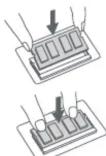
General Memory Module Installation Steps:
Follow below steps to complete the memory product installation:
- Desktop DIMM Installation


• Laptop SO-DIMM Installation
Technical Support:
Visit us at http://www.lexar.com/support/ for further assistance.
Lexar's Limited-lifetime Warranty:
This product is covered for Limited-lifetime Warranty from the date of purchase, subject to the applicable warranty terms and conditions, as defined at
http://www.lexar.com/support/warranties/
Disposal Instructions:
Used electronic equipment should not be mixed with general household waste. Improper disposal may be harmful to the environment and human health. Please refer to your local waste authority for information on return and collection systems in your area.
Lexar
快速安装指南
SC
安全及操作说明:

Brand : LEXAR
Model : LD4AS008G-R3200GSST
Category : Data Storage