
PBT99 - FM Transmitter Pyle - Free user manual and instructions
Find the device manual for free PBT99 Pyle in PDF.


| Product Type | FM Transmitter |
| Brand | Pyle |
| Model | PBT99 |
| Color | Black |
| Dimensions | Approx. 4.5 x 2.5 x 1.2 inches |
| Weight | Approx. 2.5 oz |
| Power Source | 12V DC (cigarette lighter) |
| FM Frequency Range | 87.5 - 108 MHz |
| Audio Input | 3.5mm AUX |
| USB Port | Yes (for charging external devices) |
| Supported Audio Formats | MP3, WMA (via USB/SD) |
| Output Power | < 10 mW |
| Operating Voltage | 12-24V DC |
| Preset Stations | 4 |
| Display | Digital LCD |
| Material | Plastic |
| Package Contents | FM Transmitter, User Manual |
| Warranty | 1 year |
| Certifications | FCC, CE |
Frequently Asked Questions - PBT99 Pyle
User questions about PBT99 Pyle
0 question about this device. Answer the ones you know or ask your own.
Ask a new question about this device
Download the instructions for your FM Transmitter in PDF format for free! Find your manual PBT99 - Pyle and take your electronic device back in hand. On this page are published all the documents necessary for the use of your device. PBT99 by Pyle.
USER MANUAL PBT99 Pyle
Hands-Free Talking Wireless Car Adapter with MP3/AUX/USB/Micro SD Readers
USER MANUAL
Brief Introduction
This device streams music and calls directly from your Bluetooth device to the car FM stereo system. The built-in microphone provides you with an amazing hands free function, it also features Micro SD card that lets you steam your favorite MP3 tunes to your car's stereo system and charge your phone simultaneously. It also delivers a deeper bass with touch of the bass button when playing the music.
What's more, it also equips Dual USB Charging ports (Q.C 3.0 & 2.4A). This will greatly save your mobile charging time. Please read the User Manual carefully before using. Hope this device makes your driving more interesting and safer.
Product Overview:


Using FM Transmitter function:
- Plug the Bluetooth FM transmitter into your vehicle's cigarette lighter or power port.
- Tune your radio to an unused FM frequency, then match the same frequency of this unit.
-
Insert a Micro SD card which containing MP3 files into Micro SD Memory Card Slot of this unit, It will play and transmit the MP3 files automatically.
-
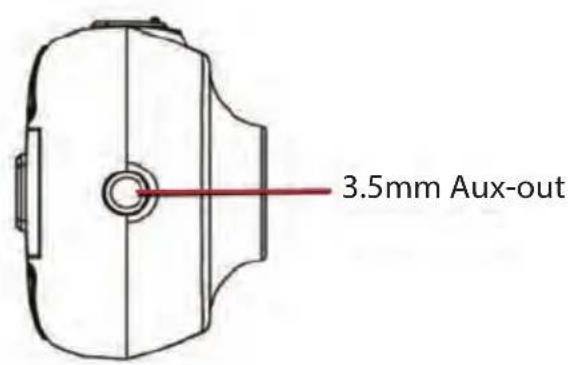
Line-out function: Plug the provided audio cable into car Aux-in port to connect with car system. Another connector to the Aux-in port of this unit. When using this function, the high quality music or phone call will come out from car system.
- Music bass boost function: Press the bass button to active deeper bass when listening to music.
- Shut Down the FM Transmission: If you don't need the FM transmission temporarily, please press and hold for 3 seconds to turn OFF, and remain charging.
Using Bluetooth function:
- Using Bluetooth for the first time, you need to pair your mobile phone with this unit. Activate your mobile phone's Bluetooth function, then search new device. When the mobile phone detects this unit (named as "PyleUSA"), please pair or connect by using the original password "0000"
- On music playing mode, when there is an incoming call, this unit will automatically switch to telephone mode.
- On music playing mode, simply press the "BASS" button to enjoy louder and deeper bass.
- On music playing mode, press the "BASS" and hold for 2 seconds to switch the modes between Bluetooth and Micro SD card reading.
Bluetooth calling:
- Please press _n to answer the incoming call or hang off a call.
- Please press _n and hold for 2 seconds during call to reject the incoming call in Bluetooth calling mode.
- Please press _n twice to dial the last Number automatically.
- When making a call, you can only dial the phone number by your mobile phone, but once the call is connected, you can use the hands-free function to enjoy it.
Using USB charger function:
This device with dual USB port for charging, one port is 2.4A. Another port is the quick charge 3.0. When this unit is powered from car lighter socket, connect the USB Charger port to your mobile phone or others device with a special USB cable (not included).
About QC3.0 USB Port:
If your mobile support the Quick charge, it will charge based on Qualcomm QC 3.0 protocol, DC 3.5-6.5V/3A,6.5V-9A/2A,9-12V/1.5A.
Here also listed the compatible Devices for reference:
Galaxy S7/S6/Edge/Edge Plus, Galaxy Note 5/4/ Edge, LG G4/G5,LG G Flex2,Nexus 6,HTC One M8/M9,Droid Turbo, Xperia Z3/Z3 Compact/Z3 Tablet Compact/Z4 Tablet and many more (please check the official Qualcomm QC product list for more update)
But if you plug mobile which not listed among above, it will detect the phone voltage automatically and output accordingly.
About 2.4A USB Port:
This USB port output maximum 2.4A. It will also detect the phone voltage and output accordingly.
Quick Guide:
| Operation Guide On FM transmitter | |
| 1. Answer/hang up the call | Press " 🔊" button: answer the callPress " 🔊" button: hang up the call |
| 2. Ignore call Press " | " and hold for 3 seconds to reject incoming calls |
| 3. Call last Number Press " " twice to dial the last Number automatically. | |
| 4. Private calling When answering a call, press " " and hold for 3 seconds to switch to private call mode. | |
| 5. Play and Pause the music | Press " 🔊" Button: Play the musicPress " 🔊" Button again: Pause playing |
| 6. Adjust the Volume Press " ►" and hold for 2 seconds to increase the VolumePres "◄◄" and hold for 2 seconds to decrease Volume | |
| 7. Set frequency | Press "CH + ": increase the frequencyPress "CH - ": decrease the frequency |
| 8. Choose music Press " " Button: Play the next songPress "◄◄" Button: Play the previous song | |
| 9. Bass Booster | Press "BASS"Button to active the deeper bass music |
| 10. Feature Switch | Press "BASS"Button and hold for 2 seconds to switch the modes between the Bluetooth and Micro SD card reading. |
PBT99
Wireless BT Streaming Car FM Transmitter with USB Quick Charge
Hands-Free Talking Wireless Car Adapter with MP3/AUX/USB/Micro SD Readers
Features:
• Universal Car & Truck Compatible
- Bluetooth Wireless Streaming Receiver
- Play Music & Answer Phone Calls via Car Stereo System
- Connects to Cigarette Lighter Accessory Power Outlet
• Large 2.0" -inch Digital LED Display Screen
- Convenient Flexible Gooseneck Design
• Built-in FM Transmitter
• USB 3.0 Device Quick Charge Port
- Aux (3.5mm) Jack
- Direct Connect Your Device via Aux for Audio Playback
- Scroll Through Music Playlists with Button Controls
- Unique 'Bass Boost' Sound Button Activation
- Hassle-Free Design with Simple Plug-in Operation
Bluetooth Connectivity:
• Built-in Bluetooth for Wireless Music Streaming
• Built-in Microphone for Hands-Free Calling
- Simple & Hassle-Free Pairing
- Works with All of Today's Latest Devices (Smartphones, Tablets, Laptops, Computers, etc.)
- Bluetooth Version: v5.0 (AVRCP, HFP, A2DP)
- Bluetooth Pairing Name: 'PyleUSA'
- Bluetooth Password: '0000' (4 Zeroes)
- Wireless Range: Up to 30'+ ft.
Technical Specs:
• Frequency Range: 87.5-108.0MHz
• Frequency Stability: ±10ppm
• Music Format Support: MP3/WMA/FLAC
- *USB Playback Port can be Used for Standard Device Charging
• Maximum Micro SD Flash Support Size: 32GB Max
- Construction Material: Engineered ABS
- USB Power: Quick Charge QC 3.0 + Standard 5V/2.4A
• Vehicle Power Supply: 12-24V
- Dimensions (L x W x H): 7.8" x 1.6" x 3.4" –inches
What's in the Box:
- Bluetooth Car Adapter
• Audio (3.5mm) Cable
PYLE
PyleUSA.com

natural_image
Illustration of a laptop with a red checkmark on the screen (no text or symbols)VISIT US ONLINE:
Have a question?
Need service or repair?
Want to leave a comment?
PyleUSA.com/ContactUs
- Brief Introduction
- Using FM Transmitter function:
- Using Bluetooth function:
- Bluetooth calling:
- Using USB charger function:
- About QC3.0 USB Port:
- Here also listed the compatible Devices for reference:
- About 2.4A USB Port:
- PBT99
- Wireless BT Streaming Car FM Transmitter with USB Quick Charge
- Hands-Free Talking Wireless Car Adapter with MP3/AUX/USB/Micro SD Readers
- Features:
- Bluetooth Connectivity:
- Technical Specs:
- What's in the Box:
- PYLE
- PyleUSA.com
Brand : Pyle
Model : PBT99
Category : FM Transmitter