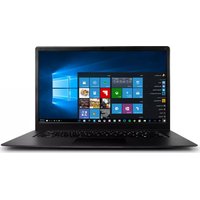
S14-8350G04128WH - Laptop HAIER - Free user manual and instructions
Find the device manual for free S14-8350G04128WH HAIER in PDF.


Pick your language and provide your email: we'll send you a specifically translated version.
| Product Type | Laptop |
| Brand | Haier |
| Model | S14-8350G04128WH |
| Display Size | 14 inches |
| Processor | Intel Core i5 (8th Gen) |
| RAM | 8 GB DDR4 |
| Storage | 128 GB SSD |
| Operating System | Windows 10 Home |
| Dimensions (W x D x H) | 32.5 x 23 x 1.8 cm |
| Weight | 1.5 kg |
| Power Supply | 19V DC, 45W adapter |
| Battery Type | Lithium-ion, 3-cell |
| Main Functions | Computing, web browsing, office applications, multimedia playback |
| Connectivity | Wi-Fi 802.11ac, Bluetooth 4.2, USB 3.0, HDMI |
| Maintenance & Cleaning | Wipe with a soft dry cloth; avoid liquids and abrasives |
| Safety Precautions | Keep away from water, do not block vents, use only specified charger |
| Spare Parts & Repairability | Contact Haier support for battery, keyboard, or hard drive replacement |
| General Information | Laptop for home and office use; color: white |
Frequently Asked Questions - S14-8350G04128WH HAIER
How do I connect to Wi-Fi on my Haier laptop?
Click the network icon in the system tray, select your Wi-Fi network, enter the password, and click Connect.
How can I extend battery life?
Reduce screen brightness, close unused apps, disable Bluetooth/Wi-Fi when not needed, and use power saver mode.
How do I clean the laptop screen?
Power off the laptop, use a microfiber cloth slightly dampened with water or screen cleaner, and gently wipe the screen.
How do I perform a factory reset?
Go to Settings > Update & Security > Recovery, and under 'Reset this PC', click Get Started. Follow the on-screen instructions.
Can I upgrade the RAM or storage?
Yes, the laptop has an accessible memory slot and M.2 SSD slot. Refer to the user manual for compatibility.
How do I connect an external monitor?
Connect the monitor via HDMI or VGA (if available). Press Windows + P to select display mode (Duplicate, Extend, etc.).
What should I do if the laptop doesn't turn on?
Check the charger connection, ensure the power outlet works, press and hold the power button for 10 seconds, then try again.
How do I update drivers?
Visit Haier's support website, enter your model S14-8350G04128WH, and download the latest drivers for chipset, graphics, etc. Or use Windows Update.
How do I use the function keys (F1-F12) for media control?
Press the Fn key together with the desired F key. For example, Fn + F5 toggles volume mute. Check icons on the keys.
How do I enable Bluetooth?
Go to Settings > Devices > Bluetooth & other devices, toggle Bluetooth on. Alternatively, use the Action Center (Windows + A) to enable.
User questions about S14-8350G04128WH HAIER
0 question about this device. Answer the ones you know or ask your own.
Ask a new question about this device
No questions yet. Be the first to ask one.
Download the instructions for your Laptop in PDF format for free! Find your manual S14-8350G04128WH - HAIER and take your electronic device back in hand. On this page are published all the documents necessary for the use of your device. S14-8350G04128WH by HAIER.
USER MANUAL S14-8350G04128WH HAIER

Manual assistant
Powered by Anthropic
Waiting for your message
Product information
Brand : HAIER
Model : S14-8350G04128WH
Category : Laptop