21073DPA - Uncategorized AMS Neve - Free user manual and instructions
Find the device manual for free 21073DPA AMS Neve in PDF.


| Product Type | Dual-channel microphone preamplifier |
| Dimensions (W x D x H) | 19 x 8.5 x 1.75 inches (48.3 x 21.6 x 4.4 cm), 1U rackmount |
| Weight | Approx. 5.5 kg (12.1 lbs) |
| Power Supply | Internal AC power supply, 100-240V AC, 50/60 Hz |
| Input Impedance | 1.2 kohms (microphone), 10 kohms (line) |
| Output Impedance | 75 ohms (XLR), 600 ohms (balanced) |
| Maximum Gain | +68 dB (microphone input) |
| Frequency Response | 20 Hz to 20 kHz (±0.5 dB) |
| THD+N | <0.0005% at 1 kHz, +20 dBu output |
| Signal-to-Noise Ratio | >120 dB (A-weighted) |
| Phantom Power | +48V switchable per channel |
| Polarity Reversal | Pin 2/pin 3 reversal switch per channel |
| Main Functions | Microphone preamplification, line input, direct output, insert points, high-pass filter |
| Maintenance | Keep clean with dry cloth; avoid moisture; no internal user-serviceable parts |
| Safety Warnings | Do not expose to rain or moisture; disconnect power before cleaning; use proper grounding |
| Spare Parts & Repairability | Contact authorized AMS Neve service centers; limited user-replaceable parts |
| General Information | Studio-grade preamplifier designed for professional audio recording and mixing |
Frequently Asked Questions - 21073DPA AMS Neve
User questions about 21073DPA AMS Neve
0 question about this device. Answer the ones you know or ask your own.
Ask a new question about this device
Download the instructions for your Uncategorized in PDF format for free! Find your manual 21073DPA - AMS Neve and take your electronic device back in hand. On this page are published all the documents necessary for the use of your device. 21073DPA by AMS Neve.
USER MANUAL 21073DPA AMS Neve
1073DPA and 1073DPD Mic Pre- Amplifier
User Guide
527-349
Issue 2
© 2005 AMS Neve plc own the copyright of all information and drawings contained in this manual which are not to be copied or reproduced by any means or disclosed in part or whole to any third party without written permission.
As part of our policy of continual product improvement, we reserve the right to alter specifications without notice but with due regard to all current legislation.
Disclaimer: The information in this manual has been carefully checked and is believed to be accurate at the time of publication. However, no responsibility is taken by us for inaccuracies, errors or omissions nor any liability assumed for any loss or damage resulting either directly or indirectly from use of the information contained within it.
HEAD OFFICE
AMS NEVE PLC • BILLINGTON ROAD • BURNLEY
LANCS BBII 5UB • ENGLAND
TELEPHONE: +44 (0) 1282 457011 • FAX: +44 (0) 1282 417282
LONDON OFFICE
TELEPHONE: +44 (0) 20 7916 2828 • FAX: +44 (0) 20 7916 2827
NORTH AMERICAN OFFICES
AMS NEVE INC., NEW YORK
TEL: +1 (212) 965 1400 • FAX: +1 (212) 965 9306
AMS NEVE INC., HOLLYWOOD
TEL: +1 (818) 753 8789 • FAX: +1 (818) 623 4839
e-mail: enquiry@ams-neve.com
http://www.ams-neve.com
Contents
Introduction 1
1073DPA 1
1073DPD 1
Dimensions 2
Rack Mounting and Cooling 2
Power Requirements 2
Mains Supply 2
DC Power Supply Indicators 2
Phantom Power 2
Rear Panel Connectors 3
1073DPA 3
1073DPD 3
Amplifier Controls 4
1073DPA 4
1073DPD 4
DPD Headroom Level Setting 6
Specifications 7
1073DPA 7
1073DPD ADC 7
Introduction
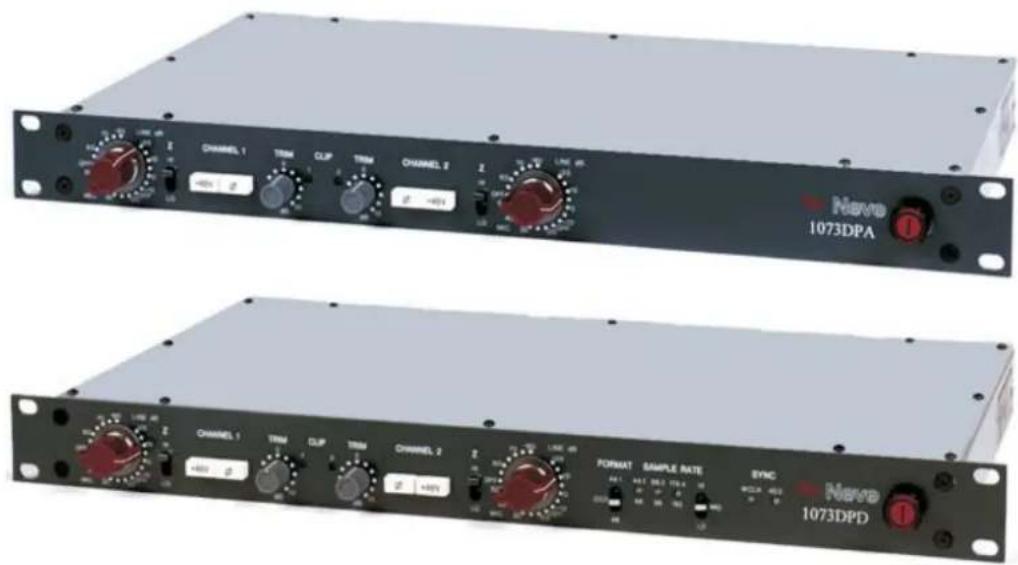
1073DPA
The latest addition to the Neve outboard range, the 1073DPA provides two of the world famous Class A Neve 1073 microphone pre-amplifiers. This classic design is a consummate mic pre for recording vocals, guitars and acoustic instruments of all descriptions.
1073DPD
Two classic Neve 1073 mic pre-amplifiers are complemented by pristine professional ADCs to capture a performance to any required format. In addition to Neve's famous Class A analogue outputs are a series of digital options including all standard PCM sampling rates up to 192kHz. A unique feature is the Neve DSD output. Analogue insert points are provided ahead of the ADCs. The ultimate analogue circuitry is coupled with superior digital quality making this unit the obvious choice as a front end for recording to workstations.
Both of these modules are supplied in a 1U 19" rack-mounting unit.
Dimensions
| Units U Depth | mm (inches) | Height mm (inches) | Approx. Weight kg (lbs) | |
| 1073DPA / 1073DPD | 1 | 254 (10) | 45 (1.75) | 5 (11) |
Rack Mounting and Cooling
The rack units should be installed in a 19" cabinet with access to the front and rear.
No specific air conditioning is required for the racks, provided that there is a free flow of air through the rack from front to back, and that the ambient air is maintained below 30 degrees centigrade. Therefore the racks may be stacked.
Power Requirements
| 1073DPA/1073DPD | |
| Rated Voltage 100-240V AC | |
| Rated Frequency 47-63 Hz | |
| Rated Current 0.5A Max | |
| Primary Protection Fuse: | |
| Operating Voltage 100-240V AC | |
| Fuse Rating and Type T1.6A anti-surge20mm x 5mm CERAMIC | |
| Location IEC Mains connector | |
Mains Supply
The power supply unit is a universal input type therefore no mains operating voltage setting is required.
The CH (chassis) and 0V are linked internally.
DC Power Supply Indicators
The red LED on the mains switch indicates +5V power healthy when illuminated.
Phantom Power
Phantom power can be supplied to each channel by pressing the relevant +48V switch on the front panel of the unit.
Rear Panel Connectors

Mating connectors are not supplied with these units.
1073DPA

LINE OUTPUT - Male XLR.
LINE INPUT - Female XLR and 1/4 inch jack combo. Maximum input level of +26dBu and an input impedance of 20kohms.
MIC INPUT - Female XLR with a maximum input level of +6dBu and an input impedance of 300 or 1200ohms.

These connectors also apply to the 1073DPD
1073DPD

ADC INPUT - 1/4 inch jack acting as a switched insert into the ADC Input. Maximum input level +26dBu for conversion to 0dBFS.
AES SYNC - Female XLR to take a standard AES 110ohm input signal for use as a wordclock sync source.
OUT 1/L and 2/R - Male XLRs outputting standard AES 110ohm digital audio.
WCLK IN - BNC input for TTL level wordclock signal. Input impedance can be set to 75ohm using adjacent DIP switch.
WCLK OUT - BNC 75ohm output TTL level wordclock signal at sampling frequency buffered from ADC sync source.
DSD L and R - BNC 75ohm output TTL level DSD signals.
DIPSwitches:
75R ON/OFF - Selects a 75ohm input impedance for WCLK In.
SDIF 2/3 - Selects DSD output format; SDIF2 DSD data only, SDIF3 DSD data with embedded clock.
Amplifier Controls
1073DPA

Mic Input
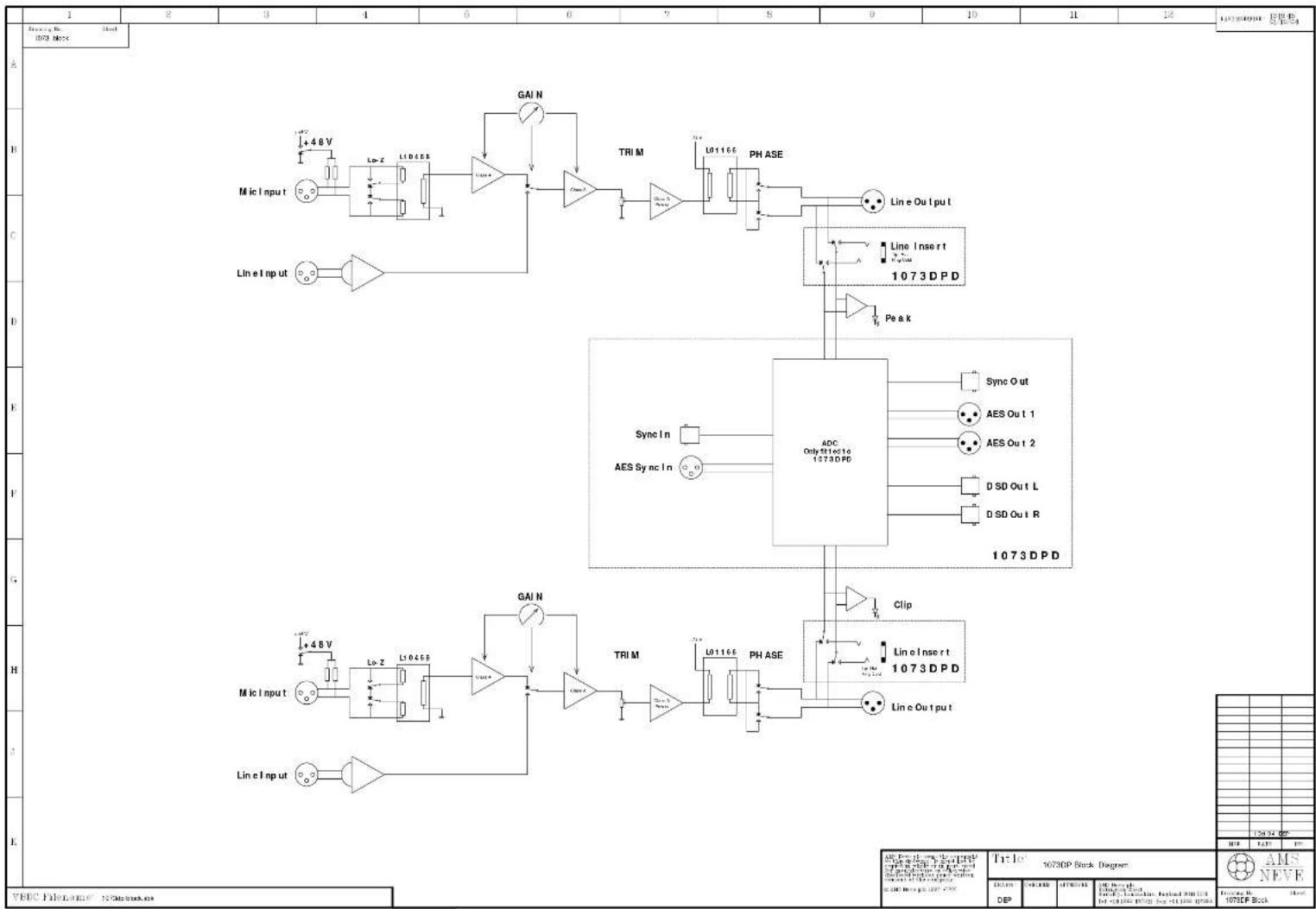
1200ohm (Hi-Z) or 300ohm (Lo-Z) input impedance transformer coupled stage. 48V is switchable onto the Mic Input. Mic gain is across two class A gain stages. The signal then feeds a transformer balanced class A output stage via a +/-10dB trim.
Line Input
20k input impedance, +26dBu peak signal level. Electronically balanced input stage. Gain from this input is applied in the second class A gain stage and is output through the same class A transformer coupled output stage as the Mic In.
Line Output
Phase reversal is available pre Line Output. The Line Output has a minimum +26dBu peak output level. The peak LEDs will illuminate 3dB below clipping.

These controls also apply to the 1073DPD.
1073DPD

In addition the 1073DPD has an ADC converter. The input to the converter is fed from the Line Output XLR. This ensures that the digital output signal includes the analogue class A output and transformer colouration.
The signal passes to the ADC via a 1/4 inch jack Insert point. A balanced signal can be plugged into the Insert jack and it will break the path from the Line Output to the ADC, substituting the Insert signal. Tip is hot, ring is cold and sleeve is ground.
The Insert point has a peak signal level of +26dBu. This allows the user to use the ADC independently of the Mic/Line amps or to put a piece of outboard equipment such as a compressor between the Mic/Line amps and the ADC. With no Insert signal the signal is output as both analogue line out and digital out enabling the analogue to be used for foldback monitoring whilst the digital output signal with it's inherent conversion delay is being used for recording.
The ADC is set up to output 0dBFS with +26dBu at the Line Output or Insert point.
Sampling Frequency
The left hand FORMAT switch selects the 44.1kHz PCM range, the 48kHz PCM range or DSD. The right hand SAMPLE RATE switch selects which multiple of sampling rate to use e.g. 48, 96 or 192kHz.
With 44.1kHz selected the multiple LEDs illuminate red, with 48kHz range selected the multiple LEDs illuminate green. Selecting DSD only allows 44.1kHz sync (the multiple LEDs are all off).
Sync Inputs
The 1073DPD has two sync inputs; AES3 on a female XLR and wordclock on a chassis BNC. If neither Sync Input is present the unit will synchronise to it's internal crystal clock. If one or other sync input is present at the correct sampling frequency selected on the front panel the LED (AES or WCLK) will illuminate green showing that the sync input is being used as a reference. If both sync inputs are present and correct the wordclock input will be used as reference. Normally the sync input is set to the required sample rate. In this case both AES OUT 1L and AES OUT 2R carry the same stereo AES signal converted from the left and right analogue inputs.
Double Rate AES Output
It is also possible to select 96kHz (or 88.1kHz) sampling rate with a 48kHz (or 44.1kHz) sync input. Similarly it is possible to select 192kHz (or 176.2kHz) sampling rate with a 96kHz (or 88.1kHz) sync input. This will cause the unit to output double rate AES on the two output AES connectors. The sync LED will still illuminate green indicating the sync reference is still being used for the digital output even though the ADC is sampling at twice the sync input sampling rate. In this situation AES OUT 1L carries the odd and even samples of the left audio double rate signal on its Left and Right digital channels respectively. Similarly, AES OUT 2R carries the odd and even samples of the right audio double rate signal on its Left and Right AES channels.
DSD
Selecting DSD will default to 44.1kHz reference. If no sync is available it will use the internal crystal reference.
The interface requires a minimum of two BNC cables (DSD L and DSD R) to the DSD DAC.
The DSD output is switchable between SDIF2 and SDIF3 with the rear panel dip switch. SDIF2 requires a 44.1kHz sync signal to be passed to the DAC and this should preferably come from the 1073DPD sync output via a third BNC cable. SDIF3 transmits the DSD signals with clock information included and should not need the sync signal.
RefertoyourDACforcompatibilityinformation.

DPD Headroom Level Setting
The following information covers later units that have been fitted with the Level Change Switch.
If you have a unit which does NOT have this switch fitted and you need to change the level setting please contact AMSNeve or your local distributor.
How to change the Headroom Level Setting
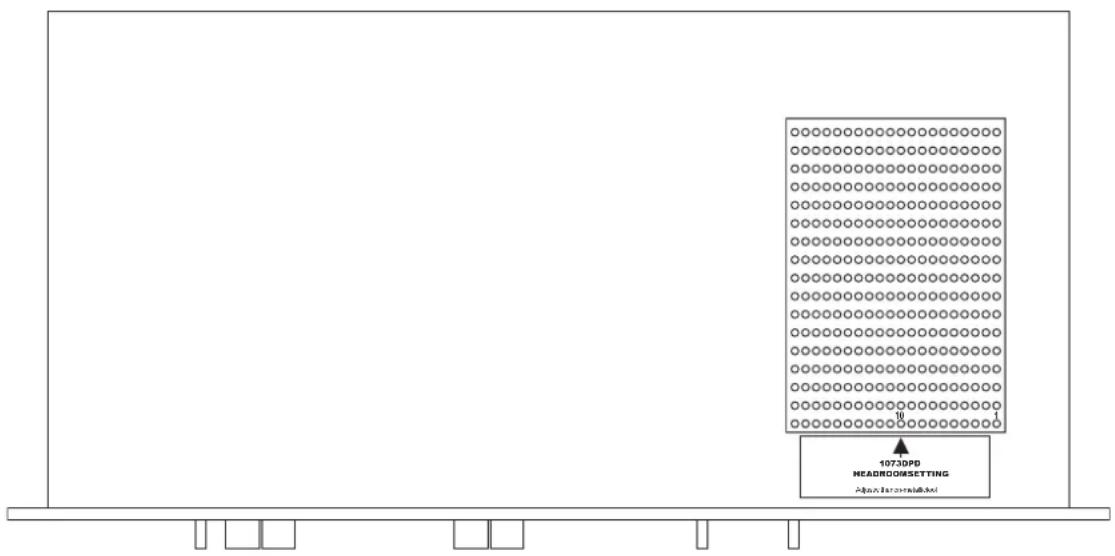
The unit can be set to one of two headroom settings; 18dB or 26dB. The headroom set is the number of dB above 0dBu before the ADC clips. The clip led will still come on around 3dB below clipping in either setting.
The headroom can be changed by operating the switch through the hole marked by the 'Headroom Setting' label on the top of the unit - see diagram below.
For 18dB operation the switch should be in the down position.
For 26dB operation the switch should be in the up position (not operated).

Only use a non-metallic plunger tool to operate the level change switch.
1073DPD Top View
Front
Specifications
1073DPA
Input Impedance: Mic switchable 300ohm or 1200ohm Line 20kohm
Frequency Response: 60dB gain into 600ohm +/-0.5dB 60dB gain into 600ohm -3dB 20Hz to 20kHz 20Hz to 40kHz
EIN: Mic 60dB gain <-125dB
THD+Noise: +20dBu into 600ohm <0.07% 50Hz to 10kHz
1073DPD ADC
Input Impedance: 20kohm
Frequency Response: 48kHz +/-1.25dB <10Hz to 20kHz 96kHz +/-1dB <10Hz to 40kHz 192kHz +/-1dB <10Hz to >40kHz
Dynamic Range: >106dB
flowchart
graph TD
    A["Microcontroller 1073D PDA"] --> B["Lo-2 L10468"]
    B --> C["TRIM"]
    C --> D["L01166 PHASE"]
    D --> E["Line Oul put"]
    E --> F["ADC Only set to 1073DPD"]
    F --> G["Sync In"]
    G --> H["AES Sync In"]
    H --> I["DSD Out L"]
    H --> J["DSD Out R"]
    F --> K["Line Oul put"]
    F --> L["Line Insert 1073DPD"]
    F --> M["Clip"]
    M --> N["Line Oul put"]
    F --> O["Line Insert 1073DPD"]
    P["Microcontroller 1073D PDA"] --> Q["Lo-2 L10468"]
    Q --> R["TRIM"]
    R --> S["L01166 PHASE"]
    S --> T["Line Oul put"]
    T --> U["Line Insert 1073DPD"]
    U --> V["Sync In"]
    V --> W["AES Sync In"]
    W --> X["DSD Out L"]
    W --> Y["DSD Out R"]
    X --> Z["Line Oul put"]
    Y --> AA["Line Insert 1073DPD"]
    Z --> AB["Line Oul put"]
    AA --> AC["Line Insert 1073DPD"]
    AB --> AD["Line Oul put"]
    AC --> AE["Line Insert 1073DPD"]
- 1073DPA and 1073DPD Mic Pre- Amplifier
- Contents
- Introduction 1
- Dimensions 2
- Rack Mounting and Cooling 2
- Power Requirements 2
- Rear Panel Connectors 3
- Amplifier Controls 4
- DPD Headroom Level Setting 6
- Specifications 7
- Introduction
- 1073DPA
- 1073DPD
- Dimensions
- Rack Mounting and Cooling
- Power Requirements
- Mains Supply
- DC Power Supply Indicators
- Phantom Power
- Rear Panel Connectors
- Amplifier Controls
- Mic Input
- Line Input
- Line Output
- Sampling Frequency
- Sync Inputs
- Double Rate AES Output
- DSD
- DPD Headroom Level Setting
- How to change the Headroom Level Setting
- Specifications
- 1073DPD ADC
Brand : AMS Neve
Model : 21073DPA
Category : Uncategorized