Revolation Delta - Autres appareils de cuisine ChocoVision - Free user manual and instructions
Find the device manual for free Revolation Delta ChocoVision in PDF.


| Product Type | Chocolate Tempering Machine |
| Brand | ChocoVision |
| Model | Revolation Delta |
| Dimensions (approx.) | 14 x 10 x 8 inches |
| Weight (approx.) | 12 lbs |
| Power Supply | 120V AC, 60Hz |
| Power Consumption | 400W |
| Capacity | 3 lbs of chocolate |
| Material | Stainless steel and high-impact plastic |
| Temperature Range | 80°F - 120°F |
| Key Functions | Automatic tempering, digital display, programmable settings, pre-set cycles |
| Operation | Touch button control panel |
| Cleaning | Wipe with damp cloth; bowl is removable for hand washing |
| Safety Features | Overheat protection, automatic shut-off, cool-touch exterior |
| Spare Parts Availability | Replacement bowls, lids, and paddles available from manufacturer |
| Warranty | 1 year limited warranty |
| Certifications | ETL, CE, RoHS |
| Included Accessories | Tempering bowl, lid, paddle, user manual |
Frequently Asked Questions - Revolation Delta ChocoVision
User questions about Revolation Delta ChocoVision
0 question about this device. Answer the ones you know or ask your own.
Ask a new question about this device
Download the instructions for your Autres appareils de cuisine in PDF format for free! Find your manual Revolation Delta - ChocoVision and take your electronic device back in hand. On this page are published all the documents necessary for the use of your device. Revolation Delta by ChocoVision.
USER MANUAL Revolation Delta ChocoVision
natural_image
Illustration of a Rev Delta Cheevision machine with a circular fan and control panel (no text or symbols on the device itself)Revolution Delta
CHOCOLATE TEMPERING SYSTEM
CHOCOVISION
14 CATHARINE STREET • POUGHKEEPSIE, NY 12601
TEL: (800) 324-6252 (845) 473-4970 FAX: (845) 473-8004

CHOCOVISION CORP. REVOLATION DELTA
Microprocessor Controlled Chocolate Tempering Machine FOR PROFESSIONAL/LABORATORY/COMMERCIAL USE
Thank you for purchasing the Revolution Delta Chocolate Tempering Machine by ChocoVision Corp.
This fully-automatic, microprocessor-controlled system was designed for professional chocolatiers, pastry chefs, caterers, restaurateurs, and candy shops owners
With the latest and most sophisticated in microprocessor technology, ChocoVision has created a remarkable addition to the world-renowned Revolution series of chocolate tempering machines.
The Revolution Delta can produce 10 lbs. of perfectly tempered chocolate (17 lbs. with optional Holey Baffle*) at a time. Our patented microprocessor control card monitors the temperature of the chocolate within 1/10th of a degree. The Rev Delta's user-friendly display screen makes monitoring and controlling your chocolate simple.
As always, our unit uses forced hot air as its heat source. NO LIGHTBULBS. NO HOT WATER BATHS.
*The tempering capacity of the Rev Delta can be increased up to 50% with the addition of our Holey Baffle. This optional accessory expands the machine's capacity by allowing melted chocolate to flow on both sides of the bowl with a specially louvered baffle. The Revolution Series of chocolate tempering machines are available directly from ChocoVision or designated dealers.
For information about product availability contact: sales@chocovision.com
TABLE OF CONTENTS
INTRODUCTION....1
TABLE OF CONTENTS......2
SAFETY TIPS & CLEANING....3
YOUR MACHINE (EXPLODED VIEW)....4
ASSEMBLY....5
CONTROLS....6
USING YOUR MACHINE (STANDARD FUNCTIONS)....7-8
HINTS & TIPS....9
FREQUENTLY ASKED QUESTIONS....10-11
ADVANCED FUNCTIONS
ETM (EXTENDED TEMPER MODE)....7
HEAT CONTROLS....7
PROGRAMMING MODE....8
MANUAL MODE....8
MACHINE TIMER....8
IMPORTANT SAFETY TIPS
PLEASE READ AND UNDERSTAND THE FOLLOWING SAFETY MEASURES BEFORE USING YOUR MACHINE
- For personal safety, Appliance must always be plugged into a properly grounded electrical circuit.
- Do not cut or remove the third (ground) prong from the power plug or attempt to use a grounding adaptor.
- Never immerse the machine in water (see cleaning instructions below).
• Always place the machine away from any water source. Avoid water splashing on top of, or into the machine or near the fan areas. -
Never use extension cords to power the machine.
-
To avoid suffocation, keep all packing material (Plastic bags and small parts) away from children.
- Position machine so that the intake and exhaust fans are not obstructed (minimum of 6" clearance). Please also be mindful of loose objects that may block air flow.
- Unplug machine from power source when not in use.
• Always unplug your machine before cleaning. Do not use spray solvents or cleaning fluids near the machine.
• To avoid electrical shock, never open the metal case.
CLEANING
- Machine's stainless steel bowl, plastic scraper, and knobs are removable and dishwasher-safe.
- Removable baffle is to be hand-washed in lukewarm water. Soap is not harmful, but not required.
• Always unplug your machine before cleaning. Never use spray solvents or cleaning fluids near the machine. -
When machine is done for the day, the outside metal casing should be wiped down with a wet rag or sponge using mild soap.
-
NEVER use steel wool or any other type of abrasive to clean your machine or any of its components.
- Use the special baffle cleaning brush for areas where chocolate collects and may be difficult to clean, such as the inside of the bowl ring and crevasses on the baffle.
YOUR MACHINE
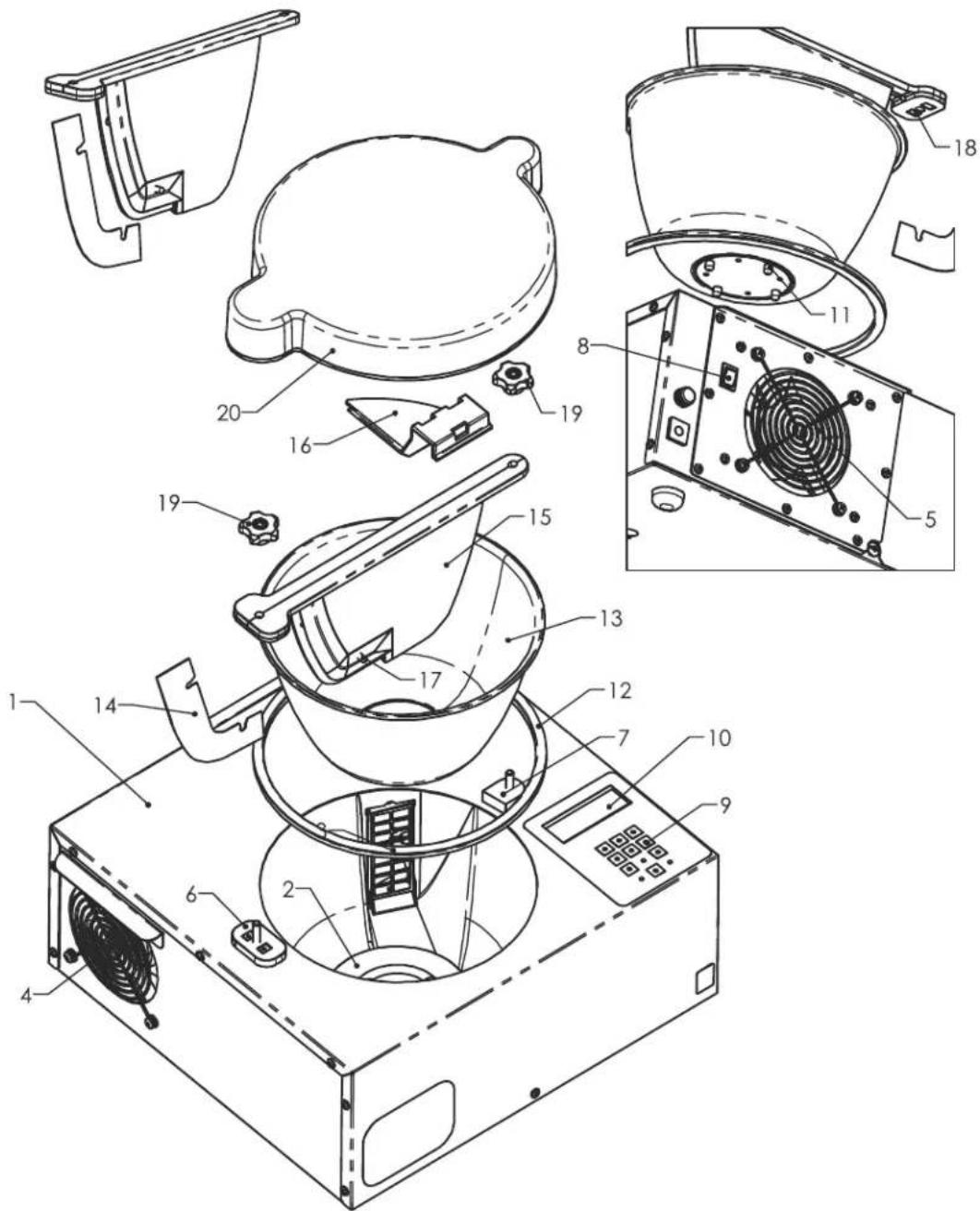
- MAIN CASE
- BOWL COUPLER
- HEAT DUCT/OUTLET
- EXHAUST FAN
- INTAKE FAN
- RISER A (WITH BAFFLE CONTACTS)
- RISER B
- POWER SWITCH
- KEYPAD
-
DISPLAY WINDOW
-
BOWL LOCATORS
- BOWL RING
- BOWL
- SCRAPER
- BAFFLE
- BAFFLE CLIP
- TEMPERATURE PROBE
- BAFFLE CONTACTS (CORRESPONDS TO RISER A)
- KNOBS
- DUST COVER
ASSEMBLY
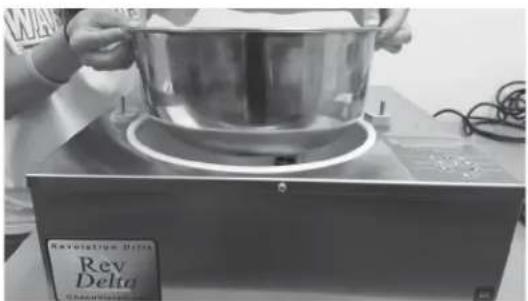
Figure 1
BEFORE USING YOUR MACHINE, WASH ALL COMPONENTS THAT MAY COME INTO CONTACT WITH CHOCOLATE USING A SOFT SPONGE OR CLOTH AND MILD SOAP.
natural_image
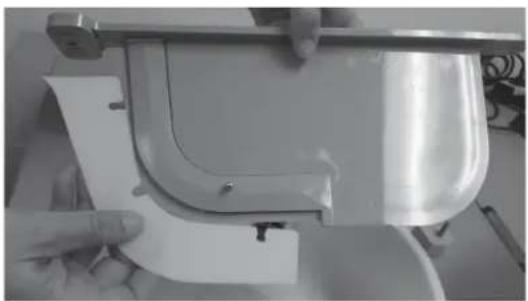
Close-up of hands installing or adjusting a white plastic component on a metal frame (no visible text or symbols)Figure 2
MACHINE ASSEMBLY
Lower the BOWL into your machine and rotate it until it fits into place (Fig. 1).
Place the SCRAPER into corresponding slot on the BAFFLE (Fig 2). SCRAPER will not stay in place until entire BAFFLE is screwed-down into position. When properly installed the SCRAPER should curve toward the front of the machine.
natural_image
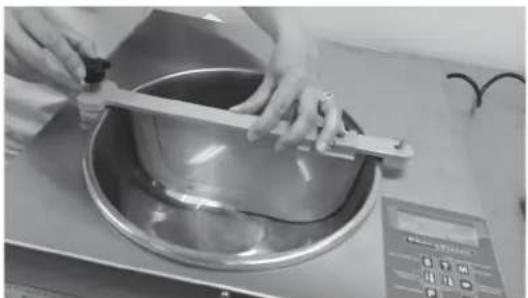
Person using a metal tool to handle a large bowl on a kitchen counter (no visible text or symbols)Figure 3
Fit the BAFFLE into the BOWL making certain that the contact "strips" on the BAFFLE and the machine's BAFFLE MOUNTS are aligned. Thread the BAFFLE KNOBS onto both BAFFLE MOUNTS (Fig. 3). If the BAFFLE is not installed properly, an error message (INSTALL BAFFLE) will appear on the display screen the machine will not start.
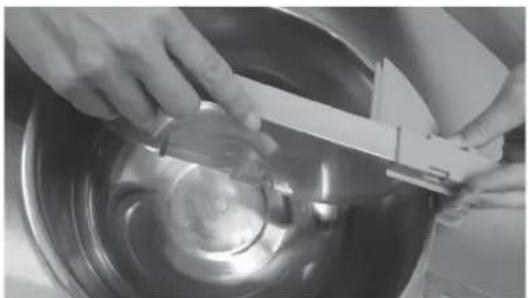
Fit the BAFFLE CLIP on to the BAFFLE (Fig. 4). The BAFFLE CLIP prevents chocolate from overflowing out of the BOWL when it is rotating.
natural_image
Close-up of hands using a tool to clean or inspect a metallic bowl (no visible text or symbols)Figure 4
THE CONTROLS

SELECT CHOCOLATE TYPE:
Upon machine start-up, press the "S" button to select dark, milk or white chocolate. This Button may be held down to increase the length of heated bowl pause as well.

TEMPER MODE:
After chocolate has reached its melt-point, add seed and press the "T" button to select either Quick, Normal, or Extended Temper Mode. When prompted to "remove seed," you will press this "T" button again to continue. (see page 7)

MANUAL MODE:
When the machine is in start mode, you can press "M" to manually enter the desired temperature. This feature is ideal for melting compound-coating or icing.

BOWL PAUSE:
Press this button to pause the bowl for 90 seconds.

PROGRAMMING MODE:
Press this button upon machine start-up to enter programming mode. You can select between recipes "A" through "Z," and specify your own dark, milk, and white chocolate settings. Continue pressing "P" to switch from "Recipe," "Temper Point," "Temper Delta," and "Melt Point." Use the up and down arrow keys to select recipe and desired temperature settings.

UP / DOWN ARROW KEYS:
Increase / decrease the desired temperature in Melt, Temper, Manual, and Programming Mode. (see page 8).

The Down Arrow Key also allows you to toggle between Fahrenheit and Centigrade upon machine start-up.
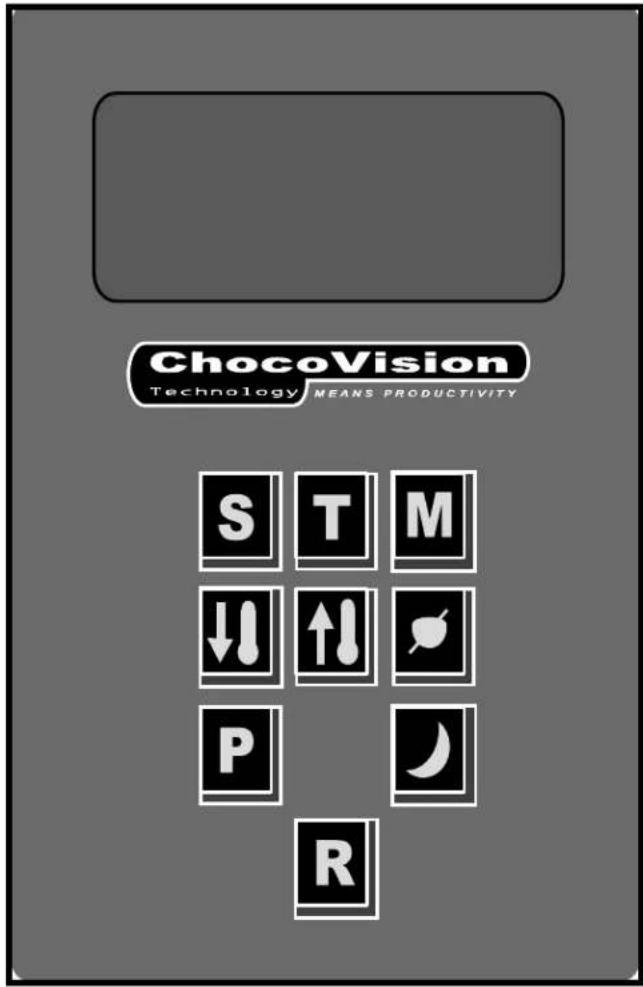

OVERNIGHT MODE:
This button can be pressed at any time to activate Overnight Mode, which allows your chocolate to remain in a melted state for as long as 24 hours.

RESET
Press this button any time to cancel all activities and return to the start-up state. Pressing this will not erase your stored programs.
USING YOUR MACHINE
GETTING STARTED
- Plug the machine into an appropriate, grounded circuit and turn on the POWER SWITCH (located on the side of the machine). Load chocolate behind the baffle. A minimum of one pound of chocolate is needed for the unit to function properly*.
- Select your chocolate type by pressing the S button. The machine will heat the bowl for several minutes and begin rotation when the microprocessor determines that the chocolate has reached roughly 85°F.
- After the bowl begins rotating, the chocolate will create a pool in front of the SCRAPER and cover the PROBE on the BAFFLE. The chocolate will heat until the desired melting point (default:108°F) is reached.
-
When the machine indicates (two beeps) that your chocolate has reached the desired melt point, and is ready to be tempered, press the T (temper mode) button to select between Quick, Normal and Extended Temper Modes (see below).
-
When you select your temper mode, place more solid "SEED" chocolate behind the baffle. The ration of melted chocolate in the pool to unmelted "seed" chocolate should be 10:1, or at least 10% of the total melted batch. The machine will then begin cooling the chocolate toward the temper point.
- Once the chocolate cools down near the temper set point, the REMOVE SEED auto alert signal will sound. Remove any remaining solid seed chocolate from behind the baffle and press the button to acknowledge you have done so.
- When the final stages of tempering are complete the machine will sound three long beeps and the display will show "READY" meaning that your chocolate is in temper.
* For best performance more than one pound of chocolate should be loaded; otherwise, usage of chocolate will bring it below the minimum quantity required for the machine to function properly.
Quick Temper: Chocolate will cool down directly from the melt to the temper point.
Normal Temper: Also called "traditional tempering." The temperature of the chocolate will fall slightly below the temper point and then slowly rise back to it. This margin between is known as the "Delta"
Extended Temper Mode (ETM):
This function allows the chocolate to remain in perfect temper for extended periods of time (up to 12 hours).
NOTE: If the chocolate you are using requires higher melt or temper points, the Custom Heat Setting can circumvent the factory defaults. While in the desired mode (Melt or Temper), press the UP ARROW 🔊 or the DOWN ARROW 🔊 button. Incremental numeric selections can be made with each keystroke or a rapid scroll with the button held. Desired temperature change is displayed below the temperature bar.
Preset Melt Point: 108^ F
Preset Temper Points:
Milk Chocolate: 86.6°F
Dark Chocolate: 88.7°F
White Chocolate: 87.7°F
USING YOUR MACHINE
ADVANCED FUNCTIONS
Each stroke of the ⚪ ARROW DOWN button toggles between Fahrenheit and Celsius.
BOWL PAUSE
This function allows the user to quickly pause the bowl for a period of 90 seconds while in the TEMPER MODE. Press the ⚙️ BOWL PAUSE button. The bowl rotation stops and countdown (from 90) begins. The bowl resumes spinning when either the 90 second countdown is complete, or when the ⚙️ BOWL PAUSE button is pressed again.
OVERNIGHT MODE
This feature was developed for users that would like to leave melted chocolate in the machine overnight, saving on additional melting and cleanup time. This function can be activated at any time by pressing the ⬤ OVERNIGHT button. The machine goes through a series of bowl pauses and temperature swings.
NOTE: The chocolate is NOT KEPT IN TEMPER in Overnight Mode. You must go through the temper process (detailed on page 7) after the machine has been on OVERNIGHT MODE. To deactivate OVERNIGHT MODE, press the RESET button.
PROGRAMMING MODE
This allows the user to save custom temperatures for special blend recipes or to simply choose custom melting/delta or temper points. Once the desired temperature is set, it can be recalled over and again.
- To enter the Programming Mode, press the P'P' button while the machine is in its startup phase.
- Select a recipe "A" through "Z" (or DARK, WHITE, MILK or MANUAL MODE) using the ARROW UP and ARROW DOWN buttons.
- Advance to each menu item (TEMPER POINT, TEMPER DELTA and MELT POINT) by once again pressing the P 'P' button.
- Use the UP and DOWN ARROW to adjust the desired temperature settings for TEMPER POINT, TEMPER DELTA, and MELT POINT.
- To run a recipe, remain in Programming Mode and select the desired recipe using the UP ARROW and DOWN ARROW buttons to toggle between them. Press the 'S' button to begin the cycle.
- Press the RESET BUTTON any time to save changes and exit Programming Mode.
Note: Changing the recipe settings for "DARK," "MILK" or "WHITE" in Programming Mode WILL change the machine's default settings for that chocolate type.
Machine Timer: While in the Programming Mode, the user can elect to have the machine begin its melt cycle up to 72 hours from the time of setting it. This feature is similar to a coffee maker's timer; your melting process will begin at the instructed time, allowing you to begin working with melted chocolate that just needs to go through a temper cycle. This can save up to 2 hours of waiting for the chocolate to melt.
To access the machine's timer, press the P 'P' button, once you have set the TEMPER, DELTA, and MELT points. Use the P 'P' button to toggle between MINUTES and HOURS, and the ↑↓ ARROW UP and ↓↓ ARROW DOWN buttons to change the amount of time until you wish for the melt cycle to begin.
MANUAL MODE
MANUAL MODE allows the user to set a desired temperature, and the machine will heat-up or cool-down until that temperature is reached. This feature is typically used to melt compound (non-cocoa-butter-based) chocolates.
- To run the MANUAL MODE cycle, press the P 'P' button to enter PROGRAMMING MODE while the machine is in its startup state. Once in PROGRAMMING MODE, notice that the first recipe is titled 'MANUAL'. Select MANUAL and press the S 'S' button to begin the MANUAL cycle.
- Press the P 'P' button while MANUAL is highlighted in order to change the default melt point. Once the melt point is flashing, use the UP ARROW and DOWN ARROW buttons to toggle to your desired melt point. Select the S 'S' button to begin the melting process, or press the RESET button to store that temperature and exit the menu.
HINTS & TIPS
- Place your machine away from any water source where splashing can occur and possibly get water into your unit. Never allow water to mix with chocolate. Contact with water can cause chocolate to seize, rendering it unable to be re-tempered.
- Contact strips on baffles as well as corresponding "riser" strips on your machine should at all times be free of chocolate or any other debris; if not, your machine may have difficulty starting up or working properly.
- Baffle scraper will not be in place for use until the baffle knobs are screwed down into position with baffle in place. When properly installed, the scraper blade will bend toward the front of your machine (the side with the temperature probe). See Fig. 3 on page 5.
- Do not allow the level of chocolate in your machine to drop below the thermistor/probe (silver "bump") on the baffle. This probe measures the temperature of the chocolate and reports it to the microprocessor. If
the chocolate falls below this point during use, chocolate may be usable for only up to a few minutes. You should then replenish the bowl with more chocolate, press the R 'R' button, and begin the melting process once more. KEEP AT OR ABOVE 1 LB. OF LIQUID CHOCOLATE FOR OPTIMUM TEMPERATURE READOUT.
- Avoid placing machine directly under or next to an air conditioning vent which can create uneven heat distribution and lead to bloom.
- It is recommended to use the DUST COVER assembly at all times other than when in TEMPER MODE (cooling) or using the chocolate.
- DO NOT WASH BAFFLE IN DISHWASHER. ALWAYS HAND WASH WITH SOAP AND LUKEWARM WATER.
FAQs
1. What is "pure" chocolate? What is "compound" chocolate?
"Pure" chocolate (unsweetened) is produced from the seed of the tropical cacao tree and contains primarily cocoa solids and cocoa butter in varying proportions. Most consumed chocolate is sweetened with sugar. Milk chocolate contains sugar and some form of either condensed or powdered milk. "White chocolate" contains cocoa butter, sugar and milk but no cocoa solids (thus is not truly chocolate).
Compound chocolate is a chocolate replacement made from a combination of cocoa, vegetable fats, coconut or palm kernel oils, and sweeteners. Compound chocolate is designed to simulate enrobed chocolate on a product.
2. Why do I have to temper my chocolate?
Cocoa butter is the fat in cacao that gives chocolate its stable properties. To be considered "real" chocolate, a chocolate bar or chunk can contain only cocoa butter, not any other fat. Cocoa butter is the reason that chocolate must be tempered.
Cocoa butter is comprised of three to four fatty acids, each of which solidifies at a different temperature. When chocolate is melted, the crystals of fatty acids separate. The objective of tempering is to entice those separated fat crystals of cocoa butter back into a stable form.
Proper tempering gives chocolate a smooth and glossy finish, a crisp snap, and reduces melting to the touch compared to untempered chocolate.
3. What is seed chocolate?
The “seed” is tempered chocolate (chunks or wafers) that should be set aside and placed behind the baffle at the beginning of the temper cycle (your machine will beep three times to indicate that your chocolate has hit its melt-point and is ready for tempering/seeding). These pieces of seed chocolate act like magnets, attracting other loose crystals of fatty acids together, beginning the crystallization process that results in a proper temper.
Tempered chocolate melts at a much higher temperature than untempered. The fat crystals are locked together tightly and are resistant to developing chocolate bloom.
4. What is bloom?
Chocolate bloom is visible by whitish-gray streaks or spots on the surface of the chocolate, typically caused by two things; moisture (sugar bloom) or warmth (fat bloom).
Sugar bloom is caused by moisture which makes the sugar in chocolate dissolve. Once the moisture evaporates, sugar crystals remain on the surface. Your chocolate will become sticky and discolored. Although sugar bloom is most often the result of humid storage, it can occur when stored in a cool climate and moved too quickly to a warmer one.
Fat bloom is similar to sugar bloom, except that it is fat or cocoa butter separating from the chocolate and depositing itself outside of it. As with sugar bloom, the most common causes of fat bloom are quick temperature changes and overly warm storage. Bloomed chocolate is edible. It just does not appear as appetizing.
FAQs (Cont.)
5. How does climate affect chocolate tempering?
If your work area is overly hot or cold, there is a good chance that it will have a negative effect on your finished chocolate products. As stated, relative room humidity can cause or make your chocolate susceptible to sugar bloom. A room that is either too hot, cold or humid will interfere with your chocolate setting-up properly.
Ideal working conditions are: 66-70° Fahrenheit/18.5-21° Celsius with humidity below 50%
6. How does the storage of my chocolate affect tempering?
Your chocolate can come out of temper if not stored properly. Ideally, chocolate should be wrapped thoroughly to avoid moisture and stored at a constant temperature of 55^ to 60^ F with a relative humidity at or below 50% (neither temperature or humidity varying much). Chocolate has a propensity to absorb odor very quickly, so do not store your chocolate within the vicinity of any items that exude a pungent odor.
Stored under perfect conditions, unsweetened and dark chocolate will last for up to 18 months, milk and white chocolate for 8 to 12 months.
7. Why may my chocolate have thickened?
Due to constant bowl rotation and agitation of the chocolate, the viscosity will increase. A typical batch of (dark) chocolate, depending on room conditions, will stay in perfect temper for between 45 to 90 minutes. Thickening is a sign of overseeding, overtempering, or over-crystalization.
As stated, the nature of the machine dictates roughly an hour of optimum dipping time before overtempering begins. That said, there are measures to prolong your window of dipping by heeding the following:
- Remove all seed chocolate when instructed
- Only dip items that are at room temperature
- Use your chocolate within 1 to 1.5 hours*
- Raise the temperature incrementally as you notice chocolate thickening (Do not exceed 92°F)
- Add cocoa butter as you notice chocolate thickening (consult with a professional)
* This time limit does not apply to the Extended Temper Mode where your chocolate will stay in temper for up to 12 hours.
- Revolution Delta
- CHOCOLATE TEMPERING SYSTEM
- CHOCOVISION
- CHOCOVISION CORP. REVOLATION DELTA
- Thank you for purchasing the Revolution Delta Chocolate Tempering Machine by ChocoVision Corp.
- TABLE OF CONTENTS
- ADVANCED FUNCTIONS
- IMPORTANT SAFETY TIPS
- PLEASE READ AND UNDERSTAND THE FOLLOWING SAFETY MEASURES BEFORE USING YOUR MACHINE
- CLEANING
- YOUR MACHINE
- ASSEMBLY
- MACHINE ASSEMBLY
- THE CONTROLS
- SELECT CHOCOLATE TYPE:
- TEMPER MODE:
- MANUAL MODE:
- BOWL PAUSE:
- PROGRAMMING MODE:
- UP / DOWN ARROW KEYS:
- OVERNIGHT MODE:
- RESET
- USING YOUR MACHINE
- GETTING STARTED
- Extended Temper Mode (ETM):
- Preset Melt Point: 108° F
- Preset Temper Points:
- BOWL PAUSE
- OVERNIGHT MODE
- PROGRAMMING MODE
- MANUAL MODE
- HINTS & TIPS
- FAQs
- What is "pure" chocolate? What is "compound" chocolate?
- Why do I have to temper my chocolate?
- What is seed chocolate?
- What is bloom?
- FAQs (Cont.)
- How does climate affect chocolate tempering?
- How does the storage of my chocolate affect tempering?
- Why may my chocolate have thickened?
Brand : ChocoVision
Model : Revolation Delta
Category : Autres appareils de cuisine