
Strandberg V-BDN - Guitar BOSS - Free user manual and instructions
Find the device manual for free Strandberg V-BDN BOSS in PDF.


| Product Type | Electric Guitar |
| Brand | Boss |
| Model | Strandberg V-BDN |
| Body Shape | Strandberg Original |
| Scale Length | 25.5” (648 mm) on high strings, 26.25” (667 mm) on low strings |
| Frets | 24 Stainless Steel |
| Neck Material | Roasted Maple |
| Fretboard Material | Roasted Maple or Richlite |
| Nut | Zero Fret with Brass Nut |
| Pickups | Boss passive humbuckers (bridge and neck) |
| Controls | Volume, Tone, 3-way pickup selector |
| Bridge | Strandberg EGS Rev 7 fixed bridge |
| Tuners | Strandberg custom tuners (headless) |
| Weight | 5.5 lbs (2.5 kg) |
| Dimensions (Body) | 12.5” x 14” x 1.75” (318 x 356 x 44 mm) |
| Power | None (passive electronics) |
| Recommended Strings | 10-46 or 9-42 gauge |
| Maintenance | Wipe with dry cloth after use; condition fretboard as needed |
| Safety | Keep away from extreme temperatures and humidity |
| Spare Parts | Strings, tuners, knobs, strap buttons |
| Repairability | Designed for easy adjustments; professional service for electronics |
| Documentation | User manual available on notice-facile.com |
Frequently Asked Questions - Strandberg V-BDN BOSS
User questions about Strandberg V-BDN BOSS
0 question about this device. Answer the ones you know or ask your own.
Ask a new question about this device
Download the instructions for your Guitar in PDF format for free! Find your manual Strandberg V-BDN - BOSS and take your electronic device back in hand. On this page are published all the documents necessary for the use of your device. Strandberg V-BDN by BOSS.
USER MANUAL Strandberg V-BDN BOSS
natural_image
Black-and-white photo of a standard electric guitar with visible fretboard and grille (no text or symbols)V·Guitar
V-BDN
VG-Strandberg
Owner's Manual
Main Features
The V-BDN is a new instrument that fuses. strandberg's innovative BODEN model with the latest technology from BOSS.
The V-BDN can be used not only as a conventional BODEN model, but also allows you to play a wide range of sounds including guitar synthesizer sounds or bass guitar sounds powered by COSM technology, simply by turning a single knob.
You can also instantly switch to multiple types of dropped tunings without touching the tuning pegs, allowing a single V-BDN to fulfill the roles of multiple guitars.
What is the COSM?
Technology that simulates existing physical structures, materials, and the like using different, virtual means is called “modeling technology.” COSM (Composite Object Sound Modeling) is a technical innovation from Roland that combines a number of such sound-modeling technologies to create new and unique sounds.
Contents
Main Features 2
Panel Descriptions.... 3
Turning On the Power 5
Selecting Modes.... 6
Selecting Tunings.... 7
About GK Pickup Height...... 8
USING THE UNIT SAFELY 9
IMPORTANT NOTES.... 11
Main Specifications.... 12
Before using this unit, carefully read "USING THE UNIT SAFELY" (p. 9) and "IMPORTANT NOTES" (p. 11). After reading, keep the document(s) where it will be available for immediate reference.
Panel Descriptions

flowchart
graph TD
    A["Normal Pickups\nThese are the normal guitar pickups."] --> B["Tuning Knob\nSelects tunings such as a semitone down, a whole tone down, or drop D tuning. page 7"]
    C["GK Pickup\nThis is the special V-Guitar divided pickup."] --> B
    B --> D["5-Way Switch\nIn normal guitar mode, this selects different pickup positions. For the modeling guitar, this switches between different tonal characters. page 6"]
    D --> E["Tone Control Knob\nThis adjusts the tone within the selected mode"]
    E --> F["Power Indicator\nThis is lit when the power is on. page 5"]
    F --> G["Volume Knob\nWith the volume control you are able to control the volume level of the instrument in all modes. page 6"]
    G --> H["Mode Knob\nThis switches the mode (tonal character) between normal guitar and modeling guitar. page 6"]
Battery Cover
Install batteries here.
Battery Type: Four AA
Life: Up to 9 hours with high powered rechargeable Ni-MH batteries (2,600–2,700 mAH). Life may be less with regular alkaline batteries. We recommend getting 8 high quality rechargeable batteries, so you can always have one set charging while the other set is in the guitar. When the batteries run low, the power indicator will begin to flash as a warning and will eventually go out.

When the batteries are dead or removed from the instrument, the guitar still continues to function as a normal guitar.
* When turning the unit over, be careful so as to protect the buttons and knobs from damage. Also, handle the unit carefully; do not drop it.
* If you handle batteries improperly, you risk explosion and fluid leakage. Make sure that you carefully observe all of the items related to batteries that are listed in "USING THE UNIT SAFELY" (p. 9) and "IMPORTANT NOTES" (p. 11).

natural_image
3D model of a mechanical component with mounting holes and internal features (no text or symbols)Electronics Cover
* DO NOT remove the Electronics Cover. Doing so will result in a void of warranty.
Guitar Jack
Connect this to your guitar amp. The power will turn on when a plug is inserted into the guitar jack.
Turning On the Power
* To prevent malfunction and equipment failure, always turn down the volume, and turn off all the units before making any connections.
| When powering up | Turn on the power to your amp last. |
| When powering down | Turn off the power to your amp first. |
The power will turn on when a plug is inserted in the guitar jack.
* Before turning the unit on/off, always be sure to turn the volume down. Even with the volume turned down, you might hear some sound when switching the unit on/off. However, this is normal and does not indicate a malfunction.

natural_image
Diagram showing a mechanical component connected to an audio amplifier (no text or symbols present)Power indicator
The indicator is lit when the power is on, and becomes dimmer as the batteries run low. When the battery voltage falls below a specified level, the indicator starts blinking. When the voltage falls even lower, the indicator goes dark, and all modes stop working.
Should this happen, the normal guitar mode will still work, so you can continue to play your BODEN without the modeling and tuning features.
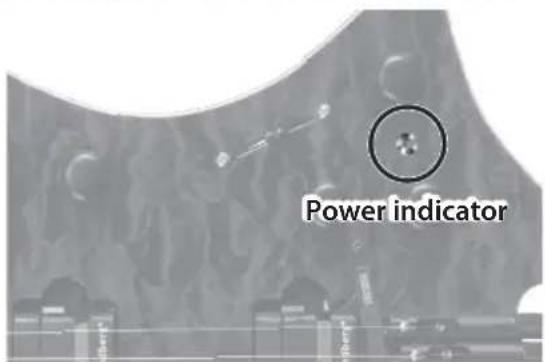
* The time it takes for all functions to stop after the power indicator has begun flashing varies depending on the battery type and temperature.
* When the battery is nearly worn out, the unit's indicator becomes dim. Replace the battery as soon as possible.
* Expected battery life under continuous use:
Rechargeable Ni-MH batteries: Approx. 9 hours
Alkaline batteries: Approx. 6 hours
These figures will vary depending on the specifications of the batteries and the actual conditions of use.
* ALWAYS UNPLUG YOUR GUITAR WHEN NOT PLAYING FOR BEST BATTERY LIFE.
Selecting Modes
The mode knob lets you select either the normal guitar or one of the modes (tonal characters).
While in each mode, simply use the blade 5-way selector switch to switch pickups as if you are playing the guitar type that you've selected.

| Mode/Explanation 5-way switch | |||||
 Normal Synthesizer guitar Normal Synthesizer guitar | BridgeNeck | BridgeNeck | BridgeNeck | BridgeNeck | BridgeNeck |
| Normal guitarLets you play the guitar as a conventional BODEN with the two pickups. | Neck full Neck | tapped Neck+Br | bridge Bridge t | pped Bridge full | |
| Modeled single coil pickups | Single Coil Neck | Single Coil Neck+Middle | Single Coil Neck+Bridge | Single Coil Middle+Bridge | Single Coil Bridge |
| Modeled humbucker pickups | Humbucker Neck | Single coil Neck 2 | Humbucker Neck+Bridge | Single coil bridge 2 | Humbucker Bridge |
| Hybrid Electric Bass | EG Humbucker Oct Down (5th, 6th)+ EG Humbucker (1st-4th) | Electric Sitar | Nylon String Acoustic | Steel String Acoustic Dreadnought | |
| Synthesizer | Strings Synth lead | Organ sound | GR-300 Lead (Oct Down) | GR-300 Lead (Normal) | GR-300 Lead (Oct Up) |
Selecting Tunings
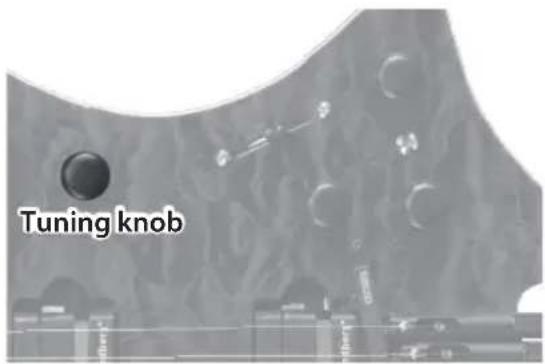
You can use the tuning knob to choose from a variety of tunings.
You'll no longer need to have multiple guitars in different tunings at your live performance or in the studio.

Normal
Drop C
| Tuning Explanation | |
| Normal Standard tuning (E A D G B E) | |
| Semitone down | Tuned a semitone down (Eb, Ab, Db, Gb, Bb, Eb) |
| Whole tone down Tuned a whole tone down (D G C F A D) | |
| Drop D 6th string is tuned to D (D A D G B E) | |
| Drop C# | Tuned a semitone lower than drop D (C#G# C# F# A# D#) |
| Drop C Tuned a whole tone lower than drop D (C G C F A D) | |
* To obtain the correct tuning effect, tune the guitar to standard tuning (E A D G B E). If the guitar is tuned to different pitches (such as a semitone down), the modeled tunings are transposed relative to the actual tuning of the guitar.
* If the volume of your guitar amp is low, you might hear the acoustic sound from the strings, possibly causing an unnatural sensation. You may be able to solve this problem by raising the volume of your guitar amp.
About GK Pickup Height
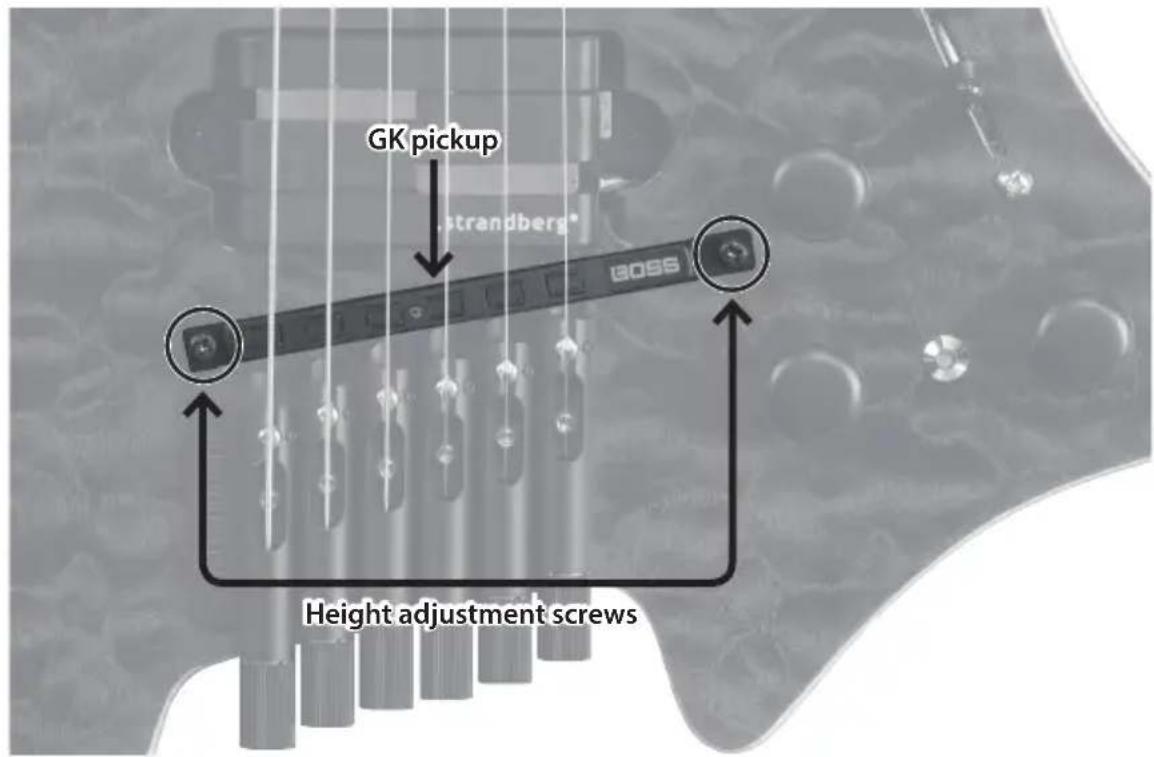
Once your guitar is properly set up you should make sure the distance between the top of the GK pickup and the bottom of the strings is approximately 1 mm (0.04") when depressing the strings at the highest fret. The height of the GK pickup can be adjusted by using the height adjustment screws.
* The sound will be muddy if the GK pickup is not adjusted to the correct height.
INSTRUCTIONS FOR THE PREVENTION OF FIRE, ELECTRIC SHOCK, OR INJURY TO PERSONS
About ⚠️ WARNING and ⚠️ CAUTION Notices
| ⚠ WARNING | Used for instructions intended to alert the user to the risk of death or severe injury should the unit be used improperly. |
| ⚠ CAUTION | Used for instructions intended to alert the user to the risk of injury or material damage should the unit be used improperly.* Material damage refers to damage or other adverse effects caused with respect to the home and all its furnishings, as well to domestic animals or pets. |
About the Symbols
| The △ symbol alerts the user to important instructions or warnings. The specific meaning of the symbol is determined by the design contained within the triangle. In the case of the symbol at left, it is used for general cautions, warnings, or alerts to danger. | |
| The Ⓧ symbol alerts the user to items that must never be carried out (are forbidden). The specific thing that must not be done is indicated by the design contained within the circle. In the case of the symbol at left, it means that the unit must never be disassembled. | |
| The ● symbol alerts the user to things that must be carried out. The specific thing that must be done is indicated by the design contained within the circle. In the case of the symbol at left, it means that the power-cord plug must be unplugged from the outlet. |
ALWAYS OBSERVE THE FOLLOWING

WARNING
Do not disassemble or modify by yourself
Do not carry out anything unless you are instructed to do so in the owner's manual. Otherwise, you risk causing malfunction.

Do not repair or replace parts by yourself
Refer all servicing to your retailer, the nearest Roland Service Center, or an authorized Roland distributor, as listed on the "Information."

Do not use or store in the following types of locations
- Subject to temperature extremes (e.g., direct sunlight in an enclosed vehicle, near a heating duct, on top of heat-generating equipment); or are
- Damp (e.g., baths, washrooms, on wet floors); or are
- Exposed to steam or smoke; or are
- Subject to salt exposure; or are
- Exposed to rain; or are
• Dusty or sandy; or are - Subject to high levels of vibration and shakiness; or are
- Placed in a poorly ventilated location.
Avoid extended use at high volume
Use of the unit at high volume for extended periods of time may cause hearing loss. If you ever experience any hearing loss or ringing in the ears, you should immediately stop using the unit and consult a specialized physician.


WARNING
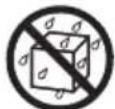
Do not allow foreign objects or liquids to enter unit; never place containers with liquid on unit
Do not place containers containing liquid (e.g., flower vases) on this product. Never allow foreign objects (e.g., flammable objects, coins, wires) or liquids (e.g., water or juice) to enter this product. Doing so may cause short circuits, faulty operation, or other malfunctions.


Turn off the unit if an abnormality or malfunction occurs
Immediately unplug the cable from the guitar jack, and request servicing by your retailer, the nearest Roland Service Center, or an authorized Roland distributor, as listed on the "Information" when:

• If smoke or unusual odor occurs; or
- Objects have fallen into, or liquid has been spilled onto the unit; or
- The unit has been exposed to rain (or otherwise has become wet); or
- The unit does not appear to operate normally or exhibits a marked change in performance.
Be cautious to protect children from injury
Always make sure that an adult is on hand to provide supervision and guidance when using the unit in places where children are present, or when a child will be using the unit.


WARNING
Do not drop or subject to strong impact
Otherwise, you risk causing damage or malfunction.

Handle batteries carefully
If used improperly, you risk the dangers of fluid leakage, overheating, combustion, explosion, etc. Carefully observe the following:
- Do not heat, disassemble, or toss them into a fire or water.
- Do not expose them to sunlight, flame, or any other source of extreme heat.
- Do not attempt to charge a dry cell battery.
- When using a rechargeable battery and a charger, make sure to use only the combination of rechargeable battery and charger that has been specified by the battery manufacturer. Also, be sure to read all of the precautions that were supplied with the rechargeable battery and charger, and abide by them when using the battery/charger.





CAUTION
Route all power cords and cables in such a way as to prevent them from getting entangled
Injury could result if someone were to trip on a cable and cause the unit to fall or topple.

Avoid climbing on top of the unit, or placing heavy objects on it
Otherwise, you risk injury as the result of the unit toppling over or dropping down.

Disconnect all cords/cables before moving the unit
Damage or malfunction may result if you fail to disconnect all cables before moving the unit.


CAUTION
Handle batteries carefully
If used improperly, batteries may explode or leak and cause damage or injury. In the interest of safety, please read and observe the following precautions.


- Carefully follow the installation instructions for batteries, and make sure you observe the correct polarity.
- Avoid using new batteries together with used ones. In addition, avoid mixing different types of batteries.
- Remove the batteries whenever the unit is to remain unused for an extended period of time.

- Never keep batteries together with metallic objects such as ballpoint pens, necklaces, hairpins, etc.
• Used batteries must be disposed of in compliance with whatever regulations for their safe disposal that may be observed in the region in which you live.
Keep small items out of the reach of children
To prevent accidental ingestion of the parts listed below, always keep them out of the reach of small children.

• Included Parts
Allen wrench
- Removable Parts
- Tuning peg (bridge)
- String lock (block)
Handle leaking batteries carefully
- Do not touch the liquid with your bare hands.
- If any of the leaking fluid gets into your eyes, the loss of vision may result. Do not rub your eyes; use clean water to flush them thoroughly. Then, promptly see a doctor.
- Burning of the skin or dermatitis may result if fluid has gotten onto your skin or clothing. Use clean water to flush affected areas thoroughly; then, promptly see a doctor.
- Using a soft cloth, carefully wipe any remaining fluid from the inside of the battery compartment. Then, install new batteries.

Power Supply: Use of Batteries
- To prevent faulty operation or malfunctions, power-off this unit before installing or replacing the batteries.
- The life of the supplied batteries may be limited, since its primary purpose was to enable testing.
If operating this unit on batteries, please use alkaline batteries or rechargeable Ni-MH batteries.
Placement
- Using the unit near power amplifiers (or other equipment containing large power transformers) may induce hum. To alleviate the problem, change the orientation of this unit; or move it farther away from the source of interference.
- This unit may interfere with radio and television reception. Do not use this unit in the vicinity of such receivers.
- Noise may be produced if wireless communications devices, such as cell phones, are operated in the vicinity of this unit. Such noise could occur when receiving or initiating a call, or while conversing. Should you experience such problems, you should relocate such wireless devices so they are at a greater distance from this unit, or switch them off.
- Do not allow lighting devices that normally are used while their light source is very close to the unit (such as a piano light), or powerful spotlights to shine upon the same area of the unit for extended periods of time. Excessive heat can deform or discolor the unit.
- When moved from one location to another where the temperature and/or humidity is very different, water droplets (condensation) may form inside the unit. Damage or malfunction may result if you attempt to use the unit in this condition. Therefore, before using the unit, you must allow it to stand for several hours, until the condensation has completely evaporated.
- Do not paste stickers, decals, or the like to this instrument. Peeling such matter off the instrument may damage the exterior finish.
- Do not place containers or anything else containing liquid on top of this unit. Also, whenever any liquid has been spilled on the surface of this unit, be sure to promptly wipe it away using a soft, dry cloth.
Maintenance
- Never use benzine, thinners, alcohol or solvents of any kind, to avoid the possibility of discoloration and/or deformation.
Additional Precautions
- Use a reasonable amount of care when using the unit's buttons, sliders, or other controls; and when using its jacks and connectors. Rough handling can lead to malfunctions.
- When disconnecting all cables, grasp the connector itself—never pull on the cable. This way you will avoid causing shorts, or damage to the cable's internal elements.
- To avoid disturbing others nearby, try to keep the unit's volume at reasonable levels.
Intellectual Property Right
- Roland, BOSS, V-Guitar, and COSM are either registered trademarks or trademarks of Roland Corporation in the United States and/or other countries.
- Company names and product names appearing in this document are registered trademarks or trademarks of their respective owners.
Main Specifications
V-Guitar V-BDN: VG-Strandberg
| Controls Mode, Tuning, 5 | -Way Switch, Tone, Volume |
| Indicator Power Indicator | |
| Connectors Guitar Jack | |
| Nominal Output Level -20 dBu | |
| Output Impedance 2 k ohms | |
| Recommended Load Impedance | 20 k ohms or greater |
| Power Supply | DC 6 V: Alkaline battery (AA, LR6) x 4,Rechargeable Ni-MH battery (AA, HR6) x 4 |
| Current Draw | 230 mA |
| * Expected battery life under continuous use:Alkaline battery: 6 hoursRechargeable Ni-MH battery: 9 hours* These figures will vary depending on the specifications of the batteries and the actual conditions of use. | |
| Accessories | Owner's ManualAllen wrenchAlkaline battery (AA, LR6) x 4Gig bag |
* 0 dBu = 0.775 Vrms
* This document explains the specifications of the product at the time that the document was issued. For the latest information, refer to the Roland website.
FEDERAL COMMUNICATIONS COMMISSION RADIO FREQUENCY INTERFERENCE STATEMENT
This equipment has been tested and found to comply with the limits for a Class B digital device, pursuant to Part 15 of the FCC Rules. These limits are designed to provide reasonable protection against harmful interference in a residential installation. This equipment generates, uses, and can radiate radio frequency energy and, if not installed and used in accordance with the instructions, may cause harmful interference to radio communications. However, there is no guarantee that interference will not occur in a particular installation. If this equipment does cause harmful interference to radio or television reception, which can be determined by turning the equipment off and on, the user is encouraged to try to correct the interference by one or more of the following measures:
- Reorient or relocate the receiving antenna.
– Increase the separation between the equipment and receiver. - Connect the equipment into an outlet on a circuit different from that to which the receiver is connected.
- Consult the dealer or an experienced radio/TV technician for help.
This device complies with Part 15 of the FCC Rules. Operation is subject to the following two conditions:
(1) this device may not cause harmful interference, and
(2) this device must accept any interference received, including interference that may cause undesired operation.
This equipment requires shielded interface cables in order to meet FCC class B limit.
Any unauthorized changes or modifications not expressly approved by the party responsible for compliance could void the user's authority to operate the equipment.
For Canada
CAN ICES-3 (B)/NMB-3 (B)
For Korea
사용자 안내문
Manufacturer: 2036-1 Nakagawa, Hosoe-cho, Kita-ku, Hamamatsu, Shizuoka 431-1304, JAPAN
ENA 23 Zone 1 nr. 1620 Klaus-Michael Kuehnelaan 13, 2440 Geel, BELGIUMImporter:

For EU Countries


This symbol indicates that in EU countries, this product must be collected separately from household waste, as defined in each region. Products bearing this symbol must not be discarded together with household waste.

Royal Cape Park, Unit 24
Londonderry Road, Ottery 7800
Cape Town, SOUTH AFRICA
TEL:(021)7994900
ASIA
CHINA
Roland China Limited
No. 421 Ziyun Rd Changning
District Shanghai T1 SOHO
Tianshan Plaza Room 703–705
Toll Free: 400-921-8771
CAMBODIA
SOUNDSKOOL MUSIC
13, Street 178, Phnom Penh,
CAMBODIA
TEL: +855 (0) 12 698 349
HONG KONG
Tom Lee Music
11/F Silvercord Tower 1
30 Canton Rd
Tsimshatsui, Kowloon,
HONG KONG
TEL:852-2737-7688
Parsons Music Ltd.
8th Floor, Railway Plaza, 39
Chatham Road South, T.S.T,
Kowloon, HONG KONG
TEL: 852-2333-1863
INDIA
Rivera Digitec (India) Pvt. Ltd.
411, Niman Kendra,
Off Dr. Edwin Moses Road,
Mahalaxmi (W),
Mumbai :- 400011, INDIA
TEL: (022) 2493 4512
INDONESIA
PT. Citra Intirama
Ruko Garden Shopping Arcade
Unit 8 CR, Podomoro City
Jl.Letjend. S.Parman Kav.2
Jakarta Barat 11470, INDONESIA
TEL: (021) 5698-5519/5520
KAZAKHSTAN
Alatau Dybystary
141 Abylai-Khan ave, 1st floor,
050000 Almaty, KAZAKHSTAN
TEL: +7 (727) 2725477
FAX: +7 (727) 2720730
KOREA
Cosmos Corporation
27, Banpo-daero, Seocho-gu,
Seoul, 06710 KOREA
TEL: (02) 3486-8855
MALAYSIA
Roland Asia Pacific Sdn. Bhd
45-1, Block C2, Jalan PJU 1/39,
Dataran Prima, 47301 Petaling
Jaya, Selangor, MALAYSIA
TEL: (03) 7805-3263
MYANMAR
THAW AND ZIN FAMILY CO., LTD.
4061-4062, Taw Win Center,
Level-3, Yangon, MYANMAR
TEL:09 31010744 / 09 5061300
PHILIPPINES
G.A. Yupangco & Co. Inc.
339 Gil J. Puyat Avenue
Makati, Metro Manila 1200,
PHILIPPINES
TEL: (02) 899 9801
SINGAPORE
North Road Sec. 2 Taipei 104,
TAIWAN
TEL: (02) 2561 3339
THAILAND
Theera Music Co., Ltd.
77/55 Boromratchachonnani
Road, Arun Amarin, Bangkok
Noi, Bangkok 10700, THAILAND
TEL: 66-2-4249959, 66-2-4248388
VIET NAM
VIET THUONG CORPORATION
386 CACH MANG THANG TAM ST.
DIST.3, HO CHI MINH CITY,
VIETNAM
TEL: (08) 9316540
CARIBBEAN
BARBADOS
A&B Music Supplies LTD
12 Webster Industrial Park
Wildey, St. Michael, BARBADOS
TEL: (246) 430-1100
CURACAO
Zeelandia Music Center Inc.
Orionweg 30
Curacao, Netherland Antilles
TEL:(305)5926866
DOMINICAN REPUBLIC
Instrumentos Fernando Giraldez
Calle Roberto Pastoriza #325
Sanchez Naco Santo Domingo,
DOMINICAN REPUBLIC
TEL: (809) 683 0305
MARTINIQUE
Musique & Son
Z.I.Les Mangle
97232 Le Lamentin.
MARTINIQUE F.W.I.
TEL: 596 596 426860
TRINIDAD
AMR Ltd
Ground Floor Maritime Plaza
Barataria TRINIDAD W.I.
TEL: (868) 638 6385
CENTRAL/SOUTH AMERICA
ARGENTINA
Instrumentos Musicales S.A.
Av.Santa Fe 2055
(1123) Buenos Aires, ARGENTINA
TEL: (011) 4508-2700
BRAZIL
Roland Brasil Ltda.
Rua Pacífico, 292
06707-065, Cotia Sao Paulo,
BRAZIL
TEL: (011) 4615 5666
CHILE
Comercial Fancy II S.A.
Rut.: 96.919.420-1 Nataniel Cox
739, 4th Floor Santiago-Centro,
CHILE
TEL: (02) 384-2180
COLOMBIA
Boulevard Andrews, Albrook,
Panama City, REP. DE PANAMA
TEL: 315-0101
PARAGUAY
ProTechnica Bulgaria Ltd.
Trade Center EUROPE, Building
10, 7 Iskarsko Chausee blvd.
1528 Sofia, BULGARIA
TEL: +359 2 978 2025
FAX: +359 2 978 5870
CZECH REPUBLIC
Czech Republic Distributor s.r.o.
Roland Scandinavia A/S, Filial
Finland
Vanha Nurmijarventie 62
G2 Calmount Park, Calmount
Avenue, Dublin 12,
Republic of IRELAND
TEL: (01) 4294444
MACEDONIA
MK MJUZIK
Alekso Demnievski-Bauman 9-3,
1400 Veles, MACEDONIA
TEL: +389 70 264 458
MONTENEGRO
MAX-AP
Przno, Kamenovo bb., 86000
Budva, MONTENEGRO
TEL: +382 68 050 112
NORWAY
Roland Scandinavia A/S
Kontor Norge



- V-BDN
- Main Features
- What is the COSM?
- Contents
- Panel Descriptions
- Battery Cover
- Electronics Cover
- Guitar Jack
- Turning On the Power
- The power will turn on when a plug is inserted in the guitar jack.
- Power indicator
- Selecting Modes
- Selecting Tunings
- About GK Pickup Height
- INSTRUCTIONS FOR THE PREVENTION OF FIRE, ELECTRIC SHOCK, OR INJURY TO PERSONS
- ALWAYS OBSERVE THE FOLLOWING
- WARNING
- Do not disassemble or modify by yourself
- Do not repair or replace parts by yourself
- Do not use or store in the following types of locations
- Avoid extended use at high volume
- Do not allow foreign objects or liquids to enter unit; never place containers with liquid on unit
- Turn off the unit if an abnormality or malfunction occurs
- Be cautious to protect children from injury
- Do not drop or subject to strong impact
- Handle batteries carefully
- CAUTION
- Route all power cords and cables in such a way as to prevent them from getting entangled
- Avoid climbing on top of the unit, or placing heavy objects on it
- Disconnect all cords/cables before moving the unit
- Keep small items out of the reach of children
- Handle leaking batteries carefully
- Power Supply: Use of Batteries
- Placement
- Maintenance
- Additional Precautions
- Intellectual Property Right
- Main Specifications
- FEDERAL COMMUNICATIONS COMMISSION RADIO FREQUENCY INTERFERENCE STATEMENT
- For EU Countries
- ASIA
- CHINA
- CAMBODIA
- 13, Street 178, Phnom Penh,
- HONG KONG
- INDIA
- INDONESIA
- KAZAKHSTAN
- KOREA
- MALAYSIA
- MYANMAR
- PHILIPPINES
- SINGAPORE
- THAILAND
- VIET NAM
- CARIBBEAN
- BARBADOS
- CURACAO
- DOMINICAN REPUBLIC
- MARTINIQUE
- TRINIDAD
- CENTRAL/SOUTH AMERICA
- ARGENTINA
- BRAZIL
- CHILE
- 739, 4th Floor Santiago-Centro,
- COLOMBIA
- PARAGUAY
- 10, 7 Iskarsko Chausee blvd.
- CZECH REPUBLIC
- MACEDONIA
- MONTENEGRO
- NORWAY
Brand : BOSS
Model : Strandberg V-BDN
Category : Guitar