Artist Elite 450-1 - Cutting machine Logan - Free user manual and instructions
Find the device manual for free Artist Elite 450-1 Logan in PDF.


| Product Type | Cutting Machine |
| Brand | Logan |
| Model | Artist Elite 450-1 |
| Dimensions (L x W x H) | approx. 45 x 20 x 15 cm |
| Weight | approx. 3.5 kg |
| Power Source | AC 100-240V, 50/60Hz |
| Cutting Width | Up to 12 inches (30.5 cm) |
| Max Cutting Thickness | approx. 2 mm (cardstock) |
| Blade Type | Interchangeable rotary blade |
| Additional Features | Scoring, embossing, and cutting with interchangeable heads |
| Maintenance | Clean blade and cutting mat regularly; replace blade when dull |
| Safety Precautions | Keep away from children; disconnect power when changing blades; use protective mat |
| Spare Parts | Replacement blades, cutting mats, and scoring heads available |
| Repairability | User-replaceable parts; contact Logan support for repairs |
| Warranty | 2 years limited warranty |
| Manual Language | English (PDF) |
Frequently Asked Questions - Artist Elite 450-1 Logan
User questions about Artist Elite 450-1 Logan
0 question about this device. Answer the ones you know or ask your own.
Ask a new question about this device
Download the instructions for your Cutting machine in PDF format for free! Find your manual Artist Elite 450-1 - Logan and take your electronic device back in hand. On this page are published all the documents necessary for the use of your device. Artist Elite 450-1 by Logan.
USER MANUAL Artist Elite 450-1 Logan
ARTIST ELITE MAT CUTTER

LoganGraphic.com
INSTRUCTIONS AND OPERATION MANUAL
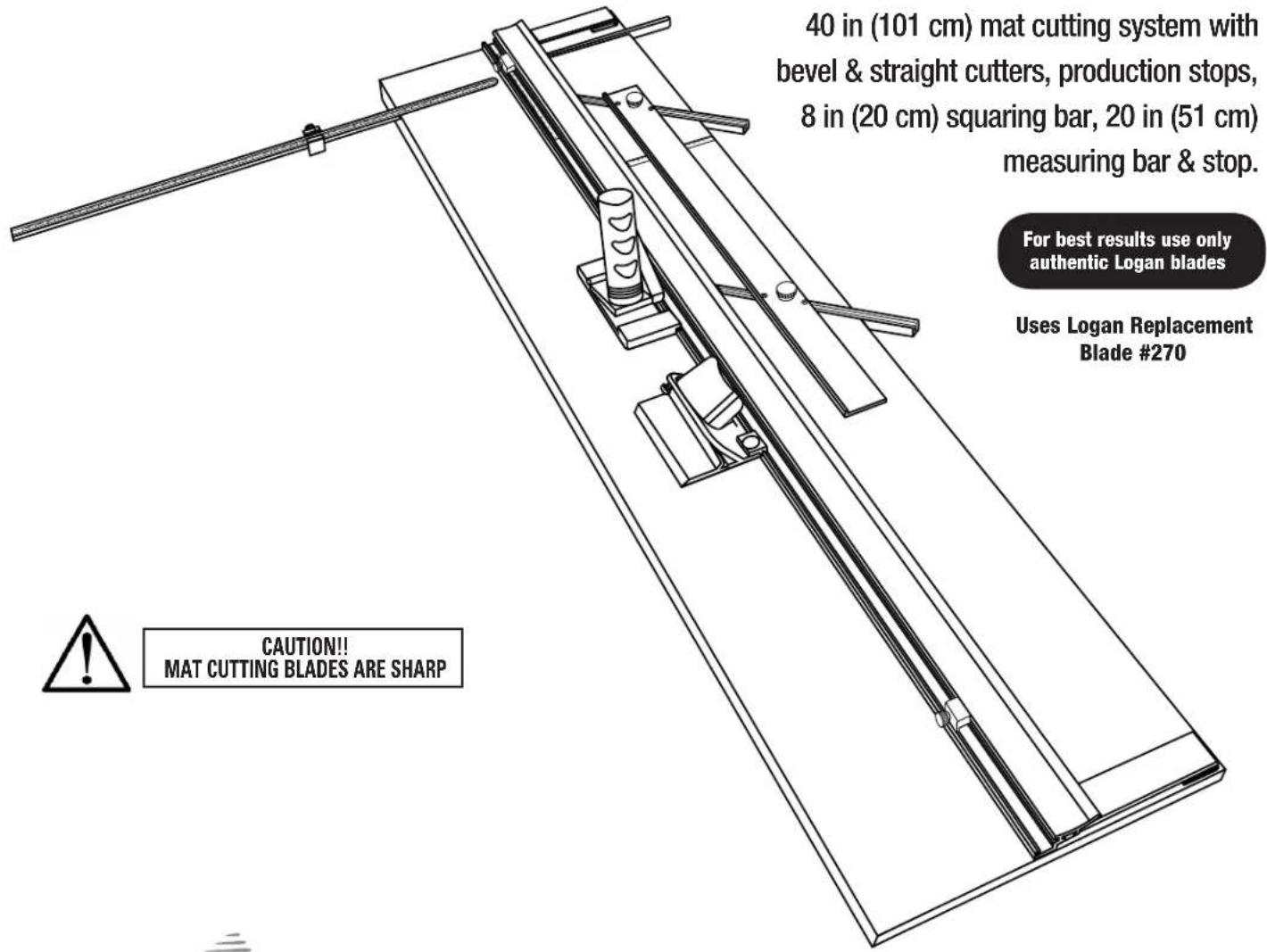
40 in (101 cm) mat cutting system with bevel & straight cutters, production stops, 8 in (20 cm) squaring bar, 20 in (51 cm)
measuring bar & stop.
For best results use only authentic Logan blades
Uses Logan Replacement Blade #270
Purchase Date
ID Number (on bottom of board) ____
Date (on bottom of board)
Fig. 1
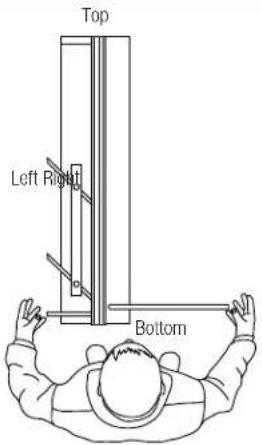
Orientation
The procedures detailed in the following instructions refer to the right & left sides and top & bottom of the machine as shown (Fig. 1).
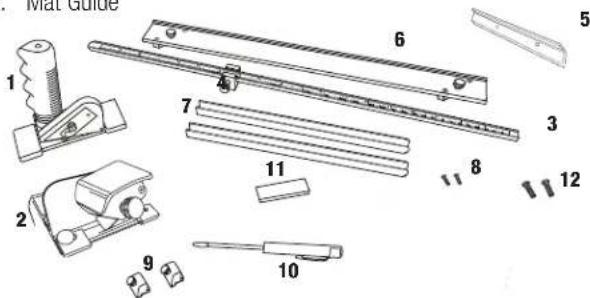
Carton Contents
- Straight Cutter 8. Channel Screws (2)
- Bevel Cutter 9. Rail Stops (2)
- Measuring Bar 10. Screwdriver
- Measuring Bar Stop 11. Blade Pack
- Squaring Bar 12. Squaring Bar Screws (2)
- Mat Guide
Congratulations on your purchase of the Logan Artist Elite Mat Cutter.
The Artist Elite is a well-designed mat cutter, combining the best of what Logan mat cutters have to offer. Features like heavy duty pull style bevel cutter with anti-crawl pin, pivot & pull straight cutter, production stops, squaring bar, removable measuring bar with stop, parallel mat guide, plus the flexibility to add additional accessories like the glass cutter or surface V-groovers make the Artist Elite a cost effective and useful tool for artists, crafters, photographers and framers. This instruction manual is written to familiarize you with the product. Please take some time to review the instructions before cutting. You will find that the time taken will be well worth it, and you will be cutting professional mats in no time.
PRODUCT DESCRIPTION
450-1 Artist Elite- 40 in vinyl covered cutting board with mat guide in aluminum channels, two production stops, 20in measuring bar, measuring bar stop, 8 in squaring bar, straight and bevel cutting heads, slip sheet, screwdriver and one 5-pack of Logan #270 blades.
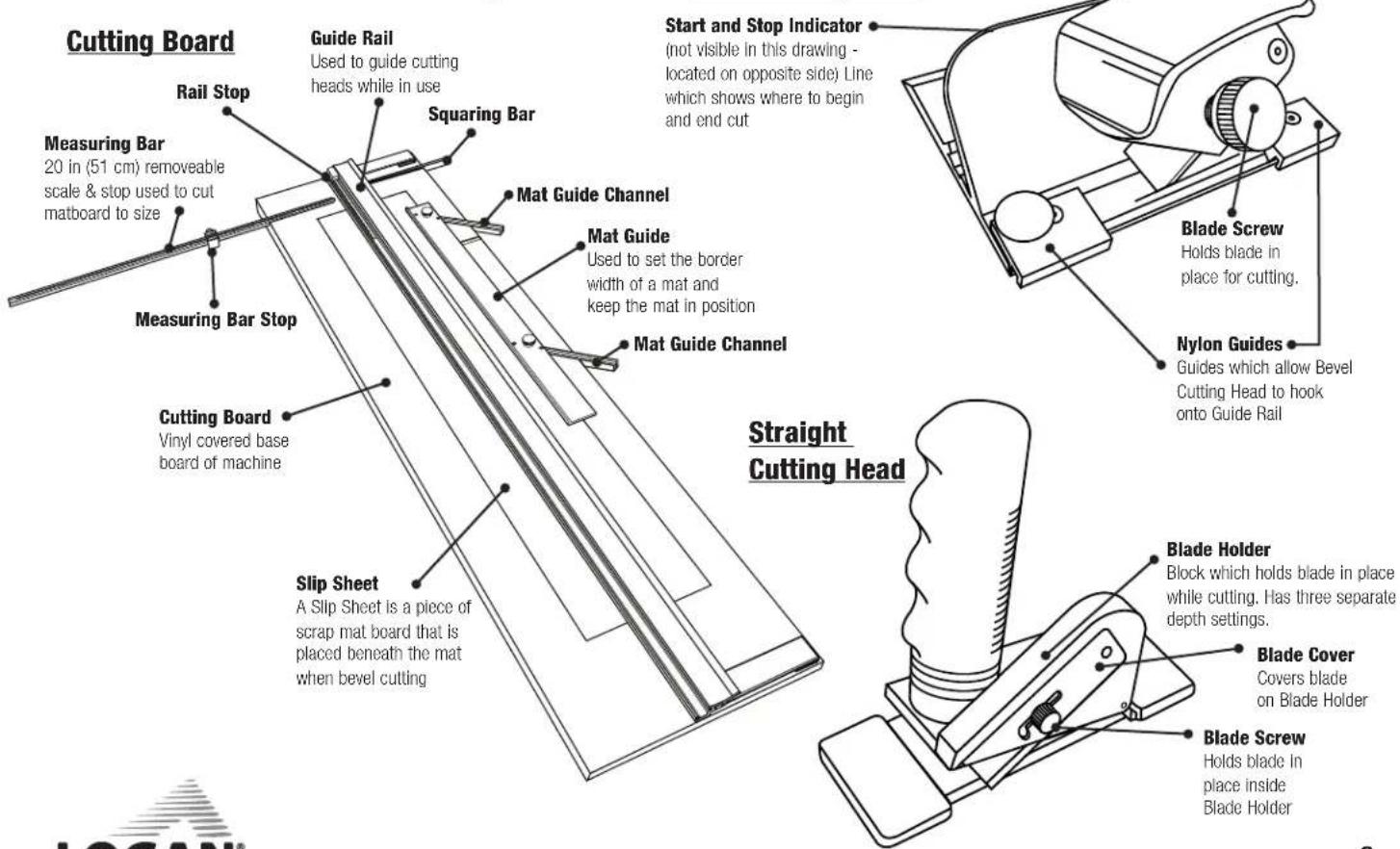
Identification of Machine Components

GRAPHIC PRODUCTS, INC.
Tools for Art - Tools for Life

CAUTION!!
MAT CUTTING BLADES ARE SHARP
Blade Installation
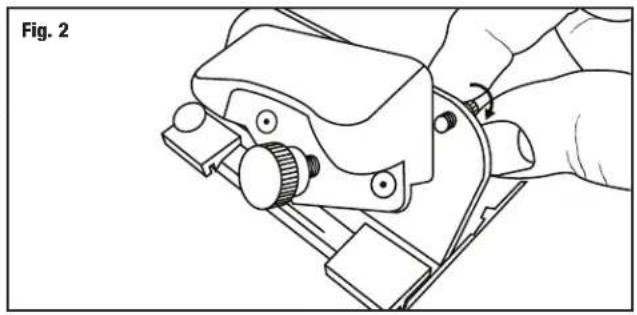
- Loosen blade retaining screw enough to allow blade holder to tilt back (Fig. 2). Loosen the blade holding knob.
- Remove one blade from the package of five.
NOTE: Because the blades are packed with a small amount of oil, they may stick together. Be certain that only one blade is being inserted into the blade slot.
- Slide blade, sharp edge down, fully into blade holder (Fig. 3).
NOTE: The hole in the blade is not designed to line up with the blade screw.
4. Tighten blade screw.
5. Tilt blade holder down, allowing tip of blade to enter into the blade slot
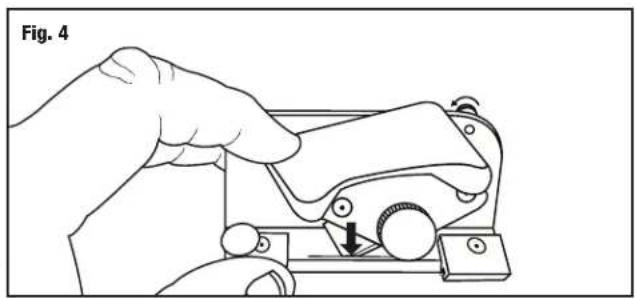
6. Retighten retaining screw (Fig. 4).
Blade Installation - Model 701-1 Straight Cutter Elite
- Remove blade knob and blade cover.
- Align blade hole over thread. Be sure sharp edge of blade is facing down.
- Reassemble blade cover and blade knob.
NOTE: Adjust blade to foamboard (fully extended), standard 4-ply mat board (middle setting) or safety (fully retracted) (Fig. 5).
Mat Guide Assembly
- Press each Mat Guide Channel into board slots with rounded end towards guiderail.
- Insert two channel screws from the UNDERSIDE of board and tighten (Fig. 6).
- Loosen each mat guide knob three full turns.
- Hold mat guide at ends with your thumbs on the loosened knobs with raised edge facing guiderail and evenly drop mat guide into channels.
- Slide to adjust and tighten knobs to lock mat guide (Fig. 7).
natural_image
Line drawing of a hand using a tool to cut or mark a mechanical component, with no visible text or symbols.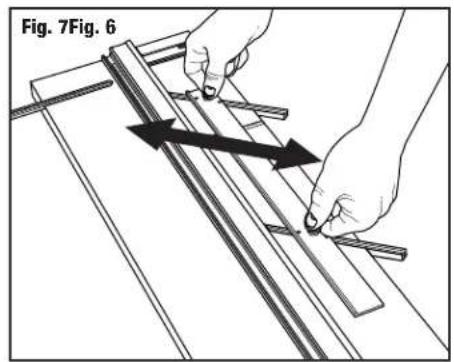
natural_image
Line drawing of a hand using a tool to adjust or install a mechanical component, labeled 'Fig. 2' (no text or symbols on the diagram itself)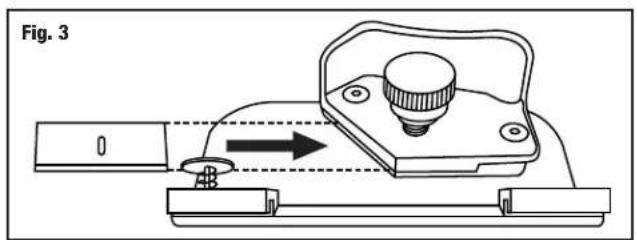
natural_image
Illustration of a hand using a mechanical tool to adjust or install a component, labeled 'Fig. 4' (no text or symbols on the diagram itself)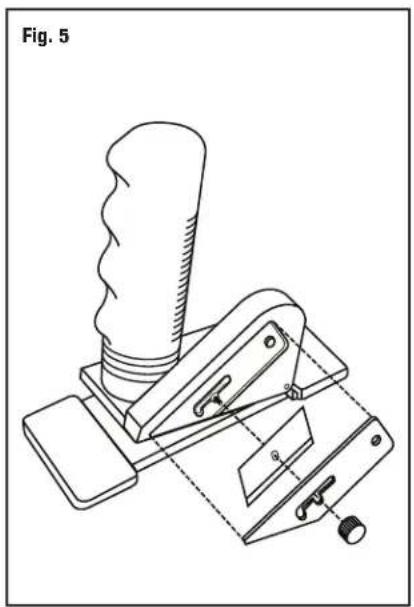
natural_image
Technical line drawing of a mechanical lever device (no text or symbols)Squaring Bar Assembly
-
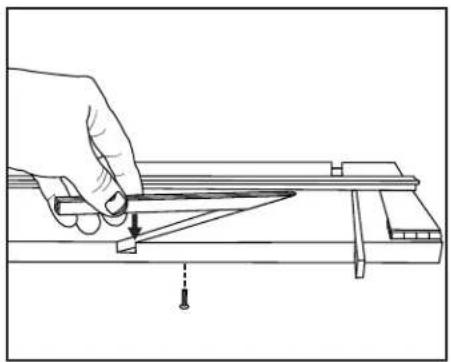
Align Squaring Bar over board slot (Fig. 8).
-
Press bar into slot.
-
Using two screws, attach Squaring Bar to board (Fig. 9).
Measuring Bar & Stop Installation
- Align pins in bottom of measuring bar with holes in board and press to install (Fig. 9).
Straight Cutting Board to Size
- Remove mat guide and slip sheet.
- Set measuring bar stop to dimension of cut (Fig. 10).
- Place mat color side down under guide rail and against squaring bar stop.
- Set the proper depth setting on the Straight Cutting Head.
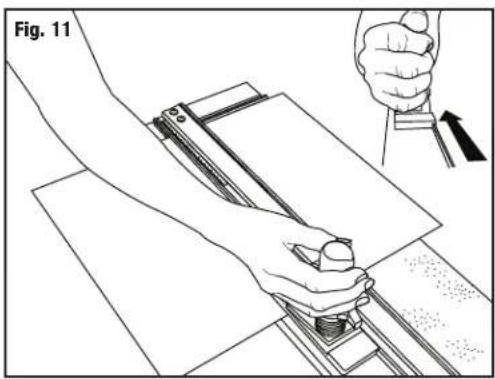
- Hook the Straight Cutting Head onto the Guide rail past the end of the board to be cut. Grasp the handle as shown in the picture, pivot down and pull the Straight Cutting Head towards you. Keep constant downward pressure on the Straight Cutting Head and the Guide Rail as you make your cut (Fig. 11).
CAUTION: Be careful to control the Straight Cutting Head as it breaks through the end of the matboard, as it will tend to "jump" towards you.
Bevel Cutting Mat Openings, Without Rail Stops, Line to Line
EXAMPLE: Cutting a mat with a 2" border.
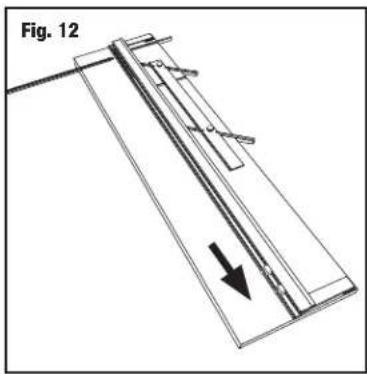
- Move stops out of cutting area or remove from rail (Fig. 12).
- Set the Mat Guide to the desired border width. For example, for a 2" border, align the front of the Mat Guide at the 2" mark and tighten the Black Knobs (Fig. 13).
- Make sure the Slip Sheet is in place before bevel cutting. You must use a Slip Sheet. The straight cut slot underneath the Guide Rail is for straight cutting only.
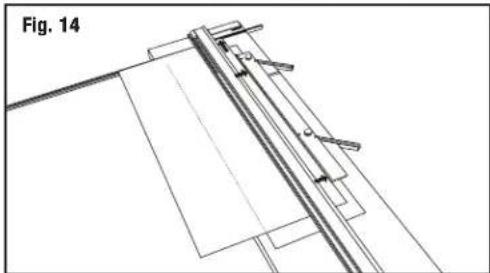
- Place the mat color side down under the Guide Rail and up against the squaring bar and mat guide (Fig. 14).
- Using a pencil, draw a line down the full length of the back of the matboard. Turn the mat after each marking and repeat this for the remaining three sides (Fig. 15).
- Attach the 702 Bevel Cutter to the Guide Rail by fitting the black nylon guides over the raised edge of the channel.
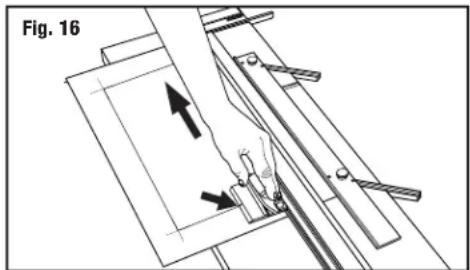
- Position the cutter so the start & stop line lines up with the marked line closest to the top of the machine (Fig. 16).
natural_image
Technical line drawing of a mechanical assembly with a downward arrow indicating motion (no text or symbols)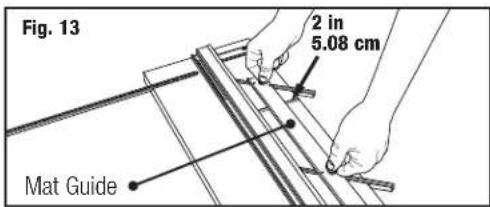
natural_image
Technical line drawing of a mechanical assembly or assembly with no visible text or symbols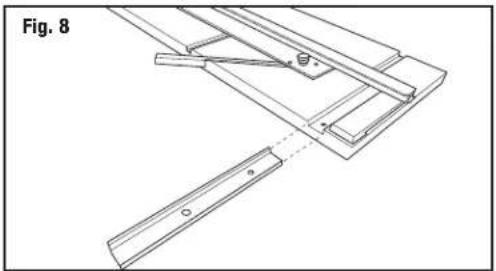
natural_image
Technical line drawing of a mechanical assembly with no visible text or symbols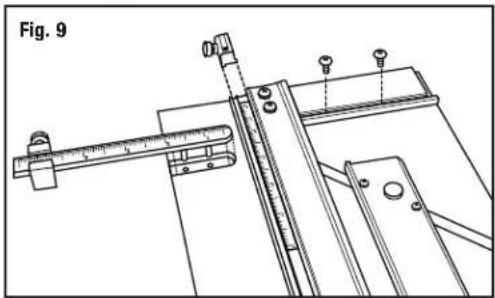
natural_image
Technical line drawing of a mechanical assembly with alignment tools and a ruler (no text or symbols)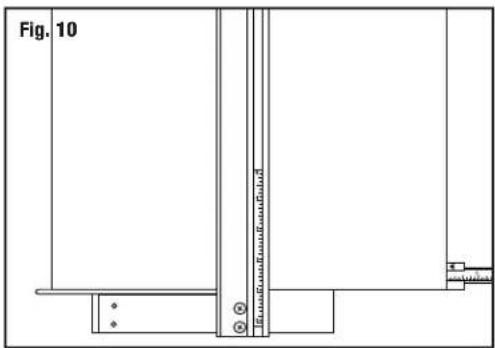
natural_image
Line drawing of a hand operating a mechanical device with a tool, no text or symbols present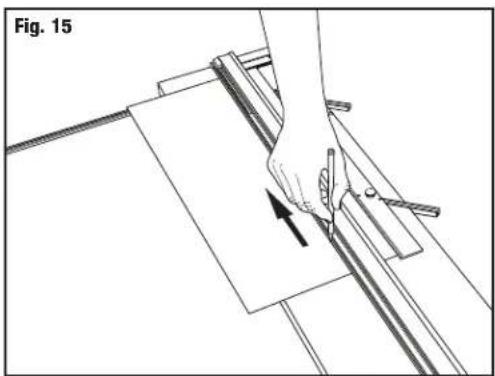
natural_image
Diagram of a hand using a tool to cut or mark a piece of paper, with an arrow indicating the process (no text or symbols present)- With left hand, depress the Anti-Crawl Pin and firmly pivot the Blade Holder down into the mat (Fig 16).
NOTE: It is essential to keep even downward pressure on the Blade Holder as you cut.
-
Release the Anti-Crawl Pin and pull the cutting head towards you until middle start & stop line lines up with bottom pencil line (Fig. 19).
-
Rotate the blade holder back up to the neutral position, turn the mat 1/4 to the right. Complete this for the remaining three sides.
Bevel Cutting Mat Openings Using One Rail Stop (most popular)
EXAMPLE: Cutting a mat with a 2" border.
- Set the Mat Guide to the desired border width. For example, for a 2" border, align the front of the Mat Guide at the 2" mark and tighten the Black Knobs (Fig. 13).
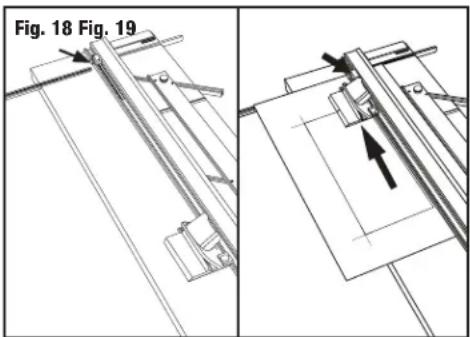
- Install or slide bottom rail stop over guiderail scale and set at 2" (Fig. 18).
- Place the mat to be cut into the machine colored side down with the Slip Sheet underneath and lower the Guide Rail (Fig. 14).
- Using a pencil, mark a line along the full length of the matboard using the Guide Rail as a guide (Fig. 15). Turn the mat 1/4 turn to the right before cutting.
- Attach the 702 Bevel Cutter to the Guide Rail by fitting the black nylon guides over the raised edge of the channel.
- Position the cutter so the middle start & stop line lines up with the marked line closest to the top of the machine (Fig. 16).
NOTE: Extra start & stop lines are for reference to increase or decrease overcuts.
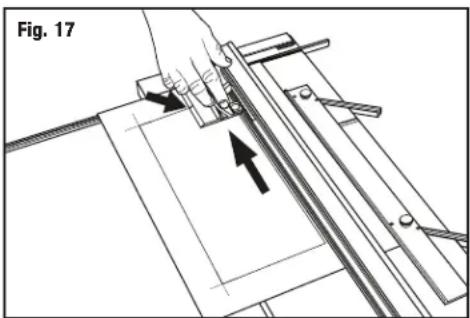
- With left hand, depress the Anti-Crawl Pin and firmly pivot the Blade Holder down into the mat (Fig 17).
NOTE: It is essential to keep even downward pressure on the Blade Holder as you cut.
-
Release the Anti-Crawl Pin and pull the cutting head towards you until you hit the stop (Fig. 19).
-
Rotate the blade holder back up to the neutral position, turn the mat 1/4 to the right and use the cut line in the back of the matboard to start your next cut. Complete this for remaining three sides.
Bevel Cutting Mat Openings Using Two Rail Stops (production cutting)
EXAMPLE: Cutting a mat with a 2" border.
NOTE: This method should only be used when cutting multiple numbers of mats that have the same outside and inside dimensions.
- Set the Mat Guide to the desired border width. For example, for a 2" border, align the front of the Mat Guide at the 2" mark and tighten the Black Knobs (Fig. 13).
- Place the mat to be cut into the machine colored side down with the Slip Sheet underneath and lower the Guide Rail (Fig. 14).
- Using a pencil, mark a line along the full length of the matboard using the Guide Rail as a guide (Fig. 15). Turn the mat 1/4 turn to the right before cutting.
- Install or slide the top Guide Rail Stop onto the Guide Rail and slide it past the far end of the matboard but do not tighten it.
- Install or slide the bottom Guide Rail Stop onto the Guide Rail and tighten at the 2" mark on the Guide Rail scale (Fig. 18).
- Hook the bevel cutting head onto the Guide Rail and slide up until the Start & Stop indicator lines up with the marked line closest to the top of the machine.
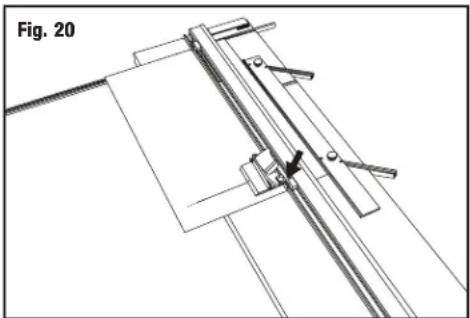
- Slide the top Guide Rail Stop towards you until it makes contact against the bevel cutting head and tighten (Fig. 20).
- Both Guide Rail Stops are now set to make repeated opposite side cuts on a multiple number of mats of the same size. To then cut the other side of the mats, reset the top stop as you did in step 6. and cut the remaining sides.
Straight Cut Mat Opening
EXAMPLE: Cutting a mat with a 2" border.
- Set the Mat Guide to the 2" mark on the scale and retighten the black knobs.
- Place the mat to be cut into the machine colored side down with the Slip Sheet underneath and lower the Guide Rail.
- Using a pencil, mark a line along the full length of the mat board using the Guide Rail as a guide. Repeat this for remaining three sides.
natural_image
Technical line drawing of a mechanical assembly with no visible text or symbols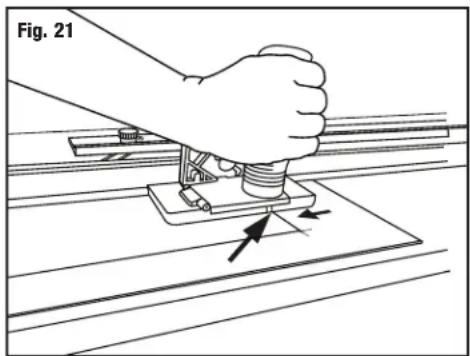
natural_image
Illustration of a hand using a tool to press or install a mechanical component, labeled 'Fig. 21' (no text or symbols on the diagram itself)- Using the Straight Cutting Head, align the top scribe line with the top border line and press down on the handle until the cutting head sits flat on the mat board and the Nylon Guides hook onto the Guide Rail lip (Fig. 21).
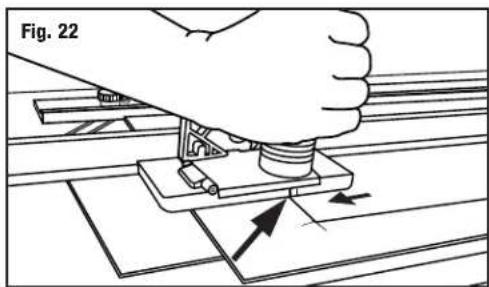
- Pull the Straight Cutting Head until the bottom scribe line lines up with the bottom border line. Repeat until all borders are cut (Fig. 22).
Adjustments
Bevel blade depth adjustment
- Increase depth to increase overcuts - Decrease depth to reduce overcuts
- Hold the 702 Bevel Cutter upside down in your hand with the blade activated in the cutting position.
- Measure the exposed amount with a ruler at the same angle as the blade. For standard thickness mat board (4 ply/1.4mm) only 1/8" of blade should be seen (Fig. 23).
- Turn blade depth screw (clockwise) to decrease blade depth and (counterclockwise) to increase depth.
NOTE: Always have blade depth set so that Slip Sheet is only slightly scored.
natural_image
Diagram of a hand using a tool to press or install a mechanical component, with arrows indicating motion (no text or symbols)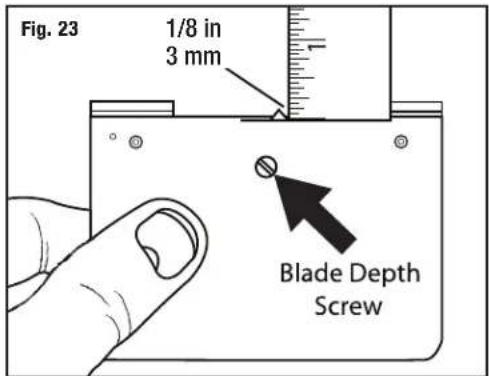
Re-squaring the Squaring Bar
Tools needed: Screwdriver, Carpenter's square
Before making any adjustments to the squaring bar, make sure that the machine is truly out of square, not the mat board, by using the squareness test.
ATTENTION: It is common for 32" x 40" sheets of mat board to be unsquare when bought. Take this into account before making any adjustments to the squaring bar.
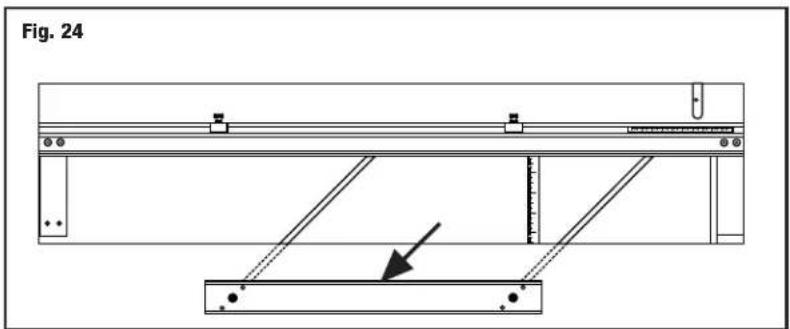
- Remove mat guide (Fig. 24).
- Add slip sheet (white side up). Raise guiderail.
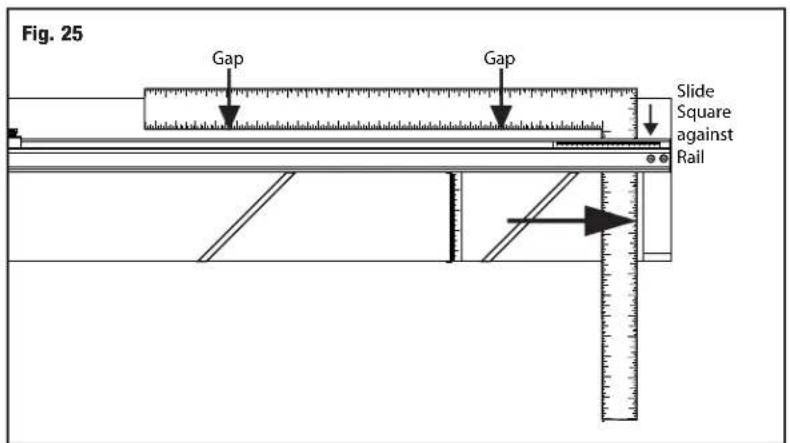
- Position carpenter square up against squaring bar and under guiderail (Fig. 25).
- Hold carpenter square firmly against squaring bar.
- Look to see if there are any gaps. If so, squaring bar needs to be adjusted.

CAUTION!!
MAT CUTTING BLADES ARE SHARP
Re-squaring continued
- By looking at where the gap is, you can determine which way the squaring bar needs to go in order to be square again.
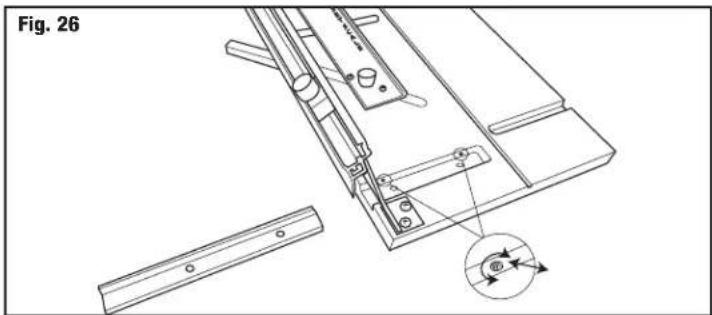
- Remove the squaring bar and locate the two screws inside of the slot.
- To adjust, you must turn screws A & B in equal but opposite directions. To move the far right end of the squaring bar towards the top end of the machine, turn adjustment screw B inward (clockwise) about a quarter turn, and turn adjustment screw A outward (counter clock-wise) about a quarter turn (Fig. 26).
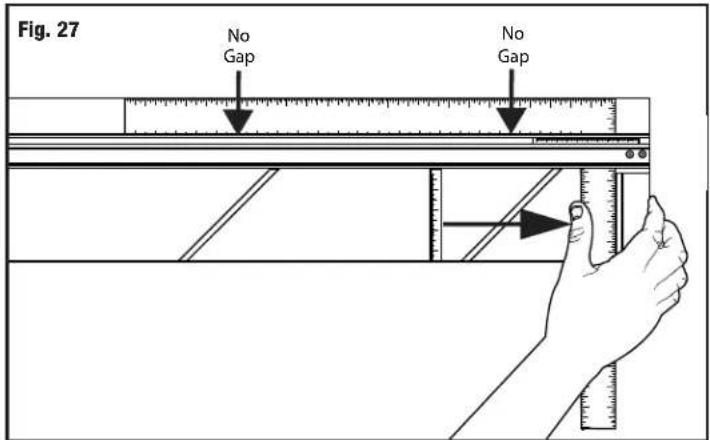
- Re-install the squaring bar and check for square. This is a trial and error method. In some cases more than a quarter turn is needed, in some cases, less. (Fig 27)
Re-parallel Mat Guide
Tools Needed: Phillips Screwdriver, Ruler
To re-parallel the Mat Guide, first determine that the Mat Guide is out of parallel by doing a parallel test.
Parallel Test:
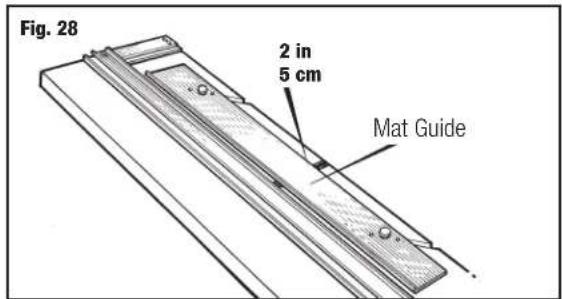
- Lock the Mat Guide at the 2" mark on the scale (Fig. 28).
- Place a scrap piece of matboard under the Guide Rail and up against the Mat Guide at the far end of the machine.
- Using a pencil, mark a line across the matboard.
- Slide the mat all the way down near where you are standing keeping under the Guide Rail.
- Mark another line across the matboard.
- The piece of matboard should now appear to only have one single line across it. If the two lines drawn do not line up with each other, the Mat Guide needs to be re-paralleled.
To Re-parallel:
- Release the Mat Guide.
- Use a Phillips head screwdriver to loosen the four screws on either side of the black knobs one turn.
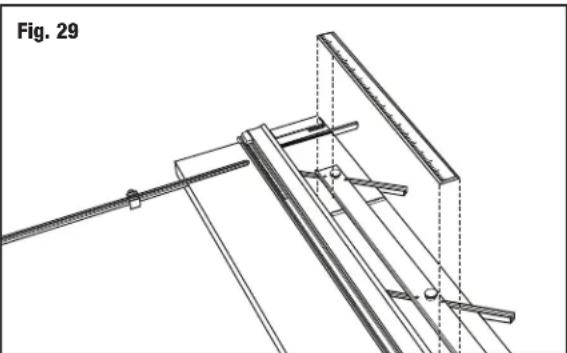
- Place a ruler or straight edge between the Mat Guide and the Guide Rail (Fig. 29).
- Slide the Mat Guide against the straight edge and the Guide Rail. Make sure both the Mat Guide and the Guide Rail are making solid contact on both sides of the straight edge.
- Re-tighten the Black Knobs first.
- Then re-tighten the four screws. Do another parallel test to ensure that the Mat Guide is now parallel.
Mat Guide Assembly
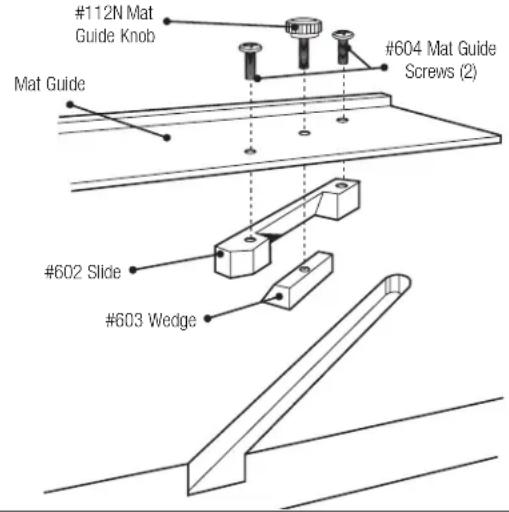
If mat guide wedge becomes unscrewed from mat guide, reassemble making sure angle of wedge is aligned correctly (Fig. 30).
natural_image
Technical line drawing of a mechanical assembly with rods and supports, labeled Fig. 29 (no text or symbols on the diagram itself)Trouble Shooting
| Problem Solution | |
| Hooks or Curves | Blade depth set too deep.Blade is dull.Blade is catching on previous cut in Slip Sheet.Uneven pressure being applied to Cutting Head during cut. |
| Overcut on Top Cut | Blade depth set too deep. |
| Overcut on Bottom Cut | If too small - align start and stop indicator slightly below pencil line and cut.If too big - align start and stop indicator slightly above pencil line and cut. |
| Mat Borders Uneven | Mat Guide not parallel |
| Ragged Bevel Cut | Cutting without a Slip Sheet.Slip Sheet is worn out.Not changing the blade often enough. |
| Not Cutting Through | Machine not on a level surface.Not using a Slip Sheet as least as long as the mat you are cutting.Blade depth set too shallow. |
Fig. 30
Warranty
Logan Graphic Products, Inc. ("Logan") warrants the 450-1 ARTIST ELITE to be free from defects in parts and workmanship for a period of two years from the date of original purchase. Logan warrants that it will either repair or replace, in its sole discretion, any necessary replacement parts found to be defective. Should the product need to be returned to Logan for repair or replacement parts, authorization for any return must come from Logan in writing. Costs of returning the product to Logan, including insurances, shall be borne by the purchaser. Logan shall not be liable for any damages or losses, incidental or consequential, direct or indirect, arising from the use of this product. This warranty extends only to the original purchaser and is not assignable or transferable. This warranty is in lieu of all other warranties, expressed or implied. Be advised that any Logan products purchased as "new" from an unauthorized dealer, such as an online auction site or similar, may be void of their warranty.
Logan Graphic Products, Inc.
1100 Brown Street Wauconda, IL 60084
800-331-6232 847-526-5515
Helpful Hints
Avoid Board Warp - Always store your Mat Cutter flat.
Clean Guide Rail - Only use evaporative solvents such as lighter fluid or alcohol. Do not lubricate the Guide Rail: lubricants will soften the nylon guides and cause them to bind on guide rail.
Cutting a Border Less Than 3/4" - Mark mat (back side) using a pencil and do not use Mat Guide.
Blade Life - Use only authentic Logan blades to ensure best results. No two blades last the same amount of time. Size of mats and differences in mat board effect blade life. It is best practice to use a new blade whenever starting a new project.
- ARTIST ELITE MAT CUTTER
- Orientation
- Carton Contents
- Congratulations on your purchase of the Logan Artist Elite Mat Cutter.
- PRODUCT DESCRIPTION
- Blade Installation
- Blade Installation - Model 701-1 Straight Cutter Elite
- Mat Guide Assembly
- Squaring Bar Assembly
- Measuring Bar & Stop Installation
- Straight Cutting Board to Size
- Bevel Cutting Mat Openings, Without Rail Stops, Line to Line
- EXAMPLE: Cutting a mat with a 2" border.
- Bevel Cutting Mat Openings Using One Rail Stop (most popular)
- Bevel Cutting Mat Openings Using Two Rail Stops (production cutting)
- Straight Cut Mat Opening
- Adjustments
- Bevel blade depth adjustment
- Re-squaring the Squaring Bar
- Tools needed: Screwdriver, Carpenter's square
- Re-squaring continued
- Re-parallel Mat Guide
- Tools Needed: Phillips Screwdriver, Ruler
- Parallel Test:
- To Re-parallel:
- Warranty
- Helpful Hints
Brand : Logan
Model : Artist Elite 450-1
Category : Cutting machine