
EDC-600L - Humidifier Ruggard - Free user manual and instructions
Find the device manual for free EDC-600L Ruggard in PDF.


| Product Type | Humidifier |
| Model | EDC-600L |
| Brand | Ruggard |
| Dimensions (L x W x H) | 18 x 18 x 30 cm (7.1 x 7.1 x 11.8 in) |
| Weight | 1.2 kg (2.65 lb) |
| Power Supply | AC 100-240V, 50/60Hz |
| Power Consumption | 25 W |
| Water Tank Capacity | 1.5 L |
| Mist Output | 300 ml/h (maximum) |
| Noise Level | < 35 dB |
| Type | Ultrasonic |
| Functions | Adjustable mist level, auto shut-off, LED night light, timer (1-12h) |
| Coverage Area | Up to 30 m² (323 ft²) |
| Filter Type | Replaceable wick filter (recommended every 3 months) |
| Cleaning | Wipe exterior with damp cloth; descale tank weekly with vinegar solution |
| Safety | Automatic shut-off when water runs out; tip-over protection |
| Spare Parts | Filter, water tank, mist nozzle (available on Ruggard website) |
| Repairability | User-replaceable filter; other repairs by authorized service |
| Warranty | 1 year limited warranty |
| Included Accessories | Humidifier, AC adapter, filter, user manual |
Frequently Asked Questions - EDC-600L Ruggard
User questions about EDC-600L Ruggard
0 question about this device. Answer the ones you know or ask your own.
Ask a new question about this device
Download the instructions for your Humidifier in PDF format for free! Find your manual EDC-600L - Ruggard and take your electronic device back in hand. On this page are published all the documents necessary for the use of your device. EDC-600L by Ruggard.
USER MANUAL EDC-600L Ruggard
Electronic Dry Cabinet

natural_image
Black Ruggard oven with open door and digital display (no visible text or symbols on the cabinet body)Model EDC-30L Shown
THANK YOU FOR CHOOSING RUGGARD
The Ruggard Electronic Dry Cabinet protects your lenses, photographic and optical equipment, mobile electronics, and other valuable accessories from excessive moisture. Using the cabinet's fast-acting TE Cooling Wafer, you can regulate the interior's relative humidity to help prevent fungus and corrosion from damaging your gear. The cabinet offers silent operation with no fan or compressor, and the unit is drippless, so there's no need for a water tray. The glass door and rubber seal provide extra protection against dust or airborne debris, keeping your gear working great for years.
OVERVIEW
Control Panel
The illuminated digital display shows the cabinet's interior humidity and temperature settings.
[F/C Set], [▲/○]: Fahrenheit/Celsius set button, value increase/Light (on/off)
[%RH], [▼]: Relative humidity value decrease, display brightness (Bright/Dim)
[SET]: Confirm setting

- DC port
- Moisture sync
2 LED bulbe - Front adjustable leveling feet
(see models)
(Some models)
-
Base-foam filling
-
Contoured lens-foam lining
-
Adjustable sliding shelf
-
Shelf brackets (2)
-
Door keys (2)
-
Handle ^1
11 Adjustable shelf
12 Foam lining
-
Chelwing law
-
Sherving brackets (4)
-
LOCK
15.Fixed shelf

Sliding Shelf models
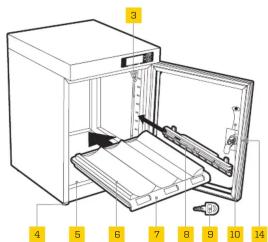
Note: Features vary by model.
Bracket Shelf models

^1 For some models, the handle is attached to the inside of the unit for shipping. Use a Phillips screwdriver to unscrew and reposition the handle on the outside of the glass. Be careful not to overtighten.
^2 For EDC-600L-S only. Use the power switch to turn the zones on or off.
SPECIFICATIONS
| EDC-18L EDC-30L EDC-50L EDC-80L EDC-125L EDC-180L EDC-230L EDC-600L / 600L-S | |||||||||
| Volume | 30 L, 50 L, 80 L, 125 L, 18 | 80 L, 230 L, 600 L | |||||||
| Power | 110 to 240 V, 50/60 Hz | 110 to 240 V, 50/60 Hz | 110 to 240 V, 50/60 Hz | 110 to 240 V, 50/60 Hz | 110 to 240 V, 50/60 Hz | 110 to 240 V, 50/60 Hz | 110 to 240V, 50/60 Hz | 110 to 240 V, 50/60 Hz | 110 to 240 V, 50/60 Hz |
| Relative humidity | 60% to 35% (+7%RH) | 60% to 35% (+7%RH) | 60% to 35% (+7%RH) | 60% to 35% (+7%RH) | 60% to 35% (+7%RH) | 60% to 35% (+7%RH) | 60% to 35% (+7%RH) | 60% to 35% (+7%RH) | 110 to 240 V, 50/60 Hz |
| Zones | 1 | 1 | 1 | 1 | 1 | 2 | 1 | 1 | 2 ^a |
| Dimensions(W × D × H) | 13.8 × 10.6 × 10.6 in.(35 × 27.5 × 27 cm) | 11.4 × 12.6 × 16.5 in.(29 × 32 × 42 cm) | 11.4 × 12.6 × 23.8 in.(29 × 32 × 60.5 cm) | 21.2 × 14.3 × 20.3 in.(53.8 × 36.2 × 51.6 cm) | 16.1 × 15.4 × 35.4 in.(41 × 39 × 90 cm) | 15 × 15.4 × 53 in.(38 × 39 × 134.5 cm) | 23.6 × 19 × 33.5 in.(60 × 48.2 × 85.2 cm) | 33.5 × 16.9 × 72 in.(85.1 × 43 × 183 cm) | |
| Weight | 8.4 lb (3.8 kg) | 14.3 lb (6.5 kg) | 20 lb (9.1 kg) | 29.5 lb (13.4 kg) | 42.3 lb (19.2 kg) | 58.4 lb (26.5 kg) | 60.6 lb (27.5 kg) | 158.7 lb (72 kg) | |
| Size comparison | |||||||||
| EDC-18L EDC-30L EDC-50L EDC-80L EDC-125L EDC-180L EDC-230L EDC-600L / 600L-S | |||||||||
| Volume | 30 L, 50 L, 80 L, 125 L, 18 | 80 L, 230 L, 600 L | |||||||
| Power | 110 to 240 V, 50/60 Hz | 110 to 240 V, 50/60 Hz | 110 to 240 V, 50/60 Hz | 110 to 240 V, 50/60 Hz | 110 to 240 V, 50/60 Hz | 110 to 240 V, 50/60 Hz | 110 to 240V, 50/60 Hz | 110 to 240 V, 50/60 Hz | 110 to 240 V, 50/60 Hz |
| Relative humidity | 60% to 35% (+7%RH) | 60% to 35% (+7%RH) | 60% to 35% (+7%RH) | 60% to 35% (+7%RH) | 60% to 35% (+7%RH) | 60% to 35% (+7%RH) | 60% to 35% (+7%RH) | 60% to 35% (+7%RH) | 110 to 240 V, 50/60 Hz |
| Zones | 1 | 1 | 1 | 1 | 1 | 2 | 1 | 1 | 2 ^a |
| Dimensions(W × D × H) | 13.8 × 10.6 × 10.6 in.(35 × 27.5 × 27 cm) | 11.4 × 12.6 × 16.5 in.(29 × 32 × 42 cm) | 11.4 × 12.6 × 23.8 in.(29 × 32 × 60.5 cm) | 21.2 × 14.3 × 20.3 in.(53.8 × 36.2 × 51.6 cm) | 16.1 × 15.4 × 35.4 in.(41 × 39 × 90 cm) | 15 × 15.4 × 53 in.(38 × 39 × 134.5 cm) | 23.6 × 19 × 33.5 in.(60 × 48.2 × 85.2 cm) | 33.5 × 16.9 × 72 in.(85.1 × 43 × 183 cm) | |
| Weight | 8.4 lb (3.8 kg) | 14.3 lb (6.5 kg) | 20 lb (9.1 kg) | 29.5 lb (13.4 kg) | 42.3 lb (19.2 kg) | 58.4 lb (26.5 kg) | 60.6 lb (27.5 kg) | 158.7 lb (72 kg) | |
| Size comparison | |||||||||
PRECAUTIONS
- Please read and follow these instructions, and keep this manual in a safe place.
- Do not place any corrosive or flammable materials inside the cabinet.
- Keep this product away from direct sunlight, high temperatures, and windy environments.
- When storing food, medicine, or chemicals, make sure they are stored in a separate and sealed container.
- The weight limit for each shelf is 40 pounds (18.1 kg). Do not overload the shelves.
- Keep this product away from children.
• This product is for indoor use only.
• All images are for illustrative purposes only.
SETTING AND CHECKING HUMIDITY
The relative humidity setting regulates the entire cabinet interior. You can set the relative humidity percentage from 25% to 60%*, and it adjusts fully within 1 to 3 hours. The inside humidity can be decreased, but you cannot increase the humidity more than the surrounding environment. Keep the door closed to ensure optimal humidity levels.
- Press the [S]erton twice until the humidity display (blue) begins to flash.
- Use the [ ] and [ ] buttons to set the desired relative humidity value.
- Press the [Set] button to confirm the settings.
Verify the target humidity by pressing the [%]bution. The display will show the target value for two seconds before returning to the actual humidity level reading.
*The Electronic Dry Cabinet functions only within 25% to 60% relative humidity, even if you set the value outside that range.
Note: Do not place the rear of the cabinet directly against a wall or other surface. This may reduce the operational efficiency. Keep the door closed to prevent the humidity from increasing inside the cabinet.
SETTING THE BRIGHTNESS AND TEMPERATURE DISPLAY
Press and hold the []button for three seconds to switch between the Bright or Dim display mode.
When the unit is initially turned on, the displayed temperature will be in degrees Celsius.
Press and hold the [F] button for three seconds to change to Fahrenheit and vice versa.
Note: This unit does not control temperature.
OPTIMAL RELATIVE HUMIDITY (RH) LEVELS
| Relative Humidity (RH) Level Recommended Items | |
| 50%-60% Books, antique documents, paper (fax, copy, print) | |
| 40%-50% | Camcorders, cameras, lenses, telescopes, microscopes, endoscopes, compact discs, film negatives, film transparency/slides, microfilm, disk drives, audio and video tapes |
| 35%-40% Metal and metal powder products, electrical equipment, semiconductors, capacitors, printed circuit boards, IC, batteries and other electronic equipment, precision measuring tools, spectrometers, optics, lenses | |
| 25%-30% | Pharmaceutical raw materials, spices, powder coating, adhesives, seeds, pollen, dry flour |
FIVE-YEAR LIMITED WARRANTY
This Ruggard product is warranted to the original purchaser to be free from defects in materials and workmanship under normal consumer use for a period of five (5) years from the original purchase date or thirty (30) days after replacement, whichever occurs later. The warranty provider's responsibility with respect to this limited warranty shall be limited solely to repair or replacement, at the provider's discretion, of any product that fails during normal use of this product in its intended manner and in its intended environment. Inoperability of the product or part(s) shall be determined by the warranty provider. If the product has been discontinued, the warranty provider reserves the right to replace it with a model of equivalent quality and function.
This warranty does not cover damage or defect caused by misuse, neglect, accident, alteration, abuse, improper installation or maintenance. EXCEPT AS PROVIDED HEREIN, THE WARRANTY PROVIDER MAKES NEITHER ANY EXPRESS WARRANTIES NOR ANY IMPLIED WARRANTIES, INCLUDING BUT NOT LIMITED TO ANY IMPLIED WARRANTY OF MERCHANTABILITY OR FITNESS FOR A PARTICULAR PURPOSE. This warranty provides you with specific legal rights, and you may also have additional rights that vary from state to state.
To obtain warranty coverage, contact the Ruggard Customer Service Department to obtain a return merchandise authorization (“RMA”) number, and return the defective product to Ruggard along with the RMA number and proof of purchase. Shipment of the defective product is at the purchaser’s own risk and expense.
For more information or to arrange service, visit www.ruggard.com or call Customer Service at 212-594-2353.
Product warranty provided by the Gradus Group. www.gradusgroup.com
Ruggard is a registered trademark of the Gradus Group. © 2021 Gradus Group LLC. All Rights Reserved.

RUGGARD® A Gradus Group Brand


Brand : Ruggard
Model : EDC-600L
Category : Humidifier