PMKS40 - Microphone Pyle - Free user manual and instructions
Find the device manual for free PMKS40 Pyle in PDF.


Pick your language and provide your email: we'll send you a specifically translated version.
| Product Type | Wireless Microphone System |
| Brand | Pyle |
| Model | PMKS40 |
| Microphone Type | Handheld Dynamic |
| Wireless Technology | UHF (Ultra High Frequency) |
| Number of Microphones | 1 |
| Frequency Range | 470-506 MHz |
| Operating Range | Up to 100 feet (30 meters) |
| Microphone Dimensions | 10.6 x 1.8 x 1.8 inches (27 x 4.5 x 4.5 cm) |
| Microphone Weight | 0.6 lbs (270 g) with battery |
| Receiver Dimensions | 7.1 x 4.7 x 1.6 inches (18 x 12 x 4 cm) |
| Receiver Weight | 1.1 lbs (500 g) |
| Power Source (Microphone) | 2 x AA batteries (not included) |
| Power Source (Receiver) | AC adapter (included) |
| Battery Life | Approximately 10 hours continuous use |
| Audio Output | 1/4 inch (6.35 mm) unbalanced jack |
| Frequency Response | 40 Hz - 15 kHz |
| Signal-to-Noise Ratio | > 60 dB |
| Construction Material | Metal body withABS plastic |
| Maintenance | Clean with a soft, dry cloth; avoid moisture |
| Safety | Keep away from water and extreme temperatures |
| Spare Parts | Batteries, optional replacement microphone capsules |
| Repairability | Limited user-serviceable parts; refer to qualified service |
| Package Contents | 1x Microphone, 1x Receiver, AC adapter, user manual |
Frequently Asked Questions - PMKS40 Pyle
What type of batteries does the microphone use?
The Pyle PMKS40 microphone uses 2 x AA batteries (not included). For best performance, use alkaline batteries.
How far can the microphone work from the receiver?
The operating range is up to 100 feet (30 meters) in open line-of-sight conditions. Range may vary with obstacles.
Can I use the microphone with multiple receivers?
Each microphone is paired to its specific receiver. You cannot use one microphone with multiple receivers unless the system supports that feature.
What is the frequency range of the PMKS40?
The system operates on UHF frequencies between 470 and 506 MHz.
How do I connect the receiver to a speaker?
Connect a 1/4 inch (6.35 mm) instrument cable from the receiver's output jack to your speaker or amplifier's input.
The microphone has no sound. What should I check?
Ensure the batteries are installed correctly and fresh. Check that the receiver is powered on and the microphone is within range. Also verify that the audio cable is securely connected.
Is the microphone compatible with other Pyle wireless systems?
The PMKS40 uses a fixed frequency, so it is only compatible with its matching receiver. It may not work with other Pyle models unless specified.
How long does the battery last?
With fresh alkaline batteries, you can expect approximately 10 hours of continuous use.
Can I use rechargeable batteries?
Yes, you can use rechargeable AA batteries, but note that the operating time may be less than with alkaline batteries.
What is included in the package?
The package includes the handheld microphone, receiver unit, AC adapter for the receiver, and an instruction manual.
User questions about PMKS40 Pyle
0 question about this device. Answer the ones you know or ask your own.
Ask a new question about this device
No questions yet. Be the first to ask one.
Download the instructions for your Microphone in PDF format for free! Find your manual PMKS40 - Pyle and take your electronic device back in hand. On this page are published all the documents necessary for the use of your device. PMKS40 by Pyle.
USER MANUAL PMKS40 Pyle
natural_image
Black adjustable stand with a handle and circular base (no text or symbols visible)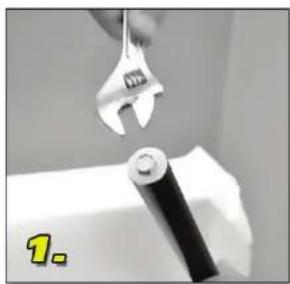
natural_image
Close-up of a hand using an adjustable wrench to lift a white cylindrical object (no text or symbols visible)Unscrew the bolt
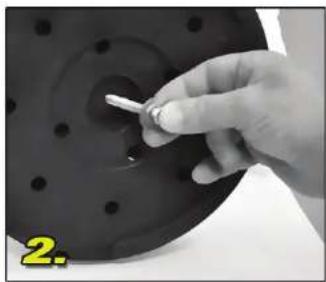
natural_image
Close-up of a hand holding a small white object over a dark circular component, no visible text or symbolsInsert bolt through the bottom of base
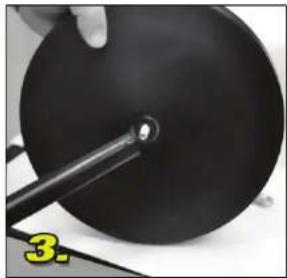
natural_image
Close-up of a black circular object with a small metallic rod inserted, being held by a hand (no text or symbols visible)Screw the pole back onto the bolt
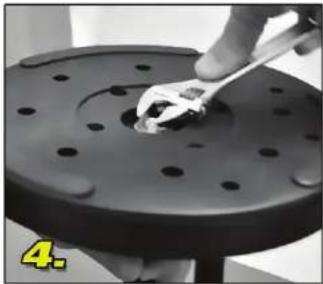
natural_image
Close-up of a hand using a wrench to work on a mechanical component (no visible text or symbols)Secure and tighten bolt from under base
- Clutch the Quick-Release Handle and adjust the pole to desired height.
- Place and tighten the mic holder on the top.