
VC080 - Audio/video converter ATEN - Free user manual and instructions
Find the device manual for free VC080 ATEN in PDF.


| Product Type | Audio/Video Converter |
| Brand | ATEN |
| Model | VC080 |
| Input Interface | VGA (D-Sub 15-pin) + 3.5mm Audio Jack |
| Output Interface | HDMI Type A (19-pin) + 3.5mm Audio Jack (pass-through) |
| Max Resolution | 1920 x 1200 (WUXGA) @ 60Hz |
| Audio Support | Analog stereo via 3.5mm input; embedded digital audio on HDMI |
| Power Supply | USB powered (5V DC, 500mA) or optional DC adapter |
| Dimensions (W x D x H) | 70mm x 50mm x 20mm (2.76" x 1.97" x 0.79") |
| Weight | 50g (1.76 oz) |
| Housing Material | Metal enclosure with plastic end caps |
| LED Indicators | Power (green) and Signal (orange) |
| Supported Video Modes | VGA, SVGA, XGA, SXGA, UXGA, WUXGA; interlaced and progressive |
| Plug and Play | Yes, no driver required |
| Compliance | CE, FCC, RoHS |
| Operating Temperature | 0°C to 50°C (32°F to 122°F) |
| Storage Temperature | -20°C to 60°C (-4°F to 140°F) |
| Humidity | 20% to 80% RH (non-condensing) |
| Package Contents | VC080 unit, USB power cable, user manual |
| Warranty | 2 years limited |
Frequently Asked Questions - VC080 ATEN
User questions about VC080 ATEN
0 question about this device. Answer the ones you know or ask your own.
Ask a new question about this device
Download the instructions for your Audio/video converter in PDF format for free! Find your manual VC080 - ATEN and take your electronic device back in hand. On this page are published all the documents necessary for the use of your device. VC080 by ATEN.
USER MANUAL VC080 ATEN
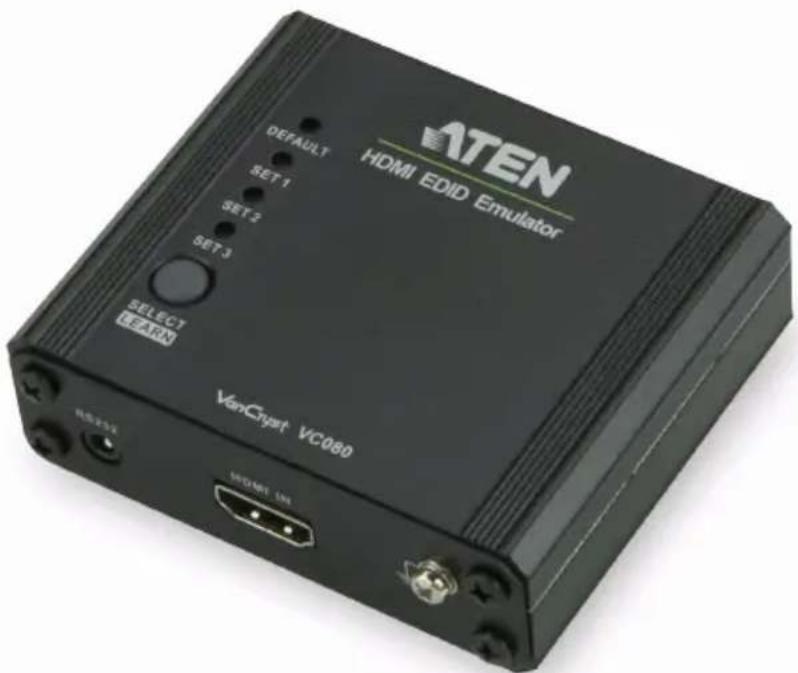
VGA/DVI/HDMI EDID Emulator
VC010 / VC060 / VC080
User Manual
EMC Information
FEDERAL COMMUNICATIONS COMMISSION INTERFERENCE STATEMENT
This equipment has been tested and found to comply with the limits for a Class A digital device, pursuant to Part 15 of the FCC Rules. These limits are designed to provide reasonable protection against harmful interference when the equipment is operated in a commercial environment. This equipment generates, uses, and can radiate radio frequency energy and, if not installed and used in accordance with the instruction manual, may cause harmful interference to radio communications. Operation of this equipment in a residential area is likely to cause harmful interference in which case the user will be required to correct the interference at his own expense.
FCC Caution: Any changes or modifications not expressly approved by the party responsible for compliance could void the user's authority to operate this equipment.
CE Warning:
This is a class A product. In a domestic environment this product may cause radio interference in which case the user may be required to take adequate measures.
RoHS
This product is RoHS compliant.
Safety
This product has been classified as Information Technology Equipment.
SJ/T 11364-2006
The following contains information that relates to China.
Be sure to register your product at our online support center:
| International http://eservice.aten.com |
Telephone Support
For telephone support, call this number:
| International 886-2-86 | 92-6959 |
| China 86-10-5255-0110 | |
| Japan 81-3-5615-5811 | |
| Korea 82-2-467-6789 | |
| North America 1-888-999-ATEN ext 4988 | |
| United Kingdom 44-8-4481-58923 | |
User Notice
All information, documentation, and specifications contained in this manual are subject to change without prior notification by the manufacturer. The manufacturer makes no representations or warranties, either expressed or implied, with respect to the contents hereof and specifically disclaims any warranties as to merchantability or fitness for any particular purpose. Any of the manufacturer's software described in this manual is sold or licensed as is. Should the programs prove defective following their purchase, the buyer (and not the manufacturer, its distributor, or its dealer), assumes the entire cost of all necessary servicing, repair and any incidental or consequential damages resulting from any defect in the software.
The manufacturer of this system is not responsible for any radio and/or TV interference caused by unauthorized modifications to this device. It is the responsibility of the user to correct such interference.
The manufacturer is not responsible for any damage incurred in the operation of this system if the correct operational voltage setting was not selected prior to operation. PLEASE VERIFY THAT THE VOLTAGE SETTING IS CORRECT BEFORE USE.
Package Contents
The VC010 / VC060 / VC080 VGA/DVI/HDMI EDID Emulator package consists of:
◆ 1 VC010 / VC060 / VC080 VGA/DVI/HDMI EDID Emulator
◆ 1 RS-232 Configuration Cable
◆ 1 USB to DC Power Cord
◆ 1 User Instructions*
Check to make sure that all the components are present and that nothing got damaged in shipping. If you encounter a problem, contact your dealer.
Read this manual thoroughly and follow the installation and operation procedures carefully to prevent any damage to the unit, and/or any of the devices connected to it.
* Features may have been added to the VC010 / VC060 / VC080 since this manual was published. Please visit our website to download the most up-to-date version.
© Copyright 2012–2014 ATEN® International Co., Ltd.
Manual Date: 2014-04-10
ATEN and the ATEN logo are registered trademarks of ATEN International Co., Ltd. All rights reserved.
All other brand names and trademarks are the registered property of their respective owners.
Contents
EMC Information .... ii
RoHS. ii
Safety ii
SJ/T 11364-2006....ii
User Information ....iii
Online Registration .....iii
Telephone Support ....iii
User Notice ....iii
Package Contents.... iv
Contents ...... v
About this Manual....vii
Conventions . . . . . . . . . . . . . . . . . . . . . . . . . . . . . . . . . . . . . . . . . . . . . . . . . . . . . . . . . . . . . . . . . . . . . . . . . . . . . .
Product Information......viii
1. Introduction
Overview 1
Features 2
Requirements 3
Source Devices(s) 3
Display Device....3
Cables 3
Components 4
Top View 4
Front View ....5
Rear View 6
2. Hardware Setup
Installation....7
Installing the RS-232 Controller 8
3. Operation
Overview 9
EDID Panel Selection 9
EDID Learn Pushbutton 9
EDID Wizard 10
EDID Wizard Menu 10
Main Page 11
EDID Programming 13
Editing EDID Sets 14
EDID 15
Established Timings....15
Standard Timings....15
Detail Timing / Display Description 16
Monitor Description 2....16
CEA 17
Display Support 17
Audio Data....18
Vendor Specific Data....19
Detail Timing / Display Description ..... 19
Saving your Settings 20
About 20
Powering Off and Restarting....20
4. The Firmware Upgrade Utility
Introduction 21
Downloading the Firmware Upgrade Package 21
Preparation 22
Starting the Upgrade....23
Upgrade Succeeded 25
Upgrade Failed 25
Firmware Upgrade Recovery 26
Appendix
Safety Instructions 27
General 27
Technical Support. 29
International 29
North America 29
Specifications 30
Limited Warranty....31
About this Manual
This User Manual is provided to help you get the most from your VC010 / VC060 / VC080 system. It covers all aspects of installation, configuration and operation. An overview of the information found in the manual is provided below.
Chapter 1, Introduction, introduces you to the VC010 / VC060 / VC080 system. Its purpose, features and benefits are presented, and its front and back panel components are described.
Chapter 2, Hardware Setup, describes how to set up your VC010 / VC060 / VC080 installation. The necessary steps are provided.
Chapter 3, Operation, explains the fundamental concepts involved in operating the VC010 / VC060 / VC080 via the front panel pushbuttons, remote controlled On-Screen Display (OSD), or through the RS-232 serial interface.
Chapter 4, The Firmware Upgrade Utility, explains how to use this utility to upgrade the VC010 / VC060 / VC080's firmware with the latest available versions.
An Appendix, provides specifications and other technical information regarding the VC010 / VC060 / VC080.
Conventions
This manual uses the following conventions:
Monospaced Indicates text that you should key in.
[ ] Indicates keys you should press. For example, [Enter] means to press the Enter key. If keys need to be chorded, they appear together in the same bracket with a plus sign between them: [Ctrl+Alt].
- Numbered lists represent procedures with sequential steps.
◆ Bullet lists provide information, but do not involve sequential steps.
→ Indicates selecting the option (on a menu or dialog box, for example), that comes next. For example, Start → Run means to open the Start menu, and then select Run.

Indicates critical information.
Product Information
For information about all ATEN products and how they can help you connect without limits, visit ATEN on the Web or contact an ATEN Authorized Reseller. Visit ATEN on the Web for a list of locations and telephone numbers:
| International http://www.aten.com |
| North America http://www.aten-usa.com |
Overview
With various monitors and video display devices available in the market, much emphasis is placed on how quickly video resolution is optimized to get the best picture quality. Storing the EDID (Extended Display Identification Data) of video output devices facilitates a video resolution “handshake” between the display monitor and the computer/source device. Installations that employ devices, such as switches, extenders and splitters that do not support EDID, between the video source and display monitor, may fail to take advantage of this feature.
The ATEN VC010 / VC060 / VC080 is a VGA/DVI/HDMI EDID Emulator, which is designed to emulate and store the EDID of a video display, providing constant and reliable EDID data for the a VGA/DVI/HDMI source device to efficiently optimize video resolution.
The VGA/DVI/HDMI EDID Emulator provides three flexible methods for selecting and switching between EDID configurations: Default Mode, Programming Mode, and Learning Mode. A user can quickly view, store and manage EDID settings using an easy-to-use EDID Wizard (see EDID Wizard, page 10). In addition, the information can also be directly captured via the EDID Learn Pushbutton (see EDID Learn Pushbutton, page 9) and selected manually in the VC010 / VC060 / VC080 top panel (see EDID Panel Selection, page 9).
The ATEN VGA/DVI/HDMI EDID Emulator is a convenient and handy tool that ensures smooth viewing experience for any video installation.
Features
- Superior video quality – HDTV resolutions of 480i, 480p, 720i, 720p, 1080i, 1080p (1920 x 1080); VGA, SVGA, XGA, SXGA, UXGA and WUXGA (1920 x 1200)
- EDID Wizard – provides users with an easy way to manage EDID settings
- Consumer Electronics Control (CEC) allows interconnected HDMI devices to communicate and respond to one remote control (VC080)
◆ EDID mode selection – Default, Learning, and Programming
♦ HDMI (3D, Deep Color), HDCP compatible (VC080)
◆ Supports Dolby True HD and DTS HD Master Audio (VC080 only) - Automatically manages EDID communication between connected devices
◆ Employs signaling rates up to 2.25 Gbits in support of 1080p display
Built-in LED indicator to easily identify the EDID settings being used
◆ Supports popular Wide Screen formats - Fully compliant with DVI-Digital – supports transmission of Single Link and Dual Link signals (VC060 only)
- Intelligent DDC Channel Switch – HDCP bypass or EDID mode can be selected automatically (VC080 only)
Hot pluggable
Non-Powered – powered from VGA/DVI/HDMI video source device
Note: If the video source is not receiving enough power an external power cord should be connected.
Requirements
The following equipment is required for a complete VC010 / VC060 / VC080 installation:
Source Devices(s)
One of the following, depending on the unit you have:
- VC010: VGA device and HDB-15 connector with 3.5mm audio connector
◆ VC060: A DVI enabled source device
◆ VC080: HDMI Type A connector(s)
Display Device
One of the following, depending on the unit you have:
◆ VC010: A display device with a HDB-15 Female connector
◆ VC060: A DVI enabled display device
- VC080: HDMI display device or receiver with an HDMI Type A input connector
Cables
- Firmware Upgrade cable
One of the following, depending on the unit you have:
◆ VC010: VGA cable
◆ VC060: DVI-I or DVI-D cable
◆ VC080: HDMI cable
Components
Top View

natural_image
Simple diagram with a rectangular panel and two labeled circular components, no text or symbols present.| No. | Component Description | |
| 1 | EDID Set LEDs The LEDs | indicate the active EDID configuration of the unit.♦ LED 1 - the EDID is set to the ATEN default configuration♦ LED 2 ~ 4 - the EDID is customized; the EDID settings can be configured using the EDID Learn Push-button or via the EDID Wizard and stored for later use (as 2, 3 or 4).See EDID Wizard, page 10 for steps on how to configure the EDID settings via the EDID Wizard. |
| 2 | Learn/Select Pushbutton | Press this button to cycle through the EDID settings stored in the unit. See EDID Panel Selection, page 9 for details.You can also use this pushbutton to automatically store the active display's EDID for later use. See EDID Learn Pushbutton, page 9 for steps on how to do this. |
Front View
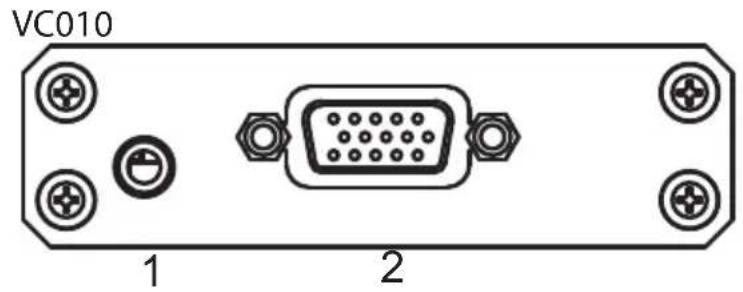
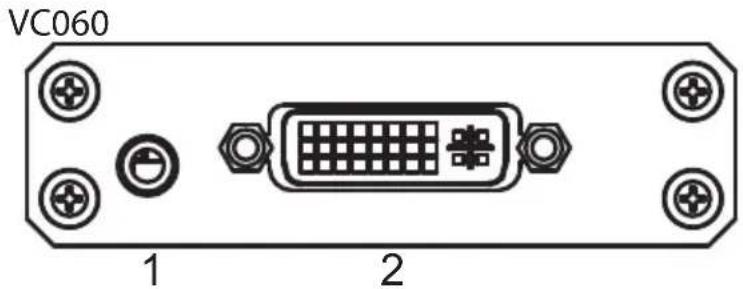

| No. | Component Description | |
| 1 RS-232 port Connect one | end of the provided RS-232Configuration Cable to this port and the other end to your PC's serial port for RS-232 Command Control. | |
| 2 VGA IN port /DVI IN port /HDMI IN port | Connect your VGA / DVI / HDMI source device to this port. | |
Rear View
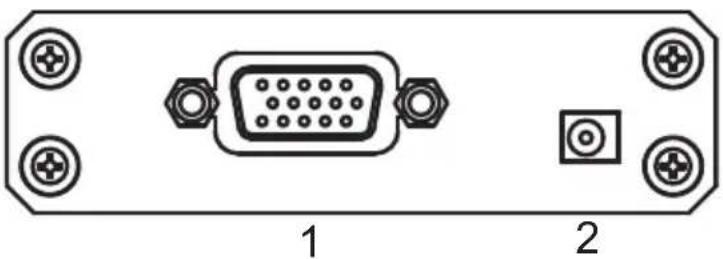
VC010
natural_image
Diagram of a 2D computer interface panel showing a central VGA port with four connectors and two labeled pins (no text or symbols beyond labels)VC060

natural_image
Diagram of a D-sub connector with labeled pins (no text or symbols beyond labels 1 and 2)VC080

natural_image
Diagram of a device rear panel with labeled ports and an internal connector (no text or symbols beyond labels)| No. | Component Description | |
| 1 VGA OUT port /DVI OUT port /HDMI OUT port | Connect your VGA / DVI / HDMI display to this port. | |
| 2 Power Jack Plug in the power adapter to the power jack and use the switch to power on the VC010 / VC060 / VC080. | ||

- Important safety information regarding the placement of this device is provided on page 27. Please review it before proceeding.
- Make sure that the power to all devices connected to the installation are turned off.
- Make sure that all devices you will be installing are properly grounded.
Installation
Installation of the VC010 / VC060 / VC080 is simply a matter of plugging in the appropriate cables.
To install the VC010 / VC060 / VC080, refer to the installation diagram in the next page as you perform the following steps:
-
Do the cable connection for your device as follows:
-
For VC010, use a HDB-15 cable to connect the VGA input port on the video display device to the VGA Out port on the rear of the VC010.
- For VC060, use a DVI cable to connect the DVI input port on the video display device to the DVI Out port on the rear of the VC060.
-
For VC080, use an HDMI cable to connect the HDMI input port on the video display device to the HDMI Out port on the rear of the VC080.
-
Connect the source device(s) to the front panel port, as follows:
-
For VC010, use an HDB-15 cable to connect the VGA source device(s) to the VGA In port on the VC010.
- For VC060, use a DVI cable to connect the DVI source device(s) to the DVI In port on the VC060.
-
For VC080, use HDMI cables to connect the HDMI output ports on the source device(s) to the HDMI In port on the VC080.
-
Plug the Plug the USB to DC Power Cord cable into the power jack on the into the Power Jack on the VC010 / VC060 / VC080.
-
(Optional) To edit the VC010 / VC060 / VC080 system settings through the RS-232 port, connect the hardware / software controller here using the provided RS-232 Configuration Cable.

This completes the basic installation of the VGA/DVI/HDMI EDID Emulator. You may now power on the display and source devices.
Installing the RS-232 Controller
You can access and configure the VC010 / VC060 / VC080 EDID Wizard AP through the RS-232 serial interface. Use the RS-232 configuration cable and connect one end to the VC010 / VC060 / VC080 RS-232 port, and the other end to the serial port of your PC.
Note: To configure the VC010 / VC060 / VC080 through the EDID Wizard, see page 10.
Overview
The VGA/DVI/HDMI EDID Emulator offers an easy and flexible EDID selection method using the front panel pushbuttons. You can select the default ATEN EDID configuration or one of three customized EDID settings (stored via the EDID Learn Pushbutton or the EDID Wizard). Upgrade the firmware conveniently through the RS-232 serial interface. The VC010 / VC060 / VC080 is set to use the ATEN EDID configuration by default at initialization.
EDID Panel Selection
To select an EDID via the front panel, press the EDID Set pushbutton to toggle between the Default and EDID Sets 1\~3. The LEDs indicate which setting is currently selected.
◆ Default- the EDID is set to the ATEN default configuration
- LED 1 \~ 3 - the EDID is customized; see the next section for details on how to customize and store EDIDs for later use.
EDID Learn Pushbutton
You can automatically store a display's EDID for later use by pressing the EDID Learn Pushbutton located in the top panel. Follow these steps:
- Attach the video display/monitor you want to use to the VC010 / VC060 / VC080.
- Select the EDID Set (1\~3) into which you want to store the configuration – do this by pressing the EDID Learn Pushbutton. The LED lights up to indicate it is the active position.
- Press the EDID Learn Pushbutton for more than three (3) seconds. The selected LED flashes to indicate that the settings are being captured and stored.
- Do these steps (1 to 3) for each display/monitor EDID that you want to store. You can also use the EDID Wizard's EDID Program feature.
EDID Wizard
The EDID Wizard application can downloaded from the ATEN website. It enables users to view detailed information about the attached display and edit them accordingly. Save time by using the EDID Wizard to automatically retrieve a display's EDID. Furthermore, you can use the EDID Wizard to preconfigure up to 3 EDID settings for later use, thus eliminating delays when changing displays.
EDID Wizard Menu
The OSD menu options are shown in the table below.
| Menu Page Sub-Menu Page(s) | |||
| EDID Setting | Location | ATEN Default / Set 1 / Set 2 / Set 3 | |
| Resolution Resolution | |||
| Audio Audio Format (1-3) | |||
| Position EDID Vendor / Product Identification | |||
| CEA Display | Support | ||
| Video Data | |||
| Audio Data | |||
| Speaker Allocation | |||
| Vendor Specific Data | |||
| Detail Timing / Display Description (1-5) | |||
Main Page
After downloading and installing, run the VC010 / VC060 / VC080's EDID Wizard application to display the EDID main page.

The menu options on top of the screen include:
◆ File - load / save a configuration or quit the application
- Load EDID from file - if you have previously saved an EDID configuration file, use this option to retrieve and use it for a display
- Save - use this to save a configuration to a file, which can be loaded later
- Save as - use this to save a configuration to a new file instead of overwriting the active configuration file
- Quit - this closes the EDID application
- CEC - connect or disconnect to a monitor/video display
◆ Help - check the version of the EDID Wizard

- The Summary screen provides a quick view of active EDID configurations stored on the device, including the active Resolution and Audio settings
Note: To edit the Resolution and Audio options in the Summary screen, you have to manually select the values in the corresponding Set 1\~3 screen. The Summary screen automatically updates when changes are made.
- The Default and Set 1\~3 menu tabs lead to screens showing the configuration for each EDID Set. See Editing EDID Sets, page 14 for more details
- Retrieve EDID from Display – select a set (Set 1\~3) and click this button to automatically retrieve the EDID of an attached display/monitor and save it to the set – see EDID Programming, page 13 for more details on how to do this
- Save to Device – see page 13
- Retrieve EDID from Device – select a set (Set 1\~3) and click this button to automatically retrieve the EDID of an attached emulator device and save it to the set
Save to Device
The Save to Device button enables you to use an EDID configuration for the duration of the session. Unlike the File > Save/Save as menu option, the Save to Device button does not save the configuration into a file.
Note: When editing the rest of the screens in the application, make sure you use the File > Save/Save as menu option to make an EDID configuration available for later use. Otherwise, you will have to re-enter the EDID configuration values.
EDID Programming
You can use the Summary screen to automatically retrieve and save the EDID settings of a connected monitor/display device. To do this, follow these steps:
- In the Summary screen, under the Location column, check the EDID Set (1\~3) into which you want to store the configuration.
- Click the Retrieve EDID from Display button. This captures the EDID settings of the device currently connected to the VC010 / VC060 / VC080.
- The Summary screen displays the acquired settings. Click the Save to Device button to use the configuration for the duration of the session, or go to File > Save / Save as menu option to save the configuration to a file, making it available for later use.
Note: See EDID Learn Pushbutton, page 9 for retrieving and storing EDID settings using the front panel pushbutton.
Editing EDID Sets
Use the succeeding screens to view, configure and store the EDID configuration for each EDID Set.
Select which EDID Set you want to view/edit by clicking on the menu tab (Set 1, Set 2 or Set 3). The screen has two panels:
| EDID Vendor/Product Identification | Vendor/Product Identification |
| EDID Structure/Revision Basic Display/Feature Color Characteristics Established Timings Standard Timings Detail Timing/Display Description 1 Detail Timing/Display Description 2 Monitor Description 1 Monitor Description 2 | Model ID: 0x0000 Manufacturer ID: LCD Serial Number: 0x00000001 Manufacture Date: 2011 week 0 Week of Manufacture: 0 Year of Manufacture: 2011 |
| CEA Display Support Video Data Audio Data Speaker Allocation Vendor Specific Data Detail Timing/Display Description 1 Detail Timing/Display Description 2 Detail Timing/Display Description 3 Detail Timing/Display Description 4 Detail Timing/Display Description 5 |
Click the option in the left panel that you want to view and/or edit. There are two categories: EDID (Extended Display Identification Data) and CEA (Consumer Electronics Association).
When you highlight the menu items, the right side panel displays the current settings for the corresponding EDID configuration. Some of the screens are read-only, including the following:
◆ EDID
Vendor / Product Identification; EDID Structure / Revision; Basic Display / Feature; Color Characteristics; Monitor Description
CEA
Speaker Allocation
The rest of the screens can be configured and are described in the succeeding sections.
Note: The default ATEN EDID configuration or EDID Default screens are shown in this manual.
EDID
The EDID structure is comprised of 128 bytes in total – each heading shown in the left panel of the EDID Set screen corresponds to a specific number of bytes.
Established Timings
This screen lists video resolutions/timings that display devices can support. Select the resolutions you want to use for the attached monitor/display device.

Standard Timings
This screen shows eight resolutions/timings that display devices can support in addition to those listed in the Established Timings. Select the H Active Pixel and Aspect Ratio for each.
| EDID Vendor/Product Identification EDID Structure/Revision Basic Display/Feature Color Characteristics Established Timings Standard Timings Detail Timing/Display Description 1 Detail Timing/Display Description 2 Monitor Description 1 Monitor Description 2 CEA Display Support Video Data Audio Data Speaker Allocation Vendor Specific Data Detail Timing/Display Description 1 Detail Timing/Display Description 2 Detail Timing/Display Description 3 Detail Timing/Display Description 4 Detail Timing/Display Description 5 | Standard Timings | |||
| H Active Pixel | V Active Pixel | R Refresh Rate | Aspect Ratio | |
| H 256 | V 160 | R 61 | 16:10 | |
| H 256 | V 160 | R 61 | 16:10 | |
| H 256 | V 160 | R 61 | 16:10 | |
| H 256 | V 160 | R 61 | 16:10 | |
| H 256 | V 160 | R 61 | 16:1 | |
| H 256 | V 160 | R 61 | 16:10 | |
| H 256 | V 160 | R 61 | 16:10 | |
| H 256 | V 160 | R 61 | 16:10 | |
Detail Timing / Display Description
This screen gives more video resolution options, and provides resolution/timing details. In the drop down menu, choose a resolution with values that fit the attached monitor/display device.

Monitor Description 2
This screen lets you specify the viewing specifications, namely horizontal and vertical scan ranges and pixel clock rate, of your monitor/display device. Enter the values that correspond to your device.
| EDID Vendor/Product Identification EDID Structure/Revision Basic Display/Feature Color Characteristics Established Timings Standard Timings Detail Timing/Display Description 1 Detail Timing/Display Description 2 Monitor Description 1 Monitor Description 2 | Monitor Description Min Max Horizontal scan range: 15 ~ 46 kHz Vertical scan range: 59 ~ 61 Hz Pixel clock rate: 80 MHz (10-2550) |
| CEA Display Support Video Data Audio Data Speaker Allocation Vendor Specific Data Detail Timing/Display Description 1 Detail Timing/Display Description 2 Detail Timing/Display Description 3 Detail Timing/Display Description 4 Detail Timing/Display Description 5 |
CEA
The following screens fall under the CEA category. CEA is an extension data of the EDID structure, which further extends the standard definitions of EDID to support advanced features of monitors/display devices.
Note: The screens under the CEA category are relevant for HDMI displays only. Only configure these screens if necessary for your display. You may skip the proceeding screens if you are using a VGA or DVI display.
Display Support
This screen describes the display's basic digital components. You can select the YCbCr mode applicable to your display.

Video Data
This screen lists additional video resolution/timing displays that may be supported by other devices, other than PC monitors (for example 1080i). Select the resolutions that work with the attached monitor/display device.

Audio Data
This screen lets you select advanced audio configurations for your device. Use the drop down menu to select the audio format (1\~3) applicable to your audio output device.

Vendor Specific Data
This screen shows other advanced video parameters supported by your display device. You can select whether to enable/disable 3D support from your device if the feature is supported.

Detail Timing / Display Description
This screen gives more video resolution options, and provides resolution/timing details (in addition to those specified in the EDID structure). In the drop down menu, choose a resolution with values that fit the attached monitor/display device.

Saving your Settings
To save your EDID configuration, click File from the top menu and either select:
- Save to overwrite an existing file; or
◆ Save as to save the settings into a new .BIN file
The .BIN file can be retrieved for later use by clicking File > Load and selecting the configuration file.
About
To view the EDID Wizard version, click Help and select About.

Click OK to close this window.
Powering Off and Restarting
If you power off the VC010 / VC060 / VC080, follows these steps before powering it on again:
- Power off the attached devices.
- Unplug the power adapter cable from the VC010 / VC060 / VC080.
- Wait 10 seconds, and then plug the power adapter cable back in.
- After the VC010 / VC060 / VC080 is powered on, power on the attached devices.
The Firmware Upgrade Utility
Introduction
The purpose of the Windows-based Firmware Upgrade Utility is to provide an easy process for upgrading the VC010 / VC060 / VC080. The program comes as part of a Firmware Upgrade Package that is specific for each device.
As new firmware versions become available, new firmware upgrade packages are posted on our website. Check the website regularly to find the latest information and packages.
Downloading the Firmware Upgrade Package
To download the firmware upgrade package:
-
On our Website go to: Download - Firmware and choose the device model, or from the VC010 / VC060 / VC080 product page under the Resources tab, select Firmware. A list of available firmware upgrade packages appears.
-
Choose the firmware upgrade package that you wish to install (usually the most recent) and download it to your computer.
Preparation
To prepare for the firmware upgrade, do the following:
- Use the Firmware Upgrade Cable provided with this unit to connect a COM port on your computer to the Firmware Upgrade Port of your VC010 / VC060 / VC080.

-
Press and hold the Learn/Select button.
-
Plug the power adapter into the VC010 / VC060 / VC080 to power the unit.
Starting the Upgrade
To upgrade the firmware:
- Run the downloaded firmware upgrade package file either by double-clicking the file icon, or by opening a command line and entering the full path to it.
The Firmware Upgrade Utility welcome screen appears:

Note: The screens shown in this section are for reference only. The wording and layout of the actual screens put up by the Firmware Upgrade Utility may vary slightly from these examples.
- Read and Agree to the License Agreement (click the I Agree radio button).
(Continues on next page.)
(Continued from previous page.)
- Click Next to continue. The Firmware Upgrade Utility main screen appears. The devices capable of being upgraded are listed in the Device List panel:

- Click Next to perform the upgrade.
If you enabled Check Firmware Version, the Utility compares the device's firmware level with that of the upgrade files. If it finds that the device's version is higher than the upgrade version, it brings up a dialog box informing you of the situation and gives you the option to continue or cancel.

If you didn't enable Check Firmware Version, the Utility installs the upgrade files without checking whether they are a higher level, or not.
As the upgrade proceeds, status messages appear in the Status Messages panel, and the progress toward completion is shown on the Progress bar.
Upgrade Succeeded
After the upgrade has completed, a screen appears to inform you that the procedure was successful:

Click Finish to close the Firmware Upgrade Utility.
Upgrade Failed
If the Upgrade Succeeded screen doesn't appear, it means that the upgrade failed to complete successfully. See the next section, Firmware Upgrade Recovery, for how to proceed.
Firmware Upgrade Recovery
There are three conditions that call for firmware upgrade recovery:
- When a firmware upgrade is manually aborted.
- When the mainboard firmware upgrade fails.
- When the I/O firmware upgrade fails.
To perform a firmware upgrade recovery, do the following:
- Power off the device.
- Connect the Firmware Upgrade Cable to its Firmware Upgrade Port.
- Repeat the upgrade procedure.
Safety Instructions
General
- This product is for indoor use only.
- Read all of these instructions. Save them for future reference.
◆ Follow all warnings and instructions marked on the device. - Do not place the device on any unstable surface (cart, stand, table, etc.). If the device falls, serious damage will result.
- Do not use the device near water.
- Do not place the device near, or over, radiators or heat registers.
- The device cabinet is provided with slots and openings to allow for adequate ventilation. To ensure reliable operation, and to protect against overheating, these openings must never be blocked or covered.
- The device should never be placed on a soft surface (bed, sofa, rug, etc.) as this will block its ventilation openings. Likewise, the device should not be placed in a built-in enclosure unless adequate ventilation has been provided.
- Never spill liquid of any kind on the device.
- Unplug the device from the wall outlet before cleaning. Do not use liquid or aerosol cleaners. Use a damp cloth for cleaning.
- The device should be operated from the type of power source indicated on the marking label. If you are not sure of the type of power available, consult your dealer or local power company.
- The device is designed for IT power distribution systems with 230V phase-to-phase voltage.
- To prevent damage to your installation it is important that all devices are properly grounded.
- The device is equipped with a DC adapter. This is a safety feature.
- To help protect your system from sudden, transient increases and decreases in electrical power, use a surge suppressor, line conditioner, or un-interruptible power supply (UPS).
-
Position system cables and power cables carefully; Be sure that nothing rests on any cables.
-
Never push objects of any kind into or through cabinet slots. They may touch dangerous voltage points or short out parts resulting in a risk of fire or electrical shock.
- Do not attempt to service the device yourself. Refer all servicing to qualified service personnel.
- If the following conditions occur, unplug the device from the wall outlet and bring it to qualified service personnel for repair.
◆ Liquid has been spilled into the device.
- The device has been exposed to rain or water.
- The device has been dropped, or the cabinet has been damaged.
- The device exhibits a distinct change in performance, indicating a need for service.
- The device does not operate normally when the operating instructions are followed.
- Only adjust those controls that are covered in the operating instructions. Improper adjustment of other controls may result in damage that will require extensive work by a qualified technician to repair.
Technical Support
International
- For online technical support – including troubleshooting, documentation, and software updates: http://eservice.aten.com
- For telephone support, see Telephone Support, page iii:
North America
| Email Support support@aten-usa.com | ||
| Online Technical Support | Troubleshooting Documentation Software Updates | http://www.aten-usa.com/support |
| Telephone Support 1-888-999-ATEN | ext 4988 | |
When you contact us, please have the following information ready beforehand:
Product model number, serial number, and date of purchase.
- Your computer configuration, including operating system, revision level, expansion cards, and software.
◆ Any error messages displayed at the time the error occurred.
- The sequence of operations that led up to the error.
◆ Any other information you feel may be of help.
Specifications
| Function VC010 VC060 VC080 | ||||
| Connectors Video In 1 x HDB-15 F (Blue) | 1 x DVI-I F (White) | 1 x HDMI Type A F (Black) | ||
| Video Out 1 x HDB-15 F (Blue) | 1 x DVI-I F (White) | 1 x HDMI Type A F (Blue) | ||
| RS-232 Port 1 x Mini Jack (Black) | ||||
| Power 1 x DC Jack | ||||
| Switch Learn/Select 1 x Pushbutton | ||||
| LED EDID Set 4 (Green) | ||||
| Video 1920 x 1200; 1080p | ||||
| Power Consumption DC5V, 0.15W | ||||
| Environment Operating Temperature | 0°C - 50°C | |||
| Physical Properties | Housing | Metal | ||
| Weight | 0.15 kg | |||
| Dimension (L x W x H) | 7.90 x 7.76 x 2.45 cm | 7.90 x 7.86 x 2.45 cm | 7.90 x 7.16 x 2.45 cm | |
Limited Warranty
IN NO EVENT SHALL THE DIRECT VENDOR'S LIABILITY EXCEED THE PRICE PAID FOR THE PRODUCT FROM DIRECT, INDIRECT, SPECIAL, INCIDENTAL, OR CONSEQUENTIAL DAMAGES RESULTING FROM THE USE OF THE PRODUCT, DISK, OR ITS DOCUMENTATION.
The direct vendor makes no warranty or representation, expressed, implied, or statutory with respect to the contents or use of this documentation, and especially disclaims its quality, performance, merchantability, or fitness for any particular purpose.
The direct vendor also reserves the right to revise or update the device or documentation without obligation to notify any individual or entity of such revisions, or update. For further inquiries, please contact your direct vendor.


- VGA/DVI/HDMI EDID Emulator
- VC010 / VC060 / VC080
- User Manual
- EMC Information
- FEDERAL COMMUNICATIONS COMMISSION INTERFERENCE STATEMENT
- CE Warning:
- RoHS
- Safety
- SJ/T 11364-2006
- Telephone Support
- User Notice
- Package Contents
- Contents
- Introduction
- Hardware Setup
- Operation
- The Firmware Upgrade Utility
- Appendix
- About this Manual
- Conventions
- Product Information
- Overview
- Features
- Requirements
- Source Devices(s)
- Display Device
- Cables
- Components
- Top View
- Front View
- Rear View
- Installation
- Installing the RS-232 Controller
- EDID Panel Selection
- EDID Learn Pushbutton
- EDID Wizard
- EDID Wizard Menu
- Main Page
- Save to Device
- EDID Programming
- Editing EDID Sets
- EDID
- Established Timings
- Standard Timings
- Detail Timing / Display Description
- Monitor Description 2
- CEA
- Display Support
- Video Data
- Audio Data
- Vendor Specific Data
- Saving your Settings
- About
- Powering Off and Restarting
- The Firmware Upgrade Utility
- Introduction
- Downloading the Firmware Upgrade Package
- Preparation
- Starting the Upgrade
- (Continued from previous page.)
- Upgrade Succeeded
- Upgrade Failed
- Firmware Upgrade Recovery
- Safety Instructions
- General
- Technical Support
- International
- North America
- Limited Warranty
Brand : ATEN
Model : VC080
Category : Audio/video converter