
FP-F30U - Air purifier SHARP - Free user manual and instructions
Find the device manual for free FP-F30U SHARP in PDF.


| Product Type | Air Purifier |
| Brand | Sharp |
| Model | FP-F30U |
| Power Supply | 120 V ~ 60 Hz |
| Fan Speeds | MAX, MED, SLEEP |
| Rated Power (MAX) | 67 W |
| Rated Power (MED) | 49 W |
| Rated Power (SLEEP) | 34 W |
| Fan Speed (MAX) | 327 CFM |
| Fan Speed (MED) | 192 CFM |
| Fan Speed (SLEEP) | 57 CFM |
| Noise Level (MAX) | 68 dBA |
| Noise Level (MED) | 59 dBA |
| Noise Level (SLEEP) | 45 dBA |
| Standby Power | 2.6 W |
| CADR (Dust) | 323 CFM |
| CADR (Smoke) | 184 CFM |
| CADR (Pollen) | 132 CFM |
| Filter Type | True HEPA |
| Dimensions (W x D x H) | 15.5 x 9.5 x 19.5 in (394 x 241 x 495 mm) |
| Weight | 28.7 lbs (13.0 kg) |
| Cord Length | 80.7 in (2.05 m) |
| Auto Resume | Yes |
| Filter Replacement Indicator | Yes |
| Maintenance | Pre-filter: vacuum every month; HEPA filter: replace every 2 years |
Frequently Asked Questions - FP-F30U SHARP
User questions about FP-F30U SHARP
0 question about this device. Answer the ones you know or ask your own.
Ask a new question about this device
Download the instructions for your Air purifier in PDF format for free! Find your manual FP-F30U - SHARP and take your electronic device back in hand. On this page are published all the documents necessary for the use of your device. FP-F30U by SHARP.
USER MANUAL FP-F30U SHARP
HSITDN3
ESPAHOL

Read before operating your new Air Purifier.
The air purifier draws in room air through the air inlet grilles and through a pre-filter and a True HEPA filter inside the main unit and then discharges it through the air outlet. The True HEPA filter can remove 99.97% of dust particles as small as 0.3 microns that pass through the filter.
Some odors may be absorbed by the filter and released over time, causing additional odors. Depending on usage conditions, and especially if the product is used in environments significantly more severe than a normal household, these odors may become noticeable sooner than expected. If these odors persist, replace the filter. (Page 8,11)

The air purifier is not designed to remove air suspended gases such as harmful gases (for example, carbon monoxide contained in cigarette smoke).


EN-2
EN-3
EN-4
EN-5
EN-6
EN-7
EN-8
EN-9
EN-10
ENGLISH


REGISTER YOUR PRODUCT
Registering your new product is easy and offers benefits that help you get the most out of your Sharp product including:
Convenience: If you ever need warranty support, your product information is already on file. Communication: Stay up to date with important notifications and special offers from SHARP. Support: Quickly access support content including Owners Manuals, FAQ's, How-to Videos, and much more.
3 EASY WAYS TO REGISTER TODAY!

SCAN
Use the camera or QR code scanning application on your smart phone

ONLINE
Visit our sites to learn more about your product at sharpusa.com and sbl.sharpusa.com

CALL US
US 800-BE-SHARP 800-237-4277 Mon-Fri: 7am-7pm CST Sat-Sun: 9am-7pm CST
Scan this QR Code on your smart phone
Visit http://www.sharpusa.com/register
Contact a Sharp Advisor on the phone
PRODUCT SUPPORT
If you have questions about the setup or operation of your product, please refer to the corresponding section within this manual.
Additionally, visit www.sharpusa.com/support to access exclusive content about your product including:
→ FAQ's and How-To Videos
Sharp Electronics Corporation (the "Product"), when shipped in its original container, will be free from defective workmanship and materials, and agrees that it will, at its option, either repair the defect or replace the defective Product or part thereof with a new or remanufactured equivalent at no charge to the purchaser for parts or labor for the period(s) set forth below.
This warranty does not apply to any appearance items of the Product nor to the additional excluded item(s) set forth below nor to any Product the exterior of which has been damaged or defaced, which has been subjected to misuse, abnormal service or handling, or which has been altered or modified in design or construction.
In order to enforce the rights under this limited warranty, the purchaser should follow the steps set forth below and provide proof of purchase to the servicer.
The limited warranty described herein is in addition to whatever implied warranties may be granted to purchasers by law. ALL IMPLIED WARRANTIES INCLUDING THE WARRANTIES OF MERCHANTABILITY AND FITNESS FOR USE ARE LIMITED TO THE PERIOD(S) FROM THE DATE OF PURCHASE SET FORTH BELOW. Some states do not allow limitations on how long an implied warranty lasts, so the above limitation may not apply to you.
Neither the sales personnel of the seller nor any other person is authorized to make any warranties other than those described herein, or to extend the duration of any warranties beyond the time period described herein on behalf of Sharp.
The warranties described herein shall be the sole and exclusive warranties granted by Sharp and shall be the sole and exclusive remedy available to the purchaser. Correction of defects, in the manner and for the period of time described herein, shall constitute full satisfaction of all claims, whether based on contract, negligence, strict liability or otherwise. In no event shall Sharp be liable, or in any way responsible, for any damages or defects in the Product which were caused by repairs or attempted repairs performed by anyone other than an authorized servicer. Nor shall Sharp be liable or in any way responsible for any incidental or consequential economic or property damage. Some states do not allow the exclusion of incidental or consequential damages, so the above exclusion may not apply to you.
THIS LIMITED WARRANTY IS VALID ONLY IN THE FIFTY (50) UNITED STATES, THE DISTRICT OF COLUMBIA AND PUERTO RICO.
HR/HS2WCKRwtQp10Dg'umtg'q'] cxg'y k'pleto ckqp**** available when you need service for your Product.
One (1) year parts and labor from date of purchase.
Or r gctcpeg'lgo u'qlfy g'Traf wev 'Ongtu. 'beegwugigu."ql'cp!"
C1.1kopenNgo 3uGzenf of Hgo Y atcpv

When using electrical appliances, basic safety precautions should always be followed to reduce the risk of fire, electric shock, and injury to persons, including the following:
- Read all instructions before using the product.
4. Use the product only for intended household use as described in this manual. Any other use not recommended by the manufacturer may cause fire, electric shock, or injury to persons.
5. This appliance is not intended for use by persons (including children) with reduced physical, sensory or mental capabilities, or lack of experience and knowledge, unless they have been given supervision or instruction concerning use of the appliance by a person responsible for their safety.
Children should be supervised to ensure they do not play with the appliance. 6. Never operate the product if the power cord or plug is damaged or the product is malfunctioning or damaged.
- If the power cord or plug is damaged, it must be replaced by the manufacturer, its service agent or a Sharp authorized Service Center in order to avoid a hazard.
Contact the nearest Service Center for any problems, adjustments, or repairs. 8. Do not repair or disassemble the product yourself.
9. Follow the instructions a to h below for the power cord or plug. It may cause short circuit, excessive heat, electric shock, or fire.
a. Use only AC 120 volt outlet. b. Do not use the product if the power cord or plug is damaged or the
- The product has a polarized plug (one blade is wider than the other). To reduce the risk of electric shock, this plug is intended to fit in a polarized outlet only one way. If the plug does not fit fully in the outlet, reverse the plug. If it still does not fit, contact a qualified electrician or service person. Do not attempt to defeat this safety feature.
10. To reduce the risk of fire or electric shock, do not use this product with any Solid State Speed Control device.
Do not use the product near gas appliances or sparks from lit cigarettes.
- Do not operate the product in a room with flammable gas, such as oil residue or chemical fumes.
Do not expose the product to rain, or use near water, in a bathroom, laundry area or other damp location.
Do not insert fingers or foreign objects into the air inlet or air outlets.
Do not look into the air outlets.
Radio or TV Interference
If the product should cause interference to radio or television reception, try to correct the interference by one or more of the following measures:
- Reorient or relocate the receiving antenna.
Increase the separation between the product and radio/TV receiver.
Connect the product into an outlet on a circuit different from that to which the receiver is connected.
Consult the dealer or an experienced radio/TV technician for help.
HSTONE
The dust collecting ability of the product is effective even when the product is as close as 5 cm from the wall, but the surrounding walls or floor may get dirty. Please place the product at a distance from the wall. The wall directly behind the air outlets and the floor or rug on which the product is placed may become dirty over time. When using the product for an extended period of time at the same location, periodically clean the walls. The floor or the rug.
- Follow the instructions in this manual for installation and maintenance. (Pages 10-13) Take out the filters from the plastic bag before placing the filters in the main unit. Do not operate the product without the filters properly installed. Do not wash and reuse the True HEPA filter. Washing will not improve filter performance and can also cause electric shock or operating malfunctions.
- Do not operate the product in rooms where aerosol insecticides are present. It may cause the odor of insecticide to remain in the product and emitted from the air outlets.
- Do not block the air inlets or air outlets. Always operate the product in an upright position. Always hold the handle of the product when moving it. Be careful not to damage the product when moving it on an uneven surface or carpet.

To maintain the quality of the filter, it is installed in the main unit and be sure to stop operation and unplug the product before filter installation.

(Pre-filter)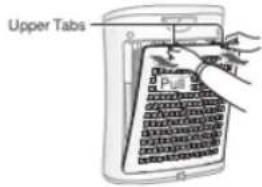
Take out the filter from the place the filter within the
Do not install the filter backwards or the product will not operate properly.
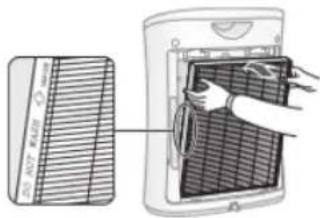


![graph LR A["ON/OFF"] --> B["ON/OFF"] B --> C["• Unless the power plug has been unplugged, the operation will Auto Resume in the previous mode it was operating in. Example: if the power is lost during operation, the operation will resume to previous operation mode and settings if power is restored."]](/content/2026/05/1059460/images/73b1f77fec99069fc1c760b16d27eba039d9128d02d996d79265b1380c9f81d1.jpg)
By continuous discharging (long cycles) in 20 minutes, the product detects removed airborne dust particles from the air as they are trapped through the filter system.

To maintain optimum performance of the filter, please clean the product including the filter periodically.


(Pre-filter)
Gently remove dust from the back panel, using a vacuum cleaner attachment or similar tool.
Be careful not to apply too much force to the pre-filter.

- Add a small amount of dish detergent to water and soak for about 30 minutes.
Rinse with clean water.
Completely dry after rinsing before reinstalling in the area.
Gently remove dust from the True HEPA filter with a vacuum
When REPLACE FILTER indicator light turns on*.
The REPLACE FILTER indicator light turns on after approximately 4,000 hours of use. (Approximately 4,000 hours? 39.722 hours?)
Filter life varies depending on the operation mode.
After the filter is replaced, connect the power plug to the wall outlet and press the POWER ON/OFF button. Then press the REPLACE FILTER button for 5 seconds.

| O cz 'Ugt xdeg | |||
| True HEPA Filter | Whenever dust accumulates, when odor emanates from the air outlet, or once a month. | 47 gctu, | H:/H52J HW |
According to the Japan Electrical Manufacturers' Association (JEMA) 3689, and the maximum service life is based on the equivalent condition of the smoke from 5 cigarettes per day whereby the dust collection power is reduced by approximately 40% per year. The recommended replacement period is

Before calling for service, please review the list below, since the problem may not be the product malfunction.
| TGO GF[ "pqVt'b crlwpevlqp+ | |
| „Ergcp'qt'lgr#eg'g"Öngt'ktN g[‘crr gcf'vq'dg] gcxkl* uqlqfl 0'Rci g':.32.33+“Ej gemhq'ugg'ktN g"Öngt'ctg] gcxkl`uqlqfl 0“T gr #eg'g"Öngt0 | |
| Uo gnlhtqo 'b'pgy 'Öngt0 | • Immediately after removing the plastic bag, a slight odor may occur.Vj ku'qf qt'ku'pqVj cto hwrlhq"Öngt'rghqto cpeg'qt'] wo cp" exposure. |
| • This model has Auto Resume function, where the operation resumes at the previous operation mode and settings if the power is restored. |
![graph LR A["MODE"] --> B["with the product OFF"] B --> C["Lighting"] C --> D["with the product OFF"] D --> E["Mode"] E --> F["Flashing"] style A fill:#f9f,stroke:#333 style B fill:#ccf,stroke:#333 style C fill:#cfc,stroke:#333 style D fill:#fcc,stroke:#333 style E fill:#cff,stroke:#333 style F fill:…](/content/2026/05/1059460/images/e2dff60f8a937f35eaaf4f88141a32d14a36a63c254cda46b5fe11ec5436014f.jpg)
| Model | HR/H52W | |||
| Power supply | 342X"f82J| | |||
| Fan Speed Operation | Fan Speed Adjustment | MAX | MED | SLEEP |
| Rated Power (W) | 67 | 49 | 34 | |
| Fan Speed (CFM) | 327 | 92 | 57 | |
| Noise Level (dBA)*1 | 68 | 59 | 45 | |
| Standby Power (W) | 26 | |||
| Tgeqo o gpf gf "Tqqo "Ug g; 4 | 3651s0h0*35o *) | |||
| CADR (Dust/Smoke/Pollen) | 323°F; 4°F32; | |||
| Filter type | Vtvg°J GRC°Ogt | |||
| Cord Length | 808°h0*402o + | |||
| Dimensions | 151⁄2ip0°Y+91⁄2ip0°F+3:1⁄2in. (H)622o o "Y+3:4o o "F+685o o "J++ | |||
| Weight | :08°du0*50 m+ | |||
1. Noise level is measured based on the JEMA 3689 standard of the Japan Electrical Manufacturers' Association. 2. The size of the room which is appropriate for operating the product at maximum speed.






Brand : SHARP
Model : FP-F30U
Category : Air purifier