
CNS-HDS09DG - Computer accessory Canyon - Free user manual and instructions
Find the device manual for free CNS-HDS09DG Canyon in PDF.


| Product Type | Stereo Headset with Microphone |
| Model | CNS-HDS09DG |
| Brand | Canyon |
| Connectivity | 3.5 mm audio jack + USB (microphone) |
| Frequency Response | 20 Hz - 20,000 Hz |
| Impedance | 32 Ω |
| Microphone Type | Omnidirectional, noise-canceling |
| Microphone Frequency Response | 100 Hz - 10,000 Hz |
| Driver Diameter | 40 mm |
| Maximum Input Power | 100 mW |
| Power Source | USB powered (5 V, 500 mA) |
| Cable Length | 2.0 m |
| Controls | Volume wheel, mute switch on cable |
| Compatibility | PC, Mac, PlayStation, Xbox, Nintendo Switch |
| Dimensions (W x D x H) | 180 x 160 x 60 mm |
| Weight | 250 g (without cable) |
| Package Contents | Headset, USB adapter (3.5mm splitter for PC), user manual |
| Construction Materials | Plastic, leatherette ear cushions, steel headband |
| Maintenance | Clean with soft, dry cloth; avoid liquids |
| Safety | Do not listen at high volume for prolonged periods; keep away from moisture |
| Spare Parts Availability | Ear cushions available from manufacturer; check official support |
| Repairability | Cable not user-replaceable; other parts replaceable only by professionals |
| Warranty | 2 years limited warranty against defects |
Frequently Asked Questions - CNS-HDS09DG Canyon
User questions about CNS-HDS09DG Canyon
0 question about this device. Answer the ones you know or ask your own.
Ask a new question about this device
Download the instructions for your Computer accessory in PDF format for free! Find your manual CNS-HDS09DG - Canyon and take your electronic device back in hand. On this page are published all the documents necessary for the use of your device. CNS-HDS09DG by Canyon.
USER MANUAL CNS-HDS09DG Canyon
The Ground Truth image displays a single, solid horizontal line, which is a stylistic or background element (like a rule line on paper). According to Rule 2, such lines must be ignored by the OCR result. The provided OCR content is "____", which consists of underscores. Underscores are not equivalent to a solid line and are not permitted under the “Stylistic/Background Lines (Ignore)” rule. Outputting underscores for a stylistic line is incorrect because it misinterprets the line as a placeholder fill-in-the-blank area. Since the OCR output incorrectly rendered a stylistic line as underscores (which should be ignored), this violates the rule. Therefore, the OCR result is inconsistent with the Ground Truth.
-
-
CNS-HDS09DG
USB Type C
Multiport Docking
Station 12-in-1

Model
CNS-HDS09DG space gray 5291485004552

space gray
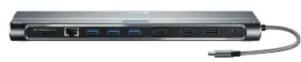
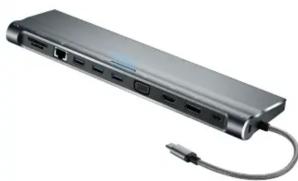
If your laptop is equipped with USB Type C, this universal docking station will improve its connectivity features with 12 built-in ports to the maximum. Using Display Port, HDMI i VGA, you can connect your laptop to two monitors simultaneously. Also, the docking station has built-in 3.5mm audio jack for headphones and a microphone, SD and TF card reader, Ethernet for flawless internet connection and USB Type C for fast charging. This cool gadget will make your workspace look stylish and modern.
Warning: 2 monitors can be simultaneously connected via DP+VGA or DP+HDMI. It's not recommended to combine HDMI+VGA.
natural_image
Exterior view of a gray USB flash drive with USB cable (no text or symbols visible)Features
• 1 combined 3,5mm audiojack
• 2 card readers: SD/SDHC/SDXC and TF 3.0
- 3 USB 3.0 ports
• 1 HDMI (4K,30Hz) port
• 1 Displayport (4K, 30Hz)
• 1 VGA port with resolution up to 1920x1200/60Hz
• 1 USB Type C port supporting USB Power Delivery 87W
• 1 Ethernet port 100 Mbit
• 1 Docking station lock
• Full aluminum case
• 15-cm integrated braided cable
• 9 LED indicators of the 9 interfaces
- Heat radiating system
• Product size: 74x22.5x276 mm
Brand : Canyon
Model : CNS-HDS09DG
Category : Computer accessory