FIVERAY M40 - Flash Zhiyun - Free user manual and instructions
Find the device manual for free FIVERAY M40 Zhiyun in PDF.


| Product Type | LED Video Light |
| Model | FIVERAY M40 |
| Brand | Zhiyun |
| Power Output | 40W |
| Beam Angle | 9° to 20° |
| Brightness | Up to 6500 lux at 1m |
| Color Temperature Range | 2700K - 6500K |
| RGB Mode | Yes, full color spectrum |
| CRI | 95+ |
| TLCI | 97+ |
| Dimensions | Approx. 150 x 80 x 50 mm |
| Weight | Approx. 350 g |
| Power Supply | Built-in battery or AC adapter |
| Battery Capacity | 2600mAh |
| Runtime | Up to 70 minutes at full power |
| Charging Time | About 2 hours |
| Control Methods | On-board controls, smartphone app |
| Mounting | 1/4" screw, cold shoe |
| Included Accessories | Light stand adapter, diffuser, case |
| Maintenance | Keep clean dry, avoid dust, charge regularly |
| Safety | Do not expose to water or extreme heat |
| Spare Parts & Repairability | Contact Zhiyun support for replacement parts |
| General Information | Designed for professional video lighting |
Frequently Asked Questions - FIVERAY M40 Zhiyun
User questions about FIVERAY M40 Zhiyun
0 question about this device. Answer the ones you know or ask your own.
Ask a new question about this device
Download the instructions for your Flash in PDF format for free! Find your manual FIVERAY M40 - Zhiyun and take your electronic device back in hand. On this page are published all the documents necessary for the use of your device. FIVERAY M40 by Zhiyun.
USER MANUAL FIVERAY M40 Zhiyun
ZHIYUN FIVERAY M40 is a high-power portable LED fill light. It supports brightness/color temperature adjustment and comes with a bracket for mounting on a light stand or a camera. The fill light has adjustable angles and meets the lighting needs for video recording, live streaming, and still portrait shooting.

WARNING
This product is not waterproof. Prevent contact with any kind of liquid or cleaner with the product. Never use the product in the rain or a humid environment.
Do not expose this product to corrosive chemicals, inflammable and explosive materials.
Do not touch heat-generating components when using the product to avoid getting burnt.
Do not wrap or block the fan with foreign objects to avoid affecting the cooling performance of the product.
Do not look directly at the glowing LED chips to avoid eyesight damage.
Do not place or use the product in environments with temperatures over 40°C.
BE CAREFUL
- This product is a high-precision control device. Damage may be caused to the product if dropped or subject to external force, and this may result in malfunction.
- Please keep your hands dry while using the product and use soft dry cloth for cleaning.
- Keep this product out of the reach of children.
- Protect the product from dust and sand during use.
- Do not disassemble this product on your own. In the event of malfunctions, it should be repaired by ZHIYUN or authorized maintenance personnel.
Get to Know ZHIYUN FIVERAY M40
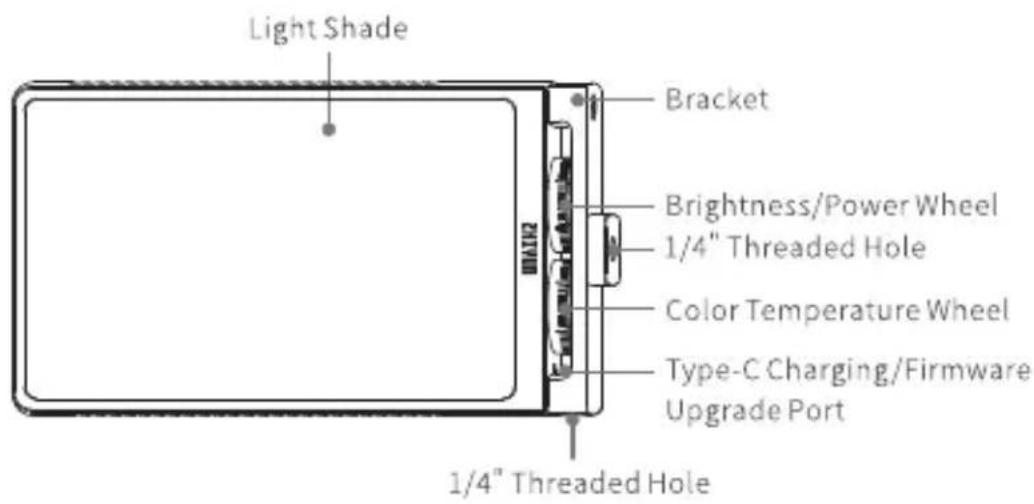
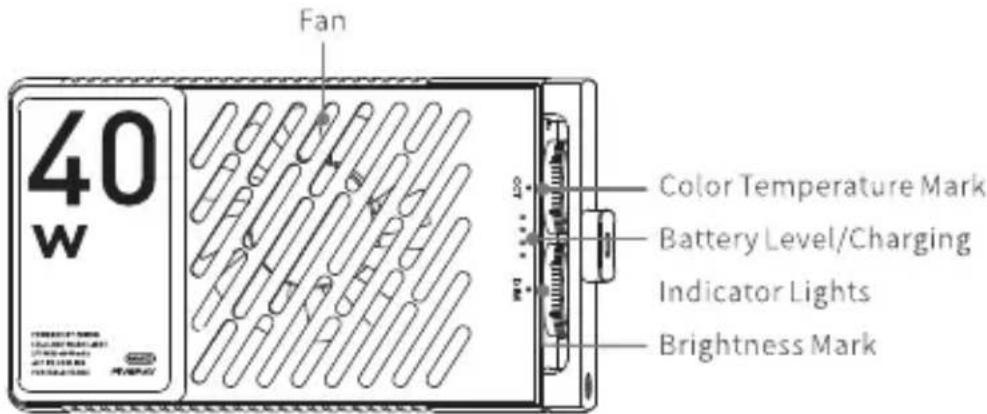
Charging
The product adopts built-in battery. When using it for the first time, please activate the battery by fully charging it to ensure proper function.
Charging method: Use provided USB Type-C cable to connect the USB charger to charge ZHIYUN FIVERAY M40. It is recommended to use USB chargers that meet the PD protocol (support 50W at most). When powered off or in operation, a maximum of 15W is supported for charging the battery.
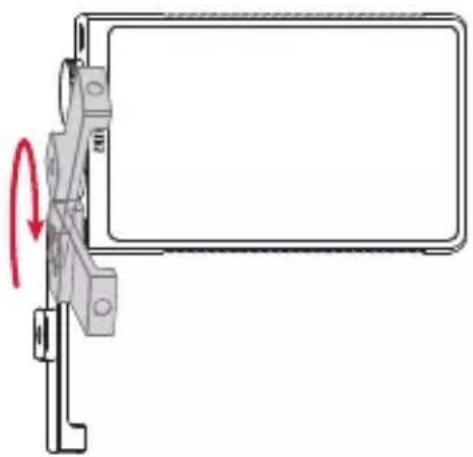
Before charging, please rotate the bracket in the opposite direction or in the direction shown in the figure to prevent the bracket from blocking the Type-C charging port.
natural_image
Diagram of a mechanical clamp or bracket with a red curved arrow indicating rotation (no text or symbols present)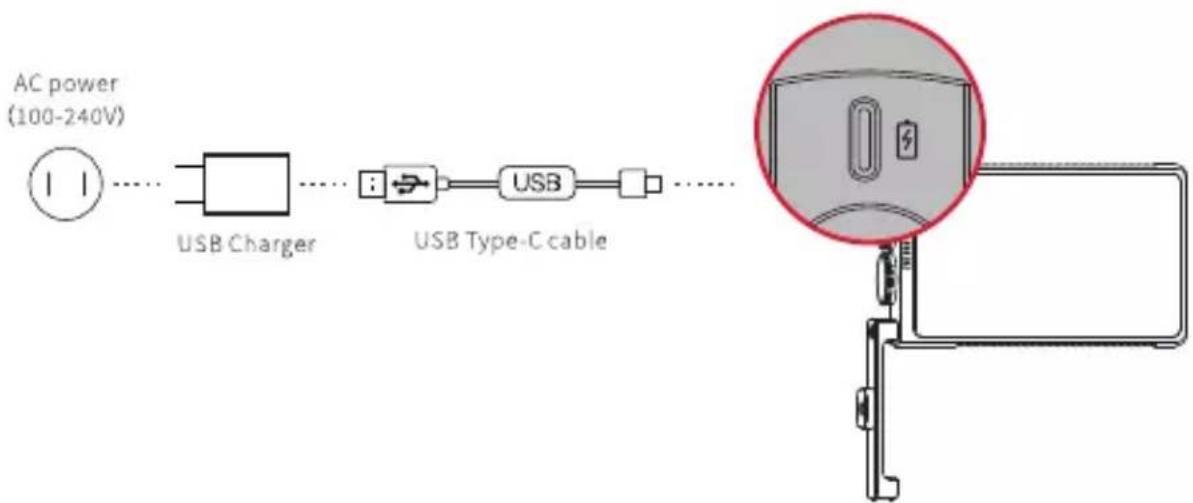
flowchart
graph LR
    A["AC power (100-240V)"] --> B["USB Charger"]
    B --> C["USB Type-C cable"]
    C --> D["Image of device with magnified detail"]
① It is recommended to fully charge ZHIYUN FIVERAY M40 every time before use. The performance will be affected if the battery level is too low.
② USB charger is not provided.
How to Use ZHIYUN FIVERAY M40

Do not stare at the glowing LED chips of ZHIYUN FIVERAY M40.

The IP rating of ZHIYUN FIVERAY M40 is IP20.
1. Installing ZHIYUN FIVERAY M40
ZHIYUN FIVERAY M40 can be installed on a light stand or a camera. Following is the installation example on a light stand.
①Rotate the ZHIYUN FIVERAY M40 bracket to its vertical state in a negative direction or the direction shown in the figure.
②Expand the light stand and place on a flat surface.
③Drive the 1/4" screw at the top of the light stand to the 1/4" screw hole at the bottom of the ZHIYUN FIVERAY M40 bracket. Rotate the bracket for a firm installation ①. Adjust the ZHIYUN FIVERAY M40 forward or backward to the ideal position ②. Please adjust the FIVERAY M40 to a proper position according to the needs of use.
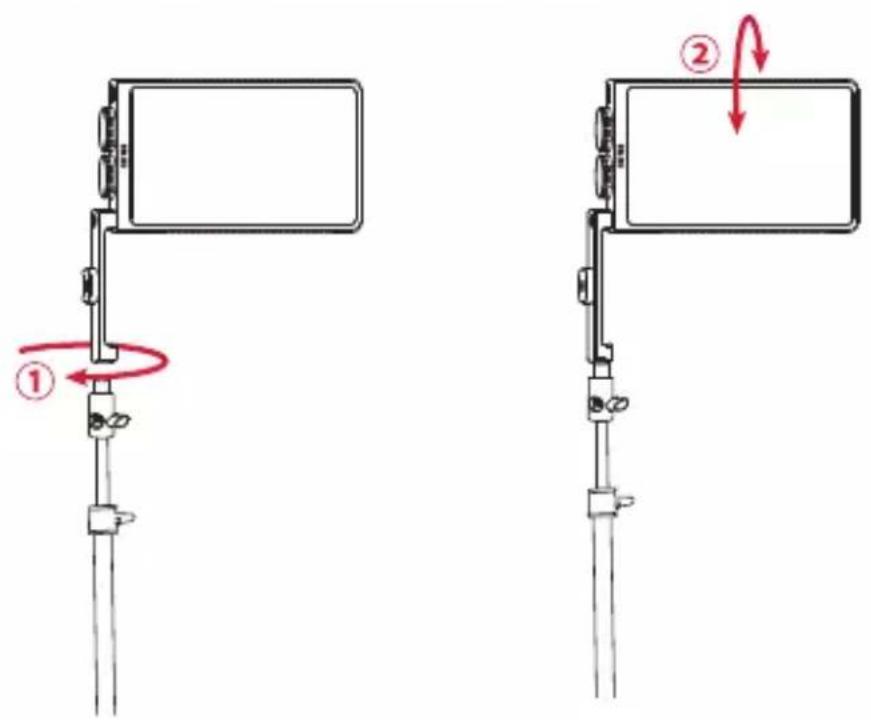

Light stand is not provided.
2. How to Use
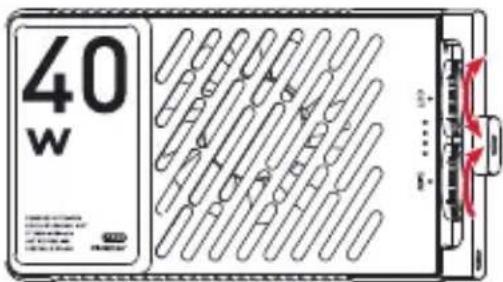
Brightness/Power Wheel:
Scroll up: Power on/increase brightness Scroll down: Power off/decrease brightness Color
Temperature Wheel:
Scroll up: Increase color temperature level Scroll down: Decrease color temperature level
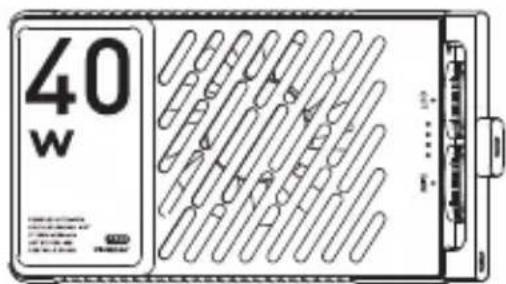
Battery Level/Charging Indicator Lights
One solid indicator light: Battery level 0%-25% Two solid indicator lights: Battery level 25%-50% Three solid indicator lights: Battery level 50%-75% Four solid indicator lights: Battery level 75%-100% Four indicator lights illuminate one by one: Charging Four solid indicator lights: Charging completed
Operation Instruction
To power on ZHIYUN FIVERAY M40, scroll up the brightness/power wheel until you hear a click sound and the brightness mark points between "OFF" and "0%". The battery level/charging indicator lights will then display current battery level. Scroll the brightness/power wheel to adjust the brightness of ZHIYUN FIVERAY M40. Scroll the color temperature wheel to adjust the color temperature. Please adjust the brightness/color temperature to a proper value according to the needs of use.
Firmware Upgrade
You can use "Zhiyun Gimbal Tools" to upgrade the firmware of ZHIYUN FIVERAY M40.
Upgrade method:
- Connect the Type-C charging port of the ZHIYUN FIVERAY M40 to the computer with the USB Type-C USB cable.
- Visit the official website of ZHIYUN (www.zhiyun-tech.com), go to the ZHIYUN FIVERAY M40 product page, click "Download", find the USB driver, Zhiyun Gimbal Tools, and the firmware, and download. (USB drivers are not required for Mac OS systems).
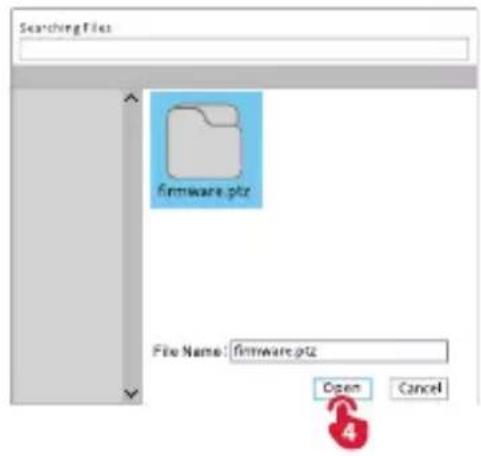
- Install the driver and the software, unzip the firmware for the files with the ".ptz" file extension.
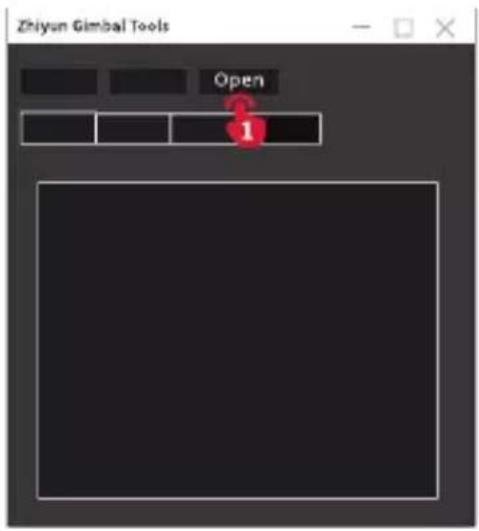
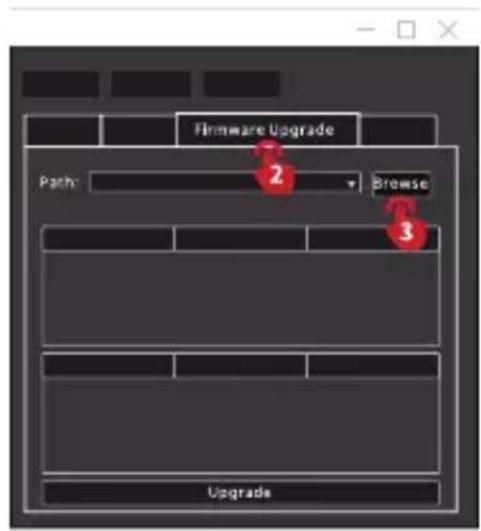
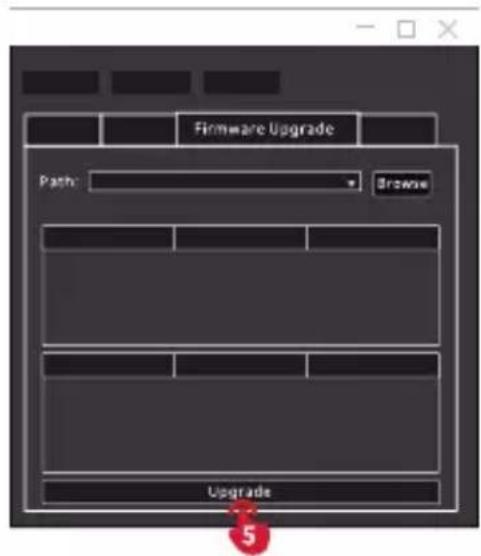
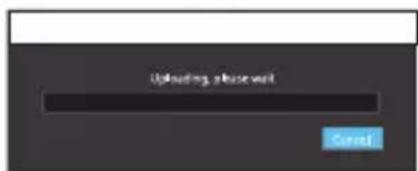
- Open "Zhiyun Gimbal Tools", select the corresponding port, click "Open", click "Firmware Upgrade". Click "Browse" under "Path" to select the latest firmware downloaded (with the ".ptz" file extension), and click "Upgrade" at the bottom to upgrade firmware.
ZHIYUN FIVERAY M40 will be restarted when the firmware upgrade finishes.

ZHIYUN FIVERAY M40 can also perform upgrade when powered off.
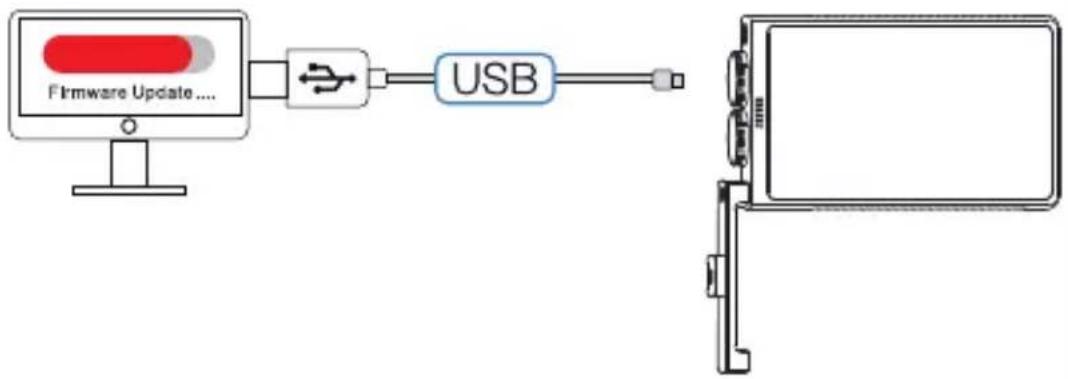
flowchart
graph LR
    A["Firmware Update...."] --> B["USB"]
    B --> C["Device Panel"]
Product Specifications
Product Model:PL102
| Battery Capacity | 2600MAH | |
| Maximum Power Output | 40W | |
| Color Temperature Range | 2700K-6200K | |
| CRI/TLCI | CRI≥96 TLCI≥97 | |
| LED Chip | 88PCS(cool light chips)+88PCS(warm light chips) | |
| PD Fast Charge Charging Time | 1H50min | Lab Data1 |
| Illuminance (Max. Power) | 14000(lux) | Lab Data2 |
| Runtime (Max. Power) | 29min | Lab Data3 |
| Operation Temperature | -10°C~40°C | |
| Size | 136.5*77.8*29mm | |
| Net Weight | 320g |
Lab Data 1: The data is collected at a specified temperature of 25^ C with 12.9W PD Fast Charging. The charging time is 1h 50 min. The actual charging time varies under different conditions: the lower the charging temperature, the lower the charging current, leading to a longer charging time.
Lab Data 2: The data is collected in the following conditions: 25^ C temperature, indoor illuminance lower than 0.1lux, test distance 0.3m, and the color temperature is set at 4300K with 100% brightness. The illuminance is 14000 lux. The actual illuminance varies under different conditions.
Lab Data 3: The data is collected in the following conditions: 25°C temperature, FIVERAY M40 is fully-charged, and the color temperature is set at 6200K with 100% brightness. The battery runtime is 29 min. The actual battery runtime varies under different conditions: the longer the operating time, the higher the charge and discharge frequency, and the less the battery activity, leading to a shorter battery runtime.
All the data is collected from internal experiments of ZHIYUN laboratories. Under different scenarios, the above data is subject to a margin of error. Please refer to actual use of this product.
Warranty Period
- Customers are entitled to replacement or free repair service in case of quality deficits found in the product within 15 days upon receipt of the product.
- Customers are entitled to free repair service from ZHIYUN for any product proven defective in material or workmanship that results in product failure during normal consumer usage and conditions within the valid warranty period, which is 12 months counting from the date of selling. However, warranty period varies by product component and country of purchase. Please contact our after-sales service team on ZHIYUN official website or your place of purchase for detailed warranty information.
Warranty Exclusions
- Products subjected to unauthorized repair, misuse, collision, neglect, mishandling, soaking, accident, and unauthorized alteration.
- Products subjected to improper use or whose labels or security tags have been torn off or altered.
- Products whose warranty has expired.
- Products damaged due to force majeure, such as fire, flood, lightning, etc.
Warranty Claim Procedure
- If failure or any problem occurs to your product after purchase, please contact a local agent for assistance, or you can always contact ZHIYUN's customer service through email at info@zhiyun-tech.com or website at www.zhiyun-tech.com.
- Your local agent or ZHIYUN's customer service will guide you through the whole service procedure regarding any product issue or problem you have encountered. ZHIYUN reserves the right to reexamine damaged or returned products.
Reading Tips
Legends:

Hints and Tips

Important
Scan the QR code below to know more about our products.

Official website

(Zhiyun Tech)

(Zhiyun Support)

Instagram

YouTube
Quality Certificate
Please download the latest version from www.zhiyun-tech.com
This document is subject to change without notice.
ZHIYUN™ are the trademark of ZHISHEN.
Copyright © 2022 ZHISHEN. All rights reserved.
Tel: +85 400 900 6868
USA Hotline: +1 808-319-6137,9:00-18:00 GMT-7, Mon-Fri
Europe Hotline: +49 (0)6101 8132 180,10:00-17:00 GMT+1,Mon-Fri
Email: info@zhiyun-tech.com
Website: www.zhiyun-tech.com
Address: 09 Huangtong Road, Tieshan Industrial Zone, Qixing District, Guilin, 541004, Guangxi, China.

If at any time in the future you should need to dispose of this product please note that: Waste electrical products should not be disposed of with household waste. Please recycle where facilities exist. Check with your Local Authority or retailer for recycling advice. (Waste Electrical and Electronic Equipment Directive)
zhiyun-tech.com