NB27C - Screen Viotek - Free user manual and instructions
Find the device manual for free NB27C Viotek in PDF.


| Product Type | 27-inch LED Monitor |
| Brand | Viotek |
| Model | NB27C |
| Screen Size | 27 inches (diagonal) |
| Resolution | 1920 x 1080 (Full HD) |
| Refresh Rate | 75Hz |
| Panel Type | IPS (In-Plane Switching) |
| Aspect Ratio | 16:9 |
| Response Time | 5ms (GTG) |
| Brightness | 250 cd/m² |
| Contrast Ratio | 1000:1 (static) |
| Viewing Angles | 178° horizontal / 178° vertical |
| Connectivity | 1 x HDMI 1.4, 1 x VGA, Audio Out |
| VESA Mount | 100 x 100mm |
| Tilt Adjustment | -5° to +15° |
| Power Consumption | 25W typical, <0.5W standby |
| Power Supply | External power adapter (12V, 3A) |
| Dimensions (with stand) | 24.2 x 17.7 x 7.5 inches |
| Weight (with stand) | 9.9 lbs (4.5 kg) |
| Care and Cleaning | Wipe with a soft, dry cloth; avoid harsh chemicals. |
| Safety Precautions | Do not disassemble; use only supplied adapter; keep away from water. |
| Spare Parts Availability | Power adapter and stand available via authorized service. |
| Repairability Index | 6.5 / 10 (user-replaceable stand and power adapter) |
| General Information | Designed for home and office use; Flicker-Free and Blue Light Filter technologies. |
Frequently Asked Questions - NB27C Viotek
User questions about NB27C Viotek
0 question about this device. Answer the ones you know or ask your own.
Ask a new question about this device
Download the instructions for your Screen in PDF format for free! Find your manual NB27C - Viotek and take your electronic device back in hand. On this page are published all the documents necessary for the use of your device. NB27C by Viotek.
USER MANUAL NB27C Viotek
natural_image
Modern curved-screen monitor with sleek white frame and metallic legs (no visible text or symbols)VIOTEK
USER MANUAL
Read and observe the following warnings and information below. Viotek shall not be held responsible for injury or damage of products or persons due to failure to adhere to these precautions.
Safety Precautions and Maintenance
- Before cleaning, always unplug your monitor. It is recommended to use dry cloth or lightly damp cloth to clean your monitor. Dry cloth is, however, the safest. If using damp cloth, wait for your monitor to completely dry before plugging it in again.
- Do not use alcohol or ammonia-based cleaner and/or liquids to clean your monitor.
- This monitor features ventilation openings on the back of the unit. Avoid blocking these openings to prevent the monitor from overheating.
- Avoid placing this monitor near any heat sources ex: portable heater or heating vent, as this may cause damage to your monitor.
- Do not spray cleaner and/or any kind of liquid directly onto the monitor's screen.
- Do not insert anything into any part of the monitor including the ventilation openings.
- Always make sure your monitor is placed on a secure, level surface to prevent it from falling and sustaining damage.
- Unplug your monitor during any extended periods of time where it will not be used.
- Do not place heavy items on the monitor or monitor cables.
- Do not attempt to dissemble the monitor or remove parts from this monitor. Any disassembly or modification etc. not performed by an authorized technician can result in damage to the monitor and/or possible exposure to high voltage electricity which may lead to serious injury or death.
Viotek shall not be held responsible for injury or damage of products or persons due to failure to adhere to the aforementioned precautions or any others noted hereafter.
Box Contents
1x Monitor
1x Power Cable (AC 100-240V 50/60Hz)
1x VGA Video Cable
1x Warranty Card
1x User manual
Basic Setup
-
Insert one end of the VGA video cable into your PC's graphics card. DVI or HDMI may also be used, cables not included.
-
Connect the other end of the video cable to the corresponding connector on your monitor. See the image below.

-
Connect the power cable to your monitor then connect the other end to your power source such as a wall outlet or surge protector. It is recommended to use a surge protector.
-
Turn on your monitor.
Indicator Light
This light is located on the front of the monitor.
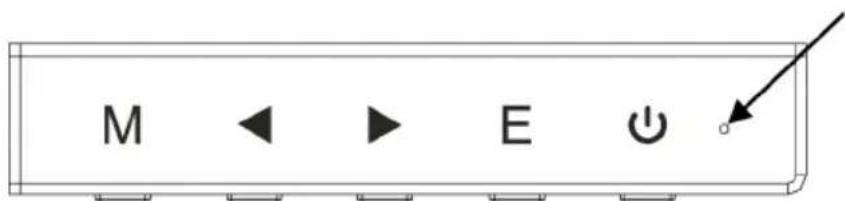
Solid blue light indicates power is on and the monitor is operating normally.
Flashing blue light indicates no video source has been detected. Please ensure your PC is on and all video cables are fully inserted and/or connected.
Control Panel
The Control Panel is located at the corner of the monitor. Its labels are on the front of the monitor while its buttons are located directly under the labels on the bottom edge. The Control Panel is used in combination with the OSD Menu to adjust the monitor settings. Review the images below for information about this panel.

Menu/Enter: Opens the main menu of the OSD
Down: Moves down/lower while navigating
Up: Moves up/higher while navigating
Exit: Exits the current menu screen and returns to the main menu, or closes the menu if currently on the main menu screen
Power: Turns the monitor on or off.
Note: Both the Down and Up buttons may be mapped to keyboard hotkeys if desired.
OSD Menu
The On-Screen Display (OSD) Menu may be used to adjust your monitor's settings and appears on screen after turning on the monitor and pressing the Control Panel's Menu/Enter Key.
Note: When using the monitor for the first time, settings will automatically adjust to optimal settings according to your computer's configuration and parts etc.
AdjustmentSettings
| MainMenu Item | MainMenu Icon | Submenu Item | SubmenuOptionsDescription | |
| BRIGHTNESS |  | BrightnessNONE | NEAdjustsbrightness | |
| ContrastNONE | EAdjustscontrast | |||
| ECO | STANDARDBestfor | overalluse. | ||
| TEXT | Bestforreadingand writing. | |||
| GAMEBestforgames. | ||||
| MOVIEBestformovies. | ||||
| DCR | ONEnablesDCR | |||
| OFFDisablesDCR | ||||
| IMAGE |  | H.POSITIONNONE | Adjusthorizontal pictureposition. | |
| V.POSITIONNONE | Adjustverticalpicture position. | |||
| CLOCKNONE | ||||
| PHASENONE | ||||
| ASPECTRATIO | AUTOBestfor overalluse. | |||
| FULLSCREEN | Setsimageaspect ratiotofullscreen. | |||
| 4:3 | Setsimageaspect ratioto4:3. | |||
| COLORTEMP. |  | COLORTEMP. | WARM | Changetowarmcolor temperature. |
| COOL | Changetocoolcolor temperature. | |||
| USER | Setcustomtemp. usingoptionsbelow. | |||
| RED | NONE | Adjustsredcolor temperature. | ||
| BLUE | NONE | Adjustbluecolor temperature. | ||
| MainMenu Item | MainMenu Icon | Submenultem | Submenu Options | Description |
| OSDSETTING |  | LANGUAGENONE | SelectstheOSDmenulanguage (English,French,German, SimplifiedChinese,Italian, Spanish,Portuguese,Turkish, Polish,Dutch,Russian,Korean) | |
| OSDH.POSITIONNONE | NEAdjustsOSDH | horizontalposition | ||
| OSDV.POSITIONNONE | NEAdjustsOSDV | Verticalposition | ||
| OSDTIMERNONE | AdjustsOSDdisplaytime | |||
| TRANSPARENCYNONE | NEAdjustsOSDtransparency | |||
| RESET |  | IMAGEAUTOADJUSTNONE | Autoadjuststhedisplay position,focus,andclock | |
| COLORAUTOADJUSTNONE | Adjustswhitebalance | |||
| RESETNONERestoretofactorysettings | ||||
| AUTOPOWERDOWNNONE | Enableautomaticshutdown (energysaving) | |||
| MISC |  | HOTKEYTYPE | ECO+DCR | AnyselecteditemisaHotkey. Thefirsttwoareavailableforall models,ASP+ECOisonly availableforwide-screenmodel, SOU+VOLisrespectivelyusedto switchinputsignalandadjust thevolume. |
| BRI+CON | ||||
| ASP+ECO | ||||
| SOU+VOL | ||||
| SIGNALSOURCE | VGAVGA(analog)signalinput | |||
| DVIDVI(digital)signalinput | ||||
| HDMIHDMIsignalinput | ||||
| MUTE | ON | DisablesBuilt-InAudio(specific modelsonly) | ||
| OFF | EnablesBuilt-InAudio(specific modelsonly) | |||
| VOLUMENONE | Adjustsspeakervolume(specific modelsonly) | |||
Note: When adjusting sound-related settings, connect a 3.5mm audio cable to your sound card.
Troubleshooting
-
The screen is blank.
-
Be sure the power button has been pressed to turn the monitor on.
- Confirm the brightness and contrast settings are set normally
- Check if the Indicator Light is flashing, if so, this indicates there is no signal from your video source
-
If your source is a notebook or laptop, be sure that its settings are in mirror mode and the device itself is powered on.
-
The image is out of focus.
- Ensure the video signal cable is inserted properly on both ends.
-
The screen is flashing.
-
Try an alternative power source as the current one causing the issue may be insufficient or too week.
- Ensure devices such as non-shielded speakers, fluorescent lighting, AC transformers, table fans etc. are away from your screen to avoid magnetic disturbances.
-
Press the Exit Key on the monitor to auto adjust the image and apply optimum settings.
-
The color bleeds or visual effects appear unusual.
-
If your screen is all red, blue, or any colors disappear, check to see that the signal cable is properly inserted. A loose connection can cause a bad signal.
-
Ty connecting to another video source for comparison.
-
The screen appears to be scrolling or rolling or moving unusually.
-
Check that your source frequency is within 55-76Hz.
-
Reconnect and ensure your video source cable is secure.
-
The monitor needs cleaning.
-
Make sure the monitor has been powered off.
• Always use a soft, non-abrasive cloth when cleaning. - Use dry, non-abrasive to gently remove debris or dust.
- If necessary, lightly dampen a non-abrasive cloth with water and gently clean the surface.
- Never use alcohol or ammonia-base cleaning solutions.
- Never spray liquid directly onto any part of the monitor.
Compatible Resolutions
| 18.5” Series | 19.5” Series | ||||
| Resolution | H-Frequency (KHz) | V-Frequency (Hz) | Resolution | H-Frequency (KHz) | V-Frequency (Hz) |
| 720x400 | 31.47 | 70.0 | 720x400 | 31.47 | 70.0 |
| 640x480 | 31.47 | 60.0 | 640x480 | 31.47 | 60.0 |
| 640x480 | 37.86 | 72.8 | 640x480 | 37.86 | 72.8 |
| 640x480 | 37.50 | 75.0 | 640x480 | 37.50 | 75.0 |
| 800x600 | 37.87 | 60.0 | 800x600 | 37.87 | 60.0 |
| 800x600 | 48.07 | 72.0 | 800x600 | 48.07 | 72.0 |
| 800x600 | 46.87 | 75.0 | 800x600 | 46.87 | 75.0 |
| 1024x768 | 48.36 | 60.0 | 1024x768 | 48.36 | 60.0 |
| 1024x768 | 56.48 | 70.0 | 1024x768 | 56.48 | 70.0 |
| 1024x768 | 60.02 | 75.0 | 1024x768 | 60.02 | 75.0 |
| 1360x768 | 47.4 | 60.0 | 1280x1024 | 63.98 | 60.0 |
| 1366x768 | 47.85 | 60.0 | 1280x1024 | 79.97 | 75.0 |
| 1600x900 | 60.0 | 60.0 | |||
| 21.5” Series | ||
| Resolution | H-Frequency (KHz) | V-Frequency (Hz) |
| 720x400 | 31.47 | 70.0 |
| 640x480 | 31.47 | 60.0 |
| 640x480 | 37.86 | 72.8 |
| 640x480 | 37.50 | 75.0 |
| 800x600 | 37.87 | 60.0 |
| 800x600 | 48.07 | 72.0 |
| 800x600 | 46.87 | 75.0 |
| 1024x768 | 48.36 | 60.0 |
| 1024x768 | 56.48 | 70.0 |
| 1024x768 | 60.02 | 75.0 |
| 1280x1024 | 63.98 | 60.0 |
| 1280x1024 | 79.97 | 75.0 |
| 1440x900 | 55.47 | 60.0 |
| 1440x900 | 55.94 | 60.0 |
| 1680x1050 | 64.67 | 60.0 |
| 1680x1050 | 65.29 | 60.0 |
| 1920x1080 | 67.50 | 60.0 |
| 27” Series | ||
| Resolution | H-Frequency (KHz) | V-Frequency (Hz) |
| 640x480 | 31.47 | 60.0 |
| 800x600 | 37.87 | 60.0 |
| 1024x768 | 48.36 | 60.0 |
| 1280x1024 | 63.98 | 60.0 |
| 1440x900 | 55.47 | 60.0 |
| 1440x900 | 55.94 | 60.0 |
| 1680x1050 | 64.67 | 60.0 |
| 1680x1050 | 65.29 | 60.0 |
| 1920x1080 | 67.50 | 60.0 |
Specifications
| Screen Size | 18.5" | 19.5" | 21.5" | 27" |
| Brightness | 200cd/m2 | 200cd/m2 | 200cd/m2 | 250cd/m2 |
| Color | 16.7M | 16.7M | 16.7M | 16.7M |
| Resolutions | 1360x768 pixels | 1600x900 pixels | 1920x1080 pixels | 1920x1080 pixels |
| H-frequency | 30-60KHz | 30-80KHz | 30-80KHz | 30-80KHz |
| V-frequency | 55-75Hz | 55-75Hz | 55-75Hz | 55-75Hz |
| Power input | AC 100V - 240V 50/60HZ | |||
| Environment | Operation Temp: 0° - 40°C Humidity: Less than 80% Storage Temp: -20° - 60°C | |||
Note: These specifications are for reference only; please refer to your monitor's packaging for specifications related to your monitoYear Limited Hardware Warranty
Viotek Inc. (Viotek) offers a ONE YEAR limited warranty covering the hardware of Viotek LED Monitor ("Product"), limited to those residing in the 50 US States and Canada. This warranty gives you specific rights and you may also have other rights which vary from state to state.
Viotek warrants the Product to be free from defects in materials and workmanship under normal use for (1) year, as sold to the original purchaser, from the date of retail purchase by the original end-user put. If a hardware defect arises and a valid claim is received within the warranty period, at its option and extent permitted by law, Viotek will: (1) repair the hardware defect by using new or refurbished parts that equivalent to new in performance and reliability; or (2) exchange the product with a product that is new refurbished, that is substantially equivalent to the original product. This warranty is for replacement for lik items only and does not cover items out of production if the company no longer stocks them. This was not assignable or transferable. The original purchaser may call the Viotek toll-free number at 1-855-229-9 for service request.
Upon Viotek's replacement or repair of a Product under warranty, the original end-user purchaser will have the remaining warranty under the original warranty period (without any postponement during repair or replacement). When a product or part is exchanged, any replacement item becomes your property and that replaced item becomes Viotek's property. Important: Do not disassemble the Product. Disassembling the Product will void this warranty. Only Viotek or a party expressly authorized by Viotek should perform sell on this Product.
This warranty only covers technical hardware defectiveness during the warranty period and under normal conditions. Viotek does not warrant uninterrupted or error-free operation of this Product. This Warranty do not apply to damages or circumstances, such as, but not limited to:
(a) Damage that is caused by conditions, malfunctions, or damage not resulting in from defects in material workmanship. These conditions include, but are not limited to, accidents, and improper operation or maintenance;
(b) Product has been tampered with, repaired and/or modified by non-authorized personnel;
(c) Obsolescence;
(d) Damage (accidental or other) to the Product that is cosmetic, meaning damage that does not impact operation and functioning of the Product, such as without limitation to rust, change in color, texture or f wear and tear, scrapes, scratches, dents, cracks, or gradual deterioration;
(e) Damage to the Product caused by war, terrorism, fire, accident, natural disaster, intentional or accide misuse, abuse, neglect or improper maintenance, use under abnormal conditions, accidental drops, abuse fire;
(f) Damage to the Product caused by an external electrical fault, surge, or any electrical anomaly;
(g) Any contamination, condition or other circumstance, which Viotek, in its sole discretion, considers a danger to health and safety, including, but not limited to any contact between the Product and a biohazard bodily fluids, infectious materials/substance, chemicals, hazardous substances, diseases, radiation, or other;
(h) Fraud, theft, misplacement, unexplained disappearance, or willful acts.
DISCLAIMER OF WARRANTY
TO THE EXTENT PERMITTED BY LAW, THIS WARRANTY AND THE REMEDIES SET FORTH ABOVE ARE EXCLUSIVE AND IN LIEU OF ALL OTHER WARRANTIES, REMEDIES AND CONDITIONS, WHETHER ORAL, WRITTEN, STATUTORY EXPRESS OR IMPLIED. AS PERMITTED BY APPLICABLE LAW, VIOTEK SPECIFICALLY DISCLAIMS ANY AND ALL STATUTORY OR IMPLIED WARRANTIES, INCLUDING, WITHOUT LIMITATION, WARRANTIES OF MERCHANTABILITY, FITNESS FOR A
PARTICULAR PURPOSE, AND WARRANTIES AGAINST HIDDEN OR LATENT DEFECTS. IF VIOTEK CANNOT LAWFULLY DISCLAIM STATUTORY OR IMPLIED WARRANTIES THEN TO THE EXTENT PERMITTED BY LAW, ALL SUCH WARRANTIES SHALL BE LIMITED IN DURATION TO THE DURATION OF THE EXPRESS WARRANTY AND TO THE REPAIR OR REPLACEMENT SERVICE AS DETERMINED BY VIOTEK IN ITS SOLE DISCRETION. NO RESELLER, AGEN OR EMPLOYEE IS AUTHORIZED TO MAKE ANY MODIFICATION, EXTENSION, OR ADDITION TO THIS WARRANTY. IF ANY TERM(S) IS HELD ILLEGAL OR UNENFORCEABLE, THE LEGALITY AND ENFORCEABILITY OF THE REMAINING TERMS SHALL NOT BE AFFECTED OR IMPAIRED.
EXCEPT AS PROVIDED IN THIS WARRANTY AND TO THE MAXIMUM EXTENT PERMITTED BY LAW, VIOTEK IS NOT RESPONSIBLE FOR DIRECT, INDIRECT, SPECIAL, INCIDENTAL OR CONSEQUENTIAL DAMAGES RESULTING FROM ANY BREACH OF WARRANTY OR CONDITION OR PERFORMANCE OF THE PRODUCT, OR UNDER ANY OTHER LEG THEORY, INCLUDING BUT NOT LIMITED TO LOSS OF USE; LOSS OF REVENUE; LOSS OF ACTUAL OR ANTICIPATIC PROFITS (INCLUDING LOSS OF PROFITS ON CONTRACTS); LOSS OF THE USE OF MONEY; LOSS OF ANTICIPATIC SAVINGS; LOSS OF BUSINESS; LOSS OF OPPORTUNITY; LOSS OF GOODWILL; LOSS OF REPUTATION; LOSS OF, DAMAGE TO, COMPROMISE, OR CORRUPTION OF DATA; OR ANY INDIRECT OR CONSEQUENTIAL LOSS OR DAMA HOWSOEVER CAUSED INCLUDING THE REPLACEMENT OF EQUIPMENT AND PROPERTY, ANY COSTS OF RECOVERING, PROGRAMMING OR REPRODUCING ANY PROGRAM OR DATA STORED IN OR USED WITH THE PRODUCT AND ANY FAILURE TO MAINTAIN THE CONFIDENTIALITY OF DATA STORED ON THE PRODUCT. THE FOREGOING LIMITATION SHALL NOT APPLY TO DEATH OR PERSONAL INJURY CLAIMS, OR ANY STATUTORY LIABILITY FOR INTENTIONAL AND GROSS NEGLIGENT ACTS AND/OR OMISSIONS. VIOTEK DISCLAIMS ANY REPRESENTATION THAT IT WILL BE ABLE TO REPAIR ANY PRODUCT UNDER THIS WARRANTY OR MAKE A PRODUCT EXCHANGE, AND IS UNABLE TO RECOVER ANY USER SOFTWARE OR DATA ON THE DEVICE.
DECLARATION OF CONFORMITY
This device complies with Part 15 of the FCC Rules.
Operation is subject to the following two conditions: (1) This device may not cause harmful interference, (2) this device must accept any interference received, including interference that may cause undesired operation.
Federal Communications Commission Notice
"Warning: Changes or modifications to this unit not expressly approved by the party responsible for compliance could void the user's authority to operate the equipment."
This equipment has been tested and found to comply with the limits for a Class B digital device, pursuant Part15 of the FCC Rules. These limits are designed to provide reasonable protection against harmful interference in a residential installation. This equipment generates, uses, and can radiate radio frequency energy and, if not installed and used in accordance with the instructions, may cause harmful interference radio communications.
However, there is no guarantee that interference will not occur in a particular installation. If this equipment does cause harmful interference to radio or television reception, which can be determined by turning the equipment off and on, the user is encouraged to try to correct the interference by one or more of the measures:
- Reorient or relocate the receiving antenna.
- Increase the separation between the equipment and receiver.
- Connect the equipment into an outlet on a circuit different from that to which the receiver is connect
- Consult the dealer or an experienced radio/TV technician for help.
VIOTEK
NB27C


Brand : Viotek
Model : NB27C
Category : Screen