MyMonitor II - Receiver ART - Free user manual and instructions
Find the device manual for free MyMonitor II ART in PDF.


| Product Type | Audio Receiver |
| Brand | ART |
| Model | MyMonitor II |
| Dimensions (W x H x D) | 19 x 1.75 x 6.5 inches (483 x 44 x 165 mm) |
| Weight | 4.5 lbs (2.04 kg) |
| Power Supply | AC 100-240V, 50/60 Hz |
| Power Consumption | 15W |
| Frequency Range | 20 Hz - 20 kHz |
| Input Impedance | 10 kOhm |
| Output Power | 100mW per channel |
| Signal-to-Noise Ratio | >90 dB |
| Total Harmonic Distortion | <0.01% |
| Input Connectors | XLR, 1/4" TRS, RCA |
| Output Connectors | XLR, 1/4" TRS, Headphone |
| Channel Count | 2 (Stereo) |
| Cooling | Convection, no fan |
| Operating Temperature | 0°C to 40°C |
| Main Functions | Signal reception, volume control, mute, headphone monitoring |
| Cleaning Instructions | Wipe with a dry cloth. Do not use solvents or water. |
| Safety Warnings | Do not expose to moisture. Use only with grounded outlet. |
| Spare Parts Availability | Contact ART support for replacement parts. |
| General Information | Designed for professional audio monitoring. Suitable for studio and live sound. |
Frequently Asked Questions - MyMonitor II ART
User questions about MyMonitor II ART
0 question about this device. Answer the ones you know or ask your own.
Ask a new question about this device
Download the instructions for your Receiver in PDF format for free! Find your manual MyMonitor II - ART and take your electronic device back in hand. On this page are published all the documents necessary for the use of your device. MyMonitor II by ART.
USER MANUAL MyMonitor II ART
Personal Monitor / Mixer
Artcessories
User's Manual

APPLIED RESEARCH AND TECHNOLOGY
IMPORTANT SAFETY INSTRUCTION – READ FIRST

This symbol, whenever it appears, alerts you to the presence of uninsulated dangerous voltage inside enclosure-voltage that may be sufficient to constitute risk of shock.

This symbol, whenever it appears, alerts you to important operating and maintenance instructions in the accompanying literature. Please read the manual.
Read Instructions: Retain safety and operating instructions for future reference. Heed all warnings printed here and on the equipment. Follow the operating instructions printed in this user guide.
Do not open: There are no user serviceable parts inside. Refer any service work to qualified technical personnel only.
Grounding: Only connect the unit to equipment with properly grounded mains power. Do not defeat the grounding and polarization means of the power cord plug of the connected equipment. Do not remove or tamper with the ground connection on the power cord of the connected equipment.
Environment: Protect from excessive dirt, dust, heat, and vibration when operating and storing. Avoid tobacco ash, drink spillage and smoke, especially that associated with smoke machines.
Handling: Protect the controls from damage during transit. Use adequate padding if you need to ship the unit. To avoid injury to yourself or damage to the equipment, take care when lifting, moving or carrying the unit.
Servicing: Refer servicing to qualified technical personnel.
Installation: Install the unit in accordance with the instructions printed in the user guide.
INTRODUCTION:
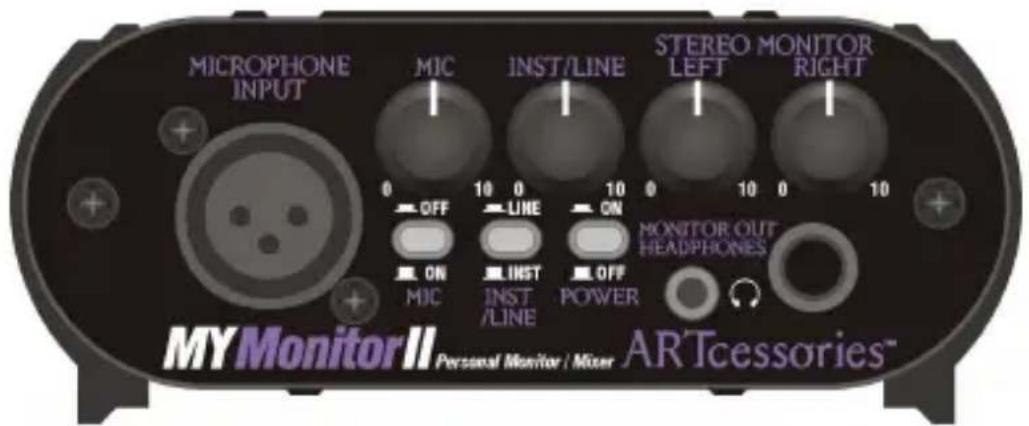
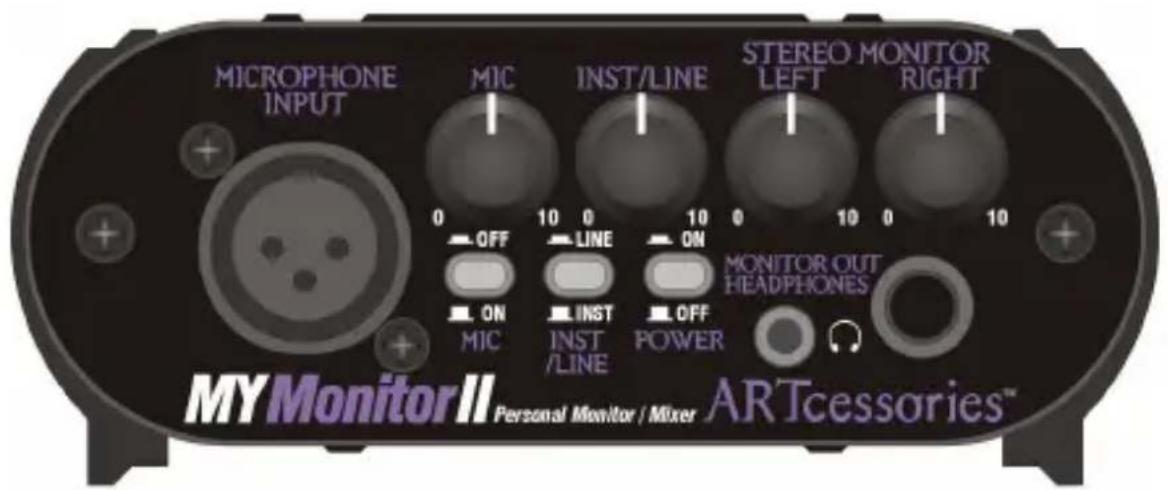
The MYMonitorII lets a performer hear them self through headphones exclusively or mixed with the output of a mixer or other stereo source. The microphone thru provides a direct connection to your mixer and allows for phantom powering of condenser microphones from the board.
The instrument/line input and thru connections allow you to locally monitor your instrument while still connecting direct to your amplifier.
While supplied with a 12V DC adapter, the MYMonitorII can also be battery powered for portable applications.
The pop-less microphone on/off switch lets you locally mute the microphone. The headphone section has independent 1/8-inch and 1/4-inch outputs with plenty of drive for both.
The product is designed for the highest quality audio performance and its compact rugged package will give you years of reliable use.
FEATURES:
• High performance low noise circuitry
- Microphone input and thru with pop-less on/off mute
- Instrument/Line input and thru jacks
- Stereo Monitor input
• Monitor Out / Headphone output section has 1/8-inch and 1/4-inch jacks
• 9V battery and 12V DC power operation
- Compact and rugged package is designed for years of use
- Perfect for professional, home, and project studios
INSTALLATION and OPERATION:
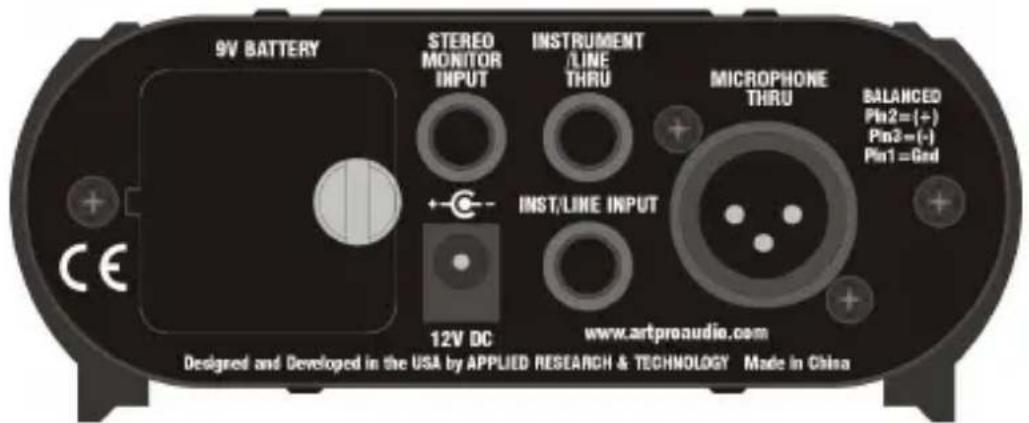
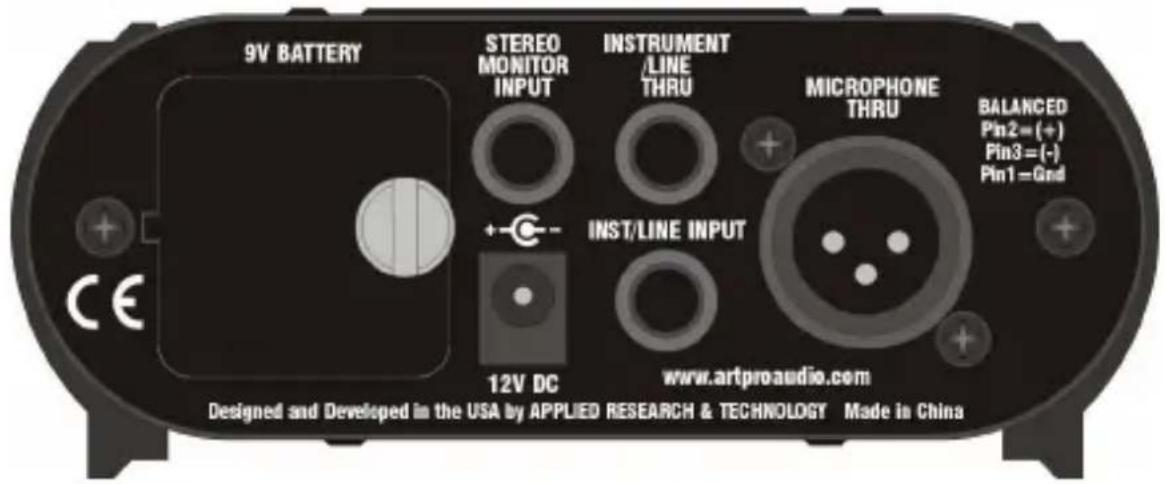
- Connect your microphone output to the XLR MICROPHONE INPUT. Next connect the XLR MICROPHONE THRU directly to the XLR microphone input on you mixer. Your microphone can be phantom powered from your mixer, if needed, as the MYMonitorII will allow power to pass directly through the units XLR connections.
- Connect your instrument, line, or speaker level signal to the INST/LINE INPUT. Connect a 1/4-inch phone jack cable from the INSTRUMENT/LINE THRU and the other end to where your signal was going to, The MYMonitorII is then inline with the feed to your amplifier or other device.
- Connect your mixers monitor output or other stereo source to the STEREO MONITOR INPUT.
- Connect headphones or other stereo monitoring system to the MONITOR OUT/HEADPHONES outputs. One or both outputs can be used at the same time.
- Connect the supplied 12V DC power supply to the MYMonitorII or install a 9V battery for portable operation. Push the POWER switch in to enable power and the switch will light red if power is available. When using a battery for power, be sure to turn the POWER switch off when not using the unit in order to maximize battery life.
-
When using a microphone source, pushing the MIC switch in will mute the microphones audio signal (off).
-
The INST/LINE switch, when in the out position, gives you enough gain for instrument level signals. If you have a higher line or speaker level signal then push the switch in and the signal will be attenuated at the input to prevent clipping.
-
Once connections have been made and switches set you can adjust the front panel level controls for the desired signal levels at the headphone/monitor outputs. The local monitor mix and level are only applied to local monitor outputs. The source microphone and instrument signals are still fed directly thru the unit to any other equipment connected to the thru connections.
SPECIFICATIONS:
Frequency Response: 10 Hz - 50 kHz,
$$ \pm 1. 0 \mathrm{dB} @ + 0 \mathrm{dBu} $$
THD: <.05% (typical)
Maximum Gain: 44 dB (mic)
38 dB (instrument)
17 dB (line)
14 dB (stereo monitor)
Signal to Noise Ratio: >96 dB
Maximum Input Level: +6 dBu (mic)
+12 dBu (instrument)
+32 dBu (line)
+32 dBu (stereo monitor)
Input Impedance: 4.5k Ohms (mic)
1m Ohm (instrument)
100k Ohms (line,
stereo monitor)
Maximum Output Level: +12 dBu
Output Impedance: 47 Ohms
Power Requirements: 12V DC @ 150 mA
(Adaptor included)
9V @ 15 mA (typical)
(IEC 6LR61, ANSI-1604A)
Dimensions HxWxD (in): 1.85 x 4.6 x 4.3
HxWxD (mm): 47 x 117 x 109
Weight (lbs/kg): 1.10 / 0.50
WARRANTY INFORMATION:
Limited Warranty (USA only)
Applied Research and Technology will provide warranty and service for this unit in accordance with the following warrants:
Applied Research and Technology, (ART) warrants to the original purchaser that this product and the components thereof will be free from defects in workmanship and materials for a period of three years from the date of purchase. Applied Research and Technology will, without charge, repair or replace, at its option, defective product or component parts upon prepaid delivery to the factory service department or authorized service center, accompanied by proof of purchase date in the form of a valid sales receipt.
Exclusions
This warranty does not apply in the event of misuse or abuse of the product or as a result of unauthorized alterations or repairs. This warranty is void if the serial number is altered, defaced, or removed.
ART reserves the right to make changes in design or make additions to or improvements upon this product without any obligation to install the same on products previously manufactured.
ART shall not be liable for any consequential damages, including without limitation damages resulting from loss of use. Some states do not allow limitations of incidental or consequential damages, so the above limitation or exclusion may not apply to you. This warranty gives you specific rights and you may have other rights, which
vary, from state to state. The warranty terms listed above are only valid within the United States of America. For units purchased outside the United States, an authorized distributor of Applied Research and Technology will provide service. For information on warranty and service policies outside of the U.S., please contact your local distributor.
Please fill in the following information for your reference:
Date of purchase: ____
Purchased from: ____
SERVICE:
The following information is provided in the unlikely event that your unit requires service.
- Be sure that the unit is the cause of the problem.
Check to make sure that the unit has power supplied, that all cables are connected correctly, and that the cables themselves are in working condition. You may want to consult with your dealer for assistance in troubleshooting or testing your particular configuration.
-
If you believe that the ART unit is at fault, go to www.artproaudio.com. Select "Support", then "Return Authorization Request" to request a return authorization number.
-
If you are returning the unit for service, pack the unit in its original carton or a reasonable substitute. The original packaging may not be suitable as a shipping carton, so consider putting the packaged unit in another box for shipping. Print the RA number clearly on the outside of the shipping box. Print your return shipping address on the outside of the box.
-
Include with your unit: a note with the RA number and your contact information, including a return shipping address (we cannot ship to a P.O. box) and a daytime phone number, and a description of the problem, preferably attached to the top of the unit. Also include a copy of your purchase receipt.

APPLIED RESEARCH AND TECHNOLOGY
www.artproaudio.com
E-mail: support@artproaudio.com
© 2016 Applied Research & Technology
MYMonitorII
MM2-5004-100
V1.0