
ALF-CMW102 - Video Conferencing System Alfatron - Free user manual and instructions
Find the device manual for free ALF-CMW102 Alfatron in PDF.


| Product Type | Video Conferencing System |
| Brand | Alfatron |
| Model | ALF-CMW102 |
| Camera Resolution | Full HD 1080P |
| Field of View | 125° wide angle |
| Microphones | Two 2.4 GHz wireless speaker microphones |
| Connectivity | USB 3.0 (2m cable included) |
| Compatibility | Windows, macOS, instant messaging software |
| Power Source | USB bus power |
| Dimensions (approx.) | Camera: 150 x 60 x 60 mm |
| Weight (approx.) | Camera: 300 g |
| Mounting Type | Desktop or tripod (mount included) |
| Image Settings | Adjustable white balance, video output size |
| Audio Features | Echo cancellation, noise reduction (via Amrep software) |
| Default Video Output | 1020x1000 (customizable) |
| Driver Installation | Plug-and-play, automatic driver install |
| Operating Temperature | 0°C to 40°C |
| Storage Temperature | -20°C to 60°C |
| Included Accessories | Camera, 2 wireless microphones, USB cable, user manual |
| Certifications | CE, FCC |
| Warranty | 1 year limited |
Frequently Asked Questions - ALF-CMW102 Alfatron
User questions about ALF-CMW102 Alfatron
0 question about this device. Answer the ones you know or ask your own.
Ask a new question about this device
Download the instructions for your Video Conferencing System in PDF format for free! Find your manual ALF-CMW102 - Alfatron and take your electronic device back in hand. On this page are published all the documents necessary for the use of your device. ALF-CMW102 by Alfatron.
USER MANUAL ALF-CMW102 Alfatron
ALF-CMW 102 User Manual
Please refer this document before using
Product overview
The CMW102 is a Full HD 1080P camera with a 120° wide angle lens. It comes with two 2.4 GHz wireless speaker microphones and is suitable for small and medium size conference scenes, personal business or home. It has a 2m USB2.0 cable.
Component

Part 2: 2.4GHz wireless speaker phone

LED Indicator 1. Blue triangular indicator: normal working status 2. Blue bottom right indicator: loudspeaker mode 3. Blue bottom left indicator: microphone mute 4. Blinking blue bottom left indicator: volume adjustment 5. Blinking orange buttons left indicator: low power
01
• Application
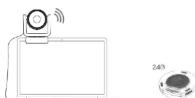
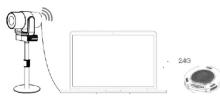
CMW102 can be used once you have connected the camera to your PC via USB and switched on the speaker phone. To switch off you can long press the off button on the speaker.

02
- Operation
- When connecting the USB to your computer, the following will appear in the lower right corner of the computer when you plug it in for the first time.

• After the device driver is installed successfully, computer terminal will have the following prompt

- If you need to reconfirm whether the device is installed successfully, you can open the computer terminal Attribute - click" device manager "- click" image device "to see the following device item and then you can use instant messaging software and video

03 04
- If the color and resolution of video are found to be abnormal, you can adjustment the setting using software called "Amcap" to check. Check the output size of the white balance and video for the corresponding values.
- Check the white balance option with a default value of 1800.

Video output size, select 1920*1080

Or change the camera effect to "restore the default effect" in instant messaging software. If it still doesn't resolve the problem, please contact our after-sales service for technical support.


Brand : Alfatron
Model : ALF-CMW102
Category : Video Conferencing System