
GC106U - Charger CyberPower - Free user manual and instructions
Find the device manual for free GC106U CyberPower in PDF.


| Product Type | Charger |
| Brand | CyberPower |
| Model | GC106U |
| Input Voltage | 100-240V AC, 50/60Hz |
| Output Voltage | 5V DC |
| Output Current | 2.0A |
| Power Output | 10W |
| Charging Port | USB-A |
| Number of Ports | 1 |
| Cable Length | 1.5 meters (4.9 ft) |
| Dimensions (L x W x H) | 5.5 x 2.5 x 1.0 inches |
| Weight | 0.2 lbs (90 g) |
| Protection Features | Overcurrent, Overvoltage, Short Circuit, Overheating |
| LED Indicator | Blue when charging, off when idle |
| Safety Certifications | FCC, CE, RoHS |
| Compatibility | Smartphones, tablets, and other USB devices |
| Operating Temperature | 0°C to 40°C (32°F to 104°F) |
| Storage Temperature | -20°C to 60°C (-4°F to 140°F) |
| Material | Fire-resistant plastic |
| Warranty | 1 year limited |
Frequently Asked Questions - GC106U CyberPower
User questions about GC106U CyberPower
0 question about this device. Answer the ones you know or ask your own.
Ask a new question about this device
Download the instructions for your Charger in PDF format for free! Find your manual GC106U - CyberPower and take your electronic device back in hand. On this page are published all the documents necessary for the use of your device. GC106U by CyberPower.
USER MANUAL GC106U CyberPower
1-Outlet USB Charging Cord
GC106U
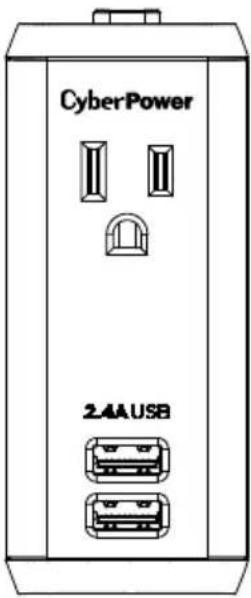
USER MANUAL
What must I do to make a warranty claim?
- Call (877) 297-6937, or write to us at Cyber Power Systems (USA), Inc., 4241 12th Ave. E., STE 400, Shakopee, MN 55379, or send us an email at claims@cpsww.com within 10 days of the occurrence for instructions.
- Identify the product and the purchase date.
- Provide a dated purchase receipt (or other proof of the original purchase) and provide a description of the defect.
- Pack and ship the product to CyberPower and all claim forms that are provided to you. Show the claim number on the shipping label, or include it with the product. You must prepay all shipping costs. You are responsible for packaging and shipment, and you must pay the cost of the repair estimate.
- Do each of these within ten days of the occurrence.
What will CyberPower do to correct problems?
CyberPower will inspect and examine the product. If the product is defective in material or workmanship, CyberPower will replace it at CyberPower's expense, or CyberPower will refund the full purchase price you paid for the product (purchase receipt showing price paid is required).
Who pays for shipping?
We pay shipping when we send items to you; you pay when you send items to us.
What are some things this Warranty does not cover?
-
THIS WARRANTY DOES NOT COVER: ANY SOFTWARE THAT WAS DAMAGED, SOFTWARE THAT NEEDS TO BE REPLACED DUE TO THE FAILURE OF THE PRODUCT; OR ANY DATA THAT IS LOST AS A RESULT OF THE FAILURE. THIS WARRANTY DOES NOT COVER THE RESTORATION OF DATA OR RECORDS, OR THE REINSTALLATION OF SOFTWARE.
-
This warranty does not cover: misuse, modification, operation, or storage outside of the environmental limits of the product or the equipment connected to it. It does not cover damage while in transit or in storage; if there has been improper operation or maintenance, or use with items not designed or intended for use with the product, such as laser printers, appliances, aquariums, medical, or life support devices, etc.
What are the other limitations?
The sole and exclusive remedies of the initial customer are those provided by this warranty.
- This warranty does not apply unless the product and the connected equipment were connected to properly wired and grounded outlets (including compliance with electrical and safety codes of the most current electrical code), without the use of any adapters or other connectors.
- The product must have been plugged directly into the power source. The equipment connected to the product must be directly connected in the product, not "daisy chained" together in serial fashion with any extension cords, another product, or device similar to the product, surge suppressor, or power tap. Any such installation voids the warranty.
- The product and connected equipment must have been used properly in a suitable environment, in conformance with any applicable license, instruction manual, or warnings.
- The product must have been used at all times within the limitations on the product's maximum rated wattage.
INSTRUCTIONS
- Plug the device into a standard grounding wall receptacle by fully inserting the plug and ensure that there are no exposed conductors.
- Make sure the electronic equipment is turned off before plugging into the device's outlet. Do not use extension cords to connect equipment to the device.
- Connected equipment can now be turned on.
SPECIFICATIONS
• Model Number: GC106U
- Outlets: 1
• Electrical Rating: 125 V/10 A/1250 W/60 Hz
• USB Charger Rating: 5 V/2.4 A total
- Operating Temperature: 32 °F to 95 °F / 0 °C to 35 °C
• Maximum Operating Elevation: 10,000 feet / 3,000 meters
CAUTION
TO REDUCE THE RISK OF ELECTRIC SHOCK - Use only in dry locations and only indoors. DO NOT plug into another relocatable power tap. DO NOT "daisy chain" surge protectors. DO NOT use with any aquarium equipment. DO NOT use if properly grounded outlets are not available. DO NOT use for medical or life support equipment.
This device features an internal protection that will disconnect the surge protective component at the end of its useful life, but it will maintain unprotected power to the load.
TECHNICAL SUPPORT
Please contact our Tech Support department with installation, troubleshooting, or general product questions.
• Phone: 1-877-297-6937
- Email: tech@cpsww.com
• Hours of Operation: Monday - Friday 7:00am - 6:00pm CST
1-YEAR LIMITED WARRANTY
Read the following terms and conditions carefully before using the CyberPower GC106U (the "product"). By using the product, you consent to be bound by the terms and conditions of this 1-year limited warranty. IF YOU DO NOT AGREE TO THE TERMS AND CONDITIONS OF THIS WARRANTY, YOU SHOULD RETURN THE PRODUCT FOR A FULL REFUND PRIOR TO USING IT.
Who is providing this Warranty, and what does it cover?
Cyber Power Systems (USA), Inc. ("CyberPower") provides this 1-year limited warranty. It only covers the original purchaser and ends if you no longer own the product. This warranty covers defects in materials and workmanship in the product under normal use and conditions. This warranty covers the product for as long as you own the product, up to 1 year from date of purchase.
1
Where can I get more information?
Contact us at:
Cyber Power Systems (USA), Inc.
4241 12th Avenue East Suite 400
Shakopee, MN 55379:
Call us at (877) 297-6937;
Send us an email at claims@cpsww.com.
PRODUCT REGISTRATION
Prompt product registration assures coverage under the limited lifetime warranty, and also allows the opportunity of notifications for product enhancements, upgrades, and other announcements. Registration is quick and easy. Go to the Product Registration Page at www.CyberPowerSystems.com/registration.
CONTACT INFORMATION
Cyber Power Systems (USA), Inc.
4241 12th Avenue East Suite 400
Shakopee, MN 55379
Toll-free: 1-877-297-6937 | CyberPowerSystems.com
CONFORMANCE APPROVAL
This device complies with Part 15 of the FCC Rules. Operation is subject to the following two conditions: (1) This device may not cause harmful interference, and (2) This device must accept any interference received, including interference that may cause undesired operation.
Changes or modifications to this unit not expressly approved by the party responsible for compliance could void the user's authority to operate the equipment. This Class B digital apparatus complies with Canadian ICES-003.
NOTE: This equipment has been tested and found to comply with the limits for a Class B digital device, pursuant to Part 15 of the FCC Rules. These limits are designed to provide reasonable protection against harmful interference in a residential installation. This equipment generates, uses and can radiate radio frequency energy and, if not installed and used in accordance with the instructions, may cause harmful interference to radio communications. However, there is no guarantee that interference will not occur in a particular installation. If this equipment does cause harmful interference to radio or television reception, which can be determined by turning the equipment off and on, the user is encouraged to try to correct the interference by one or more of the following measures: • Reorient or relocate the receiving antenna.
- Increase the separation between the equipment and receiver.
- Connect the equipment into an outlet on a circuit different from that to which the receiver is connected.
- Consult the dealer or an experienced radio/TV technician for help.

Please join CyberPower in caring for the
environment by recycling this manual.

This device is manufactured using environmentally-safe procedures in
compliance with the Restriction of Hazardous Substances (RoHS) directive.
© 2018 Cyber Power Systems (USA), Inc. All rights reserved.
All other trademarks are the property of their respective owners.
CyberPowerSystems.com

- 1-Outlet USB Charging Cord
- GC106U
- What must I do to make a warranty claim?
- What will CyberPower do to correct problems?
- Who pays for shipping?
- What are some things this Warranty does not cover?
- What are the other limitations?
- INSTRUCTIONS
- SPECIFICATIONS
- CAUTION
- TECHNICAL SUPPORT
- 1-YEAR LIMITED WARRANTY
- Who is providing this Warranty, and what does it cover?
- 1
- Where can I get more information?
- PRODUCT REGISTRATION
- CONTACT INFORMATION
- CONFORMANCE APPROVAL
Brand : CyberPower
Model : GC106U
Category : Charger