
Sensor-360 - Motion detector Vemer - Free user manual and instructions
Find the device manual for free Sensor-360 Vemer in PDF.


| Product Type | Motion Detector |
| Brand | Vemer |
| Model | Sensor-360 |
| Category | Motion Detector |
| Detection Method | Passive Infrared (PIR) |
| Detection Angle | 360° |
| Maximum Detection Range | 8 m (at 25°C, tangential movement) |
| Recommended Installation Height | 2.5 m - 4 m |
| Power Supply | 230 V AC, 50/60 Hz |
| Power Consumption | < 0.5 W (standby) |
| Output Type | Relay, normally open (NO) / normally closed (NC) |
| Maximum Load | 1000 W (incandescent), 500 VA (fluorescent) |
| Time Delay Adjustment | 10 s - 15 min |
| Light Sensitivity Adjustment | Day/night mode (adjustable Lux threshold) |
| Operating Temperature | -20°C to +40°C |
| IP Rating | IP44 (suitable for outdoor use) |
| Dimensions (Diameter x Height) | 120 mm x 95 mm |
| Weight | 150 g |
| Color | White |
| Mounting Type | Ceiling or wall mounting (bracket included) |
| Material | Polycarbonate (PC) |
| Warranty | 2 years |
| Certifications | CE, RoHS |
Frequently Asked Questions - Sensor-360 Vemer
User questions about Sensor-360 Vemer
0 question about this device. Answer the ones you know or ask your own.
Ask a new question about this device
Download the instructions for your Motion detector in PDF format for free! Find your manual Sensor-360 - Vemer and take your electronic device back in hand. On this page are published all the documents necessary for the use of your device. Sensor-360 by Vemer.
USER MANUAL Sensor-360 Vemer
Operation
CENTRING INDEX

information to users pursuant to art. 14 of the directive
2012/19 / EU of the european parliament and of the council of 4 july 2012 on waste electrical and electronic equipment (WEEE)
If the crossed-out bin symbol appears on the equipment or packaging,
this means the product must not be included with other general
waste at the end of its working life.
The user must take the worn product to a sorted waste center,
or return it to the retailer when purchasing a new one.
Products for disposal can be consigned free of charge (without any new purchase obligation)
to retailers with a sales area of at least 400m^2 , if they measure less than 25~cm
An efficient sorted waste collection for the environmentally friendly disposal of the used device,
or its subsequent recycling, helps avoid the potential negative effects on the environment
and people's health, and encourages the re-use and/or
recycling of the construction materials.
The Sensor-360 proximity switch is electronic switching device containing micro-disconnection ( ) according to EN 60669-2-1. The output circuit is activated when a heat source moves in front of the device and is deactivated when no movement is intercepted, after a settable period of elapsed time.
SAFETY WARNINGS
During installation and operation of the instrument, comply with the following instructions:
1) The instrument must be installed by a skilled person, in strict compliance with the connection diagrams
2) Do not power on or connect the instrument if any part of it is damaged
3) In the building where the instrument is to be installed, there must be a switch and a device for protection from overloads
4) Before touching the connector terminals make sure that the wires to be connected or already connected to the instrument are not live.
Code
Model
Sensor-360
Description
Movement detector 360°
TECHNICAL CHARACTERISTICS
• Power supply: 230V AC 50Hz
- Breaking capacity: 10A 250V AC (resistive load)
• Maximum recommended loads:
– Incandescent light bulbs: 1000W
– Non-compensated fluorescent: 500W
- Compensated fluorescent: 250W
– Halogen (230V AC): 1000W
– Low consumption bulbs: 200W
- Consumption: < 2W
- Range of brightness: 3-300- lux
• Time range: from 3 seconds to 10 minutes (approximate)
• Detection angle: 360°
• Maximum detection height: 5 m
- Operating temperature: -20^ ÷ +40^
• Protection degree: IP20
• Insulation: class II
INSTALLATION
- The device must be installed far from inductive loads (motors, transformers, telephone antennas, transformer plants, industrial machinery, etc.) as especially strong magnetic fields may alter operation. The device must also be protected from rain and sunlight. It must not be placed near lights, near devices that are subject to temperature changes (heating, air conditioning). It must be located far from highly reflective surfaces.
- The detection area directly depends on the installation height. In particular, an installation at 2.5 meters height, permits to detection a field of 3.5 meters ray.
- The sensibility is instead influenced by the environment temperature (the higher the temperature, the worse the sensitivity because the unit operates by detecting the movement of a heat source) and by the direction of the movement.
LESS SENSITIVITY
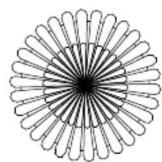
direction of movement

GREATER SENSITIVITY

direction of movement

OPERATION
- To install the instrument, remove the cover and set the selectors.
• To set the detection field:
- rotate the “lux” selector to the “” position and the “time” selector to the “” position; - check coverage by moving within the detection field limits.
The device permits to limit the field of the detection area. To exclude one or more sectors, applied a piece of insulating tape on the relative part of the sensor.
- The Sensor-360 proximity switch can be adjusted to that it only operates when the lighting conditions are below the selected level. By turning the “lux” selector to the “●” position, it will react under any luminosity conditions. By turning it to the “●” position, it will only react under low luminosity conditions.
- The “time” selector permits to set the switch-on delay. It’s possible to choice from 3 seconds “•” to 10 minutes “●
REFERENCE STANDARDS
Conformity to the EU directives:
2014/35/UE (LDV), 2014/30/UE (EMCD)
is declared with reference to harmonized standard: EN 60669-2-1

Brand : Vemer
Model : Sensor-360
Category : Motion detector