WT-3161BL - Clock LA CROSSE TECHNOLOGY - Free user manual and instructions
Find the device manual for free WT-3161BL LA CROSSE TECHNOLOGY in PDF.


| Product Type | Atomic Digital Clock with Outdoor Temperature |
| Brand | La Crosse Technology |
| Model | WT-3161BL |
| Color | Black |
| Display Type | LCD |
| Dimensions | 7.5 x 4.5 x 2.5 inches (approx.) |
| Weight | 1 lb (approx.) |
| Power Source | 2 x AA batteries (not included) or AC adapter (optional) |
| Atomic Time Reception | WWVB (Colorado) with daily auto sync |
| Time Zone Setting | Selectable (EST, CST, MST, PST, AKT, HAT) |
| Daylight Saving Time | Automatically adjusts (can be disabled) |
| Alarm Function | Daily alarm with snooze (5 minutes) |
| Calendar Display | Month, date, day of week |
| Indoor Temperature | Range: 32°F to 122°F (0°C to 50°C) |
| Outdoor Temperature | Wireless remote sensor included, range up to 330 ft (100m) |
| Temperature Display | °F or °C selectable |
| Maintenance | Clean with soft dry cloth; avoid solvents; replace batteries annually |
| Safety | Keep away from water and extreme temperatures; use only recommended batteries |
| Spare Parts / Reparability | Remote sensor (TX141TH-BCH) available; clock not user-serviceable |
Frequently Asked Questions - WT-3161BL LA CROSSE TECHNOLOGY
User questions about WT-3161BL LA CROSSE TECHNOLOGY
0 question about this device. Answer the ones you know or ask your own.
Ask a new question about this device
Download the instructions for your Clock in PDF format for free! Find your manual WT-3161BL - LA CROSSE TECHNOLOGY and take your electronic device back in hand. On this page are published all the documents necessary for the use of your device. WT-3161BL by LA CROSSE TECHNOLOGY.
USER MANUAL WT-3161BL LA CROSSE TECHNOLOGY
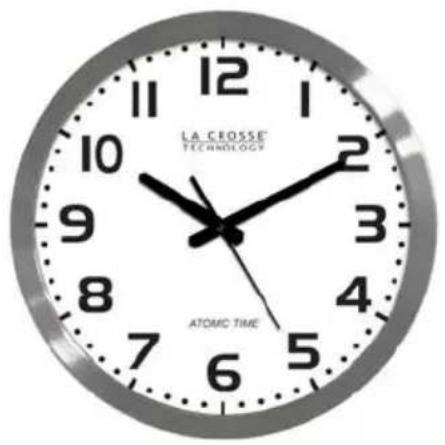
16" Atomic Wall Clock
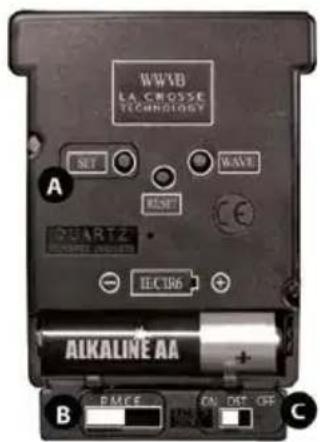
A Manual Time Setting Button
B Time Zone Selection Buttons
C Daylight Saving Time Button
Get Started
1: Slide the switch to select a time zone.
2: Insert 1 fresh AA, Alkaline battery according to the polarity marked on the case.
3: For the best reception, please place clock on a wall that faces Ft. Collins, Colorado. During the night, your clock will automatically set itself.
- When the battery is installed, the hands will move to the 12:00 position and search for the radio signal.
- If the radio signal is not received in the first 10 minutes, the clock will start running from the 12:00 position and will continue to run.
- The clock is searching for the WWVB signal and once the radio signal is decoded, the hands will automatically adjust to the correct time. This may take up to 5 nights if there is atmospheric interference.
Reset: If the clock does not respond to the various function modes, press the RESET button on the movement case.
Position Clock
- For the best reception, please place clock on a wall that faces Ft. Collins, Colorado. The antenna is best positioned for signal reception when there is only one wall or window between the clock and outside.
- Choose a location 6 feet or more from electronics such as cordless phones, wireless gaming systems, televisions, microwaves, routers, baby monitors, etc., which can prevent signal reception.
- Large office buildings, schools, or hospitals may not receive the WWVB time signal in every room.
• Buildings with a metal roof may interfere with reception.
Note: We recommend that you change the battery every 24 months to maintain accuracy. Remove the battery when the clock will not be in use for an extended period.
Manual Set Time
On rare occasions, the clock may not be able to utilize the radio controlled function because of the strength of the signal or the geographic location. In this case, the clock can be set manually and used as a regular quartz wall clock.
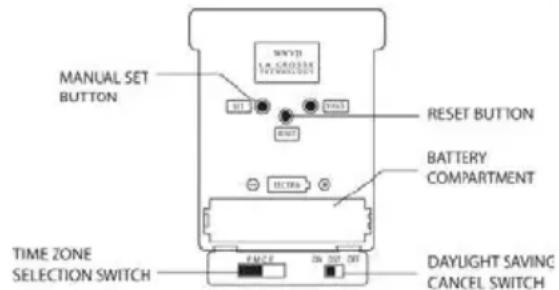
Set the clock manually:
-
Hold the SET button for 3+ seconds to activate the manual mode. There are two ways to move the minute hand forward.
-
Hold the SET button down to move the minute hand forward consistently.
- Alternatively, press the SET button rapidly (more than once per second) to move the minute hand forward step by step (in minute increments).
- Use these features to move the minute hand forward until the correct time is set. The clock will automatically leave manual mode after the SET button is not pressed for 6+ seconds.
Troubleshooting
The wonderful advantage of owning a radio-controlled clock is that it is virtually trouble free. If the clock receives a clear time signal, it will set itself perfectly. If it does not receive a time signal, consider the following:
- Battery – The clock must have a fresh battery to receive and process the time signal.
- Location – Try a different location, ideally near a window that faces Colorado.
- Weather – Electrical storms between you and Colorado during the night will interfere with the WWVB signal.
- Hands Spin- When the hands spin about the same time every day the clock is auto-correcting the time. The hour hand should not spin more than twice around the clock. Hands may spin if the battery is under powered or over powered.
Daylight Saving Time:
The National Institute of Standards and Technology and WWVB encode a special DST “bit” in the WWVB transmission for DST. Your clock will read this information and automatically advance the hands one hour in the spring and eleven hours in the fall.
If you live in an area that does not recognize DST, you must slide the DST switch OFF. To reactivate the DST program simply slide the switch to the ON position.
Manual WWVB Time Signal Search
For WWVB information: www.nist.gov/pml/div688/grp40/wwvb.cfm
Manual Signal Search:
The WWVB signal is strongest at night.
- Hold the WAVE button down for 3+ seconds.
- The hands will automatically reset to the 12:00 position, and the clock will search for the WWVB time signal.
- If the clock receives the signal, the clock will set automatically to the correct time. The signal search takes approximately 3-8 minutes.
- Set the clock manually, and the movement's micro-CPU will control the time keeping function.
Frequently Asked Questions
Q. How long will the battery last?
A. A good AA alkaline battery will last over 24 months.
Q: Can I wire a control timing circuit to the La Crosse Technology® atomic clock?
A: The clock cannot work on a timing circuit. Opening the clock voids the warranty.
Q: Is there a booster antenna to receive the WWVB signal in a difficult location?
A: The clock cannot work with a booster antenna. Opening the clock or movement voids the warranty.
Q: Can I shut off the WWVB signal?
A: No. If you manually set the time, when the clock receives a WWVB signal, that signal will override the manual set. The WAVE button will temporarily stop a WWVB search, but will not permanent stop the clock from receiving a WWVB time signal.
Care and Maintenance
• Always purchase the correct size and grade of battery suitable for intended use.
- Clean the battery contacts and also those of the device prior to battery installation.
- Ensure the battery installed with correct polarity (+and -).
- Remove battery from clock which is not to be used for an extended period of time.
- Remove expired battery promptly.
Warranty and Support Information
La Crosse Technology, Ltd. provides a 1-year limited time warranty (from date of purchase) on this product relating to manufacturing defects in materials & workmanship.
Before returning a product, please contact our friendly customer support with questions or visit our online help:
Phone: 1-608-782-1610
Online Product Support: www.lacrossetechnology.com/support
Product Registration:
www.lacrossetechnology.com/support/register
View full warranty details online at:
www.lacrossetechnology.com/warranty_info.pdf
Warranty Address:
La Crosse Technology, Ltd