WS-8119U-IT-W - Clock LA CROSSE TECHNOLOGY - Free user manual and instructions
Find the device manual for free WS-8119U-IT-W LA CROSSE TECHNOLOGY in PDF.


User questions about WS-8119U-IT-W LA CROSSE TECHNOLOGY
0 question about this device. Answer the ones you know or ask your own.
Ask a new question about this device
Download the instructions for your Clock in PDF format for free! Find your manual WS-8119U-IT-W - LA CROSSE TECHNOLOGY and take your electronic device back in hand. On this page are published all the documents necessary for the use of your device. WS-8119U-IT-W by LA CROSSE TECHNOLOGY.
USER MANUAL WS-8119U-IT-W LA CROSSE TECHNOLOGY
With Time with Seconds, Month, Date, Day, & IN/OUT
Temperature
QUICK SETUP GUIDE
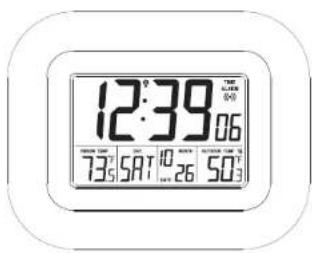
Table of Contents
Table of Contents....1
Congratulations....2
Features: 2
Setup Information: 2
The Outdoor Temperature Sensor 2
Positioning the Temperature Sensor: 3
To wall mount the Temperature Sensor: 3
WWVB (Atomic Time) Radio signal: 3
Setup of Time and Display Options: 3
-
Set the Time Zone: 4
-
Set Daylight Saving Time ON/OFF: 4
-
Set Language 4
-
Set Time Manually - Minute: 4
-
Sel Date Manually - Year....4
-
Set Date Manually - Month: 4
-
Set Date Manually - Date: 4
-
Set Date Manually - Day of Week: 4
-
Set 12 of 24 Hour Time Mode....4
-
Set Temperature Mode: 15 m/°C.....4
-
Set Temperature Mode - P or C: 4
Daylight Saving Time....4
Setting the Daily Alarms: 4
About the Daily Alarms 5
Automatic Snooze function: 5
Online Resources ....Error! Bookmark not defined.
Care and Maintenance......Error! Bookmark not defined.
Battery Replacement 5
The Low Battery Icons: 5
Specifications 5
Power Requirements 6
FCC Statement....6
Warranty Information 6
Congratulations
You have purchased an atomic digital Atomic Clock from La Crosse Technology ^® , providing the world's most accurate time at a glance, plus wireless outdoor temperature.
This product offers:

INSTANT TRANSMISSION is the state-of-the-art new wireless transmission technology, exclusively designed and developed by LA CROSSE TECHNOLOGY. INSTANT TRANSMISSION offers you an immediate update (every 8 seconds!) of all your outdoor data measured from the transmitters: follow your climatic variations in real-time!
Features
• WWW Radio Controlled Clock (Atomic Clock)
• Time in 12/24 hour format
- Manual time setting option
• Time Zone setting: +/- 12 Hours from GMT
• Daylight Saving Time(DST) On/Off
• Continuous calendar up to year 2054
- Date and weekday displayed and set automatically with the time
• Temperature display in °F or °C
- Snooze function (10 minutes)
• Indoor thermometer
• Wireless Outdoor Temperature Sensor
- Low battery icons for display and sensor
Setup Information:
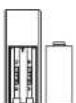
The Temperature Sensor uses 2 x AAA, IEC LR3 1.5V battery. To install and replace the batteries, please follow the steps that follow:
- Position the Atomic Clock and the Outdoor Sensor
five to six feet apart with nothing between them
- Insert batteries into the Wireless Outdoor
Temperature Sensor first - it is important that you do
not insert the batteries into the Atomic Clock yet
- You must insert the batteries into the Atomic Clock
within 3
Sensor
- Slide out the battery compartment lid at the bottom of
the Outdoor Sensor,
- Insert the batteries into the Outdoor Sensor first, observing the correct polarity (see markings inside battery compartment). Replace the battery holder on the unit.
- Immediately after and within 3 minutes, insert the batteries into the Atomic Clock, observing the correct polarity (see markings inside battery compartment). Replace the battery cover. The Atomic Clock uses 2 × AA batteries (IEC LRB, 1.5V).
- The outdoor temperature and the signal reception icon should be displayed on the Atomic Clock. If this does not happen after 3 minutes, the batteries will need to be removed from both units and re-inserted, following the instructions above.
Note: In the event of changing batteries in any of the units, all units need to be reset by following the setting up procedures. This is because a random security code is assigned by the Sensor at start-up and this code must be received and stored by the Atomic Clock in the first 3 minutes of power being supplied to it
Note: If the signal reception is not successful on the first frequency (915MHz) for 22 seconds, the frequency is changed to 920MHz and the learning is tried another 22 seconds. If still not successful the reception is tried for 22 seconds on 910MHz. This will also be done for re-synchronization.
The Outdoor Temperature Sensor
- Remote transmission of outdoor temperature to Temperature Station
by 915 MHz
• Shower proof casing
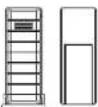
• Wall mounting case
- Mount in a sheltered place. Avoid direct rain
and sunshine.
• Under the eaves of your home is an ideal
place.
Positioning the Temperature Sensor:
The Sensor is supplied with a holder that may be attached to a wall with the two screws supplied. The Sensor can also be positioned on a flat surface by securing the stand to the bottom to the Transmitter.
Note: Before permanently fixing the Sensor wall base, place all units in the desired locations to check that the outdoor temperature reading is
receivable. If the signal is being received, the signal reception icon will be displayed on the Atomic Clock. In event that the signal is not received, relocate the Sensor or move it slightly as this may help the signal reception. To ensure a good connection, there should be a distance of no more than 200 feet between the final position of the Atomic Clock and the Sensor.
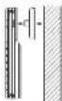
To wall mount the Temperature Sensor:
-
Secure the bracket onto a desired wall using the screws and plastic anchors.
-
Clip the remote temperature sensor onto the bracket.
WWVB (Atomic Time) Radio signal
- The clock must receive the WWV8 Radio Signal to automatically set the time, date and weekday.
- The clock automatically starts the WWVB on the top of the hour between the hours of 12:00 AM and 6:00 AM.
- If this synchronization attempt is successful the radio tower icon appears on the display. The radio tower icon will disappear if the signal reception is unsuccessful.
About WWVB (Atomic Time) Radio Signal Reception:
- A continuously displayed radio tower icon indicates that the WWVB signal was received successfully during the last attempt. If the clock attempts to receive the WWVB signal and is unsuccessful, the tower icon will not be continuously displayed on the LCD.
• We recommend a minimum distance of 8 feet (2.5 meters) to all sources of interference, such as televisions or computer monitors
- Radio reception is weaker in rooms with concrete walls (e.g.: in cellars) and in offices. In such environments, place the system close to the window.
Setup of Time and Display Options:
natural_image
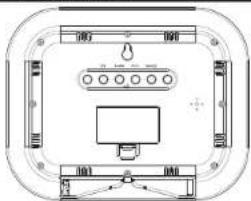
Top-down schematic of a device housing with labeled components (no text or symbols)Above: Back view of Atomic Clock showing buttons and battery compartment.
Note: The "SET" button is used to enter SET mode. The display will exit SET mode automatically after 10 seconds of inactivity. If the display exits SET mode while you are following the setup instructions, press the "SET" button the indicated number of times to return to the portion of the SET mode desired.
1. Set the Time Zone:
Press the 'SET' button and the Time Zone display will flash. Use the 'PLUS' button to select the correct Time Zone setting from the available selections below:
-1,-2,-3: Other lime zones
• 4: ATL - Atlantic
-5: EST - Eastern (default setting)
-6: CST - Central
-7: MST - Mountain
- -A: PST - Pacific
-10-11-12 12 11 10 9 8 7 6 5 4 3 2 1: Other time zones
■ 0: - Greenwich Mean Time (GMT)
2. Set Daylight Saving Time ON/OFF:
Press the 'SET' button a second time and DST will flash. Press the 'PLUS' button to toggle Daylight Saving Time on ("On") or off ("OFF"). See "Daylight Saving Time" on page 4 for more information.
3. Set Language:
Press the "SET" button a third time and the Language Abbreviation will flash. Press the "PLUS" button to switch the Language to be displayed. The three-letter abbreviation for the day of the week will display in the bottom of the LCD while the setting flashes above.
•US: English (default setting)
• F. French (Français)
•E: Spanish (Español)
Note: Manual time and date settings are optional. In most cases, the time and date will set automatically via WWVB radio signal. If placement for the display does not allow for WWVB reception due to interference, you will need to set the time and date manually.
4. Set Time Manually - Hour:
Press the 'SET' button a fourth time and the Hours digits will flash. Use the 'PLUS' button to set the correct hour.
5. Set Time Manually - Minute:
Press the "SET" button a fifth time and the Minutes digits will flash. Use the "PLUS" button to set the correct minute.
6. Set Date Manually - Year:
Press the "SET" button a sixth time and the Year digits will flash. Use the "PLUS" button to set the correct year.
7. Set Date Manually - Month:
Press the "SET" button a seventh time and the Month digits will flash. Use the "PLUS" button to set the correct month.
8. Set Date Manually - Date:
Press the 'SET' button an eighth time and the Date digits will flash. Use the 'PLUS' button to set the correct date.
9. Set Date Manually - Day of Week:
Press the "SET" button a ninth time and the Day of Week abbreviation will flash. Use the "PLUS" button to set the correct day of week.
10. Set 12 or 24 Hour Time Mode:
Press the "SET" button a tenth time and the 12 or 24 Hour Time Mode digits will flash. Use the "PLUS" button to set the time mode to either a 12 or 24 hour clock.
11. Set Temperature Mode - °F or °C;
Press the "SET" button an eleventh lime and the Temperature Mode abbreviation will flash. Use the "PLUS" button to set the temperature mode to °F or °C.
Daylight Saving Time
• The National Institute of Standards and Technology and WWVB amended a special DBT "bill" in the WWVB transatlnters for DS
- Your La Crosse Technology® clock will read this information (only if 'DST' is set to 'On') and automatically advance the time one hour in the spring and back an hour in the fall.
- Arizona and Indiana: If you live in an area that does not recognize DST you must de-activate Daylight Saving Time by setting "DST" to "OFF"
• See "Set Daylight Saving Time ON/OFF" on page 4 for instructions.
Setting the Daily Alarms:
•To turn the alarm on:
Press the "ALARM" button. The LCD will display the alarm icon Ⓞ.
- To set the Alarm Time - Hour: Press and hold down the "ALARM" button for 2 seconds until the hours digits flash. Use the "PLUS" button to set the hour. Press the "ALARM" button to confirm your setting and move to setting the minutes.
- To set the Alarm Time - Minutes: The Minutes digits of the Alarm Time will flash. Use the "PLUS" button to set the minutes. You can hold the "PLUS" button in to speed up the setting of minutes by using five minute increments. Press the "ALARM" button to confirm your minutes setting and to end the setting procedure.
- To activate or deactivate the daily alarms, briefly press the "ALARM" button once. When the alarm is active the clock displays the alarm icon (●) below the word "ALARM". When deactivated, the alarm icon (●) does not display.
About the Daily Alarms:
• After 30 seconds without pressing any button the clock switches automatically from alarm setting mode to normal clock mode
- The alarm will sound for 85 seconds if not deactivated. You can deactivate it by pressing any button. The alarm will be repeated automatically after 24 hours.
- The alarm uses 3 different patterns of bone, beginning gently and increasing in intensity, known as a "Crescendo Alarm". The effect is to provide increasing levels of alarm to ensure waking while providing a gentle alarm to lighter sleepers.
Automatic Snooze function:
- While the alarm is sounding, press the 'SNOOZE' button to activate the snooze function. The alarm icon (●) flashes on the display until the alarm sounds again when the Sensor period is run (10 minutes
- Pressing the 'SNOOZE' button moves the alarm back by 10 minutes and the alarm will restart at this time.
• The Snooze function can be interrupted by pressing any button.
Battery Replacement
- If you notice that the LCD appears faint or that WWVB time reception is not working properly. Try a fresh set of batteries before contacting customer support.
The Low Battery Icons:
- When the batteries need to be replaced in the Wireless Outdoor Sensor, the LCD will display the 'TX' icon. TX
- When the batteries need to be replaced in the Atomic Clock, the LCD will display the "RX" icon. RX

We recommend that you replace the batteries in all units regularly to ensure optimum accuracy of these units. Please see the battery life in the specifications below Help us to keep our environment clean. Return used batteries to an authorized depot.
Specifications
• Battery Life - Atomic Clock: Up to 24 months
- Battery Type - Atomic Clock: 2 X AA (IEC LR6, 1.5V)
- Battery Life - Wireless Outdoor Temperature Sensor: Up to 12 months -2X
- Battery Type - Wireless Outdoor Temperature Sensor: 2 X AAA (IEC LRS, 1.5V)
• Indoor thermometer measurement range
14.2°F to 99.9°F (-9.9°C to 37.8°C)
- Indoor temperature update interval: every 16 seconds
- Wireless Outdoor Temperature Sensor measurement range: -39.8°F to 130.8°F (-39.9°C to 59.9°C)
• Outdoor temperature update interval: every 8 seconds - Wireless Outdoor Temperature Sensor transmission range. 200 feet.
- Dimensions - Atomic Clock: 8.95^ × 1.20^ × 7.20^
- Dimensions - Wireless Outdoor Temperature Sensor: 1.27" L x 0.55" W x 3.41" H
Power Requirements
Note: Rechargeable batteries are not recommended due to the wide variation in performance between brands and types. Please use only fresh alkaline batteries.
• Atomic Clock: 2 "AA" Alkaline Batteries (not included)
- Wireless Outdoor Temperature Sensor. 2 "AAA" Alkaline Batteries (not included)
FCC Statement
ECC ID: OMO-TX35U
This device complies with part 15 of the FCC rules. Operation is subject to the following conditions: (1) This device may not cause harmful interference, and (2) This device must accept any interference received, including interference that may cause undesired operation.
Freq. 915 MHz
La Crosse Technology
Model: TX3B-IT
Made in China
Warranty Information
La Crosse Technology, Ltd provides a 1-year limited warranty on this product against
This limited warranty begins on the original date of purchase, is valid only on products purchased and used in North America and only to the original purchaser of this product. To receive warranty service, the purchase must be certified by La Cruse Technologies, Ltd for problem determination and service procedures. Warranty services can only be performed by a La Cruse Technology, Ltd authorized service center. The original dated bill of sale must be exhamed upon request and required to purchase to La Cruse Technologies, Ltd or La Cruse Technologies, Ltd's authorized service center.
La Crosse Technology, Ltd will repair or replace this product, at our option and at no charge as stipulated herein, with new or second-licensed parts or products if found to be defective during the limited warranty period specified above. At replaced parts and products became the property of La Crosse Technology, Ltd and must be returned to La Crosse Technology, Ltd.
Reposited parks and products assumes the remaining original warranty, or timely (30) days, whichever is longer. La Grosse Technology Ltd will pay all expenses for labor and materials for all repairs covered by this warranty. If necessary repairs are not covered by this warranty, or if a product is examined which is not in need of repair, you will be charged for the repairs or examination.
The owner must pay any shipping charges incurred in getting your La Cross Technology, Ltd product in a La Cross Technology, Ltd authorized service provider.
Your La Crese Technology, Ltd warranty covers all defects in material and workmanship with the following specified exceptions: (1) damage caused by accident, unreasonable use or neglect (including the lack of reasonable and necessary maintenance); (2) damage occurring during shipment (claims must be presented to the starting); (3) damage to, or under consideration of any necessary or discretionary surface; (4) damage resulting from failure to follow instructions obtained in your own's manual; (5) damage resulting from the performance of repairs or alterations by someone other than or authorized La Crese Technology. Ltd authorized service center; (6) units used for other than home use; (7) applications and uses that this product was not intended or (8) the products possibly to receive a signal due to any source of interference.
This warranty covers only actual defects within the product itself, and does not cover the cost of installation or removed from a fixed installation, normal set-up or adjustments, claims based on misrepresentation by the seller or performance variations resulting from
INDICATION PROCESSED PROFESSIONAL LA CROSSE TECHNOLOGY, LTD WILL NOT ASSUME LIABILITY FOR INCIDENTAL, CONSEQUENTIAL, PUNITIVE, OR OTHER SIMILAR DAMAGES ASSOCIATED WITH THE OPERATION OR MALFUNCTION OF THIS PRODUCT. THIS PRODUCT IS NOT TO BE USED FOR MEDICAL PURPOSES OR FOR PUBLIC INFORMATION. THIS PRODUCT IS NOT A TOY, KEEP OUT OF BUILDING BEACH
This warranty gives you specific legal rights. You may also have other rights specific to your State. Some States do not allow the exclusion of consequences or incidental damages; therefore the above exclusion of limitation may not apply to you.
La Crosse Technology, Ltd
2817 Losey Blvd. S.
La Crosse, WI 54601
Web: http://www.lacrossetechnology.com/support
All rights reserved. This handbook must not be reproduced in any form, even in excerpts, or duplicated or processed using electronic, mechanical or chemical procedures without written permission of the publisher.
This handbook may contain mistakes and printing errors. The information in this handbook is regularly checked and corrections made in the next issue. We accept no liability for technical mistakes or printing errors, or their consequences.
All trademarks and patents are acknowledged.