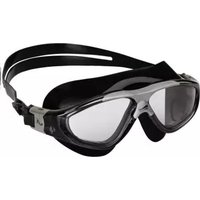
IAN 96795 - Swimming goggles CRIVIT - Free user manual and instructions
Find the device manual for free IAN 96795 CRIVIT in PDF.


| Product Type | Fitness Tracker |
| Brand | Crivit |
| Model | IAN 96795 |
| Dimensions | 40 x 20 x 10 mm |
| Weight | 25 g |
| Display | LED |
| Battery Type | CR2032 (replaceable) |
| Battery Life | Up to 6 months |
| Step Counting | Automatic, up to 99999 steps |
| Distance Measurement | Based on stride length |
| Calorie Tracking | Yes |
| Water Resistance | IPX4 (splash proof) |
| Memory | 7-day history |
| Wristband Material | Silicone |
| Clasp Type | Buckle |
| Usage | Daily fitness tracking |
| Maintenance | Clean with soft damp cloth |
| Safety | Not for medical use; avoid contact with solvents |
| Spare Parts | CR2032 battery (standard) |
Frequently Asked Questions - IAN 96795 CRIVIT
User questions about IAN 96795 CRIVIT
0 question about this device. Answer the ones you know or ask your own.
Ask a new question about this device
Download the instructions for your Swimming goggles in PDF format for free! Find your manual IAN 96795 - CRIVIT and take your electronic device back in hand. On this page are published all the documents necessary for the use of your device. IAN 96795 by CRIVIT.
USER MANUAL IAN 96795 CRIVIT
Please dispose of the product and packaging in an environmentally friendly manner, separating different materials for recycling as required! Dispose of this item through an authorised disposal company or through your local waste disposal facilities - ask your local authority for information if further guidance is required. Ensure that you comply with all regulations currently in force.
3 Years Warranty
The product was produced with great care and under constant supervision. You receive a three-year warranty for this product from the date of purchase. Please retain your receipt.
The warranty applies only to material and workmanship and does not apply to misuse or improper handling. Your statutory rights, especially the warranty rights, are not affected by this warranty. With regard to complaints, please contact the following service hotline or contact us by e-mail. Our service employees will advise as to the subsequent procedure as quickly as possible. We will be personally available to discuss the situation with you. Any repairs under the warranty, statutory guarantees or through goodwill do not extend the warranty period. This also applies to replaced and repaired parts. Repairs after the warranty are subject to a charge.
IAN: 96795
GB Service Great Britain
Tel.: 0871 5000 720 (£ 0.10/Min.)
E-Mail: deltasport@lidl.co.uk
You can also find spare parts for your product at:
www.delta-sport.com, category Service - Lidl Spare Parts Service

Instructions for use

WASSERSPORTBRILLE
Bedienungsanleitung

IAN 96795

natural_image
Illustration of two hands holding a dark object, labeled 'A' in top-left corner (no other text or symbols)
natural_image
Illustration of a person wearing sunglasses with motion arrows indicating rotation (no text or symbols)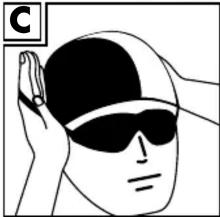
natural_image
Illustration of a person wearing sunglasses and a cap, with hands adjusting the head (no text or symbols)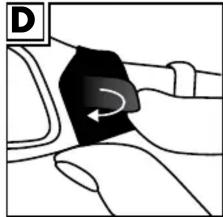
natural_image
Diagram of a car seatbelt mechanism with directional arrow (no text or symbols)Congratulations! With your purchase you have decided on a quality product. Get to know the product before you start
to use it. Carefully read the following operating instructions. Use the product only as described and only for the given areas of application. Keep these instructions safe. When passing the product on to a third party, always make sure that the documentation is included.
Intended Use
These water sports goggles are intended for use at the surface of the water. This product is intended for private use. Size S/M is intended for children and youth, size L/XL for adults.
Contents
1x Water sports goggles
1x Storage bag
1x Instructions for use
Safety Instructions
KEEP ALL SAFETY PRECAUTIONS AND INSTRUCTIONS FOR FUTURE REFERENCE!

CAUTION! RISK OF INJURY!
- Check product for damage before every use. Discontinue use if damaged.
- Do not expose the product to extreme temperatures or severe mechanical strains.
- Only use the water sports goggles at the surface of the water. To dive deeper than 2m please use a diving mask intended for such use.
- The maximum permitted jump height whilst wearing water sports goggles is 1m!
- Never pull the lenses away from the face as they may rebound, causing injury to the eyes.
• Discontinue use if eye or skin irritation occurs.
- Do not look directly into the sun.
- Immediately remove water sports goggles if water has entered the goggles and put on again to form a tight seal.
- Discontinue use if lenses are damaged, the strap is brittle or damaged, or the body is defective.
General Information

The CE mark confirm compliance
with PSA Directive 89/686/EEC
• The lenses conform to optics class 2
(EN 1836:2005+A1:2007)
General classification of sunglass lenses according to DIN EN 1836
Protection level (filter category) 0 0-20%
- Light absorption, super bright filter, for minimal light protection or dusk!
Protection level (filter category) 1 20-57%
- Light absorption, bright to medium filter, suited well for cloudy days and around town!
Protection level (filter category) 2 57-82%
- Light absorption, dark universal filter, particularly suited for summer, virtually the perfect glare filter for our latitude!
Protection level (filter category) 3 82-92%
- Light absorption, very dark filter, suited well for southern regions, bright water surfaces, beach and mountains, limited suitability for driving!
Protection level (filter category) 4 92-97%
- Light absorption, extremely dark filter, suited for high mountain regions and glaciers, too dark for road traffic!
Water sports goggles IAN 96795 with clear lenses correspond to protection level (filter category) 0.
Lenses with blue tint correspond to protection level (filter category) 1.
Putting on water sports goggles
- Using both hands, hold the water sports goggles in front of your face with the lenses in your palms and the strap around the back of your hands (see fig. A).
- Place the lenses over the eyes.
- Now carefully pull the straps over your head and across the back of your head (see fig. B).
Note: Be sure at the front of the head the strap runs at an angle of
approx. 45^ to the crown of your head. This will prevent water from entering.
- If necessary, adjust the fit of the strap (see fig. C).
Adjusting the strap
Adjust the strap to fit comfortably and not slip.
- Pull both loose ends of the strap to adjust to the desired fit.
- To loosen the strap push the closure (see fig. D) outward and pull back on the strap.
Removing water
Hold both lenses with your hands and carefully tip upward to allow water to drain.
Removing water sports goggles
Slide your thumbs under the strap at both sides of the head. Move the thumbs to the back of your head and remove the strap from the back of the head forward, across the forehead.
Cleaning and care
- Do not allow lenses to come into contact with grease.
• After each use clean the water sports goggles with fresh water. - Never rub or wipe the inside of the lenses to prevent damage to the anti-fog coating.
- Store water sports goggles inside the storage bag when not in use.

- Years Warranty
- WASSERSPORTBRILLE
- Intended Use
- Contents
- Safety Instructions
- KEEP ALL SAFETY PRECAUTIONS AND INSTRUCTIONS FOR FUTURE REFERENCE!
- CAUTION! RISK OF INJURY!
- General Information
- General classification of sunglass lenses according to DIN EN 1836
- Putting on water sports goggles
- Adjusting the strap
- Removing water
- Removing water sports goggles
- Cleaning and care
Brand : CRIVIT
Model : IAN 96795
Category : Swimming goggles