PDMICKT34 - Microphone Pyle - Free user manual and instructions
Find the device manual for free PDMICKT34 Pyle in PDF.


| Product Type | Dynamic Vocal Microphone |
| Brand | Pyle |
| Model | PDMICKT34 |
| Polar Pattern | Cardioid |
| Frequency Response | 50 Hz – 15 kHz |
| Impedance | 600 Ohms |
| Sensitivity | -54 dB ± 3 dB |
| Connector | XLR (3-pin) |
| Cable Length | 4.5 meters (15 feet) |
| Dimensions (H x W x D) | 6.3 x 1.8 x 1.8 inches (160 x 46 x 46 mm) |
| Weight | 0.45 lbs (204 g) |
| Material | Zinc alloy body with steel mesh grille |
| Power Source | Passive (no battery required) |
| On/Off Switch | Yes, integrated on body |
| Included Accessories | Microphone clip, storage pouch, XLR cable |
| Cleaning and Maintenance | Wipe with a soft, dry cloth; avoid liquids and extreme temperatures |
| Safety Warnings | Do not drop, disassemble, or expose to moisture or heat sources |
| Spare Parts Availability | Not repairable; no spare parts available |
| General Information | Suitable for karaoke, public speaking, podcasting, and home recording |
Frequently Asked Questions - PDMICKT34 Pyle
User questions about PDMICKT34 Pyle
0 question about this device. Answer the ones you know or ask your own.
Ask a new question about this device
Download the instructions for your Microphone in PDF format for free! Find your manual PDMICKT34 - Pyle and take your electronic device back in hand. On this page are published all the documents necessary for the use of your device. PDMICKT34 by Pyle.
USER MANUAL PDMICKT34 Pyle
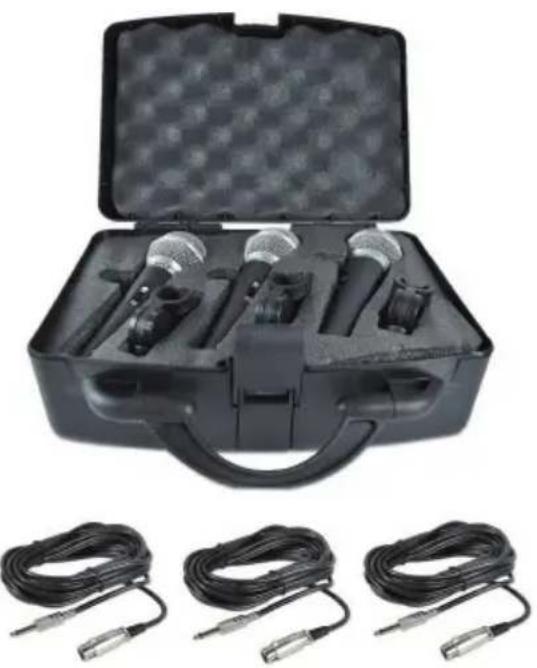
- Includes (3) Handheld Microphones & (3) XLR Audio Cables
• Built-in Acoustic Pop Filters
• Ultra-Wide Frequency Response
• High Signal Output for Vocals & Singing
• Rugged Construction & Steel Mesh Grill
• Reinforced Sound Cartridge
• ON/OFF Switch for Stage Control
• Perfect for Stage Performances or In-Studio Use
Technical Specs:
- Mic Element: Hyper-Cardioid
- Pickup Pattern: Unidirectional Moving Coil
• Mic Construction Material: Zinc Alloy
• Audio Cable Connectors: XLR to 1/4" - XLR Cable Length: 26' + Ft .
- Open Circuit Sensitivity: -54 dB
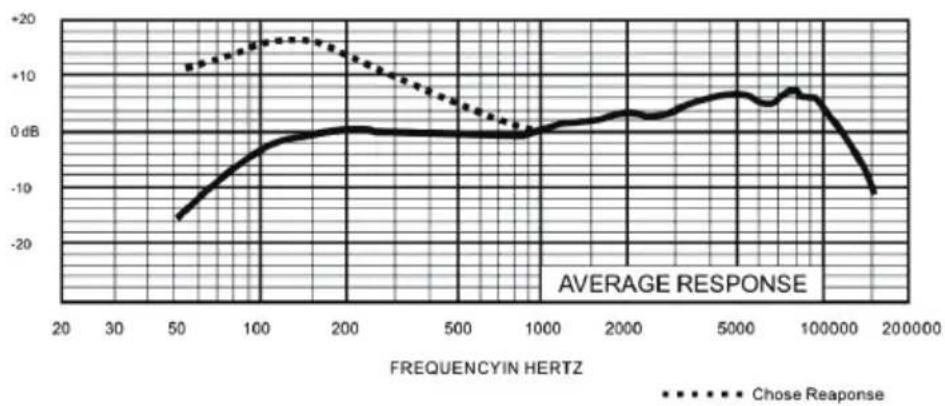
• Frequency Response: 60Hz-15kHz - Output Impedance: 600 Ohm, +/-3dB (0dB=1V/Pa @ 1kHz)
- Mic Dimensions (L x W): 6.7" x 1.8" (-Each)
• Mic Weight: 0.61 lbs. (-Each)
line
| FREQUENCY IN HERTZ | AVERAGE RESPONSE | | ------------------ | ---------------- | | 50 | -15 | | 100 | -5 | | 200 | 0 | | 500 | 0 | | 1000 | 0 | | 2000 | 5 | | 5000 | 10 | | 10000 | 5 | | 20000 | -10 |
WARNING: Cancer and Reproductive Harm - www.P65warnings.ca.gov
natural_image
Black plastic case with open lid and three connected audio devices, plus three black cables (no text or symbols visible)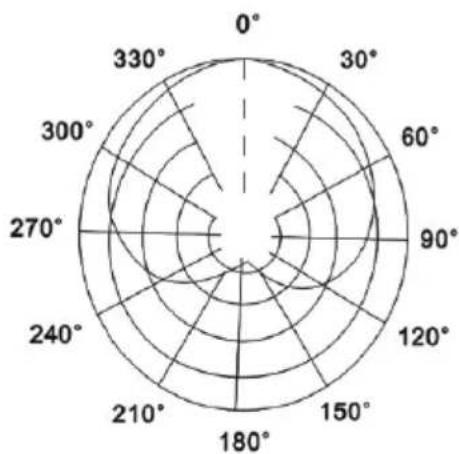
radar
| Angle | Value | |-------|-------| | 0° | 180 | | 30° | 160 | | 60° | 140 | | 90° | 120 | | 120° | 100 | | 150° | 80 | | 180° | 60 | | 210° | 40 | | 240° | 20 | | 270° | 10 | | 300° | 5 | | 330° | 2 |Cardioid (at 1KHz)
Connecting and Disconnecting the Microphone Cable
- Connecting the Cable: Insert the XLR connector into the microphone. If necessary, rotate the connector to align the key on the connector with the groove in the microphone. Push the connector into the microphone until it clicks, indicating a secure connection.
2. Disconnecting the Cable:
To disconnect the cable from the microphone, grasp the connector while depressing the tab. Gently pull the connector away from the microphone to release it.
Usage Guidelines
text_image
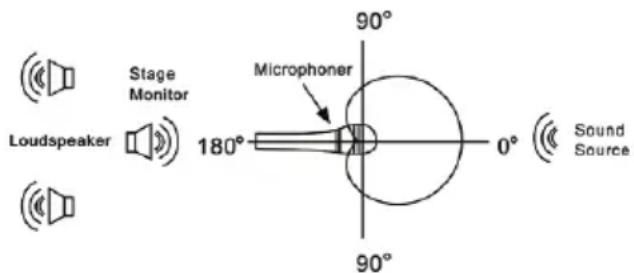
Stage Monitor Loudspeaker 180° Microphoner 90° 0° Sound Source 90°- Optimal Placement: For the best gain-before-feedback and isolation from undesired background noise, aim the microphone toward the sound source and away from unwanted sound sources.
natural_image
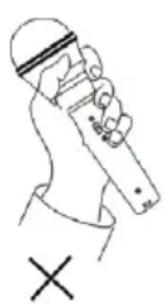
Line drawing of a person holding a device with a cross mark below (no text or symbols)
natural_image
Line drawing of a hand holding a microphone with a checkmark below (no text or symbols)- Handling the Microphone: Do not cover any part of the grille with your hand. Covering the grille alters the sound and distorts the polar pattern, increasing the chance of feedback.
Cautions
-
Feedback Prevention: If the head of the microphone is covered by your hand or brought close to the speaker, a howling sound may be generated. To prevent this, first decrease the volume, then position the microphone so that it is not pointed towards the speaker and there is sufficient distance between the microphone and the speaker.
-
Maintenance of the Grille and Windscreen: It is important to keep foreign particles out of the grille and the windscreen as they may alter the frequency response of the microphone. Clean the grille periodically using warm, soapy water. Rinse with plain water and let it dry completely before replacing.
-
Handling the Microphone: Due to the high sensitivity of the cartridge, avoid dropping it from a height or applying strong shocks to it.
4. Environmental Conditions:
To maintain the sensitivity and quality of sound reproduction, avoid exposing the microphone to moisture and extreme temperatures.

text_image
QR code image containing encoded data, no visible human-readable textQuestions or Comments?
We are here to help!
Phone: 1.718.535.1800
PyleUSA.com/ContactUs