
DJB-292 BT USB SD AX - Sound system MAJESTIC - Free user manual and instructions
Find the device manual for free DJB-292 BT USB SD AX MAJESTIC in PDF.


| Product Type | Portable Sound System / PA System |
| Brand | Majestic |
| Model | DJB-292 BT USB SD AX |
| Dimensions (W x H x D) | Approx. 30 x 20 x 15 cm |
| Weight | Approx. 2.5 kg |
| Power Supply | AC 100-240V, 50/60Hz; built-in rechargeable battery |
| Bluetooth Version | 5.0 (typical for similar devices) |
| USB Playback | Yes, supports USB drives up to 32GB (FAT32) |
| SD Card Playback | Yes, supports SD/SDHC cards up to 32GB |
| Radio Tuner | FM with built-in antenna |
| Audio Inputs | AUX (3.5mm), microphone (6.3mm) |
| Speaker Power | 2 x 10W RMS (typical) |
| Battery Life | Up to 4-6 hours at moderate volume |
| Charging Time | Approx. 4-5 hours |
| Maintenance & Cleaning | Clean with a soft dry cloth; avoid liquids and abrasive cleaners |
| Safety Precautions | Do not expose to water or moisture; keep away from heat sources; do not disassemble |
| Spare Parts & Repairability | Fuse replacement possible; contact customer service for other parts |
| General Information | Multimedia playback via BT, USB, SD, and FM; ideal for small gatherings and parties |
Frequently Asked Questions - DJB-292 BT USB SD AX MAJESTIC
User questions about DJB-292 BT USB SD AX MAJESTIC
0 question about this device. Answer the ones you know or ask your own.
Ask a new question about this device
Download the instructions for your Sound system in PDF format for free! Find your manual DJB-292 BT USB SD AX - MAJESTIC and take your electronic device back in hand. On this page are published all the documents necessary for the use of your device. DJB-292 BT USB SD AX by MAJESTIC.
USER MANUAL DJB-292 BT USB SD AX MAJESTIC
Majestic DJB 292BT USB/AX
PARTY SPEAKER - A NEW SOUND EXPERIENCE
DESCRIZIONE TASTI
26013 CREMA (CR) ITALY
TEL: 0373 31415
www.newmajestic.com
INSTRUZIONI D'USO
INFORMAZIONE AGLI UTENTI DI APPARECCHIATURE DOMESTICHE

DJB 292BT USB/AX
1 Echocontrol 12 Previous
2 Microphone equalizer 13 Play /Pause
3 Bass control 14 Next
4 Treble control 15 LEDlights button
5 Doublemicrophone inputs 16 LED Display
6 Microphone volume control 17 AC power On/Off
7 Master volumecontrol 18 Audioinput
8 SD cardslot 19 AC cable
9 USB port 20 Auxiliary powecord
10 MODEbutton(BT, FM, AUX, USB, SD)
11 REC (record toUSB/ SD card)
ENGLISH

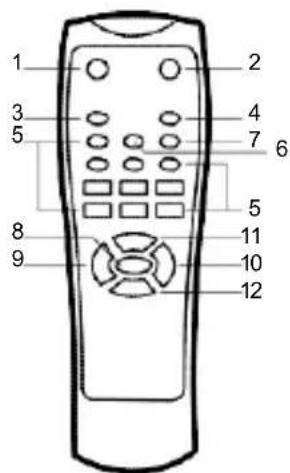
USING ThEREMOTECONTROL
Installingthe batteries Remove the battery coverfrom the back of the remote control as shown and insert 2xAAA size batteries ensuring correct polarity

Note for remote: The remote control should be used within 3m from the device, around 30 degree on the left/right side, pointed directly towards the speaker system.
USER'S MANUAL
1 Power on/Standby
2 Mute
3 Repeat key (single repeat, repeat all)
4 Mode key (choose from AUX/USB / SD/Bluetooth modes)
5 0-9 keys
6 Sound mode key (choose from EQ1, EQ2, EQ3, EQ4, EQ5)
7 Record key (press to start and again to stoprecording)
8 Play/pause (the sound will be muted when paused)
9 Volume -
10 Volume +
11 Previous song
12 Next song
AUX IN USB/SD,BLUETOOTH
To switch from one mode another press the MODE button. If the device is not connected to USB stick or anSD card, these modes will be omitted.
Long press PLAY/PAUSE button is the function of voice announcement ON/OFF.
1. AUX IN
With the attachedaudio cable, you can connect the device with the external multimedia audio sources through the
port "AUX". A connection, just set the mode to AUX by pressing the MODE button on the device. At this time the LINE indicator will be displayed on the screens, suggesting the device can play the audio files from multimediasources like PC, mobile phone, MP3 and MP4.
Note: InAUXIN mode, the forward and rewind song functions will not operate. They must be accessed through the auxiliary device directly.
ENGLISH
2. USB/SDCARD PLAYING
Insert the SD card or aUSB Flash memory stick into the corresponding slot. The device will automatically play any music in MP3/WMAformabn the card.
3. BLUETOOTHMODE
A. Press theMODEbutton until the word "BLUE" appears on the screen. The* icon will start to flash. InBluetooth mode the device goes into searching paring/reconnect mode for pair.
B. Now, turnONthe Bluetooth function on youmobile phone or tablet.
C. Search for "DJB 292 BT/USB/SD/AX" and select it to pair (for first time pairing or pairing a new mobile device). Once connected the * icon will stop flashing.
D. The Bluetooth speaker will bereconnecting automatically if your mobile phone has been paired (Depend on the of mobile phone's type and configuration, manual reconnection may require on some devices).
PANELSWITCHES AND KNOBS FUNCTION
- MICECH O(ECHO)
Receiverreverberationdepth adjustment.
- MIC VOLUME KNOB(MIC. VOL)
Microphone Volumeadjustment.
- TREBLEAND BASS ADJUSTMENT CONTROL (BASS & TREBLE)
Adjusts the treble and bass levels of the music.
- MIC. EQ
Adjusts microphoneequalization.
- LED
Switches the LED lights on and off.
- REC
Records on theUSB stick/SD card.
- Plug in amicrophoneto the MICIN input
- InsertUSB/SD card into the corresponding port, press MODE button and selectUSB/SD mode.
- If the USB/SD card is plugged into the speaker for the first time, the system will automatically create a foldemamed RECORDMto save recorded files (AT32USB file systemis supported).
- When you are ready to record, press RECbutton to go to recording mode. The current sound output will stop and go to mute status, screen shows "USB REC." The device starts recording when the screen shows 0:01 and users can use the microphoneto record.
ENGLISH
TECHNICAL SPECIFICATIONS
Portable Bluetooth Multimedia Audio system with trolley
LED display
12 "woofer / 2 x 3" tweeter
BASS REFLEX system
Bluetooth version 2.1 + EDR
Output power 160W RMS
Selectable LED lighting effects ON (lights on)/
OFF (off)
USB input for playing MP3 / WMA files
3.5mm AUX-IN input (AUX cable included)
MIC REC function (voice recording on USB / SD)
Adjustable Eco effect for microphones
HIGH/LOW tones equalization
Remote control (batteries included)
9A rechargeable battery (up to 8 hours at
medium volume playback)
Power supply with 110 / 240V AC cable - 50/60
Hz (AC cable included)
Handle and wheels for easy carrying
Product dimensions 40 (L) x 35 (D) x 67 (H) cm
Weight: 15.7 kg
MAJESTIC
Modello:
ALIMENTAZIONE:
26013 CREMA (CR) ITALY
TEL: 0373 31415
www.newmajestic.com
USER'S MANUAL

If at any time in the future you should need to dispose of this product please note that:
Waste electrical product should not be disposed of with household waste. Please recycle where facilities exist.
Check with your LocaAuthorityor retailerfor recycling advice.
(Waste Electrical and Electronic Equipment Directive)
- MAJESTIC DJB 292BT USB/AX
- DESCRIZIONE TASTI
- INSTRUZIONI D'USO
- INFORMAZIONE AGLI UTENTI DI APPARECCHIATURE DOMESTICHE
- DJB 292BT USB/AX
- ENGLISH
- USING THEREMOTECONTROL
- USER'S MANUAL
- AUX IN USB/SD,BLUETOOTH
- AUX IN
- USB/SDCARD PLAYING
- BLUETOOTHMODE
- PANELSWITCHES AND KNOBS FUNCTION
- TECHNICAL SPECIFICATIONS
- MAJESTIC
Brand : MAJESTIC
Model : DJB-292 BT USB SD AX
Category : Sound system