WD-10490SV - Washing machine LG - Free user manual and instructions
Find the device manual for free WD-10490SV LG in PDF.


| Product Type | Front-Load Washing Machine |
| Brand | LG |
| Model | WD-10490SV |
| Capacity (Wash) | 10 kg |
| Spin Speed | 1400 rpm |
| Dimensions (W x H x D) | 600 x 850 x 550 mm |
| Net Weight | 72 kg |
| Power Supply | 220-240 V, 50 Hz, 10 A |
| Energy Consumption (Annual) | Approx. 220 kWh |
| Water Consumption (Per Cycle) | Approx. 60 L |
| Noise Level (Wash/Spin) | 54 dB / 74 dB |
| Programs | Cotton, Synthetic, Delicates, Quick Wash, Eco, Wool, Hand Wash, Rinse+Spin, Spin Only |
| Additional Features | Inverter Direct Drive Motor, 6 Motion, Steam, AI DD, Smart Diagnosis, Child Lock |
| Display | LED Digital Display |
| Drum Material | Stainless Steel |
| Door Opening | Hinged Left, Glass Porthole |
| Installation Type | Freestanding |
| Energy Class | A+++ |
| Maintenance | Clean Dispenser Drawer and Door Seal Regularly; Use Drum Clean Program Monthly; Check Filter and Drain Hose |
| Safety Features | Child Lock, Unbalanced Load Detection, Overflow Protection, Anti-Flood System |
| Spare Parts Availability | LG Authorized Service Centers: Filters, Belts, Hoses, Door Gaskets, Control Boards |
| Repairability Index | 8.2/10 (Estimated based on similar LG models) |
Frequently Asked Questions - WD-10490SV LG
User questions about WD-10490SV LG
0 question about this device. Answer the ones you know or ask your own.
Ask a new question about this device
Download the instructions for your Washing machine in PDF format for free! Find your manual WD-10490SV - LG and take your electronic device back in hand. On this page are published all the documents necessary for the use of your device. WD-10490SV by LG.
USER MANUAL WD-10490SV LG
WASHING MACHINE SERVICE MANUAL
CAUTION
READ THIS MANUAL CAREFULLY TO DIAGNOSE TROUBLE CORRECTLY BEFORE OFFERING SERVICE.
- ERROR DIAGNOSIS AND CHECK LIST ....16
8-1. DIAGNOSIS AND ANSWER FOR ABNORMAL OPERATION....16
8-2. FAULT DIAGNOSIS AND TROUBLESHOOTING ....19
-
DISASSEMBLY INSTRUCTIONS .....25
-
EXPLODED VIEW 32
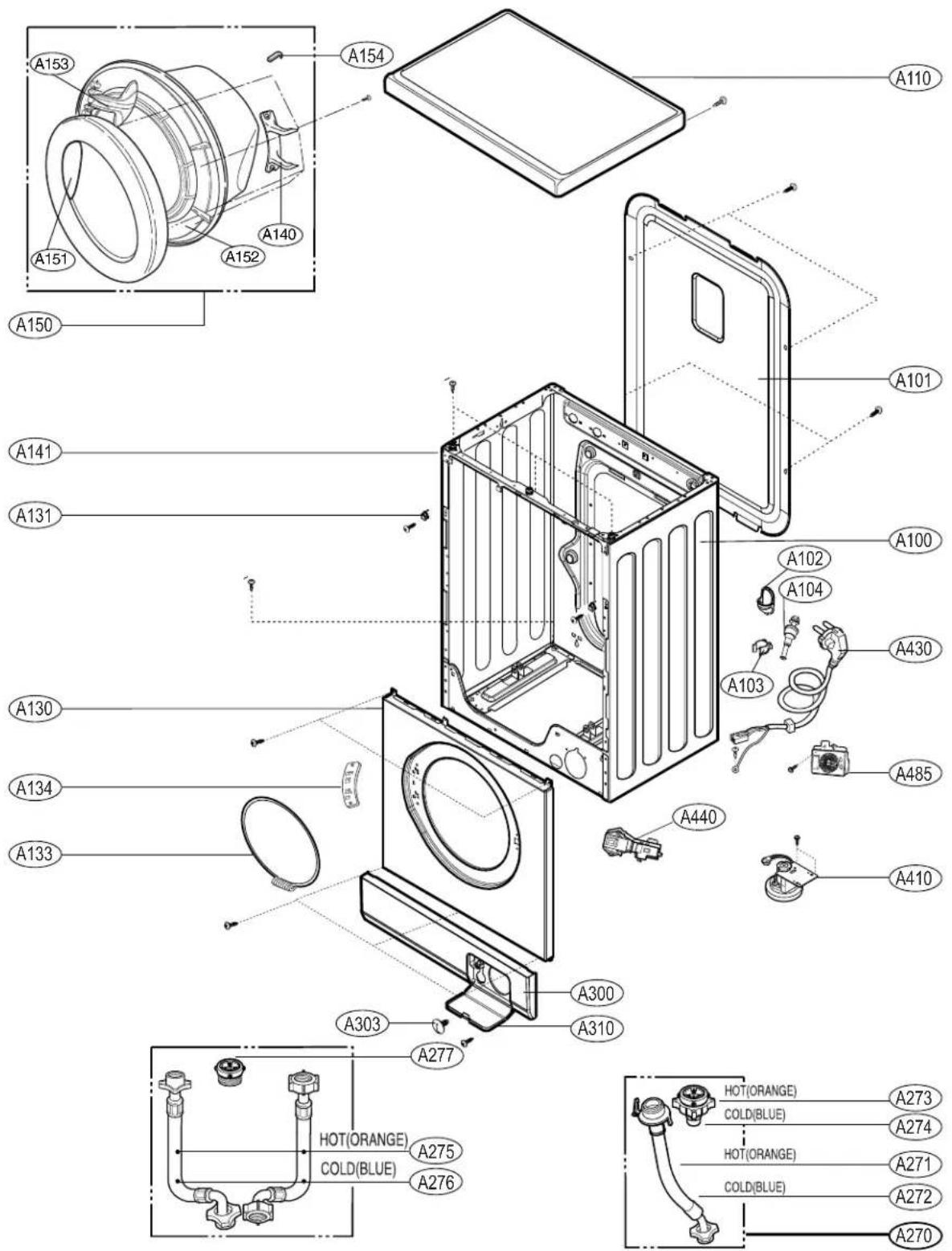
10-1. THE EXPLODED VIEW OF CABINET ASSEMBLY 32
10-2. THE EXPLODED VIEW OF CONTROL PANEL & DISPENSER ASSEMBLY....33
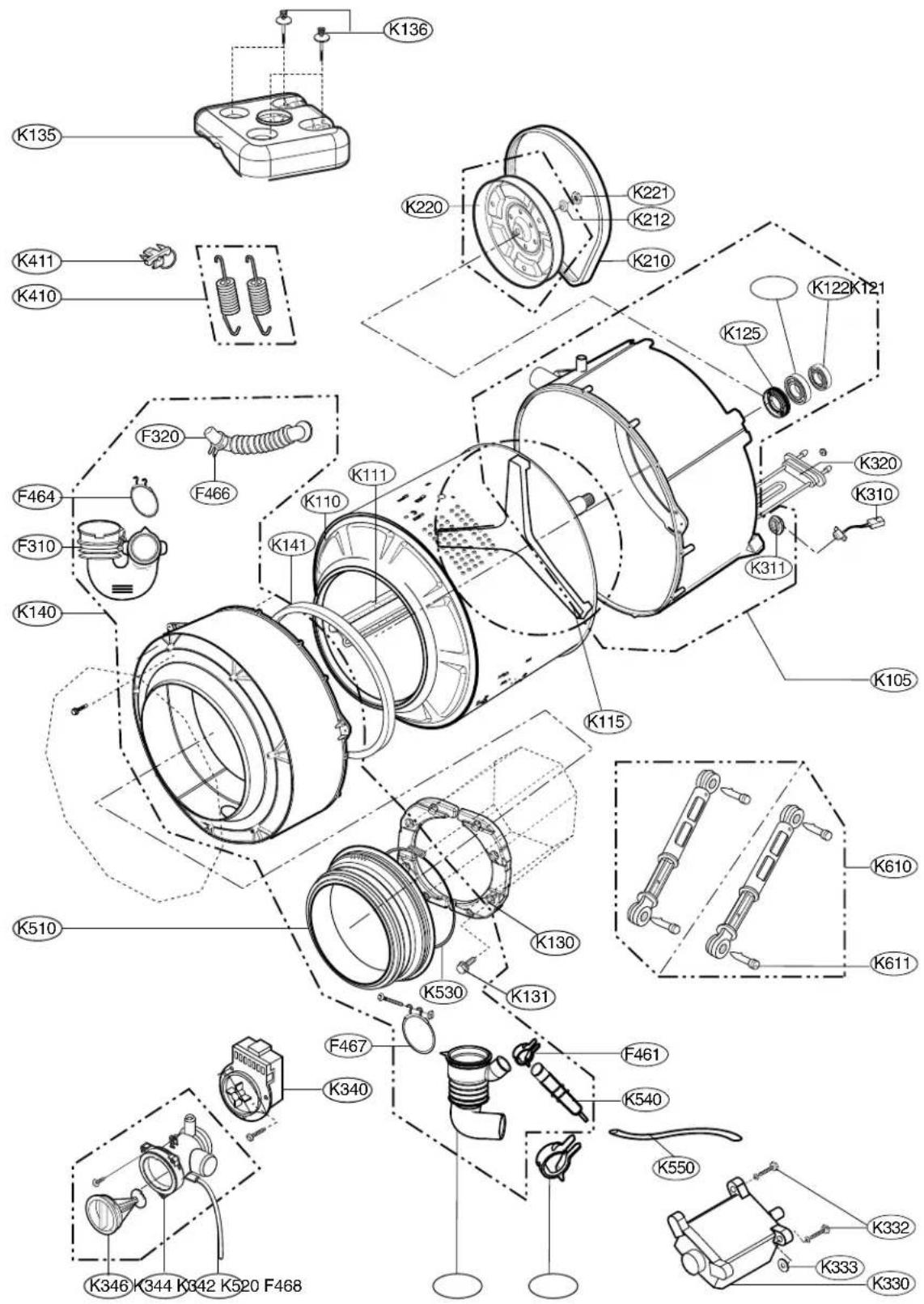
10-3. THE EXPLODED VIEW OF DRUM & TUB ASSEMBLY....34
*APPENDIX (Replacement parts list)....35
| ITEM | WD-10480SWD-80480SWD-10490SWD-80490S | WD-10480NWD-80480NWD-10490NWD-80490N | WD-10480TWD-80480TWD-10490TWD-80490T | ||
| POWER SUPPLY 220-240V+, 50Hz | |||||
| PRODUCT WEIGHT 52kg 57kg 64kg | |||||
| ELECTRICITY CONSUMPTION | WASHING 190W | ||||
| SPIN (800rpm) 300W | |||||
| DRAIN MOTOR 32W | |||||
| WASH HEATER 1900W 2000W | |||||
| REVOLUTION SPEED | WASH 50rpm | ||||
| SPIN | WD-80480S/N/T, WD-80490S/N/T | 400/800rpm | |||
| WD-10480S/N/T, WD-10490S/N/T | 400/800/1000rpm | ||||
| OPERATION WATER PRESSURE 0.3-10kgf/cm ^2 (30-1000kPa) | |||||
| CONTROL TYPE Electronic | |||||
| WASH CAPACITY | 3.5kg 5.0kg | 7.0kg | |||
| Synthetic(1.5)Delicate(1.0)Baby Care(3.0)Hand Wash/Wool(1.0)Quick 30(1.0) | Synthetic(1.7)Delicate(1.5)Baby Care(4.0)Hand Wash/Wool(1.5)Quick 30(1.5) | Synthetic(3.0)Delicate(2.0)Baby Care(6.0)Hand Wash/Wool(2.0)Quick 30(2.0) | |||
| DIMENSION | 600mm(W) ×360mm(D) ×850mm(H) | 600mm(W) ×440mm(D) ×850mm(H) | 600mm(W) ×550mm(D) ×850mm(H) | ||
| WASH PROGRAM | Cotton, Synthetic, Delicate, Hand Wash/Wool, Baby Care, Quick 30, Rinse+Spin, Spin | ||||
| OPTION | WD-10480S/N/T, 10490S/N/T | Rinse+, Pre Wash, Crease Care, Bio, Time Save, Time Delay | |||
| WD-80480S/N/T, 80490S/N/T | Rinse+, Pre Wash, Time Save, Time Delay | ||||
| DOOR SWITCH TYPE | Bi-Metal type | ||||
| WATER LEVEL | 9 steps (by sensor) | ||||
| SENSING OF THE LAUNDRY AMOUNT | Adopted | ||||
| FUZZY LOGIC | Adopted | ||||
| DISPLAY OF THE REMAINING TIME | Adopted | ||||
| ERROR DIAGNOSIS | 10 items | ||||
| POWER AUTO OFF | Adopted | ||||
| CHILD LOCK | Adopted | ||||
| AUTO RESTART | Adopted | ||||
2. FEATURES & TECHNICAL EXPLANATION
2-1 FEATURES
natural_image
Cartoon illustration of a washing machine with a thought bubble showing a shower, no text or symbols present
natural_image
Illustration of a hand pressing down on a washing machine with bubbles around (no text or symbols)
natural_image
Simple line drawing of a washing machine emitting steam from a light bulb (no text or symbols)Anti - Crease Function
With the alternate rotation of the drum, creasing in the laundry is minimized.
■ More economical by Fuzzy Logic System
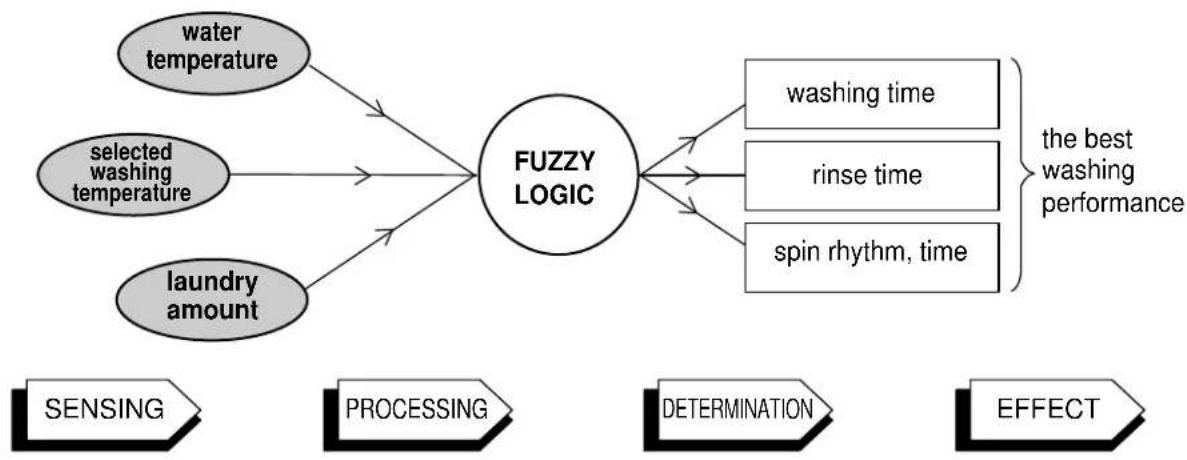
FUZZY Logic System detects the amount of load and water temperature, and then determines the optimum water level and washing time to minimize energy and water consumption.
Child-Lock
The Child-Lock system has been developed to prevent children from pressing any button (except Power button) to change the programme during operation.
■ Low noise speed control system
By sensing the amount of load and balance, this system automatically distributes load evenly to minimize the spinning noise level.
Auto Restart
Auto Restart allows the program to restart all by itself in case of power failure. It does from the stage where it stopped. It will be also the same when washer is plugged in after unplugging.
2-2.DETERMINE WASHING TIME BY FUZZY LOGIC
To get the best washing performance optimal time is determined by sensing of water temperature, selected washing temperature and laundry amount.
flowchart
graph TD
    A["water temperature"] --> C["FUZZY LOGIC"]
    B["selected washing temperature"] --> C
    D["laundry amount"] --> C
    C --> E["washing time"]
    C --> F["rinse time"]
    C --> G["spin rhythm, time"]
    E --> H["the best washing performance"]
    F --> H
    G --> H
    I["SENSING"] --> J["PROCESSING"] --> K["DETERMINATION"] --> L["EFFECT"]
2-3.WATER LEVEL CONTROL
● This model adopts a pressure sensor which can sense the water level in the tub.
- When the water level reaches to the preset level the water supply is stopped, then the washing program proceeds.
● Spinning does not proceed until the water in the tub reduces a certain level.
2-4. THE DOOR CAN NOT BE OPENED
• While program is operating.
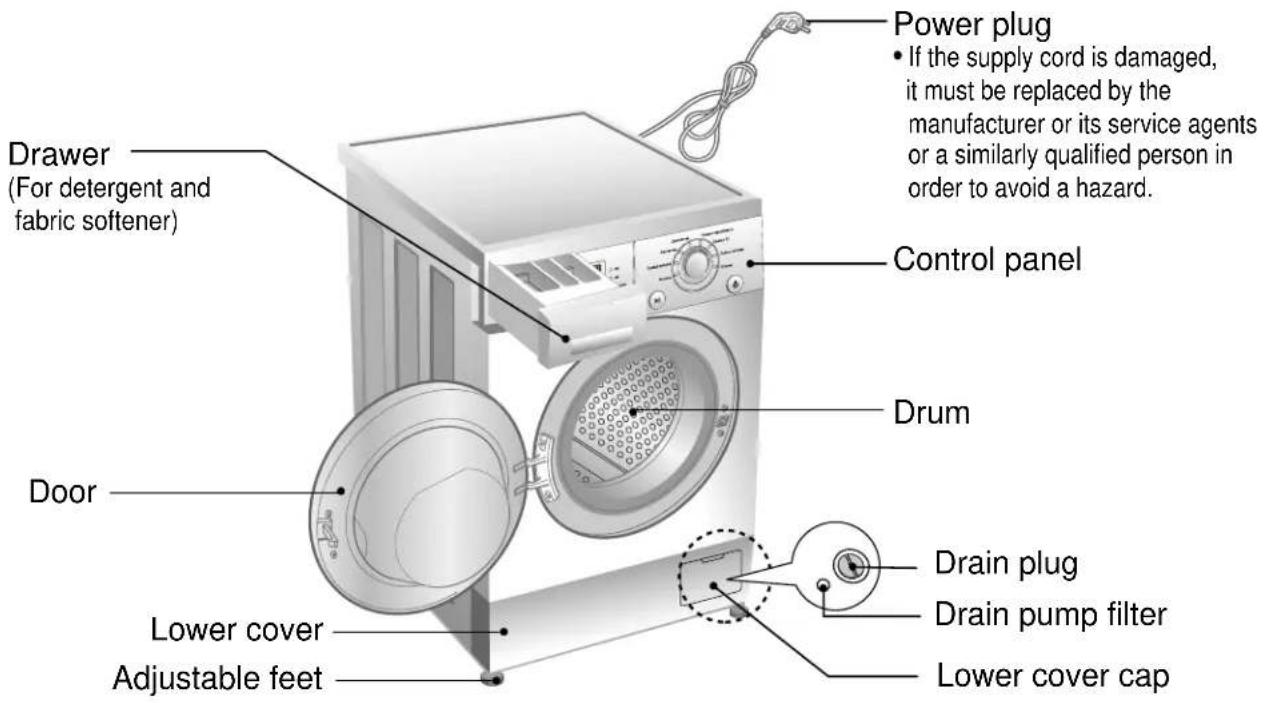
3. PARTS IDENTIFICATION
text_image
Drawer (For detergent and fabric softener) Power plug • If the supply cord is damaged, it must be replaced by the manufacturer or its service agents or a similarly qualified person in order to avoid a hazard. Control panel Drum Door Lower cover Adjustable feet Drain plug Drain pump filter Lower cover capACCESSORIES
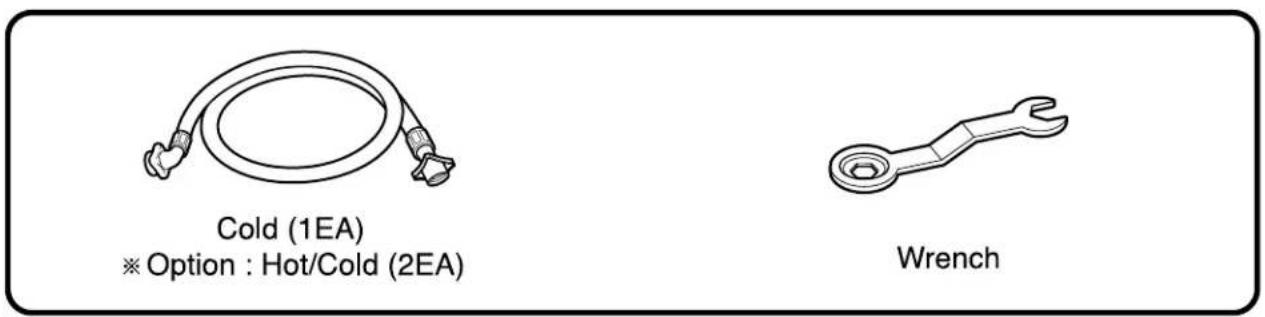
text_image
Cold (1EA) ※ Option : Hot/Cold (2EA) Wrench4. INSTALLATION
① Before servicing ask the customer what the trouble is.
② Check the adjustment (power supply is 220-240V, remove the transit bolts....)
③ Check the troubles referring to the troubleshooting.
4 Decide service steps referring to disassembly instructions.
⑤ Then, service and repair.
6 After servicing, operate the appliance to see whether it works O·Kor NOT.
■ STANDARD INSTALLATION
The appliance should be installed as follows.
| REMOVE THE TRANSIT INSTALL THE APPLIANCE ADJUST THE BOLTS ON FLAT AND FIRM SURFACE HORIZONTAL | ||
Remove the transit bolts Turn the adjustable feet to (4EA:1) with supplied wrench. set the appliance horizontally.Keep the transit bolts and wrench for future use.Insert the 4 caps provided into the hole.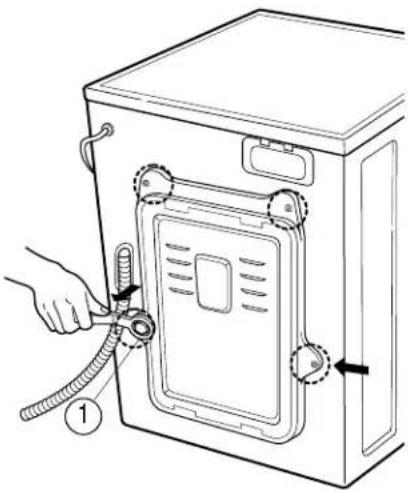 | 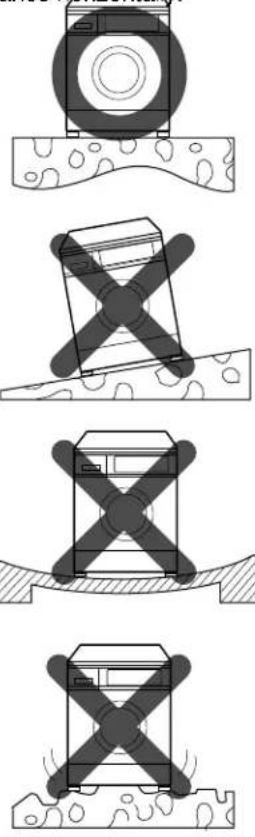 | 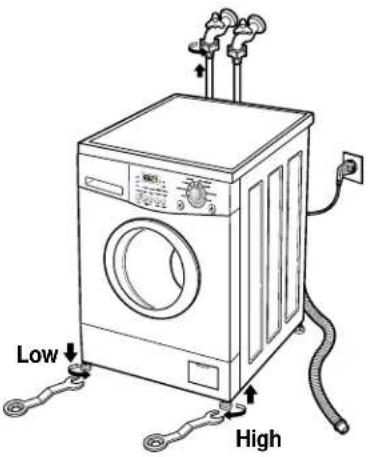 The appliance goes up by rotating the feet clockwise.The appliance comes down by rotating the feet counter-clockwise. The appliance goes up by rotating the feet clockwise.The appliance comes down by rotating the feet counter-clockwise. |
■ HOW TO CONNECT INLET HOSE
- Check that the rubber washer is the inside of the valve connector.
- Connect inlet hose firmly to prevent leak.
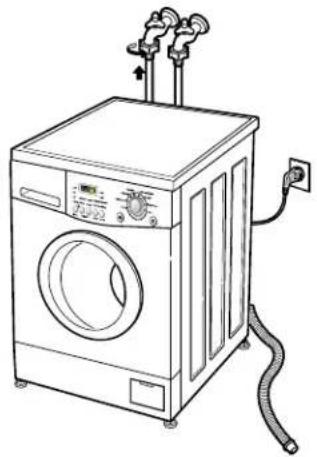
natural_image
Line drawing of a front-loading washing machine with attached piping and control panel (no text or symbols)■ CONNECT DRAIN HOSE
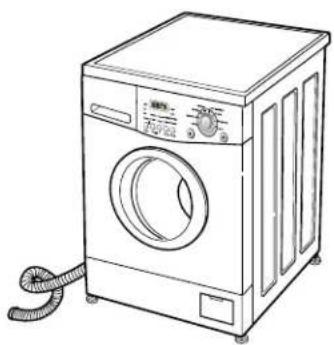
natural_image
Line drawing of a front-loading washing machine with a coiled cord (no text or symbols)• Make sure that the hose is not twisted.
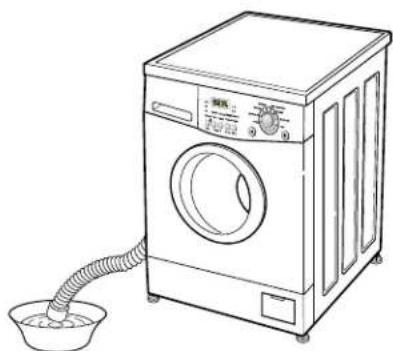
natural_image
Line drawing of a washing machine with a drain drain and bucket (no text or symbols)- Avoid submerging the end of the hose.
※ The drain hose should be placed under 100cm from the floor.
natural_image
Illustration of a hand using a power plug to switch an electrical outlet (no text or symbols present)- Connect the power plug to the wall outlet.
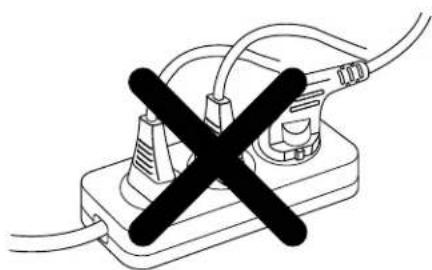
natural_image
Simple line drawing of a plug with a black X symbol crossed out, no text or symbols present- Avoid connecting several electric devices, It may be the cause of a fire.
⑦ TEST OPERATION
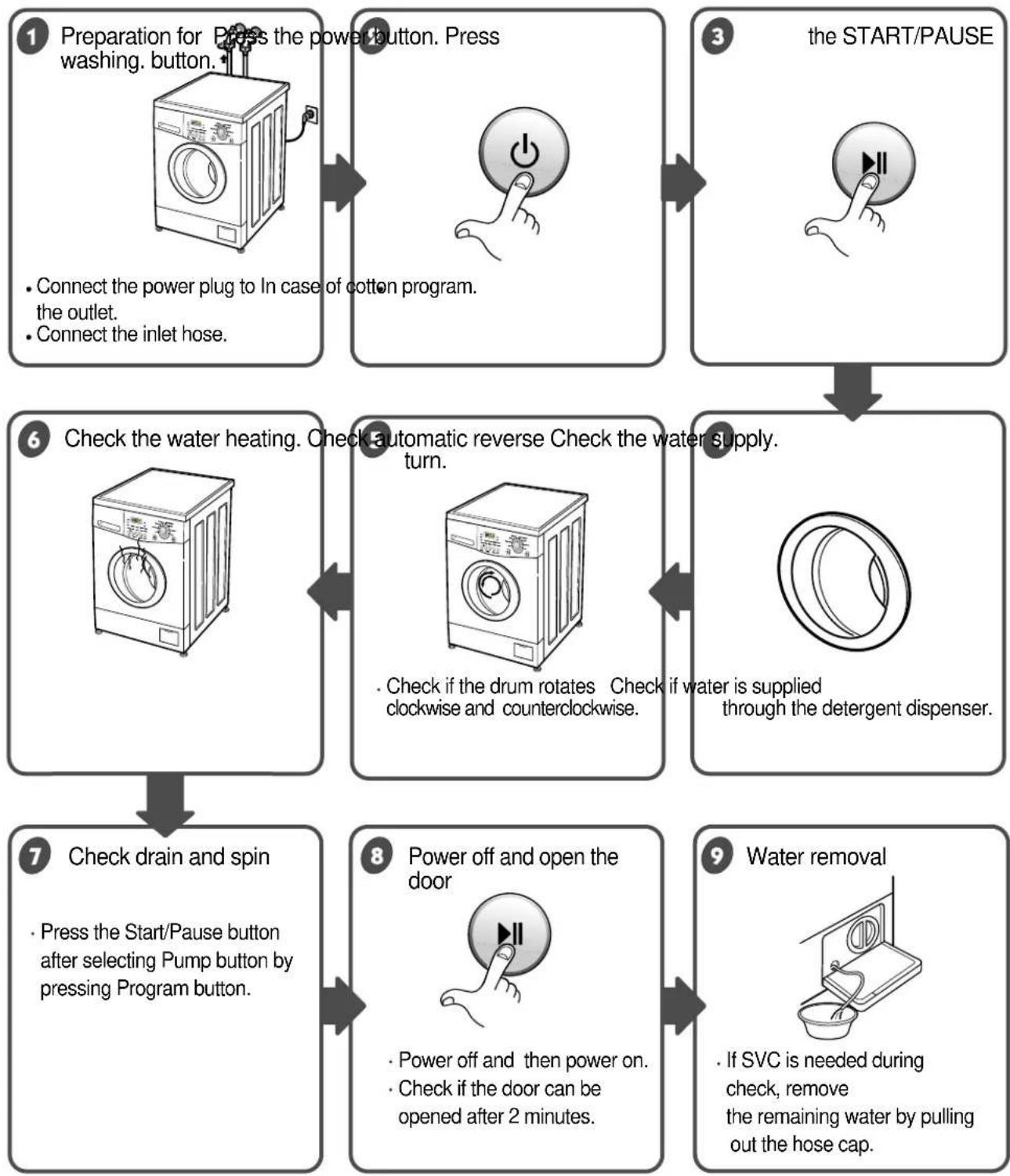
- Connect the power plug to In case of cotton program. the outlet.
-
Connect the inlet hose.
-
Power off and then power on.
- Check if the door can be opened after 2 minutes.
text_image
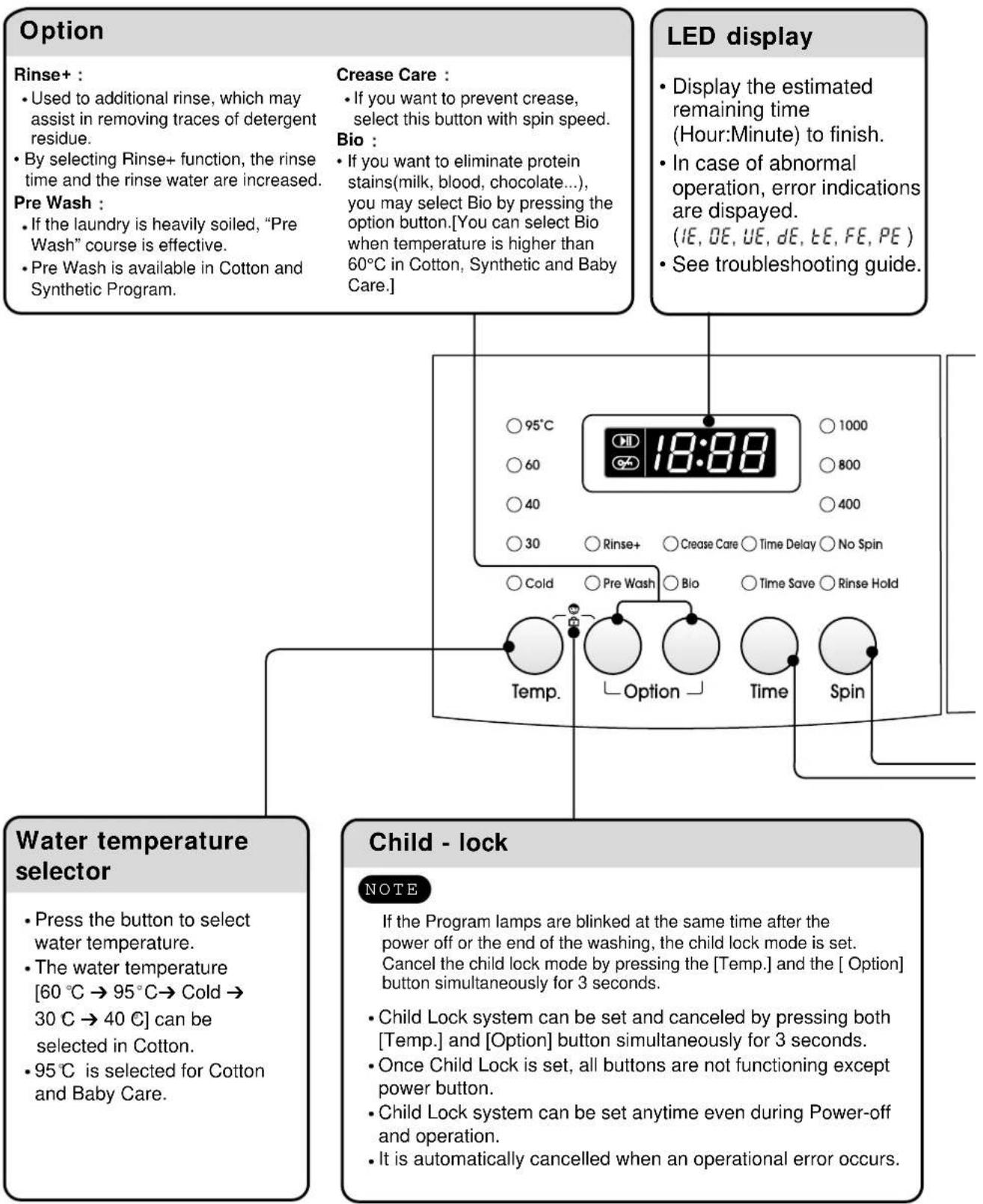
Option Rinse+ : • Used to additional rinse, which may assist in removing traces of detergent residue. • By selecting Rinse+ function, the rinse time and the rinse water are increased. Pre Wash : • If the laundry is heavily soiled, "Pre Wash" course is effective. • Pre Wash is available in Cotton and Synthetic Program. Crease Care : • If you want to prevent crease, select this button with spin speed. Bio : • If you want to eliminate protein stains(milk, blood, chocolate...), you may select Bio by pressing the option button.[You can select Bio when temperature is higher than 60°C in Cotton, Synthetic and Baby Care.] LED display • Display the estimated remaining time (Hour:Minute) to finish. • In case of abnormal operation, error indications are displayed. (IE, OE, UE, dE, tE, FE, PE) • See troubleshooting guide. ○95°C 18:88 ○1000 ○60 ○800 ○40 ○400 ○30 ○Rinse+ ○Crease Care ○Time Delay ○No Spin ○Cold ○Pre Wash ○Bio ○Time Save ○Rinse Hold Temp. Option Spin Water temperature selector • Press the button to select water temperature. • The water temperature [60 °C → 95 °C → Cold → 30 °C → 40 °C] can be selected in Cotton. • 95°C is selected for Cotton and Baby Care. Child - lock NOTE If the Program lamps are blinked at the same time after the power off or the end of the washing, the child lock mode is set. Cancel the child lock mode by pressing the [Temp.] and the [ Option] button simultaneously for 3 seconds. • Child Lock system can be set and canceled by pressing both [Temp.] and [Option] button simultaneously for 3 seconds. • Once Child Lock is set, all buttons are not functioning except power button. • Child Lock system can be set anytime even during Power-off and operation. • It is automatically cancelled when an operational error occurs.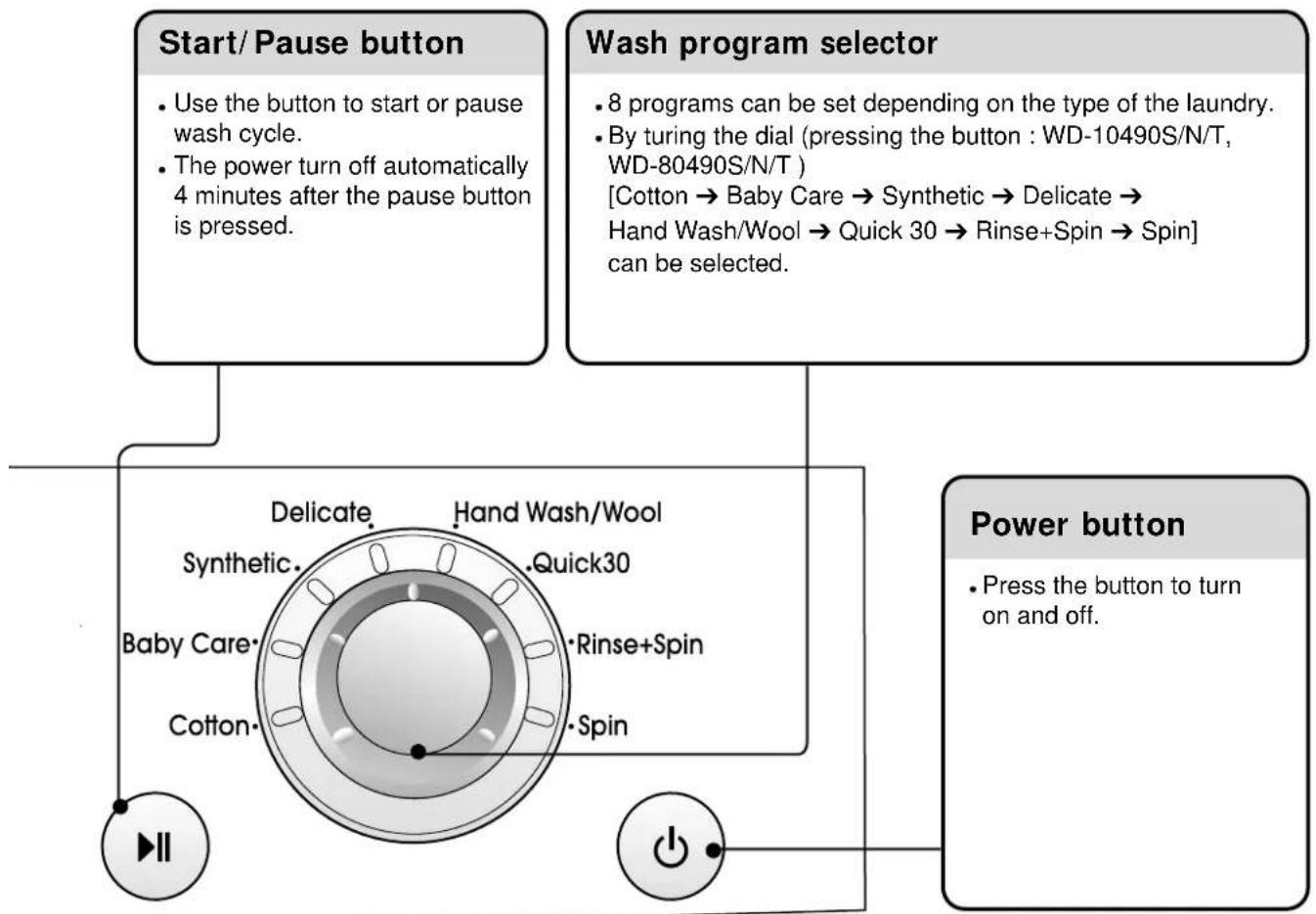
flowchart
graph TD
    A["Start/ Pause button"] --> B["Use the button to start or pause wash cycle"]
    A --> C["The power turn off automatically 4 minutes after the pause button is pressed."]
    D["Wash program selector"] --> E["8 programs can be set depending on the type of the laundry"]
    D --> F["By turing the dial (pressing the button : WD-10490S/N/T, WD-80490S/N/T) [Cotton → Baby Care → Synthetic → Delicate → Hand Wash/Wool → Quick 30 → Rinse+Spin → Spin"] can be selected.]
    G["Power button"] --> H["Press the button to turn on and off."]
    I["Hand Wash/Wool"] --> J["Delicate"]
    I --> K["Hand Wash/Wool"]
    I --> L["Synthetic"]
    I --> M["Baby Care"]
    I --> N["Cotton"]
    I --> O["Spin"]
    P["Power button"] --> Q["Press the button to turn on and off."]
flowchart
graph TD
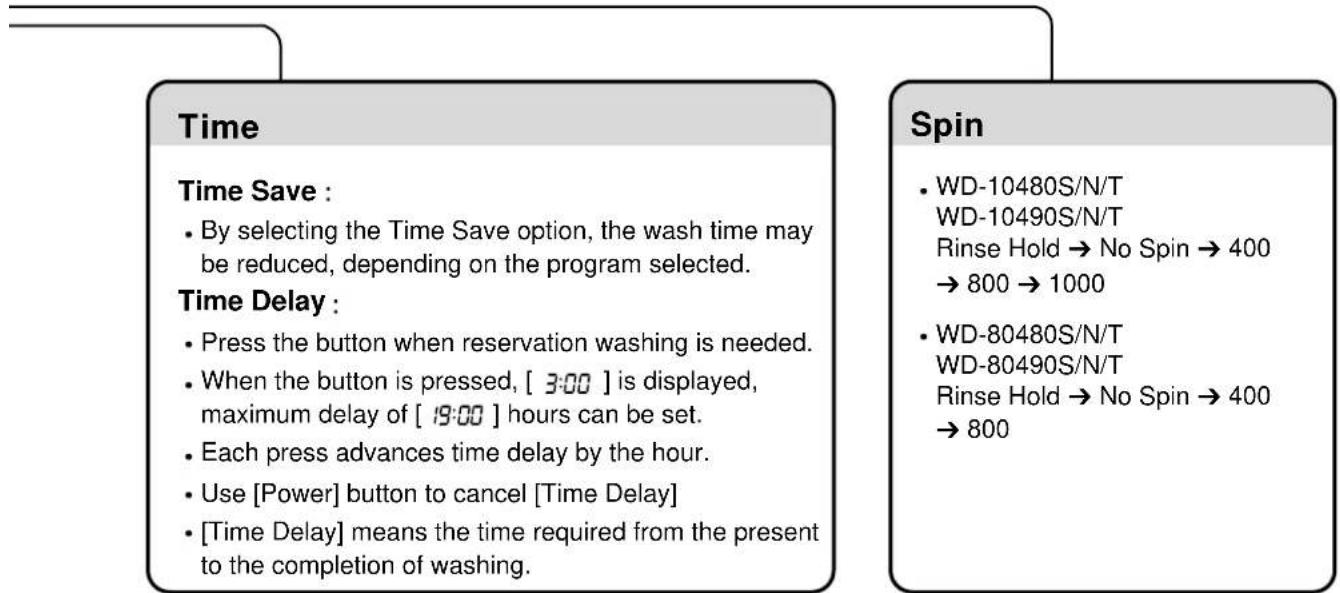
    A["Time"] --> B["Time Save:"]
    B --> C["By selecting the Time Save option, the wash time may be reduced, depending on the program selected."]
    B --> D["Time Delay:"]
    D --> E["Press the button when reservation washing is needed."]
    D --> F["When the button is pressed, [3:00"] is displayed, maximum_delay_of["19:00"] hours can be set.]
    D --> G["Each press advances time delay by the hour."]
    D --> H["Use [Power"] button_to_cancel["Time Delay"]]
    D --> I["[Time Delay"] means the time required from the present to the completion of washing.]
    J["Spin"] --> K["WD-10480S/N/T\nWD-10490S/N/T\nRinse Hold → No Spin → 400 → 800 → 1000"]
    J --> L["WD-80480S/N/T\nWD-80490S/N/T\nRinse Hold → No Spin → 400 → 800"]
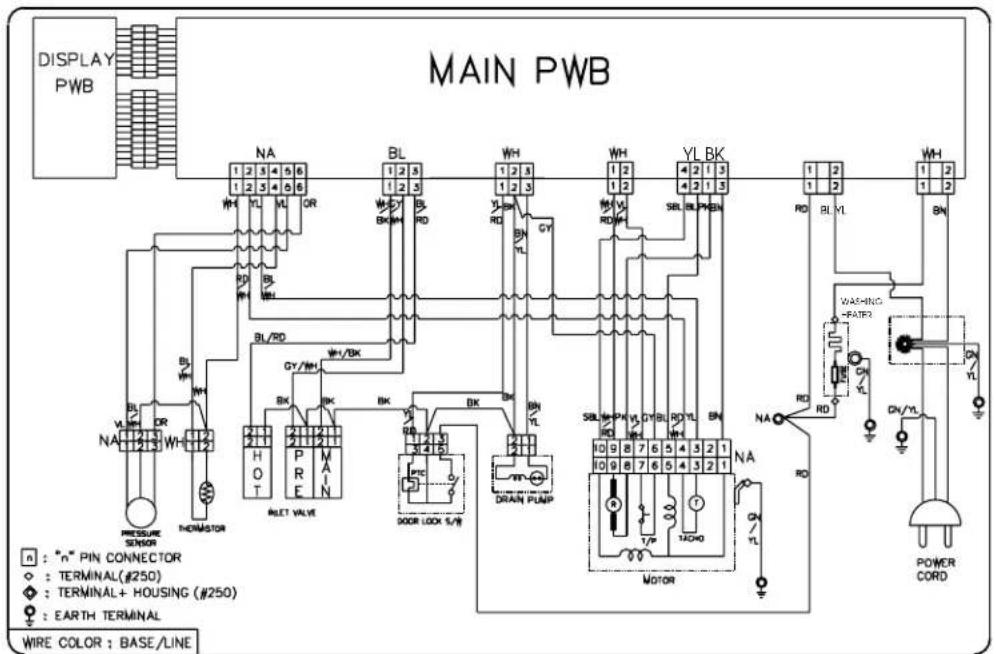
6. WIRING DIAGRAM / PROGRAM CHART
text_image
DISPLAY PWB MAIN PWB 1 2 3 4 5 6 1 2 3 4 5 6 WH YL VL OR BL BL RD WH YL BR GY 1 2 3 1 2 3 WH YL BL BK 1 2 1 2 RD BL VL WH BL DR BL/WD BY/BK HY/WH BH DRAIN PLAP SBL-PW VLD RL TL BN 10 9 8 7 6 5 4 3 2 1 10 9 8 7 6 5 4 3 2 1 MOTOR NA RD POWER CORD N : "n" PIN CONNECTOR ◇ : TERMINAL (#250) ◇ : TERMINAL+ HOUSING (#250) ● : EARTH TERMINAL WIRE COLOR : BASE/LINE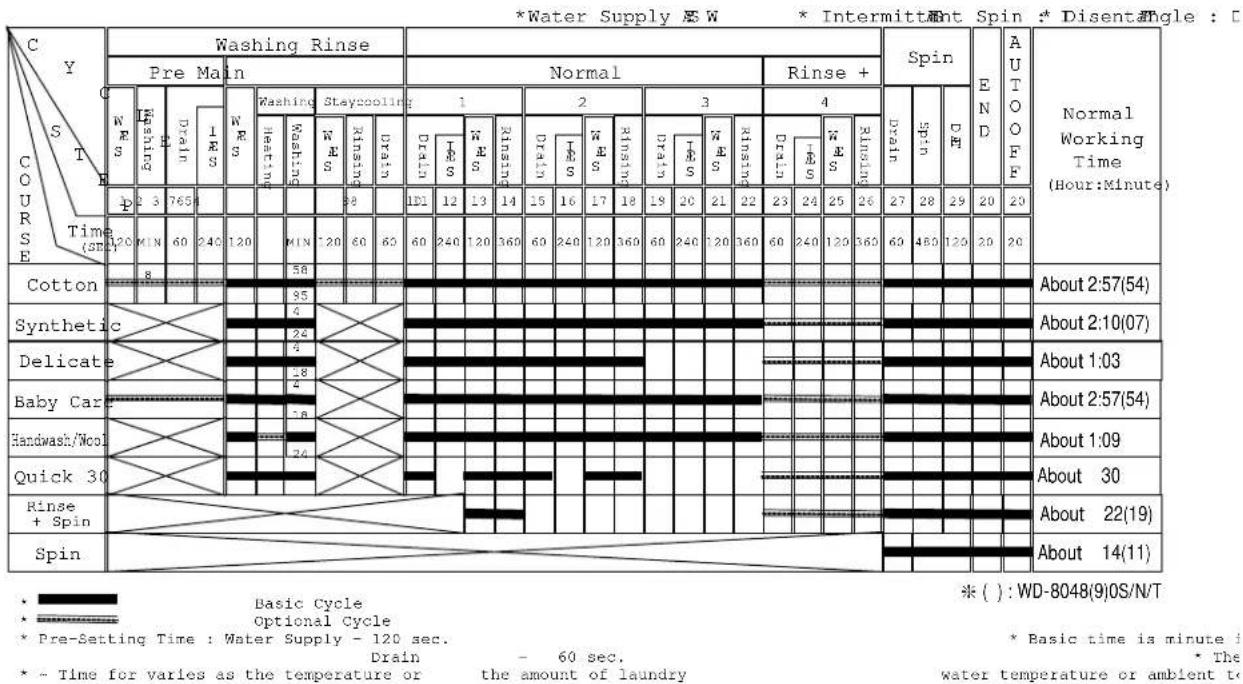
* Pre Wash : •If the laundry is heavily soiled, "Pre Wash" course is effective.
* Time Save : • This option can be used to reduce the time of a wash program.
• To use this option press the Time Save button once before the wash program is started.
• This option is not available with Quick 30 program.
* Rinse+ : • Used to additional rinse, which may assist in removing traces of detergent residue.
- By selecting Rinse ^+ function, the rinse time and the rinse water are increased.
* Crease Care : • If you want to prevent crease, select this button with spin speed.
* Bio : • If you want to eliminate protein stains (milk, blood, chocolate...), you may select Bio function by pressing the option button.
7-1. BEFORE PERFORMING SERVICE
■ Be careful of electric shock or disconnecting the parts while troubleshooting.
■ Voltage of each terminal in 220-240V\~ and DC while applying an electric current.
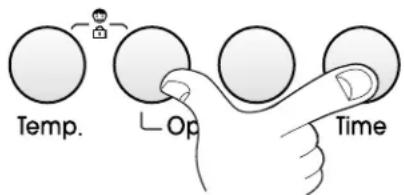
7-2. QC TEST MODE.
① Pressing Option and Time button simultaneously.
② Power supply ON with pressing upper two button.
③ Press the START/PAUSE button as follows.
[Press the START/PAUSE button more 4 times until stop spinning]
text_image
Temp. Op Time| Pressing number of [START/PAUSE] button | Checking Point | |
| None All lamps turn on | 18:88 | |
| 1 time Clockwise | spin (right) Motor rpm (About 45) | |
| 2 times Low speed | Spin Motor rpm (About 63~67) | |
| 3 times High speed | Spin | Motor rpm (About 79~85) : WD-80480S/N/T, 80490S/N/T |
| Motor rpm (About 95~106) : WD-10480S/N/T, 10490S/N/T | ||
| 4 times Inlet valve | for pre-wash operation Water level frequency (25~65) | |
| 5 times | Inlet valve for main-wash operation | Water level frequency (25~65) |
| Hot inlet valve in case of hot water fill | ||
| 6 times Inlet valve | for main-wash operation Water level frequency (25~65) | |
| 7 times Counterclockwise spin (left) Motor rpm (About 45) | ||
| 8 times A Heater is in operation for 3 sec. Water Temperature | ||
| 9 times Draining pump operation Water level frequency | ||
| 10 times | Auto off operation | |
7-4. HOW TO KNOW THE WATER LEVEL FREQUENCY
* Press the Temp. and Spin button simultaneously.
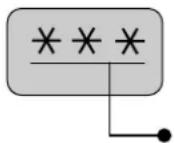
The digits means water level frequency ( 10^-1 kHz)
ex) 241 : Water level frequency = 241 × 10kHz =24.1kHz
7-5. ERROR DISPLAY.
¥ If you press the [Start/Pause] button when an error is displayed, any error except S/W ERROR will disappear and the machine will change into pause status.
¥ In case of 『if the error is not resolved within 20 sec. In the case of other errors, if the error is not resolved within 4 min. power will be turned off automatically and the error code will be blinked. But in case of 『power will not be turned off.
| ERROR | SYMPTOM | CAUSE | |
| 1 | WATER INLET ERROR | 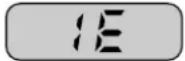 | ○ Water has not reached to the pre-set level within 4 min. since inlet valve operated, or water has not reached to the normal level within 25 min. |
| 2 | IMBALANCE ERROR |  | ○ The appliance is tilted.○ Laundry is gathered to one side.○ Non distributable things are put into the drum. |
| 3 | DRAIN ERROR Water | 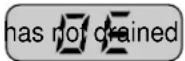 enough within 5 min. enough within 5 min. | |
| 4 | OVERFLOW WATER ERROR | Water is automatically being pumped out because too much 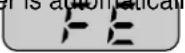 water is in the tub. water is in the tub. | |
| 5 | SENSOR PRESSURE S/W ERROR | 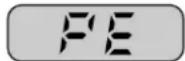 | ○ The sensor pressure switch is out of order. |
| 6 | DOOR OPEN THE ERROR | 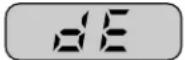 | ○ [Start/Pause] button is pressed with the door open.○ The door switch is out of order. |
| 7 | HEATING ERROR | 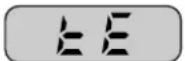 | ○ The thermistor is out of order. |
8. ERROR DIAGNOSIS AND CHECK LIST
8-1. DIAGNOSIS AND ANSWER FOR ABNORMAL OPERATION
| SYMPTOM GUIDE FOR SERVICE CALL | ||
| NO POWER | Is the power plug connected firmly to 220-240V~ outlet? YES Power failure? or Breaker opened? Is the outlet controlled by a switch. NO Visit to check 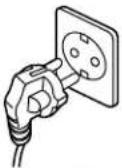 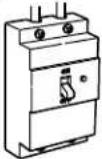 | |
| Water inlet trouble | Is displayed? YES Is the tap opened? YES Is the tap frozen? NO Is the water supply shut-off? NO Is filter in the inlet valve clogged with foreign material? Yes Clean the filter of inlet valve 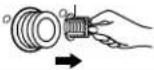 Visit to check Visit to check | |
| • DOOR OPEN ERRORRefer to7-3 ERROR DISPLAY | 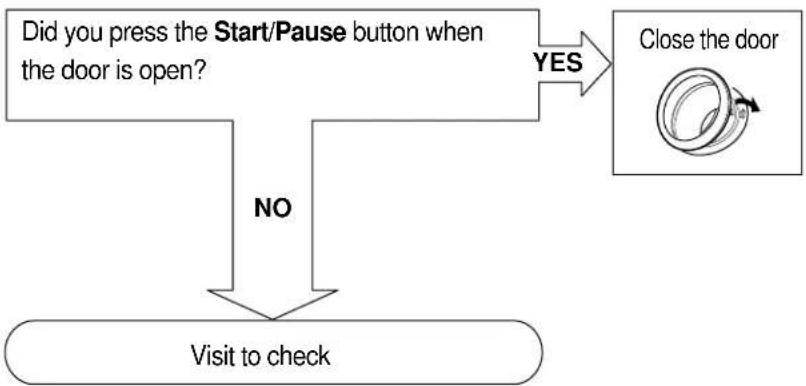 Check if the door switch is O.K Check if the door switch is O.K | |
• Drain Trouble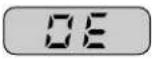 | 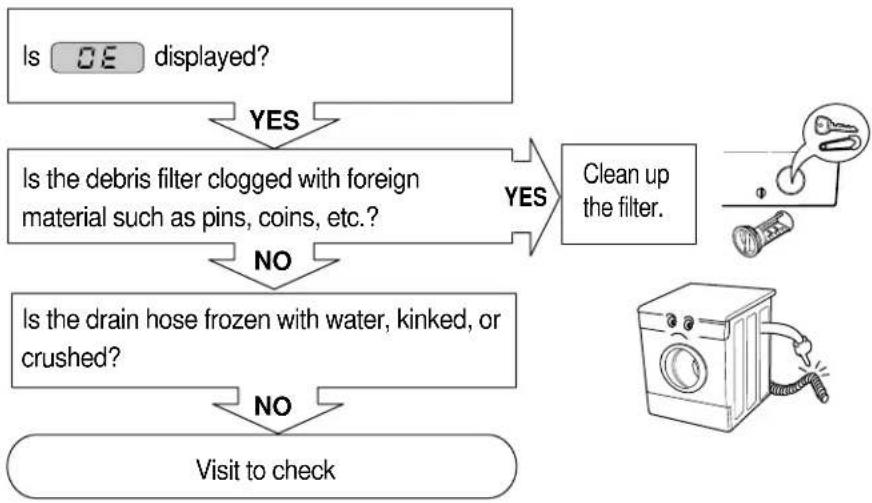 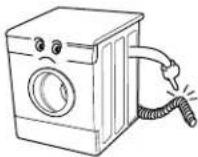 | |
| SYMPTOM | GUIDE FOR SERVICE CALL | |
| Suds overflow from the appliance.(In this condition, wash and spin do not operate normally) | 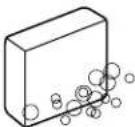 LOW SUDSINGDETERGENT LOW SUDSINGDETERGENT | |
| Is low-sudsing detergent for the durm washing machine used?YESIs the proper amount of detergent used as recommended?YESRecommend to reduce the amount of detergent.This appliance has the automatic suds sensing function which operates under much suds condition for good rinse and preventing overflow.When much suds are sensed, the suds removing fuction such as drain, water input, and pause will operate without rotating the drum. | ||
| No effect of softener | Compartment for softener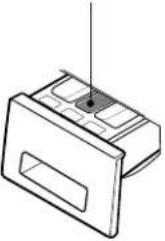 | |
| Is softener put in the correct compartment of drawer?YESIs the drawer closed during wash?YESIs the softener cap clogged?YESExplain how to use softenerClean the compartment for softener | ||
| Visit to check | ||
8-2.FAULT DIAGNOSIS AND TROUBLESHOOTING
CAUTION
- Be careful of electric shock or disconnecting the parts while troubleshooting.
- First of all, check the connection of each part terminal with wiring diagram.
- If you replace the PWB assembly (Main), put in the connectors correctly.
NO POWER
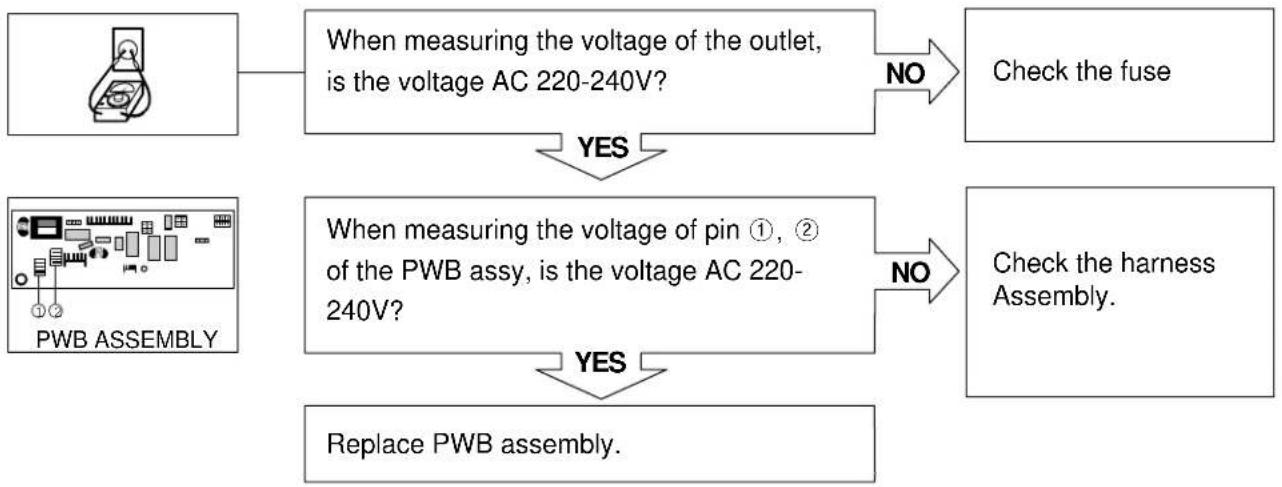
flowchart
graph TD
    A["Image"] --> B["When measuring the voltage of the outlet, is the voltage AC 220-240V?"]
    B -->|NO| C["Check the fuse"]
    A -->|YES| D["When measuring the voltage of pin ①, ② of the PWB assy, is the voltage AC 220-240V?"]
    D -->|NO| E["Check the harness Assembly"]
    D -->|YES| F["Replace PWB assembly."]
ALL BUTTONS ARE LOCKED EXCEPTOR FOR POWER BUTTON
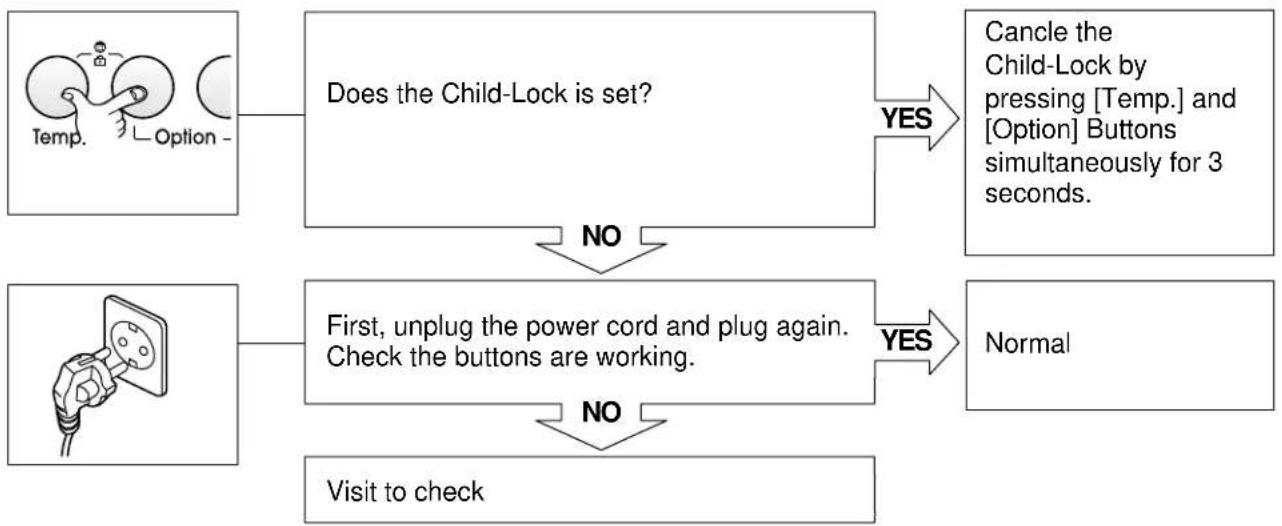
flowchart
graph TD
    A["Temp. Option"] --> B{Does the Child-Lock is set?}
    B -->|YES| C["Cancle the Child-Lock by pressing [Temp."] and["Option"] Buttons simultaneously for 3 seconds.]
    B -->|NO| D["First, unplug the power cord and plug again. Check the buttons are working."]
    D -->|YES| E["Normal"]
    D -->|NO| F["Visit to check"]
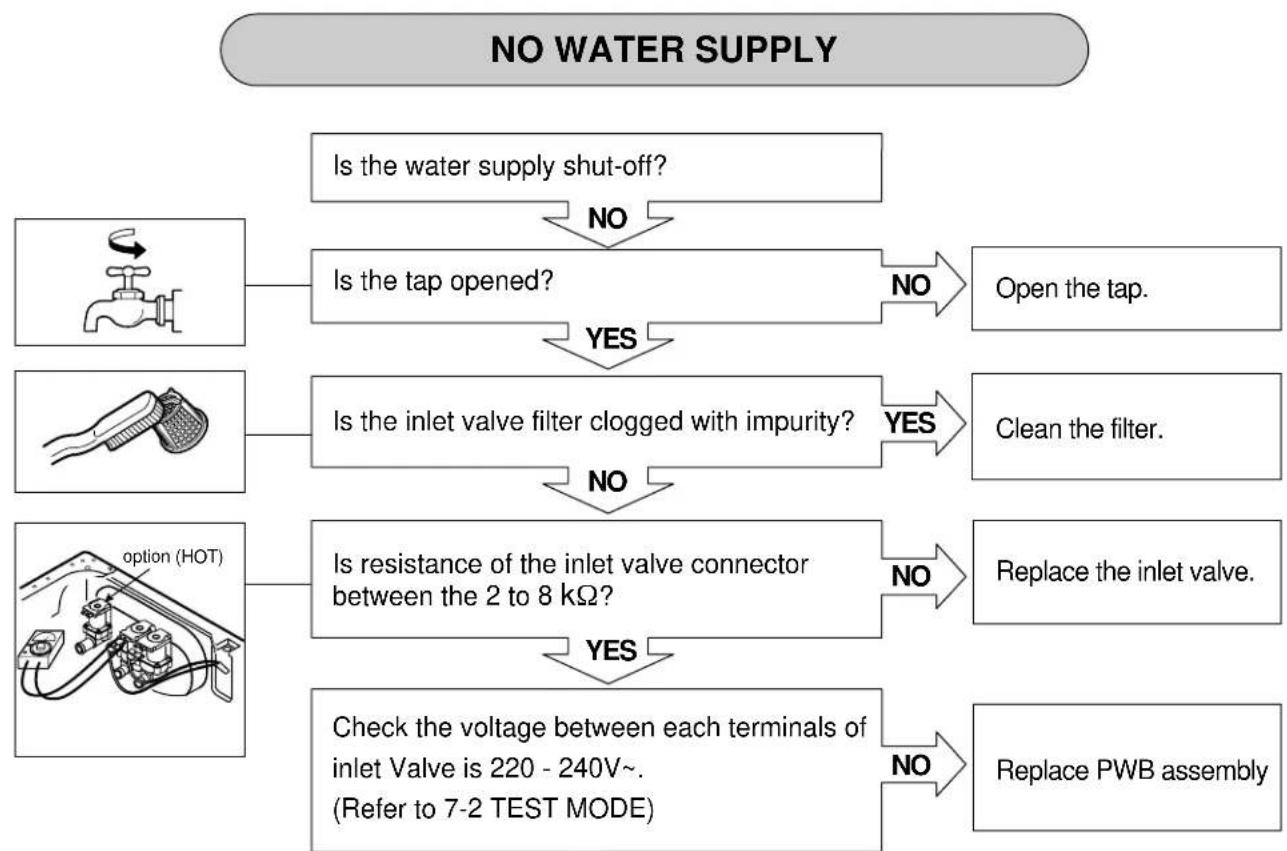
flowchart
graph TD
    A["Is the water supply shut-off?"] -->|NO| B["Is the tap opened?"]
    B -->|YES| C["Is the inlet valve filter clogged with impurity?"]
    C -->|NO| D["Is resistance of the inlet valve connector between the 2 to 8 kΩ?"]
    D -->|YES| E["Check the voltage between each terminals of inlet Valve is 220 - 240V~.<br>(Refer to 7-2 TEST MODE)"]
    D -->|NO| F["Replace the inlet valve."]
    B -->|NO| G["Open the tap."]
    C -->|YES| H["Clean the filter."]
    E --> I["Replace PWB assembly"]
DETERGENT DOES NOT FLOW IN
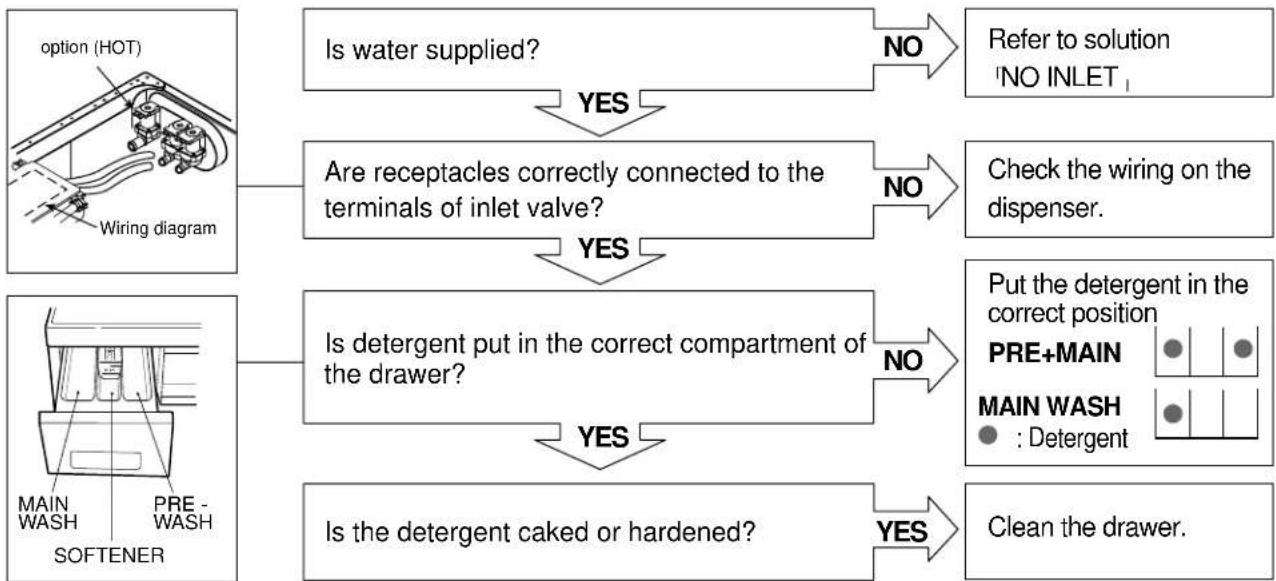
flowchart
graph TD
    A["option (HOT)\nWiring diagram"] --> B{Is water supplied?}
    B -->|YES| C["Are receptacles correctly connected to the terminals of inlet valve?"]
    B -->|NO| D["Refer to solution 'NO INLET'"]
    C -->|YES| E{Is detergent put in the correct compartment of the drawer?}
    C -->|NO| F["Check the wiring on the dispenser."]
    G["MAIN WASH\PRE-WASH\SOFTENER"] --> H{Is the detergent caked or hardened?}
    H -->|YES| I["Clean the drawer."]
    H -->|NO| J["Put the detergent in the correct position\nPRE+MAIN\nMAIN WASH\(\bullet\):Detergent"]
SOFTENER DOES NOT FLOW IN
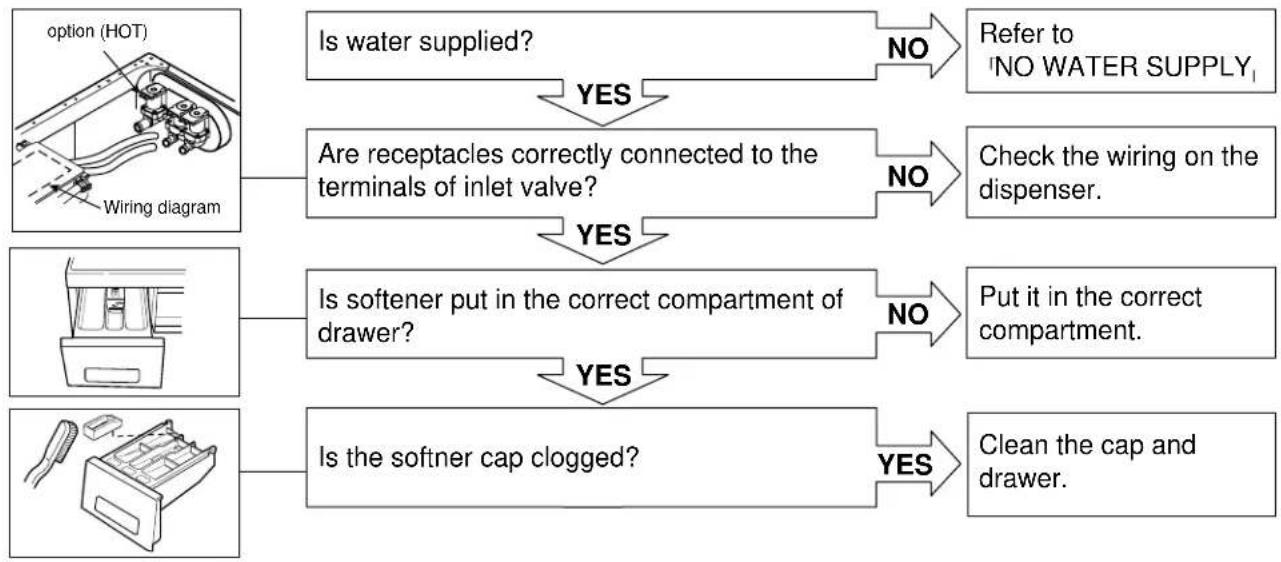
flowchart
graph TD
    A["option (HOT)\nWiring diagram"] --> B{Is water supplied?}
    B -->|YES| C["Are receptacles correctly connected to the terminals of inlet valve?"]
    B -->|NO| D["Refer to 'NO WATER SUPPLY₁'"]
    C -->|YES| E{Is softener put in the correct compartment of drawer?}
    C -->|NO| F["Check the wiring on the dispenser."]
    E -->|YES| G{Is the softner cap clogged?}
    E -->|NO| H["Put it in the correct compartment."]
    G -->|YES| I["Clean the cap and drawer."]
ABNORMAL SOUND
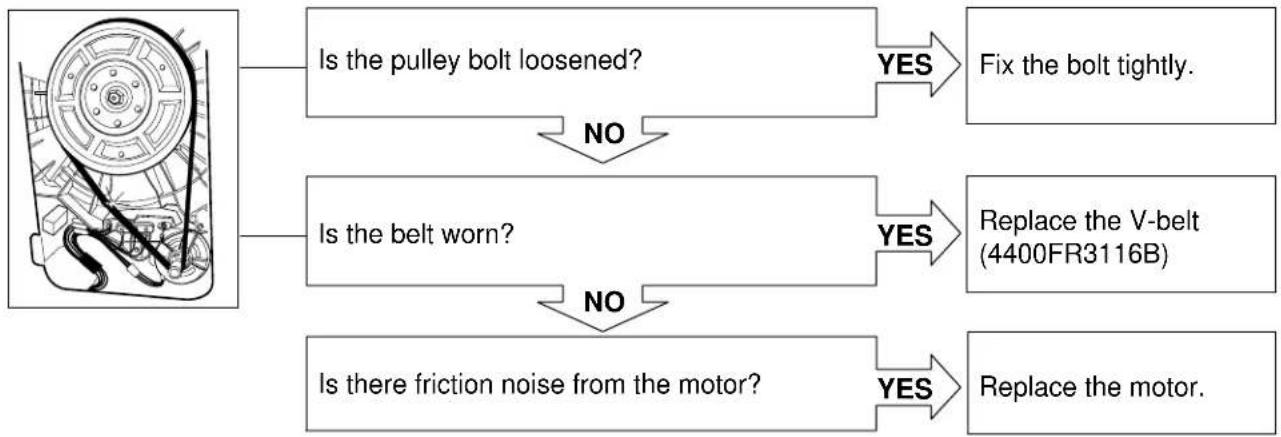
flowchart
graph TD
    A["Image of motor"] --> B{Is the pulley bolt loosened?}
    B -->|YES| C["Fix the bolt tightly."]
    B -->|NO| D{Is the belt worn?}
    D -->|YES| E["Replace the V-belt (4400FR3116B)"]
    D -->|NO| F{Is there friction noise from the motor?}
    F -->|YES| G["Replace the motor."]
HEATING WITHOUT WATER
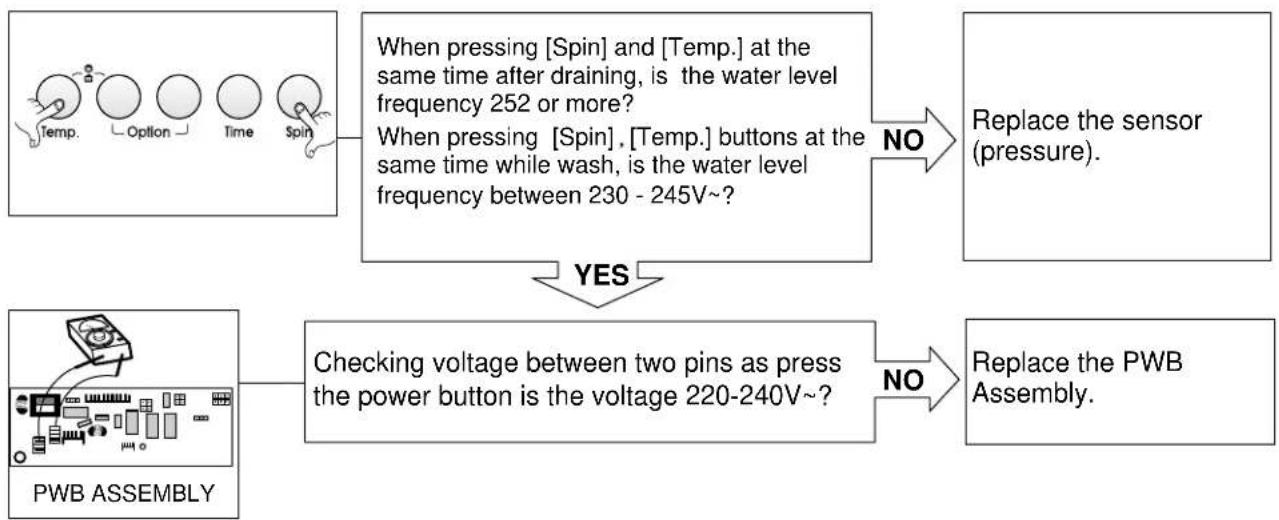
flowchart
graph TD
    A["Temp. Option Time Spin"] --> B["When pressing [Spin"] and["Temp."] at the same time after draining, is the water level frequency 252 or more? When_pressing["Spin"]. [Temp.] buttons at the same time while wash, is the water level frequency between 230 - 245V~?]
    B -->|NO| C["Replace the sensor (pressure)."]
    D["PWB ASSEMBLY"] --> E["Checking voltage between two pins as press the power button is the voltage 220-240V~?"]
    E -->|NO| F["Replace the PWB Assembly."]
    G["YES"] --> E
DRAIN MALFUNCTIONING
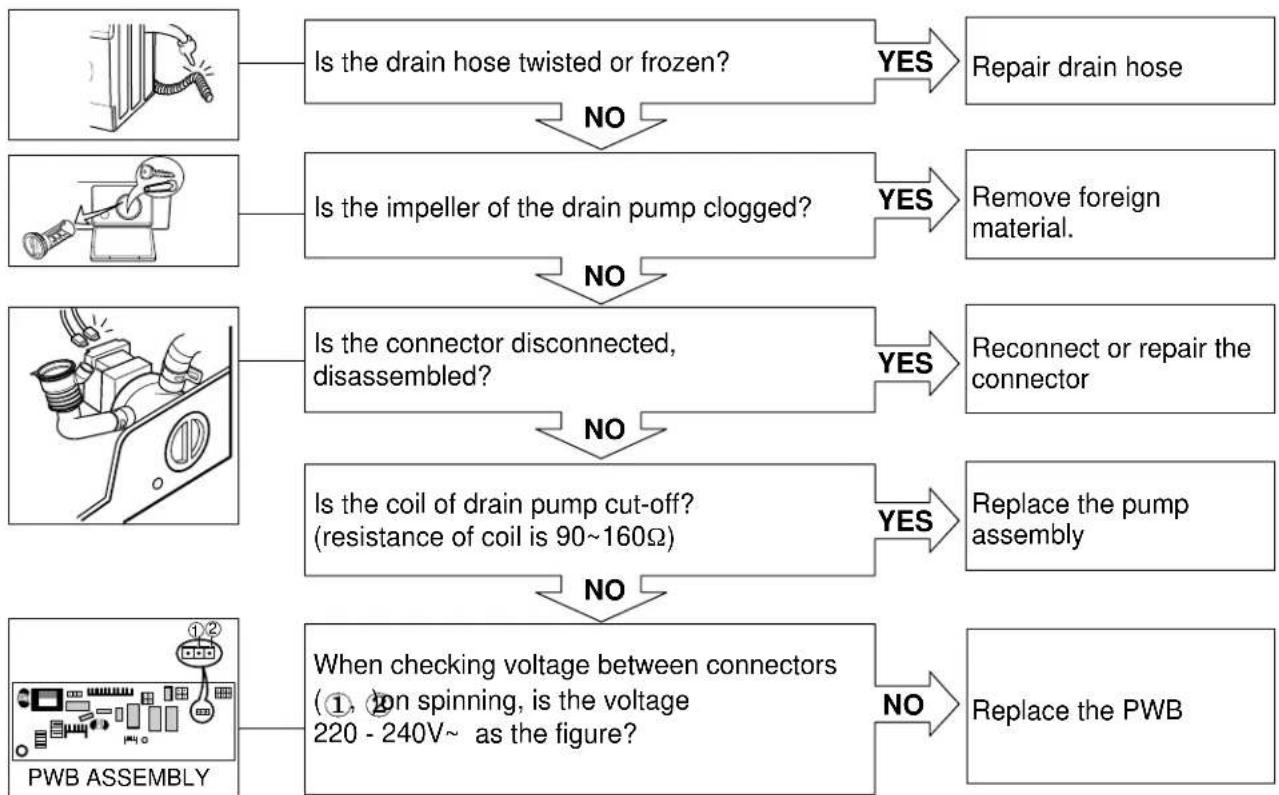
flowchart
graph TD
    A["Is the drain hose twisted or frozen?"] -->|NO| B["Is the impeller of the drain pump clogged?"]
    B -->|YES| C["Remove foreign material."]
    C -->|NO| D["Is the connector disconnected, disassembled?"]
    D -->|YES| E["Reconnect or repair the connector"]
    E -->|NO| F["Is the coil of drain pump cut-off? (resistance of coil is 90~160Ω)"]
    F -->|YES| G["Replace the pump assembly"]
    G -->|NO| H["When checking voltage between connectors (①, on spinning, is the voltage 220 - 240V~ as the figure?)"]
    H -->|NO| I["Replace the PWB"]
WASH HEATER TROUBLE
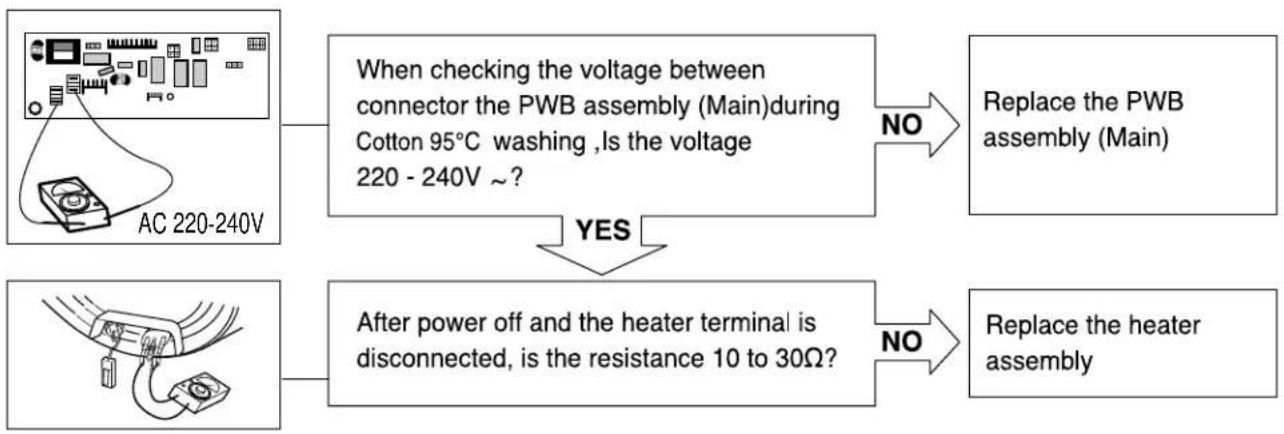
flowchart
graph TD
    A["AC 220-240V"] --> B["When checking the voltage between connector the PWB assembly (Main)during Cotton 95°C washing, Is the voltage 220 - 240V ~?"]
    B -->|NO| C["Replace the PWB assembly (Main)"]
    D["AC 220-240V"] --> E["After power off and the heater terminal is disconnected, is the resistance 10 to 30Ω?"]
    E -->|NO| F["Replace the heater assembly"]
HEATING CONTINUOUSLY ABOVE
THE SETTING WATER TEMPERATURE
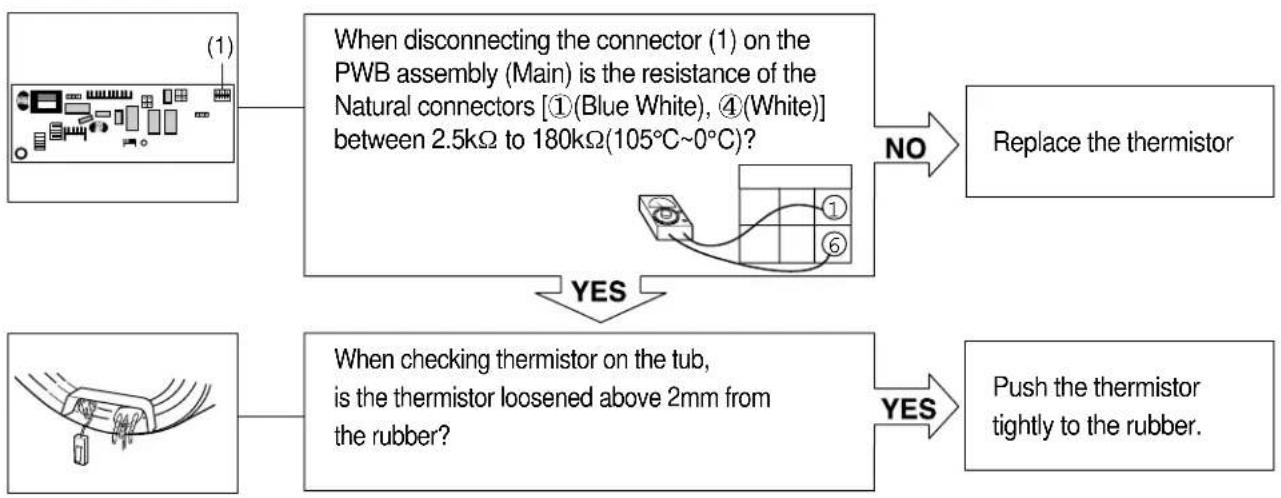
flowchart
graph TD
    A["When disconnecting the connector (1) on the PWB assembly (Main) is the resistance of the Natural connectors [①(Blue White), ④(White)"] between 2.5kΩ to 180kΩ(105°C~0°C)?] -->|NO| B["Replace the thermistor"]
    A -->|YES| C["When checking thermistor on the tub, is the thermistor loosened above 2mm from the rubber?"]
    C -->|YES| D["Push the thermistor tightly to the rubber."]
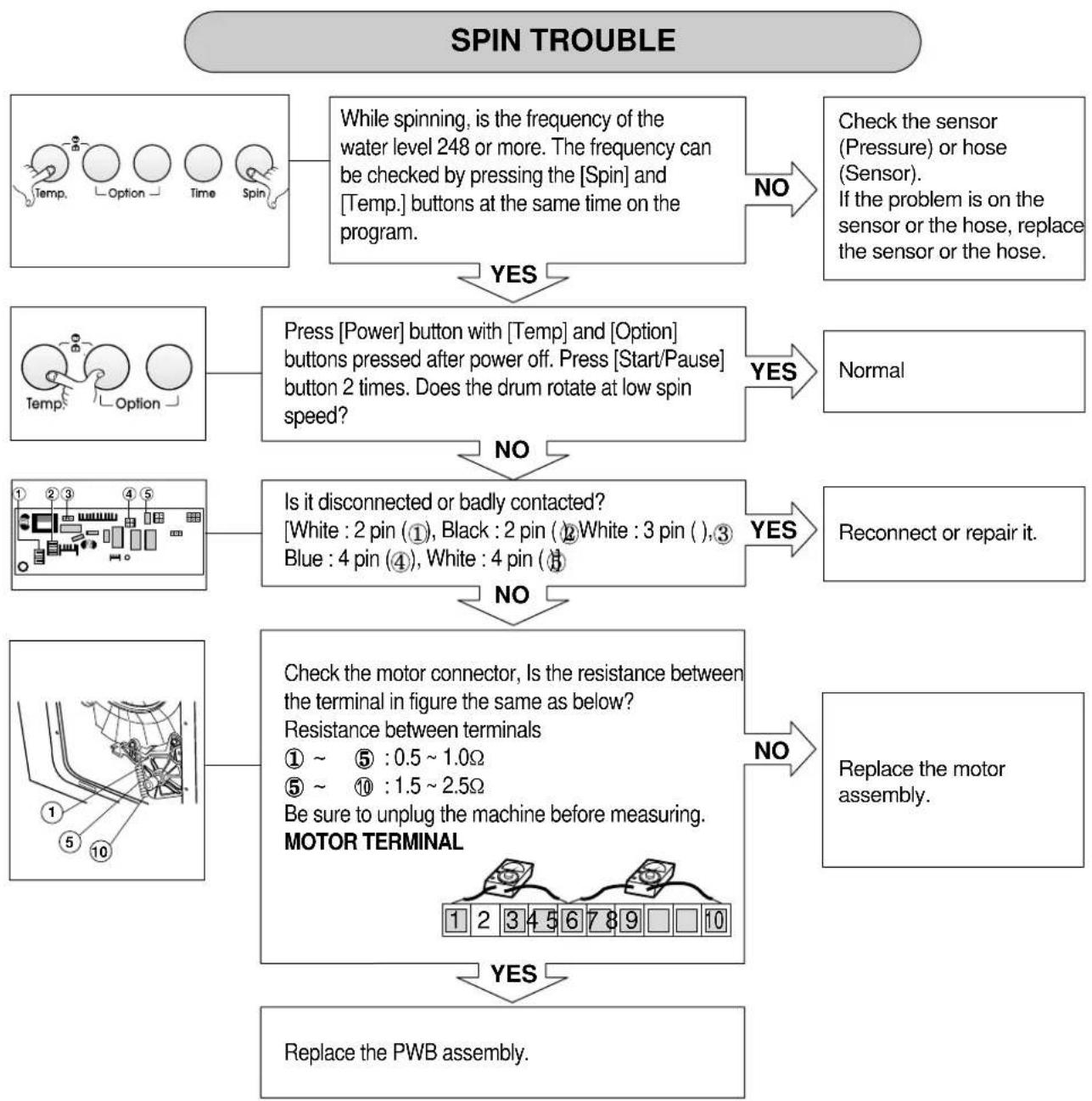
flowchart
graph TD
    A["SPIN TROUBLE"] --> B["While spinning, is the frequency of the water level 248 or more. The frequency can be checked by pressing the [Spin"] and["Temp."] buttons at the same time on the program.]
    B -->|YES| C["Check the sensor (Pressure) or hose (Sensor). If the problem is on the sensor or the hose, replace the sensor or the hose."]
    B -->|NO| D["Press [Power"] button_with["Temp"] and["Option"] buttons pressed after power off. Press["Start/Pause"] button 2 times. Does the drum rotate at low spin speed?]
    D -->|YES| E["Normal"]
    D -->|NO| F["Is it disconnected or badly contacted: White: 2 pin (①), Black: 2 pin (②), White: 3 pin ( ),③ Blue: 4 pin (④), White: 4 pin (⑤)"]
    F -->|YES| G["Reconnect or repair it."]
    F -->|NO| H["Check the motor connector, Is the resistance between the terminal in figure the same as below? Resistance between terminals ① ~ ⑤ : 0.5 ~ 1.0Ω ⑤ ~ ⑩ : 1.5 ~ 2.5Ω Be sure to unplug the machine before measuring. MOTOR TERMINAL"]
    H -->|NO| I["Replace the motor assembly."]
    H -->|YES| J["Replace the PWB assembly."]
9. DISASSEMBLY INSTRUCTIONS
* Be sure to unplug the machine out of the outlet before disassembling and repairing the parts.
CONTROL PANEL
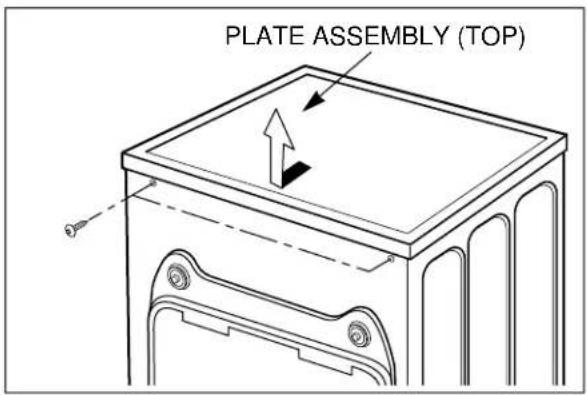
text_image
PLATE ASSEMBLY (TOP)
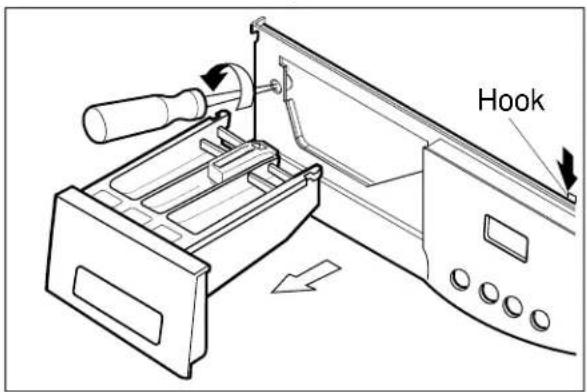
text_image
Hook
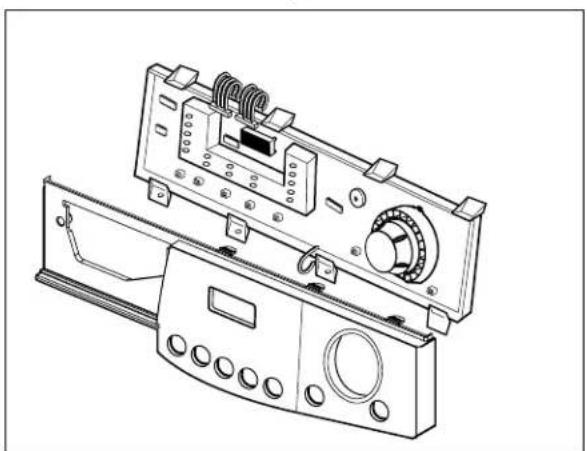
natural_image
Technical line drawing of a washing machine control panel with buttons and dials (no text or symbols)① Unscrew 2 screws on the back of the top plate.
② Pull the top plate backward and upward as shown.
① Disconnect the PWB Assembly connector from Main lead wire Assembly.
② Pull out the drawer and unscrew 2 screws.
③ Push upper hooks down on the top and pull the control panel.
① Disconnect the PWB assembly from the control panel by unscrewing 5 screws.
DISPENSER ASSEMBLY
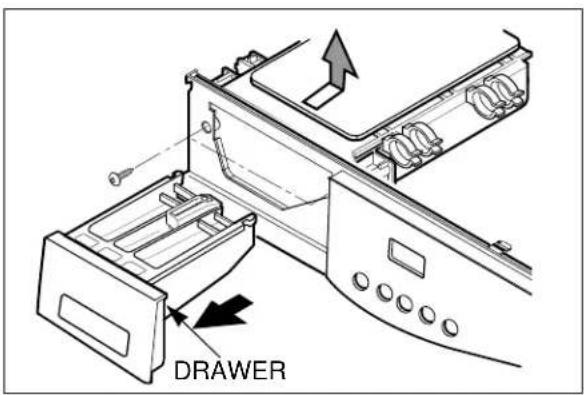
text_image
DRAWER① Disassemble the top plate assembly.
② Pull out the drawer to arrow direction.
③ Unscrew 2 screws.
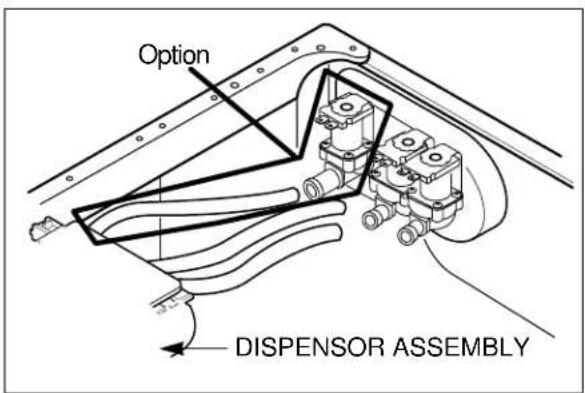
text_image
Option DISPENSOR ASSEMBLY① Disassemble hose and its clamps.
② Disassemble ventilation bellows and water inlet bellows on the tub.
INLET VALVE
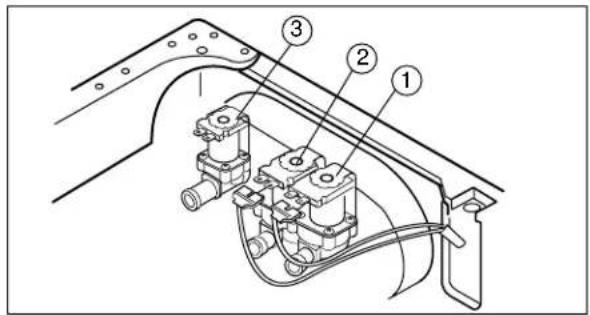
text_image
Technical diagram of a mechanical assembly with numbered components labeled 1, 2, and 3.① Disconnect the wiring receptacle.
② Unscrew 2 screws from the back.
When reconnecting the connector
| VALVE #1 (MAIN) White/Black-Black |
| VALVE #2 (PRE) Black - Gray |
| VALVE #3 (HOT) Blue/White - Black |
LOWER COVER
natural_image
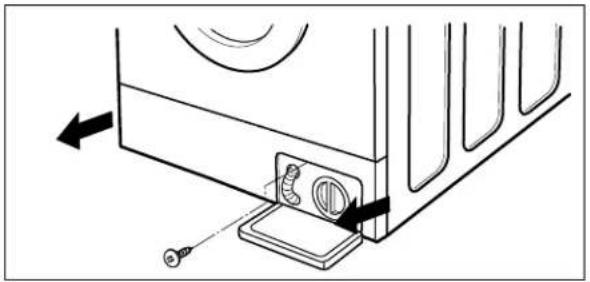
Diagram of a device rear panel with arrows indicating movement or assembly (no text or symbols)■ Open the lower cover cap by using coin and pull out the lower cover to the arrow direction after a screw is unscrewed.
DOOR
natural_image
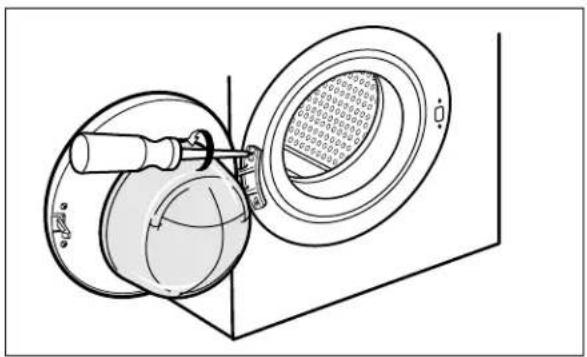
Technical line drawing of a mechanical device with a circular component and a magnified inset showing internal components (no text or symbols)① Open the door completely.
② Remove the two screws from the hinge.
When removing the door assembly, it is necessary to hold the bracket that is inner of the cabinet cover.
GASKET ASSEMBLY
natural_image
Diagram of a hand operating a rotary switch mechanism with a dial and handle (no text or symbols)↓
natural_image
Technical line drawing of a washing machine front panel with control panel and scroll wheel (no text or symbols)↓
text_image
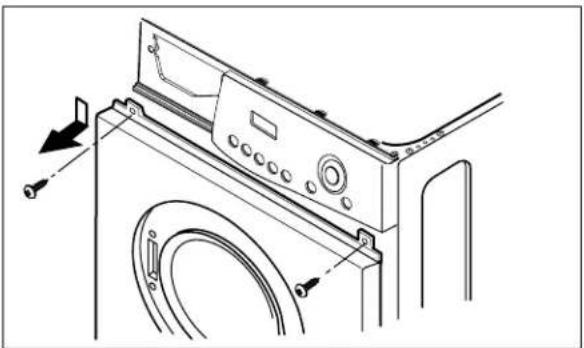
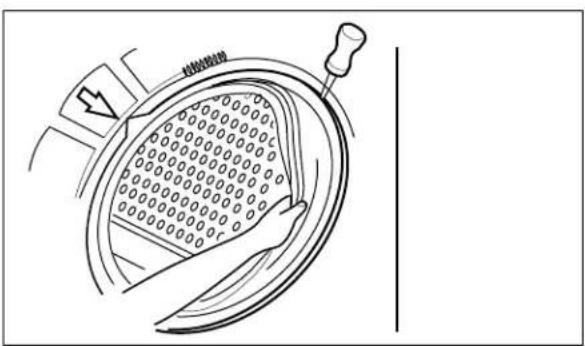
热熔断路① Take apart the cabinet gasket clamp.
② Unscrew 2 screws from the cabinet cover.
③ Open the lower cover cap and unscrew 1 screw inside.
④ Take apart the lower cover.
① Disassemble the control panel. (refer to the page 25)
② Unscrew all the screws on the upper and lower sides of the cabinet cover.
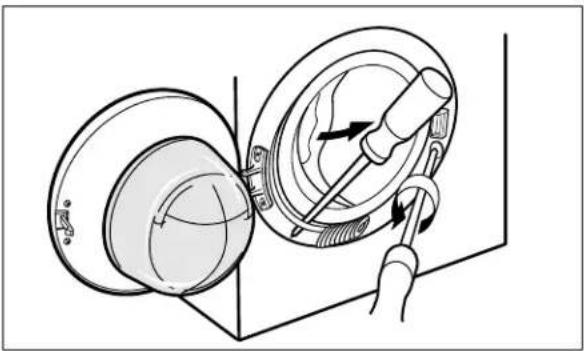
① Take apart the tub gasket clamp.
② Make sure that the drain hole of the gasket is put beneath when reassembling the gasket.
*Refer to the arrow mark on the tub cover.
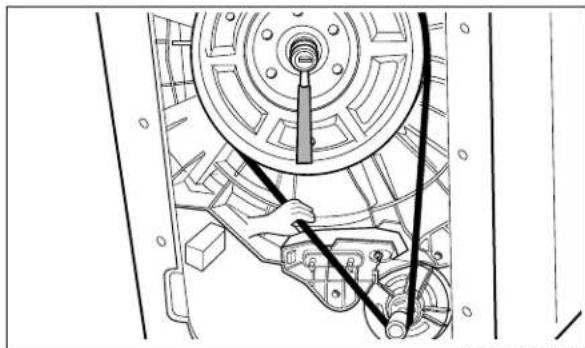
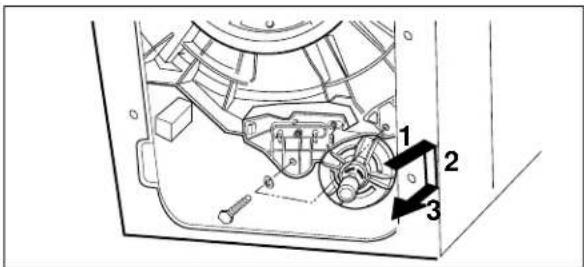
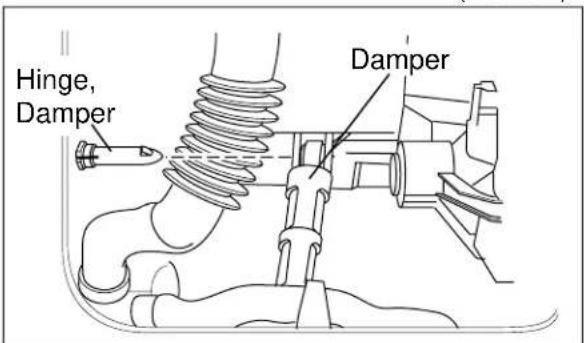
PULLEY, MOTOR, DAMPER
natural_image
Technical line drawing of a mechanical assembly with no visible text or symbols(PULLEY)
text_image
Technical diagram of a vehicle engine compartment with numbered parts and directional arrows indicating components(MOTOR)
text_image
Hinge, Damper Damper(DAMPER)
■ Clean the drain pump filter
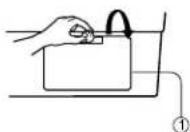
Open the lower cover cap (①) by using a coin. Turn the drain plug (②) to pull out the hose.
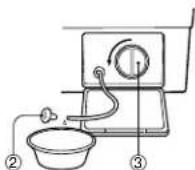
Unplug the drain plug (②), then the water flows out,
At this time use a vessel
To prevent water from flowing on the floor. If the water does not flow any more, turn the pump filter (③) open to the left.
① Remove the back cover.
② Take off the belt turning the pulley.
③ Unscrew the bolt to pull out the pulley.
① Unscrew 2 screws from the bracket.
② Push the motor in the arrow direction for disassembling.
③ When reassembling the motor, make sure that motor mounting bushings are not taken off from the bracket.
① Pull out the hinge, pressing its snap.
② Do not use the pulled - out hinge again. It may be taken off during operation.
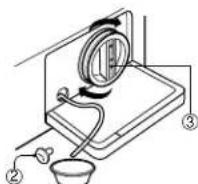
Take out any foreign material from the pump filter (③). After cleaning, turn the pump filter(③) clockwise and insert the drain plug (②) to the original place. close the lower cover cap.
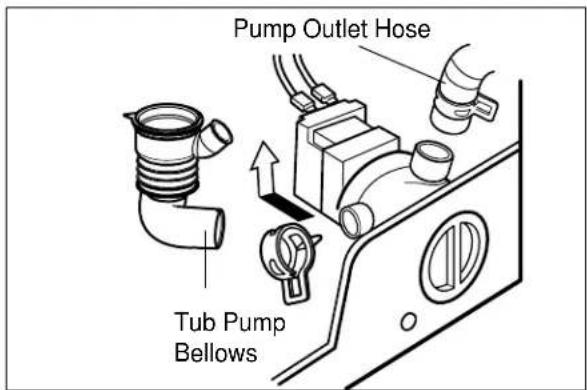
PUMP
text_image
Pump Outlet Hose Tub Pump BellowsHEATER
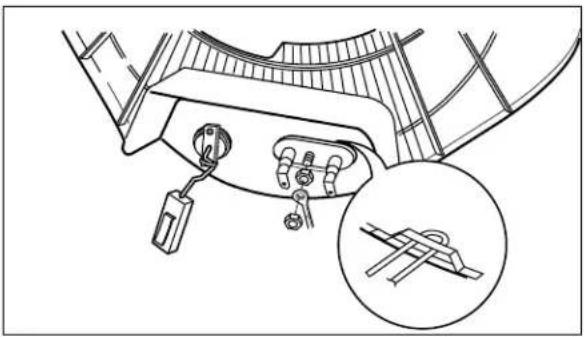
natural_image
Technical line drawing of a mechanical component with a magnified inset showing a bracket detail (no text or symbols)THERMISTOR
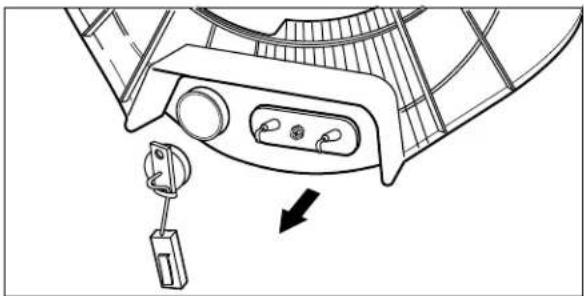
natural_image
Technical line drawing of a mechanical component with a hanging hook and internal ports (no text or symbols)① Remove pump outlet hose.
② Remove tub pump bellows.
③ Remove cap (Remaining Hose.)
④ Disconnect the wiring.
⑤ Unscrew 2 screws.
⑥ Remove the pump.
① Loosen the M6 heater nut to pull out the heater.
CAUTION
When mounting the heater, be sure to insert the heater into the heater clip on the bottom of the tub.
① Pull it out by holding the thermistor bracket.
* If it is pulled by the wire, it may be broken.
② When mounting the thermistor again, make sure that it is got back tight to the bushing.
SWITCH ASSEMBLY, DOOR LOCK
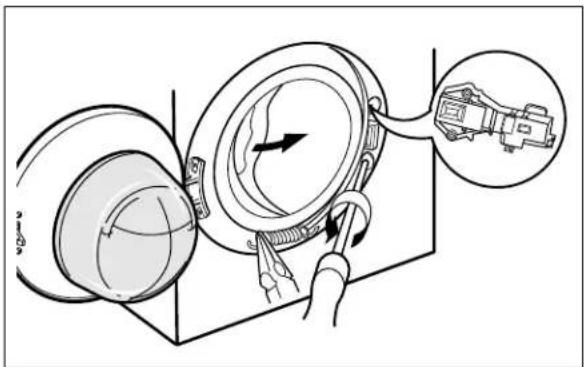
text_image
Diagram illustrating a mechanical device with labeled parts and a magnified inset showing the component.① Take apart the cabinet cover clamp and release the gasket.
② Unscrew 2 screws holding the door lock.
③ Disconnect the door lock from the wiring connector.
WHEN FOREIGN MATERIAL IS STUCK BETWEEN DRUM AND TUB
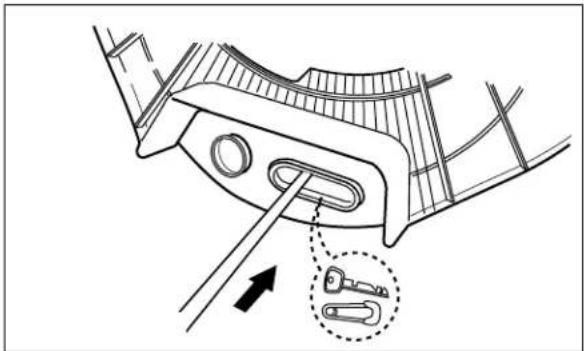
natural_image
Technical line drawing of a mechanical component with an arrow and inset detail showing two key inserted into a slot (no text or symbols)① Remove the heater.
② Remove the foreign material (wire, coin and others) by inserting a long bar through the hole.
10-1. THE EXPLODED VIEW OF CABINET ASSEMBLY
text_image
Exploded view diagram of a washing machine with labeled components and part numbers10-2 THE EXPLODED VIEW OF CONTROL PANEL & DISPENSER ASSEMBLY
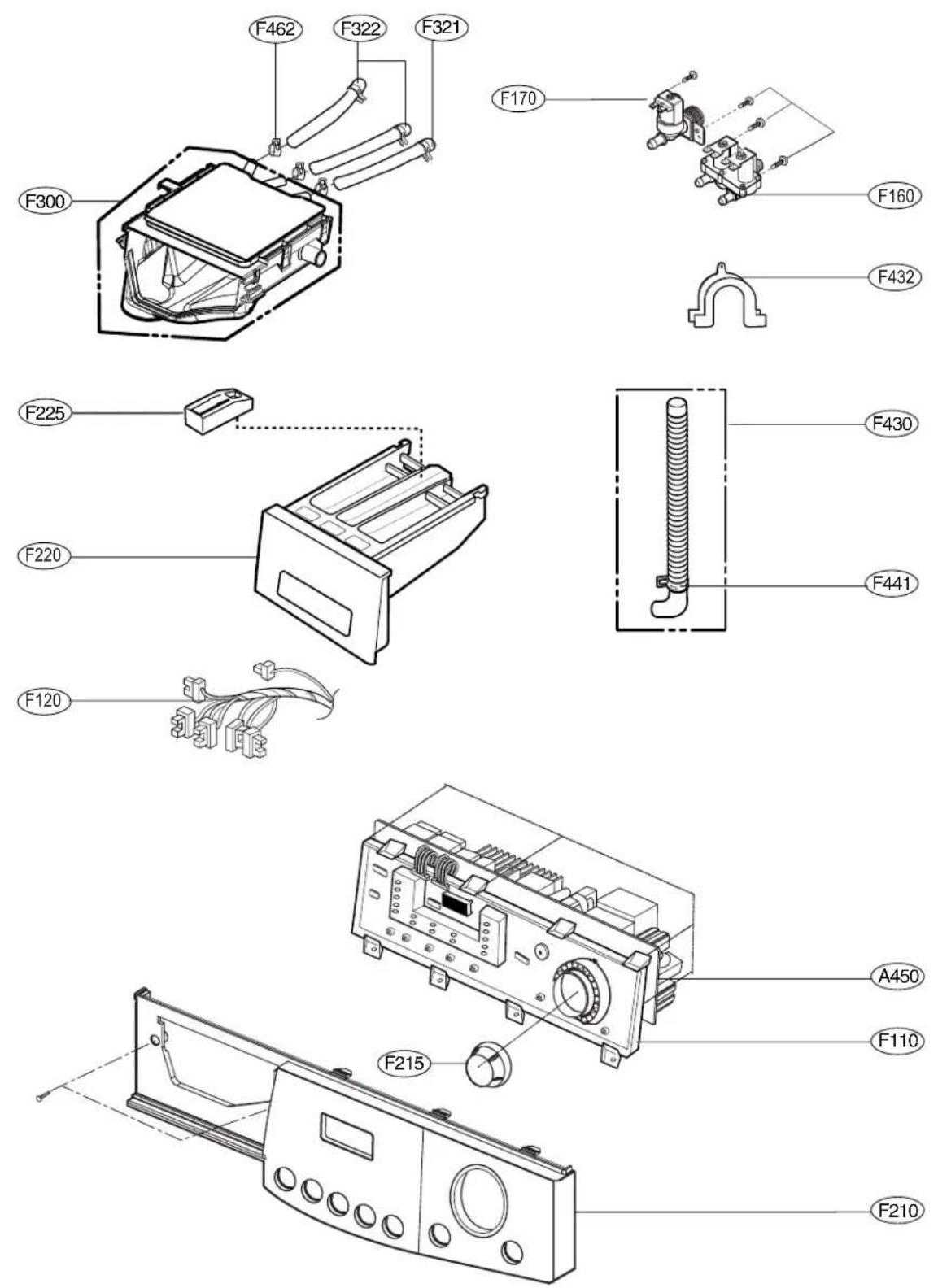
10-3 THE EXPLODED VIEW OF DRUM & TUB ASSEMBLY