
KB-S305 - Keyboard Sven - Free user manual and instructions
Find the device manual for free KB-S305 Sven in PDF.


| Product Type | Keyboard |
| Brand | Sven |
| Model | KB-S305 |
| Interface | USB |
| Key Type | Membrane |
| Number of Keys | 104 |
| Dimensions (L x W x H) | 440 x 140 x 25 mm |
| Weight | 500 g |
| Power Supply | Via USB (no battery required) |
| Cable Length | 1.5 m |
| Compatible Operating Systems | Windows, macOS, Linux |
| Special Keys | Multimedia shortcuts (volume, media player) |
| Color | Black |
| Cleaning Instructions | Clean with a soft, dry cloth. Do not use liquids. |
| Safety Warnings | Keep away from moisture and heat sources. |
| Spare Parts Availability | Not available. Non-repairable design. |
Frequently Asked Questions - KB-S305 Sven
User questions about KB-S305 Sven
0 question about this device. Answer the ones you know or ask your own.
Ask a new question about this device
Download the instructions for your Keyboard in PDF format for free! Find your manual KB-S305 - Sven and take your electronic device back in hand. On this page are published all the documents necessary for the use of your device. KB-S305 by Sven.
USER MANUAL KB-S305 Sven
Congratulations on the purchase of Sven keyboard!
Please read this User's Manual before using the unit and retain this User's Manual in safe place for future reference.
COPYRIGHT
© SVEN PTE. LTD. Version 1.0 (V 1.0).
This Manual and information contained in it are copyrighted. All rights reserved.
TRADEMARKS
All trademarks are the property of their legal holders.
UNPACKING
- Unpack the device carefully. Make sure there are no accessories left in the box. Check up the device for damage; if the product was damaged during transportation, address the firm which carried out the delivery; if the product functions incorrectly, address the dealer at once.
- Shipping and transportation equipment is permitted only in the original container.
- Does not require special conditions for realization.
- Dispose of in accordance with regulations for the disposal of household and computer equipment.
APPLICATION
KB-S305 keyboard is an input device. It is designed to enter information into the computer, as well as controll the operation of the computer.
PACKAGE CONTENTS
- Keyboard – 1 pc
- User's Manual – 1 pc
- Warranty card – 1 pc
SPECIAL FEATURES
• 12 multimedia (Fn) key
- Waterproof design
- Classic layout
SYSTEM REQUIREMENTS
- OC Windows
- Free USB port
INSTALLATION
- Connect the keyboard to an available USB port of your PC.
- Installation of the keyboard is automatic after its connection to a PC USB port.
DESCRIPTION OF FUNCTIONAL KEY
| Fn + F1 – Open home web page | Fn + F7 – Go to next media track |
| Fn + F2 – Starts | Fn + F8 – Volume down |
| Fn + F3 – Search | Fn + F9 – Volume up |
| Fn + F4 – Start Media player | Fn + F10 – Mute on/off |
| Fn + F5 – Play/Pause | Fn + F11 – Open My Computer |
| Fn + F6 – Go to previous media track | Fn + F12 – Calculator |
QUICK ACCESS KEY

Refresh page
TROUBLESHOOTING
| Problem | Solution |
| The keyboard is not working | 1. Disconnect the keyboard from your PC and check connector pins for possible damage. If there is no external damage found and connector pins are OK, connect the keyboard to your PC again2. Address your nearest authorized service center. |
If none of the above methods can solve the problem, please seek professional advice at your nearest service center. Never attempt to repair the product yourself.
TECHNICAL SPECIFICATIONS
| Parameter, measurement unit | Value |
| Q-ty of keyboard keys | 105 |
| Q-ty of keyboard shortcut keys | 1 |
| Keyboard layout | Eng/Rus/Ukr |
| OS compatibility | Windows |
| Interface | USB |
| Extrapolated mean life | more than 20,000,000 strokes |
| Dimensions (W × H × L), mm | 435 × 135 × 25 |
| Weight, g | 372 |
Notes:
- Technical specifications given in this table are supplemental information and cannot give occasion to claims.
- Technical specifications are subject to change without notice due to the improvement of SVEN production.
natural_image
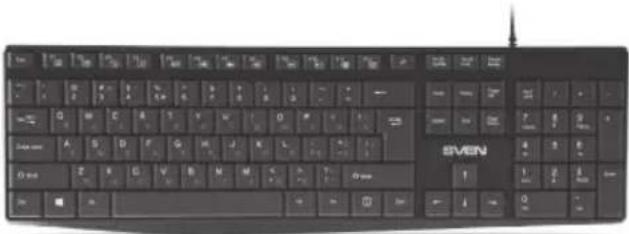
Black computer keyboard with standard keys and a 'SVEN' label (no additional text or symbols visible)Model: KB-S305
Manufacturer: SVEN PTE. LTD, 176 Joo Chiat Road,
Nº 02-02, Singapore, 427447. Produced under the
control of Oy Sven Scandinavia Ltd. 15, Kotolahdentie,
Kotka, Finland, 48310. Made in China.
Brand : Sven
Model : KB-S305
Category : Keyboard