TCC-6220 - Car stereo LG - Free user manual and instructions
Find the device manual for free TCC-6220 LG in PDF.


User questions about TCC-6220 LG
0 question about this device. Answer the ones you know or ask your own.
Ask a new question about this device
Download the instructions for your Car stereo in PDF format for free! Find your manual TCC-6220 - LG and take your electronic device back in hand. On this page are published all the documents necessary for the use of your device. TCC-6220 by LG.
USER MANUAL TCC-6220 LG
Detachable Front Panel Car Receiver
OWNER'S MANUAL MODEL:TCC-6220
Take time to read the OWNER - S. MANUAL, thoroughly. Familiarity with installation and operating procedures will help you obtain the best performance from your CAR Receiver.
P.N.38269-RO06A
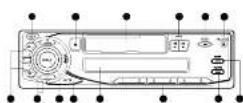
9 POWER PNSURGER
⑨ EJECTButton
① GAGSETTE Door
HEMFF[←→]
⑤ BANO Bucon
RELEASE Button
① AEPB Button
⑨ PRESET Button
① LCD Display
NOTE BUTTON
ID MD-LO Button
① UMP 43-Button CLOCK 40
1) CONTROL UP/DOWN
Button

① Press CLICK button once
momentarily to display the
17.4
- Press the CLOCK, button 2 seconds, and clock
Indication will be displayed
for 5 seconds. Adjust the clock within 6 seconds.
▶ Provision T.INS
- Fleeing 100¢ + billion adjusts the hour
▶ Pressing TUNE - Sutton
adjusts the minute.
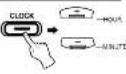
③ Press the CLOCK button,
the display returns to the previous display after 5
parcendia
■ Power(Park) Button
Press PWR button or any
other human to turn the unit
on
▶ Pass Aeth, E.100 again in park & off.
Note:
NDM.
When you press the PWR button
for a seconds after being the property volume level and notice
your setting is memorized.
simultaneously. Whenever you
in the unit, it will be obtained at the volume level marquarie.
一、MP
■ MOLD BUTTON
Press the to change the control of volume, base, table, balance
and lack
■ CONTROL UP/DOWN
Button
After you have selected the
proper mode by using the MOLD-in-tion control line
dashed function by pressing
this buttons within 5
seconds. After you finish selection marks. The wall
return to the initial mode
7 Operating
modes.
A numeric display is
to be used by processing the bubbles
[Non-Text]
■ Loudness Function
Express the MDI D. in the first
more than 2 seconds, activities
the business circuit which
boosts to compensate the. In progress, a lack of sensitivity
to by
- 10.1.2.1
■ Mute Button
This button is operated as "mutual" state on/off.
- Use wireless mode mode
state is when any button is
-
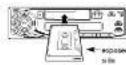
① Turn the power ON
⑦ insert a cassette tape with
the exposure tape size to the right. If radio broadcast
is being received, cassette
playback automatically
begins.
广力云智慧零售收银系统
[Non-Text]
② The tape direction can be
reversed by pressing both/ddb1 bottom
logsdnt

于
7
The tape direction
automatically reverses when the long oil box
when the hope been reached
To stop preyback, press the
EJECT (▲) button and
Remove the ca
m = 311
m = 311
4 Adjust the Volume and Tone
using MOLD and CONTROL
JPMN 42108
Note:
When the property is \$ a
cassette tape is inserted in the
cassets compartment, tape
(2) 1980.1.14
[Non-Text]
■ Memorizing Stations
24 stations [18PM, 6AM/MW]
can be present using FRESE
(16) 2023. Station data intered to can be useful
recalled
① Select the desired band
using the HAND buttons
② Time in the closed state using the UBI-5.
bullers
② Press one of the
PAESET(1-4) butbe for
more than 12 seconds. The station has now been
stored at one of the prose
buttons
④ Repeat steps ⑦ and ⑧ to each of the remaining 5
PRESET cartons
- Auto Stores (A\$)
■ AutoS
6 stations in the selected can be priced automation
Turn the power ON.
② Select the desired band of
stations to be received.
③ Press the AS/PS button for more free 2 seconds, and
then this function
Implements.
① The selected band is
subman only scanned and the stationed stations are
stored Then the present
stations are displayed
upusually
- Pass the A#PE button to stop scanning the preset
[Unreadable]
- Preset Screening (RBC)
■ Preset Scanning (PS)
① Show a station for each one of PREFET (1-8) buttons.
- When the AF/RS button is
When the AEPs button is pressed, the preset stations
are monitored in sequence
for 5 seconds each, the station number is shown in
the preset station indicators
3 When the desired station is
received, please the ASPS button again to stop.
无法识别
■ General
Output Power (S W×40Max)
Power Source 02-12-15 V Speaker Impedance 49x40x80x4
Ground System Negative
Dimensions(W×H×D) 150×50×150 mm(W@n.d. Print Paris) End World
The image is too blurry to recognize any text content.
■ Tape Player
Wow Flutter 0.2% (WRMS)
S/N Ratio 50 dB
-regular
■ Tuner
FM Frequency Change
Frequency Range 60 dB/14.0 MPa, CF: 5 dB MPa S/N Ratio 60 dB
Distortion (T.H.3.0BW) 0.5% Channel Separation 30 dB
015
A##(M W) Frequency Range 622-1,430 MHz
50 MB
13.4026
a Note: The design and specifications are subject to change without action in the cause of product improvement.
to date in the course of previous implementation.
The working life of this product is 7 years since the
e of purchase."


[Non-Text]
[Non-Text]
[Non-Text]
[Non-Text]