TCC-6210 - Car stereo LG - Free user manual and instructions
Find the device manual for free TCC-6210 LG in PDF.


User questions about TCC-6210 LG
0 question about this device. Answer the ones you know or ask your own.
Ask a new question about this device
Download the instructions for your Car stereo in PDF format for free! Find your manual TCC-6210 - LG and take your electronic device back in hand. On this page are published all the documents necessary for the use of your device. TCC-6210 by LG.
USER MANUAL TCC-6210 LG
Take time to read this OWNER'S MANUAL
throughly. Family with installation and operating proiect, res will help you obtain a low best performance from your CAR Receiver.
PN3628-F005B
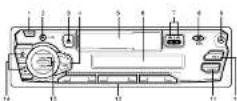
POWER PNSJBLON
⑨ MUTE Bilon
① C#S#B#n ② M#LO B#n
5 CASSETTF Dnstr
1 LOO Display
② REMIFF [◀/▶]
Boston [DIRECTION]
BAND Buzlon
⑨ RELEASE Button
ASPS-Bullon
● CINAGA BUSH
PRESET BUTTON
TUMF 43-100mm
(CLOCK Adjust) CONTROL UP DOWN
Button


① Press CLOCK button once
momentarily to display the line
Press the
seconds, and clock indicators at the drivers
mulation while deployed for 5 seconds. Adjust the
clock within 5 seconds
▶ Pressing TONE + button adjusts the hour
▶ Pressing TUNE - Sutton
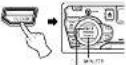
② Press the CLOCK button,
the display returns to 5 seconds previous display after 5 seconds
■ Power(PM) Button
Press FWR button or any
on.
▶ Peak PWR Button again to work off.
Note:
When you press the PWR button for 2 seconds after setting the proper Volume level and notice your setting is memorized simultaneously. Whenever you turn on the unit, it will operate at the volume level minimized.
■ MOLD Button
Press the to change the control
of valloral, biceal stice, fender and fader.
■ CONTROL UP/DOWN
Boulon
After you have selected the proper mode by using the
MOLDtion control for
dashed function by press this buttons within 5
seconds. After you finish selection modes, the vall
return to the initial mode
② Operating display in all modes
A
converted by pressing this buttons.
■ Loudness Function
Press the MDLD button for
made then 2 seconds, activated the loudness circuit which
boosts to compensate the
to base at low levels.
■ Mute Button
This button is operated as
"trusted" state profit.
state is when any button is
pressed again
① Turn the power ON
⑦ Insert a cassette tape with the apparent tape pipe to
the exposure tape was of the right. If radio broadcast
is being reserved, cassette playback automatically
begins.

图2-1
[1]
to 5m
[Non-Text]
② The tape direction can be
reversed by pressing both/100% bottom
logsdnt

[NO TEXT]
图例
[NO TEXT]
L
① The tape direction automatally protected
when the tape and his
been reached.
EJECT (▲) button and
remove the cassette tape.
(1)基因通过控制 通过控制
m = 311
4 Adjust the Volume and Tone
using WORLD AND CONTROL UPON DUTTER
Note:
Note.
with the power in the cassette tape is inserted in the
cassette compartment, tape
(2) 10.5% (2014-2016)
[Non-Text]
■ Memorizing Stations
24 stations [18PM, RAM/W]
can the product being FR-501 (1-6) buttons. Stations often
listened to can be quickly recall
① Select the desired band
using the BAND button
② Turn in the closing state using the UMB-61
tullers
② Press one of the
PRESENT(1-9) before for more than 2 seconds. The
station has now been stood at one of the purpose
buttons
① Repeat steps ② and ③ is each of the components.
equal of the remaining 5 PRESET buttons
■ Auto Store (AS)
- stations in the selected bar
can be stored automatically.
① Turn the power ON.
⑦ Select the desired band stations to be received.
② Press the AS/PS button to
more than 2 seconds, and then this function
Implements.
① The selected band is
automet only scanned and the strongest stations are
stored. Then the project stations are displayed.
disasters are destroyed repeatedly.
Press the AS/PE button to
stop scanning the present stations
■ Preset Scanning (PS)
■ Preset Scanning (PS)
8.50 a station for each one of PRESET (1-8) buttons.
When the AS/PS button is pressed for reset station
pressed. The present results are monitored in sequence
for 5 seconds each, The
station number is shown in the preset station indicator.
① When the desired station is
received, press the ASPS button again to stop
Accounting
■ General
Output Power (8 W × 4tMax)
Speaker Impedance 4Ω×4 or 8Ω×4
Ground System Negative Dimensions(Wx Hx D): 150 x 50 x 160 mm(Without Print Panel)
Red Weight 1.2 kg
■ Tape Player
Tape Drive System Full Auto Revenue
WorRutter 0.2% (WRMS)
SN Rate 50 dB Frequency Response 40-14.000 Hz
■ Tuner
EM
Frequency Range 60.0-74.0 MHz, 67.5-108 MHz
S/N Holo 60 dB Distortion (T.H.D. 0.5W) 0.5%
Charns
AM(MW) Energetics Plan 022-1-690 Mio
SN Roll 50 dB Dipolar Cl H, O NBL 2.1%
13.000024 (1.000024)
a Note: The design and specifications are subject to change without action in the course of product improvement.
Notice in the course of product representatives
The working life of this product is 7 years since the
date of purchase.


momentarily to display the
Irr
6 Picks the securide.
Indication will be displayed
for 5 seconds. Adjust the stock within 6 seconds.
▶ First
• Freshing TONE + button adjusts the hour
▶ Pressing TUNE - Sutton
adjusts the minute.
② Press the CLOCK button,
The display returns to the previous display after 5
acondida
After us
proper mode by using the
MOLD direction control for
bushed function by press this buttons within 5
seconds. After you finish
selecting modes, the unit returns to the initial mode
② Operating display in all
modes:
A numeric display is
to be used by processing this bubbles





