TCH-600 - Car stereo LG - Free user manual and instructions
Find the device manual for free TCH-600 LG in PDF.


User questions about TCH-600 LG
0 question about this device. Answer the ones you know or ask your own.
Ask a new question about this device
Download the instructions for your Car stereo in PDF format for free! Find your manual TCH-600 - LG and take your electronic device back in hand. On this page are published all the documents necessary for the use of your device. TCH-600 by LG.
USER MANUAL TCH-600 LG
To fully enjoy the features and functions of this new unit, we recommend that you read this OWNER'S MANUAL carefully and completely.


Precautions

RISK OF ELECTRIC SHOCK DO NOT OPEN

CAUTION: TO REDUCE THE RISK OF ELECTRIC SHOCK DO NOT REMOVE COVER(OR BACK) NO USER SERVICEABLE PARTS INSIDE. REFER SERVICING TO QUALIFIED SERVICE PERSONNEL.
Explanation Graphical Symbols:

The lightning flash with arrowhead symbol, within an equilateral triangle is intended to alert the user to the presence of uninsulated dangerous voltage within the product's enclosure that may be of sufficient magnitude to constitute a risk of electric shock to persons.

The exclamation point within an equilateral triangle is intended to alert the user to the presence of important operating and maintenance(servicing) instructions in the literature accompanying the appliance.
WARNING
TO REDUCE THE RISK OF FIRE OF ELECTRIC SHOCK, DO NOT EXPOSE THIS APPLIANCE TO RAIN OR MOISTURE.
To avoid electrical shock, do not open the cabinet. Refer servicing to qualified personnel only.
CAUTION
Use of controls or adjustments or performance of procedures other than those specified herein may result in hazardous radiation exposure.
Laser component in this product is capable of emitting radiation exceeding the limit for Class 1.
CAUTION: INVISIBLE LASER RADIATION WHEN OPEN AND INTERLOCKS DEFEATED. AVOID EXPOSURE TO BEAM.
VARNING:OSYNLIG LASERSTRALNING NÄR DENNA DEL AR OPPNAD STRALEN AR FARLIG.
This label is located on the interior.
CLASS 1
KLASSE 1
LUOKAN 1
KLASS 1
CLASSE 1
LASER PRODUCT
LASER PRODUKT
LASER LAITE
LASER APPARAT
PRODUIT LASER
This Compact Disc player is classified as a CLASS 1 LASER product.
The CLASS 1 LASER PRODUCT label is located on the exterior.
The apparatus shall not be exposed to dripping or splashing and that no objects filled with liquids, such as vases, shall be placed on the apparatus.
Warning:
Do not install this equipment in a confined space such a book case or similar unit.
Table of Contents
INTRODUCTION
Precautions 2
Table of Contents 2
Before Use....3
Detaching Panel 3
Front Panel/Rear Panel/Display Window.....4
BEFORE OPERATION
Installations....5
Connections....6-7
OPERATION
Basic Operation....8
Radio Operation 9
CD Operation....10
REFERENCE
Specifications 11
Before Use
- Do not attempt to disassemble this unit. Laser rays from the optical pickup are dangerous to the eyes.
- Make sure that pins or other foreign objects do not inside the unit; they may cause malfunctioning, or a safety hazard such as electrical shock or exposure of laser rays.
- When your car is parked under direct sunlight in summer, there may be a considerable rise in temperature inside the car. Ensure to let the ambient temperature cool down before operating the unit.
- This unit is designed to be operated on a 12 volt DC negative ground electrical system only.
- When replacing the fuse, be sure to use the fuse whose amperage rating is identical. Use of a fuse with higher amperage may cause serious damage to the unit.
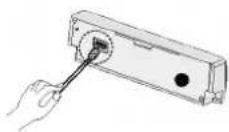
- Periodically wipe the contacts on the back of the front panel with a cotton swap moistened with alcohol.
Notes on CD
- A defective or soiled disc inserted into unit can cause sound to drop out during playback.
- Handle the disc by holding its inner and outer edges.
- Do not touch the surface of the unlabeled side of the disc.
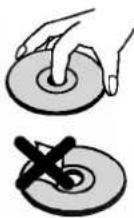
- Do not stick paper or tape etc. on the surface.
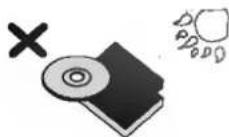
- Do not expose the disc to direct sunlight or excessive heat.
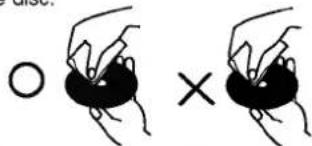
- Clean the disc before playback. Wipe the disc from the center outward with a cleaning cloth.
- Never use solvents such as benzine or alcohol to clean the disc.
- This unit cannot be operated by 8cm disc (using 12cm disc only).

Detaching Panel
You can detach the front panel from the unit and carry it with you when you leave your car unattended.
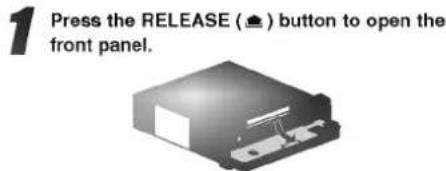
2 Pull the front panel toward you.
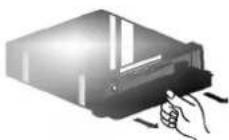

Take care not to put pressure on the display or control buttons, or drop the front panel.
1 Close the inner lid.
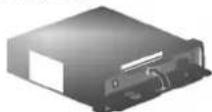
2 Place the front panel in the supplied protective case.
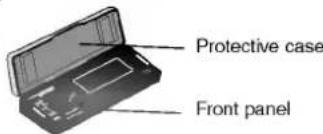

Front Panel/Rear Panel/Display Window
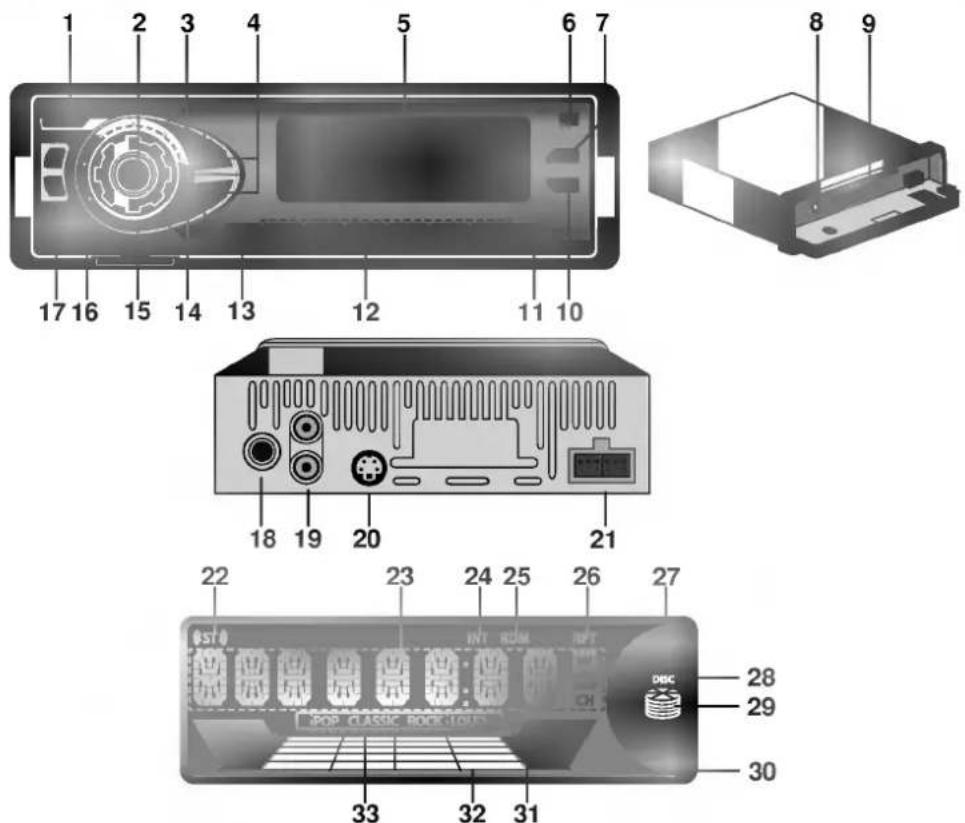
-
POWER (PWR) button
-
SELECTION (SEL) button
-
EQUALIZER (EQ) button
-
• CD SKIP (◀◀/▶▶) button
- SEEK (-/+) button
-
DISPLAY WINDOW
-
RELEASE ( ) button
-
MUTE button
-
EJECT (▲) button
-
CD disc slot
-
CLOCK (CLK) button
-
AS/PS (auto store/preset scan) button
-
• Preset Station buttons (1\~6)
- CD PLAY/PAUSE (▶/II) button
- INTRO SCAN (INT) button
- REPEAT (RPT) button
• RANDOM (RDM) button
-
BAND button
-
LOUDNESS (LOUD) button
-
CONTROL UP/DOWN dial
-
FUNCTION (FUN.) button
-
• TUNE (◀◀/▶▶) button • CD SEARCH (◀◀/▶▶) button
-
ANTENNA JACK
-
LINE OUT JACK (OPTIONAL)
-
CD CHANGER CONNECTOR (OPTIONAL)
-
POWER/ SPEAKER CONNECTOR
-
STEREO indicator
-
MAIN DISPLAY SECTION
-
INTRO SCAN indicator
-
RANDOM indicator
-
REPEAT indicator
-
CD OPERATING indicator
-
DISC IN indicator
-
CD CHANGER indicator (OPTIONAL)
-
VOLUME LEVEL indicator
-
LOUD indicator
-
LEVEL indicator
-
EQUALIZER indicator
Installations
Basic Installation
Before installing, make sure that the ignition-switch is set to OFF and remove the terminal of the car battery to avoid short-circuiting.
1 Remove the existing receiver unit.
2 Make the necessary connections.
Install the installation sleeve.
Install the unit in to the installation sleeve.
Removing existing receiver unit
If there is already an installation sleeve for the receiver unit in the dashboard, it must be removed.
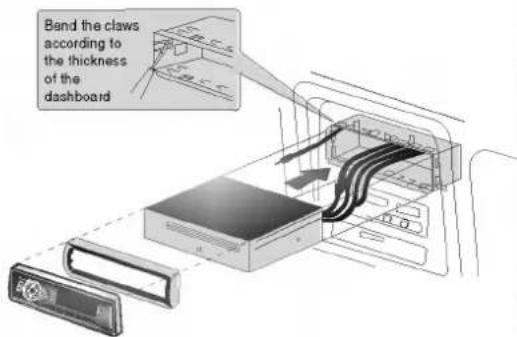
ISO-DIN Installation
1 Slide radio into ISO-DIN frame.
2 Install screws removed from old radio.
3 Slide radio and frame into dash opening.
4 Install dash panel or adapter plate.
5 Install trim ring to radio.
The notch on trim ring must be positioned at the bottom.
6 Install faceplate by fitting right edge into position then pushing left edge closed.
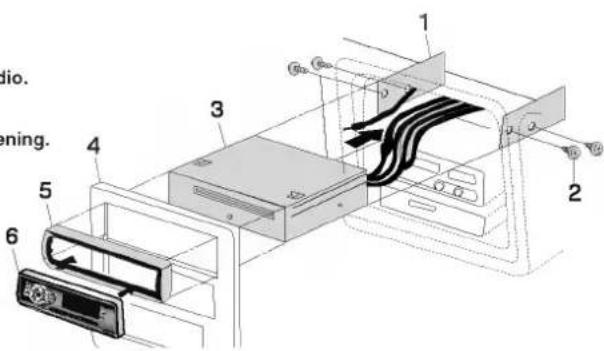
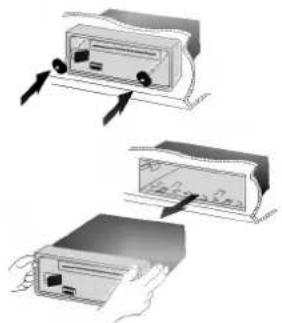
When removing the unit from the installation sleeve
If you need to remove the unit from the installation sleeve, proceed as follows.
1 Remove the rear supporter from the unit.
2 Remove the control panel from the unit.
3 Insert the lever into the hole on one side of the unit, and pull the lever toward you. Do the same operation on the other side and pull out the unit from the installation sleeve.
natural_image
Illustration of three hands inserting a device into a box, showing internal components and directional arrows (no text or symbols)Connections
Precaution on making connections
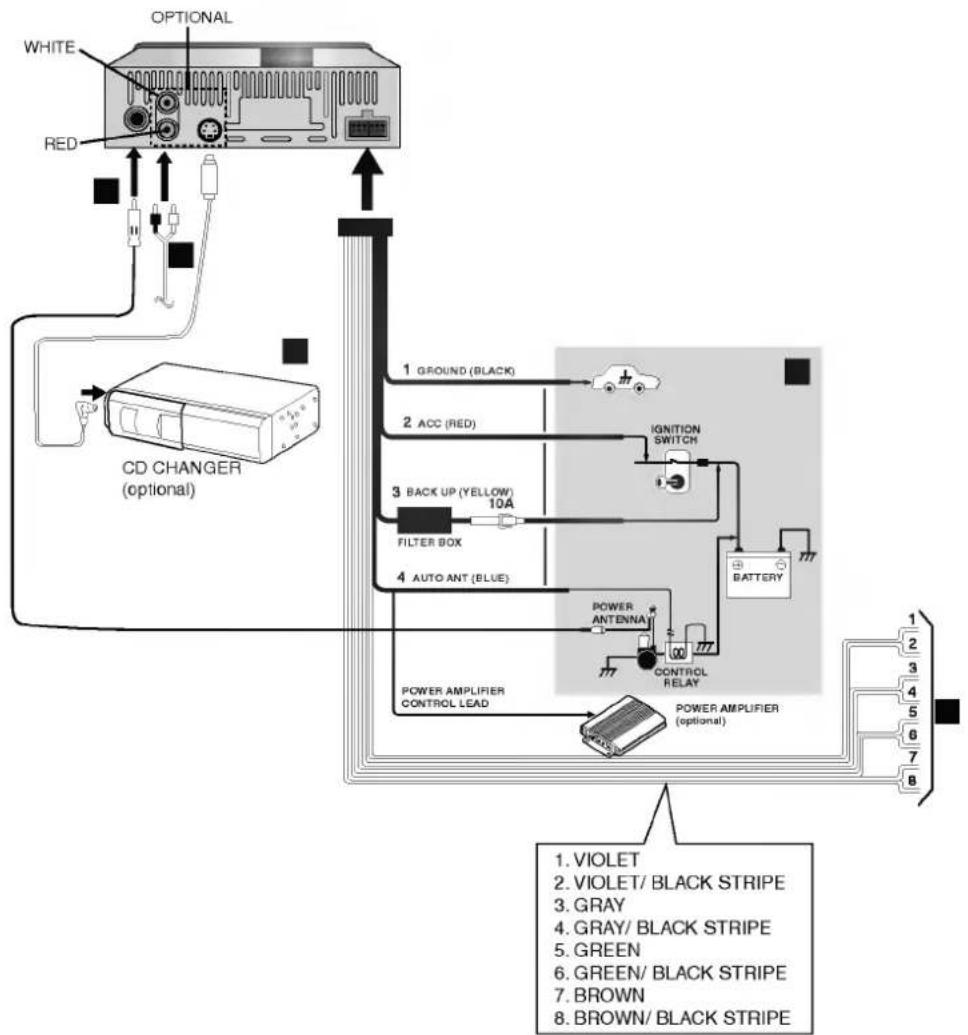
Before connecting, make sure that ignition switch is set to OFF, and remove the ⊖ terminal of the battery to avoid short circuits.

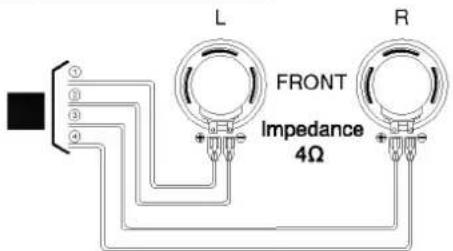
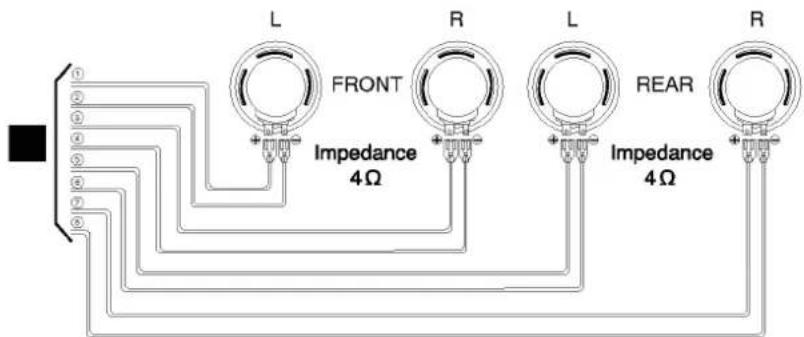
Make correct connections as illustrated in the connection diagram. Never use the ⊖ cord of each speaker in common.
flowchart
graph TD
    A["CD CHANGER (optional)"] --> B["OPTIONAL"]
    B --> C["WHITE"]
    B --> D["RED"]
    C --> E["1 GROUND (BLACK)"]
    D --> F["2 ACC (RED)"]
    E --> G["3 BACK UP (YELLOW) 10A"]
    F --> H["4 FILTER BOX"]
    G --> I["5 AUTO ANT (BLUE)"]
    H --> J["6 BATTERY"]
    I --> K["7 POWER AMPLIFIER CONTROL LEAD"]
    J --> L["8 POWER AMPLIFIER (optional)"]
    K --> M["POWER ANTENNAL"]
    L --> N["CONTROL RELAY"]
    M --> O["1 VIOLET"]
    N --> P["2 VIOLET/ BLACK STRIPE"]
    N --> Q["3 GRAY"]
    N --> R["4 GRAY/ BLACK STRIPE"]
    N --> S["5 GREEN"]
    N --> T["6 GREEN/ BLACK STRIPE"]
    N --> U["7 BROWN"]
    N --> V["8 BROWN/ BLACK STRIPE"]
Connections
A From antenna
B From power amplifier's input jack (2 channel or 4 channel : optional)
C To the wiring of vehicle Colors of leads
1 Black (Ground lead to be connected to vehicle (metal) body.)
2 Red (ACC lead to be connected to the terminal from which the power is supplied when the ignition switch is set to ACC).
3 Yellow (battery lead to be connected to the backup terminal from which power is always supplied.)
4 Blue (To relay box for full automatic power antenna or power amplifier control lead. Power antenna load to be connected to the terminal of the control relay switch for vehicles equipped with a power antenna. This lead is not used for vehicles with manual or semiautomatic antennas.)
D Connect the CD changer(optional)
Your car receiver works as control unit for a CD changer which you can buy, if not yet done, later.
The suitable cord shown on the scheme will be provided together with the CD changer.
2-Speaker Connections
4-Speaker Connections
Basic Operation
Power ON and OFF
- Press POWER (PWR) button or any other button to turn the unit on. (When you insert the CD in the CD slot, it is turned on.)
- Press POWER (PWR) to turn it off. (When the front panel is opened for more than 30 seconds, it is turned automatically off.)
Note
When you turn off, the unit is memorized automatically the volume level currently before you turn off. Whenever you turn on the unit, it will operate at the volume level memorized.
- After you have selected the proper mode by using the SELECTION (SEL) button, control the desired function by turning this dial within 6 seconds. After you finish selecting modes, the unit returns to the initial mode.
- Operating display in all modes: A numeric display is converted by turning this dial.
FUNCTION (FUN.) Button
This button serves to switch over between CD and RADIO operation. (CD ⇌ RADIO).
Beep Sound Function
"BEEP ALL" Sound Mode
-
Press the SELECTION (SEL) button for more than 1 seconds.
"BEEP ALL" or "BEEP 2ND" appear in the display window. -
Turn right CONTROL UP/DOWN dial to select the "BEEP ALL" indicator.
When any button is pressed, beep sounds.
"BEEP 2ND" Sound Mode
-
Press the SELECTION (SEL) button for more than 2 seconds.
"BEEP ALL" or "BEEP 2ND" appear in the display window. -
Turn left CONTROL UP/DOWN dial to select the "BEEP 2ND" indicator.
When Preset Station (1\~6) and SELECTION (SEL) buttons are pressed for more than 1 seconds, beep sounds.
SELECTION (SEL) Button
Press the SELECTION (SEL) button to change the control of volume, bass, treble, balance and fader.
Note
The unit cannot adjust the bass and treble in the EQ on mode.
SOUND Adjustment
LOUDNESS Function
Press the LOUDNESS (LOUD) button, activates the loudness circuit which boosts to compensate the human ear's lack of sensitivity to bass at low levels.
MUTE Function
- MUTE button is operated as muted state on/off.
- The releasing mode mute state is when any button is pressed again.
Each press of the EQ button switches the unit to the other equalizer mode, as follows.
$$ \text { POP } \rightarrow \text { CLASSIC } \rightarrow \text { ROCK } \rightarrow \text { Release } \rightarrow \text { POP } \dots $$
• POP : Optimized for R&B, Soul and Country music
- CLASSIC : Optimized for orchestral music
- ROCK : Optimized for Hard Rock and Heavy Metal music.
SOUND MODE
1 Press SELECTION (SEL) button repeatedly to select the mode you want to adjust from VOL (volume), BAS (bass), TRB (treble), BAL (balance), and FAD (fader).
The mode indicator lights up in the following order.
$$ \boxed {\begin{array}{l}\rightarrow V O L \rightarrow B A S \rightarrow T R B \rightarrow B R L \rightarrow F A D\end{array}} $$
2 Turn left or right CONTROL UP/DOWN dial to adjust the sound quality.
| Turn right. | Turn left. | |
| VOL | Increase the volume level. | Decrease the volume level. |
| BAS | Increase the bass level. | Decrease the bass level. |
| TRB | Increase the treble level. | Decrease the treble level. |
| BAL | Decrease the level of the left speaker(s). | Decrease the level of the right speaker(s). |
| FAJ | Decrease the level of the front speakers. | Decrease the level of the rear speakers. |
Setting the CLOCK
- Press CLOCK (CLK) button once momentarily to display the time.
- Press the CLOCK (CLK) button for more than 2 seconds, and clock indication will be displayed for 5 seconds. Adjust the clock within 5 seconds.
Press ▶▶ to adjust the hour.
Press ◀◀ to adjust the minute. - Press the CLOCK (CLK) button, the display returns to the previous display after 5 seconds.
Radio Operation
Presetting the radio stations
Up to 6 stations for each band FM1, FM2, FM3, MW and LW (optional) can be stored on the preset station buttons.
1 Press BAND to select the desired band. - If a CD is inserted in the unit, press FUNCTION (FUN.) button to select radio function.
2 Tune in the station to be preset by pressing TUNE (◄◄/►►) button.
3 Press one of the preset station buttons (1 - 6) for more than 1 seconds. The number of the pressed preset station button is displayed.
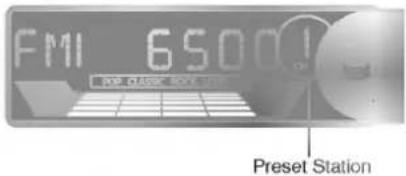
4 Repeat steps 2 and 3 to preset other stations.
Note
- As FM1, FM2 and FM3 have the same frequency range, up to 18 station can be preset for FM.
- When a station is preset on the preset station button on which another station of the same band has already been preset, the previously preset station is automatically erased.
Automatic Store Stations
The automatic presetting function is used to automatically preset up to 6 stations for each band.
- Press BAND to select the desired band.
- Press and hold AS/PS (auto store/preset scan) down for more than 1 seconds.
The scanning starts from the currently displayed frequency to higher frequencies and stops when 6 stations have been preset or the receivable frequencies have been scanned once.
Note
- The presetting is not performed if there is no station to be tuned in.
- When the automatic presetting is performed, the previously preset stations are automatically erased.
- To stop the automatic presetting, press AS/PS (auto store/preset scan) again or press any of the preset station buttons (1 - 6).
To scan the preset stations
Press AS/PS (auto store/preset scan) button briefly. Each preset station is tuned in for 7 seconds in order. To stop the scanning, press AS/PS again or any of the preset station buttons (1 - 6).
To tune in the preset stations
Press BAND to select the desired band and press the desired preset station buttons (1 - 6). The number of the preset station button is displayed and the preset station is received.
Listening to the radio
1 Press any button (except ☐) to turn on the unit. The radio frequency is displayed. If the unit is in the CD operation, press FUNCTION (FUN.) to select the radio operation.
2 Press BAND to select the desired band.
The band indicator [ FM1, FM2, FM3, MW or LW (optional) ] is displayed.
3 Press TUNE (◄◄/►►) repeatedly to tune in the desired station.
Press ▶▶ to increase and ◀◀ to decrease the frequency.
To change the frequency rapidly, press and hold
◀◀ or ▶▶ down longer.
Seek Tuning
The seek function is used to search for the station automatically.
- Press SEEK (-/+) to start the seek function.
- Press SEEK (+) to search for the higher frequencies and SEEK (-) for the lower frequencies.
The seeking stops when the nearest station with good reception is tuned in. - Press SEEK (-/+) repeatedly until desired station is received.
CD Operation
Basic Playback

Open the front panel by pressing RELEASE ( ≈ ) button.

Insert a disc with the labeled side up to start playback.
If a disc is already inserted, press FUNCTION (FUN.) to select the CD operation. Disc indicator lights up, and the track number and elapsed playing time are displayed.

Adjust the volume by turning CONTROL UP/DOWN dial.
** CD playback button
| Load or eject a disc.To with draw the CD, firmly depress ▲.The unit automatically switches to radio reception. | |
| Pause play.The track number and elapsed playing time flash on and off.To resume play, press ▶/□ again. | |
| Forward on the disc. Press and hold “▶” down until the start of the desired passage, then release it. | |
| Reverse on the disc. Press and hold “◀” down until the start of the desired passage, then release it. | |
| Skip to the next track with a short press (for less than 1 seconds).Each extra press skips forward one extra track.To skip forward rapidly, press and hold ▶down until the desired track number is displayed, then release it. | |
| Restart the track currently in play with a short press (for less than 1 seconds).Each extra press skips backward one extra track.To skip backward rapidly, press and hold◀down until the desired track number is displayed, then release it. |

Notes
- The disc is either inserted or ejected when the unit is not turned on.
- The playback starts from the first track on the disc only when inserting a disc. In other cases (when switching from the radio operation or turning on the unit), the playback starts from the beginning of the track being played when the playback has stopped.
- A disc can be inserted by putting it into the disc compartment slot, and either pushing it lightly with fingers or pressing ▲.
- Suitable CD: This unit is design to be operated on a 12 Cm(5") disc only.
Advanced Playback
INTRO SCAN Play
Press INT during playback.
INT indicator lights up and the first 10 seconds of all the tracks on the disc are played in order.
When the desired track is found, press INT again.
The unit returns to the normal playback.

Notes
- The intro scan play cannot be performed with the repeat or random play.
- After the first 10 seconds of all the tracks on the disc are played in order, the unit returns to the normal playback.
REPEAT Play
Press RPT during playback.
RPT indicator lights up and the currently selected track is played repeatedly.
To cancel the repeat play, press RPT again.

Note
- If the repeat play is not selected, all the tracks on the disc are played repeatedly.
- The repeat play cannot be performed with the intro or random play.
RANDOM Play
Press RDM during playback.
RDM indicator lights up and the tracks on the disc are played randomly.
To cancel the random play, press RDM again.

Notes
- The random play cannot be performed with the intro play. If the repeat play is selected during the random play, the random play is canceled.
- During the random play, even if is pressed repeatedly, the track currently in play is restarted.
Switching between audio source
(Stops CD/Plays Radio)
Press FUNCTION (FUN.) to stop CD play and switch to radio play.
Press again to resume CD play at beginning of last track played.
For your reference
- Auto Loading
When the disc is ejected by pressing ▲ during play-back, it will be loaded automatically after 5 seconds unless you pull out the disc from the unit.
- Anti Shock
Even if the unit is inflicted an external shock within 10 seconds, it will operate continuously.
Specifications
Radio Section
FM
Frequency Range . . . .65.0\~74.0MHz, 87.5\~108.0MHz
S/N Ratio 55 dB
Distortion 2%
Stereo Separation(1kHz) 30dB
AM (MW)
Frequency Range 522\~1,620kHz
S/N Ratio 45 dB
Distortion 2%
LW (optional)
Frequency Range 144-281kHz
S/N Ratio 45 dB
Distortion 2%
Audio Section
Max. Power Output 4 x 50 W
Speaker Impedance 4Ω
GENERAL
Power Supply Voltage 12 - 15V DC
negative ground
Dimensions(WxHxD) 188x58x166mm
Net Weight 1.34kg
• The design and specification are subject to change without notice in the course of product improvement.
- The working life of this product is 7 years since the date of purchase.
CD Section
Frequency Response 40Hz \~ 20KHz
S/N Ratio 60 dB
Distortion 1%
Channel Separation (1kHz) 50 dB