1150 - Power bank Tevion - Free user manual and instructions
Find the device manual for free 1150 Tevion in PDF.


| Product Type | Power Bank |
| Brand | Tevion |
| Model | 1150 |
| Battery Type | Lithium-ion |
| Battery Capacity | 10,000 mAh |
| Input Port | Micro USB (5V/2A) |
| Output Ports | 2x USB-A (5V/2.1A max each) |
| Charging Time | Approx. 5-6 hours |
| Dimensions | 140 x 70 x 15 mm |
| Weight | 200 g |
| LED Indicator | 4 LEDs for battery level |
| Protections | Overcharge, overdischarge, short circuit, overcurrent |
| Compatibility | Smartphones, tablets, cameras, and other USB devices |
| Maintenance | Clean with a soft, dry cloth; avoid moisture |
| Safety | Use only supplied cable; do not disassemble |
| Repairability | Non-repairable; dispose of properly |
Frequently Asked Questions - 1150 Tevion
User questions about 1150 Tevion
0 question about this device. Answer the ones you know or ask your own.
Ask a new question about this device
Download the instructions for your Power bank in PDF format for free! Find your manual 1150 - Tevion and take your electronic device back in hand. On this page are published all the documents necessary for the use of your device. 1150 by Tevion.
USER MANUAL 1150 Tevion
natural_image
Product photo showing a white electronic device connected to a plug, with a separate device displaying 'TEVION' and its screen displaying three ports (no readable text or symbols on components)CONTENTS
Welcome 4
Your Universal Travel Power Pack .... 6
What is included in the box?......7
Cautions/warnings....9
Parts name ....10
Care and Maintenance....11
Operation....12
Troubleshooting 15
Disposal 17
Warranty 18
Welcome
You have made an excellent choice with the purchase of this quality TEVION brand product.
By doing so you now have the assurance and peace of mind which comes from purchasing a product that has been manufactured to the highest standards of performance and safety, supported by the high quality standards of Aldi.
We want you to be completely satisfied with your purchase so this [brand] product is backed by a comprehensive manufacturer's 3 year warranty and an outstanding after sales service through our dedicated Helpline.
We hope you will enjoy using your purchase for many years to come.
If you require technical support or in the unlikely event that your purchase is faulty please telephone our Helpline for immediate assistance. Faulty product claims made within the 3 year warranty period will be repaired or replaced free of charge provided that you have satisfactory proof of purchase (keep your till receipt safe!). This does not affect your statutory rights. However, be aware that the warranty will become null and void if the product is found to have been deliberately damaged, misused or disassembled.
Your Universal Travel Power Pack
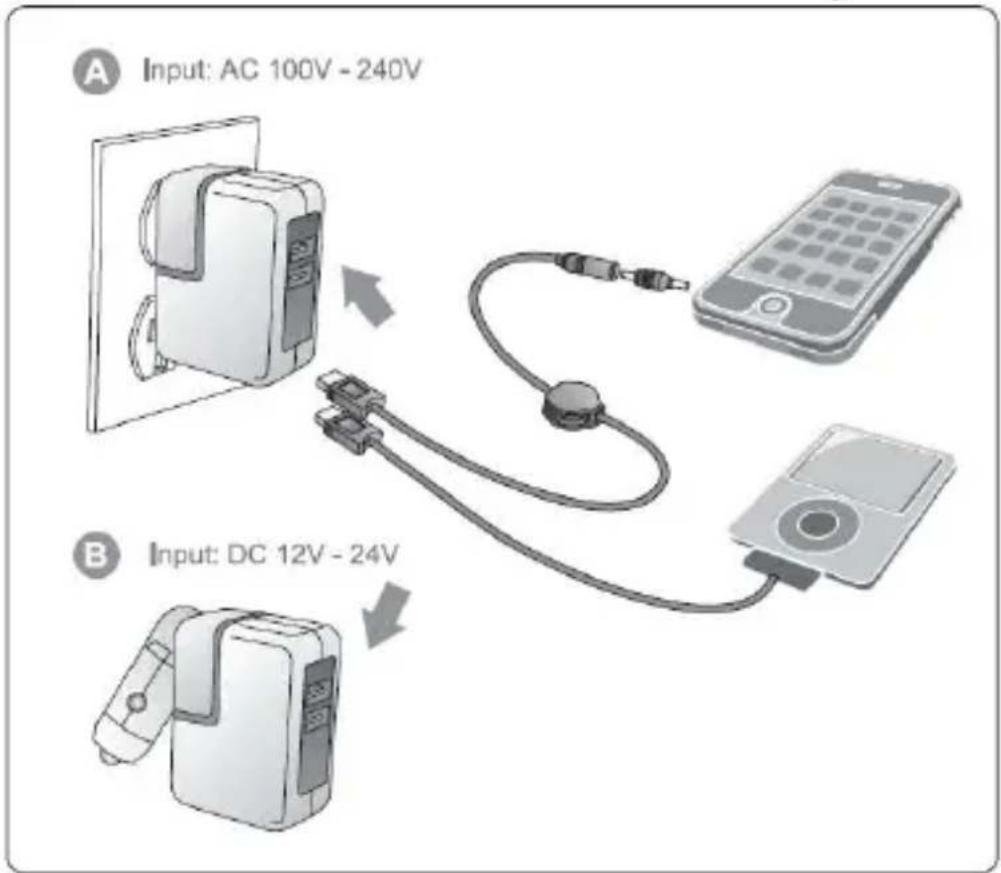
This universal USB Travel Power Pack provides instant power to most devices using a voltage of 5V DC (mobile telephones, MP3 players, etc.).
Please read this manual carefully and keep it for further reference, as it contains important safety and operating instructions. Before using the USB Travel Power Pack, read all instructions and cautionary markings on both the USB Travel Power Pack and the device to be charged.
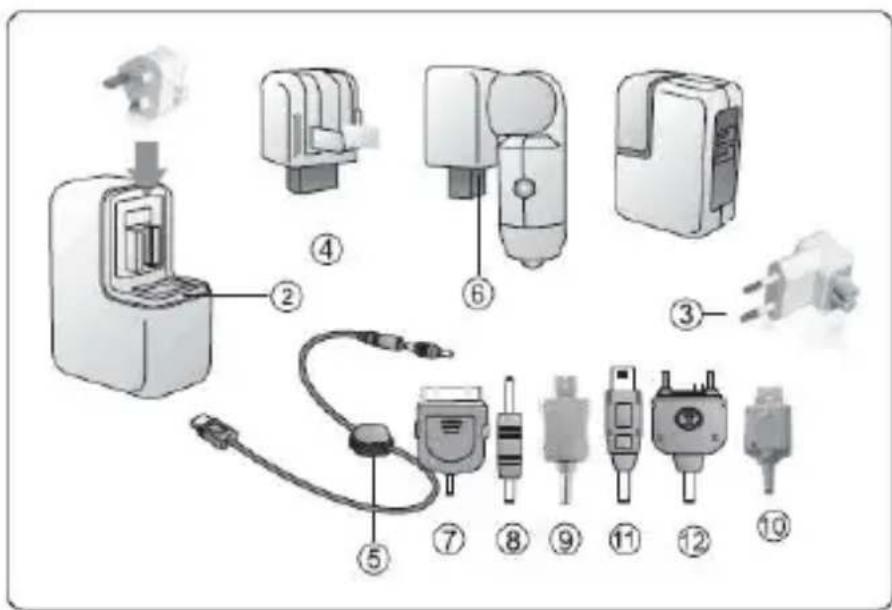
What is included in the box?
- Instruction Manual with Warranty information
- 1 charger with UK power plug
- 1 EU power plug
- 1 US power plug
- 1 Retractable USB cable
- 1 Car charger
- 1 iPhone/iPod connector
- 1 Nokia mini connector
- 1 Micro USB connector (compatible with Blackberry and HTC)
- 1 LG connector
- Mini USB connector
- 1 Sony Ericsson connector
In the box we have included one Multi Charger Cable. You can charge two devices at the same time. You can use the USB cable belonging to the device you want to charge.
Cautions/ warnings
- Read and understand all warnings on the USB Power Pack and in this user manual.
- Power consumption of the connected device should not exceed 5.0V,1000mA as it can't charge the device properly
- Keep the USB Power Pack and especially its cable and tips away from children
- Do not expose the USB Power Pack to water, rain or excessive moisture
- Do not place inflammable, explosive or hazardous objects near the USB Power Pack
- Do not disassemble or try to repair the USB Power Pack yourself; you might get injured or damage the USB Power Pack
- Do not crush or puncture the internal battery
- Do not operate the USB Power Pack if it is damaged
- Do not throw or shake the USB Power Pack
- The AC plug needs to be fully inserted into the socket before charging
- The polymer Li-battery is rechargeable and could be recycled
- Keep away from corrosive materials or chemicals
Parts name
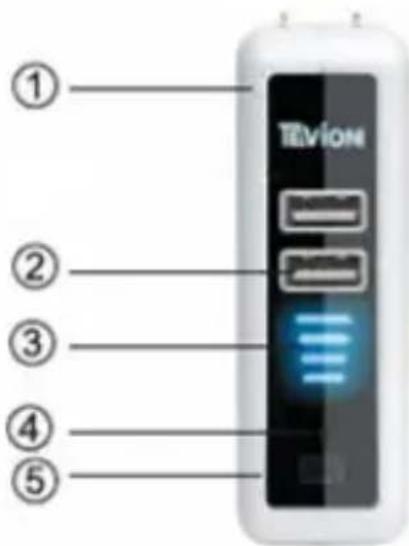
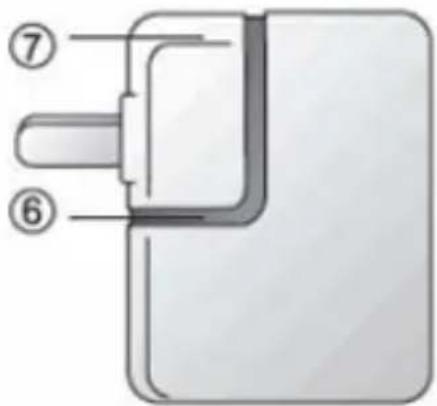
- Housing
- DC OUT USB port
- Indication for remaining battery capacity
- Reset button
- Button for showing the remaining battery capacity and for restarting when it can't charge automatically for the connected devices.
- LED light
- AC plug
Care and Maintenance
- Only use and store the USB Power Pack in a dry environment with the proper temperature.
- To avoid risk of electric shock, unplug the USB Power Pack from the AC power supply and disconnect devices before cleaning or when not in use.
- Allow a sufficient amount of free space all around the USB Power Pack for adequate ventilation.
- Clean the body with a dry and soft cloth
- Keep charging with a specific interval (2 times/week), even if you do not use it for a long time, to prolong the battery life.
- Please do not expose the charger to sunlight for a long time.
Operation
A: LED indicator
a) When on AC input and the output USB 1-4 Pin (USB1, USB2) are not in use or the connected device is fully charged,
• The LED light is flashing;
- The 4 LED bars will be on gradually from the lowest to the highest one. All 4 bars are on when fully charged;
- 30 seconds later, the LED light and the 4 LED bars will be turned off automatically, moving to idle status.
b) When on AC input and charging another device:
- When the output USB 1-4Pin (USB1 or USB2) is 1000 ~mA the LED light turns on;
- The 4 LED bars will be on gradually from the lowest to the highest one. All 4 bars are on when fully charged;
c) When without AC input and the output USB 1-4Pin (USB1, USB2) are not in use or the connect device is full charged, the LED light and 4 LED bars are unlit, moving to idle status.
d) When without AC input and charging another device,
- The output USB 1-4Pin (USB1 or USB2) is 1000 ~mA .
• The LED light bar is on; 4 LED bars are off - If the battery capacity is low, the output from USB 1-4Pin (USB, 1 USB2) stops.
B: Charging devices—preparation
Please note that it takes approx. 9 hours to fully charge the USB Travel Power Pack when it is completely out of power!
1) Check the maximum input voltage (V DC) of the device you wish to connect. See the user manual that came with the device for more information.
2) Make sure the device does not consume more current (mA) than 1000mA.
3) Check what connector tip is required for your device. See the compatibility sheet for the proper tip for your device
4) The Power Pack can charge up to 2 devices at the same time, each USB is 500 ~mA while charging simultaneously.
C: Charging 5V devices
You can charge a 5V device in two ways;
- Charge directly from the internal battery (when the battery power is enough for your device).
- Insert the power plug into a wall outlet charging 5V devices and the internal battery together (when the battery power is not enough for your device).
Insert the plug of the USB cable into the USB port
1) Connect the connector tip to the USB cable
2) Insert the connector tip into the power supply jack of the device
3) Disconnect the device from the USB Power Pack when the device is fully charged.
Remark:
-
Please plug in the unit into the AC power supply before connecting its USB output to any Apple devices.
-
Please disconnect any Apple devices before unplugging the unit from the AC power supply.
Troubleshooting
Problem: Voltage of device does not correspond with that of USB Power Pack
Solution: Refer to the user manual that came with the devices
Problem: My iPhone has a 1400mA battery, but this manual states that no devices more than 1000mA should be charged.
Solution: Please notice there is a difference between mA & mAh. An iPhone battery is typically 1000mA, but the capacity can be 1400mAh. So the charger supports devices up to 1000mA. The actual capacity of the USB Power PACK is 2600mAh, so it can actually charge an iPhone almost 2 times (when the USB POWER PACK) is fully charged.
Problem: The device is not charging while connected to USB Power Pack.
Solution: Make sure that the USB cable is properly inserted into the device and the USB Power Pack.
Problem: Damaged USB cable or connector tip.
Solution: Replace USB cable and/or connector tip.
Problem: Wrong connector tip used.
Solution: Check connector tip and replace if necessary.
Problem: Supplied USB cable /connector tip failed to charge while connected with the Power Pack.
Solution: Replace the supplied USB cable/connector tip
Disposal

natural_image
Symbol of a trash bin crossed with diagonal lines, no text or numbers presentBatteries, electrical and electronic equipment (EEE) contains materials, parts and substances, which can be dangerous to the environment and harmful to
human health if waste of electrical and electronic equipment (WEEE) is not disposed of correctly.
Batteries, electrical and electronic equipment, which is marked with the WEEE logo (as shown on the left), should not be thrown away with your household waste. Contact your Local Authority Waste Disposal Department, as they will be able to provide details of the recycling options available in your area.

natural_image
Symbol of a trash bin crossed with two diagonal lines, representing no waste or discharge (no text or labels)Battery safety:
Do not burn. Risk of explosion.
Do not recharge non-recharge-able batteries.
If swallowed seek immediately medical advice.
Ensure correct polarity.
If not used for extended period remove battery.
TEVION
Warranty card
Travel Power Pack 47440
Please keep your purchase receipt together with your warranty card
Name ____
Address

Date of purchase ____
Location of purchase
Detailed description of malfunction
Accession ApS, Nibevej 54.1, DK-9200 Aalborg SV.
www.accessionx.com

UK 0871 0750 105
IRE 0818 200 032
accession@teknihall.com